Traditional active-active usually costs roughly twice a single region because you run a full second stack, while active-passive costs less but recovers slower and sits idle most of the time. Control Plane is the platform that runs one workload active-active across locations without paying for idle standby capacity.
Disclosure: Control Plane publishes this guide.
TL;DR
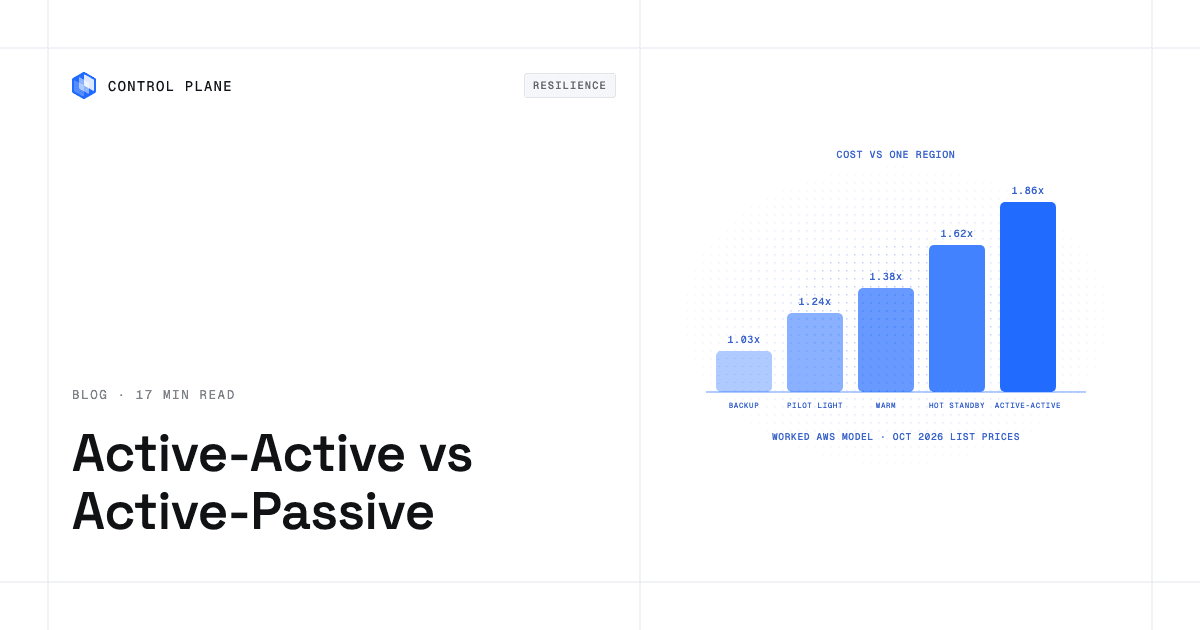
- A second region adds 3% to 86% to the monthly bill of our reference application, depending on the pattern. Backup and restore is cheapest. Active-active is the most expensive.
- Hot standby (active-passive) and active-active both run a full second stack. In active-active that stack serves traffic. In hot standby it waits.
- Whether the extra cost is worth it depends on the cost of one hour of downtime and how many hours of outage the pattern removes. Section 4 gives the formula.
| Pattern | Typical RTO | Typical RPO | Cost vs single region (reference app) | Best for |
|---|---|---|---|---|
| Backup and restore | Hours to a day | Hours (last backup) | 1.03x | Internal tools, dev and test, early-stage products |
| Pilot light | Tens of minutes to hours | Seconds to minutes | 1.24x | Products with an RTO of a few hours |
| Warm standby | Minutes to tens of minutes | Seconds to minutes | 1.38x | Most B2B SaaS with a 99.9% target |
| Active-passive (hot standby) | Minutes | Seconds | 1.62x | Strict RTO, tolerates an idle second stack |
| Active-active (multi-site) | Seconds to minutes | Near zero to seconds | 1.86x | 99.99% targets, global users, high cost of downtime |
RTO and RPO ranges are planning ranges for this guide. Your measured numbers depend on design and testing. Cost multiples come from the worked model in section 3, priced on October 29, 2026.
The five resilience patterns, in order of cost
The AWS Well-Architected disaster recovery whitepaper defines the strategies used below. It groups them as active/passive (the first three, plus hot standby) and active/active. It describes multi-site active/active as the most complex and costly approach, one that can reduce recovery time to near zero for most disasters.
Backup and restore
How it works: You copy backups and snapshots to a second region on a schedule. After a disaster you rebuild infrastructure from code and restore data.RTO and RPO: RTO is hours to a day. RPO equals the age of the last good backup.What sits idle: Nothing runs. You pay for stored copies.What breaks during failover: Everything is down until the rebuild finishes. Untested restores and missing infrastructure code are the usual causes of long recoveries.
Pilot light
How it works: The database replicates continuously to region 2 and runs there. Application servers and load balancers are defined in code but switched off.RTO and RPO: RTO is tens of minutes to hours, because you start and scale the application tier. RPO is seconds to minutes with asynchronous replication.What sits idle: The replica runs and serves nobody.What breaks during failover: You must promote the replica, start compute, and move traffic. Scale-up can hit capacity limits in the recovery region.
Warm standby
How it works: A complete but scaled-down copy of the stack runs in region 2 and receives a small amount of traffic or health checks. At failover you scale it up.RTO and RPO: RTO is minutes to tens of minutes. RPO is seconds to minutes.What sits idle: A fraction of the application tier and a full replica.What breaks during failover: Region 2 starts at reduced capacity and must absorb full load. Autoscaling speed sets how long users see slow responses.
Active-passive (hot standby)
How it works: Region 2 runs a full-size stack that takes no user traffic. AWS calls this hot standby. Data replicates continuously.RTO and RPO: RTO is minutes, mostly detection and traffic shift. RPO is seconds.What sits idle: Nearly the whole second stack.What breaks during failover: Database promotion, cache warm-up, and DNS or routing changes. Because the stack never serves production traffic, configuration drift goes unnoticed until the day you need it.
Active-active (multi-site)
How it works: Both regions serve production traffic at all times. A global routing layer sends each user to a healthy region.RTO and RPO: RTO is seconds to minutes. RPO is near zero to seconds, depending on the data layer.What sits idle: Little, if each region is autoscaled. Reserved headroom for absorbing the other region’s load is the main idle cost.What breaks during failover: The surviving region must take double load. Writes are the hard part. A single-writer database makes writes active-passive even if reads are active-active.
Active-active vs active-passive disaster recovery: which is better for a SaaS company?
Active-active is better when downtime is expensive, users are spread across geographies, or the RTO target is under a few minutes. It also exercises region 2 every day, so failover is routine. Active-passive is better when the budget is tight, writes must go to one database, and a recovery time of tens of minutes is acceptable. AWS notes that most customers who stand up a full second environment find it makes sense to use it active-active. If you do not want both regions serving users, warm standby is the more economical and simpler option.
How much does multi-region high availability cost compared with a single region?
On AWS list prices, our reference application costs $621.11 per month in one region. A second region raises that to between $642.11 (backup and restore) and $1,152.29 (active-active). The rest of this section shows every line.
The reference application
- Compute: a web API on 6 vCPU and 24 GiB, run as three
m7i.largeinstances (2 vCPU and 8 GiB each) on Linux. - Database: managed PostgreSQL on
db.m7g.large, Multi-AZ, with 200 GB of gp3 storage. - Load balancer: one Application Load Balancer.
- Traffic: 1 TB (1,024 GB) of data transfer out to the internet per month.
- Regions: us-east-1 (N. Virginia) as region 1, us-east-2 (Ohio) as region 2.
Prices used (on-demand list prices, checked October 29, 2026)
| Line item | Price | Source |
|---|---|---|
m7i.large, Linux, us-east-1 and us-east-2 | $0.1008 per hour | EC2 on-demand pricing |
RDS PostgreSQL db.m7g.large, Single-AZ | $0.168 per hour | RDS for PostgreSQL pricing |
RDS PostgreSQL db.m7g.large, Multi-AZ | $0.337 per hour | RDS for PostgreSQL pricing |
| RDS gp3 storage, Single-AZ | $0.115 per GB-month | RDS for PostgreSQL pricing |
| RDS gp3 storage, Multi-AZ | $0.23 per GB-month | RDS for PostgreSQL pricing |
| RDS backup storage beyond the free allocation | $0.095 per GB-month | RDS for PostgreSQL pricing |
| Application Load Balancer | $0.0225 per hour plus $0.008 per LCU-hour | Elastic Load Balancing pricing |
| Data transfer out to the internet | $0.09 per GB for the first 10 TB, after a 100 GB monthly free tier | EC2 on-demand pricing, data transfer |
| Data transfer, us-east-1 to us-east-2 | $0.01 per GB | EC2 on-demand pricing, data transfer |
Our assumptions, not AWS prices: 730 hours per month, 1.5 average LCUs, 200 GB of database changes replicated per month, and backup snapshots equal to the provisioned database size (an upper bound, since snapshots are incremental).
Single-region cost
| Line | Arithmetic | Monthly |
|---|---|---|
| Compute | 3 x $0.1008 x 730 | $220.75 |
| Load balancer, hourly | $0.0225 x 730 | $16.43 |
| Load balancer, LCU | 1.5 x $0.008 x 730 | $8.76 |
| Database instance, Multi-AZ | $0.337 x 730 | $246.01 |
| Database storage, Multi-AZ | 200 x $0.23 | $46.00 |
| Internet egress | (1,024 – 100) x $0.09 | $83.16 |
| Total | $621.11 |
Cost of each pattern with a second region
Cross-region transfer and database replication appear as their own line items. The $2.00 transfer line is 200 GB x $0.01.
| Pattern | What runs in region 2 | Region 2 arithmetic | Monthly total | Multiple | RTO | RPO |
|---|---|---|---|---|---|---|
| Backup and restore | Stored snapshots only | 200 x $0.095 = $19.00, plus $2.00 transfer = $21.00 | $642.11 | 1.03x | Hours to a day | Hours |
| Pilot light | Single-AZ database replica | $122.64 instance + $23.00 storage + $2.00 transfer = $147.64 | $768.75 | 1.24x | Tens of minutes to hours | Seconds to minutes |
| Warm standby | 1 instance, load balancer, Single-AZ replica | $73.58 + $16.43 + $122.64 + $23.00 + $2.00 = $237.65 | $858.76 | 1.38x | Minutes to tens of minutes | Seconds to minutes |
| Hot standby | 3 instances, load balancer, Single-AZ replica | $220.75 + $16.43 + $122.64 + $23.00 + $2.00 = $384.82 | $1,005.92 | 1.62x | Minutes | Seconds |
| Active-active | 3 instances, load balancer, Multi-AZ database copy | $220.75 + $16.43 + $246.01 + $46.00 + $2.00 = $531.19 | $1,152.29 | 1.86x | Seconds to minutes | Near zero to seconds |
Totals are $621.11 plus the region 2 amount. Single-AZ replica instance: $0.168 x 730 = $122.64. Replica storage: 200 x $0.115 = $23.00.
How to read the model
- The multiple is 1.86x, not 2x, because egress does not double. Users still download 1 TB in total. Excluding egress, active-active is $1,069.13 against $537.95, or 1.99x. Hot standby is 1.72x on the same basis.
- Hot standby is cheaper than active-active here for one reason. Its replica is Single-AZ, a risk you accept while it idles. An active-active region serves production and needs a Multi-AZ database.
- Active-active needs a data design the table does not price. RDS PostgreSQL has one writer. Reads can be served in both regions while writes go to region 1. A true multi-writer database is a different product with different pricing.
- Items excluded: Route 53 or Global Accelerator, health checks, NAT gateways, CloudWatch, EBS volumes, reserved IOPS, cross-region write forwarding, and engineering time. We list no price for these because none is shown on the pages linked above.
These figures are estimates from public list prices on the date checked. They exclude discounts, savings plans, and reserved pricing, and will vary with your instance sizes, traffic, and region pair.
Is multi-region active-active worth the cost for a growing SaaS company?
It is worth it when the downtime hours the pattern removes cost more than the pattern adds each year. Use this formula:
Break-even avoided downtime (hours per year) = (added monthly cost x 12) / cost of one hour of downtime
The Cloud Outage Tracker gives a method for the hourly cost: cost per minute = (R x A x L) + (S + E) + C, covering revenue, staff, idle employees, and SLA credits. Its hypothetical example is a SaaS company with $50M in annual revenue and a cost of $281.22 per minute, which is $16,873 per hour ($281.22 x 60). Churn and brand damage are excluded.
For the worked example, assume a hypothetical single-region infrastructure bill of $60,000 per month. Each pattern adds the multiple from section 3 minus 1:
| Pattern | Added cost | Added per month | Added per year | Break-even avoided downtime |
|---|---|---|---|---|
| Backup and restore | 3.4% | $2,029 | $24,344 | 1.4 hours |
| Pilot light | 23.8% | $14,263 | $171,150 | 10.1 hours |
| Warm standby | 38.3% | $22,958 | $275,491 | 16.3 hours |
| Hot standby | 62.0% | $37,173 | $446,076 | 26.4 hours |
| Active-active | 85.5% | $51,314 | $615,771 | 36.5 hours |
Now compare those hours with real outages. The tracker covers 62 major AWS, Azure, Google Cloud, and Cloudflare outages since 2020. The median lasted 6h 08m. Recent examples:
- AWS us-east-1, October 19-20, 2025: 14h 32m.
- AWS us-east-1, October 28, 2025: 13h 43m.
- Azure West US 2, May 29-30, 2026: 22h 06m.
- AWS us-east-1, one availability zone, May 7-8, 2026: 21h 30m to majority recovery.
- Google Cloud europe-west2 (London), October 19-20, 2026: 6h 08m.
The tracker also lists 9 of AWS’s 14 major outages in us-east-1, the region this model uses as region 1.
At $16,873 per hour, active-active pays back only if it avoids about 36.5 hours of downtime a year. That is roughly six median-length outages. For this hypothetical company, warm standby or pilot light is the better purchase. A company that loses $100,000 per hour reaches active-active break-even at about 6.2 hours, a single median outage. Count only outages that hit your region and that the pattern would prevent. The tracker’s cause data matters here: 32% of major outages came from configuration or deployment changes. A bad release can reach both regions if they share one pipeline, so multi-region does not cover that risk without staged rollouts.
What’s the cheapest way to run active-active across two cloud regions?
Traditional active-active doubles compute and database cost because each region needs capacity for peak load. If one region fails, the other must carry 100% of traffic. Two regions therefore need 200% of peak capacity. The levers that reduce the bill:
- Right-size each region. Use measured CPU and memory, not launch-day guesses.
- Autoscale each region to its share of traffic. Reserve only the headroom you need during the minutes autoscaling takes to catch up.
- Add regions to cut headroom. With n regions, each sized peak / (n – 1), total capacity is n / (n – 1) times peak: 200% for two regions, 150% for three, 133% for four. Rounding to instance sizes and extra operations limit the saving.
- Choose the database pattern first. Single-writer with regional read replicas is cheapest. Multi-writer databases cost more and bring conflict handling.
- Remove idle standby. Hot standby pays full price for capacity that never serves a request. For the architecture side, see how to build active-active high availability across regions and clouds.
How do I stop paying for idle disaster recovery infrastructure?
Move from standby to serving. If region 2 runs production traffic, its capacity is not idle. Then autoscale both regions so you hold only the headroom failover needs. For the data tier, replicate continuously and keep the replica small until promotion.
How Control Plane approaches active-active
Control Plane is the platform for running unbreakable apps and agents. It combines any cloud, neocloud, and bare metal into what Control Plane calls a Global Virtual Cloud (GVC). Day-two operations are built in: failover, autoscaling, health checks, and observability.
A workload deployed to a GVC runs active-active in every location of that GVC. A global endpoint routes each request to the nearest healthy location, so you get failover without paying for idle standby capacity. On Control Plane-provided compute, there is no Kubernetes cluster you have to operate.
On Control Plane-provided compute, you pay for the CPU and memory you reserve, by the millicore and the megabyte, with no contracts or minimums. Other resources such as egress, storage, load balancers, and GPUs are also billed. Control Plane’s Capacity AI right-sizes CPU and memory reservations based on historical usage, within a minimum and maximum you set. Active-active on Control Plane still costs more than one location, because every location runs replicas. The saving comes from reserving only what each location needs. Customers typically cut compute costs 30 to 50 percent compared with running directly on AWS, GCP, or Azure.
Stateless services fail over automatically through the global endpoint. For stateful services, your RPO depends on how data replicates between locations, so the data design in section 3 still applies. Control Plane runs stateful workloads with persistent volumes and scheduled snapshots, alongside the multi-location deployment, health-aware routing, and workload identity.
How do I run active-active across AWS and Azure without paying for idle standby capacity?
Multi-cloud usually adds work: two infrastructure toolchains, two identity systems, two network designs with private connectivity between them, and DNS or global load balancing that sits outside both clouds. Cross-cloud data transfer is billed by each provider and is not modeled here.
A Global Virtual Cloud (GVC) on Control Plane can include locations on different providers. One workload definition runs across them, with optional per-location overrides, and the global endpoint routes to the nearest healthy location. Control Plane’s Universal Cloud Identity gives workloads short-lived, least-privilege access to 600+ AWS, GCP, and Azure services, with no long-lived cloud keys in your code. The CLI, console, Terraform and Pulumi providers, and the Control Plane MCP server all work through the same Control Plane API. Control Plane complements Terraform and Pulumi. It does not replace them.
The 99.999% availability SLA applies to workloads running at least two replicas in at least two locations. Those locations can be two regions of one cloud or locations on different providers. For a walkthrough, see how to run the same app on AWS, GCP, and Azure. To compare tooling, see best multi-cloud failover solutions in 2026.
How do I design multi-region failover to meet a target RTO and RPO?
- Set RTO and RPO per service. Checkout and auth may need minutes. Reporting may tolerate hours.
- Pick the pattern from the table. Match the slowest acceptable RTO to the cheapest pattern that meets it.
- Choose the replication approach. Synchronous replication gives an RPO of zero but adds write latency and couples regions. Asynchronous replication keeps writes fast, and your RPO equals replication lag at failure. Measure lag under peak load.
- Plan traffic steering. Use DNS failover or a global load balancer. Set DNS TTLs to match your RTO, and remember resolvers may cache longer.
- Define health checks. Test the dependency path (app, database, downstream API), not only the port. Require several failures before failing over to avoid flapping.
- Automate promotion. Script database promotion, cache warm-up, and config switches. A manual runbook adds minutes to RTO.
- Protect against bad data. Replication copies corruption. Keep point-in-time backups in a separate account or region.
- Document failback. Decide when and how to return, and re-seed the original region’s data.
- Record the result. Compare measured RTO and RPO with targets after every drill.
For setting the targets themselves, see cloud disaster recovery RTO and RPO targets. For deeper coverage, read best cloud disaster recovery solutions for 2026 and how to keep your app online during an AWS region outage.
How do I test failover without taking production down?
- Game days. Schedule a team exercise with a written scenario, a named incident lead, and a rollback plan. Start with a low-traffic window.
- Region evacuation drills. On a fixed schedule (quarterly is common), drain traffic from one region and confirm the other carries the load. Active-active makes this routine, since both regions serve traffic already.
- Synthetic traffic. Run probes from several locations against the failover path. Alert on error rate and latency during the drill.
- Chaos testing in staging. Kill instances, block a dependency, add network latency, and fail a database node. Fix what breaks before repeating with a small slice of production.
- Measure actual RTO and RPO. Time detection, decision, traffic shift, and recovery separately. Record replication lag at the moment of failure.
- Test restores. For backup-based patterns, restore into an isolated environment and verify data integrity.
Keep the blast radius small, announce drills, and stop on a defined error threshold. See how to prevent website downtime for related practices.
What are the most cost effective high availability infrastructure options for a 30 person startup?
Multi-AZ in one region plus good backups is often enough at first. Run the application across two or three availability zones, use a Multi-AZ managed database, define infrastructure as code, keep automated backups, and test a restore. In our model that stays at the single-region cost of $621.11, with no second region.
Step up to multi-region when one of these is true:
- A customer contract or SLA needs availability above what a single region delivers.
- Your RTO is shorter than a rebuild from backups.
- The break-even in section 4 is below the outage hours you expect.
- Enterprise buyers ask for tested disaster recovery evidence.
- A regulation or data residency rule requires a second location.
The cheapest step is pilot light, which added 24% in our model. On Control Plane, locations can be two regions of one cloud, so a startup can run active-active without adopting a second provider. Many teams run Control Plane in a single cloud.
How do I achieve 99.99% uptime for a SaaS application?
Availability targets translate into a downtime budget. The math: a year has 525,600 minutes (365 x 24 x 60) and a month has 43,800 minutes (730 x 60). Allowed downtime = (1 – availability) x minutes.
| Target | Per year | Per month |
|---|---|---|
| 99.9% | 0.001 x 525,600 = 525.6 min (8.76 hours) | 0.001 x 43,800 = 43.8 min |
| 99.99% | 0.0001 x 525,600 = 52.56 min | 0.0001 x 43,800 = 4.38 min |
| 99.999% | 0.00001 x 525,600 = 5.26 min (5 min 15 s) | 0.00001 x 43,800 = 0.44 min (26 s) |
A single region rarely meets 99.99% once provider outages count. The tracker’s median major outage lasted 6h 08m, or 368 minutes. That is about seven years of 99.99% budget (368 / 52.56 = 7.0). Not every outage hits your region, but your own deployments also spend the budget, and the tracker attributes 55% of major outages to changes and code.
To reach 99.99%: run at least two regions with automated, health-checked failover, deploy in stages, keep per-service error budgets, and drill failover. Two independent regions at 99.9% each give 1 – (0.001 x 0.001) = 99.9999% in theory. Real results are lower because regions share release pipelines, DNS, and data layers. The five nines architecture guide compares single-region, multi-region, and multi-cloud designs. On Control Plane, the 99.999% availability SLA applies to workloads running at least two replicas in at least two locations.
What is the best cloud architecture model that delivers the highest level of resilience and availability?
Active-active across multiple locations, ideally across failure domains that do not share a management layer, with health-aware routing, staged rollouts, and tested failover. It carries the highest cost and complexity. Add locations and providers only as far as your cost of downtime justifies.
FAQ
Is multi-region active-active worth the cost for a growing SaaS company?
It is when avoided downtime exceeds the added yearly cost. In our model active-active adds 86% to the bill. Use the break-even formula in section 4 with your own hourly downtime cost.
What’s the cheapest way to run active-active across two cloud regions?
Right-size each region, autoscale to its traffic share, use a single-writer database with read replicas, and avoid idle standby. A platform that runs the workload in every location removes the separate standby stack.
How much does multi-region high availability cost compared with a single region?
On AWS list prices checked October 29, 2026, a second region costs 1.03x to 1.86x the single-region bill for our reference application, depending on the pattern.
Active-active vs active-passive disaster recovery: which is better for a SaaS company?
Active-active recovers faster and uses both regions. Active-passive costs less and suits teams that accept an RTO of minutes to tens of minutes.
How do I stop paying for idle disaster recovery infrastructure?
Serve traffic from region 2, autoscale both regions, and keep the data replica small until promotion. Control Plane bills reserved CPU and memory by the millicore and megabyte, with no contracts or minimums.
How do I run active-active across AWS and Azure without paying for idle standby capacity?
Deploy one workload to a GVC that includes locations on both providers. The global endpoint routes to the nearest healthy location. Cross-cloud data transfer is billed separately by each provider.
What are the most cost effective high availability infrastructure options for a 30 person startup?
Multi-AZ in one region with tested backups. Move to pilot light or warm standby when contracts or RTO targets require it.
How do I design multi-region failover to meet a target RTO and RPO?
Set targets per service, pick the pattern, choose synchronous or asynchronous replication, plan traffic steering and health checks, automate promotion, and document failback.
How do I test failover without taking production down?
Run game days, scheduled region evacuation drills, synthetic traffic, and chaos tests in staging. Measure actual RTO and RPO each time.
How do I achieve 99.99% uptime for a SaaS application?
Budget 52.56 minutes of downtime per year. Use at least two regions with automated failover, staged deployments, and regular drills.