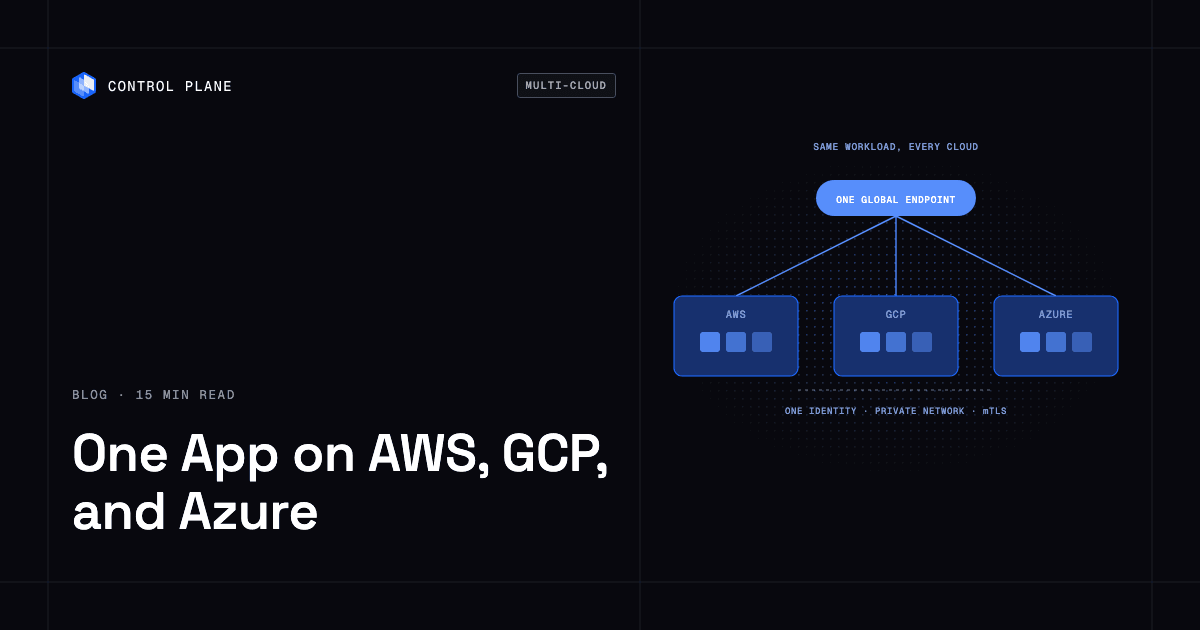
Package the app as containers, deploy one workload definition to locations on each provider behind one global endpoint, and solve the four hard parts (identity, networking, data, and operations) once instead of once per cloud. Control Plane is one way to do that.
Disclosure: Control Plane publishes this guide and is one of the options listed.
TL;DR
Direct answer: Running one app on AWS, GCP, and Azure at the same time takes a single deployable unit, a routing layer that sends each request to a healthy location, and a plan for four problems that each hyperscaler solves differently: identity, networking, data, and operations. Containerized services usually run on any provider. The work is in the connections between them. The data layer is the hardest part, and you still choose and own it.
Five steps:
- Containerize. Package each service as a container image so the same artifact runs in every location.
- Pick locations. Choose the regions or providers you need for resilience, customer or regulatory requirements, cost, or capacity.
- Unify identity. Give each workload one identity that can reach services in all three clouds with short-lived credentials.
- Connect networks privately. Decide how workloads reach each other, and how they reach private databases and on-premises systems.
- Decide the data pattern. Choose a primary with replicas, a distributed database, or partitioning by region or customer, and set your RPO and RTO.
What does a reference architecture for an active-active multi-cloud app look like?
The reference architecture has one entry point and several identical runtime locations. A global endpoint receives every request. Health-aware routing sends each request to a healthy location. Each location runs the same workload definition. Workloads call each other, call cloud services, and reach private data through paths you define once.
| Component | Role |
|---|---|
| Global endpoint and health-checked routing | One address for users. Routes each request to a healthy location and stops sending traffic to a failed one. |
| One workload definition, deployed to AWS, GCP, and Azure locations | The same containers and settings in every location, deployed through one path. |
| Service-to-service traffic | Workloads reach each other by name, with encrypted traffic between them. |
| Identity to each cloud’s services | One workload identity that can call AWS, GCP, and Azure services with short-lived credentials. |
| Private paths to databases and on-premises systems | Private connectivity to VPCs, private networks, and systems behind firewalls. |
| Data layer | A primary with replicas, a distributed database, or data partitioned by region or customer. |
| Logs, metrics, and traces | One collection path, so you debug one system instead of three. |
What does the request path look like when a location fails?
- A user request reaches the global endpoint.
- The endpoint checks which locations are healthy and picks the nearest healthy one.
- That location serves the request. Any call to a database or cloud service uses the identity and private path defined for the workload.
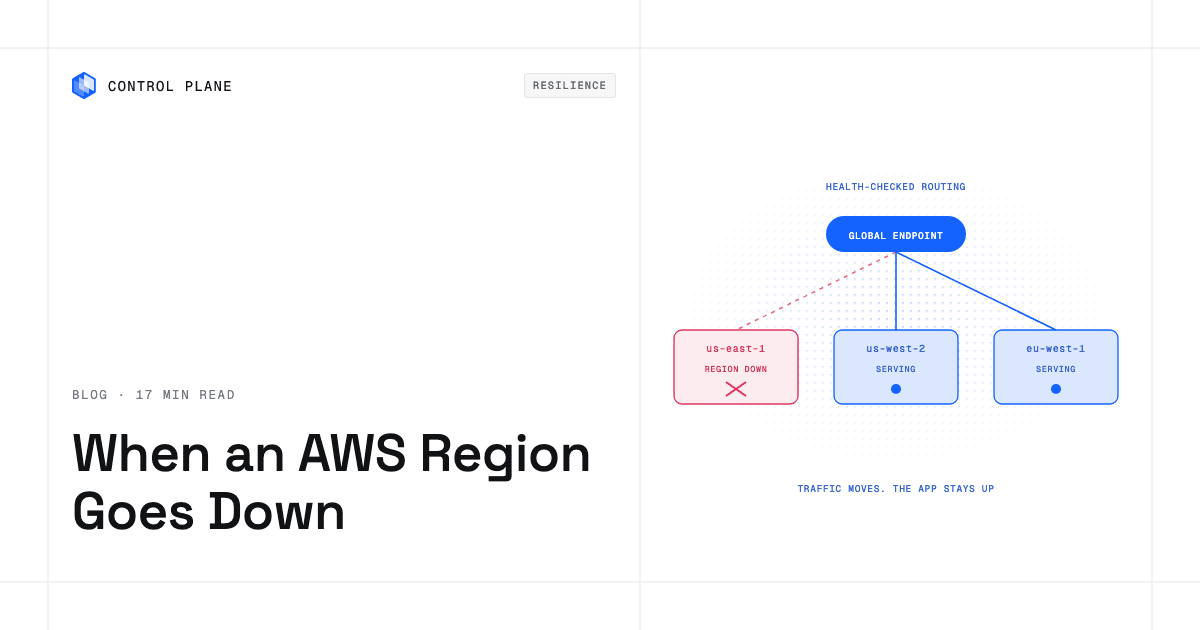
- If a location fails its health checks, the endpoint stops routing to it. The next request goes to the nearest remaining healthy location, which runs the same workload definition.
- The data layer decides what the user sees after a failover. If replicas lag behind the primary, recent writes may be missing. This is an RPO question, and the routing layer does not answer it.
Failure domains explain why this layout matters. In the Control Plane 2026 Cloud Outage Report, 31 of 62 major AWS, Azure, Google Cloud, and Cloudflare outages hit more than one region or a provider’s global services. Among AWS, Azure, and Google Cloud alone, 18 of 46 (39%) did. Several regions of one provider can share a blast radius. Locations on different providers do not share a provider control plane. For a full architecture walkthrough, see how to build active-active high availability across regions and clouds.
What are the four hard parts of running one app across clouds?
How do I run the same application across multiple clouds under one identity model?
On your own. Each cloud has its own identity system. You federate them so a workload in one cloud can call services in another. The provider docs describe the building blocks: AWS IAM roles, Google Cloud Workload Identity Federation, and Microsoft Entra workload identities. You configure trust, permissions, and credential exchange for each pair of clouds, and you maintain them as services change.
On a platform. Universal Cloud Identity lets one workload identity access AWS, GCP, and Azure services with short-lived, least-privilege credentials. The same workload in any location can call 600+ AWS, GCP, and Azure services with no long-lived cloud keys in your code. Control Plane’s identity documentation describes one identity for everything a workload reaches: a policy decides which secrets it may read, a cloud account decides which provider services it may call with no stored key, and a wormhole agent or native networking decides which private hosts it may dial.
What options exist for cross cloud VPC VNet connectivity and private service exposure between regions?
On your own. Cross-cloud networking has three common building blocks:
- Site-to-site VPNs. AWS Site-to-Site VPN is one example. You build tunnels between networks and manage routes.
- Dedicated interconnects. Google Cloud Interconnect and Azure ExpressRoute are two examples. Microsoft describes ExpressRoute as extending on-premises networks into the Microsoft cloud over a private connection through a connectivity provider. Google also offers Cross-Cloud Interconnect, a direct physical connection between Google’s network and another cloud provider’s.
- Private endpoint services. AWS PrivateLink, Google Private Service Connect, and Azure Private Link expose services privately inside each provider’s network. AWS describes PrivateLink as a way to privately connect a VPC to services and resources as if they were in that VPC.
Plan for these trade-offs:
- Overlapping IP ranges. Networks that use the same address ranges cannot be joined directly. You renumber or add translation.
- Per-pair setup. Three clouds mean three pairs, and each pair needs its own configuration, routing, and testing.
- Interconnect cost. Dedicated links carry a recurring cost and lead time. Compare it with your traffic profile before committing.
- Different models. Each provider’s private endpoint service works differently, so a pattern you build for one does not carry over unchanged.
On a platform. Once a workload’s internal firewall allows it, workloads in the same GVC on Control Plane reach each other by internal DNS name (WORKLOAD.GVC.cpln.local). Control Plane enforces mTLS on all internal workload-to-workload traffic, with no TLS setup in your code (see service-to-service calls). For private resources, Cloud Wormhole agents give workloads private access to VPCs, private networks, and on-premises resources behind firewalls, with no VPN for you to configure (see the agent reference). The RDS guide shows a workload reaching a private Amazon RDS database through an agent. Identities can also use native AWS PrivateLink and GCP Private Service Connect network resources (see identity).
How do I decide the data pattern for a multi-cloud app?
Data is the hardest part. Stateless services move between providers easily. State has weight, and every pattern trades something.
| Pattern | How it works | Trade-offs |
|---|---|---|
| Primary in one cloud, replicas elsewhere | One location takes writes. Other locations hold read replicas. | Simple to reason about. Writes from distant locations pay extra latency. A failover promotes a replica, and recent writes may be missing depending on replication lag. |
| Distributed database across providers | One logical database runs on nodes in several clouds. | Writes can be accepted in more than one place. Consistency and write latency depend on the database’s replication model. Cross-cloud replication traffic carries egress cost. |
| Partition by region or customer | Each region or customer’s data lives in one place. Requests route to the owning partition. | Limits the blast radius of a failure and helps with data residency. A partition’s failover still needs a replica, and cross-partition queries get harder. |
A platform moves traffic. You still choose and own the data replication design, your RPO, and your RTO. For the distributed-database pattern, Control Plane’s Template Catalog includes pgEdge, an active-active distributed PostgreSQL with multi-master replication. Settle the data pattern early, because it constrains how fast and how completely a failover can recover.
How do I operate one app on three clouds without three toolchains?
On your own. Each cloud has its own deploy tooling, cluster setup, logging, metrics, and access policy. You run three of everything, or you build an abstraction layer over them and maintain it.
On a platform. You use one deploy API, one set of logs and metrics, and one policy and audit model. The same capabilities are available in the CLI, console, Terraform, Pulumi, and the Control Plane MCP server. Control Plane complements Terraform and Pulumi. It does not replace them.
How do I run the same app across AWS, GCP, and Azure without rewriting it?
Containerized services usually run unchanged on any provider. A container image does not care which cloud runs it. Code that calls a specific cloud’s services needs a decision. Take a queue or an object storage API as an example. You have two options:
- Keep calling the service from every location. The workload in an Azure location calls an AWS queue, using cross-cloud identity for access. You pay cross-cloud latency and transfer cost on each call, and you accept a dependency on that service’s availability.
- Move to a portable equivalent. Replace the provider-specific service with one that runs in every location, such as a queue or object store you can deploy anywhere. This is a code and migration change, and it removes the cross-cloud dependency.
Audit the app for provider-specific calls before you commit to locations. Group them as stateless compute (usually portable), cloud service calls (choose keep or replace), and stateful data (decide in the data pattern step). The audit tells you how much of the app changes. Any claim that an app moves without changes holds only for the services that do not call provider-specific APIs.
How do I add a second cloud provider for failover without doubling my ops work?
Ops work doubles when each cloud has its own clusters, pipelines, identity, and monitoring. You avoid it by keeping one workload definition, one deploy path, one identity model, and one place for logs and metrics, and by adding the second provider as another location of the same system instead of a second system.
A staged plan:
- Start with stateless services. Deploy them to a location on the second provider and let them serve real traffic. Real traffic exposes problems that a standby never shows.
- Keep one deploy path. The same workload definition goes to both providers through the same API or Terraform module.
- Add the data layer. Choose the replication pattern, set RPO and RTO targets, and bring replicas into the second provider.
- Run a failover drill. Take a location out of rotation on purpose. Measure what users see, how long recovery takes, and how much data is missing. Repeat after each major change.
A second provider that never serves traffic is unverified. A location that serves production traffic every day tests your identity, networking, and deploy path continuously.
What changes in cost and egress when you run on several providers?
Cost changes in three places. The amounts depend on your traffic and your contracts.
- Cross-cloud data transfer. Traffic that leaves one provider’s network is billed. Replication between clouds, calls from a workload in one cloud to a service in another, and user traffic served from a different provider all contribute. Keep chatty calls inside one location and replicate on a schedule that matches your RPO.
- Duplicated managed services. If each location uses its own managed database, queue, or cache, you pay for each copy. Decide which services every location needs and which only one location needs.
- Capacity in each location. Every location needs enough capacity to absorb traffic from a failed one. An active-active design uses that capacity for real traffic. A standby design leaves it idle.
On Control Plane-provided compute, you pay for the CPU and memory reserved for each workload, by the millicore and the megabyte, with no contracts or minimums. Capacity AI right-sizes a workload’s CPU and memory based on historical usage, within a minimum and maximum you set. Customers typically cut compute costs 30 to 50 percent compared with running directly on AWS, GCP, or Azure. For a comparison of failover approaches on idle standby cost and documented RTO and RPO, see Best Multi-Cloud and Multi-Region Failover Solutions (2026).
How does Control Plane run the same app across AWS, GCP, and Azure?
Control Plane is the platform for running unbreakable apps and agents. It combines any cloud, neocloud, and bare metal into one Global Virtual Cloud (GVC). A GVC is a set of locations that can include regions on AWS, GCP, and Azure, your own Kubernetes clusters (BYOK), and your own machines (MK8s).
| Hard part | How Control Plane handles it | What you still own |
|---|---|---|
| Deployment and routing | A workload deployed to a GVC runs active-active in every location of that GVC. A global endpoint routes each request to the nearest healthy location, so you get failover without paying for idle standby capacity. | Choice of locations and replica counts |
| Identity | Universal Cloud Identity gives workloads short-lived, least-privilege access to 600+ AWS, GCP, and Azure services, with no long-lived cloud keys in your code. | Which services each workload may call |
| Networking | Internal DNS names and automatic mTLS between workloads in a GVC. Cloud Wormhole agents for private access to VPCs, private networks, and on-premises resources. | Network resources and firewall rules at the edges you connect |
| Data | Traffic moves to healthy locations. Template Catalog databases, including pgEdge active-active PostgreSQL, deploy into GVC locations. | Replication design, RPO, and RTO |
| Operations | One API, with the same capabilities in the CLI, console, Terraform, Pulumi, and the Control Plane MCP server. | Your workload definitions and pipelines |
Control Plane runs serverless, standard, stateful, cron, and VM workloads on AWS, GCP, and Azure, on clusters you already run through Bring Your Own Kubernetes (BYOK), on your own machines (bare metal or VMs) turned into managed locations with Managed Kubernetes (MK8s), and on premises. On Control Plane-provided compute, there is no Kubernetes cluster you have to operate. For a comparison with running Kubernetes yourself, see Control Plane vs Kubernetes. Control Plane is not only for multi-cloud. Many teams run it in one cloud.
The 99.999% availability SLA applies to workloads running at least two replicas in at least two locations. Those locations can be two regions of one cloud or locations on different providers.
During the October 2025 AWS us-east-1 outage, 20% of Control Plane customers had us-east-1 in their Global Virtual Clouds. Their workloads were active and running in healthy locations within 10 seconds, with no customer downtime, according to Control Plane internal incident telemetry.
For the region-outage guide, read How to Keep Your App Online When an AWS Region Goes Down. Control Plane is PCI DSS Level 1, SOC 2 Type II, HIPAA, and GDPR compliant.
FAQ
How can I run the same workloads on AWS and GCP at the same time?
Package the workloads as containers, deploy one workload definition to a location on each provider, and put one global endpoint with health-aware routing in front. Then solve identity, networking, data, and operations once. In a Control Plane Global Virtual Cloud (GVC), a workload runs active-active in every location.
How do I run the same application across multiple clouds under one identity model?
Use one workload identity that reaches each cloud’s services with short-lived credentials. On your own, you federate each provider’s identity system. With Universal Cloud Identity, one identity accesses AWS, GCP, and Azure services without long-lived keys.
What is a reference architecture for active active multi region apps on multi cloud infrastructure?
A global endpoint with health-checked routing, one workload definition running in locations on each provider, service-to-service traffic with encryption, identity to each cloud’s services, private paths to databases and on-premises systems, a data layer, and one collection path for logs, metrics, and traces.
What options exist for cross cloud VPC VNet connectivity and private service exposure between regions?
Site-to-site VPNs, dedicated interconnects such as Google Cloud Interconnect and Azure ExpressRoute, and private endpoint services such as AWS PrivateLink, Google Private Service Connect, and Azure Private Link. Plan for overlapping IP ranges, per-pair setup, and interconnect cost. Cloud Wormhole agents give Control Plane workloads private access to VPCs, private networks, and on-premises resources with no VPN for you to configure.
How do I add a second cloud provider for failover without doubling my ops work?
Keep one workload definition, one deploy path, and one identity model. Start with stateless services serving real traffic on the second provider, add the data layer, then run a failover drill.
How do I run the same app across AWS, GCP, and Azure without rewriting it?
Containerized services usually run unchanged. Code that calls a provider-specific service either keeps calling it from every location using cross-cloud identity, or moves to a portable equivalent. Audit provider-specific calls first.
Which platform unifies identity, networking, and deployment across AWS, GCP, and Azure?
Control Plane is one. It provides Universal Cloud Identity, internal service-to-service networking with automatic mTLS, Cloud Wormhole for private access, and one deploy API across locations in a GVC. Other options include building the same layers yourself from each provider’s native tools.
Does the platform replicate my database across clouds?
Not automatically. The platform moves traffic to healthy locations, and you choose and own the replication design, RPO, and RTO. For active-active PostgreSQL, Control Plane’s Template Catalog includes pgEdge, which uses multi-master replication.
Does Control Plane require me to run Kubernetes?
On Control Plane-provided compute, there is no Kubernetes cluster you have to operate. If you already run clusters, you can add them as locations through BYOK.
What does the 99.999% availability SLA require?
The 99.999% availability SLA applies to workloads running at least two replicas in at least two locations. Those locations can be two regions of one cloud or locations on different providers.