TL;DR
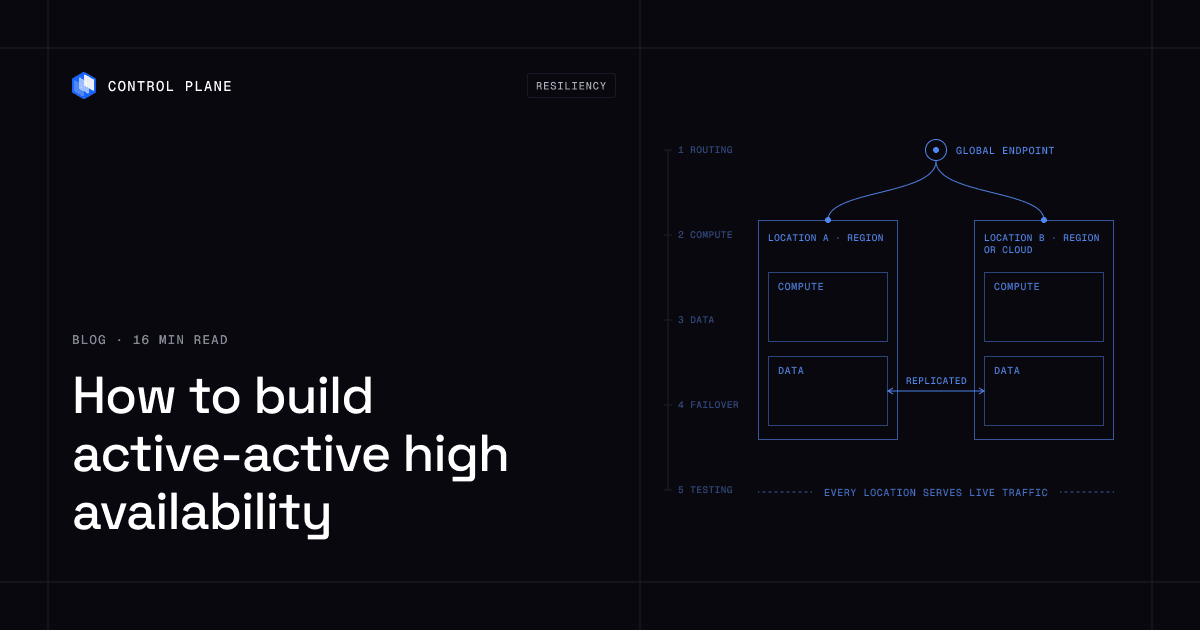
Active-active means two or more locations serve live traffic at the same time, with the application running in each and its data replicated across them, so no location sits idle waiting for a failover. You build it in five layers, and data is the hardest:
- Global routing: one endpoint sends each request to the nearest healthy location and stops sending traffic to a location that fails health checks.
- Compute in every location: the same workload definition, image, and config run everywhere, and each location can absorb the others’ traffic.
- Replicated data: a multi-writer database, a single writer with fast promotion, or a cell design keeps state available in more than one location.
- Automatic failover: health signals remove a failed location from routing, in-flight requests drain, and clients retry safely, with no human in the loop.
- Regular testing: game days, evacuation drills, and chaos experiments prove on a schedule that the first four layers work.
Control Plane runs the routing, multi-location compute, data, and failover layers as one platform and handles day-two operations, with no Kubernetes cluster you have to operate. One workload definition runs active-active in every location of a Global Virtual Cloud, across regions or clouds, without paying for idle standby capacity. The 99.999% availability SLA applies to workloads running at least two replicas in at least two locations, and replicated databases such as pgEdge and CockroachDB deploy from its template catalog into the same Global Virtual Cloud.
For what five nines means, downtime budgets, and published cloud SLAs, see Five Nines Availability Architecture and What Is High Availability?.
Active-active vs active-passive
| Active-passive | Active-active | |
|---|---|---|
| Traffic in each location | The primary takes all traffic; the standby takes none until failover | Every location takes live traffic at the same time |
| Failover mechanism | A switch event promotes the standby and repoints traffic | Routing stops sending traffic to the failed location; the others already serve |
| Failover time drivers | Detection, DNS or routing change, standby warm-up, database promotion, cache warming | Detection and routing change; survivors are already warm |
| Idle capacity | Standby capacity is provisioned and serves no users | No dedicated standby; headroom in every location absorbs a failure |
| Data replication | Usually one primary database with a replica | Multi-writer replication, or partitioned data with a home location per tenant |
Standby capacity that never serves traffic is unproven until the outage. Its configuration drifts, its certificates expire, and its quotas, autoscaling limits, and connection pools have never seen production load. In active-active, real users exercise every location every minute, so a broken location shows up in your metrics long before it matters.
Failover time also consumes the budget. Five nines allows about 26 seconds of downtime a month. A failover that needs detection, a DNS change, resolver cache expiry, a database promotion, and a warm-up period spends that budget in one event. In active-active the survivors are already serving, so failover costs only detection plus the routing change.
The October 2025 us-east-1 outage
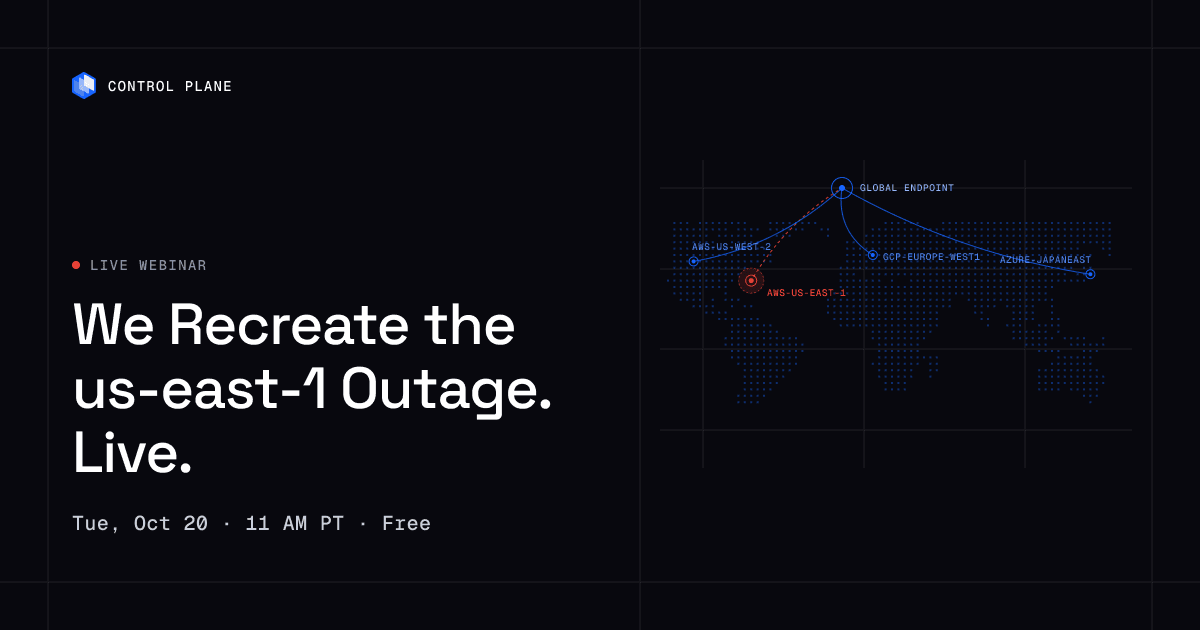
On October 20, 2025, a DynamoDB DNS issue in AWS us-east-1 disrupted services for about 15 hours, according to the AWS post-event summary. Deployments spread across Availability Zones inside us-east-1 were still affected, because zone redundancy does not protect against a regional management service or shared service failing. During the October 2025 AWS us-east-1 outage, 20% of Control Plane customers had us-east-1 in their Global Virtual Clouds. Their workloads were active and running in healthy locations within 10 seconds, with no customer downtime, according to Control Plane internal incident telemetry. More lessons are in AWS Outage One Year Later.
Layer 1: Global routing
Anycast vs DNS-based routing
DNS-based routing answers a name lookup with the address of a chosen location. Resolvers and clients cache each answer for the record’s time to live (TTL), and some hold it longer. Failover time is the sum of health-check detection (check interval multiplied by the failure threshold), the TTL, and caching you do not control. A low TTL shortens this but does not remove it, and it increases query volume. Health-gated DNS with short TTLs reaches origins on any provider, which is why multi-provider designs often use it.
Anycast advertises the same IP address from many locations, and the network delivers each packet to the nearest one. Google Cloud’s global external load balancers use a single anycast IP address as the frontend for backends in regions around the world and move traffic to other backends when the primary backends become unhealthy. Cloudflare also runs its edge on anycast. Many designs use anycast at the edge and latency-aware routing from the edge to the origins.
Other routing services include Amazon Route 53, with latency-based DNS routing across AWS Regions, and Azure Front Door, with latency, priority, weighted, and session-affinity routing. Route 53 bases latency on traffic between users and AWS Regions, and every latency record must be assigned an AWS Region, so for origins outside AWS the real latency can differ significantly from Route 53’s data, even when the origin is in the same city as a Region.
Health checks must test a real request path
A health check that returns 200 from a static route proves the process is alive, not that users can log in or check out. Use two tiers. A shallow check confirms the process accepts connections, for fast removal from rotation. A deep check sends a synthetic request along the user’s path, through the edge, the service, and one critical dependency such as the database, with a strict timeout.
Azure Front Door treats only a 200 OK as healthy and defaults to the HEAD method for new profiles, so a probe to a lightweight path can pass while the application path fails. When every origin fails its probe, Front Door routes round robin across all of them. Decide whether that fail-open behavior is what you want.
Latency-based routing and traffic shifting
Latency-based routing sends each user to the location with the lowest network latency, not the nearest by map distance. With Evaluate Target Health set to Yes on its latency alias records, Route 53 checks whether a Region has healthy resources before routing there and otherwise chooses a healthy resource in another Region. Attach a health check to every non-alias record, because Route 53 assumes a record without one is healthy. On Control Plane, a built-in global endpoint routes each request to the nearest healthy location.
Layer 2: Compute in every location
One definition, many locations
Run the same workload definition, container image digest, and configuration in every location. Keep location-specific values, such as a database endpoint or a regional bucket, in a small explicit override. Any larger difference turns one workload into separate deployments that drift apart. Deploy from one pipeline to every location, with readiness gates so a bad release stops at the first location.
Size each location for the others’ traffic
With N equal locations, each survivor needs headroom of 1/(N-1) of its normal load when one location fails:
| Locations | Headroom needed in each survivor |
|---|---|
| 2 | 100% of normal load |
| 3 | 50% of normal load |
| 4 | 33% of normal load |
Adding a third or fourth location lowers the cost of surviving a failure. Autoscaling covers the rest, as long as quotas and capacity are confirmed in advance, not discovered during the event. On Control Plane, workloads scale on requests per second, a p50, p75, or p99 latency target, or custom metrics through KEDA, and new replicas receive traffic only after they pass the readiness probe.
Stateless services and session handling
- Keep user state out of local memory and local disk. Use signed, self-contained session tokens or a session store that replicates across locations.
- Do not depend on sticky sessions to hold state. If a session lives only in one location, the user loses it when that location goes away.
- Make background jobs and schedulers safe to run in more than one location, using leases or partitioned work queues, so no job runs in two locations.
Remove hidden single-region dependencies
A workload can run in three locations and still depend on one. Audit each of these:
- Identity: login and token validation must not depend on an identity provider in one region.
- Secrets: services must not fetch secrets from a single-region store at startup or on every request.
- DNS and global routing: the routing layer is itself a dependency. Azure Front Door had a global service disruption on October 29, 2025, according to the Azure post-incident review.
- CI/CD: you must be able to deploy and roll back while one location is down, so pipelines cannot need one region’s runners or artifact store.
- Container registry: replicate images to every location, or new replicas cannot start elsewhere during an incident.
- Third-party APIs and feature flags: a flag service that fails closed can take down every location at once.
Layer 3: Data
Data is the hardest layer, because the same record can be written in two places at once and copying data between regions takes time that physics sets. An application running in several regions with a single database in one region is not active-active: every read and write goes to that region, and when it fails the application stops. CAP says that during a network partition a system chooses between consistency and availability. PACELC adds that even without a partition, stronger consistency across regions costs latency, especially on writes.
Option 1: Multi-writer databases
Every location accepts writes. Synchronous coordination gives stronger consistency at higher write latency. Asynchronous replication gives fast local writes and requires conflict handling.
| Type | Examples | Consistency and write latency | Conflict handling |
|---|---|---|---|
| Distributed SQL | CockroachDB, TiDB, Spanner | Strong consistency; writes coordinate across locations | Prevented by transactions and consensus; conflicting transactions wait, abort, or retry |
| Active-active PostgreSQL | pgEdge | Multi-master replication with local writes | Design for conflicts and plan which tables take concurrent writes |
| Managed global NoSQL | Amazon DynamoDB global tables, Azure Cosmos DB multi-region writes | DynamoDB offers eventual (default) and strong multi-Region consistency; Cosmos DB multi-region write accounts cannot use strong consistency | DynamoDB eventual mode always uses last writer wins; Cosmos DB uses it by default |
| Wide column | Apache Cassandra | Consistency level chosen per operation | Last write wins per column by write timestamp; lightweight transactions provide compare-and-set |
CockroachDB’s region survival goal needs at least three regions and adds at least the round trip to the nearest region to write latency. DynamoDB’s strong multi-Region mode runs in exactly three Regions (three replicas, or two replicas plus a witness), does not support transactions or TTL, and rejects a write to an item being modified in another Region with a retryable conflict error. Cosmos DB recommends sending reads and writes that originate in a region to that region’s replica, and API for NoSQL containers can use a custom merge procedure set at container creation. Last writer wins can silently discard an update, which is acceptable for a profile photo and wrong for an account balance.
Option 2: Single writer with fast promotion
One location holds the writable primary, and replicas in other locations serve reads and can be promoted. A PostgreSQL cluster stretched across locations with automatic promotion is the common form. It is a step below active-active for writes: distant users pay cross-region latency on every write, and a primary failure pauses writes until promotion completes. The Patroni documentation notes that automatic failover across data centers needs at least three of them for the consensus store, and that with only two it recommends a standby cluster promoted manually, because automatic promotion is not possible. Manual promotion does not fit a five-nines budget. Use this option when the workload cannot tolerate conflicts and a short write pause during failover is acceptable.
Option 3: Partitioning and cells
Pin each tenant, customer, or region to a home location that writes its partition and replicates to a second location. Only one location writes a given record, so there are no write conflicts, and a failure moves affected partitions to their backup. The costs are routing that knows each user’s home, uneven load between cells, and extra work for cross-partition queries. Cells also limit blast radius, because a bad deploy or a noisy tenant affects one cell. This suits multi-tenant software where tenants rarely interact.
Choosing by workload
| Workload | Typical fit | Reason |
|---|---|---|
| Payments and ledgers | Distributed SQL, or cells with a single writer per account | Lost or duplicated updates are not acceptable |
| Product catalog and content | Multi-writer with last writer wins, or read replicas | Reads dominate and brief divergence is tolerable |
| User sessions | Signed tokens, or a replicated store with eventual consistency | A lost session means a new login, not lost data |
| Caches | An independent cache per location | Caches are rebuildable, so do not replicate them |
Most systems mix approaches. Put each data set in the least strict category it can tolerate.
Layer 4: Automatic failover
Failover has to be automatic, because a person cannot detect, decide, and act inside a 26-second monthly budget. People own the policy, the thresholds, and the post-incident review; detection and the traffic move are automated.
- Triggers: combine failed deep health checks from several vantage points, error rate and latency thresholds at the edge, and loss of a critical dependency, and require agreement so one noisy probe cannot remove a location.
- Removal from routing: the routing layer drops an unhealthy location with no manual edit. Keep a manual drain control for maintenance and drills.
- Draining: stop new requests, let in-flight requests finish within a timeout, and send long-lived connections such as WebSockets an explicit reconnect signal.
- Retries and idempotency: clients and edge proxies retry on another location, which is safe only for idempotent operations. Give every write an idempotency key so a retried payment charges once.
- Retry storms: use exponential backoff with jitter, a retry budget per client, circuit breakers, and load shedding in the survivors so the critical paths stay up.
Layer 5: Testing
Failover that has not been drilled since the last few releases is unproven.
- Game days: the team simulates a failure and responds with real tools and runbooks.
- Region evacuation drills: drain one location in production at a time you choose, so the first real evacuation is not the first evacuation.
- Chaos experiments: inject dropped links, killed replicas, blocked dependencies, and slow responses, widening the blast radius as confidence grows.
Record four numbers in every drill: traffic shift time, error rate during the shift and how long it stays elevated, replication lag at the moment of failure, and saturation in the locations that took the load. A reasonable starting cadence is a game day each quarter and smaller evacuation drills more often.
Reference architecture and build order
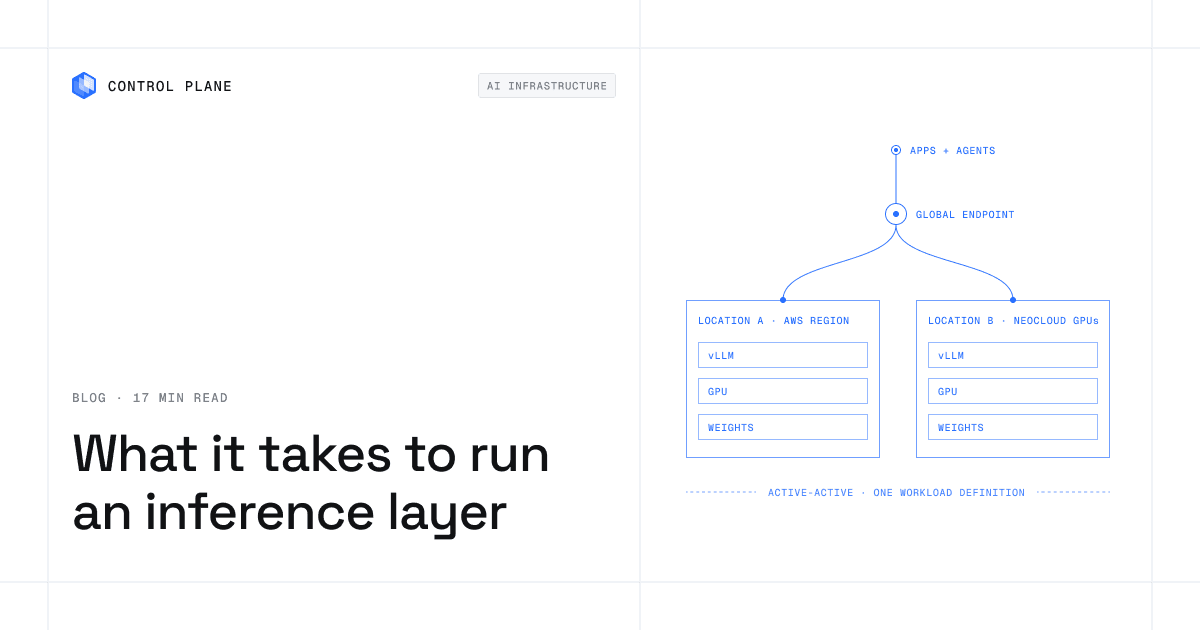
- Global endpoint: users connect to one hostname, and anycast or latency-based routing with deep health checks sends each request to the nearest healthy location.
- Locations: location A is one cloud region, and location B is a second region or a second provider.
- Compute: the same stateless services run in each location from the same image digest and workload definition, sized so each location can carry the other’s traffic.
- Data: a multi-writer data layer replicates across both locations, with a conflict policy per data set, plus a third location or witness when the database needs a quorum.
- Identity and secrets: each location authenticates and decrypts without calling the other.
- Observability: logs, metrics, and traces from every location appear side by side, with alerts on divergence in latency, error rate, and replication lag.
On Control Plane, locations A and B are locations of one Global Virtual Cloud running one workload definition. Build in this order:
| Step | Work | Relative effort | Why this order |
|---|---|---|---|
| 1 | Remove hidden single-region dependencies | Low to medium | Cheapest to fix before a second location exists |
| 2 | Compute in a second location (Layer 2) | Medium | Proves the workload is portable |
| 3 | Global routing and health checks (Layer 1) | Low to medium | Sends real traffic to location B |
| 4 | Data layer (Layer 3) | High | Longest lead time; design early and migrate by data set |
| 5 | Failover automation (Layer 4) | Medium | Depends on health signals and idempotent clients |
| 6 | Testing cadence (Layer 5) | Low per drill, ongoing | Starts the first time a location can be drained safely |
For recovery-time tiers and backup strategy, see Best Cloud Disaster Recovery Solutions for 2026.
Build it yourself vs on a platform
Routing, multi-location compute, failover, and cross-location observability are platform work. On Control Plane, the replicated database you choose for each data set runs on the same platform.
| Layer | Do it yourself | On Control Plane |
|---|---|---|
| Global routing and health checks | Choose a routing service, tune probes and TTLs, and wire in every location | A built-in global endpoint routes each request to the nearest healthy location |
| Per-location clusters and pipelines | Run a cluster and a pipeline in every region and keep them identical | One workload definition runs in every location of a Global Virtual Cloud, with no Kubernetes cluster you have to operate |
| Cross-cloud networking and identity | VPC peering or transit, per-cloud IAM, key rotation, and private links to on-premises sites | Universal Cloud Identity for short-lived access to AWS, GCP, and Azure services, Cloud Wormhole for private VPCs and data centers, and mutual TLS between workloads in every location |
| Data replication | Select, deploy, and operate a replicated database across locations | Stateful workloads plus templates for pgEdge, CockroachDB, TiDB, Cassandra, MongoDB, and PostgreSQL |
| Failover automation | Write and test the logic that removes locations and shifts traffic | Automatic: requests to a failed location shift to the nearest healthy one, with no runbook or manual switch |
| Observability across locations | Aggregate logs, metrics, and traces from each cloud | Logs, metrics, and traces from every location in one place |
How Control Plane runs active-active
Control Plane is the platform for running unbreakable apps and agents. It combines any cloud, neocloud, and bare metal into one Global Virtual Cloud. A workload deployed to it runs active-active in every location. Adding a location changes where the workload runs, not how you define or deploy it. You get active-active failover without paying for idle standby capacity.
- Day-two operations: autoscaling, Capacity AI right-sizing, readiness-gated rollouts, certificate issuance and renewal, unified observability (logs, metrics, and traces) from every location, mutual TLS, a deny-by-default internal firewall, and a tamper-proof audit trail are built in.
- Availability: the 99.999% availability SLA applies to workloads running at least two replicas in at least two locations. Those locations can be two regions of one cloud or locations on different providers, and a second provider also removes dependencies that regions of one cloud share.
- Data: stateful workloads have individually addressable replicas and auto-growing persistent volumes. The template catalog includes pgEdge (active-active distributed PostgreSQL with multi-master replication across locations), CockroachDB (distributed SQL with multi-location survivability), TiDB, Apache Cassandra, a MongoDB replica set, and a PostgreSQL cluster. The MongoDB replica set and the PostgreSQL cluster each span locations and fail over automatically to a surviving location when they span three or more. pgEdge, CockroachDB, and TiDB cover Option 1, the MongoDB and PostgreSQL clusters cover Option 2, and each data set can use a different one inside the same Global Virtual Cloud.
- Identity and connectivity: Universal Cloud Identity gives workloads short-lived, least-privilege access to 600+ AWS, GCP, and Azure services, with no long-lived cloud keys in your code. Cloud Wormhole connects workloads to private VPCs and data centers.
- Cost: customers typically cut compute costs 30 to 50 percent compared with running directly on AWS, GCP, or Azure.
Starting from one provider? See how to move off a single cloud provider without re-architecting your apps.
FAQ
What is active-active high availability?
An architecture where two or more locations serve production traffic at the same time, so when one fails the others keep serving and recovery is a routing change. It takes global routing, compute in every location, replicated data, automatic failover, and regular testing. Running the app in several regions against a single database in one region is not active-active.
Active-active vs active-passive: which is better?
Active-active has a shorter failover path and proves every location with real traffic. Active-passive is simpler to build, particularly for data, and fits workloads that tolerate minutes of recovery. At a five-nines target, a failover that needs a promotion and warm-up can use the whole monthly budget in one event.
How does data stay consistent in active-active?
Through synchronous replication with consensus, which gives strong consistency at higher write latency; asynchronous multi-writer replication with a conflict policy such as last writer wins; or partitioning, so only one location writes a given record.
Can a relational database run active-active?
Yes. Distributed SQL databases such as CockroachDB, TiDB, and Spanner provide strongly consistent transactions across locations, and pgEdge runs active-active PostgreSQL with multi-master replication. A single-writer PostgreSQL cluster with automatic promotion is simpler, but writes pause during promotion. Control Plane’s template catalog includes pgEdge, CockroachDB, TiDB, and a PostgreSQL cluster stretched across three or more locations with automatic promotion in a surviving location.
Do I need multiple clouds for active-active?
No. Multiple regions on one cloud can be active-active, and Control Plane’s 99.999% availability SLA applies to workloads running at least two replicas in at least two locations, on one provider or several. A second provider adds protection from failures that regions of one provider share, such as a provider-wide management or global service issue, and avoids lock-in.
How much does active-active cost compared with a single region?
Because every location serves traffic, you are not paying for idle standby capacity. The added cost is headroom (each survivor needs 1/(N-1) of its normal load) and engineering effort, mostly in the data layer. On Control Plane, routing, multi-location compute, and failover come with the platform, and customers typically cut compute costs 30 to 50 percent compared with running directly on AWS, GCP, or Azure.
How do you test active-active failover?
Run game days, drain one location in production on purpose, and inject faults with chaos experiments, measuring traffic shift time, error rate, replication lag, and survivor saturation. On Control Plane, logs, metrics, and traces from every location appear in one place, so you can watch the traffic shift and survivor load during a drill.
How many locations do I need?
Two is the minimum for active-active, and each must be able to carry the full load. Three lowers the headroom each location needs to 50% and gives databases that need a quorum, such as CockroachDB with region survival, the three locations they require. On Control Plane, MongoDB and PostgreSQL clusters fail over automatically once they span three locations.
What platform runs active-active across regions and clouds?
Control Plane runs one workload definition active-active in every location of a Global Virtual Cloud, across regions of one cloud or across providers, with a built-in global endpoint that routes around a failed location and templates for replicated databases such as pgEdge and CockroachDB. Its 99.999% availability SLA applies to workloads running at least two replicas in at least two locations.
How fast does active-active fail over?
It depends on how fast the routing layer detects the failure and stops sending traffic there. With DNS routing, TTLs and client caching add time after detection. During the October 2025 AWS us-east-1 outage, 20% of Control Plane customers had us-east-1 in their Global Virtual Clouds. Their workloads were active and running in healthy locations within 10 seconds, with no customer downtime, according to Control Plane internal incident telemetry.
Next step: Talk to the Control Plane team about running active-active across regions or clouds, or sign up free and deploy a workload to two locations.