TL;DR
A production inference layer needs GPU compute sized to the model, a serving runtime such as vLLM or SGLang, orchestration that autoscales on queue depth, one endpoint with health-aware routing and failover, model weights cached near the GPUs, and observability, security, and cost controls. For customer-facing inference and AI agents, run the same serving workload active-active in at least two locations, in different regions or on different providers, so one GPU pool, region, or provider outage does not take inference down.
Control Plane runs that layer as one platform and handles its day-two operations: autoscaling, rollouts, observability, mutual TLS, and a tamper-proof audit trail, with no Kubernetes cluster you have to operate. It combines any cloud, neocloud, and bare metal into one virtual cloud and runs the serving workload active-active in every location, without paying for idle standby capacity. The 99.999% availability SLA applies to workloads running at least two replicas in at least two locations, so inference and the agents that depend on it stay up when a region or provider goes down.
What is an inference layer?
An inference layer is the service between your applications or agents and your models. Your code sends a prompt or input, and the layer runs the model and returns tokens, embeddings, or predictions. It also handles authentication, queuing, batching, routing, retries, logging, and limits.
Inference is different from training. Training adjusts weights in long batch jobs that tolerate restarts and can wait for capacity. Inference uses fixed weights to answer live requests with latency targets of milliseconds to seconds. Large training runs need many GPUs for a limited time. Inference needs enough GPUs, in the right places, all the time.
In production, a model call sits on the critical path of chat, search, copilots, document processing, and agents. A single agent task can trigger dozens of model calls in sequence, so one slow or failed call stalls the whole task. An agent is only as available as the inference behind it. The guide to AI agent infrastructure platforms compares where to run agents themselves.
The components of a production inference stack
GPU compute
Memory is usually the first constraint. The weights must fit in GPU memory with room left for the KV cache, the per-request attention state that grows with context length and concurrency. Weight memory is parameter count times bytes per parameter: about 2 bytes at 16-bit, 1 byte at 8-bit, and 0.5 bytes at 4-bit.
| Model size | Weights at 16-bit | Weights at 8-bit | Typical GPU fit |
|---|---|---|---|
| 1B to 3B | 2 to 6 GB | 1 to 3 GB | A single T4 or L4 |
| 7B to 8B | 14 to 16 GB | 7 to 8 GB | L4 or L40S at 16-bit; T4 at 8-bit with limited context |
| 13B | About 26 GB | About 13 GB | L40S, or smaller GPUs at 8-bit |
| 30B to 34B | 60 to 68 GB | 30 to 34 GB | L40S at 8-bit; one H100 at 16-bit only for the smaller models in this range, with very little KV cache headroom |
| 70B | About 140 GB | About 70 GB | Two H100s at 16-bit with minimal headroom, or two H200s or four H100s for production concurrency. At 8-bit: one H100 with very tight headroom, or one H200 with ample headroom |
These figures exclude the KV cache, which can use as much memory as the weights, or more, at long contexts and high concurrency, so measure with your real prompts. For reference, NVIDIA lists the T4 at 16 GB, the L4 at 24 GB, the L40S at 48 GB, the H100 SXM at 80 GB, and the H200 at 141 GB. Models split across several GPUs with tensor parallelism depend on fast GPU-to-GPU links inside one server, so check the interconnect first: H100 and H200 SXM servers use NVLink, while L4 and L40S GPUs communicate over PCIe.
Providers sell GPU capacity three ways: on-demand (start and stop at will, availability not guaranteed), reserved (a committed term for a lower rate, with assured capacity only when you buy a capacity reservation or block), and spot (cheaper, but reclaimable on short notice, so a poor fit as the only capacity behind a user-facing endpoint). A common mix is reserved for baseline load, on-demand for bursts, and spot for batch jobs.
AWS, GCP, and Azure place GPUs next to the rest of your stack. Neoclouds often have different availability, pricing, and GPU generations. Each additional provider usually adds another account, network, identity system, and deployment pipeline. The guide to combining GPU capacity across providers covers how to avoid that duplication.
Model serving runtime
The runtime loads the model onto the GPU, batches concurrent requests, manages the KV cache, and exposes an API. Main options:
- vLLM: an open source LLM serving engine built around paged KV cache management and continuous batching, with an OpenAI-compatible HTTP server and support for many open-weight model families.
- SGLang: an open source serving framework for LLMs and multimodal models, with prefix caching, structured output support, and a frontend language for multi-call workflows.
- NVIDIA Dynamo-Triton (formerly Triton Inference Server) and TensorRT-LLM: a general inference server for many model types, and NVIDIA’s open source library for optimized LLM inference on NVIDIA GPUs. For distributed LLM serving, NVIDIA also offers NVIDIA Dynamo.
- Text Generation Inference (TGI): Hugging Face’s text generation server. Hugging Face moved it to maintenance mode and archived the repository in March 2026, and recommends vLLM, SGLang, llama.cpp, or MLX instead, so it is a poor choice for new deployments.
- Ollama: runs open-weight models on a laptop or workstation with a simple CLI and API. It suits development more than high-concurrency production serving.
Benchmark two candidates with your own model, prompts, and target GPU, because published numbers depend heavily on batch size, context length, and precision. Pin the runtime version, since a new release can change memory use or output. An OpenAI-compatible endpoint lets you switch between a hosted API and your own serving mostly by changing the base URL and model name.
Orchestration and autoscaling
Orchestration places replicas on GPU nodes, restarts failed ones, rolls out new versions, and scales replica counts. Options include plain Kubernetes with the NVIDIA device plugin, KServe (a CNCF incubating, Kubernetes-native platform for generative and predictive serving, with canary rollouts and OpenAI-compatible LLM serving), and Ray Serve (a serving library on Ray for composing models and business logic).
CPU utilization is a weak scaling signal for GPU inference, because the CPU can idle while the GPU is saturated. Scale on queue depth, in-flight requests per replica, tokens per second against a measured ceiling, or time to first token, and add a second signal as a guardrail.
New replicas take time: they must be scheduled, pull an image, load weights into GPU memory, and pass a readiness check, which can take minutes for large models. Keep a minimum replica count that covers baseline traffic, scale up early, and gate traffic on readiness so a half-loaded replica never receives requests.
On Control Plane, a workload can scale on requests per second or a p50, p75, or p99 latency target, and on queue length and other custom metrics through KEDA. New replicas receive traffic only after they pass the readiness probe.
Routing, load balancing, and failover
Clients need one stable endpoint that sends each request to a healthy replica. Inference routing has its own constraints. Requests are long and uneven, often ranging from under a second to tens of seconds, so least-outstanding-requests or queue-aware balancing beats round-robin. Responses stream, so clients must handle a dropped stream and resend. Replicas hold prefix and KV caches, so cache-aware routing helps, but it should never override health.
A replica can pass a liveness probe while its GPU is hung. Use readiness checks that run a small real inference, set timeouts and retry budgets, and cap retries so a struggling backend does not get a retry storm. Process, GPU, and node failures are handled inside one cluster. Zone, region, and provider failures need other locations.
Model weights and storage
Weights usually live in object storage such as Amazon S3 or Google Cloud Storage and are pulled into each replica at start. A 70B model at 16-bit is about 140 GB, so at an effective 1 GB per second it takes about 140 seconds just to move the bytes. To shorten cold starts, keep a copy of the weights in the same region or provider as the GPUs, cache them on node-local or shared volumes, pre-stage them before traffic arrives, use fast-loading formats such as safetensors, and keep warm replicas for baseline traffic.
Treat weights as a versioned artifact with a promotion process, so two locations never serve different versions, and watch egress charges when several locations pull from one bucket.
Observability
Inference needs model-aware metrics, collected from every location and viewed in one place, with alerts on tail latency and error rate rather than only replica health:
| Metric | What it tells you |
|---|---|
| Time to first token (TTFT) | How long users wait before output starts |
| Tokens per second | Generation speed and throughput per replica |
| p50, p95, p99 latency | Typical and tail request time; averages hide slow requests |
| Queue depth and wait time | Whether you are under-provisioned; a primary autoscaling signal |
| GPU and KV cache utilization | Whether GPUs are saturated or idle, and whether long contexts crowd out concurrency |
| Error rate by type | Timeouts, out-of-memory errors, rate limits, bad requests |
| Cost per 1,000 tokens or per request | Spend tied to usage, for capacity planning |
Break metrics out per location, or a regional problem hides inside a healthy average. Log request metadata such as model, version, token counts, and latency, and decide deliberately whether to store prompt and response text. Control Plane collects logs, metrics, and traces from every location in one place.
Security and access
- Identity without long-lived keys: replicas reading weights or data should use short-lived, least-privilege credentials tied to the workload, not static keys in images or environment variables.
- Network isolation: expose only the gateway, use a deny-by-default internal firewall, and encrypt service-to-service traffic with mutual TLS.
- Private data access: reach private VPCs and on-premises data centers over private connectivity.
- Authentication and quotas: authenticate callers and set per-client rate limits so one client cannot consume all GPU capacity.
- Audit trail: record who deployed, changed, or accessed what.
Cost controls
GPU spend is usually the largest line item. Right-size the GPU to the model, use quantization where output quality allows, raise utilization with continuous batching and prefix caching, route simple tasks to a smaller model, scale idle replicas down, and set budgets and alerts per team, model, and environment, tracking cost per request.
Self-host vs managed API vs inference platform
There are four ways to get inference.
- (a) A fully managed API from a model provider or cloud, such as OpenAI, Anthropic, Amazon Bedrock, or Google Cloud’s Gemini Enterprise Agent Platform (formerly Vertex AI).
- (b) A managed inference platform for open models, such as Together AI, Fireworks, Baseten, or Modal.
- (c) Self-hosted serving on your own cloud account or GPU capacity, using a runtime from above.
- (d) Self-hosted serving on Control Plane, where your runtime runs in one Global Virtual Cloud across cloud, neocloud, and bare-metal GPU locations and Control Plane handles day-two operations.
| (a) Managed API | (b) Inference platform | (c) Self-hosted | (d) On Control Plane | |
|---|---|---|---|---|
| Control over models | The provider’s catalog and tuning options | Open-weight and, on many platforms, custom models within the supported set | Any model, runtime, quantization, and version | Any model, runtime, quantization, and version |
| Data residency | Set by the provider’s regions and terms | Set by the platform’s regions; some offer dedicated deployments | You choose the locations and keep data in your accounts | You choose the locations and keep data in your accounts |
| Cost profile at scale | Usually per token, with discounts for batch, prompt caching, or committed throughput; scales roughly with usage | Per token or per GPU time, by plan | Mostly fixed GPU cost; lower unit cost at high, steady utilization, higher when GPUs idle | GPU cost of the locations you choose, with no second stack per provider |
| Operational effort | Lowest | Low to moderate | Highest | Low; Control Plane runs the day-two work |
| Failure blast radius | A provider incident hits every dependent feature unless you integrate a second provider | A platform incident hits your deployments; multi-provider routing is yours to build | You control it; one region or provider is a single point of failure unless you deploy to several | Active-active across locations and providers, so one failure does not take inference down |
Low or spiky volume favors per-token pricing, high steady volume can favor dedicated GPUs, and data rules can rule options in or out. Self-hosting on your own is a real operational commitment for a small team; on Control Plane, most of that work is handled for you. Many teams mix approaches behind one stable internal endpoint, so application code does not depend on the choice.
How to make inference highly available
A single GPU pool, region, or provider is a single point of failure. A region-level incident, a GPU provider outage, a capacity shortage during a spike, a bad driver update across one node pool, or a quota or account suspension can each take out every replica in that pool at once. More replicas in the same pool do not help, because they share the failure. On October 20, 2025, AWS us-east-1 was disrupted for about 15 hours, according to the AWS post-event summary, and Azure Front Door had a global service disruption on October 29, 2025, according to the Azure post-incident review.
Four practices keep inference serving through a GPU provider or region outage:
- Run the same serving workload in at least two locations, in different regions or on different providers, each able to serve the full model on its own.
- Keep weights cached in each location and a baseline of warm replicas, because downloading 140 GB during an outage is too slow to help.
- Route each request to a healthy location through a global endpoint that detects an unhealthy location, shifts traffic away, and prefers the nearest healthy one.
- Size for failure, so each location can absorb the other’s traffic, or plan to degrade with shorter outputs or a smaller fallback model.
Active-active beats active-passive for inference. Standby locations have cold caches and unproven capacity that you discover during the outage, while active-active locations serve live traffic and are verified continuously. Test it on purpose: disable one location and measure the traffic shift, in-flight streams, and latency change.
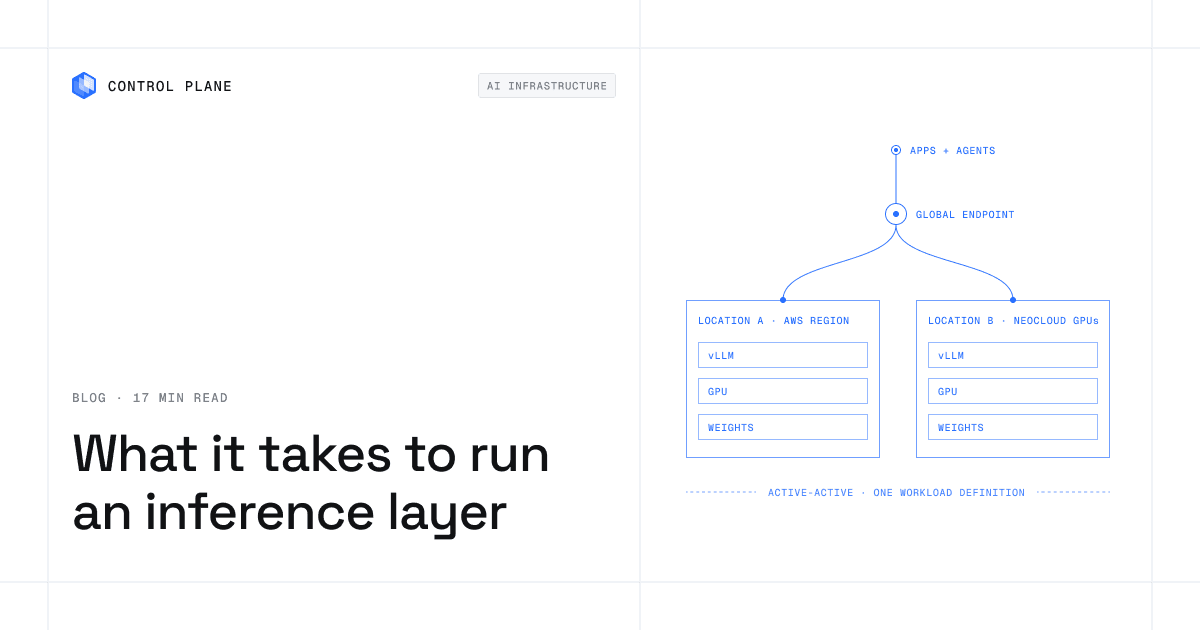
Control Plane runs this pattern as a platform. One workload definition runs active-active in every location of a Global Virtual Cloud, including neocloud and bare-metal GPU locations, and the global endpoint shifts traffic away from a location that fails. Every location serves live traffic, so you get active-active failover without paying for idle standby capacity. The 99.999% availability SLA applies to workloads running at least two replicas in at least two locations, and those locations can be on different providers. On October 20, 2025, 20% of Control Plane customers had us-east-1 in their Global Virtual Clouds. Their workloads were active and running in healthy locations within 10 seconds, with no customer downtime, according to Control Plane internal incident telemetry.
Serving is stateless and weights are read-only, so each location runs on its own copy. Agent state such as conversation memory needs a database replicated across the same locations to stay active-active.
For availability targets, see how many nines you actually need. To add a second GPU provider without a second stack, see how to add a neocloud to AWS or GCP.
Reference architecture and rollout
A baseline that survives the loss of one location, using an AWS region and neocloud GPU capacity as the two locations:
- Apps and agents call one internal inference hostname, never a specific region or provider, with timeouts and stream retries.
- A global endpoint terminates TLS, authenticates and rate-limits callers, and routes each request to the nearest healthy location.
- Location A (an AWS region) and location B (neocloud GPUs) run the same workload definition, runtime version, model version, and autoscaling rules, both serving live traffic.
- Model storage holds versioned weights with a cached copy near each location, read with short-lived credentials.
- Private connectivity reaches data in private VPCs or data centers.
- Observability brings both locations’ metrics into one place, broken out by location, with alerts on tail latency, errors, and loss of a location.
Roll it out in order: profile the model and set latency targets, benchmark and pin a runtime, size GPUs with the memory math and a load test, deploy to two locations with weights staged in each, add autoscaling and per-location observability, then take one location offline and fix what you find.
How Control Plane runs a resilient inference layer
Control Plane is the platform for running unbreakable apps and agents, including the inference layer under them. You bring the model and serving runtime, and Control Plane runs them and handles day-two operations.
- One virtual cloud across providers. The reference architecture above is one Global Virtual Cloud with one workload definition. Location A and location B are locations of that Global Virtual Cloud, so adding a third location or provider, or a second region of the same cloud, changes where the workload runs, not how you define or deploy it.
- GPU Ocean. GPU Ocean lets you pull GPU capacity from any provider. Today you join GPU servers from any provider as locations with Managed Kubernetes, and an existing Kubernetes cluster can join as a location through BYOK. Control Plane’s pricing page lists NVIDIA GPUs from T4 through B200, priced per GPU-hour, with per-second billing, subject to availability.
- Weights and private data without long-lived keys. Universal Cloud Identity gives workloads short-lived, least-privilege access to 600+ AWS, GCP, and Azure services, such as the S3 or Cloud Storage bucket that holds model weights, with no long-lived cloud keys in your code. Cloud Wormhole connects workloads to private VPCs and data centers.
- Day-two operations built in. Autoscaling, readiness-gated rollouts, logs, metrics, and traces, mutual TLS, a deny-by-default internal firewall, and a tamper-proof audit trail, with no Kubernetes cluster you have to operate.
- Cost. Customers typically cut compute costs 30 to 50 percent compared with running directly on AWS, GCP, or Azure.
FAQ
What GPU do I need to serve a 7B or 70B model?
A 7B model at 16-bit needs about 14 GB for weights, so an L4 or L40S fits it with KV cache headroom, and a 16 GB T4 fits it only at lower precision. A 70B model needs about 140 GB at 16-bit, so two H100s with minimal headroom or more GPUs for production concurrency. At 8-bit, about 70 GB fits one 80 GB H100 with very little KV cache room, or one 141 GB H200 with plenty.
Should I self-host or use an API?
It depends on volume, data rules, and team size. A managed API is fastest with the least operational effort. Self-hosting gives control over models and data location and can lower unit cost at high, steady utilization. Many teams use both behind one internal endpoint. Control Plane removes most of the operational effort of self-hosting by running the day-two work.
What’s the easiest way to add an inference layer to an existing application?
Put one internal inference endpoint in front of the model, so application code calls a stable hostname. Start with a managed API or an OpenAI-compatible runtime such as vLLM, and switch between them mostly by changing the base URL and model name. To self-host without building a platform, deploy the runtime as a Control Plane workload next to your existing services. It runs in every location of your Global Virtual Cloud, reaches the bucket that holds the weights through Universal Cloud Identity, and gets autoscaling and observability with no Kubernetes cluster you have to operate.
How do I autoscale inference?
Scale on queue depth, in-flight requests per replica, tokens per second, or time to first token, not CPU alone. Keep a minimum replica count for baseline traffic, scale up early because new replicas take time to load weights, and gate traffic on readiness. On Control Plane, workloads scale on requests per second, a latency percentile, or queue length through KEDA.
How do I reduce inference cold starts?
Cold start is mostly pulling the serving image and moving weights into GPU memory. Keep weights in the same location as the GPUs, cache them on local or shared volumes, pre-stage them, and use fast-loading formats. The most dependable fix is warm replicas that cover baseline traffic.
How do I make an inference API highly available?
Run multiple replicas per location and the same workload in at least two locations or providers, keep weights cached in each, and route each request to a healthy location through a global endpoint. Control Plane does this as a platform: one workload runs active-active across clouds, neoclouds, and bare metal, and the 99.999% availability SLA applies to workloads running at least two replicas in at least two locations, which can be on different providers.
What does it cost to run an inference layer?
The main costs are GPU hours, storage and network transfer for weights, and engineering time. GPU cost depends on GPU class, replica count, capacity type, and utilization. Build a cost model from your measured throughput per GPU and your traffic, and track cost per request. Control Plane’s pricing page lists per-GPU-hour rates for NVIDIA GPUs from T4 through B200, and customers typically cut compute costs 30 to 50 percent compared with running directly on AWS, GCP, or Azure.
Can I run inference on my own GPUs alongside my cloud apps?
Yes, if you can schedule workloads onto those GPUs, connect them to your apps over a private network, and give them an identity to reach cloud storage. On Control Plane, GPU servers from any provider join as locations with Managed Kubernetes, an existing Kubernetes cluster joins through BYOK, and Cloud Wormhole connects workloads to private VPCs and data centers.
How do I fail over inference between GPU providers?
Run the same serving workload and model version on both providers, keep weights cached at each, and put a health-checked routing layer in front that shifts traffic when one fails, with enough capacity in each to absorb the other. On Control Plane, both providers are locations in one GVC, so the same workload definition runs in each and the global endpoint handles the shift. The guide to combining GPU capacity across providers walks through it.
Do I need Kubernetes to serve models?
Not for a prototype on one server. Once you add replicas, autoscaling, rollouts, and multiple locations, you need a scheduler, and Kubernetes is the most common. On Control Plane you never have to operate a Kubernetes cluster, and Managed Kubernetes and BYOK are there when you want one.
Next step: Talk to the Control Plane team about running inference across providers, or sign up free and deploy a serving workload to two locations.