No website has 100% uptime, but you can get very close. Remove single points of failure, catch problems before your users do, and make bad changes fast to undo. The realistic goal is a site that recovers in seconds and warns you before customers notice a problem.
Disclosure: Control Plane publishes this guide.
TL;DR
The short answer: Downtime comes from a short list of causes, and each has a known fix. Most of the fixes are cheap. The more involved ones (running across several locations or providers) matter most for sites that cannot afford to be down. Control Plane runs a workload in several locations at once, so a failure in one location does not take the site offline.
The five highest-impact steps:
- Monitor from outside your own infrastructure, and send alerts to a person who can act.
- Make deploys safe and rollbacks fast. Bad changes cause more outages than hardware does.
- Automate certificate and domain renewals, and set expiry alerts.
- Run more than one server behind a health-checked load balancer, spread across availability zones.
- Plan for the provider failing, by using more than one region, and for critical parts, more than one provider.
How do I make sure my website never goes down?
You cannot guarantee it. Every component between your visitor and your code can fail: the browser’s network, the DNS provider, the CDN, the load balancer, the server, the database, and every third-party service the page calls. Each has its own failure rate. The site’s availability is the product of all of them.
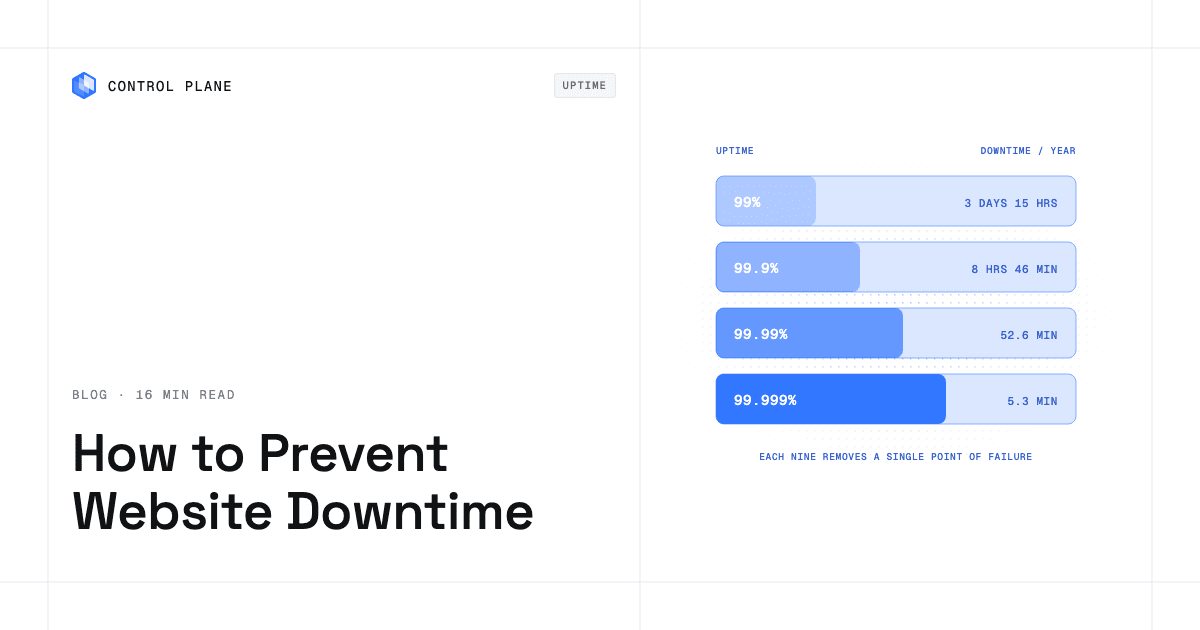
What you can do is measure availability honestly and raise it deliberately. Availability is the share of time a site works for users. It is usually written as a percentage, and each extra nine cuts the allowed downtime by a factor of ten.
| Uptime | Allowed downtime per year (365 days) |
|---|---|
| 99% | About 3 days 15 hours |
| 99.9% | About 8 hours 46 minutes |
| 99.99% | About 52.6 minutes |
| 99.999% | About 5.3 minutes |
These figures are arithmetic on a 365-day year. At 99.99%, a single bad deploy that takes 30 minutes to roll back uses more than half your yearly budget. That is why detection speed and rollback speed matter as much as redundancy.
“Close to never” means three things in practice:
- No single point of failure in the parts of the site that must stay up.
- Fast detection, so a person knows within minutes, not when a customer emails.
- Fast recovery, so a bad change or a failed component is reversed or bypassed quickly.
What causes website downtime?
Two public data points show where large-scale failures start.
- In the Control Plane 2026 Cloud Outage Report, 34 of 62 major AWS, Azure, Google Cloud, and Cloudflare outages documented since January 2020 (55%) started with a configuration or deployment change, a software bug, or automation acting on bad input. The median major outage lasted 6 hours 8 minutes.
- The October 19-20, 2025 AWS us-east-1 outage started with a latent race condition in DynamoDB’s automated DNS management and lasted 14 hours 32 minutes, per AWS’s post-event summary.
Providers run some of the most carefully operated infrastructure in the world, and their own changes are the most common trigger. Your own site is at least as exposed to the same pattern.
Common causes of downtime for an individual site:
- Bad deploys and configuration changes. A broken release, a wrong environment variable, a bad firewall rule.
- A single server or region failing. Hardware faults, a crashed process, a full disk, a regional provider incident.
- Traffic spikes. A launch, a campaign, or a link that goes viral exceeds capacity.
- Expired SSL certificates or domain registrations. The site is fine, but browsers refuse to load it, or the domain stops resolving.
- DNS problems. DNS (the Domain Name System) translates your domain name into the address of your server. If it fails, users cannot find you.
- DDoS attacks. A distributed denial-of-service attack floods the site with junk traffic until real users cannot get through.
- Database overload. Slow queries, exhausted connections, or a failed primary database.
- Third-party services failing. Payment, login, analytics, or chat widgets that block the page when they time out.
A site you configure perfectly still depends on its host, its DNS provider, and its CDN. A CDN (content delivery network) is a network of servers that caches and serves your content close to users. You inherit the availability of each of those, which is why the later steps cover redundancy at every layer.
How do I prevent website downtime? 12 ways
The steps below run roughly from cheapest to most involved. Each one names the failure it prevents and how to start.
1. Monitor uptime from outside your infrastructure, with alerts to a person
What it is: A service that requests your site from several locations on a schedule and alerts you when it fails or slows down.
What it prevents: Long outages that nobody notices. Monitoring that runs on the same server as the site goes down with it.
How to start: Create checks for the home page, the login page, and one critical transaction such as checkout. Check at least once a minute. Send alerts to a phone or chat channel that a named person watches, and require a second failed check before paging to cut false alarms.
2. Make deploys safe and rollbacks fast
What it is: A release process with a staging environment, gradual rollout, and a one-step rollback.
What it prevents: Bad changes, the most common trigger in the outage data above.
How to start: Deploy to staging first and run a smoke test. Release to a small share of traffic, watch error rates, then widen. Keep the previous version ready so a rollback is one command. Avoid releasing right before you are unavailable to respond.
3. Automate SSL certificate and domain renewals, and set expiry alerts
What it is: Automatic renewal for TLS certificates and domain registrations, plus alerts well before expiry.
What it prevents: An expired certificate or domain, which takes a healthy site offline.
How to start: Turn on auto-renewal at your registrar and certificate provider. Add an expiry alert at 30 days and again at 7 days, sent to more than one person. Confirm the contact email on the domain account is monitored.
4. Put a CDN in front of the site
What it is: A CDN caches static content such as images, scripts, and pages, and serves it from locations near users.
What it prevents: Origin overload during traffic spikes, and some origin failures, because cached pages can still be served.
How to start: Route your domain through a CDN and set cache rules for static assets. Enable an option to serve stale content when the origin is unreachable, if your CDN offers one. Remember that the CDN itself is a dependency.
5. Use a DNS provider with high availability, or more than one DNS provider
What it is: A DNS service built to stay up across many locations, optionally paired with a second provider.
What it prevents: A DNS outage that makes a healthy site unreachable.
How to start: Choose a DNS provider that publishes its availability design. For sites that cannot go down, add a second provider so that either can answer. Keep record time-to-live (TTL) values short enough to change quickly, such as a few minutes, for records you may need to repoint during an incident.
6. Run more than one server behind a health-checked load balancer
What it is: A load balancer spreads requests across several servers and stops sending traffic to any server that fails its health check.
What it prevents: A single server crash or a bad instance taking the site down.
How to start: Run at least two instances of the web tier. Configure a health check that tests a real endpoint, not just that the port is open. Make instances interchangeable by keeping state in a database or cache instead of on local disk.
7. Spread across availability zones, then regions
What it is: An availability zone is an isolated data center within a cloud region. A region is a geographic area containing several zones.
What it prevents: Zone failures (use multiple zones) and regional incidents (use multiple regions).
How to start: Place instances in at least two zones of one region. Then add a second region for the parts that must stay up, with failover (switching traffic from a failed location to a healthy one) tested on a schedule. In the outage report, 31 of the 62 outages hit more than one region or a provider’s global services, so zones alone leave real gaps.
8. Autoscale for traffic spikes
What it is: Automatic addition and removal of servers based on load.
What it prevents: Overload during a launch, a sale, or an unexpected surge.
How to start: Set a minimum number of instances that handles normal traffic and a maximum that you can afford. Scale on a metric that reflects user experience, such as request latency or queue depth. Load test before an expected spike, because autoscalers take time to add capacity.
9. Add DDoS protection and a web application firewall
What it is: DDoS protection absorbs or filters flood traffic. A web application firewall (WAF) blocks malicious requests, such as injection attempts, before they reach the app.
What it prevents: Attack traffic that exhausts capacity or exploits a vulnerability.
How to start: Enable the DDoS protection that your CDN or host offers. Turn on WAF rules in monitoring mode first, review what they would block, then switch to blocking. Add rate limits on login and search endpoints.
10. Back up data and test restores
What it is: Regular copies of your database and files, stored in a separate location, with restores you have actually tried.
What it prevents: Permanent data loss and long recoveries after corruption, a bad migration, or ransomware.
How to start: Automate daily backups at minimum, and more often for busy databases. Store a copy in a different account or location. Restore to a test environment every quarter and record how long it takes. Two numbers define your plan: RPO (recovery point objective, how much data you can lose) and RTO (recovery time objective, how long you can be down). For targets and practices, see cloud disaster recovery RTO and RPO targets.
11. Plan for third-party dependency failures
What it is: Timeouts, fallbacks, and graceful degradation for every external service your pages call.
What it prevents: A failing payment widget, analytics script, or chat tool freezing the whole page.
How to start: List every external call in the critical path. Set short timeouts. Load non-essential scripts asynchronously so they cannot block rendering. Decide in advance what the page does without each service, such as hiding the chat widget or queueing orders for later.
12. Run across more than one cloud provider for the parts that cannot go down
What it is: Running the critical parts of the site in locations on different providers, so one provider’s failure does not take them offline.
What it prevents: Provider-wide incidents, including those that cross regions and global services.
How to start: Identify the smallest part of the site that must stay up, such as the checkout or the API. Run that part in two providers first. Keep one deployment definition so you do not double the operational work. Decide your data replication design early, because the data layer is the hardest part. For a detailed walkthrough, see how to build active-active high availability across regions and clouds.
How do I get 99.99% uptime for my website?
Each extra nine requires removing a class of single point of failure: the server, then the zone, then the region, then the provider. Monitoring, safe deploys, and redundancy all have to be in place. Redundancy without fast detection leaves failures unnoticed. Detection without redundancy tells you about an outage you cannot avoid.
| Target | Allowed downtime per year | What has to be true | Steps from the list |
|---|---|---|---|
| 99% | About 3 days 15 hours | Basic monitoring, renewals handled, backups exist | 1, 3, 10 |
| 99.9% | About 8 hours 46 minutes | No single server failure takes the site down, deploys can be rolled back quickly | 1, 2, 3, 4, 5, 6, 8, 10 |
| 99.99% | About 52.6 minutes | Survives a zone failure, handles spikes and attacks, degrades gracefully when a third party fails | 1 through 11, with step 7 at the zone level at minimum |
| 99.999% | About 5.3 minutes | Survives a region failure and, for the critical parts, a provider failure, with failover tested | 1 through 12 |
Use the table as a planning guide, not a guarantee. Your real availability depends on how well each step is implemented and tested. Measure it over a full year, and count every outage, including planned maintenance that users notice.
At 99.99% and above, manual recovery does not fit the budget. A 52.6 minute yearly allowance can disappear in one incident that needs a person to wake up, diagnose, and act. Automated failover and automated rollback do the work in seconds.
How can I tell if my website is down?
Use three layers of checks.
- External monitoring. Checks from several locations tell you whether users in different places can reach the site. See step 1.
- A status page. A public page shows users what is working, and an internal view shows the team the same facts. It reduces support load during an incident.
- A source check. When a check fails, find out whether the problem is your site, your host, or a wider provider outage. Look at your own error logs and recent deploys first. Then check your host’s and DNS provider’s status pages. For a record of major provider incidents, see the Control Plane cloud outage tracker.
Test from a network outside your own. A site can load for your office and fail for everyone else, or the reverse.
What should I do when my website goes down?
Work through a short, calm checklist. Write it down now so nobody improvises during an incident.
- Confirm. Check from a second network and a second device. Make sure the alert is real.
- Check recent changes and roll back. If a deploy or configuration change happened shortly before the failure, roll it back first and investigate afterward.
- Check provider status pages. Look at your host, DNS provider, CDN, and any third parties on the critical path.
- Communicate on a status page. Post what you know, what you are doing, and when you will update next. Update on schedule even when there is no news.
- Fix. Restore service by the fastest safe route: rollback, failover, scaling up, or removing a failing dependency. A permanent fix can wait.
- Write down what happened. Record the timeline, the cause, and what would have prevented or shortened it. Turn each finding into a task with an owner.
How does Control Plane help sites and apps that cannot go down?
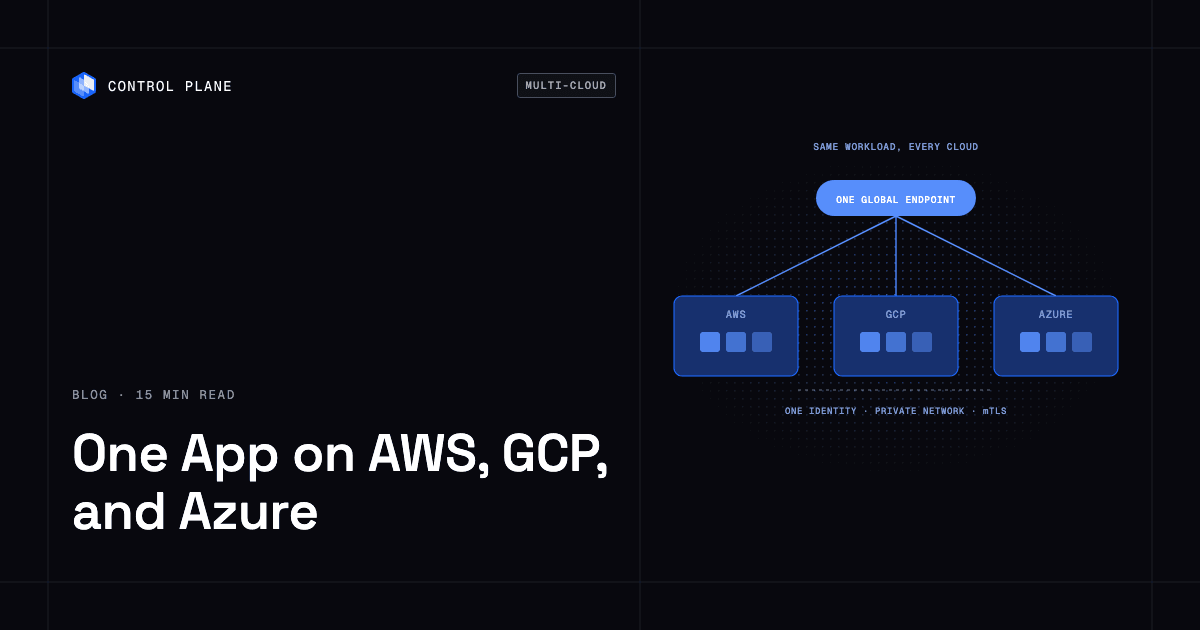
Control Plane is the platform for running unbreakable apps and agents. It combines any cloud, neocloud, and bare metal into what Control Plane calls a Global Virtual Cloud (GVC). A workload deployed to a GVC runs active-active in every location of that GVC, and a global endpoint routes each request to the nearest healthy location. That gives you failover without paying for idle standby capacity.
The 99.999% availability SLA applies to workloads running at least two replicas in at least two locations. Those locations can be two regions of one cloud or locations on different providers.
During the October 2025 AWS us-east-1 outage, 20% of Control Plane customers had us-east-1 in their Global Virtual Clouds. Their workloads were active and running in healthy locations within 10 seconds, with no customer downtime, according to Control Plane internal incident telemetry.
Of the 12 steps above, Control Plane covers the redundancy and failover layers (steps 6, 7, 8, and 12) from one place. It also issues and renews TLS certificates for your custom domains automatically (step 3), and its Template Catalog includes the Coraza web application firewall (step 9).
- Where it runs: serverless, standard, stateful, cron, and VM workloads on AWS, GCP, and Azure, on clusters you already run through Control Plane’s Bring Your Own Kubernetes (BYOK), on your own machines (bare metal or VMs) turned into managed locations with Control Plane’s Managed Kubernetes (MK8s), and on premises. On Control Plane-provided compute, there is no Kubernetes cluster you have to operate.
- Not only multi-cloud: many teams run it in one cloud.
- Access: Control Plane’s Universal Cloud Identity gives workloads short-lived, least-privilege access to 600+ AWS, GCP, and Azure services, with no long-lived cloud keys in your code.
- Cost: Customers typically cut compute costs 30 to 50 percent compared with running directly on AWS, GCP, or Azure. Control Plane’s Capacity AI right-sizes CPU and memory based on historical usage, within a minimum and maximum you set. On Control Plane-provided compute, you pay for the CPU and memory reserved for each workload, by the millicore and the megabyte, with no contracts or minimums.
- Operations: Teams operate Control Plane through one API, with the same capabilities in the CLI, console, Terraform, Pulumi, and the Control Plane MCP server. Control Plane complements Terraform and Pulumi. It does not replace them.
- Compliance: Control Plane is PCI DSS Level 1, SOC 2 Type II, HIPAA, and GDPR compliant.
External monitoring, safe deploys, tested backups, and an incident checklist still matter on any platform, Control Plane included. For the full region-outage guide, read How to Keep Your App Online When an AWS Region Goes Down.
FAQ
How do I make sure my website never goes down?
You cannot make that guarantee, because no website has 100% uptime. You can get very close by removing single points of failure, monitoring from outside your infrastructure, and making deploys easy to roll back.
How do I keep a website from going down?
Start with the cheap steps: external monitoring, safe deploys with fast rollback, automated certificate and domain renewals, and backups. Then add redundancy: several servers behind a health-checked load balancer, more than one zone and region, and a CDN.
How do I prevent website downtime?
Address the common causes. Control changes with staging and rollback, renew certificates and domains automatically, handle traffic spikes with autoscaling, add DDoS protection, and plan for third-party failures. Test your backups and your failover.
What causes website downtime?
Bad deploys and configuration changes, a single server or region failing, traffic spikes, expired certificates or domains, DNS problems, DDoS attacks, database overload, and third-party services failing. In the Control Plane 2026 Cloud Outage Report, 34 of 62 major outages (55%) started with a configuration or deployment change, a software bug, or automation acting on bad input.
How do I get 99.99% uptime for my website?
99.99% allows about 52.6 minutes of downtime per year. You need external monitoring, safe deploys, redundant servers across zones, autoscaling, protection against attacks, and graceful handling of third-party failures. Automated failover and rollback matter because a single manual recovery can use most of the yearly allowance.
How can I tell if my website is down?
Use external monitoring that checks from several locations and alerts a person. Add a status page, and check your own logs, your host, and wider provider outages when an alert fires.
What should I do when my website goes down?
Confirm the outage, check recent changes and roll back, check provider status pages, post updates on a status page, restore service by the fastest safe route, and write down what happened afterward.
What is the difference between 99.9% and 99.99% uptime?
99.9% allows about 8 hours 46 minutes of downtime per year. 99.99% allows about 52.6 minutes. Moving from one to the other usually means surviving a zone failure and recovering automatically instead of manually.
What does the 99.999% availability SLA from Control Plane require?
The 99.999% availability SLA applies to workloads running at least two replicas in at least two locations. Those locations can be two regions of one cloud or locations on different providers.
Is Control Plane only for multi-cloud?
No. Many teams run it in one cloud. A GVC can span two regions of one cloud or locations on different providers.