
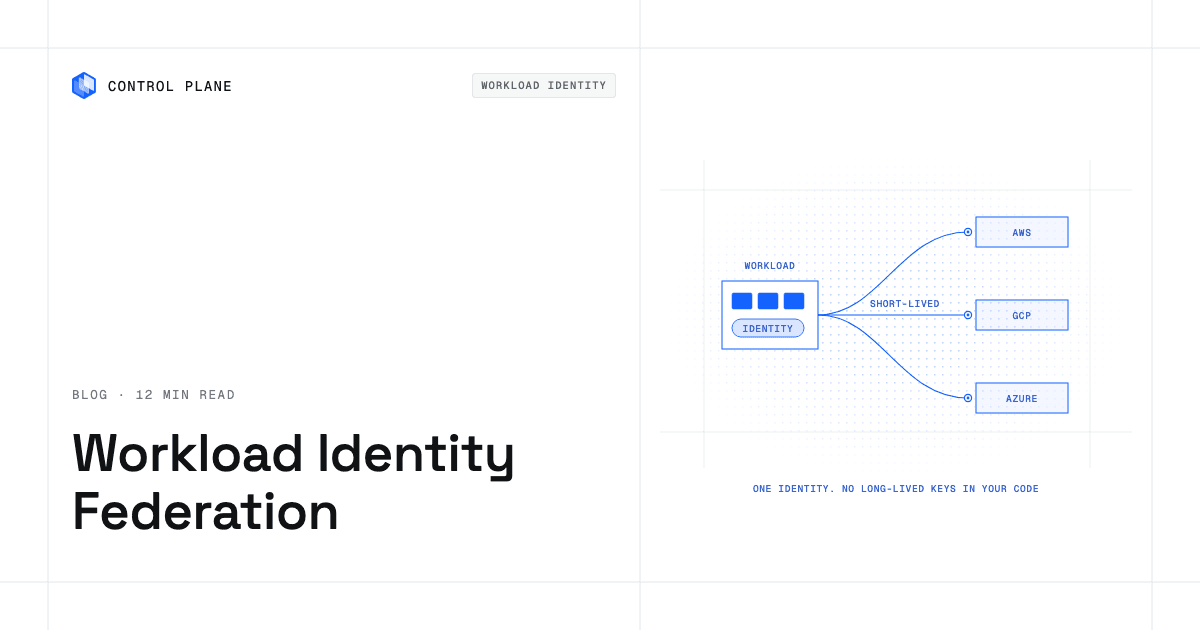
Workload identity replaces stored cloud keys with an identity the platform proves for each workload. The cloud exchanges that proof for short-lived, least-privilege credentials at runtime, so there is no long-lived key to leak, rotate, or copy.
Workload identity federation extends the same idea across environments: a workload on a Kubernetes cluster, another cloud, an on-premises server, or a CI pipeline presents a signed token from an identity provider the target cloud trusts, and the cloud returns temporary credentials.
TL;DR
- Static keys are the weak point. Access keys and service account key files leak through source code, CI logs, images, and laptops, and they stay valid until someone disables or rotates them, unless an expiry is enforced by policy.
- Workload identity and secrets management solve different problems. Secrets managers hold secrets that must exist; workload identity removes the cloud credential from the secret store entirely.
- Each cloud has a native mechanism: IAM roles and IAM Roles Anywhere on AWS, Workload Identity Federation on Google Cloud, and managed identities and Microsoft Entra Workload ID on Azure.
- Cross-cloud access works through trust, not keys. Each target cloud trusts a token issuer, and the setup repeats for each provider and often for each cluster.
- Identity must follow the workload. Credentials tied to one cloud or one cluster can break a failover even when the workload itself starts.
Control Plane gives each workload one identity that works in every cloud and location. Universal Cloud Identity gives workloads short-lived, least-privilege access to 600+ AWS, GCP, and Azure services, with no long-lived cloud keys in your code, and the same identity keeps working when a workload fails over to another location.
Why long-lived keys are the problem
A static access key or service account key file is a bearer credential: anyone who holds the string can act as the identity, from anywhere, until the key is disabled. Google Cloud’s best practices for managing service account keys state that “Service account keys can become a security risk if not managed carefully” and tell readers to “choose a more secure alternative for authentication whenever possible.” Keys end up in predictable places:
- Source code and config files. A key committed once stays in version history.
- CI logs and environment variables. Pipelines print and pass credentials to many steps.
- Container images. A key baked into an image travels with every copy.
- Laptops. A developer downloads a key to debug and never deletes it.
Two public incidents show the downstream cost. Codecov’s Bash Uploader update listed as affected “any credentials, tokens, or keys that our customers were passing through their CI runner that would be accessible when the Bash Uploader script was executed.” CircleCI’s January 2023 incident report urged customers to rotate and revoke secrets. In both cases, customers had to find and replace every credential that might have been exposed.
Rotation rarely happens because it is manual: create a new key, update every consumer, confirm nothing broke, and delete the old key. A missed consumer causes an outage. AWS’s IAM best practices tell readers to “Require workloads to use temporary credentials with IAM roles to access AWS” and treat long-term access keys as the exception.
A shared key breaks least privilege. It must carry the union of everything its services need, so one compromise exposes all of it, and every action appears under the same identity in audit logs. Separate identities per workload grant exactly what each needs and show exactly what each did.
Secrets management vs workload identity
A secrets manager stores a secret that has to exist and controls who can read it. Examples include HashiCorp Vault, AWS Secrets Manager, Google Secret Manager, and Azure Key Vault. Workload identity answers a different question: how a workload proves who it is to a cloud without a stored credential.
| Secrets management | Workload identity | |
|---|---|---|
| What it handles | Secrets that must exist: third-party API tokens, database passwords, signing keys | Proof of which workload is calling a cloud API |
| Where the credential lives | In the secret store, then in the workload’s memory | Nowhere long term; a short-lived credential is issued at runtime |
| Rotation | Scheduled or automated rotation of stored values | Credentials expire and are reissued automatically; only issuer signing keys or CA certificates need managing |
| Typical examples | Vault, AWS Secrets Manager, Google Secret Manager, Azure Key Vault | IAM roles, GKE Workload Identity Federation, Microsoft Entra Workload ID, SPIFFE and SPIRE |
| Main risk it reduces | A secret leaking from code, config, or logs | A cloud key leaking and staying valid |
Most teams need both: workload identity for cloud services, and a secrets manager for credentials cloud IAM cannot replace, such as a payment processor token. The secrets manager benefits too, since the workload can authenticate to it without a stored credential of its own.
How each cloud does it natively
AWS
- IAM roles for EC2. Amazon EC2 uses an instance profile as a container for an IAM role, and the application retrieves temporary credentials through the instance metadata service.
- IAM Roles for Service Accounts (IRSA). On EKS, an OIDC JSON web token is passed to STS AssumeRoleWithWebIdentity, which returns temporary role credentials. AssumeRoleWithWebIdentity works with any OpenID Connect-compatible provider.
- EKS Pod Identity. EKS Pod Identity grants pods access to AWS services; the Pod Identity Agent on each node issues the credentials to the SDKs.
- IAM Roles Anywhere. IAM Roles Anywhere gives workloads outside AWS temporary credentials using X.509 certificates from your certificate authority, registered as a trust anchor, so you don’t manage long-term AWS credentials for them.
Google Cloud
- Attached service accounts. Applications using client libraries automatically use the attached service account, with credentials from the metadata server.
- Workload Identity Federation for GKE. The GKE metadata server uses Security Token Service to exchange the Kubernetes JWT for a short-lived federated access token.
- Workload Identity Federation for other environments. Workload Identity Federation lets on-premises or multicloud workloads use federated identities instead of a service account key, from X.509 certificates, AWS, Azure, on-premises Active Directory, GitHub, GitLab, or any OIDC or SAML 2.0 provider.
- Blocking keys. Google lists credential leakage, privilege escalation, information disclosure, non-repudiation, and malicious credential configurations as the main key threats, and the iam.managed.disableServiceAccountKeyCreation constraint disables creation of new external service account keys.
Azure
- Managed identities. Microsoft’s managed identities overview says: “Manual handling of secrets and certificates are a known source of security issues and outages. Managed identities eliminate the need for developers to manage these credentials.” They come as system-assigned or user-assigned identities.
- Microsoft Entra Workload ID on AKS. Workload ID on AKS uses federated identity credentials on a managed identity.
- Workload identity federation for external workloads. Workload identity federation lets a user-assigned managed identity or app registration trust tokens from an external identity provider such as GitHub or Google, for software running in places like on-premises Kubernetes or GitHub Actions.
Cross-cloud and hybrid access
The harder case is a workload in one environment calling another. The pattern is the same in every cloud:
- Choose a token issuer: an OIDC issuer or certificate authority on the workload’s platform, such as a Kubernetes cluster, a cloud metadata service, or a CI system.
- Configure trust in the target cloud: which issuer to trust and which claims map to which role or identity.
- Exchange the token: the workload presents its token at runtime and receives short-lived credentials.
- Scope the permissions: the role, service account, or app registration holds only what that workload needs.
| Workload runs on | Target cloud | Native path |
|---|---|---|
| GCP or Azure | AWS | An OIDC identity provider plus STS AssumeRoleWithWebIdentity, or IAM Roles Anywhere with X.509 certificates |
| AWS or Azure | Google Cloud | Workload Identity Federation with an AWS or Azure provider |
| AWS or Kubernetes | Azure | A federated identity credential on a managed identity or app registration |
| On premises | Any of the three | The cloud’s federation feature, backed by an OIDC issuer or X.509 certificates |
Every cloud, cluster, and location adds setup. Three clouds and four clusters mean many issuers, trust configurations, and role mappings, each with its own limits and console. Drift between them causes outages that look like authentication errors, and moving a workload means repeating the setup there. That operational load is a main reason teams fall back to static keys.
SPIFFE and SPIRE
SPIFFE, the Secure Production Identity Framework for Everyone, is an open standard for workload identity; the project describes SPIFFE and SPIRE as providing “strongly attested, cryptographic identities to workloads across a wide variety of platforms.” SPIFFE defines how an identity is named and carried in an X.509 certificate or JWT, and SPIRE attests workloads and issues those identities. SPIFFE identities can be federated into AWS, Google Cloud, or Azure through the mechanisms above, and teams that run SPIRE take on operating it.
CI federation
CI pipelines are a common source of leaked keys. GitHub’s OpenID Connect documentation says you won’t need to duplicate cloud credentials as long-lived GitHub secrets: configure OIDC trust on your cloud provider and have workflows request a short-lived token. All three clouds support this, and it is often the easiest first migration.
Why cloud credentials break failover
A pod identity bound to one cluster’s issuer stops working when the workload moves to a cluster with a different issuer, unless the cloud also trusts that issuer. The workload starts in the new location, tries to read from S3 or write to BigQuery, and fails with an access error: the failover succeeded and the application is still down.
Teams often find this during an incident, because failover tests check that the workload starts, not that it reaches its dependencies. The fix is identity that follows the workload into every location it runs in, so access depends on who the workload is, not where it runs. That belongs on the checklist for active-active high availability, where every location serves live traffic.
Best practices checklist
- Inventory every static key across code, pipelines, images, and secret stores.
- Use short-lived credentials for workloads; automatic expiry removes manual credential rotation and limits the value of a stolen credential.
- Give each workload its own identity to limit blast radius and keep audit logs readable.
- Apply least privilege and review permissions on a schedule.
- Federate CI pipelines instead of storing cloud keys as pipeline secrets.
- Block new keys by policy. Google Cloud offers the
iam.managed.disableServiceAccountKeyCreationconstraint. On AWS, a service control policy can denyiam:CreateAccessKey. In Microsoft Entra ID, app management policies can block new client secrets and cap credential lifetimes. - Keep a secrets manager for third-party tokens and database passwords.
- Audit access and alert on unused or unexpected access.
- Remove old keys after migrating: disable first, watch for failures, then delete.
- Test credentials during failover: move a workload to another location and confirm it still reaches every cloud service it uses.
- Document the exceptions with an owner, a reason, and a removal date.
How Control Plane handles workload identity
Control Plane is the platform for running unbreakable apps and agents. It combines any cloud, neocloud, on-premises, and bare-metal location into one Global Virtual Cloud (GVC) and runs workloads active-active in every location of a GVC. Removing long-lived keys matters on a single cloud too, because a static key carries the same leak risk on one cloud or three.
- What it does. Universal Cloud Identity covers 600+ AWS, GCP, and Azure services through short-lived, least-privilege credentials issued at runtime.
- How it works. You attach one identity to a workload. Giving the identity a cloud access rule provisions one principal for it inside your own cloud account: an IAM role on AWS, a service account on GCP, and an app registration on Azure. Per cloud, you either list the permissions for Control Plane to create that principal, or name an existing role or service account to attach to. Control Plane serves the provider’s own instance metadata endpoint inside the workload, so an unmodified cloud SDK finds short-lived credentials exactly where it already looks. Applications that use the cloud SDK’s default credential lookup need no code changes.
- One identity across clouds. An identity can hold access to one AWS account, one GCP account, and one Azure account at once, so a workload that reads from Amazon S3 and writes to BigQuery uses a single identity.
- The same identity in every location. Access works the same on compute Control Plane provides, on your own Kubernetes clusters through Bring Your Own Kubernetes (BYOK), and on Managed Kubernetes locations, including on premises, so a workload fails over between locations or clouds without changing its credentials. The 99.999% availability SLA applies to workloads running at least two replicas in at least two locations.
- Proven in an outage. During the October 2025 AWS us-east-1 outage, 20% of Control Plane customers had us-east-1 in their Global Virtual Clouds. Their workloads were active and running in healthy locations within 10 seconds, with no customer downtime, according to Control Plane internal incident telemetry.
- Built-in secrets management. Third-party API tokens and database passwords live in Control Plane secrets. A workload reads one only when a policy grants its identity reveal on that secret, and references it as
cpln://secret/NAME, so the value never appears in the workload definition. Teams with an existing secrets manager can keep using it alongside the platform. - Traffic and audit. Every workload talks to other workloads over mutual TLS with a certificate unique to that workload, with no certificate management required, and a tamper-proof audit trail records every action.
- Day-two operations included: autoscaling, readiness-gated rollouts, automatic TLS certificates, and unified logs, metrics, and traces, with no Kubernetes cluster you have to operate; see the Kubernetes alternatives guide.
- Compliance. Control Plane is PCI DSS Level 1, SOC 2 Type II, HIPAA, and GDPR compliant; for regulated data placement, see the data residency guide.
FAQ
What is workload identity?
A way for software, not a person, to prove who it is to a cloud or service. The platform running the workload vouches for it, and the cloud returns short-lived credentials scoped to that workload, so no long-lived key is stored in the application.
What is workload identity federation?
It lets a workload in one environment access another by presenting a token from an identity provider the target trusts; the target validates it and issues temporary credentials. AWS, Google Cloud, and Azure each document a federation path.
How do I stop using long-lived AWS access keys in my applications?
Use IAM roles: an instance profile on EC2, IRSA or EKS Pod Identity on EKS, and IAM Roles Anywhere or an OIDC provider with AssumeRoleWithWebIdentity outside AWS. Remove the old keys once nothing uses them.
How do I access AWS from GCP or Azure without storing keys?
Create an IAM OIDC identity provider in AWS that trusts the workload platform’s token issuer, create a role that trusts specific claims from it, and exchange the token through AssumeRoleWithWebIdentity. IAM Roles Anywhere is the alternative for workloads with X.509 certificates from your own CA.
How do I access GCP or Azure from AWS or Kubernetes without service account keys?
For Google Cloud, configure Workload Identity Federation with an AWS, Azure, or OIDC provider. For Azure, add a federated identity credential to a managed identity or app registration that trusts your cluster’s or provider’s tokens.
What is the difference between secrets management and workload identity?
Secrets management stores and rotates secrets that must exist, such as third-party API tokens; workload identity removes the need to store a cloud credential at all.
Does workload identity keep working during failover?
Only if the identity is not bound to one cluster or cloud. On Control Plane, the identity belongs to the workload’s Global Virtual Cloud (GVC) and follows it to every location, so a workload that fails over keeps its AWS, GCP, and Azure access.
What are the best practices for secrets management in 2026?
Remove static cloud keys, use short-lived credentials, give each workload its own identity, and apply least privilege. Keep a secrets manager for non-cloud secrets with restricted reads, rotation, and audit, and block new long-lived keys by policy.
How do I manage cloud credentials across multiple clouds?
Federate trust instead of distributing keys, and attach one identity per workload that holds access to each cloud. On Control Plane, a single identity covers one AWS, one GCP, and one Azure account.
What tools help with workload identity and secretless access?
Native options are AWS IAM roles, IRSA, EKS Pod Identity, and IAM Roles Anywhere, Google Cloud Workload Identity Federation, and Azure managed identities with Microsoft Entra Workload ID; SPIFFE and SPIRE are the open standard. Control Plane’s Universal Cloud Identity provides access to AWS, GCP, and Azure services across every location of a GVC, with no long-lived cloud keys in your code.
Next step: start with an inventory of your static keys, then see how one identity can replace them across clouds and locations. Talk to the Control Plane team or sign up free.