
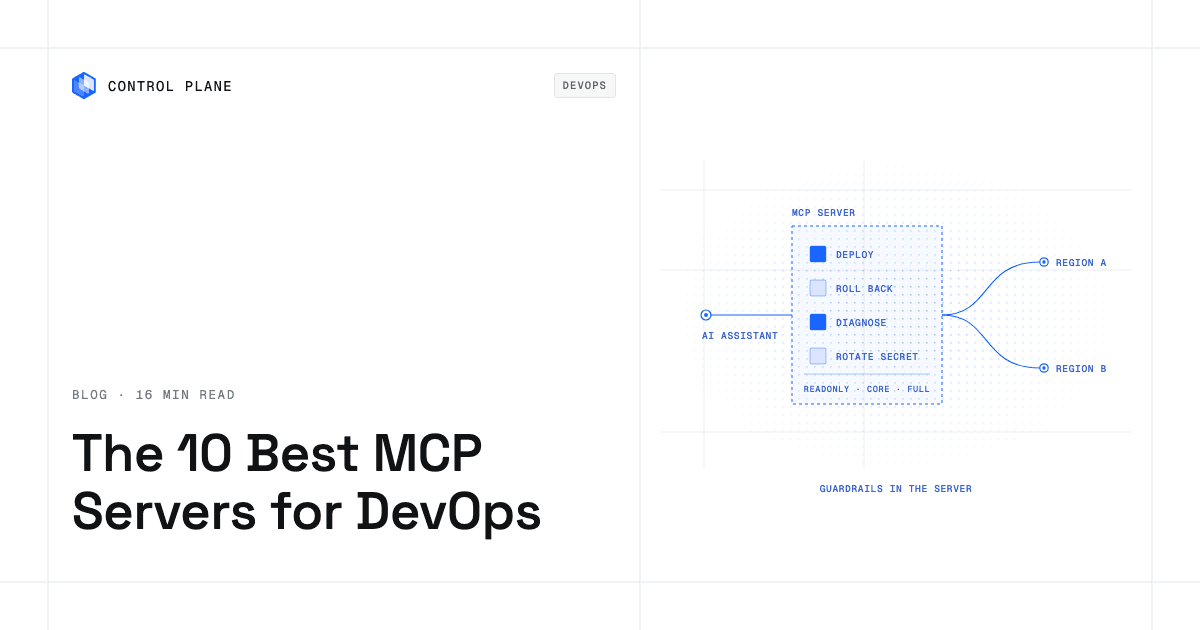
The best MCP servers for DevOps depends on what you want an AI assistant to do: read code and pipelines, plan infrastructure as code, call one cloud’s APIs, observe production, or deploy and operate workloads. The safest setups combine scoped permissions, a read-only mode for investigation, confirmation before destructive actions, and an audit trail of every change.
TL;DR
The Control Plane MCP Server ranks first for teams that want an agent to deploy and operate production workloads. One call deploys an app, rolls back a release, or diagnoses a failing workload; the readonly profile advertises no tool that can change anything; and the workloads underneath run active-active across locations with day-two operations built in. The other servers each cover one job: code, infrastructure as code, one cloud’s services, clusters you run, or observability.
- Control Plane MCP Server: deploy, diagnose, roll back, and promote workloads on any cloud, neocloud, or bare metal.
- GitHub MCP Server: repositories, issues, pull requests, and Actions.
- HashiCorp Terraform MCP Server: Terraform Registry lookups and HCP Terraform workspaces and runs.
- AWS MCP Server: AWS documentation and API calls under your IAM policies.
- Azure MCP Server: Azure services under your Azure RBAC permissions.
- Google Cloud MCP servers: managed servers for Cloud Run, Compute Engine, and GKE, plus MCP Toolbox for Databases.
- Kubernetes MCP Server: Kubernetes and OpenShift resources on clusters you run.
- Pulumi MCP Server: stacks, policy violations, and the Pulumi Registry.
- Datadog MCP Server: logs, metrics, APM, monitors, and dashboards.
- Grafana MCP Server: dashboards, Prometheus and Loki queries, alerts, and incidents.
Quick comparison
| Server | Scope | Deploys and operates workloads | Auth | Read-only mode | Audit trail | Hosting |
|---|---|---|---|---|---|---|
| Control Plane | Any cloud, neocloud, or bare metal; one region or many | Yes, with one-call job tools | OAuth with per-org consent | Yes (readonly profile) | Yes, tamper-proof | Remote |
| GitHub | Code and pipelines | No (can trigger Actions workflows) | OAuth or personal access token | Yes (--read-only) | Not documented | Local and remote |
| Terraform | Terraform Registry and HCP Terraform | Applies runs when enabled | HCP Terraform token | Toolset filtering; run tools off by default | Not documented | Local (stdio or Streamable HTTP) |
| AWS | AWS only | Yes, on AWS | IAM (SigV4) or OAuth 2.1 | Through IAM policies | CloudTrail | Managed remote; local open source servers |
| Azure | Azure only | Per service | Azure sign-in and RBAC | Yes (--read-only) | Not documented | Local, self-hosted remote |
| Google Cloud | Google Cloud only, mostly one product per server | Cloud Run deploys | OAuth 2.0 and IAM | IAM policies on read-only tools; Toolbox read-only mode | MCP request audit logs | Google-managed remote, local |
| Kubernetes | Clusters you run | Yes, on your clusters | kubeconfig, ServiceAccount, or OAuth/OIDC | Yes (read_only, disable_destructive) | Not documented | Local, HTTP, Helm chart |
| Pulumi | Pulumi Cloud | No (Neo tasks can act) | Pulumi access token and RBAC | Through token role and denying neo-bridge | Not documented | Remote |
| Datadog | Observability | No | Datadog permissions | Through read-only user permissions | Datadog Audit Trail | Remote |
| Grafana | Observability | No | Service account token | Yes (--disable-write) | Not documented | Local, Docker, Helm |
“Not documented” means the vendor’s official pages do not state it.
What is an MCP server?
The Model Context Protocol (MCP) is an open protocol that lets AI tools call external tools. An MCP server exposes named operations, the assistant picks the one that fits a request, and the server runs it. The assistant can do only what the server exposes and its credential allows, so those permissions are the real security boundary.
- Read-only vs read-write. A read-only server fetches logs, metrics, resource state, and configuration. A read-write server also creates, updates, deletes, or executes. The strongest designs enforce read-only in the server by never advertising write tools.
- Local vs remote. A local server runs on the developer’s machine over standard input and output (stdio) and uses credentials on that machine, such as a cloud CLI login or kubeconfig. A remote server runs as a hosted service over HTTP and can use OAuth, so no laptop holds a long-lived key.
- Tool count and scoping. Every advertised tool takes space in the assistant’s context, and some clients cap how many tools they load. Smaller profiles and toolset filters keep the list focused and shrink what an assistant can reach.
What can go wrong when an AI assistant changes infrastructure?
- Wrong environment: a change meant for staging lands in production.
- Destructive deletes: a request to clean up removes resources other services depend on.
- Leaked secrets: a secret value passes through the chat and lands in transcripts or code.
- Runaway cost: large resources are provisioned or left running.
- A bad release: a change takes a service down, so prefer platforms that send traffic to new replicas only after they pass readiness checks and can roll back in one call.
- Prompt injection: text in a log line, issue, web page, or pull request carries instructions the assistant follows.
Require these guardrails from any infrastructure MCP server:
- OAuth with scoped access instead of long-lived keys pasted into the assistant.
- A read-only profile or mode, enforced by the server, for investigation.
- Confirmation before deletes, moves, and overwrites.
- Secrets created or rotated outside the conversation.
- Least-privilege roles behind the connection.
- A queryable audit trail of every change, tied to an identity.
- Separate connections per environment, so production reads and staging writes never share a profile.
- Untrusted input (logs, issues, web content) treated as data, not instructions.
Some guardrails live in the server and others in the identity and cloud account behind it, so check both.
How to choose
| Question | What to look for |
|---|---|
| What can it do? | Read only, or read and write; whether it can deploy and operate workloads or only plan and inspect |
| What is its scope? | One cloud, any cloud, or one tool such as Terraform, Kubernetes, or Datadog |
| Which clients does it support? | Your assistants, and remote MCP support if the server is hosted |
| What does it cost? | The vendor’s pricing; some servers bill for the underlying service or for tasks they start |
The 10 best MCP servers for DevOps and cloud infrastructure in 2026
1. Control Plane MCP Server
What it is. A remote MCP server at https://mcp.cpln.io/mcp that lets any AI tool with MCP support, such as Claude Code, Codex, or ChatGPT, manage Control Plane resources in plain language. Control Plane is the platform for running unbreakable apps and agents: it combines any cloud, neocloud, and bare metal into one Global Virtual Cloud (GVC), and a workload deployed to it runs active-active in every location of its GVC.
Best for. Teams that want an assistant to deploy and operate production workloads that stay up, in one region or many, under guardrails the server enforces.
Key capabilities. Job tools finish a whole task in one call: deploy an app, add a database, create or rotate a secret, grant a workload credential-free access to AWS, GCP, or Azure, and diagnose, restart, roll back, or promote a workload. Image builds work from a repository or from app files the assistant writes itself, so a chat can take an app from a request to a running URL. No tool accepts, reveals, or deletes a secret value.
Considerations. The default core profile covers the everyday deploy-and-operate journey. The mk8s profile adds creating and updating Managed Kubernetes clusters on your providers, and full adds the complete administrative catalog, including cloud-account registration. To provision a cloud’s own managed services, pair it with the Terraform or Pulumi server.
Auth and safety. Authentication is OAuth with per-org consent: on the consent screen you choose the orgs the assistant may use, and it cannot reach any other. The readonly profile covers metrics, logs, traces, workload events, one-call workload diagnosis, quotas, the audit trail, configuration inventory, and Terraform export, and it advertises no tool that can create, update, delete, or execute, so an assistant on it cannot change a live resource. On the write profiles, the assistant asks for your explicit yes before it moves, re-places, or deletes existing resources.
How to connect. Add the URL to any client that supports remote MCP servers and complete OAuth, adding ?toolsets= with readonly, mk8s, or full to choose a profile. In Claude Code: claude mcp add --transport http cpln "https://mcp.cpln.io/mcp?toolsets=full" --scope user. The Control Plane AI Plugin configures the server for Claude Code, Codex, and Antigravity CLI, and the MCP docs include guides for Claude Web, Claude Desktop, and ChatGPT, whose directory listings use core.
2. GitHub MCP Server
What it is. GitHub’s official GitHub MCP Server, available locally and as a remote server at https://api.githubcopilot.com/mcp/.
Best for. Reading code, issues, and pull requests, and driving the code side of a delivery pipeline.
Key capabilities. Tools are grouped into toolsets such as repos, issues, pull_requests, actions, and code_security, selected with --toolsets or GITHUB_TOOLSETS. It can trigger Actions workflow runs.
Limitations. It covers GitHub. Deploys happen only through the workflows it triggers.
Auth and safety. It signs in with OAuth or a personal access token. Read-only mode (--read-only) skips write tools even when they are requested, and lockdown mode is a best-effort filter that limits content from public repositories to reduce prompt injection risk.
How to connect. Add the remote URL to a client with remote MCP support, or run the Docker image locally.
3. HashiCorp Terraform MCP Server
What it is. HashiCorp’s Terraform MCP Server connects assistants to the Terraform Registry and to HCP Terraform and Terraform Enterprise.
Best for. Planning infrastructure as code with accurate provider and module documentation, and managing workspaces.
Key capabilities. It looks up providers, modules, and policies in the public Registry, and with HCP Terraform or Terraform Enterprise it creates, updates, and deletes workspaces with variables, tags, and run management.
Limitations. It works with Terraform data, workspaces, and runs; with ENABLE_TF_OPERATIONS turned on it can create and apply runs, which changes real infrastructure. HashiCorp warns not to use it with untrusted MCP clients or LLMs.
Auth and safety. Access uses TFE_TOKEN and TFE_ADDRESS. You choose tool groups with --toolsets or individual tools with --tools, and the tools that require explicit approval are off by default.
How to connect. Stdio is the default transport and Streamable HTTP is supported; the README shows the hashicorp/terraform-mcp-server Docker image in client configurations.
4. AWS MCP Server
What it is. A managed server that is part of AWS’s Agent Toolkit for AWS, alongside agent skills and plugins for Claude Code and Codex. AWS also publishes open source servers in awslabs/mcp.
Best for. Teams on AWS that want an assistant to work with AWS APIs under existing IAM policies.
Key capabilities. Agents can search AWS documentation without authentication, and with IAM credentials they can call AWS APIs and run Python scripts in an isolated sandbox through the run_script tool. AWS describes building and deploying applications and troubleshooting with CloudWatch logs and metrics.
Limitations. It covers AWS only, and each open source server in awslabs/mcp has its own scope and runs locally.
Auth and safety. Access follows your IAM roles and policies, using SigV4 credentials through the MCP Proxy for AWS or OAuth 2.1 through AWS Sign-in. Condition keys such as aws:ViaAWSMCPService let policies distinguish MCP-initiated actions, and CloudTrail logs the API calls.
How to connect. Install the plugin for Claude Code or Codex, or connect Kiro directly. AWS lists no additional charge for the toolkit beyond the resources your agent uses.
5. Azure MCP Server
What it is. Microsoft’s Azure MCP Server puts Azure tools in one server; version 2.0 is generally available, and development moved from the archived Azure/azure-mcp repository to microsoft/mcp.
Best for. Teams on Azure, especially those using VS Code or GitHub Copilot for Azure.
Key capabilities. It lists supported Azure services one by one, installs through npm, NuGet, PyPI, Docker, MCPB, or IDE extensions, and supports Claude Code through a plugin.
Limitations. It covers Azure only, and you authenticate to Azure before running it.
Auth and safety. Operations run under the user’s Azure RBAC permissions. A --read-only flag blocks write operations and --namespace exposes only selected services; Microsoft notes that flags to prevent destructive operations are not standardized in MCP and may not be supported by every client, and tells you to apply least-privilege roles.
How to connect. Run it locally through a package manager or IDE extension, or self-host a remote instance, for example on Azure Container Apps.
6. Google Cloud MCP servers
What it is. Google runs managed remote MCP servers for Cloud Run, Compute Engine, GKE, and other products, and publishes open source servers including cloud-run-mcp and MCP Toolbox for Databases.
Best for. Teams on Google Cloud that want an assistant to deploy to Cloud Run or work with Cloud SQL, AlloyDB, or BigQuery.
Key capabilities. The managed Cloud Run MCP server at https://run.googleapis.com/mcp is generally available and deploys and inspects Cloud Run services; the open source cloud-run-mcp is the local alternative. MCP Toolbox connects agents to enterprise databases.
Limitations. Most managed servers cover one Google Cloud product, and all of them stay on Google Cloud.
Auth and safety. The managed Cloud Run server authenticates with OAuth 2.0 and IAM, logs MCP requests for audit, and supports IAM policies that restrict agents to read-only tools. MCP Toolbox has a read-only mode that locks database sessions at the engine level and removes write tools for Cloud SQL, AlloyDB, and BigQuery.
How to connect. Point a client at the managed endpoint and sign in with your Google account, or run the open source servers locally.
7. Kubernetes MCP Server
What it is. The containers/kubernetes-mcp-server project supports Kubernetes and OpenShift.
Best for. Teams that already run clusters and want an assistant to inspect and operate them.
Key capabilities. Generic create, update, get, list, and delete on any resource, pod operations including logs, top, exec, and run, events, Helm install, list, and uninstall, and Tekton operations.
Limitations. You operate the clusters, and multi-cluster placement, networking, and identity stay with you. Pod exec and delete act on running workloads, so scope them carefully.
Auth and safety. It uses your kubeconfig, in-cluster configuration, or OAuth/OIDC over HTTP. Configuration options include read_only, disable_destructive to block delete and update tools, and denied_resources to hide sensitive kinds such as Secret.
How to connect. The README shows npx configurations for Claude Desktop and Claude Code, and the repository includes a Helm chart.
8. Pulumi MCP Server
What it is. The Pulumi MCP server is hosted by Pulumi at https://mcp.ai.pulumi.com/mcp.
Best for. Teams that manage infrastructure with Pulumi and want an assistant to inspect stacks, check policy, and look up resource schemas.
Key capabilities. Tools include get-stacks, resource-search, get-policy-violations, Pulumi Registry lookups, and deploy-to-aws, which returns instructions the agent follows to write Pulumi code. The neo-bridge tool starts tasks in Pulumi Neo.
Limitations. Pulumi states that the server never runs pulumi up itself, but approving a Neo task can let Neo change infrastructure, and Neo tasks are billed to your organization.
Auth and safety. Every call runs as your Pulumi access token’s identity under your organization’s RBAC. To keep an agent read-only, Pulumi advises denying neo-bridge in the agent’s permissions.
How to connect. In Claude Code: claude mcp add --transport http pulumi https://mcp.ai.pulumi.com/mcp, or add the URL to Cursor, Claude Desktop, Windsurf, or Kiro.
9. Datadog MCP Server
What it is. The Datadog MCP Server gives AI agents remote access to most Datadog products, including APM, logs, metrics, monitors, dashboards, and security signals.
Best for. Investigating production behavior from an assistant using the observability data you already collect.
Key capabilities. Tools are organized into toolsets you can enable selectively, and supported clients include Cursor, Claude Code, Claude, VS Code, Codex CLI, Copilot CLI, Kiro, and ChatGPT.
Limitations. It is an observability server and is not GovCloud compatible.
Auth and safety. Write operations require the matching Datadog permission, such as monitors_write, checked on each tool call, so a read-only user’s write calls are rejected. All tool calls are recorded in the Datadog Audit Trail and marked as MCP actions.
How to connect. Follow the setup page for your client.
10. Grafana MCP Server
What it is. The Grafana MCP server provides access to a Grafana instance (9.0 or later) and its ecosystem.
Best for. Teams that run Grafana for metrics, logs, and alerting and want an assistant to query and summarize them.
Key capabilities. Dashboard search and editing, Prometheus and Loki queries, alert rule management, Grafana Incident and OnCall, annotations, and deeplinks, with some categories, such as Admin and SQL tools, off by default.
Limitations. It is an observability and incident server; its write tools can create and update dashboards and alert rules.
Auth and safety. It uses a service account token, and each tool requires specific RBAC permissions. --disable-write runs the server read-only and removes write tools, and --disable-<category> or --enabled-tools narrow the catalog.
How to connect. The quick start runs uvx mcp-grafana; Docker, binary, and Helm installs are also documented.
A reference setup
- Production triage, read-only: the Control Plane MCP Server on the
readonlyprofile plus Datadog or Grafana under a read-only role, so the assistant reads metrics, logs, traces, events, and the audit trail. - Staging changes: a separate Control Plane connection on
core, consented only to the staging org, to deploy, restart, roll back, and promote. - Code: the GitHub MCP Server with only the toolsets the work needs, read-only for review sessions.
- Infrastructure as code: the Terraform or Pulumi server to draft changes that go through your normal pipeline with review. Control Plane exports configuration as Terraform and integrates with Terraform and Pulumi, so your code stays the source of truth.
Why Control Plane ranks first
Control Plane is the only server in this list where one call deploys, rolls back, or diagnoses a production workload that runs active-active across every location of its GVC, on any cloud, with read-only enforcement, per-org consent, and secret handling built into the server.
- Resilience: The 99.999% availability SLA applies to workloads running at least two replicas in at least two locations, and those locations can be two regions of one cloud or locations on different providers. During the October 2025 AWS us-east-1 outage, 20% of Control Plane customers had us-east-1 in their Global Virtual Clouds. Their workloads were active and running in healthy locations within 10 seconds, with no customer downtime, according to Control Plane internal incident telemetry.
- Day-two operations: autoscaling, readiness-gated rollouts, observability, mutual TLS, a deny-by-default internal firewall, and a tamper-proof audit trail are part of the platform the assistant operates, with no Kubernetes cluster you have to operate.
- Credential-free cloud access: Universal Cloud Identity gives workloads short-lived, least-privilege access to 600+ AWS, GCP, and Azure services, with no long-lived cloud keys in your code.
- Compliance: Control Plane is PCI DSS Level 1, SOC 2 Type II, HIPAA, and GDPR compliant.
The same applies to AI workloads; see what infrastructure you need to run an inference layer.
FAQ
What are the best MCP servers for DevOps?
The Control Plane MCP Server ranks first: it lets an assistant deploy, diagnose, roll back, and promote production workloads, with a read-only profile for investigation, OAuth with per-org consent, and confirmation before existing resources are moved or deleted. The rest of the top ten are GitHub for code and pipelines; HashiCorp Terraform and Pulumi for infrastructure as code; AWS, Azure, and Google Cloud for one provider’s services; the Kubernetes MCP Server for clusters you run; and Datadog and Grafana for observability.
What are the best MCP servers for cloud infrastructure?
The Control Plane MCP Server ranks first because it deploys and operates workloads in one region of one cloud or across any cloud, neocloud, and bare metal, with day-two operations built in. The AWS, Azure, and Google Cloud servers each work with one provider’s services under that provider’s identity system, and the Kubernetes MCP Server operates clusters you run yourself.
What are the top AI-operated infrastructure services for developers?
Choose a service whose MCP server can deploy and change workloads under guardrails. Control Plane lets an assistant deploy, diagnose, restart, roll back, and promote workloads across clouds, AWS documents building and deploying applications through its Agent Toolkit, and Google’s managed Cloud Run server deploys to Cloud Run. For the wider category, see the 10 best AI agent infrastructure platforms.
How do I connect an AI coding assistant to my cloud infrastructure via MCP?
Add the server to your client as a URL for a remote server or a command for a local one, sign in with a least-privilege identity, choose the narrowest profile, ask the assistant which tools it sees, and test a harmless change on staging. For Control Plane, point the client at https://mcp.cpln.io/mcp?toolsets=readonly, select only the orgs it may use on the OAuth consent screen, and switch to core or full once you trust the setup.
Which platforms let AI agents provision and manage their own cloud infrastructure safely?
Look for server-enforced scoping and confirmation. On Control Plane, an assistant connects with OAuth to the orgs you select, works within a toolset profile, and asks for your explicit yes before it moves or deletes existing resources. AWS and Azure rely on your IAM and RBAC permissions, and Pulumi’s server never runs pulumi up itself.
How do I let an AI agent deploy to production without giving it my cloud keys?
Use a remote server that authenticates with OAuth and scoped consent, so no long-lived key sits in the assistant. Control Plane uses OAuth with per-org consent, and no tool accepts or reveals a secret value.
What is the difference between a read-only and a read-write MCP server for infrastructure?
A read-only server only fetches data such as logs, metrics, and configuration, while a read-write server can also create, update, delete, or execute. The most reliable read-only designs never advertise write tools, as the Control Plane readonly profile does; others use a flag, such as GitHub’s or Azure’s --read-only, or the permissions of the connected identity, as Datadog does.
How do I add guardrails and audit trails when AI agents change infrastructure?
Scope each connection with OAuth or a least-privilege role, use separate connections per environment, require confirmation before destructive actions, and query the platform’s own record after each session, such as the Control Plane audit trail, AWS CloudTrail, or the Datadog Audit Trail.
Which tools automate infrastructure provisioning and operations with AI across multiple clouds?
Control Plane combines any cloud, neocloud, and bare metal into one Global Virtual Cloud and exposes deployment and operations through its MCP server. Terraform and Pulumi provision infrastructure as code across providers, and their MCP servers help an assistant plan those changes.
What happens to workloads an AI assistant deployed if a cloud region fails?
On Control Plane, a workload runs active-active in every location of its Global Virtual Cloud, and a global endpoint routes each request to the nearest healthy location, so a regional failure shifts traffic instead of taking the service down. The 99.999% availability SLA applies to workloads running at least two replicas in at least two locations. See how to build active-active high availability.
Next step: Talk to the Control Plane team about letting AI assistants operate your infrastructure safely, or sign up free and connect an assistant on the readonly profile first.