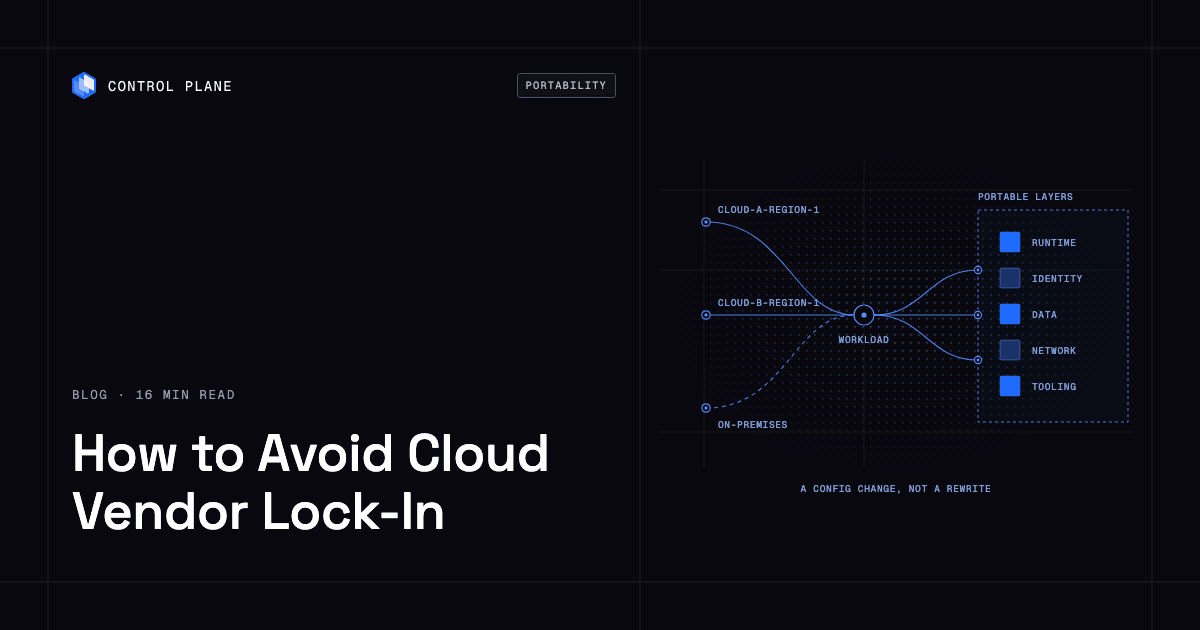
You avoid cloud vendor lock-in by keeping the parts that are expensive to move portable: the compute runtime, identity, data, networking, and deployment tooling. You accept proprietary services only where their value clearly exceeds the exit cost, so that leaving or adding a provider is a configuration change rather than a rewrite.
TL;DR
Lock-in is measured by switching cost. Lower it one layer at a time:
- Containers: package services as Open Container Initiative (OCI) images and run them on any conformant platform, such as Kubernetes or Control Plane.
- Identity: use workload identity and short-lived credentials, not provider-specific static keys in code. Control Plane’s Universal Cloud Identity issues short-lived, least-privilege credentials for AWS, GCP, and Azure at runtime.
- Data: keep systems of record in engines you can run anywhere, with replication and backups you control.
- Networking: own the global endpoint so no single provider’s load balancer is the only front door, for example Control Plane’s built-in global endpoint, which routes each request to the nearest healthy location.
- Tooling: use Terraform, OpenTofu, or Pulumi, and pipelines that deploy to more than one target.
- Proprietary services: adopt them on purpose, with an exit plan.
- Contracts: negotiate export formats, egress terms, and commitment limits before signing.
- Proof: run in a second location so portability is tested, not assumed.
Control Plane covers the runtime, identity, networking, and tooling layers in one platform. One workload definition runs active-active in every location of a Global Virtual Cloud, on one cloud or several. The 99.999% availability SLA applies to workloads running at least two replicas in at least two locations.
What is cloud vendor lock-in?
Vendor lock-in is the gap between the cost of staying with a provider and the cost of leaving it. Switching cost includes engineering time to change code and configuration, data transfer and migration time, retesting, downtime risk during the move, and contract penalties. A provider can be expensive and still not lock you in if you could leave within a quarter; a provider with fair prices can lock you in if leaving would take two years.
Lock-in forms in five technical layers and one contractual layer.
| Layer | Where lock-in shows up | Portable default |
|---|---|---|
| Compute runtime | Provider-specific function runtimes, proprietary container services, custom machine images | OCI images on Kubernetes or a container platform |
| Identity and credentials | Static access keys in code, permissions tied to one provider’s role model | Workload identity with short-lived credentials |
| Data and databases | Proprietary engines and APIs, replication that works only inside one provider | PostgreSQL, MySQL, or Redis-compatible engines with replication and backups you control |
| Networking and traffic | One provider’s load balancer, DNS, and CDN as the only entry point | A global endpoint and routing you control |
| Deployment and tooling | Templates and consoles bound to one provider’s API | Terraform, OpenTofu, or Pulumi, plus CI/CD with more than one target |
Contractual lock-in comes from spend commitments and egress fees. A commitment you cannot move or shrink is a switching cost, because leaving means paying for capacity you no longer use, and egress fees raise the cost of migrating and of running across providers.
Why avoiding lock-in matters now
- Pricing changes. Google Cloud’s network pricing page notes that it raised some Premium Tier internet egress SKUs on February 1, 2024. You can respond to a change like that only if you have somewhere else to go.
- Concentration risk. On October 20, 2025, a DynamoDB DNS failure in AWS us-east-1 disrupted services for about 15 hours, according to the AWS post-event summary. On October 29, a global Azure Front Door disruption caused connection timeouts and DNS errors for about 8.5 hours, according to Microsoft’s post-incident review. When a region or a shared global service fails, every workload that depends only on it fails with it. Our look back one year after the AWS outage covers what teams changed afterward.
- Negotiating leverage. If you cannot credibly move, renewal talks are one-sided.
- Data residency. The provider that suits your main region may not have a location where a customer needs one.
- Capacity. GPUs and other scarce capacity vary by provider and region, and a second provider lets you use capacity wherever it exists.
The eight practices that keep you portable
1. Package everything as containers
What to do. Build every service as an OCI image. The Open Container Initiative defines open standards for container image formats, runtimes, and distribution, so an image runs on any compliant runtime for its CPU architecture and OS; publish multi-architecture images if you run on both x86 and Arm. EKS and AKS are certified Kubernetes conformant, and GKE is Google’s managed Kubernetes. Pass configuration through environment variables and keep provider agents and SDK assumptions out of the image.
Trade-off. You take on orchestration, upgrades, and cluster networking, or you use a platform that runs them for you. Stateful services need more care than stateless ones.
How to measure. Count the production services that deploy from an OCI image with no provider-specific build step, and time how long it takes to deploy the same image to a second target.
2. Decouple identity
What to do. Static access keys in code are the quietest lock-in: every service holds a credential only one provider understands, and rotating or replacing them touches everything. Use workload identity, where the platform issues short-lived credentials to the running workload. Providers offer their own versions, such as Microsoft Entra Workload ID on AKS, EKS Pod Identity and IAM roles for service accounts, and Workload Identity Federation for GKE, each exchanging a Kubernetes service account token for short-lived cloud credentials. Keep the mapping of workload to permission in code and in one place.
On Control Plane, Universal Cloud Identity defines a workload’s cloud access once, and it applies in every location of its Global Virtual Cloud.
Trade-off. Setup takes more effort than pasting a key, and each provider’s model has its own rules.
How to measure. Count long-lived keys in repositories, CI variables, and secret stores (the target is zero), and track the maximum credential lifetime.
3. Choose data stores deliberately
What to do. Data has the highest switching cost because it has weight and state. Prefer engines you can run anywhere for systems of record. PostgreSQL is free and open source and lists asynchronous, synchronous, and logical replication and point-in-time recovery among its features, so you can replicate to a second location and restore from backups you hold. MySQL, Redis 8 or later (available under AGPLv3), and its BSD-licensed fork Valkey offer the same portability of protocol and data format.
Trade-off. Self-hosting or choosing portable engines moves operations work to you or to a platform. Managed databases save that work; judge each on five checks: a standard protocol such as PostgreSQL or MySQL wire compatibility, standard export and change streaming, no dependence on service-only features, the real cost of self-hosting, and the measured cost and time of moving your data. A managed service that passes the first three has a low exit cost.
How to measure. Time a restore of a production backup into a second location, track replication lag, and keep a current estimate of the cost to move your data.
To price a move, multiply data volume by the egress rate and add time. AWS gives 100 GB a month of free data transfer out to the internet, aggregated across services and Regions (except China and GovCloud). Azure also gives the first 100 GB free, then lists $0.087 per GB for the next 10 TB from North America or Europe over its Premium Global Network, so moving 10 TB costs about $861. Google Cloud lists rates by destination, starting at $0.12 per GiB for Premium Tier traffic from a North American region to North America. Time, validation, and cutover risk usually cost more than the transfer fee.
4. Abstract networking and traffic
What to do. Run the front door from a layer that does not depend on the provider hosting your origin: a global endpoint with health-checked routing. Microsoft’s review of the Front Door incident points customers to its mission-critical global HTTP ingress guidance, which adds a second ingress path that takes over when Front Door is unavailable, and notes that many Microsoft services failed away from Front Door during the incident. A front door outside the hosting provider takes the same idea one step further. Use internal DNS names for service-to-service calls. For a design that spans regions and clouds, see how to build active-active high availability.
On Control Plane, a built-in global endpoint routes each request to the nearest healthy location, with automatic TLS certificates.
Trade-off. You operate or buy another layer, and you manage TLS certificates, caching, and health checks across it.
How to measure. Time how long it takes to move all traffic away from one provider, and record DNS TTLs and the routing change time.
5. Use portable infrastructure as code and CI/CD
What to do. Define all infrastructure in code. Terraform and OpenTofu describe cloud and on-premises resources in configuration files, with providers for AWS, Azure, GCP, Kubernetes, and many other platforms. Terraform has been licensed under the Business Source License since 2023; OpenTofu is its open source fork under MPL 2.0, now a CNCF project, and stays largely compatible with Terraform configurations. Pulumi uses general-purpose languages and YAML and is open source. These tools standardize the workflow, but resource definitions stay provider-specific, so put provider-specific resources inside thin modules with a stable interface, such as “postgres” or “object store”, and make pipelines take the target as a parameter.
Trade-off. You maintain state, modules, and pipelines.
How to measure. Track the share of production infrastructure defined in code (target 100%), provider-specific resource types outside modules, and the time to stand up a full environment in a new account.
6. Use proprietary services on purpose
What to do. Managed services increase lock-in when your code calls a proprietary API directly, when your system of record lives in a format only that vendor reads, or when the service sits in every request path. Adopt a proprietary service only if it offers capability no portable option matches, and either its exit cost is low (standard exports, a replacement estimated in engineer-weeks) or one module you own isolates it behind an interface. Keep a lock-in register: service, reason, exit plan, estimated exit cost, owner, and review date.
Trade-off. Interfaces add code, and you give up some vendor-specific features.
How to measure. Count proprietary services, how many have a written exit estimate, and how many revenue-critical paths depend on them.
7. Negotiate exit terms
What to do. Get answers to these in the contract:
- Which export formats and tools exist for each data service, and do exports include backups, logs, configuration, and metadata?
- How long does an export take at your data volume, and who bears the cost?
- What are egress charges on exit, and is there a waiver program?
- Can spend commitments move across services and regions, and can you step them down at renewal?
- How much notice do you get before a service is deprecated or a price changes?
- What SLA remedies apply, and how do they compare with your actual loss?
- How long is data retained after termination, and how is erasure confirmed?
- What support do you get during an exit?
All three large providers publish exit programs; confirm current terms with your account team, because they change.
| Provider | What the provider states |
|---|---|
| AWS | Free data transfer out to the internet for eligible customers moving all of their data, or all of their data from one AWS service, off AWS. Requested through AWS Support; eligible customers outside the EU have 180 days to complete the move. |
| Google Cloud | Free data transfer when you migrate all workloads and data from the relevant service to another provider or on premises. Requires an Exit Notice and ending use of that service; partial moves are not covered. |
| Azure | Free internet egress for customers moving all data off Azure. Requires advance notice through Azure Support, covers up to 60 days of egress, and requires cancelling all Azure subscriptions afterward (UK customers can exit single services, with 180 days). Front Door, CDN, ExpressRoute, and VPN egress are excluded. |
For EU customers, the EU Data Act, which has applied since September 12, 2025, limits switching charges, including egress, to the provider’s direct costs until January 12, 2027 and bans them after that date. For in-parallel use, such as multi-cloud, providers may still charge egress, but only at cost; outside the EU, continuous replication between providers is usually billed at ordinary rates.
Trade-off. Strong terms can cost discount depth or slow procurement.
How to measure. Score each contract against the eight questions and track the gaps to renewal.
8. Prove portability
What to do. Run in a second location regularly. Either run active-active across two locations, or hold a scheduled drill: deploy the full stack to a second account, region, or provider, restore the latest backup, and shift a slice of live traffic. Fix whatever breaks and repeat each quarter.
On Control Plane, every workload runs active-active in every location of its Global Virtual Cloud, so the second location serves live traffic every day, not only during a drill.
Trade-off. A second footprint costs money, and test data needs handling rules.
How to measure. Track time to serve production traffic from the second location, the data loss window, and the share of services that pass the drill.
Tools that help with cloud portability, compared
No single tool covers every layer.
| Category | Examples | What it makes portable | What it leaves to you | Operational effort |
|---|---|---|---|---|
| Virtual cloud platform | Control Plane | Workload definition, deployment, identity, routing, active-active failover, and observability across regions, providers, and on premises | Application code, and which database each data set uses (templates include PostgreSQL, MySQL, MongoDB, Redis, pgEdge, and CockroachDB) | No Kubernetes cluster you have to operate; day-two operations built in |
| Managed Kubernetes | EKS, GKE, AKS | The Kubernetes API for workloads | Per-cluster setup, identity integration, networking, and routing between clusters | Provider manages the Kubernetes control plane; you manage workloads, upgrade timing, and nodes unless you use EKS Auto Mode, GKE Autopilot, or AKS Automatic |
| Infrastructure as code | Terraform, OpenTofu, Pulumi | Provisioning workflow and tooling | Provider-specific resource definitions | State, module, and pipeline upkeep |
| Kubernetes management layer | Rancher | Cluster provisioning and import across providers, with central authentication and RBAC | The clusters and the workloads on them | Rancher plus the clusters it manages |
| Open source data engines | PostgreSQL, MySQL, Redis or Valkey | Data format, protocol, and replication | Backups, failover, and patching, unless a managed offering or template runs them | Moderate to high when self-run |
Decision checklist: how locked in are you?
Answer yes or no; each “no” scores one point.
- Does every production service build into an OCI image with no provider-specific build step?
- Are there zero long-lived cloud access keys in code, CI, and configuration?
- Is your system of record an engine you could run elsewhere, such as PostgreSQL or MySQL?
- Have you restored a production backup into a different account, region, or provider in the last 12 months?
- Does your front door (DNS, CDN, global routing) work independently of the provider hosting your origin?
- Is all production infrastructure defined in code with a tool that supports more than one provider?
- Can your CI/CD pipeline deploy the same release to a second target?
- Do you keep a register of proprietary services, each with an exit estimate?
- Do your contracts state data export formats, timelines, and egress terms for exit?
- Have you run a second-location drill in the last 12 months?
Scoring. 0 to 2 is low risk. 3 to 5 is moderate, so fix the identity and data items first. 6 to 10 is high: a single provider event or price change would be hard to answer.
How Control Plane keeps you portable
Control Plane is the platform for running unbreakable apps and agents. It combines any cloud, neocloud, and bare metal into one Global Virtual Cloud (GVC). A workload deployed to a GVC runs active-active in every location, and a global endpoint routes each request to the nearest healthy location. Adding or removing a location changes only the GVC’s location list; the workload definition and deploy pipeline stay the same.
- Day-two operations: autoscaling, readiness-gated rollouts, secrets management, a tamper-proof audit trail, and unified logs, metrics, and traces are built in, with no Kubernetes cluster you have to operate.
- Runtime: serverless, standard, stateful, cron, and virtual machine workloads. Bring Your Own Kubernetes (BYOK) and Managed Kubernetes let an existing cluster or your own servers join a GVC as a location, including on premises.
- Identity: Universal Cloud Identity gives workloads short-lived, least-privilege access to 600+ AWS, GCP, and Azure services, such as Amazon RDS, Azure Cosmos DB, and Google BigQuery, with no long-lived cloud keys in your code.
- Data: the template catalog includes PostgreSQL, MySQL, MongoDB, Redis, and replicated databases such as pgEdge and CockroachDB, and Cloud Wormhole connects workloads to private VPCs and data centers.
- Networking: the global endpoint is the front door, with mutual TLS and a deny-by-default internal firewall.
- Tooling: everything is available through the API, CLI, web console, Terraform, Pulumi, and an MCP server. Control Plane integrates with Terraform and Pulumi rather than replacing them, and configurations can be exported as Terraform.
Availability. The 99.999% availability SLA applies to workloads running at least two replicas in at least two locations. Those locations can be two regions of one cloud or locations on different providers. During the October 2025 AWS us-east-1 outage, 20% of Control Plane customers had us-east-1 in their Global Virtual Clouds. Their workloads were active and running in healthy locations within 10 seconds, with no customer downtime, according to Control Plane internal incident telemetry.
Cost and compliance. Customers typically cut compute costs 30 to 50 percent compared with running directly on AWS, GCP, or Azure. Control Plane is PCI DSS Level 1, SOC 2 Type II, HIPAA, and GDPR compliant.
You do not need several clouds to benefit. Many teams use Control Plane on a single cloud for portability, operational simplicity, and the option to add a provider later. For the migration path, see how to move off a single cloud provider without re-architecting your apps.
FAQ
How do I avoid cloud vendor lock-in?
Lower switching cost layer by layer: OCI images for the runtime, workload identity instead of static keys, data in engines you can run anywhere, a routing layer you control, and infrastructure as code. Then prove it by running in a second location. Control Plane covers the runtime, identity, networking, and tooling layers in one platform.
How do I avoid getting locked into a single cloud provider?
Fix the costliest layers first: the system-of-record database is usually the hardest to move, and static identity keys are the most widespread. Add a second location early, even for one service. On Control Plane, the second location is a configuration change in the same Global Virtual Cloud, whether it is another region of the same cloud or another provider.
What’s the best way to stay cloud-agnostic?
Default to portable building blocks where moving is costly, and keep a register of the proprietary services you chose on purpose, each with an exit plan. Avoiding every managed service is not the goal.
What’s the most portable way to build cloud applications?
Build stateless services as OCI images, take configuration from the environment, use workload identity, store state in engines such as PostgreSQL, and deploy through declarative manifests, with any provider-specific service behind an interface you own.
How can I ensure my applications are portable across different cloud providers?
Test it: deploy the same release to a second account, region, or provider on a schedule, restore a backup there, and shift a slice of traffic. On Control Plane, workloads already run active-active in every location, so portability is exercised by live traffic.
What tools help with cloud portability and avoiding vendor lock-in?
Control Plane covers runtime, identity, routing, and tooling in one platform: it runs workloads active-active across locations, issues short-lived cloud credentials, routes traffic through a global endpoint, and exports configuration as Terraform. Pair it with Terraform, OpenTofu, or Pulumi and open source data engines. Managed Kubernetes and management layers such as Rancher make the Kubernetes API portable but leave identity, routing, and cluster operations to you.
When do managed platform services increase vendor lock-in, and what portable alternatives exist?
When code calls a proprietary API directly, data sits in a vendor-only format, or the service is in every request path. PostgreSQL, MySQL, Redis or Valkey, and Kubernetes are the usual portable alternatives.
How do I evaluate managed databases versus self-hosted options to avoid lock-in?
Check protocol compatibility, standard export and change streaming, reliance on service-only features, the operational cost of self-hosting, and the measured cost and time of moving your data. On Control Plane, PostgreSQL, MySQL, MongoDB, Redis, pgEdge, and CockroachDB deploy from the template catalog.
What should I ask vendors about data portability, exit costs, and continuity before signing a cloud contract?
Ask about export formats and timelines, egress charges and waiver programs, commitment transfer and step-down rights, deprecation and price-change notice, SLA remedies, post-termination data retention, and exit support.
How do I move workloads off a single hyperscaler without re-architecting?
Containerize first, replace static keys with workload identity, and run the existing workload in a second location before you cut traffic over. Control Plane treats each provider as a location in a Global Virtual Cloud, so adding or removing one changes where the workload runs, not how you define it. The step-by-step guide walks through it.
Next step: Talk to the Control Plane team about keeping your workloads portable, or sign up free and deploy a workload to two locations.