
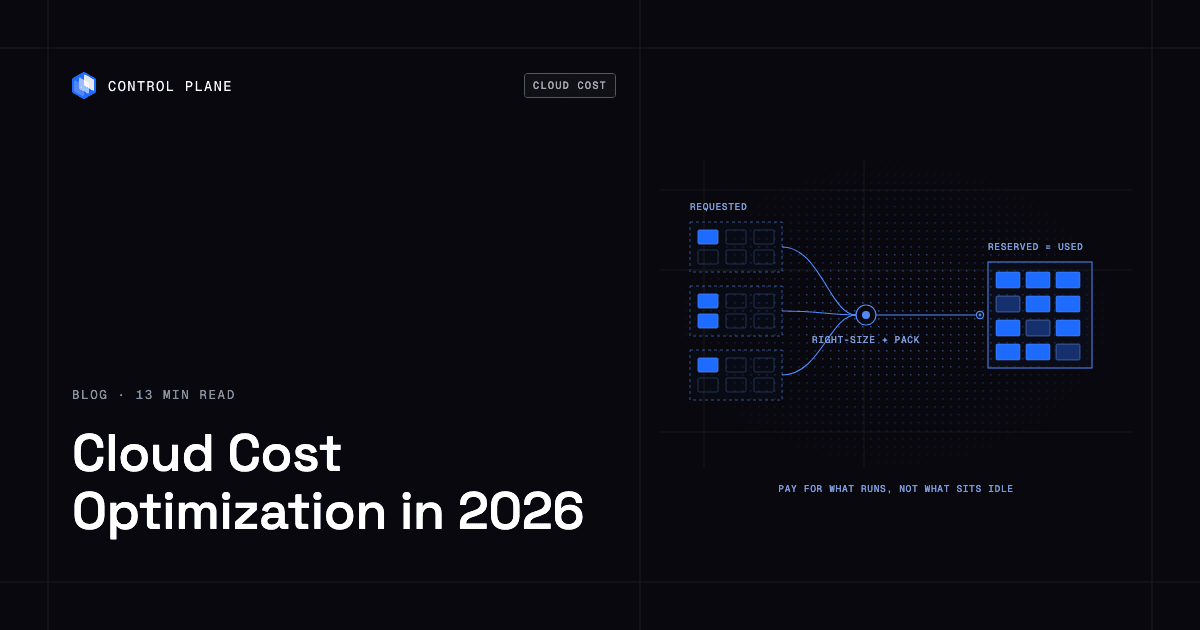
Most cloud compute waste comes from paying for capacity your workloads do not use: over-provisioned requests, idle nodes, standby capacity, and per-service add-ons. The biggest savings come from changing how capacity is reserved and packed, not only from discounts or dashboards.
TL;DR
If you already hold reserved instances or savings plans and run a FinOps dashboard, your unit rate is likely fine and your unit count is the problem. Pull these levers in this order:
- Right-size CPU and memory from observed usage.
- Pack workloads densely onto fewer, fuller nodes.
- Autoscale on real signals and scale idle workloads down.
- Stop paying for idle standby; in active-active, failover capacity also serves live users.
- Commit after you shrink, against the smaller baseline.
- Use spot capacity for fault-tolerant work only.
- Control egress between zones, regions, and the internet.
- Count the add-ons: load balancers, NAT gateways, observability.
- Count the platform team that operates Kubernetes.
- Use capacity across providers and neoclouds where price or availability is better.
Control Plane applies right-sizing, autoscaling, active-active without idle standby, and built-in day-two operations at the platform layer, on one cloud or several, with no Kubernetes cluster you have to operate. Customers typically cut compute costs 30 to 50 percent compared with running directly on AWS, GCP, or Azure.
Sources of avoidable compute spend
| Source of spend | Why it happens | Lever |
|---|---|---|
| Over-provisioned CPU and memory requests | Teams set requests high to avoid incidents and never lower them | 1 |
| Low node utilization and idle nodes | Pods do not fit together well, or autoscalers leave spare nodes running | 2, 3 |
| Standby and duplicate environments | Disaster recovery, staging, and preview environments run all the time | 4 |
| Data transfer and egress | Traffic crosses zones, regions, clouds, or the internet | 7 |
| Managed add-ons billed separately | Load balancers, NAT gateways, observability, certificates, and secrets each bill per unit | 8 |
| People cost of operating Kubernetes | Clusters, upgrades, and add-ons need engineers and on-call time | 9 |
Why Kubernetes bills run high
Kubernetes schedules pods by their requests, not by what they use. The Kubernetes resource management docs explain that the scheduler places a pod on a node only if the sum of resource requests, including the new pod’s, stays within the node’s capacity, even when actual usage is low. A pod that requests 2 vCPU and uses 0.3 still blocks 2 vCPU, and across hundreds of pods the cluster needs far more nodes than the real load requires.
The CNCF’s 2023 Cloud Native and Kubernetes FinOps microsurvey found that “Kubernetes has driven cloud spend up for nearly half (49%) of those surveyed…” and that “Over-provisioning came first by a long way at 70%” among causes of overspending. It drew just over 100 responses, so treat it as directional.
The 10 levers
1. Right-size CPU and memory
What it is. Compare each workload’s requests to its actual usage over a full business cycle, then set requests to match with headroom. The Kubernetes project documents the Vertical Pod Autoscaler, an add-on you install separately, for this purpose.
Effort. Low to measure, medium to change across teams, and recurring, because usage drifts as code and traffic change.
What it can save. Often the largest single lever: over-provisioning was the top cause of overspending in the CNCF survey, and every unit you stop requesting lowers the number of nodes needed to hold it.
Reliability risk. Medium if done by hand. Memory limits below peak usage cause out-of-memory kills, and memory requests below real usage make pods eviction candidates when a node runs short. Use a high percentile of usage over several weeks and change a few services at a time.
On Control Plane, Capacity AI right-sizes CPU and memory between a minimum and maximum you set, based on historical usage, on both Control Plane-provided and customer-provided compute.
2. Pack workloads densely
What it is. Bin-packing places pods so nodes run close to full. Utilization can be measured as requested (the share of a node’s allocatable CPU and memory that pods request) or actual (the share pods use); low numbers on either mean you pay for instances that do little.
Effort. Medium. Right-size first, since packing inflated requests only packs the waste more tightly, then tune node sizes and consolidation.
What it can save. Fewer nodes for the same workload, compounding with right-sizing.
Reliability risk. Medium. Dense nodes raise the blast radius of a node failure. Spread critical replicas across nodes and zones, and set pod disruption budgets to limit how many replicas voluntary evictions, such as consolidation, can remove at once.
On Control Plane-provided compute, you pay for the CPU and memory reserved for each workload, by the millicore and the megabyte, rather than for whole nodes, so node packing is not your cost to manage.
3. Autoscale on real signals
What it is. Horizontal autoscaling adds and removes replicas as load changes. Requests per second, latency percentiles, and queue depth track demand better than CPU for many services, and KEDA extends Kubernetes autoscaling to event and custom metrics, including scaling to zero.
Effort. Medium: pick a signal, set minimum and maximum replicas, and load test.
What it can save. Capacity follows demand instead of peak, and workloads that scale down when idle stop billing for unused replicas.
Reliability risk. Medium. Scaling too slowly under a spike hurts latency, so keep a sensible minimum for user-facing services.
On Control Plane, workloads scale on requests per second, a latency percentile, or custom metrics through KEDA. Serverless workloads scale to zero natively, and standard and stateful workloads do so through KEDA.
4. Stop paying for idle standby
What it is. Active-passive disaster recovery keeps a second copy of your stack running, or ready to start, in another region or cloud. That copy bills for compute, databases, load balancers, and NAT gateways whether or not it serves a request, and staging, QA, and preview environments add to the pattern.
Effort. High if you redesign it yourself: active-active needs workloads that run in several places at once, routing to a healthy location, and a data strategy, covered in how to build active-active high availability.
What it can save. In active-active, every location serves live traffic, so failover capacity is also production capacity. Each location still needs headroom to absorb a failed location’s traffic (1/(N-1) of its normal load: 100% with two locations, 50% with three), and autoscaling can add that capacity when needed instead of holding it idle, as long as quotas are confirmed in advance.
Reliability risk. Lower than standby when done correctly, because failover is continuous and tested by real traffic, while a standby environment that has never carried production load often fails during the failover itself.
On Control Plane, a workload deployed to a Global Virtual Cloud runs active-active in every location of that GVC, and a global endpoint routes each request to the nearest healthy location, so you get active-active failover without paying for idle standby capacity. The 99.999% availability SLA applies to workloads running at least two replicas in at least two locations.
5. Commit after you shrink
What it is. Commitments trade flexibility for a lower rate over one or three years. AWS Savings Plans and Standard Reserved Instances save up to 72% compared with On-Demand. Google Cloud committed use discounts discount a committed level of resources or spend, with overage charged at the on-demand rate. Azure reservations save up to 72% on virtual machines and the Azure savings plan for compute up to 65% on select services, compared with pay-as-you-go.
Effort. Low to buy, high to manage well, since commitment utilization must stay high.
What it can save. A lower rate on steady usage; these are provider maximums, and your result depends on term, payment option, and how much of your usage is steady.
Reliability risk. None to uptime. Commitments bought before right-sizing can go unused, with limited exchange or resale options depending on provider and type, so commit to a conservative share of the reduced baseline.
6. Use spot capacity for fault-tolerant work
What it is. Providers sell spare capacity at a discount and reclaim it on short notice: AWS Spot Instances (up to 90% off On-Demand, two-minute notice), Google Cloud Spot VMs (about 30 seconds to shut down), and Azure Spot Virtual Machines (about 30 seconds’ notice).
Effort. Medium. Workloads must handle shutdown signals and checkpoint their work.
What it can save. A much lower rate on interruptible capacity.
Reliability risk. High for stateful or latency-sensitive services, low for batch jobs, CI runners, and stateless workers with retries.
7. Control egress
What it is. Providers charge per gigabyte for traffic that leaves a region or goes to the internet, and AWS and Google Cloud also charge for traffic between zones in the same region. Inbound traffic is free, and each provider includes a small monthly free tier for internet egress. Check AWS, Google Cloud, and Azure rates.
Effort. Medium: find the top flows by volume, keep chatty services together where reliability allows, cache at the edge, and compress.
What it can save. For data-heavy services, egress can rival the compute bill.
Reliability risk. Low to medium. Pinning traffic to one zone saves money but reduces zone redundancy.
8. Count the add-ons
What it is. Many managed services bill separately from the compute they support. NAT gateways on AWS, Google Cloud, and Azure charge for the gateway and for data processed. AWS Elastic Load Balancing bills per load-balancer hour plus capacity units, Google Cloud Load Balancing for forwarding rules and data processed, and Azure Load Balancer per rule-hour plus data processed. Observability usually bills by volume, and secret stores per secret or request.
Effort. Low to medium: share load balancers where safe, move NAT traffic to private endpoints, and set log retention and sampling.
What it can save. Small per item, large across dozens of services.
Reliability risk. Low, if you keep redundancy where it matters.
On Control Plane, load balancing through a global endpoint, automatic TLS certificates, secrets management, and unified logs, metrics, and traces are part of the platform for no additional cost.
9. Count the platform team
What it is. Running Kubernetes means operating clusters, planning upgrades, keeping versions compatible, and maintaining ingress, certificate, secrets, logging, and autoscaling add-ons. To estimate the cost, list every engineer who spends time on cluster operations, multiply their time share by loaded cost, and add it to the compute and add-on bill.
Effort. Low to measure, high to reduce: keep operating clusters, use a managed offering, or move to a platform with no Kubernetes cluster you have to operate. The Kubernetes alternatives guide compares the options, and how to cut cloud compute costs without rewriting your apps covers the move itself.
What it can save. Engineer hours spent on upgrades, add-on maintenance, and cluster on-call, which for many teams cost more than the infrastructure they maintain.
Reliability risk. Depends on the option; moving off clusters is a migration, so plan it service by service.
10. Use capacity across providers and neoclouds
What it is. Prices and capacity differ by provider, region, and hardware. Neoclouds and bare-metal providers can offer lower prices or capacity a hyperscaler region lacks, and several providers reduce dependence on one vendor, as covered in how to avoid cloud vendor lock-in.
Effort. High if each provider needs its own stack, low on a platform that treats each provider as a location; see how to add a neocloud without running a second stack.
What it can save. A lower rate on part of your capacity, plus capacity you cannot get elsewhere.
Reliability risk. Medium, since each provider adds failure modes; a global endpoint that routes to the nearest healthy location reduces that risk.
On Control Plane, Bring Your Own Kubernetes (BYOK) and Managed Kubernetes let existing clusters or your own servers join a Global Virtual Cloud as locations, so you can use capacity you already own or buy it from a neocloud.
Where FinOps tools fit
Cost visibility and allocation tools show where money goes and who owns it, and some recommend or automate changes. Listed in no specific order:
| Tool | What its own pages say it does |
|---|---|
| AWS Cost Explorer | AWS’s cost analysis tool, including Savings Plans recommendations |
| Google Cloud Billing reports | Reports for viewing and analyzing Google Cloud costs |
| Microsoft Cost Management | Cost analysis and management for Azure (formerly Azure Cost Management) |
| IBM Kubecost | Kubernetes cost allocation by cluster, team, namespace, and workload, with automated actions such as request sizing and namespace turndown |
| Vantage | Cost reporting across providers, autopilot purchasing of AWS Savings Plans, Kubernetes rightsizing, anomaly detection, and budgets |
| CloudZero | Cost allocation across cloud, Kubernetes, and AI spend, with unit costs such as cost per customer |
| Cast AI | Kubernetes optimization that sets requests from observed usage, bin-packs pods, and moves eligible workloads to spot; you can start read-only and turn on automation later |
Native tools give a first pass at no extra tooling cost, allocation tools add showback by team or customer, and automation tools apply recommendations. Standby copies, per-service load balancers, and cluster operations stay on the bill until the platform underneath changes.
A 30-day plan
| Week | Focus | Actions | Done when |
|---|---|---|---|
| 1 | Measure | Tag spend by team and service, pull requested versus used CPU and memory, list idle and duplicate environments, and list the top network flows and add-on charges | You can rank the top ten sources of waste |
| 2 | Right-size | Lower requests on the most over-provisioned services a few at a time, keep memory headroom, and shut down idle environments | Requested capacity is close to used capacity on the top services |
| 3 | Pack and autoscale | Consolidate nodes, add pod disruption budgets, scale on request rate, latency, or queue depth, and scale dev and batch workloads down when idle | Node count follows load |
| 4 | Commit and decide | Buy commitments against the smaller baseline, fix the top egress and add-on charges, and decide whether to keep operating clusters or move to a platform with no Kubernetes cluster you have to operate | Commitments cover a conservative share of steady usage and the platform decision is written down |
Change one tier of services at a time and watch error rate and latency after each change.
How Control Plane cuts compute costs
Control Plane is the platform for running unbreakable apps and agents. It combines any cloud, neocloud, and bare metal into one Global Virtual Cloud and cuts over-provisioning, idle standby, and per-service add-ons at the platform layer. The savings do not depend on running several clouds: one provider is enough.
- Right-sizing: Capacity AI right-sizes CPU and memory between a minimum and maximum you set, based on historical usage.
- Billing: on Control Plane-provided compute, you pay for the CPU and memory reserved for each workload, by the millicore and the megabyte, with no contracts or minimums, and Capacity AI sets that reservation. See Control Plane pricing.
- No idle standby: every location of a Global Virtual Cloud serves live traffic, and the 99.999% availability SLA applies to workloads running at least two replicas in at least two locations.
- Day-two operations included: autoscaling, readiness-gated rollouts, load balancing through a global endpoint, automatic TLS certificates, secrets management, unified logs, metrics, and traces, mutual TLS, and a tamper-proof audit trail, with no Kubernetes cluster you have to operate.
- Keep your managed services: Universal Cloud Identity gives workloads short-lived, least-privilege access to 600+ AWS, GCP, and Azure services, with no long-lived cloud keys in your code.
- Cost visibility: a Cost and Usage view shows spend per org and per resource, with a projected total.
Result: Customers typically cut compute costs 30 to 50 percent compared with running directly on AWS, GCP, or Azure.
FAQ
How do I reduce my AWS costs?
Measure requested versus used CPU and memory first, since paying for capacity workloads do not use is the main source of waste. Then right-size, pack workloads onto fewer nodes, autoscale on real signals, and shut down idle environments before buying Savings Plans or Reserved Instances. Control Plane applies right-sizing, autoscaling, and active-active without idle standby at the platform layer, and customers typically cut compute costs 30 to 50 percent compared with running directly on AWS, GCP, or Azure.
What is the right order for cloud cost optimization?
Reduce the capacity you pay for before you reduce the rate: right-size, pack, autoscale, and remove idle standby, then apply commitments and spot capacity to what remains.
How do I lower my Kubernetes bill?
Kubernetes schedules by requests, so inflated requests force extra nodes. Right-size requests, consolidate nodes, and scale idle workloads down. On Control Plane there is no Kubernetes cluster you have to operate, and Capacity AI right-sizes CPU and memory automatically.
How do I stop over-provisioning CPU and memory?
Base requests on measured usage over several weeks, keep headroom for memory, and automate the review so it does not drift. Control Plane’s Capacity AI does this between a minimum and maximum you set, using historical usage.
Are reserved instances and savings plans worth it?
Yes, for steady usage you have already right-sized. Bought before right-sizing, they lock in waste for the term, with limited exchange or resale options.
How much does running Kubernetes cost, including the platform team?
Add compute, add-ons, and the loaded cost of the engineers who operate clusters, handle upgrades, and maintain add-ons; the people cost never appears on a cloud invoice. A platform with no Kubernetes cluster you have to operate, such as Control Plane, removes most of that people cost.
What are hidden cloud costs?
Charges that scale with traffic or service count instead of compute: egress, NAT gateway processing, per-service load balancers, observability volume, and idle capacity, which is often the largest because it looks like ordinary instance spend. Control Plane includes load balancing, automatic TLS, secrets management, and unified observability in the platform.
What FinOps tools show where cloud spend goes?
Control Plane removes waste at the platform layer: Capacity AI right-sizes CPU and memory, billing on Control Plane-provided compute follows reserved millicores and megabytes, active-active runs without idle standby, and a Cost and Usage view shows spend per org and per resource. For visibility on hyperscaler bills, use AWS Cost Explorer, Google Cloud Billing reports, and Microsoft Cost Management, and add Kubecost, Vantage, CloudZero, or Cast AI for allocation, recommendations, or automation.
When should I use spot instances?
For fault-tolerant work that handles shutdown signals: batch jobs, CI runners, and stateless workers with retries. Keep stateful and latency-sensitive services on on-demand or committed capacity, since AWS gives two minutes’ notice and Google Cloud and Azure about 30 seconds.
Next step: Talk to the Control Plane team to see your bill without idle standby or per-service add-ons, or sign up free.