Kubernetes management tools fall into about ten use cases, and the right set depends on team size, how many clusters you run, and how much of the cluster you want to operate. Small teams that want to run Kubernetes themselves can start with a managed Kubernetes mode plus a handful of tools covering delivery, observability, and a terminal UI. Multi-cluster enterprises add fleet management, GitOps, policy engines, cost visibility, and backup. Teams that do not want to operate clusters at all can run workloads on Control Plane, in one region or across clouds, which absorbs most of the runtime tooling other stacks require. This guide maps each category of tool to the team it fits, counts the tools each stack demands, and offers a checklist for narrowing the field.
Disclosure: Control Plane publishes this guide.
TL;DR
The best Kubernetes management tool set is the smallest one that covers your actual pain points without creating a second operations problem. Choosing by team stage keeps the count honest.
- Startup or small team on one cloud. Use a managed Kubernetes mode (GKE Autopilot, EKS Auto Mode, or AKS Automatic), Helm for packaging, Argo CD for delivery, Prometheus and Grafana for observability, and k9s for daily cluster access. That is five to six tools you operate.
- Growing DevOps team (two to five clusters). Add Kyverno for policy, OpenCost or Kubecost for cost visibility, and Velero for backup. The stack grows to eight or nine tools.
- Multi-cluster enterprise. Layer Rancher or OpenShift Advanced Cluster Management for fleet governance, Falco and Trivy for runtime and image security, and Kasten for enterprise backup. Expect ten to fourteen tools.
- Regulated enterprise. Same stack with stricter policy sets, audit logging, and compliance-certified platforms such as OpenShift. The tool count stays similar, but configuration and review effort rises.
- Team that does not want to operate clusters. Use Control Plane plus your CI pipeline and an infrastructure-as-code provider. Control Plane absorbs most of the runtime layers listed in the matrix. The tool count drops to three or four, counting a backup tool if you need off-site copies.
Which Kubernetes management tools fit which use case?
Each row lists what you still operate after adopting the tool and the team it fits.
| Use case | Tools to consider | What it does | Who it fits | What you still operate |
|---|---|---|---|---|
| Day-to-day cluster access | kubectl, k9s | Command-line interaction with the Kubernetes API; k9s adds a terminal UI with resource navigation and log tailing | Every team that runs Kubernetes | The cluster, networking, storage, and everything above it |
| Visual inspection and troubleshooting | Lens, Headlamp, Portainer | Desktop or web GUI for browsing resources, viewing logs, and inspecting events across namespaces | Teams that want point-and-click visibility without deep kubectl fluency | Same as above; GUIs do not manage the cluster lifecycle |
| Multi-cluster and fleet management | Rancher, OpenShift with Advanced Cluster Management, Rafay, Spectro Cloud Palette | Centralized provisioning, upgrade orchestration, RBAC, and policy distribution across clusters | Enterprises running clusters in multiple clouds, data centers, or edge sites | Each cluster’s nodes, networking, storage, and the fleet platform itself |
| Hands-off node and cluster operations | GKE Autopilot, EKS Auto Mode, AKS Automatic | Cloud-managed Kubernetes where the provider handles node provisioning, scaling, and patching | Small to mid-size teams on a single cloud who want to focus on workloads | Workload configuration, API version upgrades, delivery pipeline, observability, policy, and cost |
| Application delivery | Argo CD, Flux, Helm | GitOps reconciliation (Argo CD, Flux) and templated packaging (Helm) for deploying applications declaratively | Teams adopting GitOps or managing releases across environments | The cluster, observability, policy, and the GitOps controller itself |
| Observability | Prometheus, Grafana, OpenTelemetry | Metrics collection, dashboarding, and distributed tracing for clusters and workloads | Any production team that needs alerting and root-cause analysis | The observability stack’s own storage, retention, and upgrades |
| Security and policy | Kyverno, OPA Gatekeeper, Falco, Trivy | Admission-time policy enforcement (Kyverno, Gatekeeper), runtime threat detection (Falco), and image vulnerability scanning (Trivy) | Teams with compliance requirements or multi-tenant clusters | The admission controllers and Falco agents, policy definitions, scanner integrations, and alert routing |
| Cost visibility | OpenCost, IBM Kubecost | Per-namespace and per-workload cost allocation from cloud pricing, reconciled with billing data when configured | Finance-aware platform teams and any team doing chargeback | The cost tool and its Prometheus dependency, cost alerts, and billing API integration |
| Backup and recovery | Velero, Veeam Kasten | Scheduled backup of Kubernetes resources and persistent volumes with restore and migration support | Any team running stateful workloads in production | The backup controller, schedules, storage targets, and restore testing |
| Developer inner loop | Tilt, Skaffold | Automatic rebuild-and-redeploy cycles on local or remote clusters during development | Developers iterating on microservices who want fast feedback | A development cluster or local Kubernetes environment |
| Running production workloads without operating clusters | Control Plane | Runs standard container images active-active across the locations of one Control Plane Global Virtual Cloud (GVC), with autoscaling, a global endpoint, TLS, mutual TLS, secrets, and observability built in | Teams in one region or many that want production workloads without having to operate a Kubernetes cluster | CI pipeline, infrastructure as code, and off-site backup if required |
Which tools should a team use at each stage?
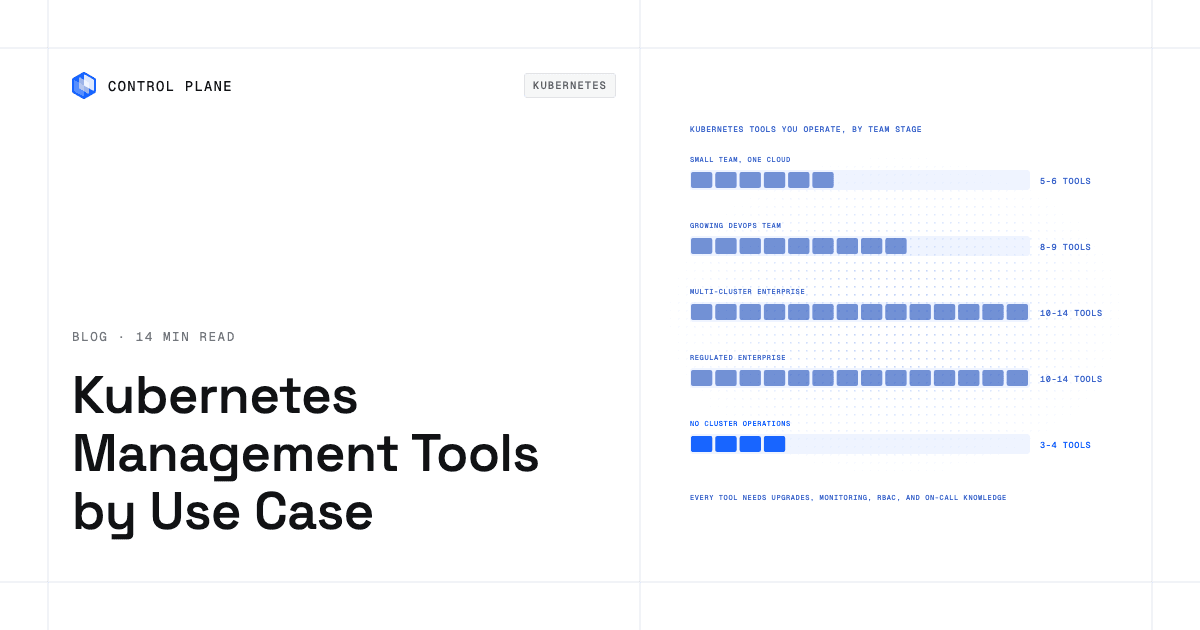
The number of tools you operate is itself an operational cost. Each tool needs upgrades, monitoring, access control, and on-call knowledge. The stage counts leave out the ingress controller, certificate manager, and secrets manager that most production clusters also run.
| Team stage | Typical stack | Number of tools you operate | Main risk |
|---|---|---|---|
| Startup or small team on one cloud | GKE Autopilot, EKS Auto Mode, or AKS Automatic, Helm, Argo CD, Prometheus, Grafana, k9s | 5 to 6 | Outgrowing the single-cloud model with no multi-cluster plan |
| Growing DevOps team (2 to 5 clusters) | Managed Kubernetes, Helm, Argo CD, Prometheus, Grafana, Kyverno, OpenCost, Velero, k9s or Lens | 8 to 9 | Tool sprawl accelerating before a platform team exists |
| Multi-cluster enterprise | Managed Kubernetes, Rancher or OpenShift ACM, Helm, Argo CD, Prometheus, Grafana, Kyverno, Falco, Trivy, Kubecost, Kasten, k9s, Lens or Headlamp | 10 to 14 | Maintaining consistency across fleet management, policy, and observability stacks |
| Regulated enterprise | Same as multi-cluster plus stricter policy sets, audit logging, and a compliance-certified platform | 10 to 14 | Audit and upgrade burden on every tool in the stack |
| Team that wants no cluster operations | Control Plane, CI pipeline, Terraform or Pulumi, plus a backup tool for off-site copies | 3 to 4 | Node-level customization needs your own nodes, joined through Control Plane’s Managed Kubernetes (MK8s) or Bring Your Own Kubernetes (BYOK) |
The breakdown of cloud tools and vendors a CTO should evaluate inventories the runtime tools a platform team operates.
Command line and GUIs
Cluster access splits between terminal tools and graphical interfaces.
kubectl
kubectl is the official Kubernetes command-line client maintained by the Kubernetes project. It talks directly to the API server and supports every resource type, making it the baseline tool for scripting, debugging, and automation. The learning curve is steep for newcomers, and kubectl skills carry over to most other tools in this guide.
k9s
k9s is an open-source terminal UI that presents Kubernetes resources in navigable, filterable views with built-in log tailing and shell access. It is faster than raw kubectl for daily triage. It runs anywhere a terminal runs and has no server-side component.
Lens
Lens is a desktop application that provides a graphical view of one or more clusters, including resource maps, log viewers, and Helm release management. It requires a desktop install; the free Personal plan covers individuals and small organizations, and organizations with over $10 million in annual revenue or funding need a paid subscription.
Headlamp
Headlamp is an official Kubernetes SIG UI subproject: a web-based Kubernetes dashboard designed to be extensible through plugins. It can run in-cluster or as a desktop app.
Portainer
Portainer provides a web UI for managing containers across Docker, Docker Swarm, Podman, and Kubernetes. Its strength is multi-runtime support, which helps teams that have not fully standardized on Kubernetes. Enterprise features require a commercial license.
Multi-cluster and fleet management
Teams running more than about five clusters, or clusters on several providers, use fleet management for consistent policy, access control, and upgrade orchestration.
Rancher
Rancher, maintained by SUSE, provisions and manages Kubernetes clusters across clouds, data centers, and edge locations from a single console. It supports several Kubernetes distributions, including RKE2, K3s, and imported EKS, GKE, or AKS clusters. Rancher is open source with commercial support available.
OpenShift with Advanced Cluster Management
Red Hat OpenShift is an enterprise Kubernetes platform with integrated CI/CD, image registry, and developer tooling. Advanced Cluster Management (ACM) governs fleets of OpenShift and other CNCF-conformant Kubernetes clusters, including EKS, AKS, and GKE, with policy-based placement and compliance. OpenShift suits regulated enterprises with existing Red Hat investments. The trade-off is a larger footprint and subscription cost.
Rafay
Rafay provides a Kubernetes and AI infrastructure orchestration platform focused on fleet automation and standardized cluster blueprints, delivered as a SaaS controller or a self-hosted version. It targets enterprise platform teams and GPU cloud operators that want centralized fleet management.
Spectro Cloud Palette
Spectro Cloud Palette uses declarative cluster profiles to define the full stack from OS to add-ons. It supports bare metal, VMs, edge, and public cloud.
The Kubernetes management platforms roundup compares these platforms in more depth.
Managed Kubernetes modes
Managed Kubernetes modes go further than standard managed services by automating node provisioning, bin-packing, and patching. They remove node-level work on a single cloud and leave delivery, observability, policy, and cost tooling to the team.
GKE Autopilot
GKE Autopilot manages nodes entirely. Most workloads are billed per pod, while pods that select specific hardware such as a machine series or GPUs are billed per node plus a management premium. Autopilot can also run individual workloads inside Standard clusters. The trade-off is limited control over node configuration and some workload restrictions.
EKS Auto Mode
EKS Auto Mode automates compute, networking, and storage management for Amazon EKS clusters. AWS provisions and scales nodes based on workload demand.
AKS Automatic
AKS Automatic is Azure’s opinionated managed mode that preconfigures node management, monitoring, and security defaults. It reduces setup decisions for teams new to Kubernetes on Azure. Customization options are narrower than standard AKS.
Delivery: GitOps and packaging
GitOps reconciliation corrects configuration drift and makes rollback a Git revert.
Argo CD
Argo CD is a CNCF Graduated project that continuously reconciles the desired state declared in Git with the live state in a cluster. It provides a web UI, RBAC, multi-tenancy, and support for Helm, Kustomize, and plain YAML. The 2025 Argo CD end-user survey by CNCF found Argo CD running in nearly 60% of respondents’ Kubernetes clusters for application delivery. It requires its own deployment, monitoring, and upgrade cycle. Argo CD vs. Flux for GitOps across environments and clusters compares the two in detail.
Flux
Flux is a CNCF Graduated GitOps toolkit that runs as a set of controllers reconciling sources from Git repositories, Helm repositories, container registries, and S3-compatible buckets. Flux is lighter-weight than Argo CD and integrates tightly with Helm’s release lifecycle. It fits teams that prefer a controller-based approach without a built-in UI.
Helm
Helm is the standard package manager for Kubernetes. It templates manifests into reusable charts and manages release history. Nearly every GitOps tool consumes Helm charts, so Helm sits underneath Argo CD and Flux.
Observability, security, cost, and backup
Teams often defer these four categories until the first incident or budget surprise.
Prometheus and Grafana
Prometheus collects time-series metrics from Kubernetes components and workloads. Prometheus evaluates alerting rules, Alertmanager routes them, and Grafana visualizes the metrics in dashboards. Together they form a widely used open-source observability stack for Kubernetes. The operational cost is storage management and retention tuning as cluster count grows.
OpenTelemetry
OpenTelemetry provides vendor-neutral APIs, SDKs, and a collector for metrics, logs, and traces. It standardizes instrumentation so teams can switch backends without re-instrumenting code. The collector is another component to operate.
Kyverno
Kyverno, a CNCF Graduated project, enforces and validates Kubernetes resource policies written in YAML with optional CEL expressions, without requiring a separate policy language like Rego. It can mutate, validate, generate, and clean up resources.
OPA Gatekeeper
OPA Gatekeeper integrates Open Policy Agent with Kubernetes admission control. Policies are written in Rego, and constraint templates can also use CEL. Gatekeeper suits teams already invested in OPA across their infrastructure.
Falco
Falco is a CNCF Graduated runtime security tool that detects anomalous behavior in containers and hosts using kernel-level event monitoring.
Trivy
Trivy scans container images, filesystems, and Kubernetes manifests for vulnerabilities, misconfigurations, and exposed secrets. It integrates into CI pipelines and, through the separate Trivy Operator, runs continuously inside clusters.
OpenCost and IBM Kubecost
OpenCost is a CNCF Incubating project that provides real-time Kubernetes cost monitoring from cloud pricing and, when configured, billing data. IBM Kubecost, from the team that created OpenCost, adds savings recommendations, budgets, forecasting, and anomaly detection. Both help platform teams answer who is spending what across namespaces and teams.
Velero
Velero backs up Kubernetes resources and persistent volumes on a schedule and restores them to the same or a different cluster. It is a widely used open-source Kubernetes backup tool and a CNCF Sandbox project. Velero requires configured storage targets and regular restore testing.
Veeam Kasten
Veeam Kasten for Kubernetes (formerly Kasten K10) provides enterprise backup, disaster recovery, and application mobility for Kubernetes. It adds a management dashboard, policy-based automation, and ransomware protection through immutable, encrypted backups.
Developer inner loop
Fast feedback during development reduces the time between a code change and a running container.
Tilt
Tilt watches source files, rebuilds images, and updates running containers in a local or remote cluster automatically. It provides a browser-based UI showing build status and logs for each service.
Skaffold
Skaffold, maintained by Google, handles the build-push-deploy cycle for Kubernetes development. It supports multiple builders and deployers and integrates with Cloud Code IDE extensions.
Running production workloads without operating clusters
Control Plane is the unbreakable platform for running production workloads, for teams in one region or many that do not want to operate Kubernetes clusters. It runs serverless, standard, stateful, and cron workloads natively on AWS, GCP, Azure, and Oracle Cloud Infrastructure (OCI), VM workloads on locations joined through Control Plane’s Managed Kubernetes (MK8s), and workloads on clusters you already run or your own machines, including on premises. A workload deployed to a GVC, a named set of locations across one or more clouds, runs active-active in every location of that GVC from one definition. On Control Plane-managed locations there is no Kubernetes cluster for you to operate. Control Plane handles Day 2 operations for you, including autoscaling, built-in observability, and security.
On a typical Kubernetes stack, a team runs a managed Kubernetes service, a GitOps controller, an observability stack, an ingress controller or service mesh, a secrets manager, and a cloud identity broker, before policy, cost, and backup tools. Control Plane builds in autoscaling, TLS, mutual TLS between workloads, secrets, logs, metrics, tracing, and a canonical endpoint for each workload that geo-routes clients through DNS to the nearest location where the workload passes its readiness probes and moves traffic away from a failed location. Control Plane’s Universal Cloud Identity gives each workload access to services across AWS, GCP, and Azure through an IAM role or service-account grant instead of long-lived keys in your code, with short-lived, least-privilege credentials at runtime. Capacity AI, Control Plane’s right-sizing feature, adjusts reserved CPU and memory between a minimum and maximum based on historical usage.
What remains is a CI pipeline and Control Plane’s Terraform or Pulumi provider. Argo CD, running on a cluster you already have, can drive Control Plane resources through Control Plane’s Kubernetes operator. Volume set snapshots stay with the volume set, so teams that need off-site copies keep a backup tool. Kubernetes production architecture covers upgrades, autoscaling, and stateful workloads in more detail.
The 99.999% availability SLA applies to workloads running at least two replicas in at least two locations, which can be on different providers. Control Plane is PCI DSS Level 1, SOC 2 Type II, HIPAA, and GDPR compliant. Customers typically cut compute costs 30 to 50 percent compared with running directly on AWS, GCP, or Azure, and pay for the CPU and memory a workload reserves, with no contracts or minimums.
Control Plane-managed locations do not expose nodes. Teams that need node-level access or a specific Kubernetes distribution can join their own clusters through BYOK, or have Control Plane run Kubernetes on their own nodes through MK8s, and keep that control while still deploying through Control Plane. Kubernetes alternatives covers teams questioning whether Kubernetes is the right abstraction.
How do I choose Kubernetes management tools for my team?
Use this checklist to narrow the field without over-investing.
- Start from the pain point. If deployments are the bottleneck, solve delivery first. If outages are the problem, solve observability first.
- Count the tools you will operate. Write down the full list, with an owner for each tool, before committing.
- Prefer managed Kubernetes modes before adding layers. GKE Autopilot, EKS Auto Mode, and AKS Automatic move node provisioning and patching to the provider.
- Add fleet management only when you run several clusters. Rancher, OpenShift ACM, Rafay, and Spectro Cloud Palette solve real problems at scale, and they add operational weight that a two-cluster team does not need.
- Standardize delivery on one GitOps tool. Running both Argo CD and Flux doubles the controllers to operate and splits team knowledge.
- Budget for policy, cost visibility, and backup from day one. These categories are easy to defer and painful to retrofit after an incident or a surprise bill.
- Evaluate total cost of ownership. License fees, training, integration effort, and ongoing maintenance matter more than dashboard screenshots.
- Decide whether you want to operate clusters at all. If the answer is no, evaluate Control Plane or a managed mode that removes as much cluster responsibility as possible. How to choose an internal developer platform covers the build-or-buy decision.
FAQ
Common questions about choosing and running Kubernetes management tools.
What are the best Kubernetes management tools?
The best tools depend on your use case and team stage. For a small team, a managed Kubernetes mode plus Helm, Argo CD, Prometheus, Grafana, and k9s covers the essentials in five to six tools. For multi-cluster enterprises, add Rancher or OpenShift ACM, Kyverno, Falco, Trivy, Kubecost, and Kasten. Teams that do not want to operate clusters can run on Control Plane with three or four tools.
Which Kubernetes management tools are worth considering for teams with different use cases?
Pick one tool per use case from the matrix, matched to team size and cluster count, and count the total before committing. Teams that want to skip cluster operations can run workloads in one region or active-active across regions and clouds on Control Plane.
What is the difference between a Kubernetes management platform and a Kubernetes management tool?
A Kubernetes management platform provides cluster lifecycle management, fleet governance, and often integrated policy, identity, and observability across multiple clusters. Rancher and OpenShift are platforms. A Kubernetes management tool solves a single operational problem such as GitOps delivery (Argo CD), policy enforcement (Kyverno), or cost visibility (OpenCost). Most production environments combine one platform with several tools.
Is Lens or k9s better?
Lens is a desktop GUI with visual resource maps and Helm management, suited to users who prefer graphical interfaces. k9s is a terminal UI that is faster for keyboard-driven operators and runs in any terminal without a desktop GUI. Many teams use both: k9s for daily triage and Lens for occasional visual inspection. Neither manages the cluster lifecycle.
Do I need Rancher if I use EKS, GKE, or AKS?
Not necessarily. If you run a few clusters on one cloud provider, the provider’s console, CLI, and fleet features handle most management tasks. Rancher adds value when you run clusters across multiple providers or on premises and need centralized provisioning, RBAC, and policy distribution.
Which Kubernetes tools help with cost?
OpenCost (CNCF Incubating) provides real-time cost monitoring from cloud pricing and, when configured, billing data. IBM Kubecost adds savings recommendations, budgets, and forecasting. Both allocate costs per namespace, label, or team. GKE Autopilot bills most workloads for pod resource requests, so idle node capacity is not charged. On Control Plane you pay for the CPU and memory each workload reserves, and on workloads with Capacity AI enabled, it adjusts that reservation based on historical usage.
Can I run containers in production without managing Kubernetes clusters?
Yes. Cloud Run, Amazon ECS on Fargate, and Azure Container Apps each run containers without a cluster to manage on their own cloud. Control Plane runs standard container images in one region or active-active across AWS, GCP, Azure, and Oracle Cloud, with no cluster for you to operate on Control Plane-managed locations. Control Plane runs the underlying compute on those locations and handles autoscaling, networking, TLS, observability, and cloud identity.
How many Kubernetes tools does a typical enterprise operate?
In the stacks this guide maps, a multi-cluster enterprise operates ten to fourteen tools spanning fleet management, GitOps, observability, policy, cost, backup, and developer interfaces. Teams reduce that count by consolidating onto OpenShift or by moving workloads to Control Plane.
To run production workloads with three or four tools instead of ten or more, talk to the Control Plane team or sign up free.