To cut the cloud tools and vendors a platform team maintains, audit every tool by the job it does and its full cost, then consolidate the runtime layer into one workload platform and keep only tools that do distinct jobs. On Control Plane, the unbreakable platform for production workloads, the runtime layer comes built in, with no Kubernetes cluster you have to operate on Control Plane-provided compute, so the add-ons in that layer no longer need separate maintenance. Teams keep infrastructure as code, CI pipelines, backup, and specialist tools.
Disclosure: Control Plane publishes this guide.
TL;DR
- Inventory by layer and owner. Map every tool to the capability layer it serves and the person who maintains it.
- Cost each tool fully. Include license fees, engineering hours for upgrades, on-call load, glue code, security reviews, training, and outage risk.
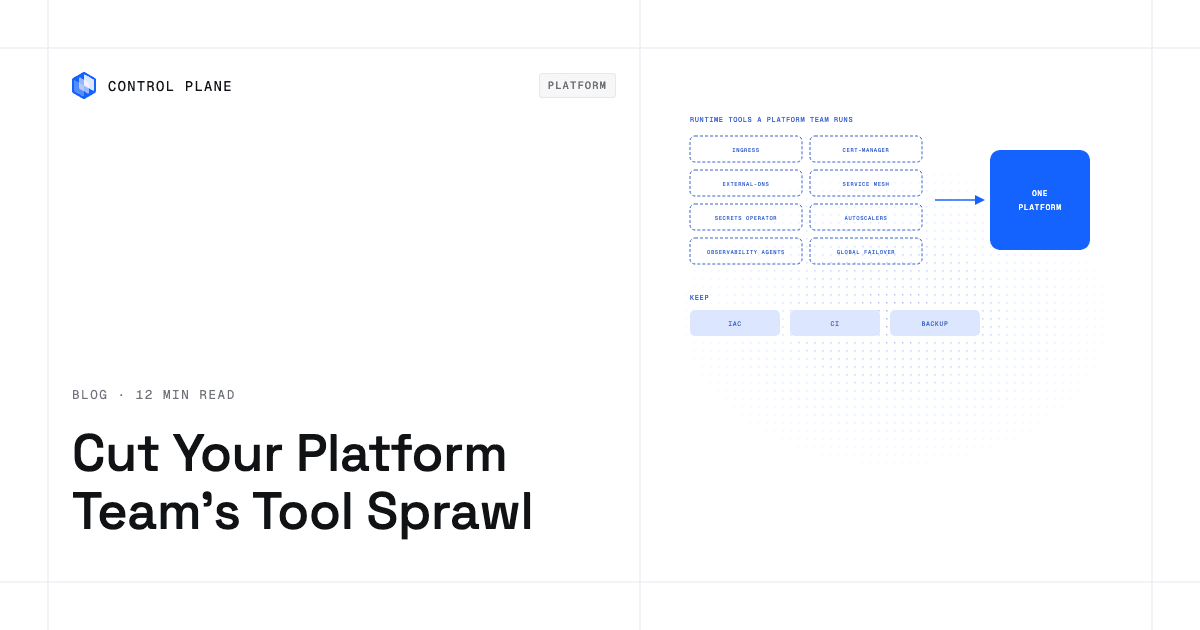
- Consolidate the runtime layer first. Orchestration, node scaling, ingress, TLS, DNS, service mesh, secrets, workload identity, pod autoscaling, observability agents, and multi-region failover carry the most maintenance and the most overlap.
- Keep what does a distinct job. Infrastructure as code, CI, backup, and specialist security or data tools stay.
- Add governance. Require an approval gate for new tools and set sunset dates for replaced ones.
- Control Plane fits here. It runs workloads on AWS, GCP, and Azure, on your own infrastructure, and on premises, with built-in autoscaling, global traffic routing, TLS, mTLS, secrets, observability, and workload identity.
Why does tool sprawl happen in platform teams?
Four forces drive tool sprawl in platform teams.
Team autonomy and decentralized procurement. When squads pick their own tools, each team optimizes locally. One team adopts Prometheus, another uses a managed monitoring service, and a third writes custom exporters.
The Kubernetes add-on model. Kubernetes provides core orchestration primitives and leaves many production functions to add-ons. The Ingress API, for example, does nothing until you install an ingress controller. Running production usually means adding an ingress or Gateway API controller, a certificate manager, a DNS automation tool, a secrets operator, a node autoscaler, a service mesh, and observability agents, each with its own release cycle and upgrade path.
Each cloud’s own services. AWS, GCP, and Azure each offer their own load balancing, secrets, identity, and monitoring. Teams on more than one cloud often run both the cloud-native version and a portable open-source alternative.
Acquisitions and growth. Mergers bring separate stacks, and a new region or compliance regime often brings a new vendor for the same job.
Platform teams then spend a growing share of their time maintaining infrastructure instead of improving developer experience. Running production-grade infrastructure without a large platform team requires cutting this sprawl.
Which tools does a platform team maintain to run production?
A typical Kubernetes-based platform team runs 17 tool layers in production. On platform-provided compute, a workload platform consolidates 10 of them and most of an 11th (DNS), partly consolidates 3, and leaves 3 in place.
| Layer | Typical open-source or cloud tools | What the team maintains | Consolidated by a workload platform? |
|---|---|---|---|
| Container orchestration | Kubernetes on EKS, GKE, or AKS | Control plane version upgrades, API version migrations, add-on compatibility, node pool upgrades and node OS patches | Yes, on platform-provided compute. No cluster to operate. |
| Node provisioning and autoscaling | Cluster Autoscaler, Karpenter | Configuration tuning, allowed instance types and NodePool constraints, scaling and consolidation policies | Yes, on platform-provided compute. The platform provisions and scales capacity. |
| Ingress and load balancing | ingress-nginx (community project, retired March 2026) or F5 NGINX Ingress Controller, cloud load balancer controllers, Gateway API implementations | Ingress class configs, annotation sprawl, certificate binding, health checks, migration from ingress-nginx to Gateway API | Yes. Built-in global endpoint. |
| TLS certificates | cert-manager | Issuer configuration, renewal monitoring, CA trust chains | Yes. Automatic TLS certificates. |
| DNS automation | external-dns | Provider credentials, record ownership, TTL tuning | Mostly. You add one CNAME or NS record per domain; with NS delegation the platform creates and manages the subdomain records. |
| Service mesh and mTLS | Istio, Linkerd | Sidecar injection (Linkerd, Istio sidecar mode) or ztunnel and waypoint proxies (Istio ambient mode), mTLS policy, control plane upgrades, proxy resource overhead | Yes. Built-in mTLS and a deny-by-default internal firewall. |
| Secrets | External Secrets Operator, HashiCorp Vault, cloud secret managers | Secret rotation, access policies, operator upgrades, audit logging | Yes. Built-in secrets. |
| Workload identity to cloud services | IRSA or EKS Pod Identity, Workload Identity Federation for GKE, Microsoft Entra Workload ID | IAM role bindings, trust policies, service account annotations or Pod Identity associations, the EKS Pod Identity Agent add-on | Yes. Built-in workload identity to cloud services. |
| Pod autoscaling | HPA, VPA, KEDA | metrics-server health, scaling thresholds, VPA and KEDA upgrades, custom metric adapters | Yes. Built-in autoscaling. |
| Metrics, logs, and tracing agents | Prometheus, Grafana, Loki, OpenTelemetry Collector | Collector and exporter DaemonSets, Prometheus and Loki storage retention, dashboard maintenance, alert rules | Yes. Built-in logs and metrics, with tracing turned on per GVC or org. |
| Multi-region traffic failover | Global DNS or load balancing, health checks | Failover policies, health-check endpoints, DNS propagation delays | Yes. A global endpoint routes to the nearest healthy location automatically. |
| Deployment | Argo CD or Flux, Helm | GitOps controller upgrades, Helm chart maintenance, sync policies | Partly. The platform API works with existing CI and IaC tools. |
| Infrastructure as code | Terraform or OpenTofu | Provider upgrades, state management, module maintenance | No, keep it. It manages the platform through Terraform and Pulumi providers. |
| CI | GitHub Actions or GitLab CI | Runner maintenance, pipeline definitions, secret injection | No, keep it. CI deploys to the platform API. |
| Policy | OPA Gatekeeper or Kyverno | Policy authoring, constraint updates, audit reports | Partly. The platform enforces access permissions and deny-by-default network rules; keep OPA or Kyverno for org-specific admission rules on clusters you still run, or run OPA policy checks in CI. |
| Cost visibility | IBM Kubecost, OpenCost | Agent deployment, cost allocation labels, dashboard upkeep | Partly. The platform shows cost and usage per org and per resource; keep a cost tool for cross-org chargeback. |
| Backup | Velero | Backup schedules, restore testing, storage credentials | No, keep it. Data protection is a distinct job. |
The 11 runtime rows (the Yes and Mostly rows) each have their own upgrade cycle, CRD migrations, and on-call runbook. The guide to Kubernetes production architecture, upgrades, and autoscaling covers the work inside each row.
How do I calculate the true cost of a cloud tool?
A tool’s full annual cost has seven components.
| Cost component | What to measure |
|---|---|
| License or usage fee | Subscription, per-seat, or consumption charges from the vendor or cloud provider |
| Engineering hours to upgrade and patch | Hours per quarter on version upgrades, CRD migrations, breaking-change fixes, and dependency updates |
| On-call load | Incidents and pages caused by the tool, multiplied by the cost of an on-call hour |
| Integration and glue code | Time to write and maintain scripts, webhooks, adapters, or custom controllers that connect the tool to the rest of the stack |
| Security reviews and access management | Hours for CVE triage, image scanning, RBAC updates, and audit preparation for the tool |
| Training and onboarding | Time new engineers spend learning the tool, plus documentation upkeep |
| Cost of an outage caused by the tool | Revenue impact, customer trust, and engineering hours for incident response and post-mortems |
Add the seven components for each tool and compare the total against the consolidated alternative. For example, a tool with no license fee that takes two engineers’ time to keep running costs far more than its line on a procurement spreadsheet suggests. If one add-on accounts for a large share of weekend pages, consolidating it cuts both cost and pager load.
A 90-day consolidation plan
The first consolidation wave takes seven steps over about 90 days.
- Inventory by layer and owner (days 1 to 10). List every tool using the layers in the table and assign an owner to each. Flag tools with no clear owner.
- Cost each tool (days 11 to 20). Use the cost table to estimate total cost of ownership, and rank tools by total cost and by engineering hours per unit of value.
- Pick the layers to consolidate first (days 21 to 30). Start with the 11 runtime rows in the table. Deployment, policy, and cost visibility come second.
- Pilot one service (days 31 to 50). Move one non-critical workload to the consolidated platform. Check autoscaling, observability, TLS, secrets, and traffic routing, and measure deployment time and developer feedback.
- Migrate in waves (days 51 to 80). Group remaining workloads by risk and dependency. Move low-risk services first, then stateful and high-traffic services, and keep the old stack running in parallel during each wave.
- Sunset old tools on a date (days 81 to 90). Set a firm deprecation date for each replaced tool, freeze new adoption, notify users, export configurations and data, and end contracts on schedule.
- Add an approval gate for new tools (ongoing). The review confirms no existing tool does the job, estimates total cost of ownership, and names a long-term owner.
The approval gate keeps sprawl from returning and is a prerequisite for developer self-service with guardrails.
What should you keep?
Keep any tool that does a job a workload platform does not handle.
- Infrastructure as code. Terraform, OpenTofu, or Pulumi manage cloud resources outside the workload runtime, such as databases, storage buckets, IAM policies, and network topology.
- CI pipelines. GitHub Actions, GitLab CI, or similar systems build and test code, then hand finished builds to the workload platform through its API.
- Backup and data protection. Tools like Velero back up Kubernetes resources and persistent volumes on clusters you still run, and dedicated database backup tools cover data elsewhere.
- Specialist security and data tools. SIEM integrations, vulnerability scanners, data pipeline orchestrators, and compliance agents do jobs outside a workload platform’s scope.
How Control Plane fits
Control Plane runs serverless, standard, stateful, and cron workloads natively on AWS, GCP, and Azure. VM workloads run on locations joined through Control Plane’s Managed Kubernetes (MK8s). Workloads also run on Kubernetes clusters you already run or on your own machines, including on premises, active-active across regions and clouds.
On Control Plane-provided compute there is no Kubernetes cluster you have to operate. You deploy a workload, a container image with CPU, memory, and ports, to a Control Plane Global Virtual Cloud (GVC), a named set of locations across one or more clouds, and the workload runs in every location of that GVC from one definition.
Built-in runtime capabilities:
- Autoscaling on concurrency, requests per second, CPU, memory, or latency.
- A built-in global endpoint that routes each request to the nearest healthy location and moves traffic automatically when a location fails.
- Automatic TLS certificates, including for custom domains once you add a CNAME or NS record.
- mTLS between workloads and a deny-by-default internal firewall.
- Built-in secrets.
- Built-in logs and metrics in every location, with tracing turned on per GVC or org.
- Capacity AI, Control Plane’s right-sizing feature, which adjusts CPU and memory from historical usage within a minimum and maximum you set. It is not available for GPU workloads or for workloads that autoscale on CPU or on multiple metrics.
Control Plane’s Universal Cloud Identity (UCI) gives workloads access to 600+ AWS, GCP, and Azure services with no long-lived cloud keys in your code. This replaces the per-cloud workload identity setups listed in the table.
The CLI, console, Terraform and Pulumi providers, and the Control Plane MCP server all work through the same Control Plane API, so Control Plane complements the infrastructure as code and CI tools you keep. Clusters you already run can join as locations through Control Plane’s Bring Your Own Kubernetes (BYOK), where you keep running the cluster, and MK8s runs clusters with Control Plane operating the Kubernetes control plane.
Control Plane handles Day 2 operations for you. The 99.999% availability SLA applies to workloads running at least two replicas in at least two locations. Control Plane is PCI DSS Level 1, SOC 2 Type II, HIPAA, and GDPR compliant. You pay for the CPU and memory a workload reserves, with no contracts or minimums. Customers typically cut compute costs 30 to 50 percent compared with running directly on AWS, GCP, or Azure.
Control Plane runs standard container images across clouds and your own infrastructure, so workloads stay portable (how to avoid cloud vendor lock-in). With the runtime layer built in, teams can practice platform engineering without a dedicated platform team.
FAQ
CTOs and platform leads ask these questions most often when they plan tool consolidation.
How can a CTO reduce the number of cloud tools and vendors the platform team maintains?
Audit every tool by the capability layer it serves and its total cost of ownership, including engineering hours, on-call load, and outage risk. Then consolidate the runtime layer into a single workload platform, keep infrastructure as code, CI, backup, and specialist tools that do distinct jobs, and add an approval gate so new tools need a review.
Which infrastructure tools can be consolidated into one platform?
The runtime layer: container orchestration, node provisioning, ingress, TLS certificates, most DNS automation, service mesh, secrets, workload identity, pod autoscaling, observability agents, and multi-region traffic failover. Infrastructure as code, CI, and backup tools do distinct jobs and stay.
Should we use cloud-native tools or third-party tools?
Use a cross-cloud platform for the runtime layer, and use cloud-native services only for what it does not cover, such as managed databases or specialized AI services. Cloud-native tools reduce integration friction inside one provider but duplicate across clouds, and third-party and open-source tools are portable but add their own maintenance.
Does consolidating tools increase vendor lock-in?
It can, if the platform uses proprietary formats for your workloads. Choose a platform that runs standard container images and works with your infrastructure as code. Control Plane runs standard container images on AWS, GCP, and Azure, on your own infrastructure, and on premises from one definition, and its Terraform and Pulumi providers keep your deployment configuration in the same versioned infrastructure as code as the rest of your stack.
How does Control Plane reduce the tools a platform team maintains?
Control Plane builds most of the runtime tool stack into one platform. Ingress, TLS, mTLS, secrets, autoscaling, failover, observability, and cloud identity are built in, and there is no Kubernetes cluster to operate on Control Plane-provided compute. Teams keep their CI pipelines and infrastructure as code, which work through the Control Plane API, along with their backup tools.
What is the risk of consolidating too aggressively?
Removing a tool that does a distinct job leaves a gap or forces the team to rebuild it. Confirm the replacement platform does each tool’s job before you cut the tool, pilot with non-critical workloads, and run old and new systems in parallel during each wave.
How do I prevent tool sprawl from returning after consolidation?
Gate every new tool request on the three checks in the 90-day plan: no overlap, a cost estimate, and a named owner. Publish a catalog of approved tools and golden paths, and review the inventory quarterly to sunset tools that have lost their owner or users.
How long does a tool consolidation initiative take?
About 90 days for a scoped first wave covering the runtime layer, using the seven-step plan above. Later waves for deployment, policy, and cost visibility follow the same pattern, and the approval gate and quarterly reviews continue after that.
Talk to the Control Plane team or sign up free to consolidate your runtime tool stack.