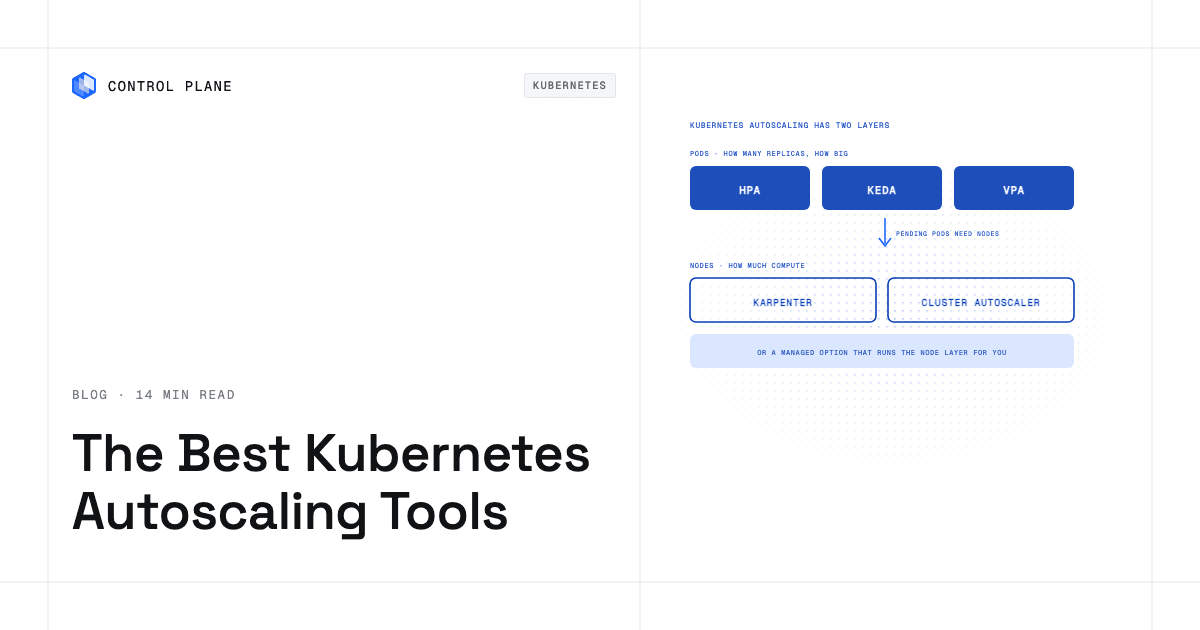
Kubernetes autoscaling has two layers, so the best setup pairs a pod autoscaler with a node autoscaler. Use HPA for CPU and memory scaling, KEDA for event-driven workloads and scale to zero, or VPA for right-sizing requests, and pair it with Karpenter where it is supported or Cluster Autoscaler elsewhere. On AWS, Karpenter or EKS Auto Mode handles EC2 nodes while HPA or KEDA handles pods, and a managed platform can take the node layer off your team’s plate. This guide compares the major tools across both layers, maps the combinations that work, and shows what each option still leaves your team to operate.
Disclosure: Control Plane publishes this guide.
TL;DR
- Two layers. Pod autoscalers (HPA, VPA, KEDA) adjust replicas or resource requests. Node autoscalers (Cluster Autoscaler, Karpenter) adjust cluster capacity.
- Best pod autoscaler by use case. HPA for steady CPU and memory scaling. KEDA for queue-driven, event-driven, or scale-to-zero workloads. VPA for right-sizing pods that do not scale horizontally.
- Best node autoscaler by environment. Karpenter on AWS, and on Azure through AKS node autoprovisioning. Cluster Autoscaler for GKE Standard, multi-cloud, and on-premises clusters.
- Recommended pairs. HPA plus Cluster Autoscaler is the portable baseline. KEDA plus Karpenter is the cost-aware AWS stack.
- EC2 answer. Karpenter or EKS Auto Mode for nodes, HPA or KEDA for pods. EKS Auto Mode removes node group management.
- What managed options remove. EKS Auto Mode, GKE Autopilot, and AKS node autoprovisioning remove node group configuration and node autoscaler tuning.
- Avoid conflicts. Keep HPA and VPA off the same metric, set PodDisruptionBudgets before consolidation, and use stabilization windows to prevent thrash.
- Where Control Plane fits. On Control Plane-managed locations, teams set workload autoscaling (concurrency, RPS, CPU, memory) and Control Plane runs the underlying compute.
Which cloud-native autoscaling tool is best for Kubernetes?
No single tool is best, because pod autoscalers decide how many replicas run and how large they are, while node autoscalers decide how many machines the cluster needs to run them. Pick one from each layer based on your workloads and cloud, or use a managed option that runs the node layer for you.
How do the Kubernetes autoscalers compare?
| Tool | Layer | Scales on | Scale to zero | Where it runs | What you still operate |
|---|---|---|---|---|---|
| HPA | Pods (replicas) | CPU, memory, custom, object, and external metrics | From Kubernetes 1.37 on object or external metrics (HPAScaleToZero, beta); otherwise minimum 1 | All Kubernetes distributions | Metrics Server, resource requests, HPA objects |
| VPA | Pods (resource requests) | Historical CPU and memory usage | No | All Kubernetes distributions | VPA objects, update mode |
| KEDA | Pods (replicas, event-driven) | 70+ scalers: queues, streams, Prometheus, cron, and more | Yes | All Kubernetes distributions | ScaledObjects, event source access |
| Cluster Autoscaler | Nodes | Unschedulable pods, underused nodes | Yes, node group minimum 0 | AWS, GCP, Azure, other clouds, on premises via Cluster API | Node groups, instance types, scaling settings |
| Karpenter | Nodes | Pending pod requirements | Yes, nodes drain when no pods need them | AWS; Azure through AKS node autoprovisioning | NodePools, instance constraints, consolidation settings |
| EKS Auto Mode | Nodes | Pending pod requirements (Karpenter-based) | Yes | Amazon EKS | Cluster settings; AWS runs provisioning, scaling, and OS patching |
| GKE Autopilot | Nodes | Pod requests | Yes | Google Kubernetes Engine | Cluster settings; Google runs nodes and capacity |
| AKS node autoprovisioning | Nodes | Pending pod requirements (Karpenter-based) | Yes | Azure Kubernetes Service | Cluster settings; Azure runs node provisioning |
Capabilities reflect each project’s and cloud provider’s documentation as of November 2026.
What does each autoscaler do best?
Pod autoscalers come first, then node autoscalers, then the managed node layers.
Horizontal Pod Autoscaler (HPA)
HPA is built into Kubernetes and adjusts the replica count of a Deployment, ReplicaSet, or StatefulSet toward a target value. It scales on CPU and memory utilization, custom metrics from the custom metrics API, object metrics, and external metrics from systems outside the cluster.
HPA fits stateless services such as web APIs and microservices. Before Kubernetes 1.37 it cannot scale below one replica; from 1.37, the beta HPAScaleToZero feature allows a minimum of zero on object or external metrics. HPA depends on accurate resource requests, because utilization is calculated as a percentage of requests.
Vertical Pod Autoscaler (VPA)
VPA analyzes historical CPU and memory use and recommends or sets resource requests. Its modes are Off (recommend only), Initial (set at pod creation), Recreate (evict and recreate, the default), and InPlaceOrRecreate (resize running pods in place and fall back to eviction, generally available since VPA 1.6). Auto is deprecated.
VPA fits workloads that cannot add replicas, such as single-replica services, some stateful applications, and batch jobs with shifting resource needs.
KEDA
KEDA is a CNCF graduated project that adds event-driven autoscaling to Kubernetes. It creates and manages HPA objects and extends the triggers to more than 70 scalers, including AWS SQS queue depth, Kafka consumer lag, Prometheus queries, and cron schedules.
KEDA scales a workload to zero when no events are pending and activates it when events arrive, on any trigger and any supported cluster version. That makes it the usual choice for queue processors, event consumers, batch pipelines, and workloads with long idle periods.
Cluster Autoscaler
Cluster Autoscaler adds nodes from predefined node groups (managed node groups on EKS, node pools on GKE and AKS) when pods cannot be scheduled, and removes underused nodes after a cooldown. It is a Kubernetes project with support for AWS, GCP, Azure, other clouds, and on-premises clusters through Cluster API.
It fits clusters with well-defined node groups and teams that want one node autoscaler across environments. Its limit is the static node group definition: you choose the instance types ahead of time, and scale-up depends on a group that matches the pending pods.
Karpenter
Karpenter skips predefined node groups. It reads each pending pod’s resource requests, scheduling constraints, and topology preferences, then provisions a node that fits, choosing among instance types, zones, and on-demand or spot capacity. It also consolidates workloads onto fewer nodes when utilization drops.
Karpenter originated at AWS and is production-ready on Amazon EKS. AKS node autoprovisioning brings the same model to Azure. GCP has only a community-maintained Karpenter provider, and GKE users typically use node auto-provisioning instead. Karpenter fits AWS-first clusters, GPU and specialized instances, and spot-heavy cost strategies.
EKS Auto Mode
EKS Auto Mode is an AWS-managed capability, built on Karpenter, that handles node provisioning, scaling, and operating system patching for EKS. Teams do not operate node groups, run a node autoscaler, or patch node images.
It fits AWS teams that want to stop running node operations. The trade-off is less control over instance types and node configuration than self-managed Karpenter.
GKE Autopilot and GKE node auto-provisioning
GKE Autopilot is Google’s mode in which Google manages the node layer. You deploy pods and Google provisions and scales the compute. General-purpose pods are billed on the CPU, memory, and ephemeral storage they request; some compute classes and hardware such as GPUs are billed per node. GKE Standard clusters can use node auto-provisioning to create and delete node pools automatically while keeping more cluster control.
AKS node autoprovisioning
AKS node autoprovisioning is the generally available, Karpenter-based node provisioner for Azure Kubernetes Service. It provisions Azure VMs from pending pod requirements without predefined node pools. Teams that need fixed VM sizes or node pool settings can keep node pools with Cluster Autoscaler.
Which managed Kubernetes solution is best for autoscaling EC2 nodes and pods?
On AWS, the trade-off is control over instance types versus operational work.
| Option | Node scaling | Pod scaling | What your team operates |
|---|---|---|---|
| EKS with Cluster Autoscaler and HPA | Cluster Autoscaler scales predefined managed node groups | HPA scales replicas on CPU, memory, or custom metrics | Node groups, instance types, Cluster Autoscaler settings, HPA objects, node image updates |
| EKS with Karpenter and HPA or KEDA | Karpenter provisions nodes from pending pods, picks instance types, and consolidates | HPA or KEDA; KEDA adds event triggers and scale to zero | NodePools, instance constraints, HPA or KEDA objects, node image updates |
| EKS Auto Mode with HPA or KEDA | AWS runs Karpenter-based provisioning, scaling, and OS patching | HPA or KEDA | Cluster settings, HPA or KEDA objects |
| Control Plane running workloads in AWS regions | Control Plane runs the underlying compute on its managed locations | Replica count per location on concurrency, RPS, CPU, or memory; KEDA for standard and stateful workloads | Workload autoscaling settings (minimum and maximum replicas, metric) |
Self-managed Karpenter gives the most control over instance selection and spot strategy. EKS Auto Mode removes node operations at the cost of some configurability. Control Plane removes node operations on its managed locations and leaves teams to configure workload autoscaling. The guide to day-two operations for containers covers the rest of the operational work.
Which combinations work best?
| Situation | Pod autoscaler | Node autoscaler |
|---|---|---|
| Steady web APIs and microservices | HPA (CPU, memory, or custom metrics such as RPS) | Cluster Autoscaler or Karpenter |
| Queue and event workers | KEDA (queue length, Kafka lag) | Karpenter or Cluster Autoscaler |
| Spiky or idle-heavy traffic | KEDA | Karpenter or Cluster Autoscaler; keep a minimum of one replica if a node cold start is too slow |
| GPU or batch jobs | HPA or KEDA | Karpenter (flexible instance selection for GPU types) |
| Multi-cloud or on-premises clusters | HPA or KEDA | Cluster Autoscaler |
VPA in recommendation mode fits any of these as a right-sizing complement.
How do you avoid autoscaling problems?
- Set resource requests on every pod. HPA calculates utilization as a percentage of requests, so missing requests break CPU and memory scaling.
- Keep HPA and VPA off the same metric. Run VPA in recommendation mode alongside HPA, let VPA manage memory while HPA scales on CPU, or have HPA scale on a custom metric.
- Set PodDisruptionBudgets. Node consolidation evicts pods, and a budget stops it from taking down every replica of a service at once.
- Use stabilization windows. HPA behavior settings and node autoscaler cooldowns prevent rapid scale-up and scale-down cycles.
- Plan for cold starts. Scaling from zero means starting a pod and possibly a node, so measure that full path or keep a minimum of one replica for latency-sensitive services.
- Test scale-up under load. Simulate traffic spikes in staging to confirm that pod and node autoscalers respond in time.
How Control Plane fits
Control Plane is the unbreakable platform for running production workloads. It runs serverless, standard, stateful, and cron workloads natively on AWS, GCP, Azure, and Oracle Cloud Infrastructure (OCI), VM workloads on locations joined through Control Plane’s Managed Kubernetes, and workloads on Kubernetes clusters you already run or your own machines, including on premises, active-active across regions and clouds. Control Plane handles Day 2 operations for you, including autoscaling, built-in observability, and security.
On Control Plane-managed locations in AWS, GCP, Azure, and Oracle Cloud regions, Control Plane runs the underlying compute, so teams do not operate node groups or a node autoscaler for those workloads. Workloads on Kubernetes clusters you bring keep that cluster’s node capacity.
A Global Virtual Cloud (GVC) is Control Plane’s named set of locations; a workload deployed to a GVC runs in every location of that GVC, and autoscaling applies per location. Autoscaling sets each workload’s replica count between minScale and maxScale on metrics that depend on workload type: concurrency for serverless workloads, requests per second, CPU, and memory, with multi-metric autoscaling on CPU, memory, and RPS for standard and stateful workloads. Serverless workloads can scale to zero when scaling on concurrency or RPS. Standard and stateful workloads scale to zero through KEDA, which is enabled at the GVC level and can scale on sources such as queue length, Kafka lag, or Prometheus queries. Cron and VM workloads cannot scale to zero.
Capacity AI is Control Plane’s feature that right-sizes a workload’s CPU and memory reservation between a minimum and maximum based on historical usage. It cannot be combined with CPU-utilization autoscaling or multi-metric autoscaling.
You pay for the CPU and memory a workload reserves, billed per millicore and per MB. Control Plane customers typically see 30 to 50 percent lower compute costs compared with running directly on AWS, GCP, or Azure. The 99.999% availability SLA applies to workloads running at least two replicas in at least two locations. Control Plane is PCI DSS Level 1, SOC 2 Type II, HIPAA, and GDPR compliant.
Control Plane removes node autoscaling work on its managed locations, but teams that need specific instance types or full control of node configuration may prefer self-managed clusters or bringing their own cluster. Teams that want Kubernetes benefits without a platform team, a production Kubernetes architecture without node operations, or a comparison of Kubernetes alternatives can start with those guides, and the guide to cutting cloud compute costs covers right-sizing in more depth.
FAQ
Short answers on choosing and combining Kubernetes autoscalers.
Which cloud native autoscaling tool is best for Kubernetes?
No single tool is best; pair one pod autoscaler with one node autoscaler. HPA plus Cluster Autoscaler is the portable default, KEDA plus Karpenter is the cost-aware AWS stack, and managed options like EKS Auto Mode remove most node autoscaling work.
Which managed Kubernetes solution is best for autoscaling EC2 nodes and automatically scaling pods?
EKS Auto Mode is the AWS-native managed option for EC2 nodes, because it runs Karpenter-based provisioning, scaling, and OS patching for you; pair it with HPA or KEDA for pods. Control Plane manages the compute layer on its AWS locations, so teams there configure workload autoscaling only.
Is Karpenter better than Cluster Autoscaler?
On AWS and Azure, usually yes. Karpenter provisions nodes directly from pod requirements without matching node groups and consolidates underused nodes. Cluster Autoscaler is supported across more environments and remains the better fit for GKE Standard, multi-cloud, and on-premises clusters.
When should I use KEDA instead of HPA?
Use KEDA when a workload scales on external events such as queue depth, Kafka lag, Prometheus queries, or schedules, or when it must scale to zero on any supported cluster version. Native HPA scales to zero only from Kubernetes 1.37, on object or external metrics. For pure CPU or memory scaling, HPA is enough.
Can HPA and VPA run together?
Yes, if they do not act on the same metric for the same workload. The usual patterns are VPA in recommendation mode, VPA on memory with HPA on CPU, or HPA on a custom metric.
How do I scale Kubernetes pods to zero?
Use KEDA, which scales replicas to zero when no events are pending and reactivates them when events arrive. On Kubernetes 1.37 and later, HPA can also reach zero on object or external metrics. On Control Plane, serverless workloads scale to zero when scaling on concurrency or RPS, and standard and stateful workloads scale to zero through KEDA.
What is the difference between Karpenter and EKS Auto Mode?
You install and configure Karpenter yourself, including NodePools and instance constraints, while EKS Auto Mode is AWS running Karpenter-based provisioning for you along with OS patching. Self-managed Karpenter gives more control over node settings; Auto Mode removes the work of running it.
What does EKS Auto Mode manage?
EKS Auto Mode manages node provisioning, scaling, and operating system patching for EKS, using Karpenter-based provisioning that AWS runs. Teams still configure pod autoscaling with HPA or KEDA.
How does Control Plane handle autoscaling?
Control Plane runs the compute on its managed locations, so teams set minScale, maxScale, and the scaling metric per workload, and autoscaling applies in each location. Capacity AI can right-size CPU and memory reservations from historical usage, and KEDA covers event-driven scaling for standard and stateful workloads.
Hand off node autoscaling and focus on your workloads. Talk to the Control Plane team or sign up free.