
Without a disaster recovery runbook, your first job during a full cloud provider outage is to put one person in charge, freeze changes, protect your data, and keep customers informed from infrastructure that does not depend on the failed provider. Then you face the central judgment call: wait for the provider to recover or try to move. That decision depends on what you already have running elsewhere, because an untested rebuild that takes longer than the remaining outage makes the incident longer.
Most major cloud outages end within a business day. A rebuild only pays off when the outage outlasts it or when your business truly cannot wait. This guide gives you an hour-by-hour plan, data on how long major outages last, and a framework for the wait-or-move decision.
Disclosure: Control Plane publishes this guide.
TL;DR
Without a runbook, follow this sequence and use outage duration data to guide your biggest decision.
- First 15 minutes. Declare the incident, name one incident commander, open a communication channel outside the failed provider, and freeze deploys and infrastructure changes except recovery actions the incident commander approves.
- Protect data. Confirm backup integrity and replication status before taking any recovery action that could cause writes to diverge.
- Communicate from outside the failed provider. Post a status update from a status page and messaging system that do not depend on the provider that is down.
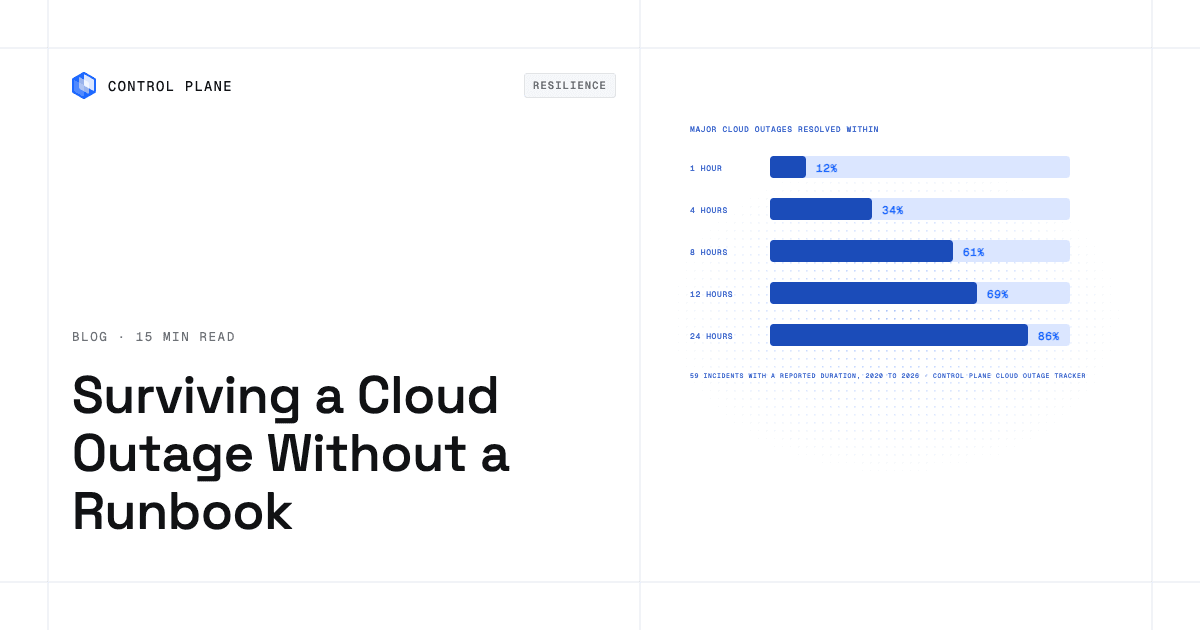
- Wait or move. Control Plane’s Cloud Outage Tracker shows that 86% of 59 major cloud incidents resolved within 24 hours and 61% within 8 hours, so shift traffic right away only to a location that is already running, and rebuild only for a long outage.
- Options depend on what you already have. A running second location is the fastest path; backups are the slowest.
- Safe recovery. When the provider comes back, return traffic gradually, verify data integrity, and treat failback as its own risk event.
- Write the runbook afterward. Document what you did, what worked, what failed, and turn it into a repeatable checklist.
- Make the next one boring. Run critical services active-active across locations, keep backups and DNS outside a single provider, and drill regularly.
- Where Control Plane fits. Control Plane runs each workload active-active across regions and clouds, and its DNS routes clients away from a failed location. Databases and incident response stay your responsibility.
What should you do in the first 15 minutes of a cloud provider outage?
Work through these steps in order.
- Declare the incident and name one incident commander. One person owns all decisions. Pick someone available, calm, and empowered to make calls. Assign a separate note-taker to log timestamps, symptoms, and decisions.
- Open an out-of-band communication channel. If your team chat, video conferencing, or paging system runs on the failed provider, it may be unreachable. Stand up a channel on a different provider’s infrastructure. A phone bridge, a messaging app hosted elsewhere, or even a group text thread will work. The goal is a single place where every responder can coordinate.
- Freeze deploys, migrations, and infrastructure changes except recovery actions the incident commander approves. Any change you push during an outage can make things worse, especially if the provider’s control plane is partially functional. A half-applied migration or a deploy that cannot complete will add cleanup work after recovery. Lock the pipeline.
- Confirm scope. Check the provider’s status page, but do not trust it as the only source of truth. Provider status pages can lag behind what your users see. Cross-reference with your own synthetic checks, uptime monitors, and alerts. Identify which regions, availability zones, and services are affected. Determine whether the issue is a data plane failure (your running workloads are down) or a control plane failure (workloads still serve traffic but you cannot deploy or scale).
- Post a first status update from a status page hosted elsewhere. Use a status page that does not depend on the failed provider. A brief, factual message is enough: “We are aware of an issue affecting [service]. Our team is investigating. We will update every 30 minutes.”
Should you wait for the provider or move?
This is the hardest call you will make during an outage, and it is where data helps most.
The Control Plane Cloud Outage Tracker catalogs 62 major incidents at AWS, Azure, Google Cloud, and Cloudflare from July 2020 to October 2026, each linked to a provider post-mortem or status page. Of those, 59 have a reported duration.
How long major cloud outages lasted
| Resolved within | Incidents | Share of 59 |
|---|---|---|
| 1 hour | 7 | 12% |
| 4 hours | 20 | 34% |
| 8 hours | 36 | 61% |
| 12 hours | 41 | 69% |
| 24 hours | 51 | 86% |
| Longer than 24 hours | 8 | 14% |
Two of the eight incidents lasting longer than 24 hours are still listed as ongoing, because some data cannot be restored. The tracker covers incidents large enough to get a public post-mortem or status page entry, so smaller outages, which tend to be shorter, are underrepresented.
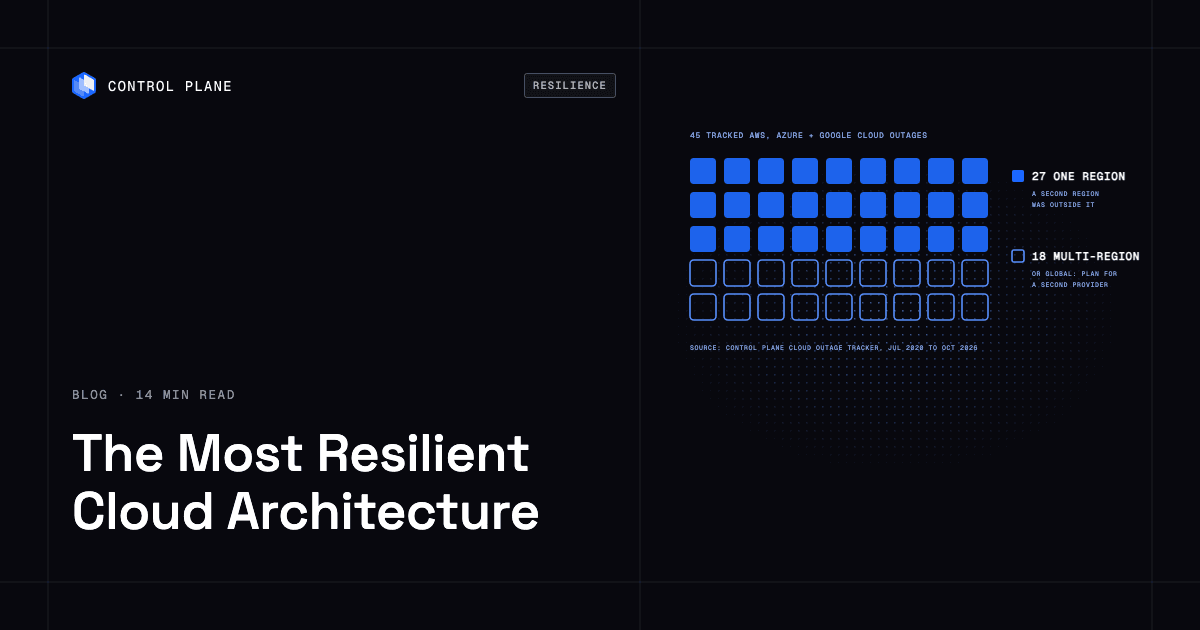
If moving your service to another location takes longer than the outage is likely to last, moving makes the incident longer. Teams with a second location already running can shift traffic in minutes. Teams rebuilding from backups typically need hours, depending on the size and complexity of the system. A cold rebuild only helps when the outage outlasts the rebuild: 39% of tracked outages ran past 8 hours and 14% ran past a full day.
Move right away if a healthy second location is already serving traffic. Restore from backups only when the outage shows no sign of resolution and has exceeded your recovery time objective (RTO). Wait when recovery appears imminent, your standby environment is untested, or replication lag is unknown.
Blind failover, flipping traffic to an environment you have never tested under production load, can turn a provider outage into a longer, self-inflicted one. If you have not drilled it, treat failover as a last resort.
What are your options, based on what you already have?
Your realistic options during an outage are constrained by what you built and tested before the outage started.
| What you have | Best move | Time to effect | Main risk |
|---|---|---|---|
| A second region or provider already serving traffic | Shift traffic away from the failed location using DNS or global load balancing | Minutes, depending on DNS TTLs and clients that cache past them | Split-brain if databases are not properly fenced |
| A warm standby with replicated data | Promote the standby after checking replication lag | Minutes to an hour, depending on the system | Data loss equal to replication lag; untested promotion path |
| Backups stored outside the failed provider and infrastructure as code | Restore in a new location only if the outage looks long; do not rehearse something new under pressure | Hours | Slow, error-prone if never drilled; risk of restoring stale data |
| Nothing outside the provider | Serve a static or maintenance page from an edge CDN; enable read-only mode if the data layer is still reachable; wait | Minutes for the static page; the outage duration for full recovery | Customer impact continues until the provider recovers |
| A provider control plane outage where running workloads still serve traffic | Do not restart or redeploy; avoid any changes that need the provider’s APIs | Immediate (no changes); no autoscaling or replacement of failed instances until the APIs recover | Accidental restart or scaling event that cannot complete |
When the provider’s control plane is down but your workloads are still running, the worst thing you can do is try to redeploy or scale. Those operations depend on APIs that are unavailable, and partial execution can leave your infrastructure in an inconsistent state. Pause CI/CD and scheduled jobs that call provider APIs, and expect failed instances not to be replaced until the APIs recover.
What does an hour-by-hour plan look like?
| Time | Goal | Actions | Avoid |
|---|---|---|---|
| 0 to 15 minutes | Stabilize and assess | Declare incident, name commander, open out-of-band channel, freeze deploys, confirm scope, post first status update | Deploying fixes, restarting services, or making infrastructure changes |
| 15 to 60 minutes | Protect data and decide | Verify backup integrity, check replication lag, assess standby readiness, make the wait-or-move decision; if a healthy location is already serving traffic, shift traffic now; update customers | Blind failover to an untested environment |
| 1 to 4 hours | Execute the decision | If moved: validate authentication and transactions, disable background jobs that write to unavailable systems. If restoring: restore the critical tier only and verify data age before opening writes. If waiting: maintain static page, monitor provider updates, keep customers informed every 30 minutes | Expanding scope beyond critical workloads; retry storms against unavailable services |
| 4 to 24 hours | Sustain and reconcile | Scale staffing for a prolonged event, reconcile data if failover occurred, continue scheduled customer updates, begin planning failback | Assuming the outage will end soon; letting communication lapse |
| Recovery | Return safely | Wait for provider confirmation, check data integrity, drain queues at a controlled rate, return traffic gradually, keep incident channel open | Rushing failback; declaring victory before error rates normalize |
How do you recover safely when the provider comes back?
Recovery is its own risk event. A provider announcing “resolved” does not mean your systems are healthy.
- Wait for the provider to confirm full recovery. Check their status page and your own monitors independently.
- Check data integrity and replication status before accepting writes. If you failed over, your primary and secondary may have diverged. Reconcile before reunifying.
- Drain queues and retry failed jobs at a controlled rate. A sudden burst of retries can overwhelm systems that are just coming back online.
- Return traffic gradually. Start with a small percentage or a single canary region. Watch error rates, latency, and resource utilization.
- Treat failback as deliberately as you treated failover. Failback carries its own risk of data loss, connection storms, and configuration drift. Do not rush it.
- Keep the incident channel open until error rates return to normal baselines for a sustained period (for example, 30 minutes). Premature closure leads to missed regressions.
How do you turn this outage into a runbook?
The best time to write a disaster recovery runbook is immediately after surviving an outage without one. The experience is fresh, the gaps are obvious, and the team is motivated. Use this one-page template as a checklist.
- Roles and contacts reachable out of band. List incident commander candidates, on-call engineers, and stakeholder contacts with phone numbers and a channel that does not depend on any single provider.
- Service tiers with RTO and RPO. Classify every workload by business criticality and assign an RTO and RPO budget that reflects what the business can actually tolerate.
- Where backups and infrastructure code live. Document the location, format, and restore procedure for every backup. Confirm they are stored outside the provider they protect.
- The traffic-shift procedure and who can run it. Write the exact steps to move traffic away from a failed location, including DNS TTLs, load balancer configuration, and database promotion. Name at least two people authorized to execute it.
- Status page and customer message templates. Pre-write templates for “investigating,” “identified,” “mitigating,” and “resolved” stages. Store them where the team can reach them during an outage.
- Recovery and failback checks. List the data integrity checks, queue drain procedures, and traffic ramp-up steps from the recovery section above.
- A drill schedule. Commit to testing failover at least quarterly. An untested runbook gives false confidence.
How do you make the next outage boring?
Cloud outages will keep happening. The goal is to make them operationally boring.
Run critical services active-active in more than one location. When traffic is already flowing through multiple regions or providers, a failure in one location reduces capacity while the service stays up. Health-aware routing removes the failed location automatically, and the remaining locations absorb the load. The most resilient cloud architecture guide compares this pattern with the alternatives.
Keep backups and DNS outside a single provider. If your DNS provider is the same provider that is down, you cannot redirect traffic anywhere. If your backups are stored in the same region that failed, they may be unreachable when you need them most.
Drill. Run failure injection exercises quarterly. Test that your traffic-shift procedure works, that your team knows their roles, and that your runbook matches reality. Every drill that reveals a gap is a future outage made shorter. Read more in how to keep your app online when an AWS region goes down.
How Control Plane fits
Control Plane is the unbreakable platform for running production workloads. It runs serverless, standard, stateful, and cron workloads natively on AWS, GCP, Azure, and Oracle Cloud Infrastructure (OCI), VM workloads on locations joined through Control Plane’s Managed Kubernetes, and workloads on Kubernetes clusters you already run or your own machines, including on premises, active-active across regions and clouds.
A Global Virtual Cloud (GVC) is Control Plane’s named set of locations drawn from cloud regions, Kubernetes clusters you register, and your own hardware. A workload deployed to a GVC runs active-active in every location of that GVC from one definition. The locations can be on different providers. Each workload’s canonical endpoint uses health-aware DNS geo-routing to send clients to the nearest location where the workload passes its readiness probes, and DNS stops sending traffic to a location that fails. Location routing options set a priority tier per location and latency offsets.
During the October 20, 2025 AWS us-east-1 outage, Control Plane customers with us-east-1 in their GVC had workloads “active and running in healthy locations within 10 seconds,” with no customer downtime, according to Control Plane’s internal incident telemetry.
Control Plane handles Day 2 operations for you, including autoscaling, built-in observability, and security. The 99.999% availability SLA applies to workloads running at least two replicas in at least two locations. Control Plane is PCI DSS Level 1, SOC 2 Type II, HIPAA, and GDPR compliant.
Control Plane keeps compute and routing running in healthy locations, but databases still need their own replication design and set the RPO, and teams still need an incident process and customer communication.
Learn more about how to fail over an application across cloud providers automatically.
FAQ
Short answers for on-call engineers in the middle of an incident.
How do I survive a full cloud provider outage without a disaster recovery runbook?
Put one person in charge, freeze changes, protect your data, and communicate from infrastructure outside the failed provider. Then shift traffic only to a location that is already running. Without one, wait, and restore from backups only if the outage passes your RTO. Write the runbook afterward.
How long do major cloud outages usually last?
Most end within a business day. Of 59 major incidents at AWS, Azure, Google Cloud, and Cloudflare from July 2020 to October 2026 in the Control Plane Cloud Outage Tracker, 61% resolved within 8 hours and 86% within 24 hours. 14% lasted longer than a full day.
Should I fail over to another region during a cloud outage?
Fail over only if you have a tested, healthy environment already running in another region or on another provider. If your failover target is untested or requires a cold rebuild, the time to get it running may exceed the remaining outage, and an untested target usually adds downtime.
What should I not do during a cloud outage?
Do not deploy code, restart services, or make infrastructure changes that depend on the failed provider’s APIs. Do not fail over to an untested environment. Do not let multiple people make conflicting decisions without a single incident commander. Do not stop communicating with customers, even if there is no new information to share.
How do I communicate with customers during a cloud outage?
Use a status page and notification system hosted on a different provider than the one experiencing the outage. Post a first update within 15 minutes acknowledging the issue. Commit to regular updates every 30 minutes, even if the update is “no change.” Use pre-written message templates so you are not drafting prose under pressure.
What if the cloud provider’s control plane is down but my app is still running?
Do nothing to your running workloads. A control plane outage means the provider’s management APIs are unavailable, but your existing containers, VMs, and networking may continue to function. Redeploy, scale, and restart operations that go through the provider’s APIs can fail partway, potentially leaving your infrastructure in a partially applied state. Monitor your workloads and wait for the control plane to recover.
How do I write a disaster recovery runbook after an outage?
Start with the incident timeline you documented during the outage. Identify what worked, what failed, and what you wish you had prepared. Structure the runbook as a checklist covering roles, service tiers with RTO and RPO, backup locations, traffic-shift procedures, communication templates, recovery checks, and a drill schedule. Test the runbook within 30 days and then quarterly.
How does Control Plane keep workloads running when a cloud provider has an outage?
On Control Plane, one workload definition runs in every location of its GVC, which can span multiple cloud providers and your own infrastructure. If a location fails its readiness probes, DNS stops sending clients there, and the other locations keep serving. Database replication, RPO, and customer communication remain your team’s job.
Can I make a cloud outage operationally boring?
Yes. Run critical workloads active-active in more than one location, keep backups and DNS outside a single provider, and drill failover regularly.
Make your next cloud outage boring. Talk to the Control Plane team or sign up free.