
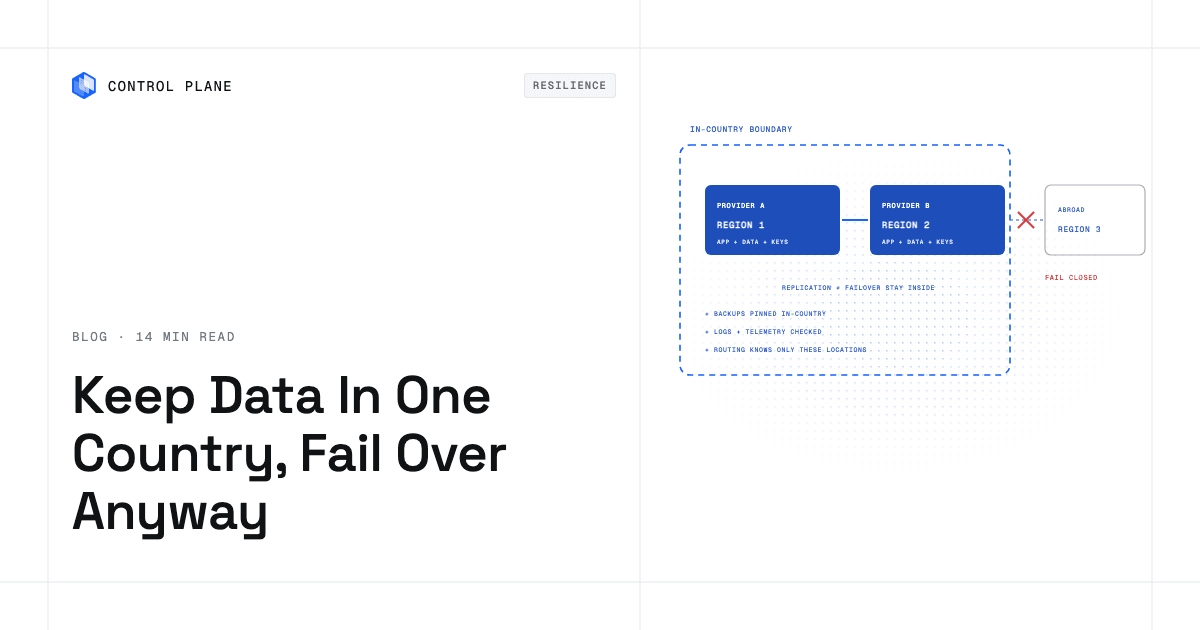
Define the legal boundary first. Then run every copy of the data, including replicas, backups, logs, and encryption keys, in two or more locations inside that boundary and configure failover so it cannot target a location outside it.
Disclosure: Control Plane publishes this guide.
TL;DR
- Define the boundary. Work with legal counsel to confirm whether the boundary is a single country, a bloc such as the EU or EEA, or a contractual scope.
- Count locations inside it. Inventory every cloud region, availability zone, colocation site, and on-premises cluster available in the country.
- Pick the replication pattern per data store. Relational databases, object storage, caches, queues, and search indexes each need an in-country replication rule.
- Close the side channels. Logs, metrics, traces, backups, support tools, AI APIs, and email providers all move data. Audit each one.
- Keep keys in the country. A key held abroad gives a foreign party the means to decrypt your data.
- Fail closed. If the only healthy location is outside the boundary, degrade or go read-only instead of failing over.
- Enforce with location policies. AWS service control policies, Azure Policy allowed-locations rules, and Google Cloud organization policy constraints prevent resources from being created outside approved regions.
- Prove it with drills. Simulate a primary region outage and verify that data stayed in the country.
- Add sovereignty controls. Hold your own keys, use confidential computing for data in use, and restrict provider staff access; each cloud offers native services for most of them.
- Where Control Plane fits. Control Plane’s Global Virtual Cloud (GVC), a named set of locations, can be limited to in-country locations so workloads run and fail over only inside the boundary, across providers.
How do I keep customer data in a specific country while still having multi-region failover?
Follow these steps in order.
- Confirm the legal boundary with counsel. The boundary might be a country, a trade bloc, or a contractual definition. Frameworks such as GDPR define rules for the EEA, but your contract with a customer may specify a single country. Get this in writing before you choose regions.
- List every in-country location across providers. Check each provider’s region page. Include availability zones within single-region countries, colocation sites, and on-premises clusters. The table in the next section maps these for fifteen countries with strong residency demand.
- Place primary and secondary inside the boundary. Deploy application clusters, databases, and storage in at least two in-country locations. Separate them into distinct accounts or resource groups to limit blast radius.
- Restrict replication and backups to in-country targets. Every data store that replicates, every backup job, and every snapshot copy rule must target a location inside the boundary. Disable geo-redundant defaults whose paired region is in another country.
- Route traffic so failover can only choose in-country locations. DNS failover, load balancers, and service meshes must have no knowledge of locations outside the boundary. Route users to the nearest healthy region covers health-aware routing.
- Keep keys and admin access in scope. Store encryption keys in key management services deployed in the country. Restrict administrative access so that staff outside the country cannot reach production data without controls that satisfy the residency requirement.
- Enforce with organization policies. Apply AWS service control policies with region condition keys, Azure Policy allowed-locations assignments, or Google Cloud organization policy resource-location constraints. These prevent anyone from creating resources outside approved regions.
- Drill and audit. Run a failover test with the primary region removed. After the test, check the destination of every data copy, including logs, metrics, and DNS query logs. Measure your RTO and RPO to confirm they meet the contract. For test methodology, see test failover without taking production down.
In-country cloud regions by country
This table maps generally available public cloud regions for fifteen countries with strong data residency demand. Use it to identify whether you can achieve in-country multi-region failover on a single provider or need to combine providers.
| Country | AWS | Microsoft Azure | Google Cloud | Oracle Cloud Infrastructure (OCI) | In-country failover options |
|---|---|---|---|---|---|
| Germany | Frankfurt (eu-central-1) | Frankfurt (germanywestcentral), Berlin (germanynorth) (restricted access) | Frankfurt (europe-west3), Berlin (europe-west10) | Frankfurt (eu-frankfurt-1) | Two regions on Google Cloud. Azure’s second region is restricted access. One each on AWS and Oracle Cloud. |
| France | Paris (eu-west-3) | Paris (francecentral), Marseille (francesouth) (restricted access) | Paris (europe-west9) | Paris (eu-paris-1), Marseille (eu-marseille-1) | Two regions on Oracle Cloud. Azure’s second region is restricted access. One each on AWS and Google Cloud. |
| United Kingdom | London (eu-west-2) | London (uksouth), Cardiff (ukwest) | London (europe-west2) | London (uk-london-1), Newport (uk-cardiff-1) | Two regions on Azure and Oracle Cloud. One each on AWS and Google Cloud. |
| Switzerland | Zurich (eu-central-2) | Zurich (switzerlandnorth), Geneva (switzerlandwest) (restricted access) | Zurich (europe-west6) | Zurich (eu-zurich-1) | One generally available region per provider. Fail over across providers in the country. |
| Italy | Milan (eu-south-1) | Milan (italynorth) | Milan (europe-west8), Turin (europe-west12) | Milan (eu-milan-1), Turin (eu-turin-1) | Two regions on Google Cloud and Oracle Cloud. One each on AWS and Azure. |
| Spain | Aragon (eu-south-2) | Madrid (spaincentral) | Madrid (europe-southwest1) | Madrid (eu-madrid-1), Madrid (eu-madrid-3) | Two regions on Oracle Cloud, both in Madrid. One each on AWS, Azure, and Google Cloud. |
| India | Mumbai (ap-south-1), Hyderabad (ap-south-2) | Pune (centralindia), Chennai (southindia), Mumbai (westindia), Hyderabad (indiasouthcentral) | Mumbai (asia-south1), Delhi (asia-south2) | Mumbai (ap-mumbai-1), Hyderabad (ap-hyderabad-1) | Two or more regions on every provider. |
| Japan | Tokyo (ap-northeast-1), Osaka (ap-northeast-3) | Tokyo (japaneast), Osaka (japanwest) | Tokyo (asia-northeast1), Osaka (asia-northeast2) | Tokyo (ap-tokyo-1), Osaka (ap-osaka-1) | Two regions on every provider. |
| Australia | Sydney (ap-southeast-2), Melbourne (ap-southeast-4) | Sydney (australiaeast), Melbourne (australiasoutheast), Canberra (australiacentral), Canberra (australiacentral2) (restricted access) | Sydney (australia-southeast1), Melbourne (australia-southeast2) | Sydney (ap-sydney-1), Melbourne (ap-melbourne-1) | Two or more regions on every provider. |
| Canada | Montreal (ca-central-1), Calgary (ca-west-1) | Toronto (canadacentral), Quebec City (canadaeast) | Montreal (northamerica-northeast1), Toronto (northamerica-northeast2) | Toronto (ca-toronto-1), Montreal (ca-montreal-1) | Two regions on every provider. |
| Brazil | São Paulo (sa-east-1) | São Paulo (brazilsouth), Rio de Janeiro (brazilsoutheast) (restricted access) | São Paulo (southamerica-east1) | São Paulo (sa-saopaulo-1), Vinhedo (sa-vinhedo-1) | Two regions on Oracle Cloud. Azure’s second region is restricted access. One each on AWS and Google Cloud. |
| United Arab Emirates | UAE (me-central-1) | Dubai (uaenorth), Abu Dhabi (uaecentral) (restricted access) | None | Dubai (me-dubai-1), Abu Dhabi (me-abudhabi-1) | Two regions on Oracle Cloud. Azure’s second region is restricted access. One on AWS. Google Cloud’s nearest region (me-central1) is in Doha, Qatar. |
| Saudi Arabia | None | None | Dammam (me-central2) (access conditions apply) | Riyadh (me-riyadh-1), Jeddah (me-jeddah-1) | Two regions on Oracle Cloud. One on Google Cloud, with access conditions. None on AWS or Azure. |
| South Africa | Cape Town (af-south-1) | Johannesburg (southafricanorth), Cape Town (southafricawest) (restricted access) | Johannesburg (africa-south1) | Johannesburg (af-johannesburg-1) | One generally available region per provider. Fail over across providers in the country. |
| Singapore | Singapore (ap-southeast-1) | Singapore (southeastasia) | Singapore (asia-southeast1) | Singapore (ap-singapore-1), Singapore (ap-singapore-2) | Two regions on Oracle Cloud. One each on AWS, Azure, and Google Cloud. |
Restricted-access Azure regions require an approved access request. Google Cloud’s Dammam region has access conditions; check Google’s locations page. Sovereign, government-only, and announced regions are excluded.
Region lists change as providers expand. Service availability differs by region. This table reflects the providers’ public pages as of November 2026.
What if a country has only one region per provider?
When every provider offers just a single region in a country, you have four options ranked by resilience.
Multi-AZ inside the one region. AWS and Google Cloud split each region into multiple availability zones. Many Azure regions and most Oracle Cloud regions have only one zone or availability domain, so check the zone count before relying on multi-zone deployment. Multi-AZ deployment survives a zone failure, which covers the most common hardware and power scenarios. It does not survive a region-wide failure.
A second provider’s region in the same country. This is the strongest option for countries like Switzerland and South Africa, where each provider has one generally available region. Deploying your workload in both AWS’s Cape Town region and Google Cloud’s Johannesburg region, for example, gives you cross-region failover that stays inside South Africa. You operate two sets of identity, networking, and database replication, and you pay egress between providers. The data stays in the country during failover. For architecture patterns, see fail over application across cloud providers automatically.
A colocation site or on-premises cluster in the country. If you already operate physical infrastructure in the country, it can serve as the secondary location. This works well for stateful workloads where you control the replication stack.
A broader legal boundary such as the EU or EEA. If counsel confirms that the applicable law or contract allows the entire EU or EEA as the boundary, you gain access to many more region pairs. Counsel makes this call.
How should data be replicated without leaving the country?
Synchronous replication is usually limited to availability zones within one region. Cross-region replicas are typically asynchronous, so replication lag sets the RPO. Measure round-trip latency between your two in-country locations before attempting synchronous replication across regions.
| Data store | In-country pattern | What to avoid |
|---|---|---|
| Relational database | In-country cross-region read replica or synchronous standby in a second in-country availability zone. | Global database clusters whose secondary is in another country. |
| Object storage | Replication rules targeting only in-country buckets. | Geo-redundant defaults whose paired region is abroad. Azure Brazil South, for example, replicates to South Central US in Texas. |
| Backups and snapshots | Copy rules pinned to in-country vaults or backup regions. | Default backup destinations that land in the provider’s nearest region, which may be in another country. |
| Caches and queues | Deploy cache clusters and queue endpoints in each in-country region. Replicate between them. | Global cache or queue namespaces that fan out to all provider regions. |
| Search indexes and data warehouses | Regional deployments with data ingestion restricted to in-country sources. | Global aggregation pipelines that merge data into a single international index. |
Where data leaves the country during failover
Even when primary and secondary compute stay in the country, data can escape through paths that teams overlook.
| Path | How data leaves | Control |
|---|---|---|
| Geo-redundant storage defaults | Geo-redundant storage copies data to the provider’s paired region, which can be in another country. Azure Brazil South pairs with South Central US, and Southeast Asia (Singapore) pairs with East Asia (Hong Kong). | Disable geo-redundant replication. Use locally redundant or zone-redundant storage. |
| Cross-region backup copy rules | Backup jobs copy snapshots to a region outside the country. | Pin backup destinations to in-country vaults. Audit copy rules quarterly. |
| Logs, metrics, and traces sent to a global SaaS endpoint | Observability platforms ingest telemetry into regions outside the country. | Use in-country log and metric endpoints, or self-host observability in the country. |
| Error tracking and APM tools | Stack traces and request samples are sent to a vendor’s global infrastructure. | Choose APM tools with in-country data storage or strip PII before export. |
| CDN caching of personalized responses | Edge nodes outside the country cache or decrypt responses containing customer data. | Send personalized responses with Cache-Control: private, no-store. Where the CDN terminates TLS outside the country, route personalized traffic to an in-country origin endpoint without the CDN. |
| DNS providers that log queries abroad | Query logs record hostnames, resolver IPs, and sometimes client subnets, and are stored outside the country. | Use DNS providers that offer in-country query logging, or accept that DNS metadata is not customer data if counsel agrees. |
| Support and ticketing tools | Support tickets include customer data and are stored in the vendor’s global region. | Redact customer data from tickets, or use a ticketing tool with in-country storage. |
| Email and SMS providers | Transactional messages contain customer data and transit through international infrastructure. | Choose providers with in-country processing, or minimize PII in message bodies. |
| AI and LLM APIs | Prompts containing customer data are sent to model endpoints outside the country. | Use in-country model deployments, or anonymize data before sending it to the API. |
| Staff admin access from other countries | Engineers outside the country access production systems and can view or download customer data. | Restrict production access to approved staff, use just-in-time access with session logging, and confirm with counsel whether remote viewing from abroad is permitted. |
| Key management services that replicate keys across regions | Replicated keys let a party in that region decrypt the data. | Restrict key replication to in-country regions only. |
| Secrets managers and parameter stores | Automatic replication policies and replica regions copy secrets, including database credentials, to other regions. | Use replication limited to in-country regions and remove foreign replica regions. |
| CI/CD pipelines and non-production copies | Production snapshots restored to staging, test fixtures, and build caches end up in foreign regions or on vendor-hosted runners. | Mask or synthesize data for non-production, pin runners and artifact registries to in-country regions, and include staging in the data flow diagram. |
How do I make failover jurisdiction-aware?
Fail closed. When every in-country location is unhealthy, the system should degrade gracefully, serve content cached in the country, or return an explicit error. It should not redirect traffic to a healthy region in another country unless the contract and applicable law explicitly allow it. Failing closed is a policy decision that must be agreed with the business.
Keep the secondary warm. A cold standby that takes hours to start defeats the purpose of failover. Keep the secondary in-country region warm enough to meet the RTO defined in your RTO and RPO budget. This means running at least minimal compute, keeping database replicas current, and pre-warming caches.
Test with the primary removed. The strongest drill is to remove the primary region from the routing layer entirely and observe whether the secondary handles traffic within the RTO, and whether any data path reaches a location outside the country. Document the results for auditors.
How do I prove data stayed in the country?
Proving residency requires both preventive controls and detective evidence.
Organization policies. AWS service control policies can deny API calls to regions outside the approved list using the aws:RequestedRegion condition key, with exemptions for global services such as IAM. An assignment of Azure Policy’s built-in Allowed locations definition blocks resource creation outside specified regions. The Google Cloud organization policy constraint gcp.resourceLocations restricts where resources can be created. Apply these at the AWS organizational unit, Azure management group, or Google Cloud folder level so that no team can bypass them.
Configuration rules that alert on out-of-boundary resources. AWS Config (enabled in every region and aggregated to one account), Azure Policy compliance reports, and Google Cloud Asset Inventory can continuously scan for resources that exist outside approved regions and trigger alerts or auto-remediation.
Data flow diagrams. Maintain a current diagram showing every path that customer data takes, including replication, backup, logging, analytics, and third-party integrations. Update it whenever a new tool or service is added.
Subprocessor lists by jurisdiction. Document every subprocessor that handles customer data and the country where they process it. Review this list when any vendor changes its infrastructure.
Drills that check where data actually went. After each failover test, audit the destination of every data copy. Check backup vaults, log destinations, metric endpoints, and DNS query logs. Retain the audit report for regulators and customers. Control Plane’s guide to sovereign cloud architecture and data residency compliance covers the full approach.
What practical controls ensure data residency and sovereignty in a multi-cloud infrastructure?
Residency is about where data is stored and processed; sovereignty adds who can be compelled to hand it over or can technically reach it. Residency controls keep data and every copy inside the boundary. Sovereignty controls limit who holds the keys and who can access the systems, including the cloud provider’s own staff. Each cloud covers most of these controls with native services.
| Control | AWS | Azure | Google Cloud |
|---|---|---|---|
| Block resources outside approved locations | Service control policies with the aws:RequestedRegion condition key | Azure Policy Allowed locations assignment | Organization policy constraint gcp.resourceLocations |
| Detect resources that drift outside the boundary | AWS Config rules with an aggregator | Azure Policy compliance reports | Cloud Asset Inventory and Security Command Center |
| Hold your own encryption keys | AWS KMS with customer managed keys; External Key Store (XKS) for keys held outside AWS | Azure Key Vault Managed HSM with customer-managed keys | Cloud KMS with customer-managed keys; Cloud External Key Manager (EKM) for keys held outside Google Cloud |
| Protect data in use | AWS Nitro Enclaves; AMD SEV-SNP on M6a, C6a, and R6a instances | Azure confidential VMs | Confidential VMs |
| Find and tag regulated data | Amazon Macie | Microsoft Purview | Sensitive Data Protection |
| Control provider staff access | No Customer Lockbox equivalent; the Nitro System prevents AWS operator access to data on EC2 instances | Customer Lockbox | Access Transparency and Access Approval |
| Sovereign cloud offerings | AWS European Sovereign Cloud | Microsoft Sovereign Cloud, including the EU Data Boundary | Assured Workloads Data Boundary packages and Sovereign Controls by Partners |
Service names and availability reflect each provider’s documentation as of November 2026; several of these features are limited to specific regions or require a particular tier.
When the same application runs in more than one cloud, three controls need consistent implementation. First, write the location rule once and implement it in each cloud’s policy engine, so a new account or project cannot bypass it. Second, use the key controls in the table so the provider cannot use your keys outside the boundary. Third, route identity through one provider with conditional access, so administrators outside the jurisdiction cannot reach regulated systems even with valid credentials.
How Control Plane fits
Control Plane is the unbreakable platform for running production workloads. It runs serverless, standard, stateful, and cron workloads natively on AWS, GCP, Azure, and Oracle Cloud Infrastructure (OCI), VM workloads on locations joined through Control Plane’s Managed Kubernetes, and workloads on Kubernetes clusters you already run or your own machines, including on premises, active-active across regions and clouds. Control Plane handles Day 2 operations for you, including autoscaling, built-in observability, and security.
A Global Virtual Cloud (GVC) is Control Plane’s named set of locations drawn from cloud regions, Kubernetes clusters you register, and your own hardware. A workload deployed to a GVC runs in the enabled locations of that GVC and never outside them. A GVC whose locations are all inside one country keeps that workload’s replicas and failover inside the country.
Those locations can span providers. A GVC can combine an AWS region and a Google Cloud region in the same country, or a cloud region and your own on-premises cluster. This is how you get cross-region failover in countries where each provider has only one region. Check the Control Plane location catalog for your country’s available locations.
Each workload’s canonical endpoint uses health-aware DNS geo-routing to send clients to the nearest location where the workload passes its readiness probes. When a location fails its health checks, new DNS lookups stop returning it. Because Control Plane’s routing only considers the GVC’s locations, failover cannot pick a location outside the GVC. Org administrators enable or disable which locations a GVC may select, adding a policy layer on top.
The 99.999% availability SLA applies to workloads running at least two replicas in at least two locations. Those locations can be on different providers.
Control Plane encrypts all volumes by default, and on AWS locations a volume set can use your own AWS KMS key in each region. Restrict who holds the volume copy permission, since a volume copy can target a volume set in another GVC.
Control Plane is PCI DSS Level 1, SOC 2 Type II, HIPAA, and GDPR compliant.
A GVC limited to in-country locations keeps workload replicas, their volume set volumes, and failover inside the boundary. External databases, backups, volume snapshots, and third-party tools each need their own in-country check. The residency boundary is a legal decision that you and your counsel make. Confirm the location of every platform’s telemetry, including Control Plane’s, in your data flow review. For guidance on running regulated workloads, see run regulated apps in the cloud with SOC 2, HIPAA, PCI, and data residency.
FAQ
These questions come up most often when teams architect in-country failover.
How do I keep customer data in a specific country while still having multi-region failover?
Define the legal boundary with counsel, deploy primary and secondary infrastructure in two or more locations inside that boundary, restrict all data replication and backups to in-country targets, configure routing so failover can only choose in-country locations, close every side channel that could move data abroad, and prove it with drills and organization policies.
Can I fail over to another country if my primary region goes down?
Only if the contract and applicable law allow it. If they do not, your failover must fail closed: degrade, serve cached content, or go read-only. Architect the system so that a second in-country location is always available, making cross-border failover unnecessary.
What if my country has only one cloud region?
Pair it with a second provider’s region in the same country for cross-provider failover. If no second provider has a region there, use multi-AZ within the single region where it has more than one zone, and add a colocation or on-premises site for region-level resilience. If counsel allows a broader boundary such as the EU, more region pairs become available.
Does encrypting data let it leave the country?
Encryption alone does not satisfy most residency requirements. Many contracts and some regulations define residency as the physical location of the data, regardless of encryption. Keys stored abroad can be used to decrypt data abroad. Keep both the ciphertext and the keys inside the boundary, and confirm with counsel whether encryption changes the legal analysis.
Is multi-AZ enough for data residency and resilience?
Multi-AZ keeps data in the country and survives zone-level failures, which are the most common. It does not survive a full region outage. If your availability target requires surviving a region failure, you need a second region or a second provider’s region in the country.
How do I stop backups from leaving the country?
Pin backup copy rules to in-country vaults. Disable geo-redundant backup defaults. Audit backup destinations quarterly. Use organization policies to prevent backup vaults from being created outside approved regions.
Which logs and tools usually break data residency?
Observability platforms, error tracking and APM tools, support and ticketing systems, email and SMS providers, AI and LLM APIs, and CDN edge caches are the most common sources of leakage. Each one may store customer data in a region outside the country. Audit every tool in your stack against the leak checklist in this guide.
How does Control Plane keep failover inside one country?
Control Plane’s Global Virtual Cloud (GVC), scoped to in-country locations, runs workloads only in those locations. Health-aware DNS geo-routing sends traffic to the nearest healthy location within the GVC and cannot route to a location outside it. Org administrators control which locations a GVC may use. Because a GVC can include locations on different providers, you get cross-provider failover inside one country.
What practical controls ensure data residency and sovereignty in a multi cloud infrastructure?
Block resource creation outside approved locations with each cloud’s policy engine, detect drift continuously, and hold encryption keys in a key manager you control inside the country. Add confidential computing for data in use, classify and tag regulated data, restrict provider staff access with tools such as Customer Lockbox or Access Approval, and route administrator access through one identity provider with location-based conditional access. Test failover at least quarterly and check where every copy of the data went.
What contract clauses should I require from cloud providers for data residency?
Require explicit commitments on data storage and processing locations, advance notice before changes to region placement or failover targets, disclosure of all subprocessors and their locations, audit rights or current third-party audit reports such as SOC 2 Type II, and defined data deletion timelines for backups and disaster recovery copies.
Ready to keep your workloads and failover inside one country? Talk to the Control Plane team or sign up free.