
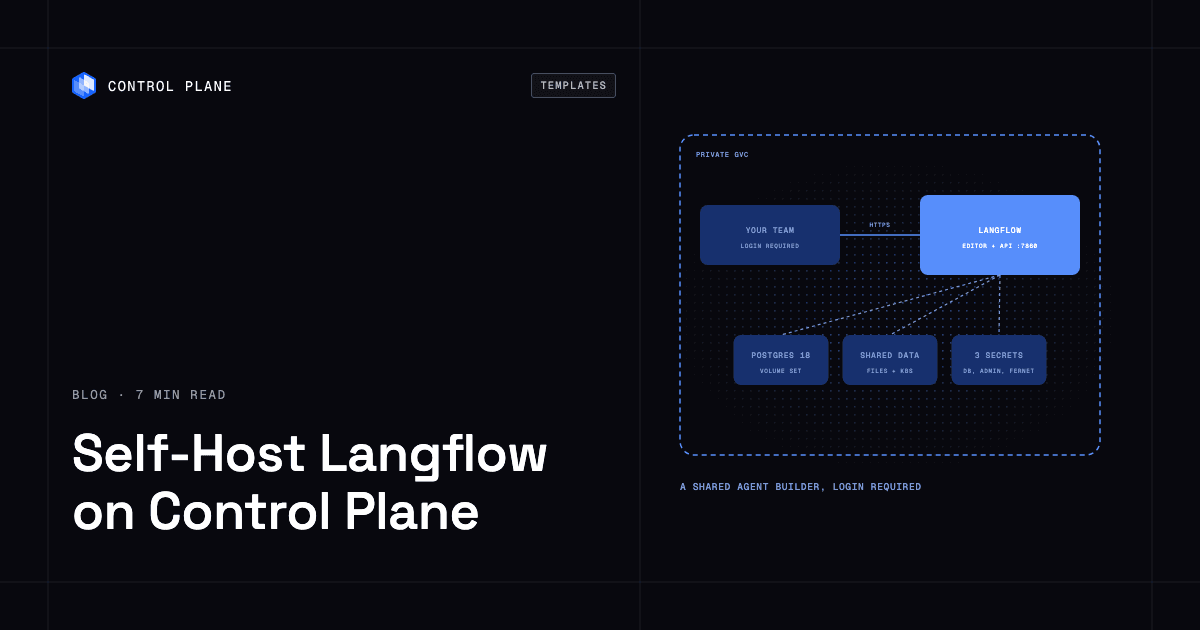
To self-host Langflow on Control Plane, create three secrets (a database login, an admin login and a Fernet encryption key) and install the Langflow template from the Template Catalog, Control Plane’s library of ready-to-install apps. You get Langflow 1.13.1 behind a required login, a bundled PostgreSQL database, a shared volume for uploads, and an optional link to Control Plane’s own MCP server.
Langflow is an MIT-licensed visual builder for AI agents, RAG pipelines and MCP servers, and its repository has more than 156,000 GitHub stars. You drop components onto a canvas, try the flow in the Playground, then call it over a REST API or hand it to Claude and Cursor as MCP tools. A laptop demo is easy. A shared deployment needs a database, a place for uploads, an encryption key that must never change, and a login in front of a tool that runs Python. The template sets up all four.
Why self-host Langflow on Control Plane
- Your org, inside your flows. Name a Control Plane service-account key and Langflow gains a
cplnMCP server pointing at Control Plane, with read-only tools by default, ready for an MCP Tools component. - Three secrets, no pasted values. The database login, admin login and encryption key live in Control Plane secrets that the workload reads by name.
- Reveal scoped to what you name. A Control Plane policy lets the workload’s Control Plane identity read only the secrets in its values, and the chart creates no credentials.
- A database that comes with it. PostgreSQL holds users, flows and messages, beside a data volume for uploads and knowledge bases.
- Availability as values. Up to four Langflow replicas, and highly available PostgreSQL chosen at install.
Included out of the box
- Langflow 1.13.1 on port 7860: editor, REST API and MCP server in one process
- A public HTTPS address on
*.cpln.app, with a Langflow login required - Bundled PostgreSQL 18 on a 10 GiB volume set (Control Plane’s managed persistent storage for a workload), plus a shared 10 GiB volume for files that every replica mounts
- Provider keys such as
OPENAI_API_KEYfrom a secret you list, also exposed as Langflow global variables - An interactive API reference at
/docs - Optional scheduled database backups to AWS S3, Google Cloud Storage or MinIO
- Built-in Control Plane logs and metrics, with tracing available to turn on
How to secure a public Langflow URL
The URL is public from the first minute, and Langflow always needs an account: the chart refuses settings that turn on auto-login. Anyone can sign up, but new accounts stay inactive until an admin activates them. Add {name: LANGFLOW_ENABLE_SIGNUP, value: "false"} to langflow.extraEnv to turn sign-up off.
Custom components run Python on the server, so give logins only to people you trust, or set Langflow’s LANGFLOW_ALLOW_CUSTOM_COMPONENTS to "false" in langflow.extraEnv to block user-written component code and Langflow’s built-in code-execution components. A flow’s Playground shared as a public link runs without a login, so treat sharing as publishing.
Langflow’s published security advisories include unauthenticated remote code execution flaws fixed in 1.3.0, 1.9.0 and 1.9.2 (CVE-2025-3248, CVE-2026-33017 and CVE-2026-48519). The template ships 1.13.1, and as of November 10, 2026 no advisory on Langflow’s GitHub security page lists 1.13.1 as affected. Check that page before installing, since Langflow ships security fixes often. To move to a newer release, set langflow.image to its tag and run cpln helm upgrade.
For no public address at all, set publicAccess.enabled to false and run cpln port-forward from the cpln CLI, Control Plane’s command-line tool, to reach port 7860 on localhost. Apps in the same Global Virtual Cloud (GVC), Control Plane’s term for the set of locations a workload runs in, call http://RELEASE_NAME-langflow.GVC_NAME.cpln.local:7860.
How to store the Langflow encryption key and admin login
Langflow’s Fernet key encrypts every API key saved in the editor and signs logins. The template reads a 44-character key from an opaque secret (a secret that holds a single value) and refuses to start with a malformed one. Never replace or delete that secret on a running release, or saved keys can no longer be decrypted, and keep a copy with your backups: a restored database’s saved keys decrypt only with the same key.
The admin login is a dictionary secret, a Control Plane secret that holds named key-value pairs, with username and password. Langflow reads it on first start only, so change the password later in the Langflow UI.
How to let flows see your Control Plane org
Langflow’s MCP client cannot do an OAuth sign-in, so the template uses a Control Plane service-account key. Create the service account, bind only the policies your flows need, store the key as an opaque secret, and set cplnMcp.keySecretName. At boot Langflow registers it as cpln for the superuser, in the background, without delaying startup. A flow can then list a GVC or inspect a workload.
Know the trade. Every flow using that server acts as that service account, and any logged-in user can read the key through Python, so grant it a narrow view. Setting cplnMcp.url to https://mcp.cpln.io/mcp offers every tool, including writes.
How to back up Langflow
All state lives in PostgreSQL and the data volume. Set postgres.backup.enabled: true (or postgresHA.backup.enabled: true with the HA database) and a cron workload runs pg_dumpall daily at 02:00 UTC by default, writing a compressed dump to an S3, GCS or MinIO bucket you own; AWS and GCP buckets connect through a Control Plane cloud account, the link between your org and a cloud provider account. Restore steps are on the postgres and postgres-highly-available template pages.
The backup covers the database only. Uploaded files and knowledge bases on the data volume are not included, so keep source documents where you can re-upload them. Uninstalling the release deletes the database and the data volume, and with them every flow, user and uploaded file.
How to scale Langflow on Control Plane
One replica is the default. Set langflow.replicas up to 4 with redis.enabled: true, which gives replicas a shared build queue and shared login rate limits. Redis stays a single node, because Langflow takes one Redis URL and cannot follow a failover.
For fewer interruptions during upgrades and database failover, install with langflow.replicas: 2, redis.enabled: true, postgres.enabled: false and postgresHA.enabled: true (plus postgresHA.config.credentialsSecretName), which runs three Patroni PostgreSQL replicas behind an HAProxy endpoint that points at the leader. Above one replica, point MCP clients at the Streamable HTTP URL, since the older SSE endpoint works with one replica only.
Install into a GVC with exactly one location, because the database, the data volume and Redis run in one location.
How to deploy Langflow on Control Plane
Sign up for Control Plane, then create three secrets: a dictionary with username, password and database for PostgreSQL (URL-safe: letters, digits and - _ . ~ only), a dictionary with the admin username and password, and an opaque secret holding the Fernet key. Then pick Langflow in the Template Catalog in the Control Plane Console, or run:
cpln helm install RELEASE_NAME oci://ghcr.io/controlplane-com/templates/langflow \
  --version 1.0.0 --gvc GVC_NAME \
  --set postgres.config.credentialsSecretName=DB_CREDENTIALS_SECRET_NAME \
  --set admin.secretName=ADMIN_SECRET_NAME \
  --set secretKey.secretName=FERNET_KEY_SECRET_NAME
If a secret is missing at install, the workload waits and cpln logs returns nothing; cpln workload get-deployments names the missing secret. The first helm upgrade after install can briefly restart the bundled database. The Langflow template documentation covers key creation, the MCP setup, backups and troubleshooting.
FAQ
Answers to common questions about running Langflow on Control Plane.
How do I self-host Langflow?
Create three secrets (database credentials, an admin login and a 44-character Fernet key), then install the Langflow template from the Template Catalog in the Control Plane Console or with cpln helm install. The template creates Langflow, PostgreSQL, a shared data volume, and an identity that can read only the secrets you name.
Is Langflow free to self-host?
Yes. Langflow is MIT-licensed. On Control Plane you pay for the CPU and memory that the Langflow and PostgreSQL workloads reserve, plus volume set storage.
Does self-hosted Langflow on Control Plane require a login?
Yes. The template refuses auto-login, so the editor needs an account and flow runs over the API need a Langflow API key. Self sign-ups stay inactive until an admin activates them.
How do I back up Langflow?
Turn on postgres.backup.enabled and the template writes a daily pg_dumpall to an S3, GCS or MinIO bucket. Files on the data volume are not included, and you need the same Fernet key to read saved API keys after a restore.
How do I call a Langflow flow from my app?
Send POST /api/v1/run/FLOW_ID with a Langflow API key in the x-api-key header, to the public URL or, from apps in the same GVC, to the internal address. Internal calls skip the public URL’s 600-second default request limit.
How do I use Langflow as an MCP server?
Each Langflow project serves its flows as MCP tools at /api/v1/mcp/project/PROJECT_ID/streamable; the MCP Server tab shows the full URL. MCP clients send a Langflow API key in the x-api-key header, even when that tab shows no auth.
Can I run Langflow on Kubernetes?
Yes, without operating a cluster: Control Plane runs the workloads for you. It can also run them on your own Kubernetes cluster, added as a location through Bring Your Own Kubernetes (BYOK); the shared data volume then needs a one-time JuiceFS object storage setup per cluster.
Does Langflow on Control Plane scale?
Yes, to four replicas in one location. More than one requires redis.enabled: true, and installing with postgresHA.enabled: true and postgres.enabled: false adds three-replica PostgreSQL with leader failover.
Can a flow reach other apps in my GVC, such as Ollama or Qdrant?
Yes, after one setting. Langflow blocks private addresses by default, including *.cpln.local, so add {name: LANGFLOW_SSRF_ALLOWED_HOSTS, value: "*.cpln.local"} to langflow.extraEnv.