
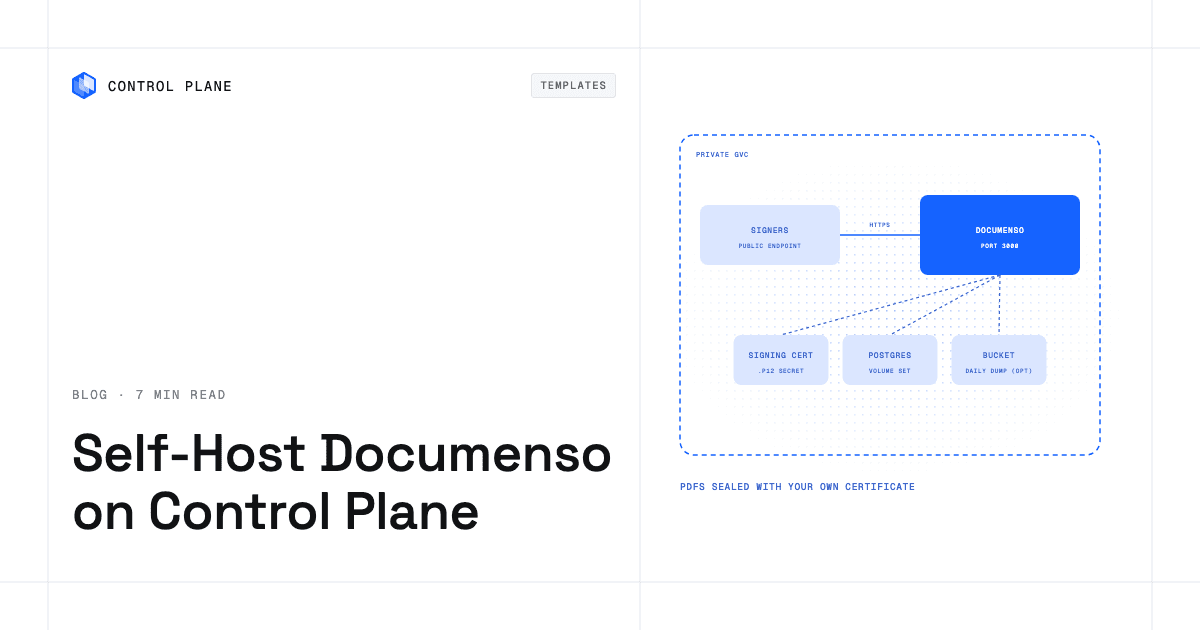
To self-host Documenso on Control Plane, create three secrets (a signing certificate, the application keys, and the database credentials) and install the Documenso template from the Template Catalog, Control Plane’s library of ready-to-install apps. You get a public signing server that seals each completed PDF with your certificate, plus a bundled PostgreSQL database.
Every signed contract that passes through a hosted e-signature service sits on someone else’s servers, under someone else’s per-envelope pricing. Documenso is the open-source option: its repository describes it as “The Open Source DocuSign Alternative” and has more than 15,000 GitHub stars. You upload a PDF, place signature fields, send it to recipients, and get back a PDF signed with a certificate you own, plus an audit trail. The catch is operational. You need a database that must not lose agreements, a signing key that must stay secret, and a public page that external signers can reach. This template puts all three on Control Plane.
Why self-host Documenso on Control Plane
- Your certificate and keys, kept in secrets. The PKCS#12 signing certificate, its passphrase, and Documenso’s session and encryption keys live in Control Plane secrets you create. The chart reads them by name, so none appear in Helm values or on the install line.
- An identity that reads only what Documenso needs. A Control Plane policy created by the template lets the workload’s Control Plane identity reveal Documenso’s own secrets and nothing else in the org.
- A database in the box, with a highly available option. One PostgreSQL server by default, or a three-member Patroni cluster with automatic failover, chosen at install.
- Signing links that work from the first minute. The public endpoint is on by default, because your signers are outside your network.
- Your documents stay in your account. Keep PDFs in the database or in an S3 bucket you own; on AWS, access comes from a Control Plane cloud account, with no AWS access keys in a secret.
- Scheduled database backups. Turn on
backupand a job dumps the database to AWS S3, Google Cloud Storage, or MinIO.
Included out of the box
- Documenso v2.21.1: UI, REST API, signing pages, and background jobs in one workload on port 3000
- Database migrations applied on every start
- PostgreSQL 18 on a 10 GiB volume (PostgreSQL 17 in highly available mode)
/api/healthand/api/certificate-statusendpoints that need no login- Sign-up controls: limit it to your email domains or turn it off
- Optional SMTP for verification and signature-request mail
- Documenso’s upstream telemetry turned off unless you enable it
- Internal DNS for apps in the same Global Virtual Cloud (GVC), Control Plane’s term for the set of locations a workload runs in, that call the REST API
- Built-in Control Plane logs and metrics, with tracing available to turn on
How to set up the Documenso signing certificate
Documenso signs every completed PDF with the PKCS#12 (.p12) certificate stored, as base64 text, in an opaque Control Plane secret. The template docs generate a self-signed one with openssl. Per Documenso’s docs, a self-signed signature still proves the PDF has not changed, but PDF readers flag it as untrusted; for a green checkmark in Adobe Acrobat, use a certificate from a CA on Adobe’s Approved Trust List. The passphrase goes into the application keys secret, a Control Plane dictionary secret that holds named key-value pairs, never into values.
After installing, /api/certificate-status must answer {"isAvailable":true}. Never replace encryptionKey later, because it protects two-factor secrets and API tokens. After changing any referenced secret, run cpln workload force-redeployment so Documenso picks up the new value.
Where Documenso stores documents
With storage.type: database, the PDFs sit in PostgreSQL on its volume set, Control Plane’s managed persistent storage for a workload, so raise postgres.volumeset.capacity for heavy use. Uploads are capped at 5 MB until you raise storage.documentSizeLimitMb. With s3, point at a bucket: on AWS through a Control Plane cloud account and a bucket-scoped IAM policy (the template docs print it), or on MinIO, SeaweedFS, or Google Cloud Storage through an endpoint and an access-key secret.
How to back up Documenso
Database backups are off by default. Enable postgres.backup.enabled (or postgresHA.backup.enabled) with a provider of aws, gcp, or minio, and a cron workload writes a compressed pg_dumpall to your bucket daily at 02:00 UTC. The highly available database can also archive continuously with WAL-G. Backups live in your bucket, off the database volume; restore steps are in the PostgreSQL template docs. Under s3 storage a dump holds only object keys, so version or replicate the document bucket too.
How to keep the signing page up
The Documenso tier is stateless, so documenso.replicas: 2 or more keeps the UI and signing pages up through a rolling restart. The single PostgreSQL server has no replication or failover, and it can briefly restart on the first helm upgrade, taking Documenso with it. If that matters, set postgresHA.enabled: true and postgres.enabled: false at install: three Patroni members with automatic failover behind an HAProxy endpoint that follows the leader. A database upgrade can still briefly refuse writes, so plan it as maintenance.
Everything runs in one location. Documenso runs only in the location set by location, while the bundled PostgreSQL starts in every location of the GVC, so install into a GVC with one location.
How to set up email and the first Documenso admin
Documenso has no admin bootstrap and requires a verified email before the first sign-in. With SMTP off (the default) it sends no mail, so register on the public endpoint, then run one psql command through cpln workload exec to verify yourself and become an admin. Copy each signing link from the UI and send it yourself. Sign-up starts open so you can register; close it right after with signup.disabled: true or signup.allowedDomains.
To send mail, set smtp.enabled: true with your relay’s host and port (smtp.secure: false for STARTTLS on 587, true for implicit TLS on 465). For an authenticated relay, name a dictionary secret with the username and password in smtp.auth.secretName. smtp.fromAddress and smtp.fromName are required even with SMTP off.
How is Documenso licensed?
Documenso’s Community Edition is AGPL-3.0 and free to self-host. If you modify it and offer it over a network, the AGPL requires you to make your modified source available to the people who use it. Features in the repository’s packages/ee directory, such as SAML and OIDC SSO, CSC signing, and 21 CFR Part 11 controls, fall under the Documenso Commercial License and need a paid Business or Enterprise license in production (CSC signing is Enterprise only). The template sets no license key.
How to deploy Documenso on Control Plane
Sign up for Control Plane, then create the three secrets first: the signing certificate, the application keys, and the database credentials. A missing one leaves the deployment waiting with an empty log, and cpln workload get-deployments names it. Set location to a location your GVC already has, then pick Documenso in the Template Catalog in the Control Plane Console, or run the cpln CLI:
cpln helm install RELEASE_NAME oci://ghcr.io/controlplane-com/templates/documenso \
  --version 1.0.0 --gvc GVC_NAME \
  --set location=LOCATION_NAME \
  --set secrets.name=APP_KEYS_SECRET_NAME \
  --set signing.certificateSecretName=SIGNING_CERT_SECRET_NAME \
  --set postgres.config.credentialsSecretName=DB_CREDENTIALS_SECRET_NAME
The Documenso template documentation has the commands for each secret, storage, email, and troubleshooting.
FAQ
Answers to common questions about running Documenso on Control Plane.
How do I self-host Documenso?
Create three Control Plane secrets (signing certificate, application keys, database credentials), then install the Documenso template from the Template Catalog in the Console or with cpln helm install. It creates the Documenso workload, a PostgreSQL database, and an identity that reads only Documenso’s secrets.
Is Documenso free to self-host?
Yes. The Community Edition is free under AGPL-3.0. Enterprise features such as SAML and OIDC SSO, CSC signing, and 21 CFR Part 11 controls need a paid Business or Enterprise license, and CSC signing needs Enterprise.
What signing certificate does Documenso need?
A PKCS#12 (.p12) certificate and its passphrase. Self-signed works, but PDF readers mark it untrusted; a certificate from a CA on Adobe’s Approved Trust List shows a green checkmark in Adobe Acrobat.
Can Documenso work without SMTP?
Yes. You verify your first account with one psql command and copy signing links from the UI to send yourself. Turn on smtp to send mail through your relay.
How do I back up Documenso?
Enable postgres.backup.enabled and choose AWS S3, Google Cloud Storage, or MinIO; a cron job writes a compressed pg_dumpall to your bucket daily at 02:00 UTC. If documents live in S3, version or replicate that bucket too.
Is a self-hosted Documenso instance public?
Yes, by default, because external signers need the signing pages. With publicAccess.enabled: false you reach it only through cpln port-forward, and outside signers cannot open links. Close sign-up once your account exists.
Does Documenso on Control Plane scale?
The app tier scales out with documenso.replicas. The database grows by raising its CPU, memory, and volume size.
Can Documenso run in more than one location?
No. Each install runs in one location of a GVC that should have only that location. Inside it, run two or more Documenso replicas with the highly available PostgreSQL.
Can I run Documenso on Kubernetes?
Yes, without operating a cluster: cpln helm install uses a Helm chart and Control Plane runs the workloads. A cluster you already run can also host them as a Control Plane Bring Your Own Kubernetes (BYOK) location.