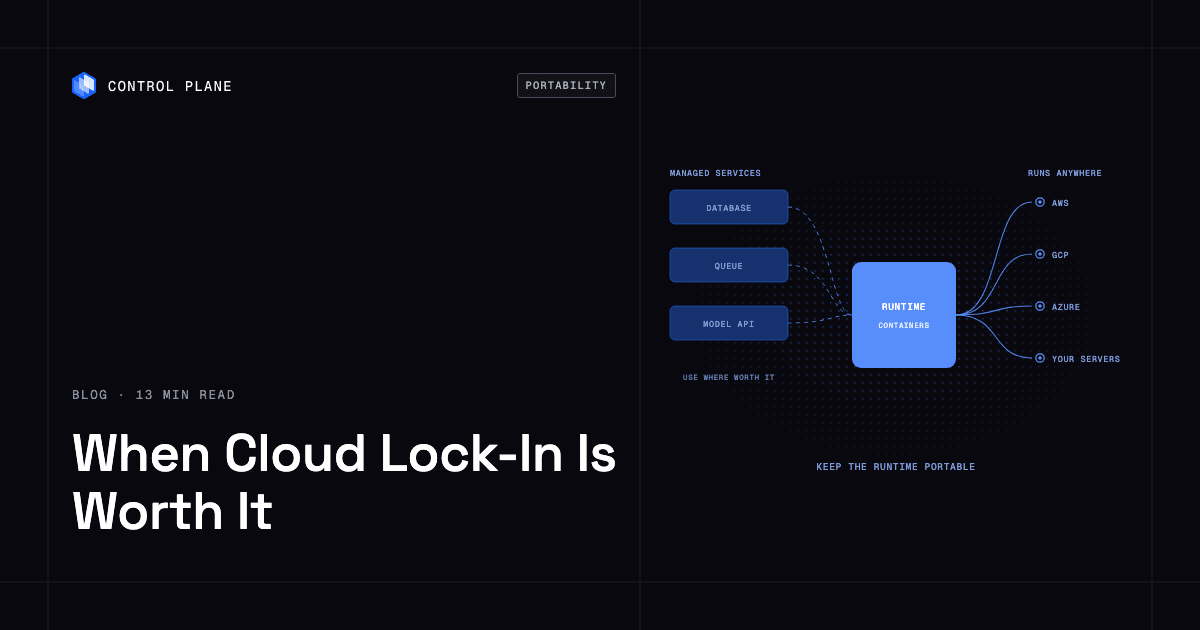
Lock-in is worth accepting when a managed service saves more engineering time than it will cost to leave, and it is not worth it for the core compute runtime that every workload depends on. The runtime is the layer you should keep portable. Control Plane keeps the runtime portable across AWS, GCP, Azure, and your own servers, including on premises, while still letting workloads use each cloud’s managed services through Universal Cloud Identity, Control Plane’s credential-free access to AWS, GCP, and Azure services. This guide offers an honest framework for deciding when lock-in is a fair price, a service-by-service map of proprietary services to portable alternatives, and a practical exit plan you can act on today.
Disclosure: Control Plane publishes this guide.
TL;DR
Lock-in becomes a problem when it is accidental, unmeasured, or applied to the wrong layer.
- When lock-in is worth it: A managed service materially reduces staffing, improves reliability, or accelerates delivery, and you have documented the exit cost.
- When it is not: The service is your core compute runtime or your identity plane, where switching costs compound across every workload. Managed Kubernetes is fine when workload definitions stay in standard manifests.
- The portable layer to protect: Application code, container images, deployment pipelines, data formats, and the runtime itself.
- The exit plan: Maintain a service-dependency register, test data exports quarterly, keep infrastructure as code, and budget for egress.
- How Control Plane fits: Control Plane runs workloads on AWS, GCP, Azure, your own Kubernetes clusters through Control Plane’s Bring Your Own Kubernetes (BYOK), and your own machines, from bare metal to on-premises servers, joined as locations with Control Plane Managed Kubernetes (MK8s), all mixed in one environment. Universal Cloud Identity lets those workloads call AWS, GCP, and Azure managed services without long-lived cloud keys in your code. You get managed-service benefits without surrendering runtime portability.
For a deeper look at the full lock-in landscape, see our companion piece on how to avoid cloud vendor lock-in.
When Do Managed Platform Services Increase Vendor Lock-In?
Managed services create lock-in in five ways, and they differ in how hard they are to undo.
Proprietary APIs
When your application code calls a vendor-specific API, every call is a line of migration debt. The more deeply integrated the API, the more refactoring a move requires. This is the most visible form of lock-in and the one engineers think of first.
Data Gravity and Egress Costs
Large datasets are expensive to move. Cloud providers charge for data leaving their network, and the sheer time to transfer terabytes or petabytes creates inertia. Transfer time and egress fees grow with data volume, so the cost of leaving rises the longer you stay.
Proprietary Identity and Permissions
IAM systems differ significantly between AWS, GCP, and Azure. Policies, roles, and service accounts written for one cloud do not translate to another. Migrating identity is tedious, error-prone, and security-sensitive.
Proprietary Serverless Runtimes
Functions tied to a specific serverless platform carry implicit dependencies on the platform’s event model, scaling behavior, timeout limits, and deployment tooling. These are difficult to replicate elsewhere.
Contract Terms
Committed-use discounts, enterprise agreements, and reserved capacity create financial lock-in. Breaking a contract early can mean forfeiting discounts or paying penalties.
Data gravity and proprietary identity are the hardest to undo. Moving data is a large but bounded transfer project, while identity must be redesigned and re-audited for every workload. Proprietary APIs come next, then serverless runtimes, then contract terms, which have a defined end date.
Decision Framework: When Is the Managed Option Worth It?
Use this table to evaluate each service category.
| Service Category | Lock-In Level | Switching Cost Drivers | When the Managed Option Is Worth It |
|---|---|---|---|
| Compute runtime | High | Every workload depends on it; migration touches everything | Rarely worth locking in. Keep this portable. |
| Kubernetes | Medium | Storage classes, load balancer and ingress annotations, CNI plugins, and the link between pods and cloud IAM (EKS Pod Identity, Workload Identity Federation for GKE, Microsoft Entra Workload ID) are cloud-specific | Use managed Kubernetes for convenience, but keep workload definitions portable via standard manifests. |
| Relational databases | Medium | Schema compatibility is high (PostgreSQL, MySQL), but managed features (replication, backups) differ | Worth it when the managed service handles HA, patching, and backups you would otherwise staff for. |
| NoSQL databases | High | Proprietary query languages, data models, and SDKs (DynamoDB, Cosmos DB) | Worth it for rapid prototyping or when throughput requirements match the service exactly. Document the exit path. |
| Object storage | Low (API), Medium (large datasets) | S3-compatible APIs are a de facto standard, though Azure Blob Storage uses its own API. Egress fees and transfer time scale with data volume. Lifecycle rules, storage classes, and event notifications differ by provider. | Almost always worth it. For large buckets, budget for egress and keep an export or replication path. |
| Queues and streaming | Medium | Client SDKs, delivery semantics, ordering, and retention differ across SQS, Pub/Sub, Event Hubs, and Kinesis | Worth it for most workloads. Wrap producers and consumers behind an interface, or use a Kafka- or AMQP-compatible managed service so client code stays portable. |
| Serverless functions | High | Event sources, cold-start behavior, and runtime constraints are proprietary | Worth it for event-driven glue code, spiky traffic, and low-traffic endpoints. For core business logic, keep handlers thin and put the logic in plain libraries that can also run in a container. |
| Identity | High | Policies, roles, and trust relationships are cloud-specific | Abstract identity where possible. Use workload identity federation over long-lived keys. |
| Observability | Medium | Proprietary query languages and dashboards; data export is usually feasible | Worth it when the team is small. Adopt OpenTelemetry for instrumentation to keep the data portable. |
| Managed AI / model APIs | Medium-High | Model-specific prompt tuning, fine-tuning artifacts, and pricing models | Worth it for speed to market. Use an abstraction layer for model calls. |
Which Open-Source Alternatives to Managed Databases Best Support Portability?
When a managed service’s lock-in level is too high for your risk tolerance, open-source alternatives can restore portability. The table below maps common managed services to their portable counterparts.
| Managed Service | Portable Alternative | Notes |
|---|---|---|
| Amazon RDS for PostgreSQL, Cloud SQL for PostgreSQL, Azure Database for PostgreSQL | PostgreSQL | Schema-level compatibility is strong. Run it on any cloud or on premises. |
| Amazon RDS for MySQL, Cloud SQL for MySQL | MySQL or MariaDB | Widely supported. MariaDB began as a MySQL fork and is compatible with many MySQL workloads, though the two have diverged in newer versions. |
| DynamoDB, Cosmos DB | ScyllaDB or Apache Cassandra | Both are wide-column databases. Apache Cassandra is open source. ScyllaDB is source-available since 2025 and offers Alternator, a DynamoDB-compatible API. Cosmos DB also offers a Cassandra-compatible API, which eases moves in either direction. |
| Amazon SQS, Google Pub/Sub | Apache Kafka, NATS, or RabbitMQ | Kafka excels at high-throughput streaming and is the closer match for Pub/Sub. RabbitMQ is mature for task queues and is the closer match for SQS. NATS is lightweight and supports both patterns. |
| AWS Lambda, Cloud Functions, Azure Functions | Standard containers | Package functions as containers to decouple from the serverless runtime. Any container platform can run them. |
| Amazon ElastiCache | Redis or Valkey | Redis is widely deployed and, from Redis 8, is available under AGPLv3 as well as source-available licenses. Valkey is a BSD-licensed Linux Foundation fork of Redis 7.2.4. ElastiCache supports both engines, so the move is usually low-friction. |
The right choice depends on your team’s operational capacity and workload requirements, not on a blanket recommendation.
When Is It Worth Accepting Platform Lock-In for Managed AI Services?
AI services are the newest and fastest-moving category of managed cloud offerings. The lock-in calculus here is different because the field changes so quickly that today’s best model may not be tomorrow’s.
Evaluate Five Factors
- Speed to market. Managed AI APIs remove the work of hosting, scaling, and updating models, so you can ship a first version without building GPU infrastructure. If time-to-market is critical, the lock-in trade-off is often favorable.
- Model quality. Some proprietary models outperform open alternatives on specific tasks. Benchmark on your data before committing.
- Data sensitivity. Sending data to a third-party model API may conflict with compliance requirements. On-premises or private inference may be necessary.
- Cost at scale. API pricing that looks cheap at prototype volume can become prohibitive at production scale. Model the cost curve before you commit.
- Ability to swap models behind an abstraction. If your application calls models through a thin abstraction layer, switching providers is mostly a configuration change. You still need to re-test prompts and tool calls, re-run evaluations, and re-embed stored vectors if the embedding model changes.
Use managed AI APIs for experimentation and initial deployment, and build an abstraction layer for model calls from day one. For production inference at scale, portable containers running on GPU infrastructure give you the flexibility to move between clouds or neoclouds as pricing and performance shift. On Control Plane, workloads can attach NVIDIA GPUs, and MK8s lets you join GPU servers from other providers as locations. See our guide on running AI inference across multiple GPU clouds.
What Multi-Cloud Infrastructure Patterns Reduce Dependence on Proprietary Managed Services?
Six engineering patterns reduce dependence on proprietary managed services when applied across the stack.
Containerize the Runtime
Package every workload as a standard container image that follows the OCI image spec. An image packages application code and dependencies so any runtime that supports the OCI image spec can run it. Portability still has limits. Build multi-architecture images if you may run on both x86 and Arm nodes, keep configuration in environment variables or secrets rather than the image, and treat kernel features and GPU drivers as host dependencies.
Infrastructure as Code
Define all infrastructure in code with tools such as Terraform, OpenTofu, or Pulumi. Infrastructure as code makes environments reproducible and auditable. On Control Plane, the CLI, console, and Control Plane’s own Terraform and Pulumi providers all work through the same Control Plane API, so your definitions stay consistent.
Open Protocols and Formats
Prefer open standards: OpenTelemetry for observability, S3-compatible APIs for object storage, SQL for relational data, AMQP or NATS for messaging. Open protocols reduce the surface area of proprietary dependency.
Isolate Provider-Specific Code Behind Interfaces
When you do use a managed service, wrap it behind a well-defined interface in your application code. A storage interface, a queue interface, or a model-call interface means you can swap implementations without touching business logic.
Scheduled Data Replication
For critical datasets, replicate data to a second cloud or to your own infrastructure on a schedule. This keeps a current copy outside the primary provider for migration or disaster recovery. Replication adds ongoing egress and storage costs, so limit it to data you cannot rebuild.
Workload Identity Instead of Long-Lived Keys
Long-lived API keys and service account credentials are both a security risk and a portability obstacle. Use workload identity federation to grant short-lived credentials scoped to the current task. On Control Plane, Universal Cloud Identity does this for AWS, GCP, and Azure services.
For a broader look at cloud-native design principles that support portability, see our guide on cloud-native architecture principles, patterns, and building portable systems.
Should I Choose PaaS or SaaS for Vendor Lock-In and Portability?
Choose a PaaS when portability matters. A PaaS runs your application, so you keep the code, images, and data. A SaaS product replaces the application, so only your data can move.
The platform provides the runtime, networking, and operational tooling. If the PaaS uses standard container images and open APIs, your application is portable even if the platform itself is not.
With SaaS, the contract usually says you own your data, but the export format and completeness depend on the vendor. You do not control the application logic, the runtime, or the operational model. Portability depends entirely on the vendor’s data export capabilities and API compatibility. Switching SaaS providers often means rebuilding workflows from scratch.
A PaaS keeps these advantages only if it runs standard containers and does not impose a proprietary build or deployment format. For a detailed comparison of PaaS options, see our guide to the best PaaS providers in 2026.
What Contract Clauses Should I Require for Data Portability and Service Exit?
Before signing a cloud or managed-service agreement, negotiate terms that protect your ability to leave. The following checklist covers the essentials.
This is general guidance, not legal advice. Consult qualified counsel for your specific situation.
- Data export format and timeline. The provider must export your data in a standard, documented format within a defined number of days after termination.
- Exit assistance. The contract should include a transition period during which the provider supports migration activities.
- Egress fee terms. Cap or waive egress fees during the transition period. At minimum, get clarity on per-GB costs.
- Notice periods. Ensure notice periods for termination are reasonable and symmetric. You should not need 12 months’ notice to leave.
- Termination for convenience. You should be able to terminate without cause, subject to reasonable notice and payment for services consumed.
- Price change caps. Limit annual price increases to a defined percentage, or require advance notice that gives you time to evaluate alternatives.
- Data deletion certification. After migration, the provider must certify in writing that your data has been deleted from their systems, including backups, within a specified timeframe.
Maintain a service-dependency register that tracks each provider-specific component, its owner, data location, export procedure, portable alternative, and estimated exit cost. Review it quarterly.
How Control Plane Approaches Portability
Control Plane is the platform for running unbreakable apps and agents. It combines any cloud, neocloud, and bare metal into what Control Plane calls a Global Virtual Cloud (GVC), a set of locations a workload runs across.
On Control Plane, a workload deployed to a GVC runs active-active in every location of that GVC, and a global endpoint routes each request to the nearest healthy location, so you get failover without paying for idle standby capacity. The 99.999% availability SLA applies to workloads running at least two replicas in at least two locations, and those locations can be on different providers.
During the October 2025 AWS us-east-1 outage, which lasted about 15 hours, Control Plane customers with us-east-1 in their GVC had no downtime, and their workloads were “active and running in healthy locations within 10 seconds,” according to Control Plane internal incident telemetry. See designing systems that survive the inevitable.
Control Plane runs serverless, standard, stateful, cron, and VM workloads on AWS, GCP, and Azure, on clusters you already run through Control Plane’s Bring Your Own Kubernetes (BYOK), on your own machines (bare metal or VMs) turned into managed locations with Control Plane Managed Kubernetes (MK8s), and on premises. On Control Plane-provided compute, there is no Kubernetes cluster you have to operate, and Control Plane handles Day 2 operations for you, including autoscaling, Capacity AI (Control Plane’s right-sizing of CPU and memory based on historical usage), built-in observability, and security. You pay for the CPU and memory you reserve, by the millicore and the megabyte, with no contracts or minimums. Egress, storage, observability, dedicated load balancers, and GPUs are billed separately.
On Control Plane, the template catalog deploys open-source data services such as PostgreSQL, MySQL, MariaDB, Cassandra, Kafka, NATS, RabbitMQ, and Redis or Valkey into a GVC, so the portable alternatives above run on the same platform as your workloads.
Control Plane’s Universal Cloud Identity gives workloads short-lived, least-privilege access to 600+ AWS, GCP, and Azure services, with no long-lived cloud keys in your code. The Control Plane MCP server uses the same API as the CLI, console, and Terraform and Pulumi providers, so Control Plane complements the infrastructure as code you already run.
Control Plane is PCI DSS Level 1, SOC 2 Type II, HIPAA, and GDPR compliant.
Customers typically cut compute costs 30 to 50 percent compared with running directly on AWS, GCP, or Azure.
You use each cloud’s managed services where they earn their place, and your runtime stays free to move. For a walkthrough of deploying the same application across AWS, GCP, and Azure, see how to run the same app on AWS, GCP, and Azure.
FAQ
When do managed platform services increase vendor lock-in?
Managed services increase lock-in when they expose proprietary APIs, store large volumes of data subject to egress fees, impose proprietary identity models, or use non-standard event systems. The more deeply your application integrates with these surfaces, the higher the switching cost.
Which open-source alternatives to managed databases best support portability?
PostgreSQL, MySQL, MariaDB, Apache Cassandra, Redis, and Valkey are widely adopted portable alternatives. ScyllaDB is a source-available option with a DynamoDB-compatible API. For queues and streaming, Apache Kafka, NATS, and RabbitMQ replace proprietary offerings.
When is it worth accepting platform lock-in for managed AI services?
It is worth it when speed to market is critical and you build an abstraction layer over model calls from day one. Avoid deep lock-in for production inference at scale; portable containers on GPU infrastructure give you pricing and performance flexibility.
What multi-cloud infrastructure patterns reduce dependence on proprietary managed services?
Containerize workloads, define infrastructure as code, use open protocols (OpenTelemetry, S3-compatible APIs, SQL), isolate provider-specific code behind interfaces, replicate critical data on a schedule, and use workload identity instead of long-lived keys.
Should I choose PaaS or SaaS for vendor lock-in and portability?
Choose PaaS when portability is a priority, because you keep control of your application code, container images, and data. SaaS portability depends almost entirely on the vendor’s data export capabilities.
What contract clauses should I require for data portability and service exit?
Require data export in standard formats within a defined timeline, exit assistance during a transition period, capped or waived egress fees, reasonable notice periods, termination for convenience, price change caps, and written data deletion certification.
How does Control Plane keep the runtime portable while using managed services?
On Control Plane, workloads (containers or VMs) run on a Global Virtual Cloud (GVC), Control Plane’s set of locations that can span AWS, GCP, Azure, Kubernetes clusters you bring through Control Plane’s Bring Your Own Kubernetes (BYOK), and your own servers on premises. Control Plane’s Universal Cloud Identity lets those workloads use AWS, GCP, and Azure managed services without long-lived cloud keys in your code.
Is multi-cloud the same as cloud-agnostic?
No. Multi-cloud means using more than one cloud provider. Cloud-agnostic means your workloads can move between providers with minimal effort. You can be multi-cloud and still deeply locked in to each provider’s proprietary services. True cloud-agnostic architecture requires portable runtimes, open standards, and abstraction layers.
Does containerization solve cloud portability?
Only partly. Containers make application code and dependencies portable, as long as images are built for the CPU architectures you target. They do not solve portability for databases, storage, identity, networking, or observability, which often remain cloud-specific. You need additional patterns, such as open protocols and interface abstraction, to address those layers.
How often should I test my cloud exit plan?
Test your cloud exit plan on a fixed schedule set by how critical the system is, such as quarterly for revenue-critical workloads, and after any major architecture change. Each test should export real data and deploy a representative workload on an alternative cloud.
Talk to the Control Plane team or sign up free to try it.