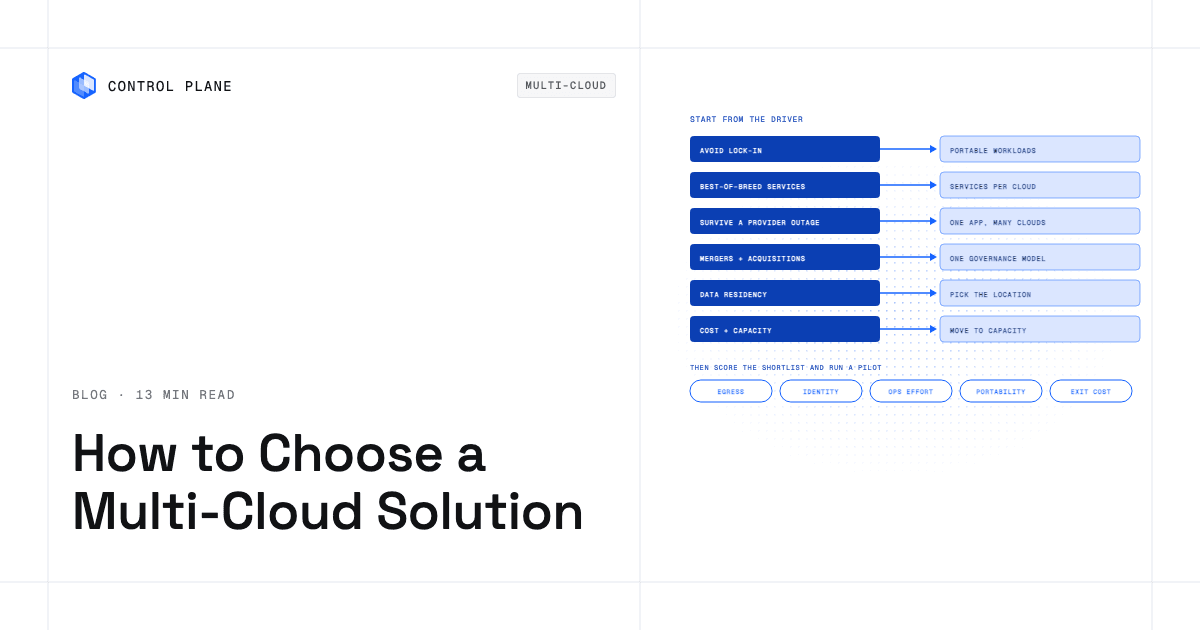
Choose a multi-cloud solution by starting from the one business driver that justifies the complexity, because each driver leads to a different architecture and tool category. Then test the shortlist on egress cost, identity, operating effort, and a real pilot workload before committing.
Disclosure: Control Plane publishes this guide.
TL;DR
Choose a multi-cloud solution by matching your primary business driver to the architecture and tool category it implies, then scoring candidates on a weighted checklist and validating with a pilot.
- Six drivers shape multi-cloud decisions: avoiding lock-in, best-of-breed services, resilience, mergers and acquisitions, data residency, and cost optimization.
- The driver decides the architecture. Portable containers on infrastructure as code look nothing like an active-active failover topology, and the tools that support each are different.
- Six solution categories exist: infrastructure as code, FinOps, cloud management and governance, Kubernetes fleet management, observability, and platforms that run one workload definition across clouds.
- An evaluation scorecard of eight criteria, weighted by your driver, keeps the comparison objective.
- A pilot on two clouds is the only reliable way to validate egress costs, identity, failover, and operating effort before you commit.
- Control Plane fits the “platform that runs one workload definition across clouds” category, handling Day 2 operations, cross-cloud identity, and geo-routed failover from a single workload definition deployed to Control Plane’s Global Virtual Cloud (GVC), a named set of locations.
How do I choose the best multi-cloud solution for my business needs?
Start by naming the single business driver that makes multi-cloud worth the added complexity. Without a clear driver, multi-cloud introduces cost, integration burden, and operational overhead that can outweigh the benefits, especially for smaller teams.
Once the driver is clear, follow this process:
- Name the driver. Pick one: negotiating leverage, a cloud service you cannot get elsewhere, resilience, an inherited environment, a data-residency mandate, or cost and capacity optimization.
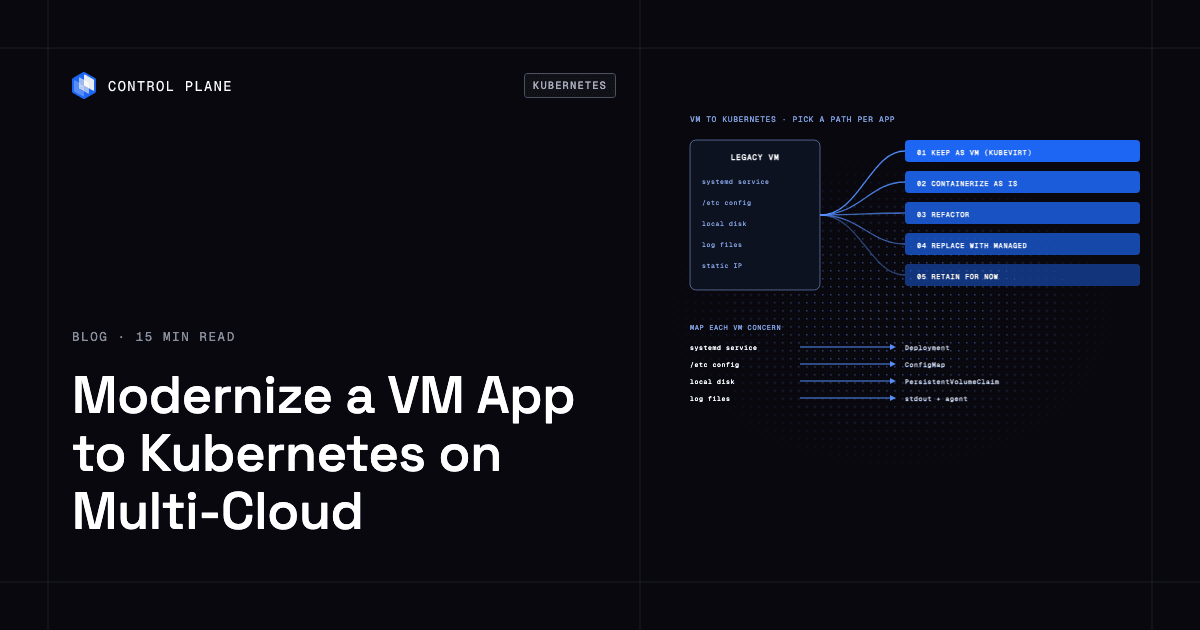
- Pick the architecture the driver implies. Portable containers are different from active-active replication, which is different from separate workloads connected by private networking.
- Shortlist the tool category. Infrastructure as code, FinOps, governance platforms, Kubernetes fleet management, observability, or a platform that runs one definition on several clouds.
- Score candidates. Use a weighted scorecard that emphasizes the criteria most relevant to your driver.
- Pilot. Deploy a real workload on two clouds and measure what matters: egress, identity, failover, and operating hours.
- Decide. Compare pilot results against the scorecard and pick the solution that scored highest on the criteria you weighted most.
- Review after six to twelve months. Drivers change. Re-evaluate whether your architecture and tooling still match the business need.
The 10 best multi-cloud management platforms in 2026 compares the platforms themselves once you know which category you need.
Which business driver should shape your multi-cloud choice?
Every multi-cloud architecture traces back to a business reason, and each reason implies its own architecture, tools, costs, and first pilot.
| Business driver | Architecture it implies | Tool category to shortlist | Main cost to plan for | First workload to pilot |
|---|---|---|---|---|
| Avoid lock-in and keep negotiating leverage | Portable workloads on containers and infrastructure as code | Terraform or OpenTofu, Kubernetes, or a platform that runs one definition on several clouds | Migration labor and abstraction maintenance | A stateless API service redeployed on a second cloud |
| Best-of-breed services | Each workload on the cloud with the strongest service, connected through private networking and workload identity | Cross-cloud identity and networking | Data transfer between clouds and per-service pricing | A workload that calls a managed AI or analytics service on a different cloud |
| Resilience against a provider outage | The same application active-active or active-passive across providers | A platform or architecture that fails over across clouds, global routing, replicated data | Replicated storage and always-on compute in two or more clouds | A customer-facing service that must survive losing one cloud region |
| Mergers and acquisitions | Operate inherited clouds under one governance and cost model | Cloud management and FinOps platforms | Tooling licenses and integration effort | Consolidated billing and policy enforcement across two inherited accounts |
| Data residency and sovereignty | Place each dataset in the jurisdiction that requires it | Location controls, key management, platforms that let you pick locations | Per-region compute and compliance auditing | A workload storing personal data in a required jurisdiction |
| Cost optimization and capacity | Move workloads to cheaper or available capacity | FinOps tools, portable runtimes | Egress fees when shifting workloads | A batch or dev workload moved to a lower-cost provider |
Avoid lock-in and keep negotiating leverage
Organizations that want the freedom to move workloads between providers, or simply the credible threat of doing so during contract negotiations, need portable workload definitions. Containers orchestrated by Kubernetes and provisioned through infrastructure as code give you that portability. The cost is maintaining the abstraction layer and resisting the pull of provider-specific managed services. Start by redeploying one stateless API on a second cloud to prove the portability claim is real. For a deeper look at the trade-offs, read how to avoid cloud vendor lock-in.
Best-of-breed services
Some teams adopt multi-cloud because one provider has the best machine-learning inference engine while another has the best data warehouse. This driver leads to an architecture where each workload runs on the cloud with the strongest service, and workloads communicate through private networking and federated identity. The main cost is data transfer between clouds. Pilot by connecting a workload on one cloud to a managed service on another without embedding long-lived credentials. The article on using services from multiple clouds in one application covers this pattern in detail.
Resilience against a provider outage
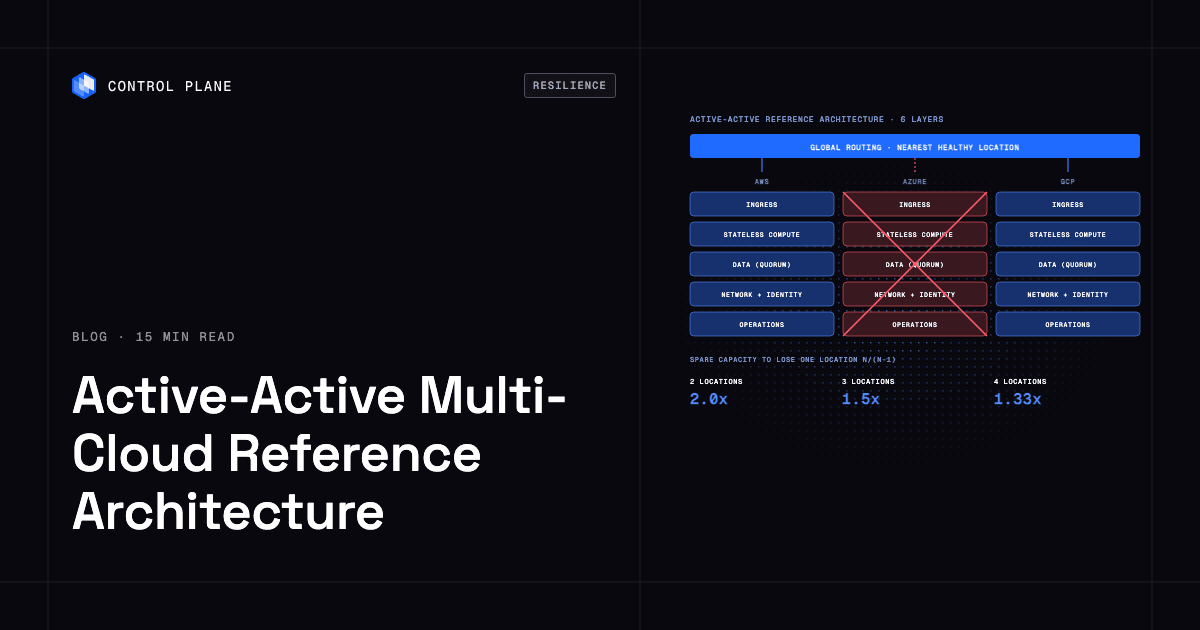
If your business cannot tolerate a full-provider outage, you need the same application running active-active or active-passive across at least two clouds. This is typically the most expensive multi-cloud architecture because it requires replicated data stores and always-on compute in every location. Global traffic routing must detect a failed location and redirect clients automatically. Pilot with a customer-facing service and simulate losing one provider to measure actual failover behavior. The comparison of the most resilient cloud architectures ranks the options against real outages.
Mergers and acquisitions
Companies that acquire other companies often inherit their cloud environments. The immediate need is visibility: who is spending what, which policies apply, and where the security gaps are. Cloud management and FinOps platforms solve this by unifying governance and cost reporting across accounts and providers. Pilot by onboarding two inherited accounts into a single management console and enforcing one tagging and access policy. Read more about how to consolidate multiple clouds onto one platform.
Data residency and sovereignty
Regulated industries often must store certain data in specific countries or regions. Multi-cloud lets you pick the provider and region that satisfies each jurisdiction’s requirements. The tool category here includes location controls, customer-managed encryption keys, and platforms that let you declare where a workload runs. Pilot by deploying a workload that stores personal data in a required jurisdiction and verifying that no data leaves the boundary.
Cost optimization and capacity
Some organizations use a second cloud purely because it offers cheaper compute for certain workloads, or because their primary provider runs out of capacity in a region. FinOps tools and portable runtimes make this feasible. Pilot by moving a batch or development workload to a lower-cost provider and comparing the total bill, including egress. The best cloud cost optimization tools covers the FinOps options.
What kinds of multi-cloud solutions are there?
Multi-cloud solutions fall into six categories. Each solves a specific problem and leaves other problems to different tools. Choosing the right category depends on the business driver you identified above.
| Category | What it solves | What it does not solve | Examples | Best fit |
|---|---|---|---|---|
| Infrastructure as code | Consistent, repeatable provisioning across clouds from version-controlled definitions | Runtime operations, cost visibility, workload identity, or failover automation | Terraform, OpenTofu, Pulumi | Teams that want portable provisioning and already handle operations separately |
| FinOps and cost visibility | Unified cost reporting, anomaly detection, and optimization recommendations across cloud accounts | Provisioning, security policy, workload orchestration, or failover | CloudZero, Vantage, Apptio Cloudability, nOps | Finance and engineering teams managing spend across two or more providers |
| Cloud management and governance platforms | Centralized policy enforcement, catalog-based provisioning, and multi-cloud inventory | Deep workload orchestration, application-level failover, or workload identity across clouds | Flexera One, CloudBolt, HPE Morpheus Enterprise | Enterprises governing many accounts and teams across providers |
| Kubernetes fleet and multi-cluster management | Consistent Kubernetes operations, policy, and observability across clusters on different clouds | Cross-cloud traffic routing, cloud-service identity federation, or automated cross-cloud failover | Red Hat OpenShift, SUSE Rancher Prime, GKE fleet management, Azure Arc | Teams already standardized on Kubernetes who need fleet-wide consistency |
| Observability | Unified metrics, logs, and traces across clouds and services | Provisioning, cost management, identity, or workload orchestration | Datadog, Dynatrace, Grafana with OpenTelemetry | Any multi-cloud environment that needs correlated telemetry |
| Platforms that run one workload definition across clouds | Deploy once, run active-active across clouds with built-in geo-routing, workload identity, and Day 2 operations | FinOps for your existing cloud accounts; workforce identity (uses your SSO provider for sign-in) | Control Plane | Teams whose driver is resilience, portability, best-of-breed services, or data residency and who want one workload definition across providers |
Every category has limits. Infrastructure as code does not operate your workloads after provisioning. FinOps tools do not deploy anything. Governance platforms do not orchestrate application failover. Observability platforms detect and alert, and can trigger runbooks, but do not deploy or fail over workloads across clouds. Kubernetes fleet managers keep clusters consistent but do not route traffic or fail over between clouds. Platforms that run workloads across clouds do not manage spend in your existing cloud accounts or replace your workforce identity provider.
How do you evaluate multi-cloud solutions?
Use a scorecard with eight criteria. Weight each criterion according to the business driver you identified in the first step.
| Criterion | What to test | Red flag |
|---|---|---|
| Egress and data transfer cost | Measure actual egress charges for your traffic patterns between clouds | Vendor cannot provide a clear egress pricing model or hides cross-region fees |
| Identity across clouds (people and workloads) | Verify that workloads can authenticate to services on each cloud without long-lived keys, and that people sign in through your existing identity provider | Requires separate credential stores per cloud or embeds static secrets |
| Operating effort | Determine who patches, upgrades, and is on call for the platform and the workloads it runs | You own all Day 2 operations with no automation or managed option |
| Portability of the workload definition | Check whether the same definition deploys to multiple clouds without rewriting | Definitions are tightly coupled to one provider’s APIs or proprietary formats |
| Resilience | Test what happens when one provider or region fails, including failover time and data consistency | Failover is manual, undocumented, or untested |
| Data placement and residency | Confirm you can control where data is stored and processed at the jurisdiction level | No location controls or unclear data-flow documentation |
| Skills the team needs | Assess whether your engineers can operate the solution or need new hires and training | Solution requires deep expertise in a stack your team does not know |
| Exit cost and contract terms | Review what it takes to leave the solution, including data export, contract minimums, and migration effort | Long lock-in contracts, proprietary data formats, or no documented export path |
Weight each criterion from 1 to 3 by driver. If your driver is resilience, the resilience and identity rows should carry the most weight. If your driver is mergers and acquisitions, operating effort and exit cost matter more. A simple 1-to-5 scoring scale across all eight criteria, multiplied by the weight, produces a ranked shortlist you can defend to stakeholders.
What should a multi-cloud pilot prove?
A pilot validates assumptions before you commit budget. Check each item with a real workload on two clouds.
- Deploy the same workload on two clouds from one definition or pipeline and confirm it works identically in both.
- Measure egress charges on real traffic patterns and compare them with the pricing calculator estimate.
- Grant the workload access to a managed service on each cloud (such as a database or object store) without embedding long-lived keys.
- Simulate losing one cloud provider or region and measure how long failover takes and whether clients experience errors.
- Log the operating hours the pilot consumes and compare them with your current baseline, including deployment, monitoring, patching, and incident response.
- Check that the actual bill matches the cost model you built during evaluation, including data transfer, storage, and any platform fees.
If any of these checks fails, either the solution is wrong for your driver or your architecture needs adjustment before you scale.
When is multi-cloud the wrong choice?
Multi-cloud is not always the right answer. Adopting it without a clear driver adds cost, complexity, and operational burden that a single-cloud strategy avoids.
One cloud meets every requirement and the team is small. If your workloads fit within one provider’s service portfolio, your compliance needs are covered, and your team is small, the overhead of a second cloud is hard to justify. Focus on portable design patterns, such as containers and infrastructure as code, so you can move later if the driver changes.
The only driver is a vague fear of lock-in with no exit plan. Avoiding lock-in is a valid driver, but only if you actually invest in portability. Running on two clouds with provider-specific services on each doubles your lock-in. Read managed services vs. portability for a framework on making this trade-off deliberately.
A regulated workload where one provider’s compliance coverage is sufficient. If a single cloud provider holds every certification your regulator requires and your data-residency needs are met by that provider’s regions, adding a second cloud introduces audit surface without adding compliance value.
In all these cases, the better move is to design for portability on one cloud: use containers, infrastructure as code, and open standards so that a future migration is feasible without running two clouds today.
How Control Plane fits
Control Plane is the unbreakable platform for running production workloads. It fits the “platform that runs one workload definition across clouds” category in the solution-category comparison.
A workload deployed to Control Plane’s Global Virtual Cloud (GVC), a named set of locations, runs in every location of that GVC from one workload definition. Locations can be Control Plane-managed regions on AWS, GCP, Azure, and Oracle Cloud Infrastructure (OCI), Kubernetes clusters you already run joined through Control Plane’s Bring Your Own Kubernetes (BYOK), or your own servers joined through Control Plane’s Managed Kubernetes (MK8s), including on premises.
Every workload gets its own canonical endpoint that DNS geo-routes clients to the nearest location where that workload passes its readiness checks. If a location stops passing readiness checks, DNS automatically routes new lookups to healthy locations. During the October 20, 2025 AWS us-east-1 outage, Control Plane customers with us-east-1 in their GVC had workloads active and running in healthy locations within 10 seconds, with no customer downtime, according to Control Plane’s internal incident telemetry.
Control Plane’s Universal Cloud Identity lets workloads reach AWS, GCP, and Azure services through one identity, with no long-lived cloud keys in your code. Workload-to-workload traffic uses mTLS with a unique client certificate per workload, behind a deny-by-default internal firewall, and workloads in different clouds reach each other without VPC peering or VPN tunnels you manage.
Control Plane handles Day 2 operations for you, including autoscaling, built-in observability, and security. The 99.999% availability SLA applies to workloads running at least two replicas in at least two locations. Control Plane is PCI DSS Level 1, SOC 2 Type II, HIPAA, and GDPR compliant.
You pay for the CPU and memory a workload reserves, plus usage such as egress and storage. A Control Plane billing account pays for one or more orgs on a single invoice. Control Plane customers typically see 30 to 50 percent lower compute costs compared with running directly on AWS, GCP, or Azure.
Control Plane is not a FinOps tool for your existing cloud accounts. Services you keep directly on a cloud, such as managed databases and storage, stay on that cloud’s bill. Sign-in runs through your existing SSO provider.
If your business driver is resilience, portability, best-of-breed cloud services, or data residency, and you want a single workload definition that runs across clouds with built-in identity and failover, Control Plane is worth evaluating in your pilot.
FAQ
These are the questions teams ask most often when evaluating multi-cloud solutions.
How do I choose the best multi-cloud solution for my business needs?
Start by identifying the one business driver that justifies multi-cloud for your organization: lock-in avoidance, best-of-breed services, resilience, M&A, data residency, or cost optimization. That driver determines the architecture and tool category you need. Then score candidates on egress cost, identity, operating effort, portability, resilience, data placement, skills, and exit cost, weighted by your driver. Run a pilot with a real workload on two clouds before committing.
What is a multi-cloud solution?
A multi-cloud solution is any tool, platform, or architectural approach that helps an organization run workloads across two or more cloud providers. Solutions range from infrastructure-as-code tools like Terraform to full platforms like Control Plane that deploy and operate workloads across AWS, GCP, Azure, and Oracle Cloud Infrastructure (OCI) from a single definition.
Is multi-cloud worth it for a small team?
Only when a specific driver requires it, such as a data-residency mandate or a critical need for resilience. A platform that handles Day 2 operations makes it easier for a small team to run. If the driver is vague or the team would need to hire to operate a second cloud, staying on one cloud with portable design patterns is usually the better choice.
What are the hidden costs of multi-cloud?
The most commonly underestimated costs are data egress between clouds, duplicate tooling licenses, the engineering time to maintain consistent security and identity across providers, and the skills investment to train or hire engineers who can operate multiple platforms. Always measure egress on real traffic during a pilot.
Do I need Kubernetes for multi-cloud?
No. Kubernetes is the most common portable runtime for multi-cloud, but two other paths exist. Infrastructure-as-code tools provide provisioning portability, and platforms like Control Plane abstract the runtime so you deploy workloads without managing Kubernetes clusters directly. The right answer depends on your team’s skills and your driver.
What is the difference between multi-cloud and hybrid cloud?
Multi-cloud means using two or more public cloud providers. Hybrid cloud means integrating a private cloud or on-premises infrastructure with one or more public clouds. The two strategies can overlap. An organization running workloads on AWS and GCP is multi-cloud. An organization running workloads on premises and on AWS is hybrid. An organization doing both is hybrid multi-cloud.
How do I avoid vendor lock-in with multi-cloud?
Use portable workload definitions, such as containers and infrastructure as code, and avoid building on provider-specific services unless the business value of that service outweighs the switching cost. Federate identity across clouds so credentials are not provider-specific. Review exit costs and contract terms before signing. For a detailed framework, read how to avoid cloud vendor lock-in.
What should I test in a multi-cloud proof of concept?
Deploy the same workload on two clouds, measure egress on real traffic, grant cross-cloud service access without long-lived keys, simulate losing one provider, compare operating hours before and after, and verify that the bill matches your cost model. Any failure in these tests signals a gap in the solution or your architecture.
How does Control Plane fit a multi-cloud strategy?
Control Plane is a platform that runs one workload definition across clouds. One workload definition runs active-active in every location of a GVC, with DNS geo-routing to locations that pass readiness checks, Universal Cloud Identity for accessing AWS, GCP, and Azure services, mTLS between workloads, and automated failover. It fits teams whose driver is resilience, portability, best-of-breed services, or data residency and who want Day 2 operations handled for them.
To see one workload definition run across clouds, talk to the Control Plane team or sign up free.