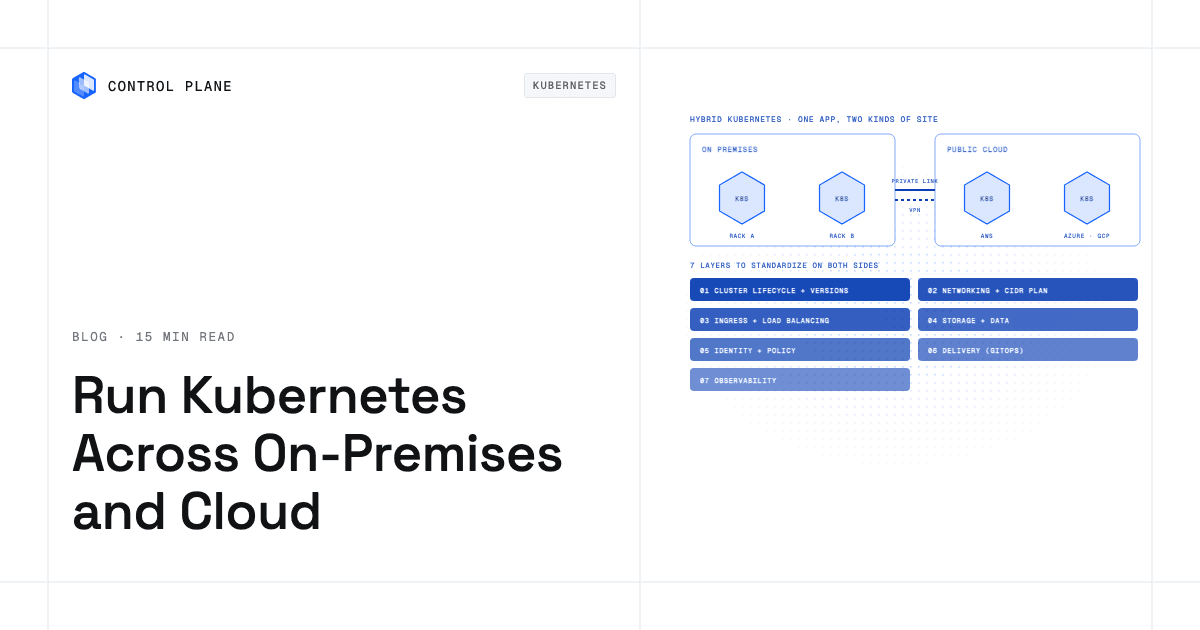
You run Kubernetes across on-premises and public cloud by choosing one of four architecture models and then standardizing seven layers across every cluster. The four models are: one distribution everywhere, a hyperscaler extension, a multi-cluster manager over mixed clusters, or a platform that deploys one workload definition to clusters in both places. The seven layers are cluster lifecycle, networking, ingress and load balancing, storage and data, identity and policy, delivery, and observability. Each layer carries an on-premises gotcha, from the absence of a managed load balancer to IP range collisions to storage that cannot be stretched over a WAN.
Disclosure: Control Plane publishes this guide.
TL;DR
- Four architecture models. One distribution everywhere (OpenShift, RKE2). Hyperscaler extension (Azure Arc, Google Distributed Cloud, EKS Anywhere, EKS Hybrid Nodes). Multi-cluster manager (Rancher, Advanced Cluster Management). Platform that deploys one workload definition to clusters in both places (Control Plane).
- Seven layers to standardize. Cluster lifecycle and versions. Networking. Ingress and load balancing. Storage and data. Identity and policy. Delivery. Observability.
- Most common on-premises gotchas. No cloud load balancer, so you need MetalLB or kube-vip. Overlapping pod and service CIDRs with the corporate network. Storage classes that do not match the cloud side. Version skew after a missed upgrade window.
- Never stretch synchronous block storage across a WAN. Replicate at the application or database layer instead.
- Where Control Plane fits. Control Plane deploys one workload definition to Control Plane’s Global Virtual Cloud (GVC), a named set of locations, that spans Control Plane-managed cloud regions, your own Kubernetes clusters joined through Control Plane’s Bring Your Own Kubernetes (BYOK), and your own servers joined through Control Plane’s Managed Kubernetes (MK8s), including on premises. Every workload gets a canonical endpoint with DNS geo-routing to the nearest healthy location passing its readiness checks.
How do I run Kubernetes across on premises and public cloud?
You need a plan that covers architecture selection, network design, cluster provisioning, connectivity, workload delivery, and failure testing, in this order.
- Choose an architecture model. Decide whether you want a single Kubernetes distribution on every site, a hyperscaler extension that brings a cloud provider’s managed Kubernetes to your data center, a multi-cluster manager that federates heterogeneous clusters, or a platform that deploys one workload definition to clusters in both places.
- Plan networks and IPs. Assign non-overlapping pod CIDRs and service CIDRs per cluster. Map out which private links (AWS Direct Connect, Azure ExpressRoute, Google Cloud Interconnect) or IPsec VPN tunnels connect each site.
- Build clusters from code. Use Cluster API, Terraform, OpenTofu, or your chosen platform’s provisioning tooling so every cluster is reproducible. Pin Kubernetes versions and enforce the upstream version skew policy.
- Connect sites. Establish private links or encrypted tunnels. Set up DNS so services in one site can resolve services in the other.
- Standardize ingress and storage. On premises, deploy MetalLB or kube-vip for LoadBalancer-type Services. Define storage classes per site using CSI drivers appropriate to each environment.
- Deploy through GitOps. Use Argo CD or Flux with a single repository and per-site overlays. Mirror your container image registry on premises so image pulls do not depend on internet availability during deployment.
- Unify identity, policy, and observability. Configure one OIDC identity provider for human access. Apply OPA Gatekeeper or Kyverno policies identically across clusters. Ship logs, metrics, and traces to a location that survives a single-site outage.
- Test a site failure. Simulate link loss, load balancer failure, certificate expiry, and registry unavailability before you declare the environment production-ready.
Which hybrid Kubernetes architecture model should you choose?
The right model depends on how much Kubernetes operations you want to own, which clouds you use, and whether you need workloads to move between sites without rewriting deployment manifests.
| Model | Examples | Where the Kubernetes control plane runs | What you operate on premises | How apps are deployed to both sides | Best fit | Main trade-off |
|---|---|---|---|---|---|---|
| One distribution everywhere | Red Hat OpenShift; SUSE Rancher with RKE2 | On premises and in the cloud, one control plane per cluster | Full Kubernetes control plane, worker nodes, storage, networking | Same Helm charts or operators applied to each cluster, often via GitOps | Teams that want full control and a single support contract | You run and upgrade every control plane yourself, in every site |
| Hyperscaler extension | Azure Arc-enabled Kubernetes with AKS on Azure Local; Google Distributed Cloud (formerly Anthos) with GKE fleets; Amazon EKS Anywhere; Amazon EKS Hybrid Nodes; AWS Outposts | EKS Anywhere: on-premises control plane. EKS Hybrid Nodes: control plane in AWS, worker nodes on premises. Google Distributed Cloud: control plane on premises in every mode, managed from Google Cloud except air-gapped. Azure Arc: existing cluster control plane stays where it is; AKS on Azure Local runs a local control plane managed from Azure. AWS Outposts: control plane in the AWS Region (extended clusters) or on the Outpost itself (local clusters). | Varies by product. EKS Anywhere: full cluster. EKS Hybrid Nodes: worker nodes only. Google Distributed Cloud: full cluster on your own servers (software-only), on hardware Google maintains remotely (connected), or on hardware with no Google Cloud connection (air-gapped). Azure Local: Microsoft-validated hardware stack. Outposts: AWS-owned and maintained rack. | Cloud-native tooling (kubectl, Flux, Arc GitOps, Config Sync) | Teams already invested in one hyperscaler who want a consistent managed experience on premises | Ties networking, identity, and billing to one cloud provider, to a degree that varies by product |
| Multi-cluster manager over mixed clusters | Rancher managing EKS, AKS, GKE, and on-premises clusters; Open Cluster Management; Red Hat Advanced Cluster Management | Each cluster keeps its own control plane; the manager runs separately | On-premises clusters (control plane and workers), plus the manager if self-hosted | Manager pushes manifests, policies, or Helm releases to registered clusters | Teams with existing heterogeneous clusters that need unified visibility and policy | The manager is another system to operate, and it does not abstract away per-cluster differences |
| Platform that deploys one workload definition to clusters in both places | Control Plane | Control Plane-managed regions: Control Plane operates them; you run no Kubernetes control plane. MK8s locations: Control Plane operates the Kubernetes control plane, your servers run the worker nodes. BYOK: your existing cluster’s control plane stays where it is. | MK8s: physical servers and local networking. BYOK: the full cluster. In both cases, hardware, physical security, network links, and stored data are your responsibility. | One workload definition deployed to a GVC; workloads run in every location of that GVC. | Teams that want production workloads across clouds and on premises without having to operate Kubernetes themselves | Control Plane is not a Kubernetes distribution you install and does not replace OpenShift or Rancher for teams that want to run Kubernetes themselves |
This table reflects each vendor’s public documentation as of November 2026.
One distribution everywhere
Running OpenShift or RKE2 in every site gives you a single set of APIs, a single support vendor, and the freedom to place clusters anywhere you have hardware or cloud accounts. The trade-off is that you own every control plane upgrade, every etcd backup, and every certificate rotation in every site. On-premises clusters do not get automatic node replacement the way cloud-managed clusters do. If your platform team is small, the operational load of maintaining identical distributions across five or ten sites can consume most of their capacity.
Hyperscaler extension
Azure Arc, Google Distributed Cloud, EKS Anywhere, EKS Hybrid Nodes, and AWS Outposts each bring a hyperscaler’s managed Kubernetes experience closer to your data center, but they differ in where the control plane runs and what hardware you supply. EKS Hybrid Nodes keeps the control plane in AWS and attaches your on-premises servers as worker nodes, which means a WAN outage can prevent new pod scheduling. EKS Anywhere runs a full on-premises control plane but is a separate product with its own lifecycle. Google Distributed Cloud runs the whole cluster, control plane included, on premises in all of its forms: software-only on VMware or bare metal, connected hardware that Google maintains remotely, and air-gapped hardware fully isolated from Google Cloud. Azure Arc projects existing clusters into Azure’s management plane without moving the control plane. The trade-off is cloud lock-in: your networking, identity, billing, and operational tooling become tightly coupled to one provider.
Multi-cluster manager over mixed clusters
Rancher, Open Cluster Management, and Red Hat Advanced Cluster Management let you register clusters from any provider and apply policies, RBAC, and application bundles from a central interface. This model works well when you already have clusters in multiple clouds and on premises and need one place to manage them. The trade-off is that the manager does not erase the differences between clusters. You still need to handle per-cluster storage classes, CNI plugins, and ingress configurations. The manager itself is another component to operate, upgrade, and secure.
Platform that deploys one workload definition to clusters in both places
You define a workload once and assign it to a GVC, which is a named set of locations. Those locations can be Control Plane-managed regions on AWS, GCP, Azure, and Oracle Cloud Infrastructure (OCI), Kubernetes clusters joined through BYOK, or your own servers joined through MK8s. The workload runs in every location of that GVC. DNS geo-routing on each workload’s canonical endpoint sends clients to the closest location where the workload passes readiness checks. The trade-off is that Control Plane is not a Kubernetes distribution you install. It does not replace OpenShift or Rancher for teams that want to run Kubernetes themselves.
What do you need to standardize across on-premises and cloud clusters?
Standardize the application-facing contracts, policies, and workflows so they behave the same in every cluster, even where the infrastructure differs.
| Layer | What to standardize | On-premises gotcha | Cloud side | Typical tools |
|---|---|---|---|---|
| Cluster lifecycle and versions | Kubernetes version, upgrade cadence, version skew policy between control plane and kubelets | No managed upgrade button; missed upgrades push clusters out of support and leave manifests on APIs that the next release removes | Managed upgrades (EKS, AKS, GKE) with maintenance windows | Cluster API, Terraform, OpenTofu |
| Networking | Non-overlapping pod and service CIDRs; private links or VPN; DNS resolution between sites | Pod CIDRs can collide with corporate RFC 1918 ranges already in use on premises | Cloud VPCs with provider-assigned ranges; AWS Direct Connect, Azure ExpressRoute, Google Cloud Interconnect | Calico, Cilium, IPsec VPN, private interconnects |
| Ingress and load balancing | Consistent LoadBalancer-type Service behavior; global DNS or GSLB in front of all sites | No cloud load balancer on premises; you must run MetalLB, kube-vip, or use a hardware load balancer | Cloud load balancers provisioned automatically by the cloud controller manager | MetalLB, kube-vip, F5, global DNS |
| Storage and data | CSI drivers per site; backup and restore procedures; replication strategy | On-premises storage requires Rook-Ceph, vendor arrays, or local disks; never stretch synchronous block storage over a WAN | EBS, Persistent Disk, Azure Disk, managed databases | Rook-Ceph, vendor CSI drivers, Velero |
| Identity and policy | One OIDC identity provider for people; workload identity per cloud; admission policies applied everywhere | On-premises clusters lack native workload identity federation; you must configure OIDC manually | Cloud IAM with workload identity (IRSA or EKS Pod Identity, Workload Identity Federation for GKE, Microsoft Entra Workload ID) | OPA Gatekeeper, Kyverno, Dex, Keycloak |
| Delivery | GitOps with one repo and per-site overlays; image registry reachable from both sides | Registry pulls from on premises may fail if the internet link is down; mirror images locally | Cloud-hosted registries with cross-region replication | Argo CD, Flux, Harbor (on-premises mirror) |
| Observability | Common metric, log, and trace formats; cluster and environment labels on every signal | If logs are stored only on premises, a site outage takes its own logs with it; ship logs off-site | Cloud-native monitoring (CloudWatch, Cloud Monitoring, Azure Monitor) | OpenTelemetry, Prometheus, Grafana, Loki |
How do you handle networking and traffic between on-premises and cloud clusters?
Private links versus VPN
Dedicated private links such as AWS Direct Connect, Azure ExpressRoute, and Google Cloud Interconnect provide predictable bandwidth and latency between your data center and a cloud region. They cost more than IPsec VPN tunnels but eliminate the variability of internet-based connections. For workloads that tolerate occasional jitter, an encrypted VPN tunnel over the public internet is a reasonable starting point. Many teams start with VPN and upgrade to a private link once traffic volume or latency sensitivity justifies the cost. The guide to cross-cloud private networking for VPCs and VNets compares the options in more depth.
CIDR planning
The most common networking failure in hybrid Kubernetes is overlapping IP ranges. On-premises corporate networks often use 10.0.0.0/8 liberally, and Flannel’s default pod range (10.244.0.0/16) and kubeadm’s default service range (10.96.0.0/12) both fall inside it. Assign each cluster a unique pod CIDR and service CIDR before provisioning. Document every allocation in a central IPAM registry.
Global DNS routing for user traffic
For traffic from end users, place a global DNS or GSLB layer in front of all sites. DNS health checks detect when a site’s ingress is unhealthy and stop routing traffic to it. This layer works with any ingress controller and does not require a service mesh. The guide to routing users to the nearest healthy region compares DNS-based and anycast options.
How do you handle storage and data in hybrid Kubernetes?
Per-site storage
Each site should have its own storage classes backed by the infrastructure available there. On premises, that means Rook-Ceph, a vendor storage array with a CSI driver, or local NVMe disks for latency-sensitive workloads. In the cloud, use the provider’s managed block storage (EBS, Persistent Disk, Azure Disk). Define storage classes with the same name and performance tier on both sides so that workload manifests do not need per-site changes.
Replication at the application or database layer
Synchronous block-level replication over a WAN introduces latency into every write and creates a single failure domain that spans both sites. Do not stretch synchronous storage across a WAN. Instead, replicate at the application or database layer. PostgreSQL streaming replication, CockroachDB multi-region, and MongoDB replica sets all handle cross-site replication at the database layer, each with its own consistency and failover rules. Object stores like MinIO can replicate buckets between sites asynchronously.
Backups
Velero backs up Kubernetes resources and persistent volume snapshots. Run Velero in each cluster and store backup artifacts in a location that survives the loss of that cluster. For on-premises clusters, that means shipping backups to a cloud object store or a separate data center.
Which workloads should run on premises, in the cloud, or both?
| Workload trait | Run on premises when | Run in public cloud when | Run in both when |
|---|---|---|---|
| Data residency or sovereignty | Regulations require data to stay in a specific facility or jurisdiction you control | The cloud region is in the required jurisdiction and the provider meets your compliance framework | Different data subjects reside in different jurisdictions served by different sites |
| Latency to on-premises systems (factory, trading, mainframe data) | The workload must respond in single-digit milliseconds to on-premises data sources | The data source has already been migrated to the cloud or latency is not a constraint | A local copy processes real-time data on premises while a cloud copy handles analytics or reporting |
| Spiky or seasonal demand (cloud bursting) | Demand is steady and fits within existing on-premises capacity | Demand is unpredictable or seasonal and would require over-provisioning on premises | A base load runs on premises and overflow runs in the cloud |
| GPU or specialized hardware | The required hardware is already installed on premises or is unavailable in the target cloud region | Cloud GPU instances are available on demand without long-term commitment | Training runs in the cloud on large GPU pools while inference runs on premises near the data |
| Steady base load with paid-off hardware | Hardware is already purchased and has remaining useful life | The workload is new and does not justify a hardware purchase | The base runs on existing hardware while new capacity is added in the cloud |
| Customer-facing services that need regional failover | All customers are near the on-premises site and failover is handled by a secondary on-premises site | Customers are globally distributed and need low-latency access from multiple regions | Active-active deployment across on-premises and cloud sites provides failover and geographic reach |
What breaks first in hybrid Kubernetes, and how do you test it?
Hybrid environments have more failure modes than single-cloud deployments. Test each of these before production.
- Link loss between sites. Disconnect the VPN or private link in a maintenance window. Verify that each site continues serving traffic independently, that each cluster keeps running its last synced state and GitOps catches up when the link returns, and that database replication resumes without data loss.
- On-premises load balancer failure. Shut down MetalLB or kube-vip speakers on a subset of nodes. Confirm that the VIP moves to a healthy node in L2 mode, or that upstream routers withdraw the route in BGP mode, and that global DNS stops routing to the site if all speakers fail.
- Certificate expiry. Issue a short-lived test certificate and confirm that cert-manager or your CA integration renews it and that alerts fire if renewal fails. Check kubeadm control plane certificates too, which expire after one year unless renewed or rotated by an upgrade.
- Version skew after a missed upgrade. Intentionally skip an upgrade cycle on one cluster. Confirm that CI flags the version drift between clusters, that a scanner such as Pluto or kubent finds manifests using APIs removed in the next release, and that kubelets stay within the supported skew of the API server.
- Registry unreachable from on premises. Block outbound access to your container registry from the on-premises cluster. Confirm that the on-premises image mirror serves cached images and that new deployments that cannot pull an image fail with a clear error.
- DNS split-brain. Cut the link and confirm that global DNS health checks remove the unreachable site, and that internal split-horizon zones keep giving the same answer on both sides.
How Control Plane fits
Control Plane is the unbreakable platform for running production workloads. It runs serverless, standard, stateful, and cron workloads natively on AWS, GCP, Azure, and Oracle Cloud Infrastructure (OCI), VM workloads on locations joined through Control Plane’s Managed Kubernetes, and workloads on Kubernetes clusters you already run or your own machines, including on premises, active-active across regions and clouds. Control Plane-managed compute runs in AWS, GCP, Azure, and Oracle Cloud regions.
A workload deployed to a GVC runs in every location of that GVC from one workload definition. You do not maintain a separate deployment per site. Add a location to the GVC and the workload runs there too.
Control Plane’s Cloud Wormhole connects workloads to TCP or UDP endpoints in VPCs and other private networks, including on-premises data centers, by running a Control Plane agent inside the private network. Workload-to-workload traffic uses mTLS with a unique client certificate per workload, behind a deny-by-default internal firewall.
Control Plane’s Universal Cloud Identity lets workloads reach AWS, GCP, and Azure services through one identity, with no long-lived cloud keys in your code. Control Plane handles Day 2 operations for you, including autoscaling, built-in observability, and security. The 99.999% availability SLA applies to workloads running at least two replicas in at least two locations, and those locations can be on different providers.
Control Plane is PCI DSS Level 1, SOC 2 Type II, HIPAA, and GDPR compliant. The CLI, console, Terraform and Pulumi providers, and the Control Plane MCP server all work through the same Control Plane API.
The 9 best hybrid cloud platforms in 2026 compares the wider platform field, and the guide on how to deploy hybrid cloud covers the plan beyond Kubernetes. For teams that want the benefits of Kubernetes without building a platform team, Control Plane runs the platform while you choose where workloads run and where data resides. The guide on how to avoid cloud vendor lock-in covers portability across clouds.
FAQ
Short answers to common questions about hybrid Kubernetes.
How do I run Kubernetes across on premises and public cloud for hybrid cloud application deployment?
Choose one of four architecture models: one distribution everywhere, a hyperscaler extension, a multi-cluster manager over mixed clusters, or a platform like Control Plane that deploys one workload definition to locations in both places. Then standardize seven layers across every cluster: cluster lifecycle and versions, networking, ingress and load balancing, storage and data, identity and policy, delivery, and observability. Connect sites with private links or VPN, deploy workloads through GitOps, and test site failure before going to production.
What is hybrid cloud Kubernetes?
Hybrid cloud Kubernetes is the practice of running Kubernetes clusters in both on-premises data centers and public cloud environments, connected and managed as a unified system. The goal is to place workloads where they make the most sense for latency, compliance, cost, or resilience while giving developers a consistent deployment experience.
Can one Kubernetes cluster span on premises and the cloud?
Stretched clusters are technically possible, and products like EKS Hybrid Nodes attach on-premises worker nodes to a cloud-hosted control plane. However, etcd and the Kubernetes control plane are latency-sensitive. A WAN link with variable latency can cause leader election failures, slow API server responses, and scheduling delays. Most teams run a separate cluster per site and connect them at the application, DNS, or service mesh layer.
Do I need a service mesh for hybrid Kubernetes?
Not always. A service mesh like Istio, Linkerd, or Cilium Cluster Mesh is valuable when workloads in one cluster need to discover and call workloads in another cluster by service name with mutual authentication. If your cross-site traffic is limited to database replication, API gateway calls, or queue-based messaging, a service mesh adds operational complexity without proportional benefit.
How do I get a load balancer for Kubernetes on premises?
On premises, there is no cloud controller manager to provision a load balancer automatically. MetalLB assigns IP addresses from a pool you define and announces them via ARP (Layer 2) or BGP. kube-vip provides a virtual IP for the Kubernetes API server and can also handle LoadBalancer-type Services. Hardware load balancers from F5 or similar vendors work as well, integrated through their respective Kubernetes ingress controllers or CRDs.
What is the difference between Azure Arc, Google Distributed Cloud, and EKS Anywhere?
Azure Arc projects existing Kubernetes clusters into Azure’s management plane, enabling Azure Policy, GitOps, and monitoring on clusters running anywhere. Google Distributed Cloud (formerly Anthos) runs GKE-compatible clusters, control plane included, on premises, managed from Google Cloud or fully air-gapped. EKS Anywhere runs a full Kubernetes control plane on your hardware using EKS-compatible tooling, separate from the EKS Hybrid Nodes product, which keeps the control plane in AWS and runs only worker nodes on premises. Each locks you into its respective cloud’s identity, networking, and billing model to varying degrees.
Should I use Rancher or OpenShift for hybrid Kubernetes?
Choose OpenShift for a curated, integrated platform; choose Rancher to manage mixed distributions from one interface. OpenShift provides a tightly integrated platform with built-in CI/CD, a container registry, and enterprise support from Red Hat. Rancher is more flexible, managing clusters across multiple distributions and providers from a single interface. OpenShift requires more resources per cluster and has a more opinionated upgrade path. Rancher gives you more freedom to mix distributions but leaves more integration work to your team.
How do I keep on-premises and cloud clusters in sync?
Use GitOps. Store all cluster configuration, policies, and application manifests in a Git repository. Argo CD or Flux continuously reconciles the desired state in Git with the actual state in each cluster. Per-site differences are handled through Kustomize overlays or Helm value files. Flux corrects drift on its next reconciliation by default; Argo CD corrects it when self-heal is enabled.
How does Control Plane run workloads on premises and in the cloud?
You define a workload and assign it to a GVC containing the locations where it should run. Locations can be Control Plane-managed cloud regions on AWS, GCP, Azure, or OCI, Kubernetes clusters you already run joined through BYOK, or your own servers joined through MK8s. With MK8s, Control Plane operates the Kubernetes control plane and your servers run the worker nodes. The workload runs in every location of that GVC from one workload definition, with DNS geo-routing directing traffic to the nearest location passing its readiness checks. On BYOK and MK8s locations, your hardware, physical security, network links, and the data you store remain your responsibility.
To run production workloads across on-premises and cloud without having to operate Kubernetes yourself, talk to the Control Plane team or sign up free.