
For long-running services and APIs, Kubernetes through a managed service such as EKS, GKE, or AKS is the best cluster manager for scaling because it autoscales pods and nodes on CPU, memory, and custom metrics such as request rate. For batch HPC and large AI training, use Slurm. For distributed Python and AI pipelines, use Ray. For mixed containers and plain binaries with less operational work, use Nomad. The right choice depends on what you are scaling, what triggers that scaling, and how machines get added underneath. This guide compares the major cluster managers on those points, matches them to workload types, and lists the practical limits that stop scaling before the scheduler does.
Disclosure: Control Plane publishes this guide.
TL;DR
Kubernetes is the best cluster manager for scaling cloud-native services and APIs. For batch, HPC, and Python AI work, the best choice changes with the workload.
- Kubernetes (managed EKS, GKE, or AKS; OpenShift or Rancher for self-managed fleets) is the default for web services, APIs, and event-driven workers.
- Slurm is the standard for HPC, tightly coupled simulations, and large-scale GPU training on fixed or cloud-bursting clusters.
- Ray is purpose-built for distributed Python AI pipelines, hyperparameter tuning, and batch inference, and it runs on Kubernetes, Slurm, or cloud VMs.
- Nomad handles mixed containers, binaries, and legacy apps with a simpler operational model.
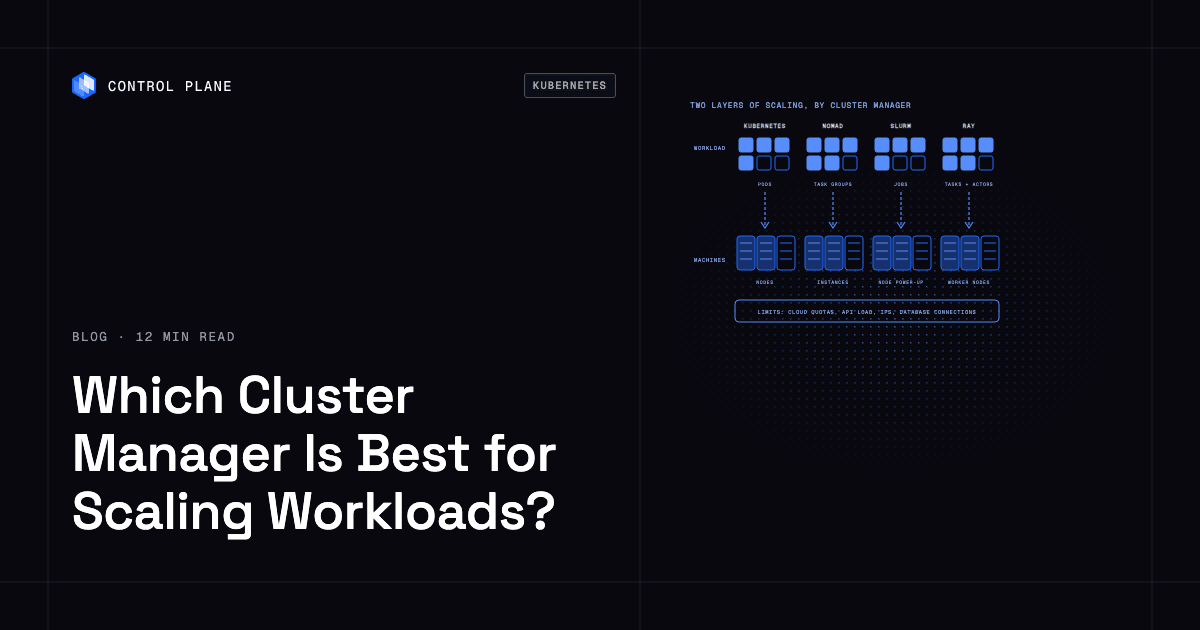
- Scaling has two layers, workload scaling (pods, tasks, jobs, actors) and machine scaling (nodes, instances), and each layer needs its own cap.
- Cloud quotas, API server load, IP exhaustion, and downstream systems usually stop scaling before the scheduler’s documented ceiling.
- Control Plane runs services, APIs, workers, stateful workloads, and cron jobs with workload autoscaling built in, on one cloud, many clouds, or your own infrastructure, and teams never have to operate a Kubernetes cluster.
Which cluster manager is best for scaling workloads?
Each cluster manager scales a different unit on different signals. A Kubernetes Horizontal Pod Autoscaler (HPA) watches CPU, memory, or custom metrics and adds pod replicas, while a Cluster Autoscaler or Karpenter provisions nodes to fit those pods. Slurm queues jobs and powers on or cloud-bursts nodes through its ResumeProgram to fit them, and it does not grow a job once it starts. Ray scales tasks and actors through its own autoscaler or KubeRay, and Nomad scales task groups through the Nomad Autoscaler with APM plugins. Docker Swarm lets you set replica counts manually but has no built-in autoscaler.
The systems were designed for different scaling patterns. Kubernetes assumes elastic infrastructure. Slurm assumes a fixed or semi-fixed cluster with queued batch work. Ray assumes a Python-native programming model where the framework manages distribution. Nomad assumes you want broad workload support with minimal operational overhead.
Scale figures come from each project’s or provider’s official documentation, checked in November 2026.
| Cluster manager | Unit that scales | What triggers scaling | How it adds machines | Documented scale limits | Best fit |
|---|---|---|---|---|---|
| Kubernetes (upstream) | Pod replicas (HPA, KEDA); pod CPU and memory requests (VPA) | CPU, memory, custom metrics, external metrics, event sources | Cluster Autoscaler or Karpenter provisions nodes from cloud provider | Designed for up to 5,000 nodes, 150,000 pods, and 110 pods per node | Long-running services, APIs, event-driven workers |
| GKE (managed Kubernetes) | Pods | Same as upstream plus GKE-specific metrics | GKE node auto-provisioning | Up to 65,000 nodes on GKE Standard, with extra requirements above 5,000 and 15,000 nodes; 5,000 on Autopilot | Services on Google Cloud |
| EKS (managed Kubernetes) | Pods | Same as upstream | Karpenter or Cluster Autoscaler with managed node groups | Up to 100,000 nodes per cluster with AWS account team support; adjustable default quotas of 30 managed node groups and 450 nodes per group | Services on AWS |
| AKS (managed Kubernetes) | Pods | Same as upstream | AKS cluster autoscaler | Up to 5,000 nodes per cluster and 1,000 per node pool | Services on Azure |
| HashiCorp Nomad | Task groups | Nomad Autoscaler with APM plugins (Prometheus, Datadog, others) | Cluster scaling target provisions cloud instances | Production clusters of more than 10,000 nodes; 2 million containers on 6,100 hosts in a 2020 benchmark | Mixed containers, binaries, batch |
| Docker Swarm | Service replicas | Manual (docker service scale); no built-in autoscaler | Manual node addition; no built-in machine scaling | No published scale limit | Small teams, simple deployments |
| Slurm | Jobs and job steps | Pending jobs allocated to powered-down or cloud nodes | ResumeProgram starts nodes on demand; SuspendProgram powers them down | Large-system guidance cites 1,966,080 tasks on 122,880 compute nodes; runs exascale systems such as Frontier | HPC, tightly coupled simulations, large AI training |
| IBM Spectrum LSF | Jobs | Job queue policies and resource demand | Resource Connector borrows cloud instances | No published scale limit | Enterprise HPC and AI training |
| Ray | Tasks and actors | Ray autoscaler acts on pending logical resource requests from tasks and actors | Ray Autoscaler requests nodes from cloud provider or KubeRay requests pods | Tested envelope of 2,000+ nodes, 40,000+ actors, and 10,000+ concurrent tasks | Distributed Python AI pipelines, hyperparameter tuning |
| Apache Spark on Kubernetes or YARN | Executors | Dynamic allocation on pending tasks and idle executors; on Kubernetes it needs shuffle tracking or decommissioning | On Kubernetes, the cluster autoscaler adds nodes; on YARN, NodeManagers must already exist | No fixed executor cap; bounded by the underlying cluster | Large-scale data processing, SQL analytics |
Fleet tools such as Rancher and OpenShift add multi-cluster management on top of Kubernetes; our Kubernetes management platforms roundup compares them.
Which cluster manager fits each workload type?
A web API absorbing traffic spikes and a training job that needs 256 GPUs at once need different schedulers.
| Workload | Best fit | Why | Watch out for |
|---|---|---|---|
| Web services and APIs | Kubernetes (managed) | HPA scales pods on CPU and memory, and on request rate or latency through a metrics adapter or KEDA; rolling updates keep services live during deploys | Requires cluster operations expertise or a managed service; networking complexity grows with cluster size |
| Event-driven and queue workers | Kubernetes with KEDA | KEDA scales pods from zero based on queue depth, stream lag, or custom triggers | Scaling from zero adds cold-start latency; monitoring queue-based triggers requires careful tuning |
| Batch and cron jobs | Kubernetes (Job and CronJob) or Slurm | Kubernetes handles cloud-native batch; Slurm handles large-scale batch with priority queues and preemption | Native gang scheduling is beta and off by default in recent Kubernetes releases; most teams use Kueue or Volcano for all-or-nothing scheduling |
| HPC and tightly coupled simulations | Slurm | All-or-nothing multi-node allocation, topology-aware placement, fine-grained GPU control, mature queue policies such as fair share and backfill | Slurm assumes HPC domain knowledge; cloud bursting adds complexity |
| Large AI model training on GPUs | Slurm | Exclusive node and GPU allocation through GRES and cgroups; topology-aware placement on the interconnect; native MPI launch through srun and PMIx | Requires dedicated or reserved GPU infrastructure for cost efficiency |
| Distributed Python data and AI pipelines | Ray (on Kubernetes, Slurm, or VMs) | Native Python API for tasks, actors, and libraries like Ray Train and Ray Tune; autoscales workers | Ray needs a host, such as KubeRay on Kubernetes, Slurm, or cloud VMs through the Ray cluster launcher; on KubeRay, configure the Kubernetes cluster autoscaler too |
| Mixed containers, binaries, and legacy apps | Nomad | Single scheduler handles Docker containers, raw binaries, Java apps, and system jobs | Smaller ecosystem than Kubernetes; fewer third-party integrations and operators |
| Small teams without Kubernetes skills | Docker Swarm or Nomad | Swarm is built into Docker; Nomad has a gentler learning curve than Kubernetes | Swarm has no autoscaling and no published scale limit; Nomad’s ecosystem is smaller |
Teams deciding whether they need Kubernetes at all can compare the trade-offs in our guide to Kubernetes alternatives.
How do workload scaling and machine scaling work together?
Workload scaling decides how many units of work run, and machine scaling decides how many machines run them.
The first layer is workload scaling. In Kubernetes, the Horizontal Pod Autoscaler adds pod replicas when CPU, memory, or a custom metric crosses a threshold. In Slurm, a new job enters the queue and waits for resources. In Ray, the application submits tasks and actors, and Ray Serve scales model replicas.
The second layer is machine scaling. When the workload layer requests more capacity than the cluster has, something needs to add machines. Kubernetes relies on Cluster Autoscaler or Karpenter to provision new nodes from the cloud provider. Slurm uses ResumeProgram to power on or provision nodes. Nomad’s cluster scaling target calls out to cloud APIs. Ray’s autoscaler can request new nodes directly or, through KubeRay, let Kubernetes handle it.
Both layers need caps. An HPA with maxReplicas set far above real demand, paired with a Cluster Autoscaler or Karpenter NodePool with no node or CPU limit, keeps adding nodes until a cloud quota stops it. A Slurm cluster without SuspendTime and SuspendProgram leaves idle GPU nodes running. Cap maxReplicas on the workload layer, and set a maximum node count, node group size, or NodePool limit on the machine layer.
The Kubernetes autoscaling tools guide covers HPA, VPA, KEDA, Cluster Autoscaler, and Karpenter in detail.
What limits scaling in practice?
The documented node and pod limits of your cluster manager are rarely the bottleneck. Practical scaling limits come from the infrastructure and systems around the scheduler.
| Limit | Where it shows up | How to raise it |
|---|---|---|
| Cloud quotas and instance availability | Cloud provider rejects instance launch requests; GPU instances unavailable in your region | Request quota increases in advance; use multiple regions or availability zones; reserve capacity |
| Kubernetes API server load | API server becomes slow or returns 429 errors under high object churn | Use a managed Kubernetes control plane (EKS, GKE, AKS) that scales the API server with load; reduce object churn and broad watches; split very large fleets across clusters |
| IP address exhaustion in the pod network | New pods stick in ContainerCreating with IP assignment errors because the subnet has no free addresses | Add larger subnets or secondary CIDR ranges (EKS custom networking, GKE additional Pod ranges); use an overlay CNI mode (Azure CNI Overlay, Cilium); move pods to IPv6 |
| Scheduler throughput | Pods or jobs wait in queue because the scheduler cannot evaluate placements fast enough | Lower percentageOfNodesToScore on self-managed Kubernetes control planes; limit costly inter-pod affinity rules; in Slurm, tune backfill settings; split very large fleets across clusters |
| Image pull time | Pods on new nodes take minutes to start because images are large | Use smaller base images, registry pull-through caches, pre-pulled images, or lazy loading (GKE image streaming, SOCI on AWS) |
| Database and downstream connection limits | Application scales but the database rejects new connections or the downstream API throttles | Keep maximum replicas times pool size below the database’s connection limit; use a pooler such as PgBouncer or RDS Proxy; add read replicas; add backpressure and circuit breakers |
| Cost guardrails (max node counts) | Platform team sets a maximum node count to control spend; autoscaler stops adding nodes | Review guardrails against actual demand; use per-namespace resource quotas for finer control |
How Control Plane fits
Control Plane is the unbreakable platform for running production workloads. It runs serverless, standard, stateful, and cron workloads natively on AWS, GCP, Azure, and Oracle Cloud Infrastructure (OCI), VM workloads on locations joined through Control Plane’s Managed Kubernetes, and workloads on Kubernetes clusters you already run or your own machines, including on premises, active-active across regions and clouds.
In Control Plane-managed regions, the platform scales the machines underneath and you set scaling rules per workload. Control Plane runs services, APIs, workers, stateful workloads, and cron jobs. Slurm and Ray stay the schedulers for tightly coupled HPC and large distributed training, and Control Plane runs the services around them.
Workload autoscaling strategies include requests per second, CPU, memory, latency, concurrency, multi-metric, and KEDA. Concurrency applies to serverless workloads only, and serverless workloads do not use latency or multi-metric scaling. Serverless workloads scale to zero on requests per second or concurrency. Standard and stateful workloads scale to zero through KEDA, enabled per Global Virtual Cloud (GVC), Control Plane’s named set of locations. Cron workloads never scale to zero, and VM workloads use fixed minScale and maxScale.
minScale and maxScale apply per location, so a workload deployed to three locations can run up to three times its maxScale.
Capacity AI, Control Plane’s automatic CPU and memory sizing, right-sizes reservations from historical usage; it does not work with CPU-based or multi-metric autoscaling, or with GPUs.
Control Plane is PCI DSS Level 1, SOC 2 Type II, HIPAA, and GDPR compliant. Control Plane handles Day 2 operations for you, including autoscaling, built-in observability, and security.
Teams that want the benefits of Kubernetes without a platform team have no node groups or cluster autoscalers to tune.
FAQ
Short answers on cluster managers, node limits, and Control Plane scaling.
Which cluster manager is best for scaling workloads?
Kubernetes, delivered as a managed service like EKS, GKE, or AKS, is the best cluster manager for scaling long-running services and APIs because it autoscales both pods and nodes on many signals. For HPC and large AI training, Slurm is the best choice. For distributed Python AI pipelines, Ray is the best runtime, and it runs on Kubernetes, Slurm, or cloud VMs. For mixed containers and binaries, Nomad offers scaling with less operational overhead.
Is Kubernetes better than Nomad for scaling?
Kubernetes is better for autoscaling depth, with more scaling triggers and a larger set of scaling tools (HPA, VPA, KEDA, Karpenter). Nomad documents production clusters of more than 10,000 nodes, above the upstream Kubernetes design target of 5,000, and it schedules binaries and VMs alongside containers with less operational work. Pick Kubernetes for the ecosystem and Nomad for a smaller operational footprint.
What is the difference between Slurm and Kubernetes?
Slurm is a batch job scheduler designed for HPC clusters with fixed or semi-fixed resources, queue-based scheduling, gang scheduling, and topology-aware GPU placement. Kubernetes is a container orchestration platform designed for elastic cloud infrastructure with autoscaling, service discovery, and rolling deployments. Slurm excels at large-scale training and simulation. Kubernetes excels at services, APIs, and cloud-native pipelines. Many organizations run both.
Can Kubernetes run HPC or AI training jobs?
Yes, Kubernetes can run HPC and AI training jobs. Kueue and Volcano add all-or-nothing scheduling and fair-share queuing, and GPU partitioning comes through MIG and Dynamic Resource Allocation. Slurm’s topology-aware placement and queue policies such as backfill are built in and more mature. For smaller runs or teams already on Kubernetes, Kubernetes works well; for tightly coupled training on hundreds of GPUs, Slurm is the more mature choice.
What is Ray used for?
Ray is a distributed computing runtime for Python-native AI workloads. It provides libraries for distributed training (Ray Train), hyperparameter tuning (Ray Tune), batch inference, reinforcement learning, and data processing. It runs on Kubernetes (through KubeRay), Slurm, or cloud VMs, and its autoscaler adds and removes worker nodes or pods on whatever infrastructure hosts it.
How many nodes can a Kubernetes cluster have?
Upstream Kubernetes is designed for up to 5,000 nodes and 150,000 pods per cluster. GKE Standard supports up to 65,000 nodes and EKS up to 100,000 on their own control planes. AKS supports up to 5,000. In practice, most organizations hit cloud quotas, API server load, or IP address exhaustion before reaching these node limits.
Do I need a cluster manager at all?
If you are running a handful of containers on a single machine, Docker Compose or a systemd-based deployment may be enough. A cluster manager becomes necessary when you need to distribute workloads across multiple machines, autoscale based on demand, handle failures automatically, or manage resource contention across teams. For services and APIs, Control Plane gives you workload autoscaling on any cloud or your own infrastructure without operating a cluster.
How does Control Plane scale workloads?
Control Plane scales each workload’s replicas on requests per second, CPU, memory, latency, concurrency (serverless only), multi-metric rules, or KEDA, and the platform provisions the machines underneath. You set minScale and maxScale once per workload, and they apply in every location of its GVC. Serverless workloads scale to zero on request or concurrency signals, standard and stateful workloads scale to zero through KEDA, and Capacity AI right-sizes CPU and memory reservations for workloads that do not autoscale on CPU or multiple metrics or use GPUs.
Can Slurm and Kubernetes coexist?
Yes. A common pattern runs Slurm for large GPU training jobs that need all-or-nothing allocation and topology-aware placement, and Kubernetes for model serving, APIs, MLOps pipelines, and monitoring. Projects such as SchedMD’s Slinky run Slurm on Kubernetes, and Ray runs on either.
Run services, APIs, and workers on any cloud without managing clusters. Talk to the Control Plane team or sign up free.