
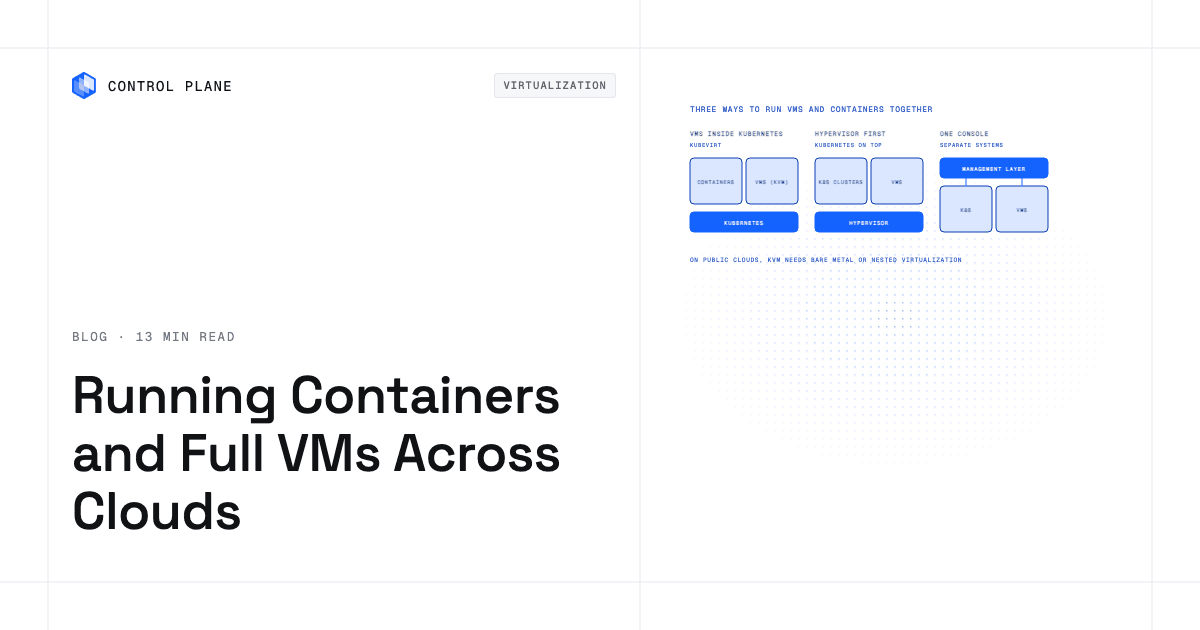
Platforms that run containers and full VMs side by side across clouds either run VMs inside Kubernetes using KubeVirt, run a traditional hypervisor with Kubernetes layered on top, or manage separate VM and container systems from one console. Pick by where your VMs run today and whether you want one unified runtime or one unified console. This guide compares each platform on how VMs run, which clouds each one reaches, what cloud hardware VMs require, and how VM images move in.
Disclosure: Control Plane publishes this guide.
TL;DR
The choice comes down to where your VMs run today and which execution model your team can operate.
- Three models exist: VMs inside Kubernetes (KubeVirt), hypervisor-first with Kubernetes on top, and a management console over separate VM and container systems.
- KubeVirt is the common engine behind most Kubernetes-native VM platforms, turning a VM into a Kubernetes pod backed by KVM.
- KubeVirt VMs in public clouds need bare-metal instances or instances that support nested virtualization, which narrows instance choice and region availability.
- Broadcom’s VMware licensing changes are a major reason enterprises are evaluating these platforms.
- Choose by matching your current hypervisor dependencies, target clouds, team skills, and migration complexity.
- Control Plane fits as a KubeVirt-based option that runs VM workloads on locations joined through Control Plane’s Managed Kubernetes and runs containers in its managed regions on AWS, GCP, Azure, and Oracle Cloud Infrastructure (OCI), under one API and policy set.
Which platform runs both containers and full VMs across multiple clouds?
Several platforms answer this question with different architectures. Some run VMs inside a Kubernetes cluster as pods, others start with a hypervisor and add Kubernetes on top, and a third group keeps VM and container systems separate under one management console. Nine platforms compare as follows on the criteria that decide the choice.
| Platform | How VMs run | Where it runs | Cloud hardware needed for VMs | VM image import | Best fit |
|---|---|---|---|---|---|
| Red Hat OpenShift Virtualization | KubeVirt on Kubernetes | On premises, AWS (incl. ROSA, bare metal), Azure (ARO), Google Cloud (bare-metal nodes), IBM Cloud (bare metal), OCI | Bare-metal instances; on Azure (ARO), specific supported VM sizes | Migration Toolkit for Virtualization (from vSphere, Hyper-V, OpenStack, Red Hat Virtualization, OVA, AWS EC2); disk images via CDI | Enterprises standardizing on OpenShift and the Red Hat ecosystem |
| SUSE Virtualization (Harvester) with SUSE Rancher Prime | KubeVirt on Kubernetes (HCI appliance) | On premises, edge | Bare-metal servers | qcow2, raw, ISO; VMware, OpenStack, and OVA imports through the VM Import Controller add-on | On-premises and edge deployments seeking open-source HCI |
| VMware Cloud Foundation with vSphere Kubernetes Service | ESXi hypervisor with Kubernetes clusters running as VMs | On premises; VMware workloads also run on VMware Cloud on AWS, Azure VMware Solution, and Google Cloud VMware Engine (Kubernetes support varies by service) | Certified servers on premises; provider-managed hosts on VMware Cloud on AWS, Azure VMware Solution, and Google Cloud VMware Engine | Native vSphere formats (VMDK, OVF) | Organizations preserving existing VMware operations |
| Nutanix Cloud Platform with Nutanix Kubernetes Platform | AHV hypervisor with Kubernetes clusters running as VMs | On premises, Nutanix Cloud Clusters on AWS, Azure, Google Cloud, and OVHcloud | Nutanix-certified bare-metal nodes | Nutanix Move (from vSphere, Hyper-V, AWS, and others) | Enterprises refreshing hardware and consolidating HCI |
| Google Distributed Cloud | KubeVirt (VM Runtime on Google Distributed Cloud) | On premises and edge (software-only for bare metal), managed from Google Cloud | Bare-metal servers | qcow2, VMDK via image import | Google Cloud-aligned organizations running VMs on premises |
| Spectro Cloud Palette Virtual Machine Orchestrator | KubeVirt on Kubernetes | On premises (bare metal, MAAS), edge, air-gapped | Bare-metal servers | qcow2, VMDK, VHDX via KubeVirt CDI | Multi-cluster Kubernetes teams needing VM support on their own hardware |
| Mirantis k0rdent Virtualization | KubeVirt on Kubernetes | On premises; any k0rdent-managed cluster with KVM-capable nodes | Bare-metal or nested-virt instances | qcow2, VMDK, VHDX via KubeVirt CDI | Teams seeking open-source Kubernetes with VM support |
| HPE Morpheus | Management layer over separate hypervisors and Kubernetes clusters | On premises, AWS, Azure, Google Cloud, OCI | Depends on underlying hypervisor | Managed through connected hypervisor or cloud provider | Organizations wanting one console without re-platforming VMs |
| Control Plane | KubeVirt on Control Plane Managed Kubernetes locations | Containers: AWS, GCP, Azure, OCI. VMs: Control Plane Managed Kubernetes locations with KVM-capable nodes, such as on AWS or your own servers | KVM-capable nodes: AWS .metal or c8i/m8i/r8i nested-virt instances, or own KVM hosts | qcow2, raw, VMDK, VHD/VHDX, VDI, ISO; HTTP(S) import with conversion, or container disk image | Teams running containers across clouds that also need VM workloads under one API |
How do containers and VMs run on one platform?
The execution model decides what your operations team manages, which skills it needs, and which trade-offs it accepts.
| Model | How it works | Strengths | Trade-offs | Examples |
|---|---|---|---|---|
| VMs inside Kubernetes (KubeVirt) | KubeVirt runs a VM as a Kubernetes pod wrapping a KVM process. The VM gets a boot disk, virtual NIC, and CPU and memory allocation managed by the Kubernetes scheduler. | One control plane for VMs and containers. Kubernetes networking, storage, and policy apply to both, with secondary VM networks needing their own policy. Declarative VM definitions stored in Git. | Requires KVM-capable nodes. Live migration needs ReadWriteMany storage and is unavailable for VMs with passthrough devices. Automated load balancing and the backup and tooling ecosystem are less mature than vSphere’s. | OpenShift Virtualization, SUSE Virtualization, Spectro Cloud Palette VMO, Mirantis k0rdent, VM Runtime on Google Distributed Cloud, Control Plane |
| Hypervisor first with Kubernetes on top | A traditional hypervisor (ESXi, AHV) runs VMs directly. Kubernetes clusters run as VMs on that hypervisor; VCF provisions them through the vSphere Supervisor, and NKP provisions them through its own Cluster API management cluster, which also targets public clouds. | Mature VM feature set: live migration, snapshots, HA, GPU passthrough, and broad OS support. Familiar to virtualization teams. | Two layers to operate: the hypervisor stack and the Kubernetes clusters on top. Tighter vendor coupling. | VMware Cloud Foundation, Nutanix Cloud Platform with NKP |
| One management console over separate systems | A management platform connects to existing hypervisors, cloud providers, and Kubernetes clusters, presenting a unified dashboard and policy engine without changing how VMs or containers execute. | No re-platforming required. Works with whatever you already run. Fast to deploy. | No runtime unification. Policies and networking remain siloed at the infrastructure layer. Depth of integration varies by connector. | HPE Morpheus |
The KubeVirt project extends Kubernetes to run VMs as native resources. It runs a virtual machine monitor inside a pod and boots a guest OS from a persistent volume. From Kubernetes’ perspective, the VM is another workload with CPU requests, memory limits, and network policies.
The hypervisor-first model remains preferable when VM feature maturity is non-negotiable. VMware’s ESX/ESXi line (since 2001) and AHV (since 2015) bring years of management tooling for live migration, storage integration, and hardware certification, while KubeVirt uses the KVM hypervisor with a younger management layer. Teams that depend on those features and do not plan to containerize most workloads may find more stability here.
The management-console model suits organizations that cannot or do not want to change their runtime layer. HPE Morpheus connects to VMware, Nutanix, Hyper-V, AWS, Azure, Google Cloud, Oracle Cloud, and Kubernetes clusters, providing visibility and governance without migrating a single VM. HPE also bundles its KVM-based VM Essentials hypervisor for teams that want to leave VMware.
What do VMs need from a public cloud?
Running VMs on Kubernetes in a public cloud requires hardware virtualization support at the host level. KubeVirt relies on KVM, which in turn requires access to CPU virtualization extensions (Intel VT-x or AMD-V). Public cloud instances are themselves VMs, so running KVM inside them requires either bare-metal instances or instances that allow nested virtualization.
Bare-metal instances are available on AWS (.metal sizes such as m5.metal and c5.metal), Google Cloud (C3, C4, and other metal machine types), and OCI (bare-metal shapes). Azure does not offer general-purpose bare-metal instances, so KubeVirt on Azure relies on nested virtualization; OpenShift Virtualization on ARO, for example, runs on supported Dsv5 and Esv5 VMs. Bare-metal instances give direct hardware access and full KVM support, but they come only in large sizes and not every region carries them.
Nested virtualization is available on Google Cloud for most Intel-based machine series, on AWS for 7th- and 8th-generation Intel instances such as M8i, C8i, and R8i, and on Azure for sizes such as Dsv5 and Esv5. It adds overhead that is most visible on I/O-heavy and interrupt-heavy workloads, and some vendors support it only for limited production use.
For hypervisor-first platforms, the cloud providers offer dedicated VMware and Nutanix environments. VMware Cloud on AWS, Azure VMware Solution, and Google Cloud VMware Engine provide ESXi hosts managed by the cloud provider. Nutanix Cloud Clusters run on AWS, Azure, Google Cloud, and OVHcloud bare-metal infrastructure. These services eliminate the nested-virtualization question but come with their own pricing and availability constraints.
Before selecting a KubeVirt-based platform for public cloud VMs, confirm that your target cloud regions offer the instance types you need and that the cost fits your budget. On-premises deployments sidestep this entirely because you control the hardware.
How do you move VMs onto a container platform?
Migrating existing VMs onto a Kubernetes-based platform involves converting disk images, validating guest OS compatibility, and reconfiguring networking and storage.
VM disk images come in three common formats. VMDK is the VMware standard. qcow2 is used by KVM and QEMU. VHD and VHDX are Microsoft Hyper-V formats. KubeVirt’s Containerized Data Importer (CDI) can pull images over HTTP(S), from container registries, or from S3 or Google Cloud Storage and convert them into persistent volumes that back a VM workload.
Live migration requires the VM’s disks on ReadWriteMany persistent volumes, ideally in block mode, from a CSI driver such as Ceph RBD, Portworx, or NetApp Trident; VMs on local or ReadWriteOnce storage can restart on another node but cannot live-migrate. By default a KubeVirt VM sits behind the pod network through NAT, so its reachable IP changes when it restarts elsewhere; VMs that must keep existing IPs or VLANs attach through Multus to a bridge or OVN-Kubernetes localnet secondary network.
Red Hat provides the Migration Toolkit for Virtualization (MTV), which pulls VMs from VMware vSphere, Hyper-V, OpenStack, Red Hat Virtualization, OVA, and AWS EC2, maps networks and storage, converts guests with VirtIO drivers, and creates KubeVirt VM definitions in OpenShift. Nutanix offers Nutanix Move for migrating VMs from VMware to AHV. For other platforms, the workflow typically involves exporting the disk, converting the guest with virt-v2v so it boots on VirtIO devices, importing it with CDI, and defining the VM as a Kubernetes custom resource.
Not every VM should stay a VM. Applications that are stateless, horizontally scalable, or already packaged as containers are better served by containerizing them during migration. The VM-to-Kubernetes modernization guide walks through the decision framework for when to modernize a VM into containers and when to keep it running as a VM workload.
Key steps in any VM migration:
- Export the VM disk image in VMDK, qcow2, or VHD format, or let a tool such as MTV pull it directly from vCenter.
- Upload or stream the image to the target platform using CDI, MTV, or the platform’s import tool.
- Map source networks and storage to Kubernetes networking (Multus, OVN-Kubernetes) and persistent volume classes.
- Validate guest OS drivers, cloud-init or sysprep configuration, and boot behavior.
- Test live migration if your workload requires it. KubeVirt migrates a VM only when its disks are on ReadWriteMany storage, it uses no passthrough devices, and another node offers a compatible CPU model.
Which questions decide the choice?
Before committing to a platform, run through these questions with your infrastructure, security, and application teams.
| Question | Why it matters |
|---|---|
| Do your VMs need live migration? | KubeVirt supports live migration but requires ReadWriteMany storage (block mode preferred) and CPU-compatible nodes. Hypervisor-first platforms handle this natively. If live migration is critical, verify the platform’s support and test it in your environment. |
| Which hypervisor features do you depend on (DRS, snapshots, GPU passthrough, backup integrations)? | KubeVirt covers live migration, snapshots, and GPU passthrough, but automated balancing and backup integrations vary by platform. Audit current feature usage before migrating. Windows Server VMs also need licenses for every node they can run on. |
| Can your target clouds provide bare metal or nested virtualization? | KubeVirt needs KVM-capable nodes. If your preferred cloud regions lack bare-metal or nested-virt instances, you cannot run VMs there. Check availability and pricing early. |
| How do VM images move in (VMDK, qcow2, VHD conversion)? | Image format compatibility and conversion tooling vary by platform. Confirm that your disk formats are supported and that the import process handles your image sizes within acceptable timeframes. |
| How are networking and storage shared between VMs and containers? | Unified networking (CNI plugins, Multus for multiple interfaces) and storage (CSI drivers, persistent volumes) simplify operations but introduce new abstractions your team must learn. |
| Who operates the platform after migration? | A KubeVirt-based platform requires Kubernetes expertise. A hypervisor-first platform requires traditional virtualization skills. A management-console approach requires familiarity with the console’s API and policy model. Match the platform to your team’s skills or plan for training. |
How Control Plane fits
Control Plane is the unbreakable platform for running production workloads. It runs serverless, standard, stateful, and cron workloads natively on AWS, GCP, Azure, and Oracle Cloud Infrastructure (OCI), and VM workloads on locations joined through Control Plane’s Managed Kubernetes.
VM workloads are a Control Plane workload type that runs full virtual machines with boot disks, persistence, cloud-init, and SSH, using KubeVirt on Managed Kubernetes locations. They need KVM-capable nodes labeled for VMs, such as AWS bare-metal instances, AWS 8th-generation Intel instances with nested virtualization, or your own KVM hosts. VM images in qcow2, raw, VMDK, VHD/VHDX, VDI, or ISO format can be imported over HTTP(S), where Control Plane converts them to the boot disk’s native format, or packaged as a container disk image in a registry.
VM workloads do not run in Control Plane-managed cloud regions. Containers run in those regions and in Managed Kubernetes locations. A Global Virtual Cloud (GVC), which is Control Plane’s named set of locations, can include both, so VMs and containers share one control plane, one API, and one set of policies and secrets. VM workloads do not scale to zero automatically. Control Plane does not offer live migration yet, so a VM that moves to another node cold-boots there, with its disk state kept on attached volume sets. Secure Boot is not yet available for Control Plane VMs, so guests that require it, such as Windows 11, are not supported yet.
Control Plane handles Day 2 operations for containers and VMs alike, including built-in observability, mTLS service mesh, and firewall rules. Containers also autoscale, while VM replica counts are set with minScale and maxScale. Control Plane is PCI DSS Level 1, SOC 2 Type II, HIPAA, and GDPR compliant.
The multi-cloud management platforms roundup compares Control Plane with other multi-cloud platforms, and a separate guide covers getting Kubernetes benefits without a platform team.
FAQ
These answers cover the questions teams ask when they combine VMs and containers.
Which platform runs both containers and full VMs across multiple clouds?
Several platforms do this, using one of three architectures. Red Hat OpenShift Virtualization, SUSE Virtualization with Rancher, Spectro Cloud Palette VMO, Mirantis k0rdent, VM Runtime on Google Distributed Cloud, and Control Plane run VMs inside Kubernetes using KubeVirt. VMware Cloud Foundation and Nutanix Cloud Platform run a hypervisor with Kubernetes on top. HPE Morpheus manages separate VM and container systems from one console. The right choice depends on your execution model preference, target clouds, and operational skills.
What is KubeVirt?
KubeVirt is a CNCF graduated project that extends Kubernetes to run virtual machines alongside containers. It creates a VM as a Kubernetes custom resource, backed by a KVM process running inside a pod. This lets teams use Kubernetes APIs, networking, storage, and policies for both VMs and containers on the same cluster.
Can Kubernetes run virtual machines?
Yes. With KubeVirt installed on a Kubernetes cluster, VMs run as first-class Kubernetes objects. The cluster’s scheduler places VMs on nodes with KVM support, and persistent volumes provide boot disks and data storage. Multiple production platforms, including OpenShift Virtualization and VM Runtime on Google Distributed Cloud, rely on this approach.
Is OpenShift Virtualization a replacement for VMware?
OpenShift Virtualization can replace VMware for many workloads, especially when an organization is already adopting Kubernetes. Red Hat’s Migration Toolkit for Virtualization automates the import of VMware VMs. OpenShift Virtualization supports live migration, snapshots, and Microsoft-certified Windows Server guests. VMware still leads in DRS-style automated balancing, storage policy integration, and the breadth of third-party backup and tooling. Evaluate your specific feature dependencies before migrating.
Do I need bare metal to run VMs on Kubernetes in the cloud?
Not always, but you need KVM-capable nodes. AWS, Google Cloud, and OCI sell bare-metal instances; Azure does not, so Azure deployments use nested virtualization. Google Cloud, Azure, and AWS each support nested virtualization on specific instance types, though some vendors support it only for test or limited production use.
Can I run Windows VMs on Kubernetes?
Yes. KubeVirt supports Windows guest operating systems, including Windows Server and Windows desktop editions. You need the appropriate Windows licenses, VirtIO drivers installed in the guest, and sufficient CPU and memory resources on the host nodes. Windows 11 guests need UEFI Secure Boot and a virtual TPM, which current KubeVirt releases provide. GPU passthrough for Windows VMs is supported on some platforms but should be tested in your environment.
How do I migrate VMware VMs to Kubernetes?
Red Hat’s Migration Toolkit for Virtualization pulls disks directly from vCenter and handles discovery, network mapping, VirtIO driver conversion, warm migration, and VM creation for OpenShift. For other KubeVirt platforms, convert guests with virt-v2v, use the Containerized Data Importer to import the disks, and define VMs as Kubernetes custom resources. The VM-to-Kubernetes modernization guide covers when to keep a VM versus containerize the application.
How does Control Plane run VMs and containers?
Control Plane runs containers as serverless, standard, stateful, and cron workloads in its managed regions on AWS, GCP, Azure, and Oracle Cloud Infrastructure (OCI). VM workloads run through KubeVirt on locations joined with Control Plane’s Managed Kubernetes, on nodes that support KVM. A Global Virtual Cloud (GVC), Control Plane’s named set of locations, can hold both kinds of location, so VMs and containers share one API, one policy set, and one set of secrets. Disk images are imported over HTTP(S) with format conversion, or as container disk images.
What is the main driver for evaluating these platforms in 2026?
Changes to VMware’s licensing and pricing under Broadcom ownership are a major reason many enterprises are evaluating alternatives. Organizations that previously ran VMware across on-premises and cloud environments are now comparing KubeVirt-based platforms, alternative hypervisors, and management-console approaches to find a better fit for their cost structure, operational model, and multi-cloud strategy.
To run containers and VMs across clouds under one API, talk to the Control Plane team or sign up free.