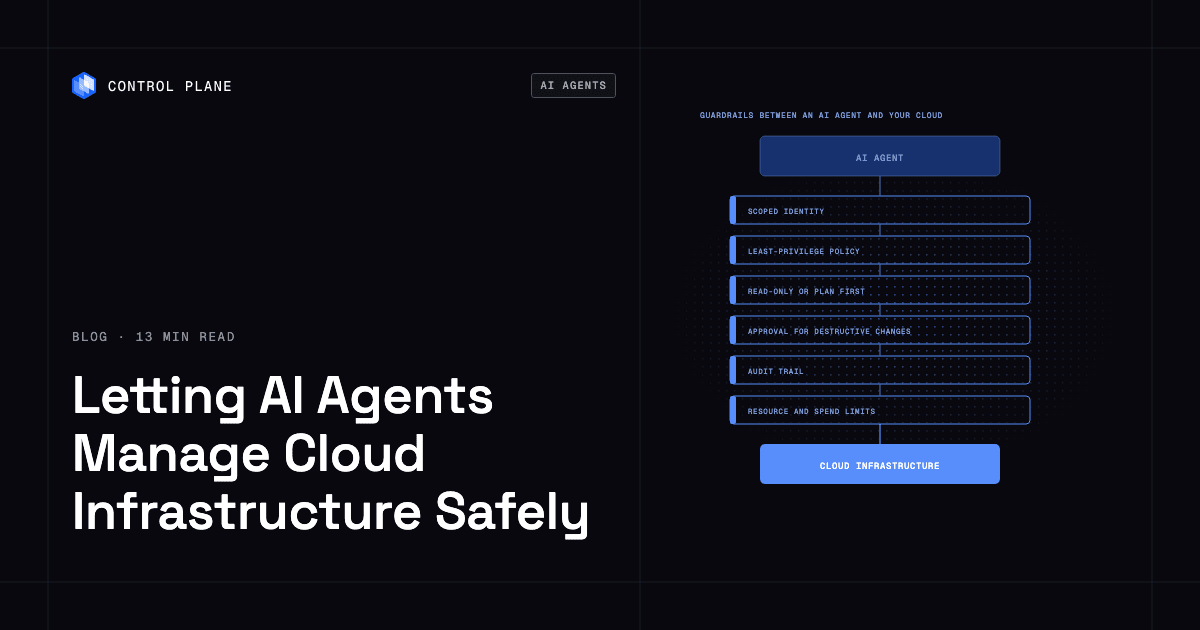
Platforms let AI agents provision cloud infrastructure safely when the agent acts through an API with its own scoped identity, least-privilege permissions, a read-only or plan step, approval for destructive changes, an audit trail, and limits on spend and resources. The options are hyperscaler agent services, infrastructure as code with policy engines, and platforms with a built-in Model Context Protocol (MCP) server such as Control Plane, the unbreakable platform for running production workloads.
Disclosure: Control Plane publishes this guide.
TL;DR
Platforms let AI agents provision and manage cloud infrastructure safely when every agent action passes through these guardrails:
- A scoped identity per agent with least-privilege permissions and short-lived credentials
- A read-only or plan step before any change
- Human approval for destructive or production changes
- Policy as code evaluated before apply
- An audit trail for every action
- Resource and spend limits that reject requests past a threshold
- Isolated execution for agent-written code
The three groups of options are:
- Platforms with a built-in MCP server: Control Plane
- Hyperscaler agent services: Amazon Bedrock AgentCore, Microsoft Foundry Agent Service with Microsoft Entra Agent ID, and Google’s Agent Runtime on Gemini Enterprise Agent Platform
- Infrastructure as code with policy engines: Terraform with HCP Terraform (Sentinel or OPA), Pulumi with Pulumi Policies and Pulumi ESC, Crossplane, and Kubernetes with OPA Gatekeeper or Kyverno
Control Plane is both a deployment target and a governance layer. Its MCP server connects AI tools to the Control Plane API, where policy-based permissions, quotas, and a tamper-proof audit trail apply to every agent action. The AI agent infrastructure platforms guide compares agent runtimes in this space.
Which platforms let AI agents provision and manage their own cloud infrastructure safely?
The table maps eight options against five guardrails, using what each vendor or project documents today. “Yes” means native support, “Partial” means native support with the gaps noted in the cell, and “You add it” means the option supports a control it does not provide itself. Terraform, Pulumi, and the hyperscalers also publish MCP servers; the grouping reflects each option’s primary governance model.
| Option | How the agent acts | Agent identity and permissions | Plan or read-only mode | Approval for destructive changes | Audit trail | Spend and resource limits |
|---|---|---|---|---|---|---|
| Control Plane (MCP server) | AI tool calls the Control Plane API through the MCP server with a Control Plane toolset profile (readonly, core, mk8s, or full) | Nothing is permitted until a policy grants it. On the MCP server the agent acts with the signed-in user’s permissions in the orgs chosen at sign-in; unattended agents on the CLI, API, or infrastructure-as-code providers use a policy-scoped service account | Yes. The readonly profile exposes no tool that creates, updates, deletes, or executes, and a profile cannot be widened mid-session | Partial. Destructive tools are marked, and the MCP server instructs the assistant to state the impact and get explicit approval before running them; policy scope and the readonly profile set hard limits, and teams that need an enforced gate route changes through the Control Plane Terraform or Pulumi provider in their existing pipeline | Yes. A tamper-proof audit trail captures every action from the console, CLI, Terraform, Pulumi, Kubernetes operator, and MCP server | Partial. Org quotas cap counts such as workloads and identities per Control Plane Global Virtual Cloud (GVC), GVCs, and domains, cap each workload’s CPU, memory, and maximum replica count, and reject requests past the limit; a monthly spend alert notifies billing admins |
| Amazon Bedrock AgentCore | Agents run on AgentCore and call AWS APIs and other tools, optionally through AgentCore Gateway | AgentCore Identity gives each agent a workload identity; AWS API calls use the agent’s IAM execution role with short-lived STS credentials | Partial. The agent can be scoped to a read-only IAM policy; no plan step | You add it. AgentCore Policy evaluates Cedar or Dogwood policies on tool calls through Gateway, and temporal policies can require an earlier approval action in the same session; you build the human approval step yourself | Yes. CloudTrail records AWS API calls | Partial. Service Quotas cap resource counts per account; AWS Budgets is a separate service |
| Microsoft Foundry Agent Service with Microsoft Entra Agent ID | Agents run on Foundry Agent Service and call Azure APIs | Microsoft Entra Agent ID gives each agent its own Entra agent identity with OAuth-based authentication, Azure RBAC scoping, and Conditional Access (with a Microsoft Agent 365 license) | Partial. The agent can be scoped to the Reader role; no plan step | Partial. MCP tool calls can be set to require approval before they run; other infrastructure changes rely on Azure Policy enforcement and CI/CD approval gates outside the agent service | Yes. Azure Activity Log and Entra audit logs record agent actions | Partial. Subscription quotas cap resource counts; Azure Cost Management budgets are separate |
| Google Agent Runtime on Gemini Enterprise Agent Platform | Agents run on Agent Runtime and call Google Cloud APIs | Runs as the platform’s service agent or a custom service account scoped with Google Cloud IAM; Agent Runtime can also give each agent its own agent identity | Partial. The agent can be scoped to the Viewer role; no plan step | You add it. Agent Gateway applies access policies to agent traffic but not to infrastructure plans | Yes. Cloud Audit Logs record API calls | Partial. Project quotas cap resource usage; Cloud Billing budgets are separate |
| Terraform with HCP Terraform (Sentinel or OPA) | Agent writes configuration; HCP Terraform plans, checks policies, and applies | Scoped team tokens or dynamic provider credentials through OIDC | Yes. Every run produces a plan before apply | Yes. With auto-apply off, an operator must confirm each plan before apply; mandatory Sentinel or OPA policies that fail stop the run, and only a user with override permission can let it continue where the policy set allows overrides | Yes. Run history keeps plan and apply logs per workspace | Partial. Sentinel policies can limit resource size and count and, in Sentinel policy checks (not policy evaluations), fail runs whose cost estimate exceeds a monthly threshold; no account-level budget cap |
| Pulumi with Pulumi Policies and Pulumi ESC | Agent writes a Pulumi program; Pulumi Policies (formerly CrossGuard) run during preview and update | Scoped access tokens; Pulumi ESC issues short-lived credentials through OIDC | Yes. pulumi preview shows the change before update | Partial. Mandatory policies block updates and advisory policies warn; no built-in approval step, so teams use CI gates or an ESC approval rule on the credentials environment | Yes. Pulumi Cloud records update history and resource diffs | Partial. Policies can enforce resource constraints; no dollar-budget cap |
| Crossplane with compositions and Kubernetes RBAC | Agent creates or updates Kubernetes custom resources; Crossplane reconciles them to cloud APIs | Kubernetes RBAC scoped to namespaces and resource types; provider credentials from Kubernetes Secrets or workload identity | Partial. crossplane composition render previews composition output and the Observe management policy makes resources observe-only; no plan against live cloud state | You add it. Admission webhooks or GitOps pull request review act as gates | Yes. Kubernetes audit logging records API server requests according to the cluster’s audit policy | Partial. ResourceQuota object counts cover namespaced Crossplane resources only; no spend limits |
| Kubernetes with OPA Gatekeeper or Kyverno | Agent creates or updates Kubernetes resources; Gatekeeper or Kyverno evaluate them at admission | Kubernetes RBAC with service accounts scoped to namespaces | Partial. Read-only RBAC plus server-side dry run, which also runs admission policies | You add it. Admission policies can reject a request but cannot hold it for human review | Yes. Kubernetes audit logging records API server requests according to the cluster’s audit policy | Partial. ResourceQuotas enforce object counts and compute limits per namespace; no spend limits |
What guardrails does an AI agent need before it touches cloud infrastructure?
Every platform in the matrix implements some of these guardrails natively and leaves others to you.
| Guardrail | What it prevents | How to implement it |
|---|---|---|
| Scoped identity per agent | Shared credentials leaking across agents or humans | Give each agent its own service account, managed identity, or workload identity. Never share credentials between agents. |
| Least-privilege permissions | Lateral movement and privilege escalation | Grant only the permissions the agent needs for its task. |
| Read-only first | Unintended changes during exploration | Default the agent to a read-only mode or viewer role, and grant write access only for specific, approved operations. |
| Plan before apply | Surprise changes to production state | Require a plan, preview, or diff before any change is executed, and review it. |
| Human approval for destructive or production changes | Accidental deletion, region changes, privilege escalation | Route destructive operations through a manual gate such as a pull request review, a pipeline confirmation, or a policy override. |
| Policy as code | Violations of security, compliance, or cost rules | Evaluate every proposed change against policies in OPA Rego, Sentinel, Pulumi Policies, or an equivalent before apply. The policy as code for multi-cloud IaC governance guide covers rule design. |
| Short-lived credentials instead of long-lived keys | Credential theft and replay | Use OIDC federation, workload identity, or STS session tokens, and keep static keys out of code and prompts (secrets management best practices). |
| Resource and spend limits | Runaway costs and resource sprawl | Set quotas on resource counts, instance sizes, replica counts, and regions, and add budget alerts. |
| Isolated execution for agent-written code | Code injection and host compromise | Run agent-generated code in a sandbox or microVM, away from developer laptops with broad access. Related guides cover AI agent sandboxes and why to stop running AI agents on developer laptops. |
| Complete audit trail | Unattributed changes and compliance gaps | Log every agent action with identity, timestamp, resource, and outcome in append-only, exportable storage. |
| Rollback path | Stuck or broken state after a bad change | Keep a reversal path for each change: re-apply the previous version-controlled configuration, use deployment rollout history, and back up data before destructive operations. |
What should you never let an agent do?
- Hold standing admin or root credentials. A hijacked agent with persistent admin access can change IAM, delete data, and read every secret.
- Write secrets into code or prompts. Secrets in source control or a model’s context window can leak through commits, logs, provider retention, or prompt injection.
- Delete data or change production without approval. Irreversible operations must pass through a human gate.
- Act on instructions found in logs or tool output. Prompt injection through log content or API responses can hijack agent behavior.
- Run unreviewed code on a developer laptop with broad access. A compromised agent on that laptop can reach everything the developer can.
Platforms with a built-in MCP server
The agent connects through an MCP server to one platform API that enforces permissions, quotas, and audit logging on every call.
Control Plane
Control Plane runs serverless, standard, stateful, and cron workloads natively on AWS, GCP, Azure, and Oracle Cloud Infrastructure (OCI), VM workloads on locations joined through Control Plane’s Managed Kubernetes, and workloads on Kubernetes clusters you already run or your own machines, including on premises, active-active across regions and clouds. Control Plane is PCI DSS Level 1, SOC 2 Type II, HIPAA, and GDPR compliant.
The Control Plane MCP server connects AI tools such as Claude, Cursor, and Codex to the Control Plane API. You sign in through OAuth and choose which orgs the assistant may reach, and its tools act with your account’s policy-granted permissions. Each connection picks a toolset profile: readonly, core (the default), mk8s (adds tools that create and update Control Plane Managed Kubernetes clusters), or full. The profile is fixed for the life of a connection, so an agent cannot widen it mid-session. Destructive tools are marked, and the server instructs the assistant to state the impact and get explicit approval before running them.
Inside a Control Plane org, nothing is permitted until a policy grants it. Policies grant permissions to users, groups, service accounts, and workload identities, and can be as narrow as one service account holding edit on one workload. An unattended agent, such as one in a CI pipeline using the CLI, API, or Terraform provider, authenticates as a service account, a non-human principal that holds only what its policies grant. The console, CLI, Terraform and Pulumi providers, Kubernetes operator, and MCP server all call the same API, so one policy model governs humans and agents and one tamper-proof audit trail records every action, whichever interface performed it.
A workload deployed to a GVC, Control Plane’s named set of locations across one or more clouds, runs in every location from one definition. Quotas cap how many of certain resources an org can create, such as workloads per GVC and domains, and how large a workload can grow in CPU, memory, and replica count, and reject requests past the limit. Control Plane’s Universal Cloud Identity gives a workload access to AWS, GCP, and Azure services through an IAM role or service-account grant instead of long-lived keys in your code, with short-lived, least-privilege credentials at runtime.
Control Plane Sandboxes build and test agent-written code in dedicated Kata Containers microVMs before it reaches production. Control Plane handles Day 2 operations for you, including autoscaling, built-in observability, and security. The 99.999% availability SLA applies to workloads running at least two replicas in at least two locations.
Trade-offs. Control Plane governs what an agent can do on Control Plane resources. Changes an agent makes directly in a hyperscaler account still depend on that provider’s IAM and policies. Teams that keep all infrastructure in Terraform can have agents propose plans through the Control Plane provider in their existing pipeline; Control Plane ships its own Terraform and Pulumi providers, so it complements the infrastructure as code you already run.
Best fit. Teams running production workloads, on one cloud or several, that want one API, one audit trail, and one policy model for human and agent access, with Day 2 operations handled by the platform.
Hyperscaler agent services
Each hyperscaler pairs a managed agent runtime with its own identity and audit logging and leaves plan steps, most approval gates, and budgets to separate services.
Amazon Bedrock AgentCore
Amazon Bedrock AgentCore is a set of modular services (Runtime, Gateway, Identity, Policy, Observability, and others) for running agents that call AWS APIs and other tools. AgentCore Identity gives each agent a workload identity and manages its outbound credentials, and calls to AWS APIs use the agent’s IAM role with short-lived STS credentials.
Trade-offs. Deep AWS integration. AgentCore Policy evaluates Cedar or Dogwood policies on tool calls routed through AgentCore Gateway, but it governs tool calls only and has no plan-and-apply workflow. Multi-cloud requires additional tooling.
Best fit. Teams already running AI workloads on AWS that want agent orchestration within one cloud.
Microsoft Foundry Agent Service with Microsoft Entra Agent ID
Microsoft Foundry Agent Service runs agents that call Azure APIs. Microsoft Entra Agent ID gives each agent its own Entra agent identity, created from an agent identity blueprint and authenticated with OAuth 2.0, so permissions can be scoped per agent.
Trade-offs. Per-agent identity is native, and MCP tool calls can require approval before they run. Policy enforcement comes from Azure Policy, and approval gates for other infrastructure changes come from CI/CD workflows outside the agent service. Multi-cloud support is limited.
Best fit. Azure-native teams that want per-agent identity in the Microsoft security ecosystem.
Google Agent Runtime on Gemini Enterprise Agent Platform
Agent Runtime hosts agents that call Google Cloud APIs. Deployed agents run as the platform’s service agent or a custom service account scoped with Google Cloud IAM, or each agent can receive its own agent identity, tied to the agent’s lifecycle. Cloud Audit Logs record admin activity, and data access once you enable those logs.
Trade-offs. There is no native plan step or approval gate for infrastructure changes. Agent Gateway can apply access policies to agent traffic, but not to infrastructure plans. Multi-cloud requires additional tooling.
Best fit. Google Cloud-native teams building agents that operate within Google Cloud.
Infrastructure as code with policy engines
The agent proposes a change as code or as a Kubernetes resource, and a policy engine evaluates it before it takes effect.
Terraform with HCP Terraform (Sentinel or OPA)
HCP Terraform runs Terraform with integrated policy enforcement. The agent writes configuration, HCP Terraform produces a plan, and Sentinel or OPA policies evaluate it before apply. Workspaces with auto-apply off hold every run for human confirmation, and, when Sentinel runs as policy checks rather than policy evaluations, its policies can use HCP Terraform cost estimates to block runs above a monthly cost threshold.
Trade-offs. The agent must produce valid HCL or JSON configuration, and state and provider credentials add operational overhead.
Best fit. Teams with Terraform workflows that want AI agents as plan authors behind policy guardrails.
Pulumi with Pulumi Policies and Pulumi ESC
Pulumi lets agents write infrastructure programs in TypeScript, Python, Go, C#, Java, or YAML. Pulumi Policies run during preview and update; mandatory policies block a change and advisory policies warn. Pulumi ESC issues short-lived credentials through OIDC.
Trade-offs. Agents must produce valid Pulumi programs. Pulumi Deployments has no built-in approval step, and dollar-budget enforcement is not native.
Best fit. Teams using general-purpose languages for infrastructure as code that want programmable policy enforcement and short-lived credentials.
Crossplane with compositions and Kubernetes RBAC
Crossplane extends the Kubernetes API with custom resources that represent cloud infrastructure. The agent creates or updates those resources, and Crossplane reconciles them to cloud provider APIs. The Crossplane CLI can render composition output locally, but nothing previews a change against live cloud state.
Trade-offs. Exposes cloud resources through a Kubernetes-native API but requires Kubernetes expertise. Policy as code comes from an added engine such as OPA Gatekeeper or Kyverno.
Best fit. Platform teams that want to expose cloud infrastructure as Kubernetes APIs with RBAC-based agent access.
Kubernetes with OPA Gatekeeper or Kyverno admission policies
For agents that manage Kubernetes resources instead of cloud provider infrastructure, OPA Gatekeeper and Kyverno evaluate policies at admission, before the API server persists the change. Server-side dry run previews changes, and policies can run in audit or warn mode before enforcement.
Trade-offs. Admission policies can reject a request but cannot hold it for human review, and they do not reach cloud provider APIs. Teams need Crossplane or Terraform for cloud provisioning.
Best fit. Teams whose agents operate within Kubernetes clusters and need admission-time policy enforcement.
How do I set up an AI agent to manage infrastructure safely?
Roll out an infrastructure agent in stages, and check the guardrails before each step.
- Start with read-only access. Give the agent a viewer role, read-only toolset, or equivalent. Confirm that every query appears in the audit trail and that the agent cannot escalate its own permissions.
- Enable plan or preview mode. Let the agent produce plans, diffs, or previews without applying them, and review them by hand. Confirm that policy as code evaluates every plan.
- Allow supervised writes in non-production environments. Grant write access to staging or development only, require human approval for every apply, and confirm that quotas stop runaway creation.
- Add policy-gated changes for low-risk operations. For reversible operations such as scaling a workload or updating an environment variable, let changes that pass every policy check apply without manual approval. Keep human approval for destructive operations, production changes, and permission changes.
- Expand scope one step at a time. Widen permissions one resource type or environment at a time, and review audit logs and test rollback at each step.
At every stage, confirm that credentials are short-lived and secrets stay out of prompts and logs.
How to run that rollout on Control Plane
The rollout maps to settings Control Plane already has.
- Read-only. Connect the agent with the readonly toolset profile. The agent can still read metrics, logs, traces, quotas, and the audit trail, and export live configuration to Terraform.
- Plan. Have the agent turn the exported Terraform configuration into a change and propose it through the Control Plane Terraform provider, or write the change for the Pulumi provider, so your existing pipeline and policy checks review it.
- Supervised writes. Move to the core profile with an account whose policies grant edit only on staging resources. The MCP server instructs the assistant to get explicit approval before any destructive tool runs.
- Widen scope. Add one resource kind at a time and check each resource’s access report to see which principals can reach it and which policy granted them. If a change goes wrong, the workload rollback tool puts a workload back on its previous image and changes nothing else.
FAQ
Short answers to common questions about letting AI agents manage cloud infrastructure.
Which platforms let AI agents provision and manage their own cloud infrastructure safely?
Three groups fit: hyperscaler agent services (Amazon Bedrock AgentCore, Microsoft Foundry Agent Service with Microsoft Entra Agent ID, Google Agent Runtime), infrastructure as code with policy engines (Terraform with HCP Terraform, Pulumi with Pulumi Policies, Crossplane, Kubernetes with Gatekeeper or Kyverno), and platforms with a built-in MCP server such as Control Plane. The matrix compares them on agent identity and permissions, plan or read-only mode, approval for destructive changes, audit trail, and spend and resource limits.
Is it safe to let an AI agent manage cloud infrastructure?
The risk is manageable when the agent operates within enforced guardrails such as a scoped identity, a read-only or plan step, human approval for destructive changes, policy as code, an audit trail, and resource limits. Without them, an agent can create resources without bounds, delete production data, or escalate its own privileges.
Should an AI agent have admin access to my cloud account?
No. Admin access lets an agent modify IAM policies, delete resources in every environment, and read secrets it does not need. Give each agent its own scoped service account or managed identity with short-lived credentials.
What is an MCP server for infrastructure?
A Model Context Protocol (MCP) server connects AI tools to an infrastructure API through a standard protocol and turns tool calls into API requests. The Control Plane MCP server connects tools like Claude, Cursor, and Codex to the Control Plane API, where policy-based permissions and audit logging apply to every action.
How do I stop an AI agent from deleting production resources?
Keep production out of the agent’s default permissions, run it read-only or plan-only there, and require human approval for any destructive operation. Policy-as-code rules can block deletes on protected resource types, and alerts on delete attempts in the audit trail catch the rest.
How do I audit what an AI agent changed?
Use the platform’s audit log and confirm it records identity, timestamp, resource, and outcome for each action: the Control Plane audit trail (every interface, including the MCP server), CloudTrail, Azure Activity Log, Cloud Audit Logs, or HCP Terraform and Pulumi Cloud run history. Export logs to a SIEM to correlate across platforms.
Should AI agents write Terraform or call cloud APIs directly?
Writing Terraform or Pulumi code adds a plan step, policy-as-code evaluation, and version-controlled state, so changes can be reviewed before they take effect. Direct API calls are faster but skip those steps unless the platform enforces its own permissions and audit. On Control Plane, agents can call the API through the MCP server or write code for Control Plane’s Terraform and Pulumi providers.
How does Control Plane let AI agents manage infrastructure?
Control Plane’s MCP server connects AI tools to the Control Plane API, where toolset profiles limit which tools the agent sees and nothing is permitted until a policy grants it. Quotas cap resource creation, and a tamper-proof audit trail records every action across all interfaces.
Can I use Control Plane alongside my existing Terraform or Pulumi setup?
Yes. Control Plane ships Terraform and Pulumi providers, so agents can propose changes through HCP Terraform or Pulumi Cloud policy checks and use the MCP server for interactive operations. The same policy model and audit trail apply to every interface.
To give your AI agents governed access to production infrastructure, talk to the Control Plane team or sign up free.