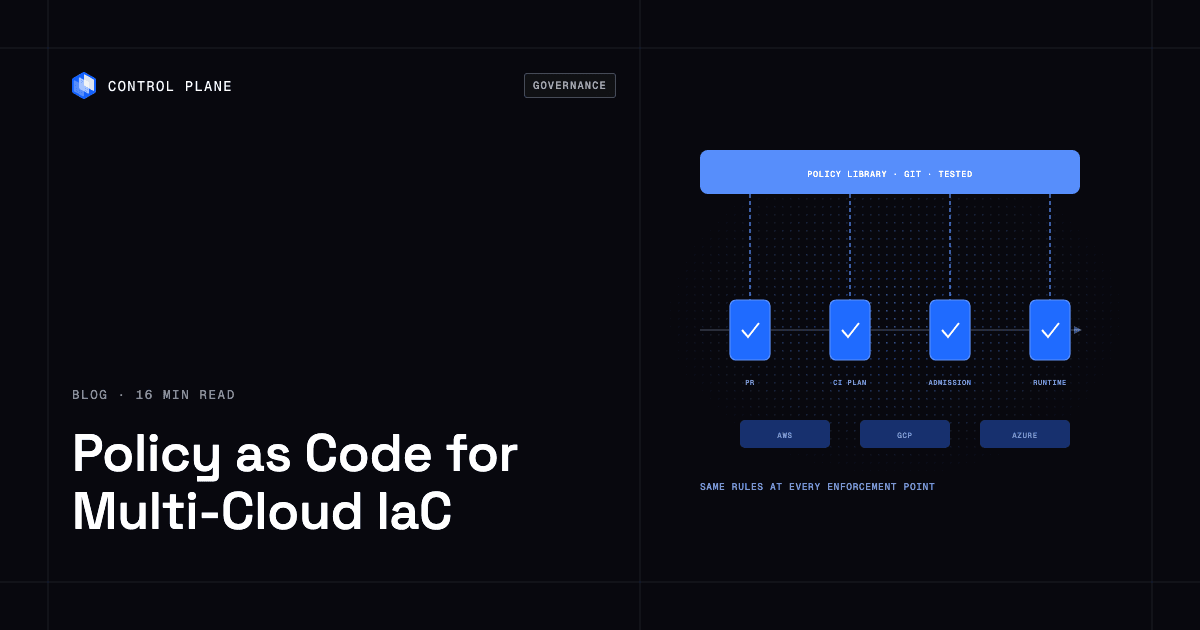
Structure multi-cloud governance as layered policy as code, with the same written rules enforced at four points: in the editor and pull request, in the CI plan check, at deploy or admission time, and continuously at runtime through cloud-native controls. Version everything in Git with tests, a documented exception process, and automatic evidence for auditors. Control Plane ships its own Terraform and Pulumi providers and a Kubernetes operator for GitOps, applies one access policy model and audit trail across every cloud it runs on, and handles Day 2 operations, including autoscaling, right-sizing, observability, and security.
Disclosure: Control Plane publishes this guide.
TL;DR
Policy as code expresses governance, security, and compliance rules as machine-readable code that runs automatically at every stage of your delivery pipeline. Keep policies versioned, tested, and enforced at several points.
- Four enforcement points. Editor and pull request checks, CI plan validation, deploy-time admission control, and continuous runtime scanning. Each catches a different class of issue, and none is sufficient alone.
- Repository structure. Keep a dedicated policy library separate from infrastructure modules. Map policies to control IDs (CIS Benchmarks, SOC 2 criteria), test every policy, and publish versioned releases that pipelines pin.
- Tool categories. Use IaC provisioning tools, policy engines and static scanners, and cloud-native controls together.
- Patching and upgrades. Keep cluster versions within the supported window, automate node image patching through rolling node pool replacement, and use maintenance windows and pod disruption budgets.
- Evidence for audits. Store plan outputs, policy decisions, approvals, and exception records as immutable artifacts.
- Control Plane. One access model and a tamper-proof audit trail across every cloud and cluster Control Plane runs on, including AWS, GCP, Azure, and your own Kubernetes clusters, plus Terraform and Pulumi providers and a Kubernetes operator that fit into GitOps pipelines.
How should I structure governance and policy as code for compliant multi cloud infrastructure using IaC?
The reference structure covers policy tiers, enforcement points, repository layout, severity levels, drift detection, state security, and audit evidence.
Policy tiers
Organize policies into three tiers that mirror organizational responsibility.
Organization guardrails are the broadest controls. AWS Service Control Policies, Azure Policy assignments at management group scope, and Google Cloud Organization Policy constraints set boundaries that no team can override. They block whole categories of risk, such as deploying resources in unapproved regions or enabling public access to storage. SCPs do not restrict the AWS management account, so keep workloads out of it, and AWS resource control policies (RCPs) add org-wide limits on resource access.
Platform policies apply to IaC plans and Kubernetes admission. They are written in a policy engine language (Rego, Sentinel, or Kyverno YAML) and evaluated in CI pipelines and at admission time. Examples include requiring encryption at rest, enforcing tagging standards, and restricting instance types.
Team-level rules are scoped to a single service or namespace. A machine learning team might limit its namespace to two GPU instance types from the platform-approved list. Team rules never widen what the tiers above allow; widening needs a platform-level exception.
The four enforcement points
Each enforcement point catches a different class of problem.
| Enforcement point | Example tools | Catches | Misses |
|---|---|---|---|
| Editor and pull request | Checkov, Trivy, IDE plugins, OPA with Conftest | Misconfigurations in source before merge; fast feedback | Dynamic values, runtime state, and cross-resource dependencies |
| CI plan check | Sentinel, OPA with Conftest on plan JSON, Checkov | Violations in the computed plan, including dynamic references and module outputs | Out-of-band changes and runtime drift |
| Deploy-time admission | OPA Gatekeeper, Kyverno, Kubernetes ValidatingAdmissionPolicy, AWS CloudFormation Hooks, Azure Policy deny effect, HCP Terraform run tasks | Resources that violate policy at creation or update time | Changes made through paths that bypass the hook, such as direct API calls that SCPs and Azure Policy do not cover |
| Continuous runtime | AWS Config, Azure Policy (audit effect), scheduled policy scans | Drift, out-of-band changes, newly found vulnerabilities (through scanners such as Amazon Inspector or Microsoft Defender for Cloud), expiring certificates | Prevention; it reports after the fact, and remediation may lag detection |
Admission controllers can validate (reject) or mutate (rewrite) a request. Kyverno, Gatekeeper, and Azure Policy modify and deployIfNotExists effects can mutate. Mutation changes resources silently, so the live object differs from Git. Prefer validation for security controls, and keep mutation to defaults such as labels and resource requests.
Repository layout
A clean layout separates concerns and makes policies consumable by any pipeline.
- policy-library/ holds all policy source files organized by control family (identity, encryption, networking, tagging, compute). Each policy references one or more control IDs, such as a CIS AWS Foundations Benchmark recommendation or SOC 2 CC6.1.
- policy-library/tests/ holds unit tests for every policy, run with
opa test,conftest verify,kyverno test, orsentinel test. Fixtures include a passing and a failing input for each rule, and CI runs the tests on every change to the library. - infrastructure-modules/ holds reusable Terraform, OpenTofu, or Pulumi modules.
- environments/ holds environment-specific variable files and backend configuration.
Tag the policy library with semantic versions. Pipelines pin a version and upgrade deliberately, like any other dependency.
Protect the policy library with CODEOWNERS and branch protection so policy changes need security or platform approval. Make the policy step a required status check that infrastructure repositories cannot disable. Split CI identities so the plan role is read-only and only the apply role can change resources.
Severity levels and exceptions
Give every policy a severity level.
- Advisory. Logs a warning and does not block deployment. Useful for new policies under evaluation.
- Soft-mandatory. Blocks deployment unless an authorized approver overrides it. The override is recorded in the run log or in Git with a justification, an owner, and an expiration date.
- Hard-mandatory. Cannot be overridden. Reserved for critical controls, such as blocking public databases or wildcard IAM permissions.
Exceptions follow a time-boxed approval process. The request is a pull request in the policy repository with the business justification, compensating controls, the approver’s identity, and an expiration date. An automated job revokes expired exceptions and opens a ticket if the underlying issue remains.
Keep a break-glass path for incidents. An emergency role bypasses pipeline gates, requires two-person approval, alerts the security team on use, expires automatically within hours, and triggers a post-incident review. Every break-glass session is logged and later reconciled back into code.
Roll out new admission policies in audit mode first (Gatekeeper enforcementAction: dryrun or warn, Kyverno Audit), review the violations, then switch to enforcement.
Drift detection and remediation
Drift happens when someone changes a resource outside the IaC pipeline, through a console click or an ad hoc API call. Detect it by running terraform plan -refresh-only -detailed-exitcode or tofu plan -refresh-only -detailed-exitcode on a schedule; exit code 2 means the plan found drift. HCP Terraform health assessments run drift detection automatically. GitOps controllers such as Argo CD and Flux reconcile continuously and can self-heal Kubernetes resources, and Crossplane reconciles cloud resources the same way. AWS Config rules and Azure Policy with the audit effect give continuous drift signals.
Automate remediation for low-risk corrections (re-enabling logging, reapplying a tag) and require human approval for higher-impact changes (modifying network rules, resizing databases). Before reverting, decide whether to revert the change or import it into code; blindly reverting an emergency fix can reopen an incident.
State file security
State files and saved plans hold resource attributes and secrets in plaintext. Store state in an encrypted backend with versioning, restrict read access to the pipeline identity and a small admin group, and log every access. OpenTofu 1.7 and later supports client-side state encryption. Never commit state or plan files to Git, and apply the saved plan file (for example terraform apply tfplan) so the plan that passed policy is the plan that runs.
Evidence for audits
Auditors need proof that each control ran. Store these artifacts automatically:
- Plan output for every deployment, with sensitive values redacted before storage, because plan JSON and state files contain secrets in plaintext.
- Policy evaluation results with pass, fail, and advisory outcomes.
- Approval records from pull request reviews and exception overrides.
- Drift detection reports with timestamps and remediation actions.
- Each artifact tagged with the commit SHA, the policy library version, and the approver identity.
Keep artifacts in a write-once store, such as S3 Object Lock in compliance mode or Azure immutable blob storage, with retention set by your compliance framework. PCI DSS requires at least 12 months of audit log history, with the most recent 3 months immediately available, and SOC 2 Type II observation periods usually run 3 to 12 months. Export the Azure Activity Log, which keeps only 90 days by default.
What are the best infrastructure-as-code tools?
The IaC landscape includes cross-cloud provisioning tools, cloud-specific frameworks, Kubernetes-native resource managers, and configuration management systems. For a broader list, see top 10 infrastructure as code tools.
| Tool | Type | Language | Multi-cloud support | State handling | License | Best fit |
|---|---|---|---|---|---|---|
| Terraform | Provisioning | HCL | Yes, through providers | Remote or local state file | Business Source License since August 2023 | Teams standardized on HCL with broad provider coverage |
| OpenTofu | Provisioning | HCL | Yes, through providers | Remote or local state file | MPL 2.0 (CNCF Sandbox project) | Teams that require an open source, Terraform-compatible tool |
| Pulumi | Provisioning | TypeScript, JavaScript, Python, Go, C#, Java, YAML, HCL | Yes, through providers | Pulumi Cloud or self-managed backend | Apache 2.0 (engine) | Teams that prefer general-purpose languages over a DSL |
| AWS CloudFormation and AWS CDK | Provisioning | JSON or YAML (CloudFormation); TypeScript, Python, Java, C#, Go (CDK) | AWS only | Managed by AWS | Managed service (CloudFormation); Apache 2.0 (CDK) | AWS-only workloads with deep service integration |
| Azure Bicep | Provisioning | Bicep DSL | Azure only | No state file; Azure Resource Manager compares templates with live resources | MIT | Azure-only workloads that want simpler syntax than ARM templates |
| Crossplane | Provisioning with continuous reconciliation | YAML (Kubernetes custom resources) | Yes, through providers | Kubernetes API | Apache 2.0 (CNCF graduated) | Teams that manage cloud resources through the Kubernetes API |
| Ansible | Configuration management and orchestration | YAML | Yes, through modules | Agentless; no state file by default | GPL 3.0 | Configuration management, application deployment, and orchestration tasks |
Standardize on one cross-cloud tool for most of your infrastructure. Use a cloud-specific tool only where a single cloud owns the workload end to end and the native tool offers a clear advantage, such as faster support for new services.
Which tools automate AI infrastructure provisioning and policy enforcement for multi cloud environments?
Policy engines and static scanners complement IaC tools by evaluating what those tools produce.
| Tool | Where it runs | Policy language | Scope |
|---|---|---|---|
| Open Policy Agent | Admission controllers (Gatekeeper), services, HCP Terraform policy sets | Rego | Any JSON or YAML input |
| Conftest | CI pipelines, local CLI | Rego | IaC plan files, Kubernetes manifests, Dockerfiles, other config files |
| HashiCorp Sentinel | HCP Terraform and Terraform Enterprise (which also run OPA policy sets) | Sentinel | Terraform plans, configuration, and state |
| Checkov | CI pipelines, IDE plugins | Python or YAML for custom checks | Terraform, CloudFormation, Kubernetes, Helm, Dockerfiles, and more |
| Kyverno | Kubernetes admission controller | YAML, with CEL expressions | Kubernetes resources |
| OPA Gatekeeper | Kubernetes admission controller | Rego or CEL (through ConstraintTemplates) | Kubernetes resources |
| Kubernetes ValidatingAdmissionPolicy | Kubernetes API server (built in, GA in 1.30) | CEL | Kubernetes resources |
| Pulumi Policy as Code (CrossGuard) | Pulumi CLI and Pulumi Cloud | TypeScript, Python, or OPA Rego | Pulumi stacks |
| Cloud-native controls (AWS SCPs and AWS Config, Azure Policy, Google Cloud Organization Policy) | Cloud provider control plane | Provider-specific JSON; custom AWS Config rules use Lambda or Guard, and Google Cloud custom constraints use CEL | Resources in the respective accounts, subscriptions, or projects |
AI-specific guardrails
AI and ML workloads add resource and data governance requirements that fit the policy as code model. Write them as ordinary policies in whichever engine you use.
- GPU instance types and quotas. Allow only approved GPU types per team and cap concurrent GPU instances through cloud quotas such as AWS Service Quotas and Azure quotas, because plan-time policy cannot count across deployments.
- Approved regions for model and data residency. Restrict training jobs and model storage to regions that meet data residency requirements.
- Required tags for cost attribution. Enforce tags such as
project,cost-center, andmodel-nameon every GPU instance and storage bucket. - Encryption for model artifacts and training data. Require encryption at rest and in transit for buckets and Azure Blob containers holding datasets or model weights.
- Network egress limits for inference services. Restrict outbound traffic from inference endpoints to known destinations.
- Approval gates for large GPU reservations. Require human approval when a deployment requests GPU capacity above a set threshold.
How can AI operable infrastructure automate patching, upgrades, and policy enforcement for clusters?
Keeping clusters current is continuous work. The Kubernetes project maintains release branches for the three most recent minor versions, and the Kubernetes version skew policy defines how far control plane and node components can drift apart. Falling outside the supported window means losing security patches and risking incompatibility.
Patching and upgrade practices
Automate node image patching through rolling node pool replacement instead of in-place updates. Create a node pool with the patched image, cordon and drain old nodes while respecting pod disruption budgets, and remove the old pool once workloads have moved. Schedule upgrades in maintenance windows that match your lowest-traffic periods.
Upgrade the control plane first, one minor version at a time, then the nodes. Scan manifests for removed APIs before each upgrade with tools such as kubent or Pluto. Managed services add their own windows: Amazon EKS gives 14 months of standard support per version plus paid extended support, AKS and GKE offer auto-upgrade or release channels, and Karpenter can replace nodes automatically when their image changes. Set surge and max-unavailable values, and check that no pod disruption budget allows zero disruptions, because that blocks drains.
Run policy checks at admission time and continuously. A cluster that was compliant at deploy time can drift as resources are created, images change, or configurations are edited.
AI assistants and infrastructure changes
AI assistants can propose infrastructure changes as pull requests or run read-only diagnostics against live clusters. Agent-initiated changes must pass the same policy checks, approval gates, and audit trail as human changes, and a read-only profile must not be able to modify resources. For agent guardrails in depth, see how to let AI agents operate production infrastructure safely.
Which tools provide an easy installation and setup process for cloud infrastructure orchestration across AWS and Azure?
Judge setup effort against these criteria before committing to a tool or platform.
Setup checklist for a first cross-cloud pipeline
- One CLI. A single CLI that works against both AWS and Azure without manual context switching.
- One state backend. A managed backend (HCP Terraform, Pulumi Cloud, or an S3 or Azure Blob backend with locking) to avoid state corruption. A managed backend reduces the work of locking, encryption, and access control; a self-hosted backend gives more control but needs maintenance.
- Workload identity federation for provider authentication. Configure OIDC trust between your CI system and each cloud, so CI variables hold no static access keys. An AWS IAM OIDC identity provider with a role trust policy and Azure federated credentials both support this pattern.
- Reusable modules. Publish shared modules to an internal registry so teams consume versioned modules instead of copying code.
- Policy checks from day one. Wire Checkov or Conftest into the pipeline before the first production deployment. Retrofitting policy checks is harder than starting with them.
On Control Plane, the Terraform and Pulumi providers and the Kubernetes operator plug into this kind of pipeline; details are in the How Control Plane fits section below.
A starter policy set for multi-cloud IaC
These policies cover the most common compliance and security gaps. Adapt severity and enforcement points to your risk tolerance.
| Policy | Why | Enforce at |
|---|---|---|
| No public object storage buckets | Prevents accidental data exposure | CI plan check, runtime |
| Encryption at rest on all storage and databases | Baseline expectation for SOC 2, PCI DSS, and HIPAA programs | CI plan check, admission |
| Required tags: owner, cost-center, environment, data-classification | Cost attribution, incident routing, and data governance | CI plan check, admission |
| Approved regions only | Data residency and sovereignty requirements | Organization guardrail, CI plan check |
| No wildcard IAM permissions | Limits the blast radius of compromised credentials | CI plan check, admission |
| No long-lived access keys for service accounts | Reduces credential theft risk | Organization guardrail, CI plan check, runtime |
| TLS 1.2 or higher on load balancers and endpoints | Transport encryption standards | CI plan check, runtime |
| Logging enabled on audit-relevant resources | Evidence for incident investigation | CI plan check, runtime |
| Approved instance and GPU types only | Controls cost and blocks unsupported hardware | CI plan check, admission |
| Deletion protection on production databases | Prevents accidental data loss | CI plan check, runtime |
| Container images from approved registries only | Blocks untrusted or unscanned images | Admission |
| No 0.0.0.0/0 ingress on SSH, RDP, or database ports | Blocks direct internet exposure | CI plan check, runtime |
| No privileged containers | Limits container escape risk | Admission, runtime |
Admission for cloud resources means deploy-time hooks such as the Azure Policy deny effect or AWS CloudFormation Hooks.
How Control Plane fits
Control Plane is the unbreakable platform for running production workloads. It runs serverless, standard, stateful, and cron workloads natively on AWS, GCP, and Azure, VM workloads on locations joined through Control Plane’s Managed Kubernetes (MK8s), a CNCF-certified Kubernetes service, and workloads on Kubernetes clusters you already run or your own machines, including on premises, active-active across regions and clouds.
IaC integration
Control Plane ships its own Terraform and Pulumi providers, so it complements the infrastructure as code you already run. The Terraform provider is published at registry.terraform.io/providers/controlplane-com/cpln. The Control Plane Kubernetes Operator manages Control Plane resources from Kubernetes manifests and supports Argo CD and GitOps workflows. On Control Plane, workloads run in a Global Virtual Cloud (GVC), Control Plane’s term for a set of locations a workload runs across. The CLI exports existing resources as Terraform HCL, for example cpln gvc get my-gvc --output tf, and as Kubernetes manifests for the operator with --output crd. The CLI, console, Terraform and Pulumi providers, and the Control Plane MCP server all work through the same Control Plane API.
Access control and guardrails
Beyond the built-in superusers and viewers policies, nothing is permitted inside a Control Plane org until a policy grants it. Policies can target resources by name or by a query on tags, properties, or relations, so resources created later that match are covered automatically. Every resource has an Access Report showing who holds each permission and which policy granted it. Control Plane prevents deletion of any resource tagged cpln/protected=true. Org quotas cap resource counts, such as workloads per GVC, and only an approved increase request raises one. Built-in metrics report quota_utilization_percent once a quota passes half its max, so you can alert before creates fail.
Several defaults line up with the starter policy set. Workload-to-workload traffic is denied by default, and external inbound and outbound traffic stay closed until a firewall rule opens them. Default workload endpoints accept TLS 1.2 or higher. Control Plane’s Universal Cloud Identity (UCI) covers the no-long-lived-keys control for cloud access, because workloads receive credentials at runtime with no long-lived cloud keys in your code.
Control Plane works alongside OPA, Sentinel, Checkov, Kyverno, and cloud-native policy services. It narrows what those tools must govern by applying one access model across every cloud it runs on.
Audit trail and compliance
A tamper-proof audit trail records platform actions from every interface; it does not collect logs from downstream services. Workloads can write their own events to the same audit trail through an audit context, and org logs can ship to external providers such as Amazon S3, CloudWatch, and Datadog for off-site retention. Control Plane publishes a PCI responsibility matrix showing which controls it covers and which stay with the customer. Control Plane is PCI DSS Level 1, SOC 2 Type II, HIPAA, and GDPR compliant, and the customer’s own controls remain the customer’s responsibility.
Day 2 operations
Control Plane handles Day 2 operations for you: autoscaling, built-in observability, security, and right-sizing with Control Plane’s Capacity AI, which adjusts reserved CPU and memory based on historical usage, with no Kubernetes cluster you have to operate. On MK8s locations, Control Plane maintains the clusters for you, including upgrades to the Kubernetes version you select and node autoscaling. Capacity AI does not apply to GPU workloads or to workloads that autoscale on CPU utilization or on multiple metrics. Customers typically cut compute costs 30 to 50 percent compared with running directly on AWS, GCP, or Azure. The 99.999% availability SLA applies to workloads running at least two replicas in at least two locations.
AI assistants
AI assistants connect to Control Plane’s MCP server through OAuth with per-org consent, reach only the orgs the user selects, and call the same API as every other interface, so their actions land in the same audit trail. A readonly profile exposes no tool that creates, updates, deletes, or executes, so an assistant on it cannot change a live resource.
For running one app across clouds, see how to run the same app on AWS, GCP, and Azure at the same time. For teams without a dedicated platform team, see production-grade infrastructure without a platform team.
FAQ
Common questions from teams adopting policy as code for multi-cloud infrastructure.
What is the difference between policy as code and infrastructure as code?
Infrastructure as code defines what resources to create, such as a virtual machine, a database, or a network. Policy as code defines the rules those resources must satisfy, such as “encryption at rest is required” or “only approved regions are allowed.” IaC provisions and policy as code governs, and both run in the same pipeline.
Should I use OPA or Sentinel?
Use OPA if your governance scope extends beyond Terraform, because it is a general-purpose, CNCF-graduated engine that works across IaC, Kubernetes, and APIs. Sentinel fits teams standardized on HCP Terraform or Terraform Enterprise that want its built-in integration. Many organizations use both: Sentinel for Terraform plan checks and OPA for Kubernetes admission and other policy decisions.
Is Terraform still open source?
No. HashiCorp moved Terraform from MPL 2.0 to the Business Source License in August 2023, which makes it source-available but not open source under the Open Source Initiative’s definition. OpenTofu is a community fork, now a CNCF Sandbox project, that keeps the MPL 2.0 license.
How do I handle exceptions to a policy?
Open a pull request in the policy repository that names the rule, the reason, a compensating control, an approver, and an expiry date. Expired exceptions are revoked automatically, and each approval and revocation is kept as evidence.
How do I structure governance and policy as code for compliant multi-cloud infrastructure using IaC?
Use three policy tiers: organization guardrails in cloud-native controls, platform policies evaluated in CI and at admission, and team-level rules scoped to specific services. Keep all policies in a versioned, tested library repository, enforce them at four points from editor to runtime, run a documented exception process, and store evidence automatically.
Which tools automate AI infrastructure provisioning and policy enforcement for multi-cloud environments?
Combine a cross-cloud IaC tool (Terraform, OpenTofu, or Pulumi) with a policy engine (OPA, Sentinel, or Kyverno) and a static scanner such as Checkov, and layer cloud-native controls (AWS SCPs, Azure Policy, Google Cloud Organization Policy) underneath. For AI workloads, add policies for GPU types and quotas, approved regions, required tags, and encryption of model artifacts.
What is drift detection and why does it matter?
Drift detection compares a resource’s live state with what your code declares and flags differences, which usually come from console or API changes made outside the pipeline. Without it, your IaC stops being a reliable record of what exists, and compliance evidence loses its value.
How can AI operable infrastructure automate patching, upgrades, and policy enforcement for clusters?
Replace node pools with patched images on a schedule, keep cluster versions inside the supported Kubernetes release window, and run admission and runtime policy checks continuously. Let AI assistants propose changes as pull requests with human approval for production, and route agent changes through the same policy pipeline and audit trail as human changes.
Which tools provide an easy installation and setup process for cloud infrastructure orchestration across AWS and Azure?
Look for a single CLI, a managed state backend, OIDC-based workload identity federation for provider authentication, a module registry, and built-in policy checks. Terraform, OpenTofu, and Pulumi all support these patterns. Policy checks come from HCP Terraform (Sentinel or OPA), Pulumi CrossGuard, or an external scanner such as Checkov or Conftest. Control Plane adds its own Terraform and Pulumi providers and a Kubernetes operator that fit into the same pipeline.
Do I need a separate policy repository or can policies live with my infrastructure code?
Use a separate policy library repository. It lets a security or platform team review policies centrally, version them independently, and serve many infrastructure repositories, each pinned to a policy version so policy releases do not couple to infrastructure changes.
Ready to run workloads across clouds with one access model and one audit trail? Talk to the Control Plane team or sign up free.