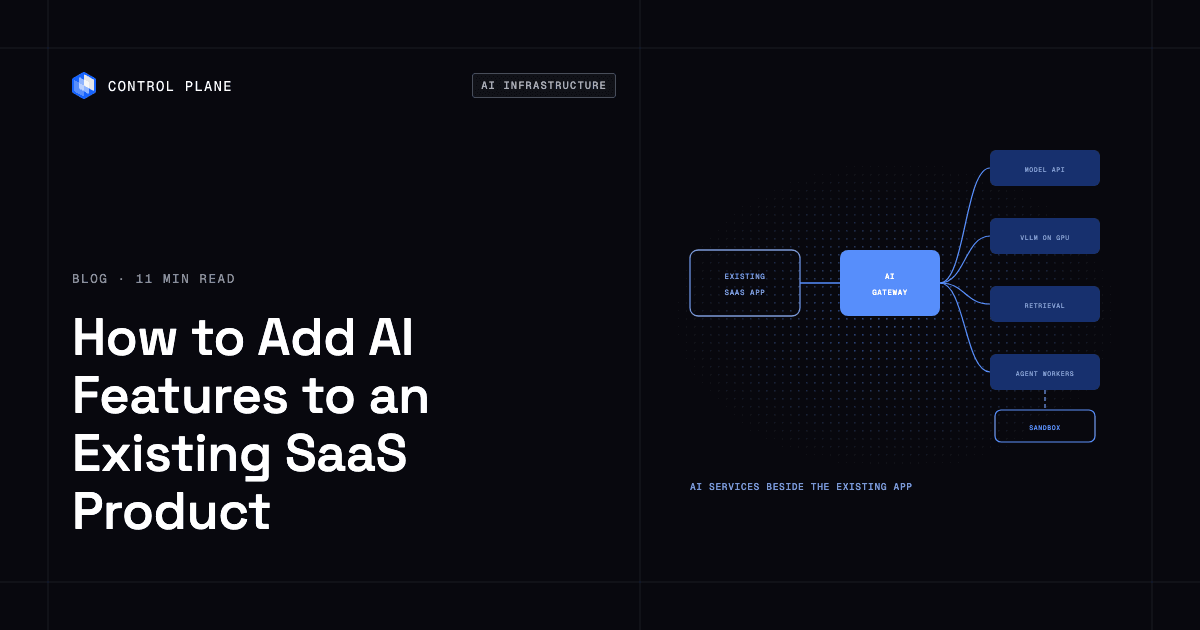
Most SaaS teams add AI features by putting an inference layer beside the existing application. That layer calls hosted model APIs or self-hosted open-weight models and pairs with retrieval, evaluation, observability, and, for agents, an isolated sandbox to run agent-generated code. Control Plane runs these new AI services (model gateways, self-hosted model servers on GPUs, and agent workers) next to the existing app on AWS, GCP, Azure, and your own infrastructure. It runs the gateway and agent workers active-active across regions and clouds and handles Day 2 operations such as autoscaling, built-in observability, and security.
Disclosure: Control Plane publishes this guide.
TL;DR
The fastest path to shipping AI in an existing SaaS product is to deploy a small inference gateway as a separate service, route the application’s AI calls through it, and add retrieval, evaluation, and agent capabilities as the feature matures.
- Components you add. A model gateway, a retrieval and embeddings pipeline, background workers, an agent runtime with tool access, a sandbox for generated code, evaluation and observability, and per-tenant security controls.
- Staged rollout. Start by calling a hosted model API through the gateway, with a small eval set from day one. Add retrieval over your own data, then broader evaluation and cost tracking, then self-hosted models where volume justifies it, then agents with sandboxes.
- GPU access. You need GPUs only when you self-host models or fine-tune. Most first AI features use hosted APIs and need no GPUs.
- Agents and sandboxes. Agents call tools in a loop with the requesting user’s permissions. Agent-generated code runs in a separate sandbox service with microVM isolation, never on your application servers.
- Enterprise requirements. Data residency, provider data terms, tenant and user isolation, audit logging, SSO, failover, cost controls, evaluation before release, and compliance coverage for AI components.
- How Control Plane fits. It runs the inference gateway and agent workers as workloads in Control Plane’s Global Virtual Cloud (GVC), a set of locations across regions and clouds where each workload runs active-active, so those services stay up when a region or provider fails. vLLM model servers and cron jobs for ingestion and evals run as workloads alongside them.
What infrastructure do I need to add AI features to a SaaS platform?
Adding AI to a SaaS product introduces a distinct set of infrastructure components. Some are needed from day one, and others become relevant as features mature.
| Component | What it does | When you need it | Common options |
|---|---|---|---|
| Model access | Provides the language or embedding model your feature calls | Day one | Amazon Bedrock, Google’s Gemini Enterprise Agent Platform (formerly Vertex AI), Microsoft Foundry, or model providers’ own APIs |
| AI gateway or inference layer | Routes requests, streams responses, handles retries and fallbacks, enforces rate limits, and tracks per-tenant quotas and cost | Day one | A custom lightweight service or an open-source gateway deployed as its own service |
| Self-hosted model serving | Runs open-weight models on GPUs you control for cost, latency, or data residency reasons | When call volume or compliance justifies it | vLLM, NVIDIA Dynamo-Triton |
| Retrieval and embeddings | Stores vector embeddings and retrieves relevant context for prompts (retrieval-augmented generation, or RAG) | When the feature needs your product’s data | pgvector in an existing PostgreSQL database, hybrid keyword and vector search, a reranker, and an ingestion pipeline |
| Background workers and queues | Process long-running AI jobs asynchronously outside the request path | When AI tasks take longer than an acceptable HTTP response time | Task queues or durable workflow engines, and cron jobs for batch ingestion |
| Agent runtime and tool access | Orchestrates a model that calls tools in a loop to complete multi-step tasks | When you ship autonomous or semi-autonomous workflows | Agent frameworks with typed tool definitions and scoped permissions |
| Sandbox for agent-generated code | Executes code produced by an agent in a strongly isolated environment | When agents generate or run arbitrary code | MicroVM-based sandbox services with per-session isolation |
| Evaluation and observability | Traces prompts and responses, measures latency percentiles, tracks token usage and cost per tenant, and scores quality | Day one, expanded over time | OpenTelemetry and its generative AI semantic conventions (still in development status) for traces and metrics, plus eval datasets and pipelines |
| Security and tenant isolation | Manages API key secrets, enforces tenant and user data boundaries, limits prompt injection damage, and produces audit logs | Day one | Secrets management with workload identity, and scoped data access policies |
Each component is a separate service or capability. The existing SaaS application changes mainly by calling the gateway instead of embedding model calls throughout its codebase.
What’s the easiest way to add an inference layer to an existing application?
The easiest path is a separate inference service, a small gateway, that the existing application calls over HTTP. That one service holds API keys, provider fallbacks, per-tenant quotas, pinned model versions, versioned prompt templates, and observability. It streams tokens to the client over server-sent events, so every proxy and load balancer in the path must allow long-lived, unbuffered responses. When application code consumes the output, request structured output against a JSON schema and validate it before use.
When a model provider has an outage, the gateway can fail over to the same model served by another cloud, or to a second model whose prompts already pass your evals. When you swap models, you change the gateway configuration instead of hunting through application code. When you need cost data per tenant, the gateway already records it.
A staged rollout keeps risk low and ships value at each step:
- Stage 1: Call a hosted model API through the gateway. Deploy the gateway as its own service. The application sends prompts to it, and the gateway forwards them to a hosted model API and returns the response. You get central logging, key management, and basic cost tracking immediately. Start a small eval set of real requests with graded answers.
- Stage 2: Add retrieval over your own data. Build an ingestion pipeline that embeds your product’s data into a vector index, so each prompt includes context from the requesting customer’s own data. Filter retrieval by the requesting user’s document permissions as well as the tenant, and propagate deletes and permission changes to the index. Store the embedding model version with every vector, because changing models means re-embedding into a new index and switching over.
- Stage 3: Expand evaluation and add per-tenant cost tracking. Grow the eval set from production traces, including answers users flag, and score every prompt or model change with code checks and an LLM judge calibrated against human grades. Add detailed cost attribution per tenant.
- Stage 4: Self-host open-weight models. When call volume, latency requirements, or data residency rules justify it, deploy a model server such as vLLM on GPUs. The gateway routes eligible requests to the self-hosted model and falls back to the hosted API.
- Stage 5: Add agents with tool access and a sandbox. Expose product functionality as tools. Deploy an agent runtime as a background worker and a sandbox service for generated code.
For a deeper walkthrough of the serving layer, see what infrastructure you need to run an inference layer.
How do I get GPU access for an existing SaaS application?
You need GPUs only if you self-host models, fine-tune, or run GPU-heavy processing. When you do need GPUs, each option has different trade-offs.
| Option | Good for | Trade-offs |
|---|---|---|
| Hosted model APIs | Getting started, low or variable volume, fast iteration | No GPUs to manage; cost per token can add up at scale, and you have less control over model versions and where data is processed |
| GPU instances or managed endpoints at your existing hyperscaler | Staying close to existing cloud services and data | Quota limits and capacity availability can be real constraints, and pricing is tied to one provider |
| GPU cloud providers (neoclouds) | Access to newer GPU generations and additional capacity | Adds another provider to manage, and data may need to move between clouds |
| GPUs you own | Steady, high-utilization workloads and data sovereignty | Capital expense, and you handle maintenance and capacity planning |
| A platform that runs GPU workloads across these from one deployment | Using the best source for each workload without separate tooling per provider | Adds a platform dependency in exchange for one deployment model across GPU sources |
Teams that rely on a single provider for GPUs can find capacity unavailable in the region they need, and spreading across providers reduces that risk. For a comparison of GPU sources, see the best GPU cloud providers. For patterns that run inference across several GPU sources, see AI inference across multiple GPU clouds.
How do I add an AI agent to my existing SaaS product?
An agent is a model that calls tools in a loop to complete a task. The model decides which tool to call next, observes the result, and repeats until the task is done or a limit is reached.
Adding an agent to an existing product follows a practical sequence:
- Pick one narrow job. Start with a well-defined task with clear success criteria, such as generating a report from existing data or triaging support tickets.
- Expose existing product functionality as tools. Build typed tool definitions on your existing API. Each tool call runs with the requesting user’s permissions, passed as a short-lived scoped token, so the agent reaches only what that user can reach. A shared service account with tenant-wide access lets any user escalate through the agent. The Model Context Protocol is an open standard for exposing tools to agents, and its authorization spec uses OAuth.
- Run agents as background workers. Agents can take seconds or minutes to finish. Run them outside the HTTP request path as background jobs with durable execution.
- Keep humans in the loop for writes. Let agents draft actions and require confirmation before they modify data. Give every write tool an idempotency key so a retried step does not create a duplicate record or send a second email.
- Treat retrieved content and tool output as untrusted. A document, ticket, or web page the agent reads can carry injected instructions. Filters miss some attacks, so limit what a hijacked agent can do with user-scoped permissions, confirmation for writes, and no requests to arbitrary URLs, including links and images rendered in responses.
- Log every tool call. Record the tool name, arguments, authorization decision, and result for every step, for debugging, compliance, and improving agent behavior.
- Set cost and step limits per tenant. Cap tool calls and total token spend per agent run to prevent runaway costs.
How do I add an AI agent sandbox to my product without a full rearchitecture?
Run the sandbox as a separate service that your agent calls over an API, with these properties:
- Per-session isolation. Each session gets its own environment. MicroVMs isolate more strongly than shared-kernel containers because each one runs its own kernel.
- No access to production credentials. The sandbox cannot see your application’s secrets, databases, or internal network, and any calls it needs go through your tool layer.
- Egress controls. Outbound network access is limited to the endpoints the task requires.
- Resource and time limits. CPU, memory, and wall-clock time are capped per session.
- Lifecycle control. Sessions are cleaned up, reset, or suspended when work ends, so idle environments do not accumulate.
Because the sandbox is its own service, you add code execution to an agent without changing your application servers or loosening their security. For a comparison of sandbox approaches, see the best AI agent sandboxes. For tenant isolation in AI workloads, see multi-tenant isolation for SaaS and AI.
What is the best infrastructure for enterprise AI adoption?
Enterprise buyers evaluate AI features against operational and compliance requirements. Before shipping AI to enterprise customers, check your infrastructure against this list:
- Data residency. You can specify and prove where prompts and model outputs are processed and stored.
- Provider data terms. Model providers contractually exclude your data from training, retention windows are documented, and zero-data-retention terms are in place where customers require them. Cross-region inference options on hosted platforms can move processing out of region, so use regional or in-geography endpoints. Redact personal data before prompts reach third-party APIs or logs where the feature allows.
- Tenant isolation. Retrieval, embeddings, caching, and logging enforce tenant boundaries and each user’s permissions within a tenant.
- No long-lived cloud keys in code. Workloads reach cloud services through short-lived credentials or workload identity, and model API keys sit in a secrets manager that grants access only to authorized workloads.
- Audit logging. Every model call, tool call, and agent action is logged with the tenant, user, timestamp, and authorization decision.
- SSO and role-based access for admins. Administrators manage AI configuration and review logs through your existing identity provider.
- Uptime and failover for AI services. A model provider outage degrades the AI feature and leaves the rest of the product running, with fallback providers keeping it usable.
- Cost controls per tenant. Quotas, rate limits, and cost tracking stop any single tenant from generating unbounded spend.
- Evaluation before release. Automated evals for retrieval accuracy, hallucination rate, and latency run before every model or prompt change reaches production.
- Compliance scope. Your platform’s certifications explicitly cover the AI components, including inference, retrieval, and sandboxes.
For more on meeting these requirements, see what AI-ready infrastructure is. For secrets handling, see secrets management best practices.
How Control Plane fits
Control Plane is the unbreakable platform for running production workloads. It runs serverless, standard, stateful, and cron workloads natively on AWS, GCP, and Azure, VM workloads on locations joined through Control Plane’s Managed Kubernetes, and workloads on Kubernetes clusters you already run or your own machines, including on premises, active-active across regions and clouds under a 99.999% SLA.
For SaaS teams adding AI features, Control Plane runs the new AI services as workloads next to the existing application. An inference gateway, containerized model servers such as vLLM, agent workers, and cron jobs for ingestion and evals each deploy as workloads in a GVC. A workload deployed to a GVC runs active-active in every location of that GVC from one definition, and a global endpoint routes each request to the nearest healthy location.
On Control Plane-managed locations in AWS, GCP, and Azure regions, there is no Kubernetes cluster to operate. Teams can also add Kubernetes clusters they already run, including GPU clusters on a neocloud, or their own machines as locations.
Failover for AI services. Run the inference gateway and agent workers in a GVC with locations on more than one provider, such as AWS and GCP. If a region or provider fails, the global endpoint sends requests to the healthy locations with no manual failover. During the October 20, 2025 AWS us-east-1 outage, Control Plane customers with us-east-1 in their GVC had workloads active and running in healthy locations within 10 seconds, according to Control Plane’s internal incident telemetry. The 99.999% availability SLA applies to workloads running at least two replicas in at least two locations.
Self-hosted models. Control Plane’s vLLM template serves one Hugging Face model through vLLM’s OpenAI-compatible API on a built-in NVIDIA A10G or T4, or on your own GPU cluster registered as a location through Control Plane’s Bring Your Own Kubernetes (BYOK), and caches weights on a persistent volume. It runs in a GVC with exactly one location, and two replicas, each with its own GPU, give zero-downtime restarts and upgrades. For redundancy across regions, deploy a second vLLM server in its own GVC in another region and configure your gateway to fall back to it or to a hosted API. Control Plane’s pricing page lists NVIDIA GPUs from T4 to B200.
Secrets and cloud identity. Control Plane’s Universal Cloud Identity (UCI) lets workloads call AWS, GCP, and Azure services, such as Amazon Bedrock, with no long-lived cloud keys in your code. Model provider API keys go in Control Plane secrets that only the workloads granted access can read.
Isolation and Sandboxes. Each workload is isolated with cgroups, namespaces, and restricted syscalls and capabilities, and Control Plane Sandboxes, isolated environments where AI coding agents and developers build software, run in dedicated Kata Containers microVMs. Each sandbox keeps its files on a persistent volume and can be suspended (you pay only for storage while suspended) and resumed.
Autoscaling. Serverless workloads scale on request concurrency and can scale to zero.
Cost and compliance. Customers typically cut compute costs 30 to 50 percent compared with running directly on AWS, GCP, or Azure. You pay for the CPU and memory a workload reserves, with no contracts or minimums. Control Plane is PCI DSS Level 1, SOC 2 Type II, HIPAA, and GDPR compliant.
FAQ
Answers to the questions CTOs ask most when adding AI to an existing product.
Do I need GPUs to add AI features to my SaaS product?
No. Hosted model APIs cover most first AI features. You need GPUs when you self-host models, fine-tune, or run GPU-heavy processing, usually after proving demand and economics with hosted APIs.
Should I self-host models or use a model API?
Start with a hosted model API to ship faster and skip GPU capacity planning. Self-host when sustained volume keeps GPUs busy enough to beat per-token pricing, including operations cost, and an open-weight model passes your evals, or when data residency rules prohibit sending data to a third-party API.
How do I keep my product online when a model provider has an outage?
Route requests through a gateway that fails over when the primary provider returns errors or times out. The safest fallback is the same model served by another cloud, since a different model needs its own tested prompts. Fail over before the first token streams, because a fallback provider cannot continue a partially streamed response. On Control Plane, a gateway deployed to a GVC with two or more locations runs active-active in each of them, so it is not a single point of failure.
How do I keep tenant data separate in AI features?
Enforce isolation at every layer. Filter vector queries by tenant and by the user’s document permissions, key cached responses by tenant, user permission scope, model, and prompt version, avoid similarity-based semantic caching for answers built from permissioned data, include the tenant ID in every log entry, and store each tenant’s embeddings in separate partitions or namespaces.
How do I run an AI agent sandbox securely?
Give each session its own microVM and treat it as hostile. Containers share the host kernel, so a kernel exploit in generated code can reach other workloads, and a microVM adds a virtualization boundary. Keep production credentials out of the sandbox, restrict egress, and cap resources and run time.
What does enterprise AI adoption require from my infrastructure?
Proof of how AI features handle customer data. Security reviews ask where prompts are processed, what the model provider retains, whether customer data trains models, how users are isolated in retrieval and caching, and whether certifications cover the AI components. On Control Plane, Universal Cloud Identity (UCI) keeps long-lived cloud keys out of workload code.
How do I control AI costs per tenant in a SaaS product?
Track token usage and model calls per tenant from day one through the inference gateway, and set per-tenant rate limits and spending caps. Use provider prompt caching for long shared prefixes such as system prompts and tool definitions, send non-urgent work to batch APIs or async workers, and as volume grows, consider self-hosting high-traffic models to move from per-token pricing to compute pricing.
Can I add AI features without rearchitecting my SaaS product?
Yes. Add AI as a separate service layer that your existing application calls through an API. The core product’s architecture, database, authentication, and tenant model stay in place, and the application changes mainly where it calls the new services and where tools wrap its existing API. On Control Plane, those services deploy as new workloads alongside the existing app.
To run inference gateways, model servers, and agent workers next to your existing product, active-active across clouds, talk to the Control Plane team or sign up free.