Consider a platform team that spends four months building a thorough migration plan. Its pilot, a stateless order-status API, runs on AWS within three weeks. Six months later, that API is still the only workload in the cloud.
In this scenario, the blockers are not exotic technical failures. The remaining services have shared dependencies that were never mapped in enough detail, a few still depend on large on-premises data flows, and the pilot has no measurable exit criteria, rollback owner, or named go/no-go decision-maker.
Planning is usually thorough enough. Execution falls apart when workload-level decisions, dependency maps, exit criteria, and operating assumptions never get translated into a sequenced, wave-by-wave execution plan.
This guide covers that decision-to-execution bridge. You’ll come away with a workload-treatment framework (the 6 Rs and when each applies), a wave-planning model with concrete exit criteria and rollback requirements, three failure modes that derail pilots before wave two, and a concrete framework for deciding between portability-first and single-cloud-first migration topology.
Workload portfolio audit before you choose a strategy
Before assigning any workload a migration strategy, document six inputs for each one. The migration treatment follows directly from why the workload is moving, and the business objective shapes the acceptable degree of application change, the allowable timeline, and the rollback risk tolerance.
Business objective for moving. The range includes datacenter exit, deployment velocity, cost reduction, resilience improvement, compliance posture, geographic expansion, modernization, and provider exit. A workload moving for datacenter exit has a hard deadline and low tolerance for scope creep. A workload moving for modernization can absorb the timeline required for refactoring.
Dependencies, both upstream and downstream. Document which services the workload calls synchronously, which services call it, and the latency sensitivity of each relationship. A workload with seven synchronous upstream callers can’t move until those callers move or the interface contract changes to accommodate a temporary routing layer.
Data residency and compliance constraints. Named requirements make this concrete. GDPR’s cross-border transfer rules can affect where personal data is transferred and what safeguards are required. HIPAA-covered workloads may require appropriate access controls and audit controls for ePHI. FedRAMP can constrain which cloud services are acceptable for in-scope U.S. federal workloads. Map the applicable requirements to each workload before choosing a provider or region.
Performance baselines. Record the current p99 latency, throughput targets, and connection pool sizes. The wave plan for this workload needs a validation condition tied to those numbers, and your go/no-go criteria should include a target-environment run that matches or exceeds the baseline.
Operational requirements. On-call coverage schedules, runbook locations, monitoring integrations, and alert routing need a target-environment equivalent before cutover. Discovering mid-wave that PagerDuty isn’t configured for the new environment adds unnecessary pressure to a live cutover.
License portability. Some database and middleware licenses include Bring Your Own License (BYOL) terms with cloud-specific restrictions. Check before assuming the same binary runs the same way in the target environment.
For a broader readiness checklist, see Control Plane’s 8 Essential Steps to Create a Cloud Migration Assessment.
The 6 Rs as a decision framework, and why some frameworks use seven
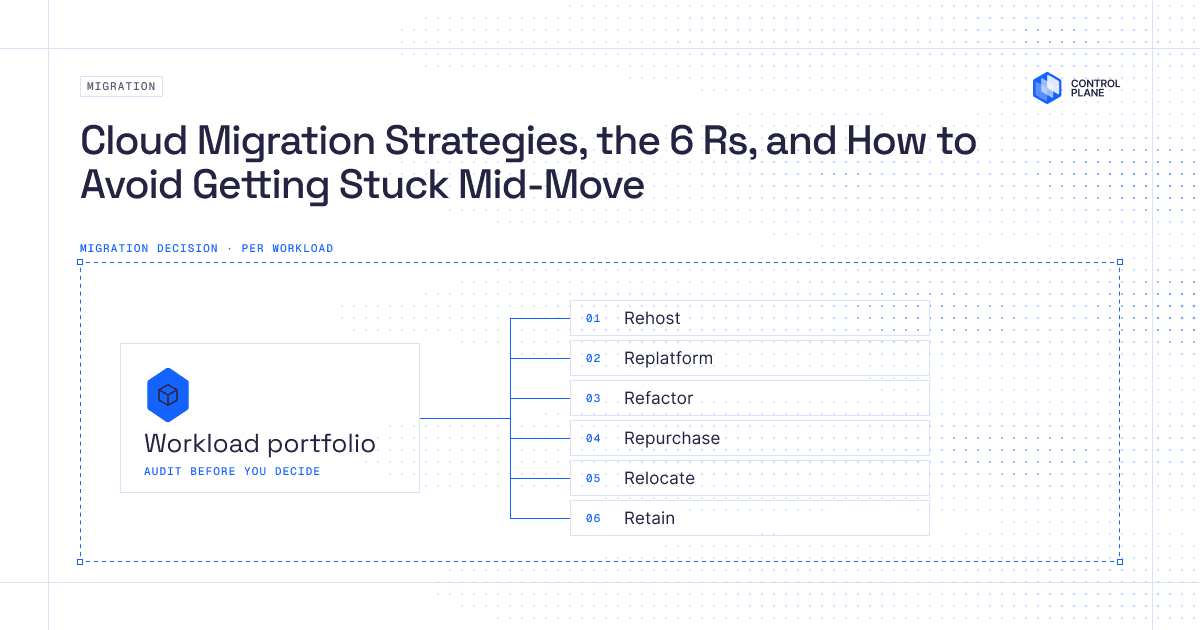
The 6 Rs are six strategies for assigning a migration treatment to each workload. Migration strategy frameworks vary by source. This article uses the classic six-strategy model, covering Rehost, Replatform, Refactor, Repurchase, Retire, and Retain. AWS’s current prescriptive guidance adds Relocate as a seventh strategy, covering workload moves that use the same virtualization infrastructure in the cloud environment (VMware Cloud on AWS, for example) with minimal configuration change. Microsoft’s Cloud Adoption Framework uses related but not identical terminology. No single list is canonical. The strategies in the table below are what drive the actual decision.
| Strategy | Choose when | Avoid when | Degree of change | Example workload |
|---|---|---|---|---|
| Rehost | Datacenter exit with a hard deadline, workload is stable, speed is the priority | The workload has a documented scaling ceiling on bare VMs, cloud-native services are a stated requirement, or the license conditions change on cloud infrastructure | Minimal (same OS, same runtime, same config) | Legacy Java service moved as-is to EC2 |
| Replatform | You want managed-runtime or managed-database benefits without a full rewrite, or performance SLA is at risk on unmanaged VMs | The app is tightly coupled to OS-level or provider-specific dependencies the target platform doesn’t expose | Moderate (targeted platform changes; limited code or configuration changes may be required) | Self-managed PostgreSQL migrated to Cloud SQL |
| Refactor | Scaling ceiling blocks product delivery, technical debt is compounding, or multi-tenancy and availability SLAs require architectural changes | The team has no test coverage of the existing system, the timeline is tight, or the target architecture is unfamiliar to the team | High (rearchitect, introduce new services, rewrite components) | Monolith decomposed into domain-bounded microservices with event sourcing |
| Repurchase | The capability is a commodity (email delivery, CRM, ticketing) and total cost of ownership favors a SaaS product | You need a custom data model, compliance requires self-hosted deployment, or integration cost exceeds operational savings | None for the application (the SaaS vendor owns it), but data and integration migration costs apply | Self-hosted Jira migrated to Jira Cloud, with in-house CRM replaced by Salesforce |
| Retire | No active users, the workload duplicates a function already covered elsewhere, or the business case no longer exists | You believe there are no active users but haven’t checked traffic logs in the last 90 days | Full decommission | Internal reporting app superseded by Looker |
| Retain | A regulatory constraint, hardware dependency, or unfavorable migration cost-to-benefit ratio within the current planning horizon | Indecision without a documented reason and scheduled revisit date | None planned | Mainframe-hosted payroll system with hardware-tied compliance certification |
A few points on applying the table. Rehost covers minimum-change migration for both stateless and stateful workloads that run without modification on cloud infrastructure, so it covers more than stateless services. Refactor implies substantial rearchitecting, justified by a specific scalability, maintainability, or capability requirement you can name before the work starts. Retain requires a documented business reason and a scheduled revisit date. If you can’t state why a workload is staying where it is and when you’ll revisit the decision, it belongs in a different category.
Migration waves and the three failure modes that derail pilots
Once each workload has a migration treatment, group workloads into waves using four criteria, ordered by dependency chain (wave N must complete before wave N+1 can start), risk tier (high-blast-radius workloads move in later waves), business criticality (revenue-critical services warrant a longer parallel-run period before full cutover), and rollback complexity (workloads with bidirectional data sync are harder to roll back and need more runway on each side of the cutover).
Every wave plan documents six things:
- Success KPIs with specific thresholds, for example p99 latency within 10ms of the baseline for 14 consecutive days, error rate below 0.1%, and cloud cost within the approved budget variance
- Rollback criteria with explicit triggers, for example “if error rate exceeds 1% for five consecutive minutes at any point during the first 30 days” rather than “if something goes wrong”
- Data migration and cutover dependencies, including the cutover sequence, any dual-write period, and the name of who runs the final data sync
- Named go/no-go owners, a specific person (not “the team”) for each stakeholder group who can authorize or block the cutover
- Observability checks, with dashboards, alerts, and log pipelines live and verified in the target environment before traffic shifts
- Compliance checks, with retention policies, access logging, and encryption at rest meeting requirements in the target environment before cutover
Failure mode 1: the pilot that never graduates
Six months after a clean pilot deployment, that service is still the only workload in the cloud. The cause is almost always the absence of written exit criteria. When “done” is a feeling rather than a documented condition, teams move on to other work, the pilot sits in place, and re-mobilizing for wave two requires a new kickoff meeting.
The fix is straightforward. Write exit criteria before the pilot starts. The pilot graduates when the target environment has matched the p99 latency baseline for 14 consecutive days, the rollback procedure has been executed in a staging environment and documented, on-call runbooks are live and reviewed by the on-call rotation, and the named go/no-go owner has signed off in writing. Without those four conditions, there’s no graduation.
Failure mode 2: the egress and data-gravity surprise
Transfer costs for wave two can come in several times higher than estimated. A batch analytics service may be blocked because the multi-terabyte daily dataset it processes still lives in the original environment and no transfer plan exists.
Skipping data-flow pattern modeling before wave scheduling causes this. For each workload, map which services it calls synchronously, where data lands after each write, and the daily transfer volume across each boundary. Co-locate high-volume data consumers with the data stores or services they depend on when those dependencies are also moving. A workload that still reads terabytes per day from a data source left in the original environment can turn an otherwise clean migration into a latency and transfer-cost problem. For a deeper treatment of cross-provider transfer cost mechanics and resilience design, see Beyond Backups: Designing Systems That Survive The Inevitable.
Failure mode 3: compliance shortfalls found post-deployment
The security team flags that a migrated workload is writing PII to a CloudWatch log stream in a region outside the approved boundary. The audit team asks for 90-day access logs that don’t exist in the target environment.
Compliance and operational checks get treated as post-migration audit work when teams are focused on meeting cutover deadlines. Move those checks into the wave plan as pre-cutover gates. If a workload requires SOC 2 log retention, the retention policy goes live in the target environment before traffic shifts. If a region constraint applies to any data the workload handles, validate that constraint in the target environment before the go/no-go call, not during the post-migration review.
All three failure modes share a root cause, insufficient definition of done at the wave level. Exit criteria, rollback ownership, data transfer modeling, and compliance validation all belong in the wave plan document before the wave begins.
The portability decision
Deciding between portability-first and single-cloud-first turns on whether your requirements genuinely span providers or whether they can be satisfied within one provider’s multi-region deployment model. Both sides carry real costs.
Portability carries overhead that teams often underestimate. AWS IAM, GCP IAM, and Microsoft Entra ID use different identity and policy models, so teams must manage provider-specific roles and audit paths. Provider-native services can also create application coupling: an application built around Aurora-specific features may need database, schema, configuration, or integration changes before moving to Cloud SQL, even when both sides use compatible database engines. Infrastructure code, CI/CD, observability, runbooks, and support processes also need a consistent cross-provider operating model.
The two topologies differ at the infrastructure level in ways that compound over time.
Design team spec. Two side-by-side panels. Left panel (Portability-First), showing a top-level “Unified Control Surface” box with downward arrows to a “Global Virtual Cloud” box that labels two provider locations (aws-us-east-1, gcp-us-central1). The GVC has two child nodes labeled “Workload Replica A” and “Workload Replica B.” A separate “Identity Layer / credential-free” node connects to both replicas with dashed lines indicating non-network identity delegation. Right panel (Single-Cloud-First), showing an “AWS Account” box containing a VPC, with a single application node (ECS Task) that has solid arrows to RDS Aurora, SQS, and S3 within the same provider boundary. The left panel shows provider-agnostic placement with an abstracted identity layer, while the right panel shows deep native service integration within one provider. Color coding: left panel uses a neutral palette, right panel uses AWS orange to visually anchor the provider dependency.
Signals that favor portability-first:
- Customer or regulatory requirements that genuinely span providers or private environments, for example a government contract requiring private cloud deployment alongside a public cloud
- A requirement to combine provider-specific capabilities with no cross-provider equivalent, such as Google BigQuery for analytical workloads alongside AWS SageMaker for inference
- An acquisition or exit scenario where the buyer’s infrastructure is unknown at planning time
- Provider-level failure independence is a stated, contractual requirement and multi-region single-cloud deployment doesn’t satisfy the failure-domain separation required
Signals that favor single-cloud-first:
- A tight delivery timeline where cross-cloud operating complexity would extend the migration schedule into unacceptable territory
- The target provider satisfies the workload’s geographic, contractual, and compliance requirements through approved regions; a residency or resilience requirement does not automatically require multi-cloud
- The workload depends on provider-native managed services with no practical equivalent on another provider
- The team has no existing cross-cloud operating model and no capacity to build one during the migration window
If you’re evaluating Oracle Cloud Infrastructure as a provider option, verify OCI’s current egress pricing directly from Oracle’s official pricing documentation before building your cost model. Egress pricing changes, and any specific figure in a blog post is likely to be stale by the time you read it.
How to validate portability before the next wave
Before committing a wave to a target environment, validate two things about a representative workload: whether its deployment model works across the intended locations and, when it uses provider-native resources, whether its identity and access model can move with it. These checks surface portability constraints while they are still cheap to address.
Control Plane is a cloud virtualization platform that lets teams deploy and manage workloads across single-cloud, multi-cloud, hybrid, and private infrastructure through a consistent control surface. The two tests below use Control Plane as the implementation path.
Test 1: deployment portability
Run a simple deployment-portability exercise with one representative workload:
- Create a Global Virtual Cloud (GVC), Control Plane’s workload-placement boundary, spanning two supported locations, for example one AWS location and one GCP location.
- Deploy the same workload to that GVC and confirm that it reaches Ready in both locations.
- Open each location-specific endpoint and compare basic behavior such as startup, health checks, configuration loading, and request handling.
If the workload behaves consistently in both locations, you have evidence that its container image, basic runtime configuration, and deployment model are portable across those locations. See the Control Plane quickstart for the documented GVC, workload, and per-location deployment workflow.
Test 2: cloud-resource identity and access
If the workload needs provider-native resources, validate identity and access separately. Universal Cloud Identity lets workloads access supported cloud-provider resources without embedding long-lived credentials. The workload gets a named Identity object, and Control Plane handles the provider-specific identity integration, such as an IAM role on AWS, service account on GCP, or app registration on Azure. Configure the identity for the representative workload and confirm that it can authenticate to the intended cloud resource without storing provider credentials in the workload.
To configure Universal Cloud Identity for a workload, see Accessing Cloud Resources in the Control Plane docs. The create-identity guide covers the cloud-account linking and Identity configuration steps.
Use these checks on a representative workload before committing the next wave. Together they show whether the workload can be deployed across the intended locations and whether its cloud-resource identity and access path works without embedded long-lived credentials. They do not by themselves prove portability of service APIs, data models, networking, or external dependencies, which should be evaluated separately.
Conclusion
A successful cloud migration is not a sequence of isolated workload moves. Start by documenting why each workload is moving, choose the migration treatment that matches that objective, and turn those decisions into dependency-aware waves with explicit success criteria, rollback ownership, and pre-cutover operational checks. Then decide deliberately whether portability across providers is a requirement or whether optimizing for one cloud first is the better tradeoff.
Control Plane can reduce the provider-specific deployment, identity, and orchestration glue around workloads while giving teams a consistent placement model across supported environments. Start building for free at console.cpln.io, or use the quickstart and cloud-resource-access docs to evaluate a representative workload before committing the next migration wave.
Frequently Asked Questions
The 6 Rs are six strategies for migrating workloads to the cloud. Rehost moves a workload as-is to cloud infrastructure with minimal changes to the application, runtime, or configuration. Replatform makes targeted platform changes, such as swapping a self-managed database for a managed cloud equivalent, without fundamentally rearchitecting the application. Refactor involves substantial architectural changes justified by a specific scalability, maintainability, or capability requirement. Repurchase replaces the workload with a commercial SaaS product when the capability is a commodity. Retire decommissions the workload entirely. Retain leaves the workload where it is with a documented reason and a scheduled revisit date. Migration taxonomies vary; AWS’s current guidance adds Relocate as a seventh strategy.
A cloud migration readiness assessment is a structured audit of workloads conducted before migration decisions are finalized. For each workload, it captures the business objective for moving, upstream and downstream dependency relationships, data residency and compliance requirements, performance baselines, operational constraints including runbooks and monitoring integrations, and license portability conditions. The assessment output provides the inputs for migration strategy selection and wave sequencing.
The difference is the layer you change. Rehost changes where the workload runs while keeping it largely as-is. Replatform changes part of the platform, such as the database or runtime, without fundamentally rearchitecting the application; limited code or configuration changes may still be required. Moving an application largely as-is to EC2 is Rehost, while moving its self-managed PostgreSQL database to Cloud SQL is Replatform.
Choose a portability-first approach when requirements genuinely span providers or private environments, when different providers offer capabilities you intentionally need to combine, when provider-level failure independence is a stated requirement, or when future infrastructure is unknown because of an acquisition or exit scenario. Single-cloud-first makes more sense when delivery timelines are tight, the target provider satisfies the workload’s geographic and compliance requirements through approved regions, or the team has no cross-cloud operating model. Residency or resilience requirements do not automatically imply multi-cloud.
Model data transfer patterns before scheduling any migration wave. For each workload, document which services it calls synchronously, where data lands after each write, and the daily transfer volume across each provider or region boundary. Workloads that consume large datasets should move in the same wave as those datasets. A service reading 2TB per day from a data store that hasn’t migrated yet produces transfer costs that didn’t appear in the original estimate, because nobody mapped the data flow before the wave was scheduled.