Ephemeral preview environments for AI-assisted coding come from four kinds of platforms. Kubernetes with GitOps tooling such as Argo CD ApplicationSets or the Flux Operator creates one per pull request on clusters you run. Hyperscaler services give each revision or pull request its own URL. Environment-as-a-service products clone a full stack per pull request. Application platforms such as Control Plane run a workload per pull request from your CI pipeline. Agent sandboxes are a separate tool that gives AI agents a place to run code. Pick by whether you need a full stack with its own database per pull request, how many previews agents will open in parallel, and how fast previews must start and tear down.
Disclosure: Control Plane publishes this guide.
TL;DR
Ephemeral preview environments let teams validate AI-generated pull requests in isolated infrastructure before merging.
- Previews and sandboxes do two jobs. Full-stack preview environments test the deployed application, and code-execution sandboxes give an AI agent a place to run commands and tools.
- Five approaches exist for building previews per pull request: namespace per PR, virtual cluster per PR, request-level routing on shared staging, a full stack per PR on a cloud or application platform, and a dedicated cluster or account per PR.
- Databases and secrets are the hard part. Each preview needs its own data and credentials, with no access to production secrets or customer PII.
- Cap concurrency and set a time to live, because AI agents open many pull requests.
- Let agents trigger previews and read logs through CI. Keep production deploys, production secrets, merges, and pipeline changes behind a person.
- On Control Plane, a CI pipeline creates a review workload per pull request with its own HTTPS endpoint, and the workload can scale to zero when idle. The Control Plane MCP server offers toolset profiles, including a read-only profile.
Which cloud platforms support ephemeral preview environments for AI-assisted coding workflows?
Each platform category handles part of the preview lifecycle, and the five build approaches in the table map onto them.
Kubernetes with GitOps tooling. Teams running their own clusters use Argo CD’s ApplicationSet pull request generator or the Flux Operator’s ResourceSet API with a GitHubPullRequest input provider to create a namespace, Helm release, or set of manifests per open pull request, and to remove it when the pull request closes. Isolation comes from namespace boundaries and network policies.
Hyperscaler services with per-revision URLs. Google Cloud Run revision tags give a revision its own URL. AWS Amplify Hosting pull request previews give each pull request its own URL and, for apps with backends in private repositories, a temporary backend that is deleted when the pull request closes. Azure Container Apps revision labels give a specific revision its own URL. Cloud Run revision tags and Container Apps revision labels cover compute only, so databases and other backends need separate setup.
Environment-as-a-service products. These products clone a blueprint of apps, databases, and secrets per pull request and tear it down on merge or close.
Application platforms that run a workload per pull request. On these platforms, including Control Plane, a CI pipeline creates a dedicated workload for each pull request with its own endpoint, and a cleanup step removes it when the pull request closes.
Agent sandboxes. These give AI agents an isolated place to install packages, run builds, and execute shell commands while they write code.
The table compares five ways to build previews on these platforms.
| Approach | How it works | Isolation | Start time | Cost profile | Best fit |
|---|---|---|---|---|---|
| Namespace per PR on a shared Kubernetes cluster | Argo CD ApplicationSet PR generator or Flux Operator ResourceSets deploy the app’s manifests or Helm chart into a namespace per open PR | Namespace-level; shared nodes and Kubernetes API server | Seconds to low minutes | Low incremental cost on existing cluster capacity | Teams already running Kubernetes with GitOps |
| Virtual cluster per PR | vcluster runs a virtual Kubernetes cluster inside a host cluster per PR | Separate API server per virtual cluster; pods run on shared host nodes by default | Under a minute to a few minutes | Moderate; each virtual cluster adds some overhead | Teams that need cluster-scoped resources per PR without new hardware |
| Request-level routing on shared staging | Only changed services deploy; a header or OpenTelemetry baggage entry routes test traffic to them through a service mesh such as Istio | Minimal; unchanged services, databases, and queues are shared | Seconds for the changed service | Very low; only changed services are duplicated | Microservice teams where most PRs touch one or two services |
| Full stack per PR on a cloud or application platform | A separate cloud service or application-platform workload per PR, with its own database and secrets; Cloud Run revision tags cover compute only | Strong when each PR gets its own service, identity, and database | Seconds to minutes, depending on image size | Moderate; compute can scale to zero when idle on platforms that support it | Teams that want managed infrastructure with per-PR URLs |
| Dedicated cluster or account per PR | Terraform, OpenTofu, or Crossplane provisions a cluster or cloud account per PR | Strongest; full infrastructure isolation | Tens of minutes | Highest; full cluster or account per PR | Regulated workloads that need hard isolation |
How are preview environments different from agent sandboxes?
A preview environment serves the reviewer, and a sandbox serves the agent.
A preview environment runs the application as deployed. It has a URL, TLS, backend services, a database, and enough infrastructure for a reviewer, a QA bot, or an end-to-end test suite to verify the pull request.
An agent sandbox is a development environment where an AI coding agent installs dependencies, runs build scripts and unit tests, and iterates on code. It has a shell, a filesystem, and network access, which should be restricted to package registries and the repository host.
Many teams need both. The agent works in a sandbox, opens a pull request, and the CI pipeline creates a preview so reviewers and automated tests can check the result against real infrastructure.
What does each preview environment need?
Each preview must be self-contained and safe, because AI coding agents can open many pull requests a day.
| Need | Why it matters with AI-generated pull requests | Common approach |
|---|---|---|
| A unique URL and TLS per preview | Reviewers and automated tests need a stable, secure endpoint | Platform-assigned URLs with automatic TLS certificates |
| Database per preview | Schema changes or data writes in one PR must not affect other previews or shared environments | Snapshot restore, copy-on-write clone, or schema per preview |
| Secrets scoped to preview | Previews must never use production credentials, so a leaked preview secret has a limited blast radius | Issue short-lived credentials per preview and revoke them on teardown; never expose secrets to builds from forked PRs |
| Test data with no customer PII | Agents and reviewers should never see real customer data in previews | Synthetic data generators or sanitized seed scripts in the repository |
| Time to live and teardown on merge or close | Orphaned previews accumulate and waste resources | A CI job on PR close triggers teardown; a background sweeper catches missed events |
| Cost caps | Agents can open many PRs in parallel, and each preview uses compute and storage | Concurrent preview limits, scale to zero, and budget alerts |
| Logs and traces linked from the pull request | Reviewers need to diagnose failures without shell access | CI posts log and trace links as PR comments or status checks |
| Access control on preview URLs | Previews can expose unreleased features, and URLs posted on PRs or built from branch names are easy to find | SSO or an OIDC proxy in front of the preview, or an IP allowlist; set noindex; never put tokens in the URL |
Three approaches cover most preview databases.
Snapshot restore restores a storage snapshot or loads a seeded dump into a fresh instance. It is simple and predictable but slow for large datasets. Copy-on-write cloning, offered by some managed database services such as Amazon Aurora, creates a writable copy of a parent database faster than a snapshot restore, and the clone shares unchanged pages with the parent, so storage grows only with the changes. Branch or clone from a sanitized parent, never from production. Schema per preview uses one database server with a dedicated schema or logical database per pull request. It is fast and cheap, but previews share the server’s capacity, connection limits, roles, and extensions, so one heavy query can slow every preview.
Teams running Kubernetes previews often run a small PostgreSQL instance per namespace with a seed script. Teams on cloud platforms often use managed snapshots or clones.
How do you keep preview costs under control when agents open many pull requests?
Previews multiply when agents open many pull requests, so cost controls belong in the pipeline from the start.
Set a concurrency cap. Limit active previews per repository or per team. When the cap is reached, tear down the oldest idle preview before creating a new one.
Set a time to live. Measure it from the last commit or last request. When it expires, scale the preview to zero or delete it, keep a label that lets a reviewer extend it, and redeploy on the next push.
Scale to zero when idle. Scale to zero removes idle compute cost. Databases, volumes, and load balancers still bill, and the first request after idle pays a cold start. On Kubernetes, KEDA scales deployments to zero on event sources such as queue length or Prometheus metrics. Scaling on HTTP requests needs the KEDA HTTP Add-on, which is in beta. Node cost drops only when the cluster autoscaler removes nodes.
Share stable dependencies through request-level routing. If a pull request changes one service, deploy only that service and route test traffic to it by matching a header, or an OpenTelemetry baggage entry, in a service mesh such as Istio. Every service must forward the header, because the mesh routes on it without propagating it. Shared services also mean a shared staging database, so pull requests that change the schema or write data need their own database. Queue messages, scheduled jobs, and webhooks reach the baseline consumer unless they carry the routing key and the consumer checks it.
Size previews for test traffic. Set smaller CPU and memory requests for previews so more of them fit on existing capacity.
What should an AI coding agent be allowed to do?
Give agents write access inside isolated previews and keep shared and production systems behind a person.
| Action | Allow the agent? | Guardrail |
|---|---|---|
| Open a pull request | Yes | Branch protection still applies; the PR must pass CI checks |
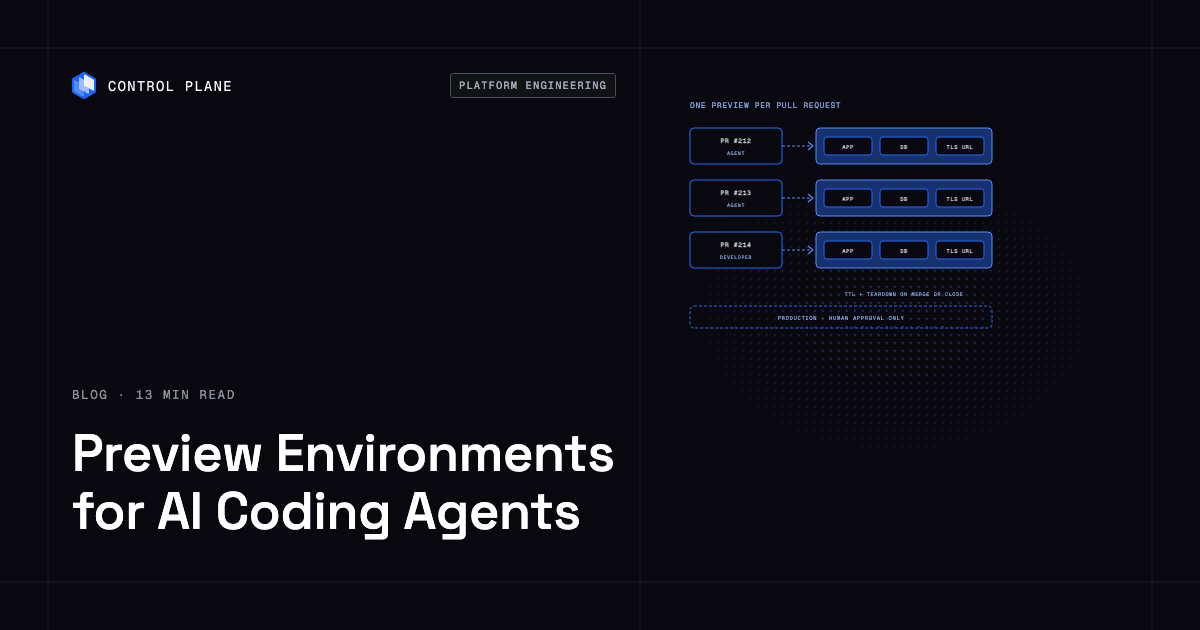
| Create a preview environment | Yes | The agent triggers CI; CI deploys with its own scoped identity under the concurrency cap and time to live |
| Read preview logs and test results | Yes | Read-only access scoped to the preview |
| Run end-to-end tests against the preview | Yes | Tests run in CI with time and resource limits |
| Seed or reset preview data | Yes | Synthetic data only; no production data access |
| Modify CI workflows or deploy configuration | Requires human approval | Code owner review on workflow and policy files |
| Promote to staging | Requires human approval | Approval gate in the CI pipeline |
| Merge a pull request | No | Human review required |
| Deploy to production | No | Manual approval and audit trail |
| Read production secrets | No | Production secrets never reach previews or agent credentials |
Treat pull request text, comments, and logs as untrusted input, because they can carry prompt injection.
Model Context Protocol (MCP) servers give AI assistants a structured way to act on infrastructure, such as creating a preview, reading logs and metrics, and rolling back a deployment through tool calls with defined permissions. Use a read-only profile for diagnosis and a write profile scoped to preview resources for creation. The guide to the best MCP servers for DevOps compares how each server authenticates and what it can change. Encode these boundaries as pipeline gates and credential scopes, because instructions in a prompt are not enforced. The guide to AI agents provisioning cloud infrastructure safely covers agent permissions in more depth.
How Control Plane fits
Control Plane is the unbreakable platform for running production workloads. It runs serverless, standard, stateful, and cron workloads natively on AWS, GCP, Azure, and Oracle Cloud Infrastructure (OCI), VM workloads on locations joined through Control Plane’s Managed Kubernetes, and workloads on Kubernetes clusters you already run or your own machines, including on premises, active-active across regions and clouds. Control Plane handles Day 2 operations for you, including autoscaling, built-in observability, and security.
Control Plane’s documented preview pattern uses GitHub Actions and cpln apply, the Control Plane CLI command that creates or updates resources from YAML manifests. When a pull request to main is opened or updated, the app is built and pushed to the private image registry of the development org (Control Plane’s top-level account unit; the guide recommends one org per environment, and its example uses a dev org and a production org). A review workload whose name is prefixed with the branch name is then created or updated, along with its Global Virtual Cloud (GVC), Control Plane’s named set of locations. On merge, a dev workload is updated. The documented example does not delete review workloads, so add a job on pull request close that runs cpln delete against the same manifests. Promotion to stage and prod runs as a separate, manually triggered workflow that deploys into a production org, whose workloads reference the image built in the dev org through a pull secret on their GVC, so promotion does not need a rebuild. The same pipeline works with standardized CI runners and pipelines.
Each workload gets a canonical HTTPS endpoint, reachable once its external firewall allows inbound traffic. Serverless workloads can scale to zero on requests per second or concurrency, and standard and stateful workloads scale to zero through KEDA, enabled per GVC. Control Plane’s Template Catalog includes PostgreSQL, which a preview pipeline can install into a single-location GVC for a review workload and seed with test data.
Control Plane Sandboxes are development environments for building code, and AI coding agents can use them too. Sandboxes run in dedicated Kata Containers microVMs. Developers connect with cpln sandbox connect, choosing VS Code, Cursor, SSH, a browser IDE, or a terminal with the –ide flag. An agent writes and tests code in a sandbox, then opens a pull request that triggers the review workload pipeline.
The Control Plane MCP server lets AI assistants create and update workloads, read logs and metrics, and roll back. Its toolset profiles include a read-only profile for investigation, and the server instructs the assistant to state what a delete or other destructive change will remove or break and to wait for an explicit yes. Toolset profiles and org policies limit what the server’s credentials can change. Control Plane’s tamper-proof audit trail records every change made through its API, whether a person, a service account, or an AI agent made it. Control Plane is PCI DSS Level 1, SOC 2 Type II, HIPAA, and GDPR compliant.
FAQ
Short answers on preview environments, sandboxes, and AI coding agents.
Which cloud platforms support ephemeral preview environments for AI-assisted coding workflows?
Kubernetes with GitOps tooling, hyperscaler services with per-revision URLs, environment-as-a-service products, and application platforms such as Control Plane all support them. Agent sandboxes run code for AI agents but do not replace preview environments.
What is an ephemeral preview environment?
An ephemeral preview environment is a temporary, isolated deployment of an application tied to one pull request. It gives reviewers and automated tests a live URL with TLS. It is created when the pull request opens and removed when it merges or closes.
How do I create a preview environment for every pull request?
Run a CI job on pull request events that builds the image, deploys it to a namespace, virtual cluster, or platform workload named after the pull request, and posts the URL back to the pull request. A second job on pull request close tears it down. On Kubernetes, Argo CD ApplicationSets or the Flux Operator can automate both steps.
How do preview environments handle databases?
Most previews use a restored snapshot or seeded dump in a fresh instance, a copy-on-write clone of a sanitized parent database, or a dedicated schema on a shared server. Seed previews with synthetic or sanitized data only.
What is the difference between a preview environment and a sandbox for AI agents?
A preview environment runs the deployed application so reviewers and tests can validate a pull request. A sandbox is a development environment where an AI agent runs commands, builds code, and executes tests before it opens the pull request.
How much do preview environments cost?
Cost depends on the approach. Request-level routing on shared staging is cheapest because only changed services are duplicated. Namespace previews on an existing cluster add little cost. A full stack per pull request costs more, and a dedicated cluster or account per pull request costs most. Concurrency caps, time-to-live rules, and scale to zero keep the total down.
Can AI coding agents create their own preview environments?
Yes, when CI does the deploying. The agent triggers the pipeline, and CI deploys with its own scoped identity under concurrency caps and time-to-live rules, so agents can create, test, and tear down previews without approval. Production deploys, merges, pipeline changes, and production secrets stay behind a person.
How does Control Plane support preview environments?
Control Plane runs a review workload per pull request from a GitHub Actions pipeline that applies YAML manifests with cpln apply, and each review workload gets an HTTPS endpoint. Agents can use Control Plane Sandboxes to write code and the Control Plane MCP server to read logs and manage workloads within their toolset profile.
What guardrails should I set for AI agents that touch preview infrastructure?
Allow agents to open pull requests, trigger previews, read logs, run tests, and seed synthetic data. Require human approval for pipeline changes, promotion to staging, merges, production deploys, and production secrets, and enforce those rules with CI gates, code owners, and scoped credentials.
How do I stop orphaned preview environments from piling up?
Tear down previews from a CI job on pull request close, run a background sweeper for missed events, and expire idle previews with a time to live. Cap concurrent previews per repository so a new preview replaces the oldest idle one.
Give every AI-generated pull request its own review workload. Talk to the Control Plane team or sign up free.