Moving off a hyperscaler means replacing each managed service with an equivalent, usually an open-source engine run on simpler infrastructure or a platform that runs it for you, while accepting different trade-offs in network reach, GPU availability, SLAs, and support. Most teams move compute and stateless services first and keep data-heavy or deeply integrated services where they are; Control Plane runs containers and common open-source data services on AWS, GCP, Azure, neoclouds, and your own servers, so a team can reduce hyperscaler use gradually without rewriting its deployment for each provider.
Disclosure: Control Plane publishes this guide.
TL;DR
Leaving AWS, Azure, or Google Cloud is a service-by-service decision. The work is finding an equivalent for each managed service, measuring performance and networking differences, reading what SLAs actually promise, and deciding which workloads justify a move.
- Equivalents exist for most categories. Compute, containers, object storage, databases, caching, messaging, load balancing, DNS, secrets, monitoring, and infrastructure as code all have portable or open-source options.
- Performance and networking change. Dedicated hardware can be more predictable; hyperscalers bring a private global backbone, mature autoscaling, and broad region coverage. Egress pricing models differ.
- SLAs are narrow. They cover one service in one region, pay credits, and exclude many failures. An application’s composite uptime is lower than any single SLA.
- Small businesses need four things. A replicated database, tested backups, monitoring with alerts, and TLS with custom domains. Predictable pricing depends on what costs extra.
- Some workloads should stay. Data gravity, proprietary services, existing compliance work, and committed-spend contracts are good reasons to keep them where they are.
- Control Plane offers a gradual path across clouds and your own servers.
What are common compute, storage, and networking service equivalents when moving off a hyperscaler?
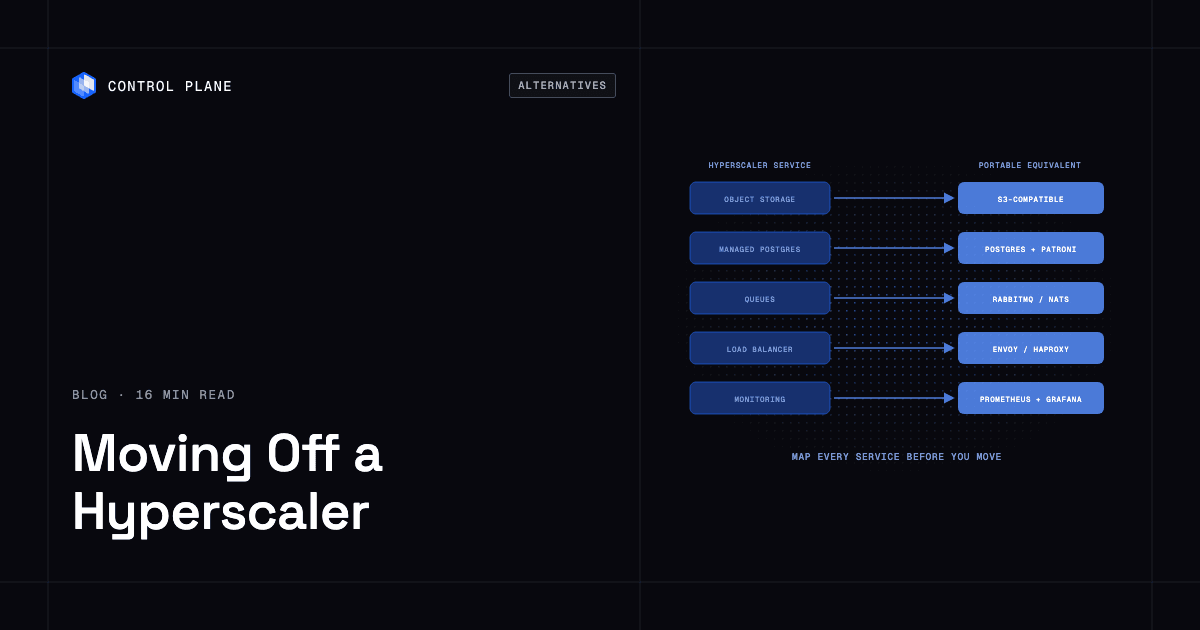
The table maps each hyperscaler service category to a portable or open-source equivalent. Difficulty reflects how much operational work moves to your team.
| Category | AWS | Azure | Google Cloud | Portable or open-source equivalent | Difficulty |
|---|---|---|---|---|---|
| Virtual machines | EC2 | Virtual Machines | Compute Engine | VMs or bare-metal servers from independent and bare-metal providers | Low: rebuild images and automation |
| Containers and Kubernetes | EKS | AKS | GKE | Self-managed Kubernetes or a platform that runs clusters for you | Medium: control-plane operations move to you unless a platform takes them |
| Serverless functions | Lambda | Azure Functions | Cloud Run functions | Knative, OpenFaaS, or scale-to-zero containers | Medium: event-source bindings are provider-specific |
| Object storage | S3 | Blob Storage | Cloud Storage | S3-compatible stores such as Ceph (RADOS Gateway), Garage, or SeaweedFS | Medium: durability, lifecycle, versioning, event notifications, and IAM-style policies differ |
| Block storage | EBS | Managed Disks | Persistent Disk | Local NVMe, SAN, or CSI-backed volumes | Medium: local NVMe is ephemeral; snapshots and replication are yours to build |
| Managed PostgreSQL | RDS for PostgreSQL | Azure Database for PostgreSQL | Cloud SQL for PostgreSQL | PostgreSQL with Patroni for high availability | Medium to high: you own backups, point-in-time recovery (pgBackRest or WAL-G), failover, read replicas, and upgrades |
| Managed MySQL | RDS for MySQL | Azure Database for MySQL | Cloud SQL for MySQL | MySQL or MariaDB with replication tooling | Medium: same operational shift |
| Caching | ElastiCache | Azure Managed Redis | Memorystore | Valkey or Redis with Sentinel | Low: protocol-compatible; high availability is yours to set up |
| Messaging and streaming | SQS, SNS, Kinesis, MSK | Service Bus, Event Hubs | Pub/Sub | RabbitMQ, NATS, Apache Kafka | Medium: ordering and delivery guarantees differ |
| Load balancing | ALB, NLB | Azure Load Balancer, Application Gateway | Cloud Load Balancing | HAProxy, Envoy, NGINX | Medium: the load balancer needs its own high availability, and WAF and DDoS protection are separate |
| DNS | Route 53 | Azure DNS | Cloud DNS | PowerDNS, CoreDNS, or a registrar’s DNS | Low: zone files export and import |
| CDN | CloudFront | Azure Front Door | Cloud CDN | An independent CDN or self-managed edge caching | Low: change origins, port cache rules |
| Secrets | Secrets Manager | Key Vault | Secret Manager | HashiCorp Vault or OpenBao | Medium: applications switch SDK or API |
| Identity and access | IAM | Microsoft Entra ID | Cloud IAM | Keycloak or another OIDC provider | High: policies are tied to provider APIs |
| Monitoring and logging | CloudWatch | Azure Monitor | Cloud Monitoring, Cloud Logging | Prometheus, Grafana, OpenTelemetry, Loki | Medium: agents and dashboards need rework |
| Infrastructure as code | CloudFormation | ARM templates, Bicep | Infrastructure Manager (Terraform-based) | Terraform or OpenTofu | Medium: provider-specific resources must be remapped |
Containerized workloads port with fewer changes than VM-based ones, but identity, networking, and storage classes almost always need work. For the broader trade-off, see managed services vs. portability.
What makes leaving a hyperscaler hard?
The categories in the table have equivalents. The harder problems are services with no direct replacement and the coupling around them.
- Managed NoSQL with proprietary APIs (DynamoDB, Cosmos DB, Bigtable) needs application changes to move to another data model.
- Event buses and workflow services (EventBridge, Step Functions, Google Cloud Workflows) hold business logic in provider-specific definitions.
- Data warehouses (Redshift, Azure Synapse, BigQuery) use their own SQL dialects, storage formats, and pricing.
- Managed AI services (SageMaker, Azure OpenAI in Microsoft Foundry, Vertex AI) tie training, serving, and billing to one provider.
- IAM policies reference provider-specific roles and resource identifiers, so rewriting them is a large task.
- Egress charges apply to ongoing traffic between moved and remaining services. AWS, Google Cloud, and Azure waive one-time exit egress on request, with conditions and deadlines.
- Marketplace licensing ties some third-party software to one cloud’s billing.
Checklist before you start:
- Inventory every managed service the application calls, including IAM, DNS, and logging.
- Flag services with provider-specific APIs or data formats.
- Estimate the volume and cost of data that must move.
- Find marketplace or bring-your-own-license software tied to one cloud.
- Map IAM roles and policies to size the rewrite.
- Check committed-spend contracts for termination terms.
- Assign on-call ownership and patching for every service you take over from the provider.
How do performance and networking differ between hyperscalers and alternative AI infrastructure providers?
Measure both from your application’s point of view.
Performance. Dedicated and bare-metal servers remove the virtualization layer and the noisy-neighbor effect of shared hosts, so steady workloads often run more predictably. GPU-focused providers frequently offer recent GPU generations and high-bandwidth interconnects, such as NVLink within a server or rack and InfiniBand or RDMA Ethernet between servers for distributed training; hyperscalers offer comparable fabrics (Azure uses InfiniBand, AWS uses EFA), though large allocations can be harder to get. Hyperscalers lead on elastic autoscaling, while on other infrastructure you often pre-provision capacity, build automation, or use a platform that scales for you. Benchmark throughput, p99 latency, scale-up time, storage IOPS, database recovery time, and behavior under failure.
Networking.
| Factor | Hyperscalers | Alternative providers |
|---|---|---|
| Region coverage | Many regions on every continent, linked by a private backbone | Ranges from a single site to dozens of locations |
| Inter-region latency | Consistent, over the provider’s own fiber | Depends on whether the provider runs its own backbone or uses the public internet |
| Egress pricing | Metered per GB, with tiered rates | Often included bandwidth or flat-rate plans; check the terms |
| Private networking | VPC peering, transit gateways, dedicated interconnects | IPsec VPN, dedicated circuits, colocation cross-connects |
| GPU interconnects | Available on specific instance families | GPU-focused providers may offer dedicated InfiniBand fabrics |
An S3-compatible API does not guarantee the same latency, throughput, or regional presence your application had before. Test with realistic data access patterns in the regions you plan to use.
How do managed hosting platforms compare to hyperscalers for reliability incident response and service level agreements?
SLAs, incident communication, and support all differ, and architecture matters more than any of them.
What an SLA covers. A hyperscaler SLA defines monthly uptime for one service in one region. A breach earns a service credit against a future bill, without compensation for business losses. Exclusions commonly include customer misconfiguration and events outside the provider’s control. Single-instance deployments often get a lower figure, and the headline SLA can require a specific configuration, such as deployment across availability zones. Credits are capped as a share of the monthly service fee and must be claimed within a set window.
Why your uptime is lower than any single SLA. If every service an application depends on is required and failures are independent, its expected availability is roughly the product of their individual figures. With illustrative numbers:
| Service | Illustrative SLA |
|---|---|
| Compute | 99.99% |
| Database | 99.95% |
| Load balancer | 99.99% |
| Object storage | 99.9% |
| Composite | About 99.83% |
That composite (0.9999 × 0.9995 × 0.9999 × 0.999) equals about 15 hours of downtime a year, even though each figure looks strong. The math applies to every provider.
Incident communication and support. Hyperscalers publish status pages and post-incident reports, with detail and speed that vary by incident. Support ranges from community forums to enterprise contracts with dedicated technical contacts. Smaller providers and platforms can communicate more directly, but a small team has less depth during a long incident.
What matters more than the number. Running in at least two regions protects against a regional outage, and running on two providers also protects against a provider-wide outage. For a sourced log of recent incidents, see the cloud outage tracker.
What are good hyperscaler alternatives for small business apps needing databases, backups, and monitoring?
Most small business applications need the same short list:
- A managed or replicated PostgreSQL or MySQL database with automated failover.
- Automated backups, checked by restoring them on a schedule.
- Monitoring and alerts for application health, database performance, and resource use.
- TLS certificates and custom domains.
Three platform categories cover this: PaaS providers that bundle compute, databases, TLS, and deploys; independent clouds with flat-priced instances, where you run the software stack yourself; and managed platforms on top of hyperscalers that take over operations. For providers in each category, see the roundup of hyperscaler alternatives.
What is the simplest cloud platform alternative for small business apps needing predictable monthly pricing?
A PaaS or an independent cloud with flat-priced instances usually gives the most predictable bill. Check what costs extra before you compare: egress, backup storage, database connections, log retention, and support. A cheap instance with metered egress and paid backups can cost more than a higher flat plan.
Which cloud providers are best for full infrastructure control?
Control sits on a spectrum, and every step toward more control adds operational work.
| Level | What you get | What you operate | Best for |
|---|---|---|---|
| Bare metal and dedicated servers | Full hardware access, no hypervisor | OS, networking, storage, security, monitoring, backups, hardware failures | Teams with infrastructure engineers who need specific hardware, kernel tuning, or physical-host control |
| IaaS virtual machines | Virtual compute on provider hardware | OS and everything above it | Teams that want OS-level control without owning hardware |
| Managed Kubernetes | A provider-run control plane | Workloads, node configuration, networking policy, upgrades | Teams running containers who want to skip control-plane work |
| PaaS and managed platforms | Compute, scaling, networking, often databases | Application code and configuration | Teams that want to ship features without running infrastructure |
When should you stay on a hyperscaler?
Five conditions favor staying:
- Data gravity. If the application reads and writes large datasets in a hyperscaler’s database or warehouse, egress cost and latency can outweigh compute savings elsewhere.
- Proprietary services. Applications built on DynamoDB, BigQuery, Step Functions, or managed AI services need significant rewrites to move.
- Existing compliance work. Audits completed against one provider’s controls would need to be repeated in part on new infrastructure.
- Committed spend. Reservations, savings plans, and enterprise agreements weaken the case for leaving until they expire.
- Operations capacity. Teams without staff to run databases and carry on-call should stay or use a managed platform.
A phased plan works for most teams: move compute and stateless services, keep data-heavy and integrated services, and revisit at each contract renewal. To lower the bill without moving, see cutting your AWS bill 30 percent without re-architecting.
How Control Plane fits
Control Plane is the platform for running unbreakable apps and agents. It combines any cloud, neocloud, and bare metal into Control Plane’s Global Virtual Cloud (GVC), a set of locations a workload runs across, and runs serverless, standard, stateful, and cron workloads on AWS, GCP, and Azure, on Kubernetes clusters you already run, and on your own machines turned into managed locations, including on premises.
Move gradually. Add a location, shift work, and remove the old one. Stateful data still moves through replication or backup and restore. A workload deployed to a GVC runs active-active in every location of that GVC, and a global endpoint routes each request to the nearest healthy location.
Run the data services. The template catalog includes highly available and multi-location PostgreSQL (Patroni), Redis with Sentinel across locations, RabbitMQ, NATS (clusters joined across locations into a super cluster), etcd, CockroachDB, pgEdge, and Grafana. Template backups are optional and off by default, and restores are manual procedures.
Keep calling what you kept. Universal Cloud Identity (UCI), Control Plane’s way of giving workloads access to AWS, GCP, and Azure services without long-lived cloud keys in your code, covers 600+ services through an IAM role or service-account grant, so a workload that moved can still use the services that stayed.
Skip the cluster work. Control Plane handles Day 2 operations for you, including autoscaling, right-sizing with Capacity AI (Control Plane’s right-sizing of CPU and memory based on historical usage), built-in observability, and security, with no Kubernetes cluster you have to operate. Capacity AI is not used for GPU workloads. Workloads can attach NVIDIA GPUs, and the pricing page lists models from T4 to B200. Control Plane ships its own Terraform and Pulumi providers, so it complements the infrastructure as code you already run.
The 99.999% availability SLA applies to workloads running at least two replicas in at least two locations. Those locations can be two regions of one cloud or locations on different providers. Customers typically cut compute costs 30 to 50 percent compared with running directly on AWS, GCP, or Azure. Control Plane is PCI DSS Level 1, SOC 2 Type II, HIPAA, and GDPR compliant.
FAQ
Short answers to common questions about moving off a hyperscaler.
What are common compute, storage, and networking service equivalents when moving off a hyperscaler?
VMs map to independent or bare-metal servers, managed Kubernetes to self-managed Kubernetes or a platform, S3 to S3-compatible stores such as Ceph or Garage, managed databases to PostgreSQL or MySQL with replication tooling, queues to RabbitMQ, NATS, or Kafka, and monitoring to Prometheus and Grafana. Identity is usually the hardest piece to move.
How do performance and networking differ between hyperscalers and alternative AI infrastructure providers?
Hyperscalers offer a private global backbone, broad regions, and mature autoscaling. Alternatives can be more predictable on dedicated hardware, may offer recent GPUs with InfiniBand, and often price egress differently. Benchmark in your target regions under realistic load.
How do managed hosting platforms compare to hyperscalers for reliability incident response and service level agreements?
Hyperscaler SLAs cover single services in one region and pay credits, and an application’s composite uptime is lower than any one SLA. Smaller platforms may communicate more directly during incidents. Multi-region or multi-provider architecture matters more than the SLA number.
What are good hyperscaler alternatives for small business apps needing databases, backups, and monitoring?
PaaS providers, independent clouds with flat-priced instances, and managed platforms on hyperscalers, as long as they include a replicated database, tested backups, monitoring with alerts, and TLS with custom domains.
What is the simplest cloud platform alternative for small business apps needing predictable monthly pricing?
A PaaS or an independent cloud with flat-priced instances. Confirm whether egress, backup storage, and support cost extra, because add-ons are where bills grow.
Which cloud providers are best for full infrastructure control?
Bare-metal and dedicated server providers. IaaS VMs give OS-level control, managed Kubernetes removes control-plane work, and PaaS removes most operations; choose by how much your team can operate.
What makes leaving a hyperscaler hard?
Proprietary NoSQL databases, event buses, data warehouses, managed AI services, IAM bindings, egress charges, and marketplace licensing.
When should a team stay on a hyperscaler?
When data gravity, proprietary services, completed compliance work, active spend commitments, or limited operations staff make moving cost more than it saves.
How does Control Plane help teams move off a hyperscaler gradually?
Add a new location to a GVC, shift workloads, and remove the old location, with data moved by replication or backup and restore. UCI lets moved workloads keep calling AWS, GCP, and Azure services without long-lived keys.
Does Control Plane tie you to one cloud?
No. It runs on AWS, GCP, and Azure, on neocloud and bare-metal servers, on Kubernetes clusters you already run, and on your own servers, and a GVC can span any of them.
Talk to the Control Plane team or sign up free to reduce hyperscaler dependence one workload at a time.