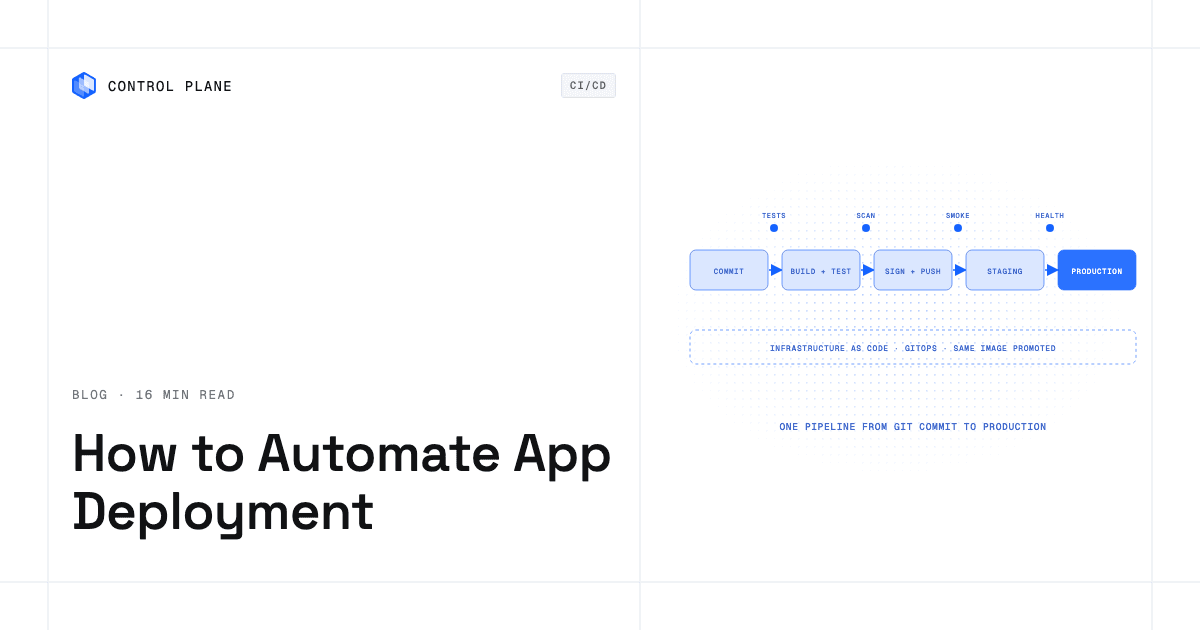
Automate deployment by building a versioned container image on every commit, defining infrastructure and environments as code, letting a CI pipeline test and publish the image, and letting continuous delivery or a GitOps controller roll it out through staging to production with health checks. The same stack works on a PaaS or on Kubernetes, and the difference is how much of the platform you have to operate. Control Plane manages the deployment side of the stack (images, workloads, environments, and domains) through its CLI, Terraform and Pulumi providers, or a Kubernetes operator for GitOps, with no Kubernetes cluster you have to operate.
Disclosure: Control Plane publishes this guide.
TL;DR
Deployment automation is a chain of five steps, and every step is repeatable and auditable.
- Build. Every commit produces an immutable container image tagged with its commit SHA and pushed to a registry.
- Define. Infrastructure, workloads, and environment configuration live as code in Git, written in Terraform, Pulumi, Helm, or plain YAML.
- Test. A CI pipeline runs linting, unit and integration tests, vulnerability scanning, and image signing before anything reaches a runtime.
- Deliver. A GitOps controller or a CI deploy step applies the desired state to staging, then production, using rolling, blue/green, or canary releases.
- Promote. The same image digest moves from staging to production; only config and secrets differ between environments.
- On Control Plane,
cpln image build,cpln apply,cpln helm, the Terraform and Pulumi providers, and a Kubernetes operator for Argo CD cover the build, define, deliver, and promote steps, and Control Plane runs the platform underneath.
How can I automate app deployment with infrastructure as code and a CI/CD pipeline?
A fully automated pipeline turns a commit into a verified production deployment through gated stages. Each stage has an input, tools, an output, and a gate that must pass before the next stage runs.
- Commit. A developer pushes code or opens a pull request, which triggers the pipeline.
- Lint and test. CI checks out the code and runs linting, unit tests, and integration tests. Any failure stops the pipeline.
- Build the container image. A multi-stage Dockerfile compiles the application in a builder stage and copies only runtime artifacts into a minimal final image tagged with the commit SHA.
- Push to a registry. CI pushes the image to a container registry and records its digest.
- Scan and sign. A vulnerability scanner checks the image against known CVEs. If it passes, a tool such as Sigstore cosign signs the digest so its provenance can be verified at deploy time.
- Update the desired state. The pipeline updates the image reference, pinned by digest, in the IaC definition, Helm values, or manifest in Git. A GitOps controller watches for this commit.
- Deploy to staging. The GitOps controller or a CI deploy step applies the new state to staging.
- Run smoke tests. End-to-end or smoke tests run against staging. If they fail, the pipeline stops before production and staging is rolled back to the previous image.
- Promote to production. The same image digest rolls out to production through a rolling update, a blue/green switch, or a canary release.
- Verify and keep a rollback path. Health checks, readiness probes, and metrics confirm the deployment. If something breaks, revert the Git commit or redeploy the previous image.
| Stage | Tool examples | Output | Gate |
|---|---|---|---|
| Commit | Git, GitHub, GitLab | Pull request or branch push | Review approval |
| Lint and test | GitHub Actions, GitLab CI, Jenkins | Test results | All tests pass |
| Container build | Docker, Buildah | Image tagged with commit SHA | Build succeeds |
| Push | Amazon ECR, Google Artifact Registry, Docker Hub, GitHub Container Registry | Published image and digest | Push succeeds |
| Scan and sign | Trivy, Grype, Sigstore cosign | Scan report, signature | No critical CVEs |
| Update desired state | Commit to a config repository | Updated manifest | Diff reviewed |
| Deploy to staging | Argo CD, Flux, Terraform | Running staging workload | Rollout healthy |
| Smoke tests | Playwright, curl, custom scripts | Test report | All pass |
| Promote to production | GitOps promotion, CI job | Running production workload | Approval and rollout healthy |
| Verify | Prometheus, Grafana, OpenTelemetry | Metrics and alerts | No error spike |
Four controls keep the pipeline safe:
- CI credentials. Use OIDC federation from the CI system to AWS, GCP, or Azure for short-lived tokens. Store any remaining tokens in the CI secrets store, scoped per environment.
- Database migrations. Run migrations as their own step before the rollout, and keep schema changes backward compatible (expand, then contract) so old and new versions run side by side during rolling and blue/green deploys.
- Approval gates. Require a manual approval or protected-environment reviewer before production.
- Concurrency. Serialize deploys per environment, for example with a GitHub Actions
concurrencygroup, so two runs cannot overlap.
What are the best practices for building and deploying container images and cloud functions?
The container image is the unit of deployment, so its quality sets your security posture, build speed, and runtime reliability.
Container image best practices
- Multi-stage builds. Compile in a builder stage with compilers and dev dependencies; copy only the binary or bundled assets into the final stage. This shrinks the image and its attack surface.
- Minimal or distroless base images. Distroless images drop shells, package managers, and unneeded libraries. Alpine-based images keep a small shell and package manager but are far smaller than full distribution images.
- Pin base images by digest. Reference
node@sha256:...instead ofnode:20so an upstream tag change cannot alter your build silently. - Immutable tags. Tag every image with the commit SHA and never deploy
latestto staging or production, so every deployment traces to one code state. - Non-root users. Add a
USERdirective so the process does not run as root, which limits the damage from a container escape. - A .dockerignore file. Exclude
.git, dependency folders, test fixtures, and local secrets from the build context. - Layer caching. Put rarely changing layers (OS packages, dependencies) before frequently changing ones (application code), and cache layers between CI runs.
- SBOM. Generate a software bill of materials during the build so scanners and consumers know what the image contains.
- Vulnerability scanning. Scan every image with Trivy or Grype before it reaches a registry, and fail the pipeline on critical findings.
- Signing. Sign images with Sigstore cosign so the deploy step can verify provenance before admitting an image.
- Reproducible builds. Lock dependency versions, pin tools, and avoid non-deterministic steps so the same commit builds the same image.
Cloud functions
Cloud functions follow the same pipeline principles. Keep packages small by excluding dev dependencies, pin the runtime version, externalize configuration into environment variables or a secrets manager, and deploy functions through the same CI/CD pipeline as containers so you keep one audit trail.
| Practice | Container images | Cloud functions |
|---|---|---|
| Minimal build | Multi-stage, distroless or Alpine | Small package, no dev dependencies |
| Pin versions | Base image by digest | Runtime by exact version |
| Immutable reference | Commit SHA tag | Published version tied to the commit |
| Least privilege | Non-root USER | Narrow execution role |
| Scan | Every build | Every build |
| Sign | Sigstore cosign | Signing where the platform supports it |
| SBOM | Yes | Yes |
| Config | Environment variables, secrets manager | Environment variables, secrets manager |
Which deployment automation stack fits PaaS and Kubernetes using infrastructure as code, GitOps and continuous delivery?
Three stacks cover most teams, and the choice depends on how much of the platform you want to operate.
PaaS with a git-push or CI deploy
A PaaS hides servers, networking, and orchestration. You push code or an image, and the platform handles scaling, TLS, and routing. Deployment is usually push-based, with a CI job calling the platform’s CLI or API. It is the fastest path for small teams. For a comparison of options, see Best PaaS Providers 2026.
Kubernetes with Helm, Kustomize, and GitOps controllers
On Kubernetes, you define workloads as manifests and manage them with Helm charts or Kustomize overlays. Argo CD and Flux, the two leading open-source GitOps controllers, run in the cluster, watch a Git repository, and apply new commits (Flux by default, Argo CD when automated sync is enabled). Argo Rollouts and Flagger add canary analysis with automated promotion or rollback based on metrics.
This stack gives the most control and requires you to operate and secure the clusters. For platforms that take on that work, see Best Kubernetes Management Platforms.
Infrastructure as code for clouds and environments
Terraform and OpenTofu declare cloud resources in HCL, and Pulumi does it in TypeScript, JavaScript, Python, Go, C#, Java, or YAML. All three keep state, detect drift between declared and actual resources, and fit a CI workflow: run plan, review the change, then apply.
Push-based CI deployment versus pull-based GitOps
| Aspect | Push-based (CI deploys) | Pull-based (GitOps controller) |
|---|---|---|
| How it works | A CI job calls the runtime’s API or CLI | A controller in the runtime pulls from Git and applies changes |
| Credentials | CI holds credentials to the runtime | The controller runs inside; Git is the trust boundary |
| Drift | Fixed only when CI runs again | Reconciled continuously when self-healing is enabled |
| Audit trail | CI logs | Git history plus controller logs |
| Complexity | Lower for small teams | You run and maintain the controller |
| Rollback | Rerun an earlier deploy | Revert the commit |
| Best for | PaaS, small teams, simple environments | Kubernetes, many clusters, compliance-heavy teams |
Some teams use push-based deploys for development environments and GitOps for production, trading speed in one for auditability in the other.
How do you promote releases between environments?
Every environment should run the same application artifact and differ only in configuration and scale.
- Promote the same digest. Move one image digest from dev to staging to production. Rebuilding per environment means the binary you tested is not the binary you ship.
- Keep differences in config. Environment-specific values live in separate config files or parameter stores; secrets live in a secrets manager and are injected at runtime, never committed in plaintext.
- Preview environments. Create a short-lived environment per pull request so reviewers test changes in isolation before merging.
- Drift detection.
terraform planrefreshes state and reports changes made outside Terraform to resources it manages, and a GitOps controller with self-healing enabled corrects drift continuously by reapplying Git’s desired state.
Which continuous delivery strategy should you use?
The strategy sets rollback speed, extra cost, and risk. Every strategy depends on health checks: readiness probes confirm a new version can take traffic, and liveness probes restart containers that stop responding.
- Rolling update. Replace instances gradually while the old version keeps serving. Low overhead; rolling back means deploying the previous version.
- Blue/green. Run the new version beside the old one and switch traffic after it passes health checks. Rollback is a route switch; cost is higher while both run.
- Canary. Send a small share of traffic to the new version and increase it as error rates and latency stay healthy. It needs traffic splitting and metric analysis.
- Feature flags. Ship the code everywhere and gate the behavior behind a flag. Rollback is turning the flag off; the code carries both paths until the flag is removed.
| Strategy | Rollback speed | Extra infrastructure | Complexity |
|---|---|---|---|
| Rolling update | Minutes (redeploy previous) | None | Low |
| Blue/green | Seconds (route switch) | Double during the deploy | Medium |
| Canary | Seconds (shift traffic back to stable) | Partial | High |
| Feature flags | Seconds (flag off) | None | Medium (code paths) |
Compare containers versus managed PaaS for scaling AI infrastructure with predictable costs
GPU inference and training change the build-versus-buy math, because idle GPUs are expensive and scaling them is slow.
| Factor | Self-managed containers on Kubernetes | Managed container services | PaaS |
|---|---|---|---|
| Control | Full control of scheduling, networking, GPU drivers | Moderate; the provider runs nodes | Least; the platform abstracts infrastructure |
| Operational effort | High: upgrades, node pools, drivers, monitoring | Medium: workload config; provider runs nodes | Low: deploy and configure |
| Scaling | Cluster autoscaler and GPU node pools you tune | Provider-managed, with GPU instance options | Platform-managed |
| GPU access | Direct, through node pools you provision | On supported instance types | Where the platform offers GPUs |
| Cost predictability | Low without right-sizing; idle GPU nodes add up | Medium; GPU pricing varies | Depends on the platform’s pricing model |
A model served around the clock on reserved GPUs can be cheapest on infrastructure you run yourself. Bursty workloads favor a platform that scales and right-sizes for you.
How Control Plane fits
Control Plane is the platform for running unbreakable apps and agents. It combines any cloud, neocloud, and bare metal into Control Plane’s Global Virtual Cloud (GVC), a set of locations a workload runs across, and runs serverless, standard, stateful, and cron workloads on AWS, GCP, and Azure, on Kubernetes clusters you already run, and on your own machines turned into managed locations, including on premises.
- CI examples. Control Plane publishes working CI/CD examples for GitHub Actions, GitLab CI, Bitbucket Pipelines, and CircleCI, each in a Terraform version and a CLI version.
- Build.
cpln image buildbuilds an image and pushes it to the org’s free private registry, with or without a local Docker install. Workloads can also pull from Docker Hub, Amazon ECR, Google Artifact Registry, Azure Container Registry, GitHub Container Registry, or any other registry. - Define.
cpln applycreates or updates any resource from YAML or JSON in Git.cpln helminstalls Helm charts of Control Plane resources as versioned releases you can roll back. Terraform and Pulumi providers define workloads, GVCs, and domains next to your cloud resources. - GitOps. The Control Plane Kubernetes Operator manages Control Plane resources from a Kubernetes cluster through custom resource definitions, so Argo CD can sync them from a Helm chart or plain YAML in Git.
- Promote. Control Plane documents environment promotion with GitHub Actions: a pull request deploys the app to a review workload, and merging promotes it to the dev environment. The Control Plane MCP server can promote a workload from a staging GVC to a production GVC.
- Deliver. Image and configuration updates roll out gradually. The previous version keeps serving until the new version reports ready on its readiness probe. Blue/green deployments use domain routes, and a documented GitHub Actions workflow health-checks the new workload before cutting traffic over. A failed rollout stops while the old version keeps serving. Rollback is manual; the MCP server’s rollback tool returns a workload to its previous image in one step.
- CI runners. A Jenkins template runs build agents as Control Plane workloads that are created when a job is queued and deleted when idle.
- Run. A workload deployed to a GVC runs active-active in every location of that GVC, and a global endpoint routes each request to the nearest healthy location. The 99.999% availability SLA applies to workloads running at least two replicas in at least two locations. Those locations can be two regions of one cloud or locations on different providers.
- Day 2. Control Plane handles Day 2 operations for you, including autoscaling, right-sizing with Capacity AI (Control Plane’s right-sizing of CPU and memory based on historical usage), built-in observability, and security, with no Kubernetes cluster you have to operate. Capacity AI is not used for GPU workloads.
- GPUs. Workloads can attach NVIDIA GPUs, and the pricing page lists models from T4 to B200.
Customers typically cut compute costs 30 to 50 percent compared with running directly on AWS, GCP, or Azure. Control Plane is PCI DSS Level 1, SOC 2 Type II, HIPAA, and GDPR compliant.
For teams without a dedicated platform group, see production-grade infrastructure without a platform team. If AI agents will trigger deployments, see running AI agents on production infrastructure safely.
FAQ
Short answers to common deployment automation questions.
How can I automate app deployment with infrastructure as code and a CI/CD pipeline?
Build a versioned image on every commit, test and scan it in CI, push it to a registry, update the desired state in Git, and let a GitOps controller or CI deploy step roll it out through staging to production with health checks at each gate.
What are the best practices for building container images for production?
Use multi-stage builds on minimal or distroless bases, pin base images by digest, tag with the commit SHA, run as a non-root user, scan for vulnerabilities, sign with Sigstore cosign, generate an SBOM, and keep secrets out of the build context with a .dockerignore.
What is the difference between push-based CI deployment and pull-based GitOps?
In push-based deployment, CI calls the runtime’s API to deploy. In pull-based GitOps, a controller inside the runtime pulls from Git and applies changes, which adds an audit trail in Git history and, with self-healing enabled, continuous drift correction.
How do I promote deployments across dev, staging, and production?
Promote the same image digest instead of rebuilding, and keep environment differences in config and secrets. On Control Plane, a documented GitHub Actions workflow deploys a pull request to a review workload and promotes it on merge, and the MCP server can promote a workload from a staging GVC to a production GVC.
Which infrastructure as code tools work for deployment automation?
Terraform, OpenTofu, and Pulumi. Terraform and OpenTofu use HCL; Pulumi uses general-purpose languages. All three track state, detect drift, and run plan-and-apply steps in CI.
Should I use rolling, blue/green, or canary deployments?
Rolling updates suit most workloads. Blue/green gives near-instant rollback for the cost of running two versions during a deploy. Canary limits exposure by shifting traffic gradually and needs metric analysis.
How does GitOps work with Kubernetes and Argo CD?
Argo CD runs in the cluster, watches a Git repository of manifests, and syncs each new commit, either automatically or on approval. The Control Plane Kubernetes Operator lets Argo CD manage Control Plane resources the same way through custom resource definitions.
Where can I find PaaS tools that manage application updates and configurations across cloud environments?
Best PaaS Providers 2026 compares the options. Look for a platform that deploys one workload definition to many environments and clouds, keeps per-environment secrets, records an audit trail, and routes traffic globally.
How do containers compare to managed PaaS for scaling AI infrastructure with predictable costs?
Self-managed containers give the most GPU control and the most operational work. A managed platform reduces that work; cost predictability depends on its pricing model. Always-on GPU inference leans toward more control.
Can I automate deployment without managing Kubernetes clusters?
Yes. Control Plane offers a declarative, GitOps-compatible workflow through its CLI, Terraform and Pulumi providers, and Kubernetes Operator, and runs the platform for you, including autoscaling, observability, and security.
Talk to the Control Plane team or sign up free to automate your deployments without having to operate a Kubernetes cluster.