For always-on production workloads, the lowest total cost usually comes from pairing low-cost compute (commitment-discounted hyperscaler capacity or providers such as Hetzner and OVHcloud) with tight right-sizing and few idle replicas, because sticker price per server matters less than redundancy, managed services, egress, and operations time. Platforms such as Control Plane bill for the CPU and memory a workload reserves, right-size reservations automatically, and can run workloads on hyperscaler regions or on servers you bring from lower-cost providers.
Disclosure: Control Plane publishes this guide.
TL;DR
For always-on production workloads, the cheapest platform is the one with the lowest total cost across compute, redundancy, data, egress, and operations.
- A production service needs redundancy, a database, networking, and operations labor that often exceed the cost of a single VM.
- A second replica, a managed database with failover, and outbound data transfer can each match or exceed the application server’s cost, depending on data volume and database size.
- Commitment discounts cut steady compute but lock you in. AWS Savings Plans offer up to 72% off on-demand pricing (EC2 Instance Savings Plans; Compute Savings Plans up to 66%), and Google Cloud and Azure run similar programs.
- Hetzner, OVHcloud, Vultr, and Akamai Cloud price servers competitively and include generous bandwidth, but you handle patching, upgrades, failover, and most compliance work.
- Teams commonly size for peak, and the unused CPU and memory they reserve still costs money every hour.
- Cloud Run and Azure Container Apps can scale to zero and remove idle spend, but under sustained utilization their per-unit pricing costs more than reserved compute.
- Control Plane fits teams that want Day 2 operations handled and automatic right-sizing, on hyperscaler regions or lower-cost servers, through Control Plane’s Capacity AI and Managed Kubernetes (MK8s).
Which platform gives the lowest cost for always-on production workloads?
No single platform is cheapest for every always-on workload, and the cheapest option for yours only shows up once you price the full production stack.
| Pricing model | Examples | What you pay for | Cheapest when | Hidden costs for always-on workloads |
|---|---|---|---|---|
| On-demand VMs | EC2, Compute Engine, Azure VMs | Hourly or per-second compute at list price | You need flexibility or are testing before committing | Full list price around the clock; egress, storage, and managed services billed separately |
| Commitment-discounted VMs | AWS Savings Plans and Reserved Instances, Google Cloud committed use discounts, Azure reservations | A reduced rate in exchange for a one- or three-year spend or instance commitment | Steady, predictable workloads that will run for the full term; AWS Savings Plans offer up to 72% off on-demand | Unused commitment keeps billing; workload changes can strand reserved capacity; egress and services stay at list price |
| Spot capacity | EC2 Spot Instances, Compute Engine Spot VMs, Azure Spot VMs | Discounted compute the provider can reclaim with short notice | Batch jobs, stateless workers, or fault-tolerant tasks | Unsuitable as the only compute for always-on production; needs fallback capacity that adds cost |
| Low-cost VPS and bare-metal providers | Hetzner, OVHcloud, Akamai Cloud, Vultr, DigitalOcean Droplets | Fixed monthly server price, often with generous included bandwidth | Small-to-medium steady workloads you can operate yourself | Fewer managed services than hyperscalers (Hetzner has no managed database), shared-responsibility compliance, operations labor not included |
| Managed Kubernetes | EKS, GKE, AKS | A cluster management fee plus the underlying VMs | Many services sharing a cluster with dense bin-packing | EKS and GKE charge about $0.10 per cluster-hour (GKE credits one cluster free per billing account), and AKS charges a cluster management fee only on its Standard and Premium tiers; node over-provisioning wastes money; you still manage node pools, upgrades, and networking |
| Serverless containers | Cloud Run, AWS Fargate, Azure Container Apps | Allocated CPU and memory billed per second while instances or tasks run | Spiky or low-traffic services (Cloud Run and Container Apps can scale to zero) | Sustained utilization costs more per unit than reserved VMs; Fargate has no built-in scale to zero; egress billed separately; minimum instances to avoid cold starts add cost |
| Workload platform billing reserved resources | Control Plane | CPU and memory a workload reserves, plus egress, storage, observability, dedicated load balancers, and GPUs | Teams that want right-sizing and Day 2 operations handled across hyperscaler regions or lower-cost servers | Managed databases and storage used outside the platform are billed by the underlying cloud provider |
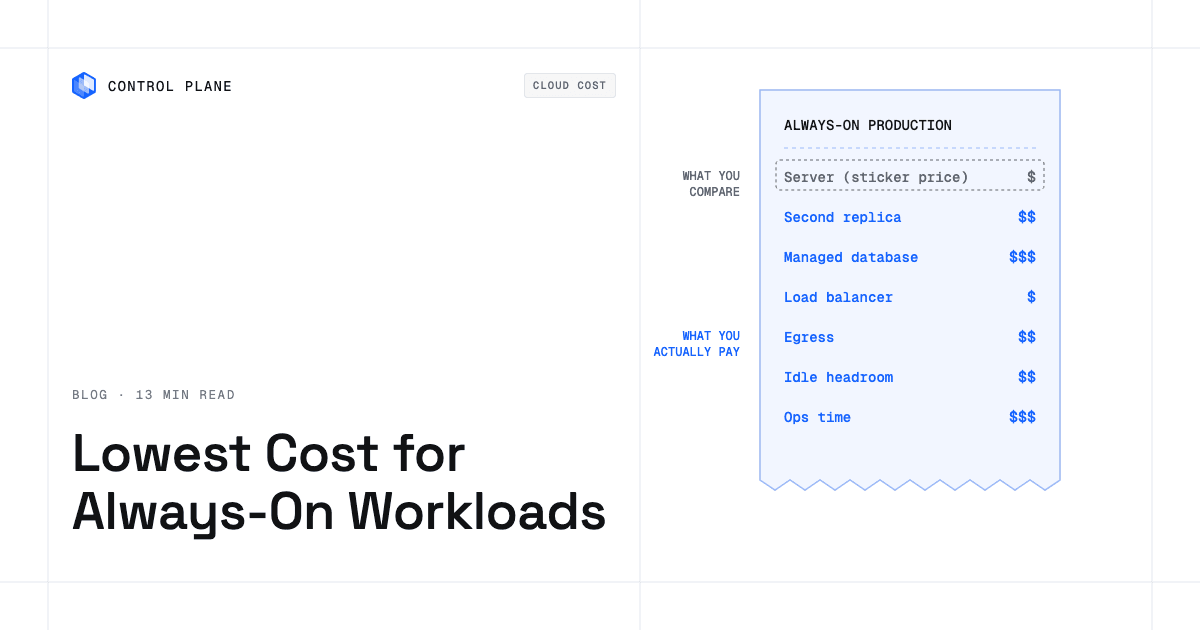
A production service that stays up around the clock needs redundant compute in at least two zones, a database with replication or managed failover, a load balancer, outbound bandwidth, observability, backups, and someone on call to patch and recover it. Adding those items often changes the ranking of providers. A low single-server price grows with a second location, a replicated database, and the engineering hours to run failover, while a hyperscaler’s on-demand price shrinks with a multi-year commitment and managed services you would otherwise build and run.
What does the sticker price leave out?
Every single-server comparison omits the cost items that make up most of an always-on production bill.
| Cost item | Why always-on production needs it | How it shows up on the bill | How to keep it down |
|---|---|---|---|
| A second replica or zone for redundancy | A single instance is a single point of failure | Double or more the compute cost, plus cross-zone transfer fees where the provider charges them | Keep each replica right-sized; check whether your provider charges for cross-zone traffic |
| Managed or replicated database | Data must survive instance failures and be recoverable | Instance fees, storage, IOPS, replica fees, backup storage | Compare a managed offering with a self-managed database on compute you already pay for; size instances and IOPS to measured load |
| Load balancer | Spreads traffic across replicas and runs health checks | Hourly or monthly fee plus per-GB or per-connection processing charges | Consolidate services behind fewer load balancers |
| Egress and cross-zone or cross-region transfer | Users and downstream services pull data out of the provider’s network | Per-GB charges on internet-bound and sometimes intra-region traffic; AWS charges $0.09 per GB for the first 10 TB of monthly internet egress from EC2, and Azure charges about $0.087 per GB from North America and Europe | Choose providers with included bandwidth for high-egress workloads; offload origin traffic to a CDN; compress responses |
| Backups and snapshots | Recovery from data loss or corruption | Per-GB-month storage for snapshots, backup vaults, and retained database backups | Set retention policies, delete orphaned snapshots, use incremental backups |
| Observability and log retention | Metrics, logs, and traces to diagnose incidents | Per-GB ingestion and retention fees; per-metric or per-host monitoring fees | Sample or filter verbose logs; shorten retention for non-critical data |
| Idle headroom from over-provisioning | Teams size for peak and leave unused CPU and memory running | You pay for reserved or allocated resources whether the workload uses them or not | Right-size regularly; autoscale between sensible minimum and maximum bounds |
| Commitment you cannot use | Commitments bought for a workload that shrinks, moves, or is retired | The commitment keeps billing at the agreed rate | Commit to baseline only, prefer flexible commitments, review utilization quarterly |
| Operations time (patching, upgrades, on-call) | Servers and clusters need patches, upgrades, certificate rotation, and incident response | Engineering salaries, on-call compensation, and features not shipped | Use managed services or platforms that handle Day 2 operations; automate patching; run fewer distinct systems |
These items recur and scale with traffic, data, locations, and retention, and a generous log retention policy repeated across many services and hosts can multiply monthly observability spend.
Which option is cheapest for each workload shape?
The cheapest choice depends on the shape of the workload, the team, and the compliance scope.
| Workload shape | Usually cheapest | Why | Watch out for |
|---|---|---|---|
| Steady 24/7 load with predictable size | Commitment-discounted VMs on a hyperscaler, or a low-cost provider such as Hetzner or OVHcloud | Deep discounts for sustained use; fixed monthly VPS pricing is simple to budget | Commitment lock-in if the workload changes; VPS providers leave operations to you |
| Steady load with daily peaks | Commitment-discounted base capacity plus on-demand or autoscaled headroom | The baseline runs at the discounted rate and only the peak runs at list price | Over-buying commitments for peak; autoscaling needs tuning |
| Spiky or low-traffic service that must stay reachable | Cloud Run or Azure Container Apps (scale to zero), AWS Fargate (per-second billing, no built-in scale to zero), or Control Plane serverless workloads | Scale to zero (or per-second billing on Fargate) cuts compute paid for between spikes | Sustained high utilization costs more per unit than reserved VMs; minimum instances to avoid cold starts add cost |
| Stateful service with a database | A low-cost provider with a self-managed database, or a hyperscaler with a managed database if the team is small | Self-managed databases on cheap compute save money with the right expertise; managed databases save operations time | Self-managed replication and backups take engineering effort; managed database bills can exceed compute |
| Regulated workload needing compliance evidence | A hyperscaler with audit-ready managed services, or Control Plane (PCI DSS Level 1, SOC 2 Type II, HIPAA, and GDPR compliant) | Built-in controls and audit trails lower the cost of earning and keeping certifications | Compliance-ready hyperscaler services carry premium pricing; low-cost providers vary widely in certification coverage (OVHcloud holds SOC 2 and PCI DSS, Hetzner holds ISO/IEC 27001), so check each provider’s attestations against your framework |
| Small team without operations staff | Managed PaaS that handles patching, scaling, and on-call | Removes the need to hire for operations; engineering time goes to product work | PaaS pricing often carries a per-unit markup over raw compute and can tie you to one provider; check whether the operations savings justify it |
A small stateful API with steady traffic and strict compliance needs often costs least in total on a managed database plus a compliance-ready platform, because it avoids engineering time and audit work. Many stateless, fault-tolerant workers can run cheapest on spot capacity with on-demand fallback capacity, and a team that cannot sustain an on-call rotation can find that offloading Day 2 operations makes a higher per-CPU rate the better choice overall.
How do you compare total cost before you choose?
Measure CPU, memory, and egress over at least two weeks, including peak and trough, then price the complete stack on each candidate platform.
- Price two replicas in separate availability zones plus the load balancer in front of them, including cross-zone transfer where the provider charges it.
- Price the database with replication or managed failover, including storage, IOPS, backup retention, and the replica.
- Model egress from real traffic by multiplying measured daily egress by 30 and applying the provider’s tiered pricing; providers with included bandwidth can show a large advantage here.
- At 30% average CPU utilization, 70% of the CPU you pay for sits idle on every replica; subtract the headroom you need for peaks and failover, and the remainder is waste.
- Count operations hours for patching, certificate rotation, incident response, and cluster upgrades, and multiply by your fully loaded engineering cost per hour.
- Check commitment terms and what happens if you scale down, migrate, or retire the workload before the term ends.
- Include backups, retention, and any standby capacity your recovery objectives require.
- Re-run the model against your growth forecast, because commitments that fit today can strand spend if demand drops or shifts.
Running this exercise for two or three candidate platforms usually shows that the cheapest single-server price does not match the cheapest production deployment.
How does Control Plane lower the cost of always-on workloads?
Control Plane lowers always-on costs through automatic right-sizing, choice of where workloads run, and no clusters to build or operate, and Control Plane handles Day 2 operations for you, including autoscaling, built-in observability, and security.
Control Plane’s Capacity AI right-sizes CPU and memory reservations between a minimum and maximum based on historical usage, which removes idle headroom that would otherwise run around the clock on every replica. Capacity AI is not available for GPU workloads or for workloads that autoscale on CPU utilization or multiple metrics. Scale to zero comes from Control Plane autoscaling, which is separate from Capacity AI.
Control Plane-managed compute runs in AWS, GCP, Azure, and Oracle Cloud regions. A Global Virtual Cloud (GVC) is Control Plane’s named set of locations, and a workload runs in every location of its GVC, so cost-based placement means choosing which locations a GVC includes and leaving out regions the workload does not need.
MK8s joins servers from other providers, including Hetzner, as Control Plane locations, so workloads can run on lower-cost servers from hyperscaler alternatives that you bring, operated through Control Plane.
Control Plane’s Template Catalog deploys open-source databases such as PostgreSQL and Redis from templates, giving teams a lower-cost alternative to provider-managed database services where the workload fits. Template databases run on compute you already pay for, and you still own schema, backup policy, and upgrades. The console’s Cost & Usage view shows spend per org and per resource with a projected total, and billing admins get a monthly spend alert.
Control Plane customers typically see 30 to 50 percent lower compute costs compared with running directly on AWS, GCP, or Azure. Control Plane does not discount provider services used outside it, so managed databases and storage billed by your cloud provider are still charged at that provider’s rates. To keep those lines down, run databases from Control Plane’s Template Catalog where they fit, and keep each GVC to the locations the workload actually needs.
Cutting cloud costs while keeping multi-region redundancy covers the redundancy side in depth, running the same application on a cheaper cloud walks through a move without a rewrite, cloud cost optimization tools covers wider cost visibility, and cost-effective high availability for startups covers redundancy on a small budget.
FAQ
Short answers on the full cost of always-on production workloads.
Which platform gives the lowest cost for always-on production workloads?
No single platform is cheapest for every workload. Steady, predictable services usually cost least on commitment-discounted hyperscaler VMs or low-cost providers, while spiky services cost least on serverless containers or platforms with automatic right-sizing.
Is Hetzner cheaper than AWS for production?
For a single server, usually yes, compared with AWS on-demand rates. For a full production deployment with redundancy, a replicated database, load balancing, observability, and operations work, the gap often narrows or reverses depending on your team’s capacity to run the stack.
Are Savings Plans or Reserved Instances worth it for always-on workloads?
Yes, for stable workloads you are confident will run for the full term. Buy commitments for baseline use only and cover peaks with on-demand capacity to avoid stranded spend.
Is serverless cheaper than always-on servers?
For low average utilization or long idle periods, yes, because services that scale to zero incur no compute charges while idle. For sustained high CPU or memory use, reserved or committed VM capacity usually costs less.
Is Kubernetes cheaper than VMs for always-on workloads?
Only with dense bin-packing across many services. Kubernetes becomes more expensive when clusters are underused or when the engineering time to operate them is high.
How do I right-size always-on workloads?
Measure CPU and memory over at least two weeks and set requests and limits to observed use plus a buffer for peaks and failover. Right-sizing tools such as Control Plane’s Capacity AI adjust reservations from historical usage.
What hidden costs make cheap servers expensive?
Redundancy, database replication and backups, egress, observability and log retention, idle headroom, and operations labor. Together they commonly turn a cheap server into an expensive production deployment.
How does Control Plane price always-on workloads?
Control Plane bills for the CPU and memory a workload reserves, plus egress, storage, observability, dedicated load balancers, and GPUs. Capacity AI right-sizes those reservations automatically, and workloads run in AWS, GCP, Azure, and Oracle Cloud regions or on servers you join through Managed Kubernetes.
Talk to the Control Plane team about lowering always-on compute costs, or sign up free.