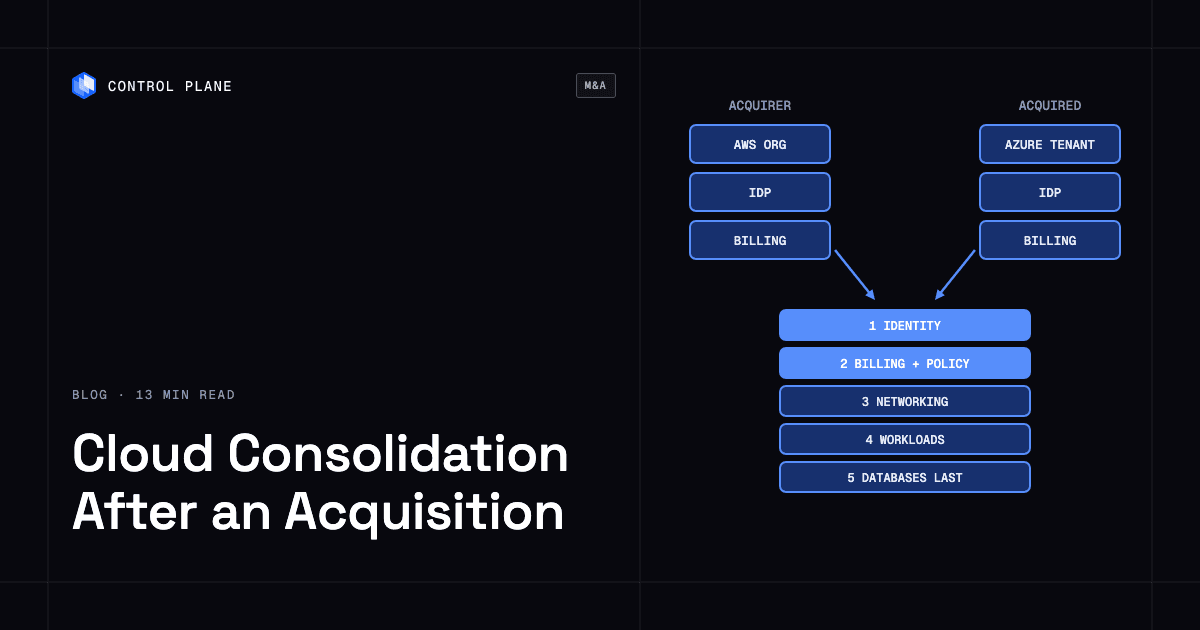
Consolidate in layers. Merge identity, billing, governance, and observability early because those steps rarely touch running workloads, and move workloads and data last, in waves, with replication and gradual traffic shifting. When both companies run on the same cloud, most consolidation is moving accounts, subscriptions, or projects into one organization, and when they run on different clouds, keeping both clouds and running workloads through one platform that spans them, such as Control Plane, avoids a forced cloud-to-cloud migration.
Disclosure: Control Plane publishes this guide.
TL;DR
Merge the layers that rarely touch running workloads first and move workloads and data last, in waves.
- Same-cloud consolidation is mostly organizational moves, and each provider breaks something specific during the move. AWS loses shares and conditions tied to the old organization, Azure deletes role assignments and policy objects, and Google Cloud loses inherited IAM.
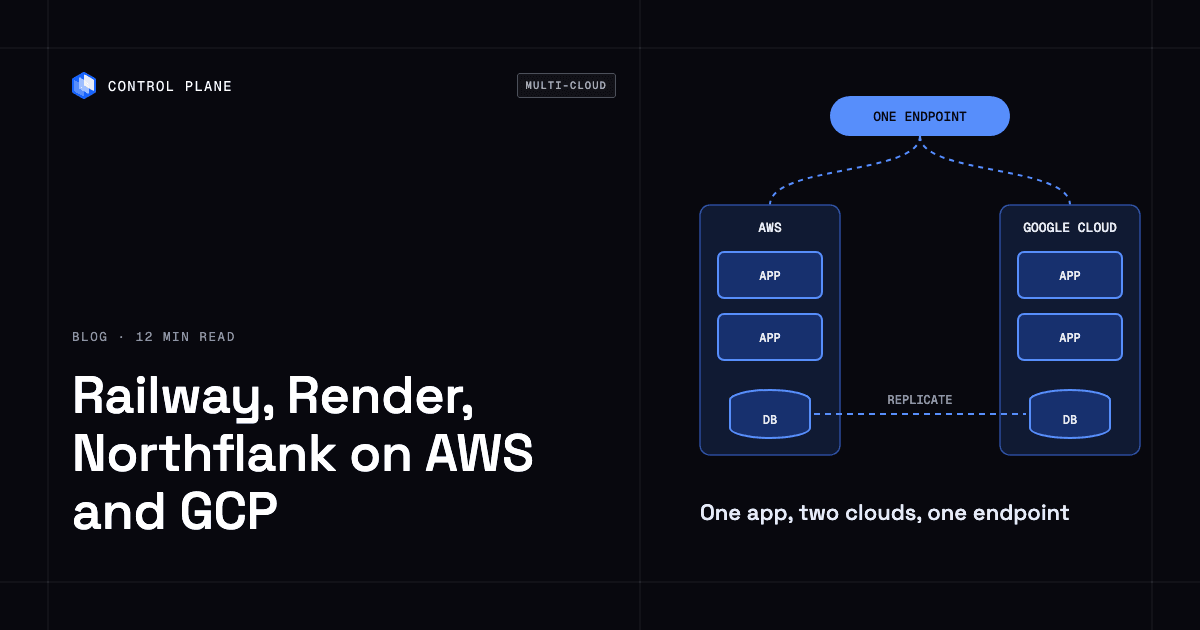
- Cross-cloud consolidation does not require picking one cloud, because a platform that spans clouds lets both environments keep running under one set of operations.
- Database cutovers carry the largest downtime risk, and re-IPing overlapping networks, DNS cutovers, and Azure directory transfers also need planned windows or rehearsal.
- Keep the old environment running until rollback windows close and data reconciliation is confirmed.
- Control Plane runs workloads active-active across AWS, GCP, Azure, and Oracle Cloud Infrastructure, shifts users to new locations through a built-in global endpoint, and lets workloads call AWS, GCP, and Azure services through Control Plane’s Universal Cloud Identity (UCI) with no long-lived cloud keys in your code.
How do I consolidate cloud infrastructure after a merger or acquisition with minimal downtime?
Treat consolidation as a sequence of layers, starting with the ones least likely to interrupt workloads and ending with the ones that can.
| Layer | Day 1 (first weeks) | Day 100 | Day 365 | Downtime risk |
|---|---|---|---|---|
| Identity and access | Federate directories with SAML or OIDC so both companies authenticate through one IdP. Inventory privileged accounts. | Consolidate into a single directory. Remove duplicate accounts. Enforce unified MFA and conditional access. | Decommission the acquired company’s standalone IdP. | None to workloads. |
| Billing and cost reporting | Bring the acquired company’s accounts into consolidated cost reporting. Tag resources with a cost-center identifier. | Unify cost dashboards, budgets, and alerts. | Consolidate contracts and commitments as they come up for renewal. | None. Billing changes do not affect running workloads. |
| Governance and policy | Apply baseline SCPs, Azure Policy assignments, or Google Cloud organization policies to the acquired accounts in audit mode. Enforce a shared tagging standard. | Switch tested policies to enforcement. Remove conflicting or redundant rules. | Operate one governance framework with automated compliance checks. | Low if tested. A deny SCP or policy can block API calls that running workloads make. |
| Security monitoring and audit logs | Forward the acquired company’s logs to the acquirer’s SIEM. Enable GuardDuty, Defender for Cloud, or Security Command Center across the new accounts. | Correlate alerts across both environments and tune detection rules. | Retire duplicate security tooling. | None. Log forwarding does not affect workloads. |
| Observability | Send metrics, traces, and logs from both environments to a shared observability platform. | Unify dashboards, SLOs, and on-call rotations. | Operate one observability stack. | None. Agents and exporters run alongside workloads. |
| Networking | Inventory CIDR ranges and find overlaps. Connect non-overlapping ranges with VPC peering, Transit Gateway, Azure Virtual WAN, or VPC Network Peering, and bridge overlapping ranges with NAT. | Re-IP the smaller environment where overlaps remain. Unify DNS zones. | Operate one network topology. Retire redundant VPN gateways. | Planned window for re-IPing; brief for DNS cutover. Connecting non-overlapping networks is non-disruptive. |
| CI/CD and IaC | Inventory pipelines and IaC repositories. Give the acquired team access to the acquirer’s CI/CD platform. | Move pipelines to a shared platform. Standardize Terraform or Pulumi modules. | Operate one deployment toolchain. | None. |
| Stateless workloads | Identify stateless services that can be redeployed. | Redeploy them in the target environment and shift traffic gradually with weighted DNS or a global load balancer. | All stateless workloads run in the target environment. | Near-zero. Traffic shifting is gradual and reversible. |
| Databases and stateful services | Inventory databases, queues, and object stores. Start replication for the ones that will move. | Validate replication. Rehearse cutovers with realistic data volumes. Cut over lower-risk databases. | Complete database cutovers and data reconciliation. | Planned window. Writes pause at promotion for as long as the remaining replication lag. |
| SaaS and internal tools | Inventory subscriptions and internal tools and find duplicates. | Consolidate duplicate SaaS contracts and move users to one tenant where possible. | Retire redundant subscriptions. | None to cloud infrastructure. |
| Decommissioning | Decommission nothing yet. | Retire redundant non-production environments after confirming backups and recovery coverage. | Retire remaining legacy accounts, subscriptions, and projects after all rollback windows close. | None if done after validation. |
Governance and security monitoring go in before networking so the two environments are not connected without a shared security baseline, and networking comes before workload moves because migrated services need to reach their dependencies. For an acquirer that now manages dozens of cloud accounts, standardizing governance across all of them comes before any workload move.
How does consolidation differ when both companies use the same cloud?
Same-cloud consolidation is mainly an organizational move of accounts, subscriptions, or projects, while cross-cloud consolidation is a choice between migrating workloads and running both clouds.
| Step | Both on AWS | Both on Azure | Both on Google Cloud | Different clouds |
|---|---|---|---|---|
| Move the acquired accounts, subscriptions, or projects | The acquirer’s management account sends an invitation and the account accepts. Since November 2025, AWS moves accounts directly between organizations without a standalone step. The account needs organizations:LeaveOrganization, and no source-organization SCP can deny it. | Change each subscription’s Microsoft Entra directory individually. Changing the directory and transferring billing ownership (EA, MCA, or pay-as-you-go) are separate operations, and CSP subscriptions cannot change directory. | Migrate projects with Resource Manager. This needs Project IAM Admin on the project, Project Mover on its parent, Project Creator or Project Mover at the destination, and Organization Policy Admin on both organizations, and both organizations must allow the export and import through organization policy constraints. | No organizational move. Workloads stay where they are and can be operated through a platform that spans clouds, such as Control Plane. |
| What breaks during the move | Resources shared through AWS RAM from the old organization (shared subnets, transit gateways, Resolver rules) become inaccessible, and policies that reference the old organization ID (aws:PrincipalOrgID) stop matching. Old SCPs stop applying and the new ones apply immediately. | All role assignments and custom roles are deleted. System-assigned managed identities must be disabled and re-enabled, and user-assigned ones re-created and re-attached. All Azure Policy objects tied to the subscription are deleted. Key Vaults need their tenant ID updated and access policies replaced. Some services, including AKS, Azure SQL or MySQL with Entra authentication, Databricks, and Service Fabric, cannot change directory and must be rebuilt or reconfigured. | Roles granted directly on the project move with it. Roles inherited from the old organization or folders are lost, and the old organization’s policies stop applying. | Nothing breaks in either environment. The work is connectivity and shared operations across two providers. |
| Billing and discounts | Reserved Instances and Savings Plans migrate with the account, and consolidated billing moves to the new payer. | A directory change alone does not change billing ownership, so reservations and savings plans keep applying unless they are scoped to a management group in the old tenant. If billing ownership also moves, whether they transfer depends on the source and destination agreement types, and a subscription holding an active MACC cannot be transferred. | The project stays linked to its original billing account until you change it. Committed use discounts may need repurchasing if the billing account changes. | Each provider’s discounts stay independent, and consolidated reporting needs a cross-cloud cost tool. |
| Identity | IAM roles and policies inside the account are preserved. IAM Identity Center assignments from the old organization no longer apply, so configure access in the new organization and remove the old management account’s access role. | Re-create role assignments and identities in the new tenant immediately after the transfer, from exports taken before it. | Project-level IAM bindings move with the project. Re-grant inherited access in the new hierarchy, and allow the acquired company’s domain first if the new organization enforces domain restricted sharing. | Federate both providers through one IdP. No provider-level identity migration is needed while workloads stay in place. |
| Networking | VPCs, the account’s own Transit Gateway attachments, and Route 53 hosted zones stay intact. Re-share or re-create anything the account received through RAM before the move. | Virtual networks, peerings, and ExpressRoute circuits stay intact. | VPC networks and Cloud DNS zones stay intact. Migrate a Shared VPC host project before its service projects, and remove projects from VPC Service Controls perimeters before migration. | Connect the clouds with site-to-site VPN or a dedicated interconnect through a colocation partner. |
| Policy | The new organization’s SCPs apply immediately. | Export policy definitions first, then re-create them and their assignments under the acquirer’s management group hierarchy. | The destination organization’s policies take effect. Project-level policies are unchanged. | Each cloud keeps its own policy framework, and shared governance needs a cross-cloud policy layer. |
| Workloads | Workloads keep running in the same account, region, and VPC. Workloads that depend on organization-scoped access fail until it is re-granted. | Workloads keep running in the same subscription and region, but apps that use managed identities fail until identities and role assignments are restored. | Workloads keep running with no downtime from the move itself. Workloads that depend on inherited access fail until it is re-granted. | Workloads can stay where they are, or move later with replication and traffic shifting. |
A single view of cost and security across multiple clouds matters when both environments will coexist for months or years.
Which consolidation steps cause downtime?
Most consolidation steps carry no workload downtime, and the risk concentrates in a few steps that can be held to planned windows.
| Step | Typical downtime risk | What causes it | How to avoid it |
|---|---|---|---|
| Identity federation | None | Federation is additive, so workloads are untouched. | Pilot federation with one group before rolling it out. |
| Moving accounts, subscriptions, or projects | None for Google Cloud. None for AWS if RAM shares and organization-ID conditions are re-created first. Planned window for Azure. | Google Cloud keeps services running during project migration. AWS keeps workload state, but RAM shares and old-organization conditions stop working. Azure deletes role assignments and custom roles, breaks managed identities, and cannot move some services. | On AWS, map RAM shares and aws:PrincipalOrgID conditions first. On Azure, export role assignments, managed identities, policy definitions, and Key Vault access policies before the transfer, run scripts that restore them immediately after, and rehearse in a non-production subscription. |
| Re-IPing to fix overlapping CIDRs | Planned window | Changing addresses on running instances or subnets means restarting interfaces or redeploying workloads. | Re-IP the smaller environment. Bridge with NAT in the meantime, for example an AWS private NAT gateway with a transit gateway. |
| Network interconnect | None | Adding peering, transit attachments, or VPN tunnels does not change existing traffic flows. | Verify route tables afterward and limit cross-environment access with security groups and firewall rules. |
| DNS changes | Brief | Clients keep resolving the old address until the TTL expires, and a wrong record causes resolution failures. | Lower TTLs well in advance, shift traffic with weighted DNS, and monitor resolution from several locations. |
| Stateless workload move | Near-zero if traffic-shifted | A new copy runs in the target environment while the source keeps serving. | Run both copies, shift traffic gradually, and remove the source only after the target is healthy. |
| Database cutover | Planned window | Writes pause at promotion until the target has applied the remaining changes. | Keep replication lag low with change data capture, rehearse the cutover, and keep the source available for rollback. |
| Storage migration | None if replicated | Copying data is non-disruptive; risk comes from deleting the source too early. | Validate object counts and checksums, and keep the source until the rollback window closes. |
| Decommissioning the old environment | None if validated | Risk comes from workloads, DNS records, or integrations that still reference it. | Scan for dependencies first and keep the environment read-only for a defined period before deletion. |
Database cutovers use change data capture to keep the target in sync, then pause writes, promote the target, and redirect connections, so the outage equals the replication lag at cutover. Rehearse against production-scale data and keep the old primary available until reconciliation confirms zero discrepancies.
Should you move everything to one cloud after an acquisition?
Not necessarily, because five factors decide whether consolidating onto one cloud beats running both.
- Contract commitments. Enterprise agreements, reserved capacity, and committed use discounts often have years left, and most cannot be cancelled, so you keep paying for them whether or not the workloads move.
- Data gravity. AWS, Google Cloud, and Azure now waive egress fees on request for customers moving all their data off the provider, but moving large datasets still takes time and re-architecture work.
- Compliance. Data residency rules and audit frameworks may require workloads to stay in specific regions or on specific providers.
- Team skills. Each team knows its current cloud well, and a forced move to an unfamiliar provider slows delivery during the transition.
- Migration cost against running two clouds. Migration is a one-time cost with cutover risk, while running two clouds is an ongoing operating cost, and the comparison depends on estate size and how long both will run.
Guides on avoiding cloud vendor lock-in and multi-cloud management platforms help weigh coexistence against migration, and the best tools for migrating workloads between clouds cover the move when you choose it.
How does Control Plane help consolidate infrastructure across clouds?
Control Plane lets two companies on different clouds run their workloads on one platform without a forced cloud-to-cloud migration.
Control Plane runs serverless, standard, stateful, and cron workloads natively on AWS, GCP, Azure, and Oracle Cloud Infrastructure, and its managed compute runs in AWS, GCP, Azure, and Oracle Cloud regions. VM workloads run on locations joined through Control Plane’s Managed Kubernetes (MK8s), and workloads also run on Kubernetes clusters you already run through Control Plane’s Bring Your Own Kubernetes (BYOK), including on premises, active-active across regions and clouds.
A Global Virtual Cloud (GVC) is Control Plane’s named set of locations, and a workload runs in every location of its GVC. To move workloads between clouds, add the new cloud location to the GVC, which deploys every workload in that GVC there, and remove the old location only after the new one passes readiness and is serving traffic. A built-in global endpoint geo-routes each client to the nearest healthy location, and Control Plane’s location routing options (priority tiers and latency offsets) control which clients the new location serves before the old one is removed.
UCI issues credentials at runtime so workloads keep calling either company’s AWS, GCP, or Azure services during consolidation. Each Control Plane identity links at most one account per provider, so when both companies run on AWS, workloads that call the acquirer’s account and workloads that call the acquired company’s account use separate identities, and neither company’s cloud keys need to be copied into code or CI.
Control Plane’s Cloud Wormhole reaches private resources in a VPC or on-premises network through an agent you install there, so workloads can reach either company’s private databases and services before the two networks are merged.
The CLI, console, Terraform and Pulumi providers, and the Control Plane MCP server all work through the same Control Plane API. Access to Control Plane resources is controlled through Control Plane policies, a tamper-proof audit trail records platform actions, and the console’s Cost & Usage view shows Control Plane spend per org and per resource, with a projected total, so both teams see the cost of the workloads they run on Control Plane in one place.
Control Plane handles Day 2 operations for you, including autoscaling, built-in observability, and security. Control Plane is PCI DSS Level 1, SOC 2 Type II, HIPAA, and GDPR compliant.
Data in Control Plane volume sets is not replicated between locations, so databases still need replication at the database layer during a cloud move, and Control Plane does not move cloud accounts, subscriptions, IAM, or provider databases, which follow the mechanics in the same-cloud table.
FAQ
Short answers on consolidating cloud infrastructure after a merger or acquisition.
How do I consolidate cloud infrastructure after a merger or acquisition with minimal downtime?
In layers. Federate identity and bring billing, governance, security monitoring, and observability together first, then connect networks, then move stateless workloads with gradual traffic shifting, and cut over databases last with replication and a rehearsed write pause. Keep the old environment available until rollback windows close.
What should be integrated on Day 1 after an acquisition?
Identity federation, cost reporting, baseline governance in audit mode, security log forwarding, and observability. These layers rarely touch running workloads once policies are tested, and they give you the visibility and access controls every later step needs.
How do you move AWS accounts to another AWS organization?
The acquirer’s management account sends an invitation and the account accepts, and since November 2025 AWS moves it directly between organizations with no standalone step. Reserved Instances and Savings Plans migrate with the account, the new organization’s SCPs apply immediately, and resources shared through RAM from the old organization stop working, so re-share them first.
What happens when you transfer an Azure subscription to another tenant?
Role assignments and custom roles are deleted, managed identities stop working until re-enabled or re-created, all Azure Policy objects are deleted, and Key Vault access tied to the old tenant breaks. Some services, including AKS and Azure SQL with Entra authentication, cannot change directory at all. Export everything before the transfer, restore it by script immediately after, and update each Key Vault’s tenant ID.
How do you handle overlapping IP ranges after a merger?
Bridge them with NAT first, then re-IP the smaller environment. Peering and transit routing cannot connect overlapping ranges, so NAT, such as an AWS private NAT gateway with a transit gateway, carries traffic until re-IPing in a planned window removes the overlap.
How do you migrate a database between clouds with minimal downtime?
Stream changes from the source with change data capture, pause writes once the target catches up, promote the target, and keep the source for rollback until reconciliation confirms zero discrepancies. The write pause lasts as long as the remaining replication lag.
Should an acquired company move to the acquirer’s cloud?
Only when the numbers favor it. Commitments that cannot be cancelled, data gravity, compliance, team skills, and the cost of migration compared with running two clouds decide it.
How does Control Plane help after a merger or acquisition?
Control Plane lets both companies’ workloads keep running on their existing clouds while being deployed, secured, and observed through one platform, with one set of Control Plane policies, built-in observability, and one Cost & Usage view for the workloads running on Control Plane. To move workloads between clouds, add the new cloud location to their Control Plane Global Virtual Cloud (GVC) and remove the old location once the new one is serving traffic, while the companies’ cloud accounts, IAM, and billing are consolidated on the providers’ own timelines.
How long does cloud consolidation take after an acquisition?
It depends on the estate. Day 1, Day 100, and Day 365 are common integration planning milestones, and actual timing varies with estate size. Plan identity, billing, governance, and observability for the first weeks, networking and CI/CD for the first 100 days, and database cutovers and decommissioning for the first year or later on complex estates.
Talk to the Control Plane team to plan infrastructure consolidation after an acquisition, or sign up free to try it.