
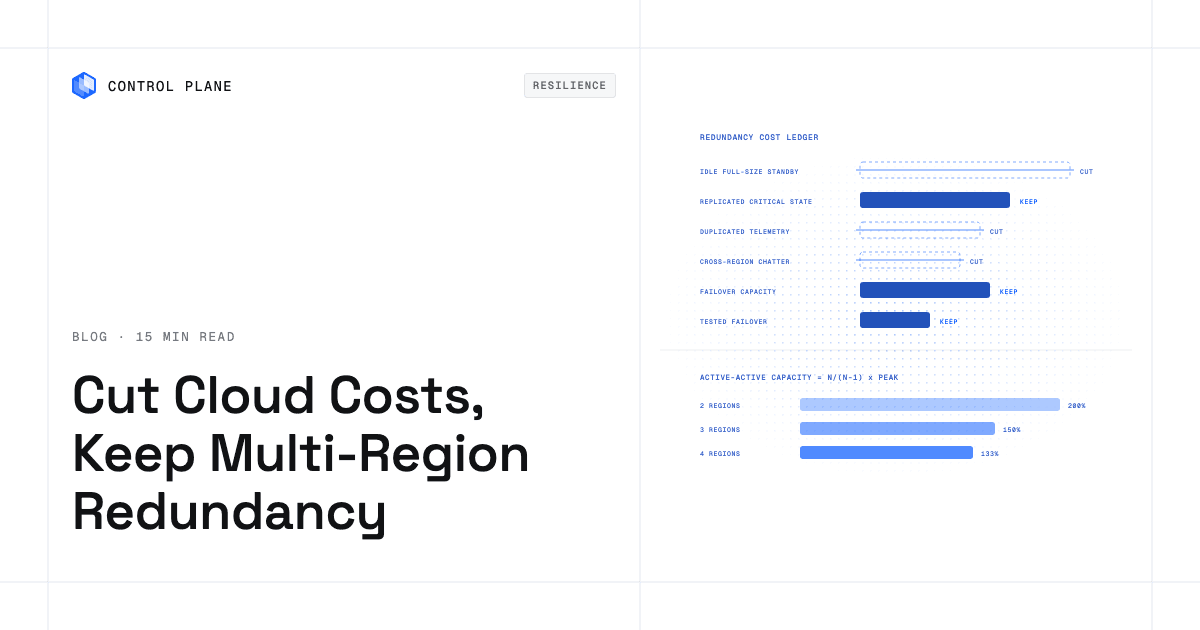
To cut cloud costs without giving up multi-region redundancy, remove spend that does not buy recovery and keep spend that does. The right approach matches each workload tier to the cheapest architecture that still meets its recovery time objective (RTO) and recovery point objective (RPO), then verifies every cut with a failover drill. The redundancy cost ledger in this post itemizes multi-region spend and flags the cuts that quietly remove redundancy.
Disclosure: Control Plane publishes this guide.
TL;DR
- Where redundancy spend goes. A second region adds compute, database replicas, cross-region data transfer, duplicated networking, duplicated observability ingestion, backup copies, DNS health checks, and capacity reservations. Itemize each one.
- Spend that buys recovery versus spend that does not. Replicated critical state, failover-ready capacity, and tested routing buy recovery. Full-size idle standby VMs, replicated staging data, and a second region’s telemetry pipeline that nobody reads do not.
- Tier workloads by criticality. Not every service needs multi-region. Revenue-critical APIs get active-active or hot standby. Internal batch jobs get backup-and-restore.
- Standby capacity math. Active-active across N regions needs N/(N-1) times peak capacity: 200% for two regions, 150% for three, roughly 133% for four. Adding a third region can lower total provisioned capacity compared with two.
- Cross-region data transfer. Selective replication and batched sync windows cut a cost that grows with every GB replicated. Replicate only the data you need to recover.
- Storage and backup copies. Lifecycle policies move cold backups to cheaper tiers, but archive retrieval times must stay within your RTO.
- Commitments. The discount from commitments that apply across regions, such as AWS Compute Savings Plans, follows a workload when it fails over. These commitments do not reserve capacity, so Tier 1 failover still needs a capacity reservation.
- Cuts that quietly remove redundancy. Running standby on spot only, region-locked reservations, shrinking standby without load testing, and dropping the second region’s observability all look like savings until a real failure hits.
- Drills. Follow every cost cut with a failover test. Revert any cut that fails the drill.
- Where Control Plane fits. A Control Plane Global Virtual Cloud (GVC) runs a workload active-active across its locations from one definition, so redundancy runs without idle standby capacity.
How do I cut cloud costs without giving up multi-region redundancy?
Work through the steps in order. Skipping one risks cutting spend that was buying recovery.
1. Inventory the redundancy line items. Pull billing data and tag every resource that exists solely because you have a second region. Record each one in the redundancy cost ledger in the next section.
2. Tier workloads by RTO and RPO. Group services into three or four criticality tiers. A payment API that needs sub-minute RTO and a nightly analytics pipeline that tolerates hours of downtime belong in different tiers. Document the business impact of each tier’s failure so finance and engineering agree on what redundancy is worth paying for.
3. Pick the cheapest pattern per tier. Active-active or hot standby for Tier 1. Warm standby or pilot light for Tier 2. Backup-and-restore for Tier 3. Each step down the ladder keeps less compute running in the second region.
4. Shrink idle standby. If you run warm standby, right-size the standby instances to the minimum that can absorb traffic while new capacity scales out. Do not mirror production sizing one-to-one unless your RTO requires instant full-capacity failover.
5. Cut cross-region transfer and duplicated telemetry. Replicate only the data needed for recovery: transaction logs, user state, encryption keys, container images. Stop replicating intermediate build outputs, CI caches, staging databases, and cache warming data. Consolidate logs and metrics into a single multi-region observability backend instead of running parallel ingestion stacks. How to cut cloud compute costs covers compute spend in more depth.
6. Tier backup storage. Move backup copies older than your shortest recovery window to infrequent-access or cold storage. Keep the most recent backup in a standard tier so retrieval time stays within RTO.
7. Buy commitments that move with failover. AWS Compute Savings Plans, the Azure savings plan for compute, and Google Cloud compute flexible committed use discounts apply across regions. EC2 Instance Savings Plans, EC2 Reserved Instances, Azure reservations, and Google Cloud resource-based committed use discounts are tied to one region. Do not put all commitments into reservations locked to the primary region, because during a failover they go unused and the secondary region runs at on-demand rates. Savings Plans and regional Reserved Instances discount usage without reserving capacity, so Tier 1 failover capacity still needs a capacity reservation.
8. Drill after every cut. Run a failover test within days of any change to redundancy spend. Measure actual RTO, RPO, and throughput under load. If the drill fails, revert the cut.
What does a second region add to the bill?
| Line item | What drives the cost | Lever that cuts it | Resilience risk of the lever |
|---|---|---|---|
| Standby or second-region compute | Instance hours for VMs or containers sitting idle or at reduced load | Right-size standby, use pilot light, or run active-active with autoscaling so standby capacity also serves live traffic | Medium: under-provisioned standby may not absorb traffic fast enough during failover |
| Standby database instances or clusters | Per-hour cost of read replicas or hot-standby clusters in the second region | Use a cross-region read replica instead of a full standby cluster; promote it on failover | Medium: promotion adds about a minute (Aurora Global Database) to several minutes or longer (RDS read replica) of RTO; replication lag sets RPO |
| Cross-region replication data transfer | Volume of data synchronized between regions, billed per GB by every major provider (AWS data transfer pricing, Azure bandwidth pricing, Google Cloud network pricing) | Replicate selectively; batch non-urgent sync; compress payloads | High if critical data is excluded from replication |
| Inter-region service-to-service calls | Latency-driven retries and egress charges when services in one region call services in another | Co-locate tightly coupled services in the same region; use async messaging | Low if every region runs a full copy of the co-located services; High if co-location leaves a dependency in one region only |
| Duplicated load balancers, NAT gateways, and firewalls | Per-hour and per-GB charges for networking infrastructure in each region | Use one global load balancer or traffic manager in front of regional endpoints; remove NAT gateways in AZs that run no workloads; send Amazon S3 and DynamoDB traffic through gateway VPC endpoints | Low if each active AZ keeps its own NAT gateway or a regional NAT gateway is used; Medium if consolidated to one zonal NAT gateway, since that AZ’s loss cuts outbound access for every AZ |
| Duplicated logs, metrics, and traces ingestion | Per-GB ingestion and retention in a second observability stack | Centralize observability into one multi-region backend | Medium: losing regional telemetry delays diagnosis during a partial failure |
| Backup and snapshot copies in a second region | Storage volume and cross-region copy transfer | Lifecycle-tier older backups; replicate only the most recent recovery set | Medium: if the latest set is corrupted, for example by ransomware, no older restore point exists in the second region; archive retrieval delays may exceed RTO |
| Global DNS and health checks | Per-query and per-health-check fees for global traffic management | Use standard 30-second health checks instead of fast 10-second checks, and drop optional health-check features, where faster detection is not required | Low: slower failover detection, which adds to RTO |
| Capacity reservations for failover | On-Demand rates charged for reserved capacity whether or not instances run in it | Reserve capacity in the failover region, for example with AWS On-Demand Capacity Reservations, only for Tier 1 workloads; cover the discount with a commitment that applies across regions | High if no reservation exists and on-demand capacity is unavailable during a regional event |
No prices are listed because rates vary by provider, region, instance family, and negotiated discount. The point of the ledger is to ensure every line item is visible, owned, and justified.
How much extra capacity does multi-region redundancy need?
Active-active deployments must provision enough capacity in each region so that surviving regions can absorb a failed region’s traffic. The arithmetic is straightforward when traffic is evenly distributed.
| Regions | Capacity per region (share of total peak) | Total provisioned capacity (share of peak) |
|---|---|---|
| 2 | 100% | 200% |
| 3 | 50% | 150% |
| 4 | ~33% | ~133% |
With two regions, each must handle 100 percent of peak load on its own, so you provision 200 percent of peak across both. With three regions, each needs only 50 percent of peak (each serves a third of peak normally and half of peak after one region fails), totaling 150 percent. A third region therefore lowers total provisioned compute compared with two. The saving covers compute only. A third region adds its own networking, observability, and a third copy of replicated data, and the 150 percent figure covers the loss of one region at a time. Active-active versus active-passive cost compares the two cost profiles.
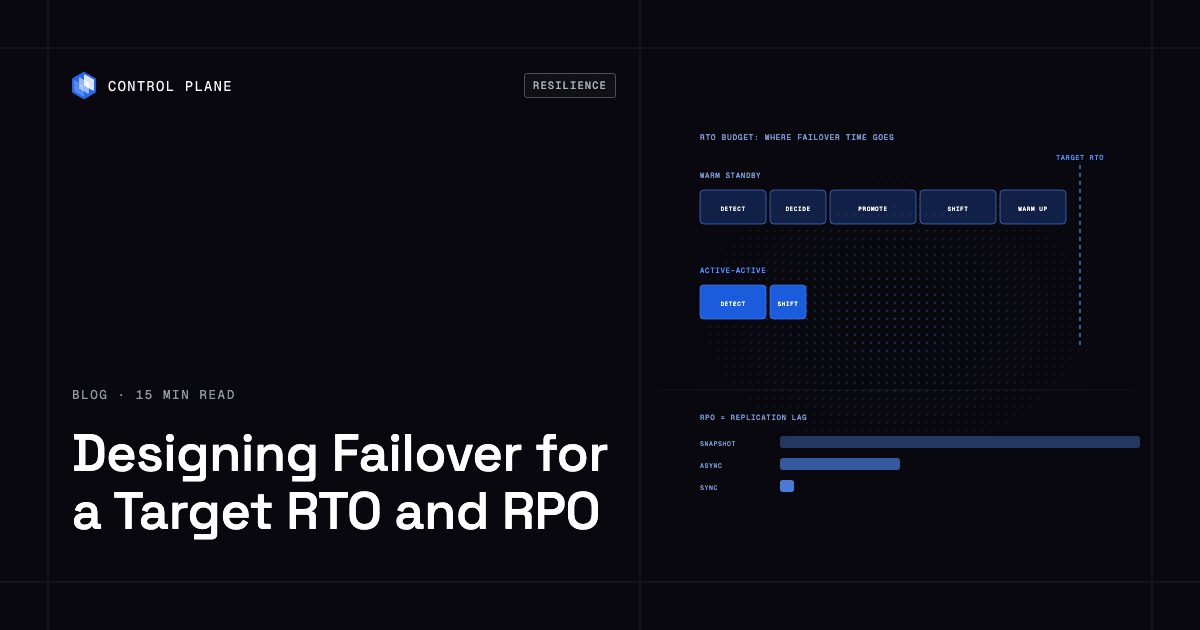
This is arithmetic on peak load that assumes even traffic distribution and no headroom buffer. Real deployments add headroom for traffic spikes and uneven distribution. Warm standby keeps a scaled-down, working copy of production in the standby region. Pilot light keeps data replicated and core infrastructure running, with application compute off or minimal. Both accept a longer RTO because capacity must scale out before it absorbs full traffic. Running active-active across AWS and Azure without idle standby works through the capacity math for two clouds.
Which cost cuts quietly remove redundancy?
Each of these cuts looks safe on a spreadsheet and can remove the recovery capability you are paying for.
| Cut | Why it looks safe | What it breaks | Safer alternative |
|---|---|---|---|
| Running standby capacity only on spot or preemptible instances | Spot prices are far below on-demand rates | Spot capacity can be interrupted when the provider needs it back and is not guaranteed during regional demand spikes, which is exactly when you need failover capacity | Mix spot with a baseline of on-demand or reserved instances for Tier 1 workloads |
| Region-locked reservations in the primary region only | Maximizes discount on the region that handles most traffic | Reservations become waste when you fail over; standby region runs at on-demand rates | Use commitments that apply across regions, such as AWS Compute Savings Plans, the Azure savings plan for compute, or Google Cloud compute flexible committed use discounts, plus capacity reservations in the failover region for Tier 1 |
| Shrinking standby without a load test | Billing drops immediately and nobody notices in steady state | Standby cannot absorb production traffic during failover; RTO blows past target | Load-test the standby at expected failover traffic before shrinking |
| Replicating data but skipping its encryption keys, secrets, or container images | Saves cross-region transfer and secrets management complexity | Data is present but unusable; applications cannot decrypt, authenticate, or start | Replicate secrets, keys, and images alongside the data they protect |
| Keeping control dependencies in one region (identity provider, DNS, CI/CD, secrets store) | Simplifies operations and reduces cost | A regional failure takes out the tooling needed to execute failover | Distribute control dependencies or use providers with built-in multi-region resilience |
| Dropping the second region’s observability entirely | Eliminates duplicated ingestion costs | You cannot diagnose failures in the standby region during or after failover | Centralize observability with a multi-region backend; keep minimal regional collection |
| Moving standby backups to an archive tier whose retrieval time exceeds the RTO | Archive storage is the cheapest tier available | S3 Glacier Deep Archive retrieval takes up to 12 hours with Standard retrieval or up to 48 hours with Bulk retrieval; if the latest standard-tier backup is also lost, recovery stalls | Keep the most recent backup set in a standard or infrequent-access tier; archive only older copies |
| Consolidating to fewer availability zones in the surviving region | Reduces per-AZ networking and compute costs | If the surviving region runs in one AZ, an AZ failure there during a regional failover causes a full outage; with two AZs, it halves surviving capacity | Maintain at least two AZs in every region that participates in failover |
Which workloads need multi-region redundancy at all?
Not every service justifies the cost of a second region. Matching the redundancy pattern to the workload’s actual business impact is usually the largest cost lever.
| Tier | Example workloads | Pattern | Indicative RTO | Indicative RPO |
|---|---|---|---|---|
| Tier 1: Revenue-critical, user-facing | Payment processing, authentication, core API | Active-active or hot standby | Seconds to low minutes | Near-zero to seconds |
| Tier 2: Important but tolerant of brief outage | Order management, notification services, dashboards | Warm standby or pilot light | Minutes to tens of minutes | Seconds to minutes |
| Tier 3: Internal or batch | Analytics pipelines, dev/staging environments, batch ETL | Backup-and-restore or single region with multi-AZ | Hours | Hours to a day |
Multi-AZ deployments inside a single region protect against the failure of a data center or availability zone. Multi-region adds protection against region-wide failures, which are less frequent and higher impact. For Tier 3 workloads, multi-AZ with regular backups copied to a second region is usually sufficient and far cheaper than running live standby capacity. Cloud disaster recovery RTO and RPO targets covers target setting.
Backup-and-restore is enough when the business can tolerate hours of downtime and the data can be restored from a recent snapshot. If that matches the workload’s actual impact profile, spending on warm standby or active-active is waste.
How do you keep the savings without losing the failover?
Savings erode as infrastructure drifts and new services ship without a redundancy review. Four checks keep both the savings and the failover in place.
Drill on a schedule. Beyond the drill after each cut in step 8, run a failover drill at least quarterly so drift shows up before a real failure. Measure actual RTO, RPO, and throughput against targets.
Measure failover capacity continuously. Track the ratio of standby capacity to expected failover traffic. Alert when standby drops below the minimum needed to absorb a region loss. Autoscaling helps, but autoscaling from zero to full production load takes time that counts against your RTO.
Alert on replication lag. With asynchronous replication, current lag is the data you would lose if the primary failed now. If lag exceeds your RPO target, a failover at that moment would lose more data than the target allows. Alert before lag reaches the target, for example at half of it, so teams can investigate before a failure turns lag into data loss.
Review the ledger quarterly. Reassess every line item in the redundancy cost ledger. New services may have been deployed without replication. Old replication rules may cover data that is no longer critical. Assign ownership of each line item to a team or product so accountability is clear.
How does Control Plane fit?
Control Plane is the unbreakable platform for running production workloads. It runs serverless, standard, stateful, and cron workloads natively on AWS, GCP, Azure, and Oracle Cloud Infrastructure (OCI), VM workloads on locations joined through Control Plane’s Managed Kubernetes, and workloads on Kubernetes clusters you already run or your own machines, including on premises, active-active across regions and clouds.
A GVC is Control Plane’s named set of locations drawn from cloud regions, Kubernetes clusters you register, and your own hardware; a workload deployed to a GVC runs active-active in every location of that GVC from one definition, so redundancy runs without paying for idle standby capacity. Each workload’s canonical endpoint uses health-aware DNS geo-routing to send clients to the nearest location where the workload passes its readiness probes. Location routing options set a priority tier per location and latency offsets. A failover location can sit in a lower tier that receives traffic only when every higher-tier location is unavailable. Per-location overrides can give the workload a smaller replica range there than in the primary, for a warm standby layout on the same GVC.
During the October 20, 2025 AWS us-east-1 outage, Control Plane customers with us-east-1 in their GVC had workloads “active and running in healthy locations within 10 seconds,” with no customer downtime, according to Control Plane’s internal incident telemetry.
Control Plane handles Day 2 operations for you, including autoscaling, built-in observability, and security. Autoscaling sets each location’s replica count between minScale and maxScale, and maxScale caps each location separately, so a GVC spanning three locations at maxScale 5 can run 15 replicas. Capacity AI is Control Plane’s feature that right-sizes a workload’s CPU and memory reservation between a minimum and maximum based on historical usage. Built-in logs and metrics carry a location label, and logs, metrics, and traces from every location are queried in one place, so teams do not need a separate telemetry stack per region and still see each location’s health during a failover. A Cost & Usage view per org and per resource with a projected total, plus a monthly spend alert to billing admins, gives finance and engineering shared visibility into redundancy spend. The billing API breaks cost down by GVC, workload, or location, so each location’s workload and storage cost can be its own line in the redundancy cost ledger.
Control Plane customers typically see 30 to 50 percent lower compute costs compared with running directly on AWS, GCP, or Azure. You pay for the CPU and memory a workload reserves, billed per millicore and per MB, with no contracts or minimums. Egress, storage, observability, dedicated load balancers, and GPUs are billed too.
The 99.999% availability SLA applies to workloads running at least two replicas in at least two locations. Control Plane is PCI DSS Level 1, SOC 2 Type II, HIPAA, and GDPR compliant.
Active-active removes idle standby, but each location still needs headroom to absorb a failed location’s traffic. minScale sets the capacity running at the moment of failover, and maxScale sets what autoscaling can add afterward. Adding a location to a GVC runs every workload there with no change to the workload definition. To move a two-location layout at 200 percent of peak to three locations at 150 percent, add the third location and lower each location’s minScale so it holds half of peak. Databases still set RPO based on replication lag, and that remains true regardless of the platform running the application tier.
FAQ
Short answers on cost, high availability, active-active, spot capacity, multi-AZ, hidden costs, and testing.
How do I cut cloud costs without giving up multi-region redundancy?
Remove spend that does not buy recovery, such as idle full-size standby compute, replicated non-critical data, and duplicated telemetry. Keep replicated critical state, obtainable failover capacity, and tested failover paths. Match each workload tier to the cheapest architecture that meets its RTO and RPO, then verify every cut with a failover drill.
How do I cut cloud costs without giving up high availability?
Use multi-AZ inside a region, with autoscaling and health-checked load balancing, for high availability. Reserve multi-region for Tier 1 workloads where regional outages are unacceptable.
How much does multi-region high availability cost compared with a single region?
Two-region active-active provisions about twice peak compute, warm standby adds a partial second copy plus data transfer, and pilot light keeps compute minimal but still pays for replication and storage. Itemize your own mix with the redundancy cost ledger.
Is active-active more expensive than active-passive?
It depends on standby size and region count. Two-region active-active and active-passive with a full-size standby both provision about 200 percent of peak. Active-passive with a scaled-down standby provisions less compute and accepts a longer RTO. Three-region active-active provisions about 150 percent of peak.
Are spot instances safe for a standby region?
Not as the only source of failover capacity for Tier 1 workloads. Providers can reclaim spot capacity, and it is scarcest during regional demand spikes. Use spot for non-critical standby and keep a baseline of on-demand or reserved capacity for critical services.
Does multi-AZ count as redundancy?
Yes, against the failure of a data center or availability zone within a region. It does not protect against region-wide outages. Multi-AZ alone is enough only when the business accepts the risk of a regional outage.
What is the biggest hidden cost of multi-region?
Cross-region data transfer is often the most underestimated cost. Replication traffic, inter-region API calls, and telemetry shipped across regions generate per-GB charges that grow with volume and frequency.
How often should I test failover after cutting costs?
Test within days of any change and run automated, non-destructive failover drills at least quarterly.
How does Control Plane reduce the cost of multi-region redundancy?
Control Plane runs a workload active-active in every location of its Control Plane Global Virtual Cloud (GVC), so redundancy runs without paying for idle standby capacity. Per-location autoscaling, Capacity AI right-sizing, built-in observability, and health-aware DNS geo-routing reduce the scaling, telemetry, and traffic-management tooling each extra region would otherwise duplicate. Each location still needs headroom to absorb a failed location’s traffic.
To size a multi-region layout on Control Plane, talk to the Control Plane team or sign up free.