
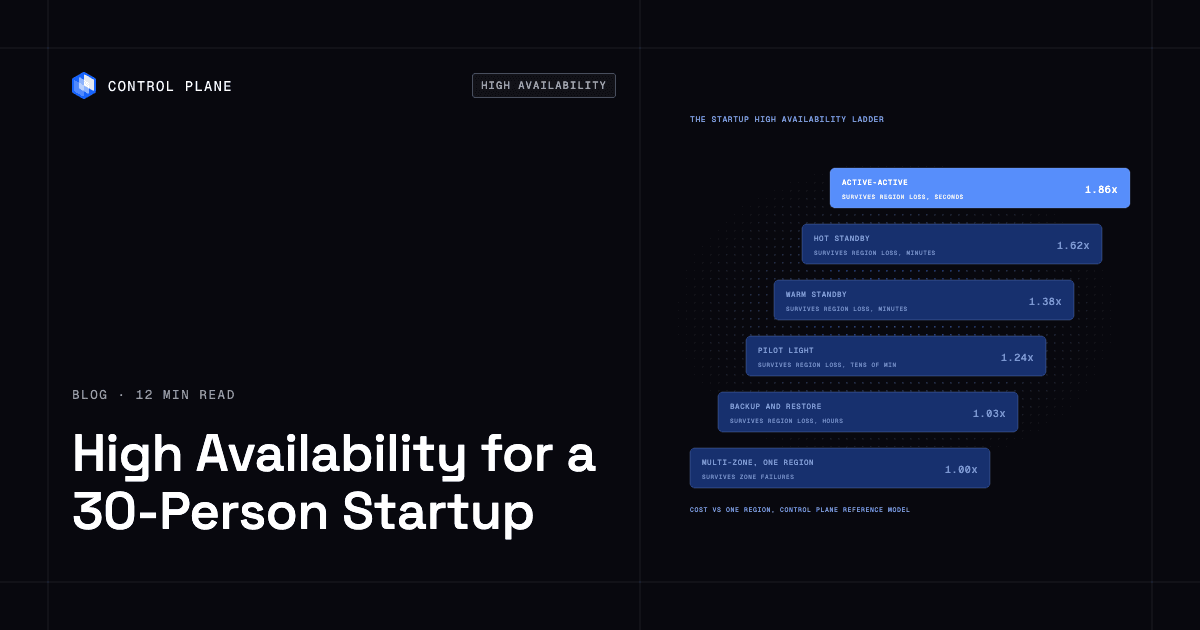
For a 30-person startup, the most cost-effective high availability setup is two or more application instances behind a health-checked load balancer with a managed database replicated across availability zones in a single region, plus backups copied to a second region. This configuration survives instance and zone failures, can recover from a region loss in hours to a day, and fits a 99.9% uptime target. Move to a second region only when the expected yearly cost of regional outages, measured in lost revenue, SLA credits, churn, and engineering time, exceeds the yearly cost of a second region, which brings total infrastructure cost to about 1.24x to 1.86x a single-region baseline. That crossover point depends on your workload, your contracts, and how much of your revenue sits in a single region.
Disclosure: Control Plane publishes this guide.
TL;DR
- Default stack. Two or more instances spread across availability zones, a managed database with a cross-zone standby, health-checked load balancing, and tested backups copied to a second region. This covers Steps 2 and 3 of the ladder and is the highest-leverage spending.
- Target to pick first. 99.9% availability. It allows about 43 minutes of downtime per month and is achievable with managed services in one region.
- When to add a second region. When the expected yearly cost of multi-hour regional outages exceeds the yearly cost of a second region (total cost of about 1.24x to 1.86x your single-region baseline), or when an enterprise contract demands 99.95% or higher.
- Database decision. Start with managed Postgres or MySQL with a cross-zone standby. Add read replicas for read-heavy workloads. Move to cross-region replicas or distributed SQL only when you move up the ladder.
- What to skip. Self-managed Kubernetes without a dedicated platform engineer. Active-active multi-region on day one. A single database instance with no standby. Untested backups. Single points of failure in DNS, secrets management, or CI/CD.
- Where Control Plane fits. Control Plane runs a small team’s production workloads in one region with Day 2 operations handled and no Kubernetes cluster the team has to operate, then adds regions or clouds from the same workload definition, with traffic routed automatically to the nearest healthy location.
What are the most cost-effective high availability options for a 30-person startup?
High availability is a ladder. Each step adds protection against a more severe class of failure, tightens your recovery time, and raises your infrastructure bill by a knowable amount. The table uses relative cost multiples from Control Plane’s published reference model, priced on AWS list prices for us-east-1 and us-east-2, checked October 29, 2026. The multiples are total cost relative to a single-region baseline for a reference application; your actual numbers depend on your workload, data volumes, and provider pricing. The availability targets are this guide’s recommendations.
The startup high availability ladder
| Step | What you run | Survives | Fits availability target | Relative infrastructure cost | Operations work added |
|---|---|---|---|---|---|
| 1 | One application instance, one database instance | Nothing. Any single failure causes downtime. | Not high availability | Below the model’s baseline (not modeled) | None beyond basic deployment |
| 2 | Two or more instances across availability zones behind a health-checked load balancer. Managed database with a standby in another zone. | Instance failure, zone failure | 99.9% | 1.00x (the model’s baseline: three instances, a Multi-AZ managed Postgres database, and a load balancer in one region) | Configure health checks, set up monitoring and alerts, write a basic runbook |
| 3 | Step 2 plus automated backups copied to a second region and a tested restore runbook | Region loss, after a manual rebuild and restore taking hours to a day, losing data since the last backup | 99.9%, with longer recovery for regional events | ~1.03x | Maintain and test the restore runbook quarterly |
| 4 | Pilot light in a second region: data replicated continuously, compute scaled to zero or off | Region loss, after scaling up compute (tens of minutes to hours) | 99.9% to 99.95% | ~1.24x | Monitor replication lag, run periodic scale-up drills |
| 5 | Warm standby in a second region: reduced-capacity compute running, data replicated | Region loss, with recovery in minutes to tens of minutes | 99.9% to 99.95% | ~1.38x | Keep the standby environment patched and tested, run failover drills |
| 6 | Hot standby in a second region: full-capacity compute running, ready to accept traffic | Region loss, with automated failover in a few minutes (a 99.99% monthly target leaves about 4 minutes 19 seconds of total downtime per month) | 99.95% to 99.99% | ~1.62x | Duplicate deployments, synchronize configuration, validate failover regularly |
| 7 | Active-active across two or more regions or clouds: both locations serve live traffic | Region outage, and provider outage when locations span clouds, in seconds to minutes | 99.99% or higher | ~1.86x for two regions | Solve data consistency across regions, handle conflict resolution, operate global traffic management |
Most early-stage 30-person startups should run Step 3 (Step 2 plus cross-region backups and a tested restore) for their first year or two of production traffic and climb higher only when business conditions demand it.
On Control Plane, a small team can run Step 2 in a single location and climb toward Step 7, active-active across regions or clouds, by adding locations to its Control Plane Global Virtual Cloud (GVC), a named set of locations across one or more clouds, without changing the workload definition or operating Kubernetes clusters, and pair those locations with a multi-location database for the data tier.
How much downtime does each availability target allow?
Each availability target permits a fixed amount of downtime.
| Availability target | Downtime per year | Downtime per 30-day month |
|---|---|---|
| 99% | 3 days 15 hours 36 minutes | 7 hours 12 minutes |
| 99.9% | 8 hours 45 minutes 36 seconds | 43 minutes 12 seconds |
| 99.95% | 4 hours 22 minutes 48 seconds | 21 minutes 36 seconds |
| 99.99% | 52 minutes 34 seconds | 4 minutes 19 seconds |
Start at 99.9%. Raise it to 99.95% or 99.99% when enterprise contracts require it, because each step up cuts allowed downtime sharply (99.95% halves it, 99.99% cuts it by 90 percent) and needs more redundancy, automation, and testing. Control Plane’s guide to SaaS uptime SLAs covers when enterprise customers start requiring 99.99%.
When should a startup add a second region?
The decision is financial. Estimate the cost of one regional outage by multiplying your hourly revenue at risk by the duration of a typical multi-hour regional outage, then add SLA credit exposure, likely customer churn, and the engineering hours your team would spend on incident response. Multiply that total by how many such outages you expect per year, and compare the result to the yearly cost of adding a second region, which raises total infrastructure cost to about 1.24x the single-region baseline for a pilot light and 1.86x for active-active, per Control Plane’s cost model.
Control Plane’s cloud outage tracker lists real outage durations across major providers. Multi-hour regional outages occur every year. If all of your revenue runs in one region, one such outage takes all of it offline.
Common triggers for adding a second region include:
- An enterprise customer contract that specifies 99.95% or higher availability.
- Customers on multiple continents who need low-latency access.
- A single cloud region holding 100% of your production revenue.
- A compliance or regulatory requirement for geographic redundancy.
Control Plane’s guide to how companies stay online during AWS us-east-1 outages covers practical patterns. The cheapest way to recover from a region outage is cross-region backups with a tested restore, which takes hours to a day. The next step up is a pilot light with tested failover, which recovers in tens of minutes to hours. A second region you never exercise protects nothing.
How should a startup handle the database for high availability?
The database is almost always the hardest component to make highly available because it holds state. Start simple and add complexity only when you move up the ladder.
Managed database with a cross-zone standby (ladder Step 2). Use a managed relational database service such as Amazon RDS Multi-AZ, Cloud SQL high availability, or Azure Database for PostgreSQL with zone-redundant HA. These services maintain a synchronous standby in a different availability zone and handle automatic failover. This removes the single-instance failure mode, and automatic failover typically completes in one to two minutes.
Read replicas. If your workload is read-heavy, add one or more read replicas in the same region. This offloads read traffic from the primary and can keep read-only paths working during a primary failover. Replication is asynchronous, so replicas may serve slightly stale data, and each replica costs about as much as another database instance.
Point-in-time recovery (ladder Step 3). Enable continuous backups with point-in-time recovery. This protects against accidental data deletion and corruption, which replication alone does not solve. Copy backups to a second region so the Step 3 restore runbook has something to restore.
Cross-region replicas (ladder Steps 4 to 6). When you move to a pilot light or standby in a second region, set up an asynchronous read replica in that region. Promoting the replica to primary during a regional failover takes minutes. Writes not yet replicated when the region fails are lost, so track replication lag against your recovery point objective.
Distributed SQL for active-active writes (ladder Step 7). If you need active-active writes across regions, consider a distributed SQL database such as CockroachDB. It requires at least three locations to survive the loss of one, and with region survival enabled, every write waits at least one round trip to another region. It raises Step 7 to three locations and a higher cost than the two-region 1.86x figure.
Keep your database vendor-neutral where possible. Avoid tightly coupling application logic to provider-specific database features unless the productivity gain is substantial and you accept the lock-in.
What should a small team avoid?
Certain patterns waste money or create false confidence. A 30-person startup should steer clear of these:
- Self-managed Kubernetes without a platform engineer. Kubernetes carries a large operational load. If nobody on the team has deep Kubernetes experience, the cluster itself becomes a reliability risk. A managed container service or platform removes cluster operations.
- Active-active multi-region on day one. The ~1.86x cost multiple and the data consistency challenges are rarely justified before product-market fit.
- A single database instance with no standby. This is a common single point of failure in early-stage infrastructure. A managed cross-zone standby roughly doubles database instance cost, which is small next to hours of downtime.
- Untested backups. Schedule quarterly restore tests; a backup that has never been restored may not work when you need it.
- Single points of failure in DNS, secrets management, or CI/CD. These components are easy to overlook and hard to recover when they fail during an incident.
- Paying for idle standby capacity you never test. A warm or hot standby that has never received live traffic will surprise you during a real failover. Run failover drills at least quarterly.
How Control Plane fits a startup
Control Plane is the unbreakable platform for running production workloads. In a single region, Control Plane handles Day 2 operations for you, including autoscaling, built-in observability, and security, with no Kubernetes cluster to operate, and its multi-zone option spreads a workload’s replicas across availability zones within one location (where the location supports multiple zones), which covers Step 2 without a second region. When the team needs a second region or cloud, it adds locations without hiring a platform engineer.
A workload deployed to a GVC runs in every location of that GVC from one definition, and adding a location provisions it for every workload. Each workload’s endpoint uses DNS to send clients to the nearest location where the workload passes its readiness probes, and shifts traffic away from a location that fails. During the October 20, 2025 AWS us-east-1 outage, Control Plane customers with us-east-1 in their GVC had workloads active and running in healthy locations within 10 seconds, with no customer downtime, according to Control Plane’s internal incident telemetry.
The 99.999% availability SLA applies to workloads running at least two replicas in at least two locations. Those locations can be on different providers. Control Plane’s guide to five nines uptime architecture compares what single-region, multi-region, and multi-cloud designs can deliver.
For databases, the Template Catalog, Control Plane’s library of ready-to-install apps, includes a single-instance Postgres template with optional scheduled backups to object storage, a highly available Postgres template with three Patroni replicas and an HAProxy leader endpoint in one location, a multi-location Postgres template that, across three or more locations, automatically promotes a replica in a surviving location, and distributed databases such as CockroachDB and pgEdge. Best platforms for running Postgres in containers compares these templates with managed services and Kubernetes operators.
You pay for the CPU and memory a workload reserves, with no contracts or minimums. Capacity AI, Control Plane’s right-sizing feature, adjusts reserved CPU and memory between a minimum and maximum based on historical usage. Customers typically cut compute costs 30 to 50 percent compared with running directly on AWS, GCP, or Azure.
Control Plane is PCI DSS Level 1, SOC 2 Type II, HIPAA, and GDPR compliant. Control Plane’s guide explains how to add a second cloud provider for failover without doubling ops.
FAQ
Each answer summarizes a section of this guide.
What are the most cost-effective high availability infrastructure options for a 30-person startup?
The most cost-effective option is two or more application instances behind a health-checked load balancer with a managed database replicated across availability zones in one region, plus backups copied to a second region. This setup survives instance and zone failures, fits a 99.9% uptime target, and serves as the 1.00x baseline in Control Plane’s cost reference model. Move to multi-region only when expected yearly regional-outage losses exceed the yearly cost of a second region, which brings total cost to about 1.24x to 1.86x the baseline, per Control Plane’s cost reference.
What uptime should a startup target?
Start at 99.9%, which allows about 43 minutes of downtime per month. This target is achievable with managed services in a single region and does not require a dedicated reliability team. Move to 99.95% or 99.99% when enterprise contracts demand it, because each step up cuts allowed downtime sharply and requires more redundancy.
Is multi-AZ enough for a startup?
Yes, for most startups in their first year or two of production traffic, provided backups are copied to a second region and restores are tested. A multi-AZ deployment with a managed database standby survives the most common failure scenarios: instance crashes, zone-level outages, and routine maintenance. It does not keep you online through a full region outage, which is why the cross-region backups matter.
How much does multi-region high availability cost compared with a single region?
It depends on the pattern. Cross-region backups and restore cost about 1.03x. A pilot light with data replicated and compute scaled to zero or off costs about 1.24x. A warm standby costs about 1.38x. A hot standby costs about 1.62x. Active-active across two regions costs about 1.86x. These multiples are total cost from Control Plane’s published reference model, relative to a single-region baseline for a reference application. Real numbers depend on your workload, data transfer volumes, and provider pricing.
Do startups need Kubernetes for high availability?
No. High availability requires redundancy, health checking, and automated failover, none of which depend on Kubernetes. Managed container services and platforms like Control Plane provide these capabilities without requiring the team to operate Kubernetes clusters. Self-managed Kubernetes without a platform engineer often reduces reliability.
What is the cheapest way to survive a cloud region outage?
Cross-region backups with a tested restore runbook cost about 1.03x your single-region baseline but take hours to a day to recover. A pilot light in a second region, with data replicated continuously and compute scaled to zero or off, costs about 1.24x and recovers in tens of minutes to hours, depending on how fast your team can scale up compute, promote the database replica, and switch traffic. Either is sufficient for most startups whose revenue can tolerate several hours of downtime during a rare regional event, provided the runbook is drilled.
What is the difference between high availability and disaster recovery?
High availability is the ability to keep serving requests during a component failure, typically through redundancy and automated failover within a region. Disaster recovery is the ability to restore service after a larger event, such as a region outage, data corruption, or accidental deletion, often involving backups, a secondary region, and a runbook. A complete strategy includes both: multi-AZ redundancy for high availability and tested backups with a regional recovery plan for disaster recovery.
How does Control Plane help a small team get high availability?
Control Plane lets a team deploy a workload to a Global Virtual Cloud that spans one or more locations across AWS, GCP, Azure, and your own infrastructure. The team starts in one location and adds regions or clouds by adding locations to the GVC. Each workload’s endpoint routes clients to the nearest healthy location and shifts traffic away from a failed location automatically. The 99.999% SLA covers workloads with at least two replicas in at least two locations. The team never has to operate a Kubernetes cluster, and Capacity AI adjusts reserved CPU and memory based on historical usage.
When should a startup consider multi-cloud high availability?
Consider multi-cloud when a provider-wide outage would threaten the business, when a customer contract requires provider diversity, or when you need regions where your primary provider has no presence. Multi-cloud adds networking, tooling, and operational work. Platforms like Control Plane reduce that work by running workloads across providers from a single definition. Base the decision on a specific need such as a contract, revenue concentration, or regional coverage.
To build high availability without building a platform team, talk to the Control Plane team or sign up free.