
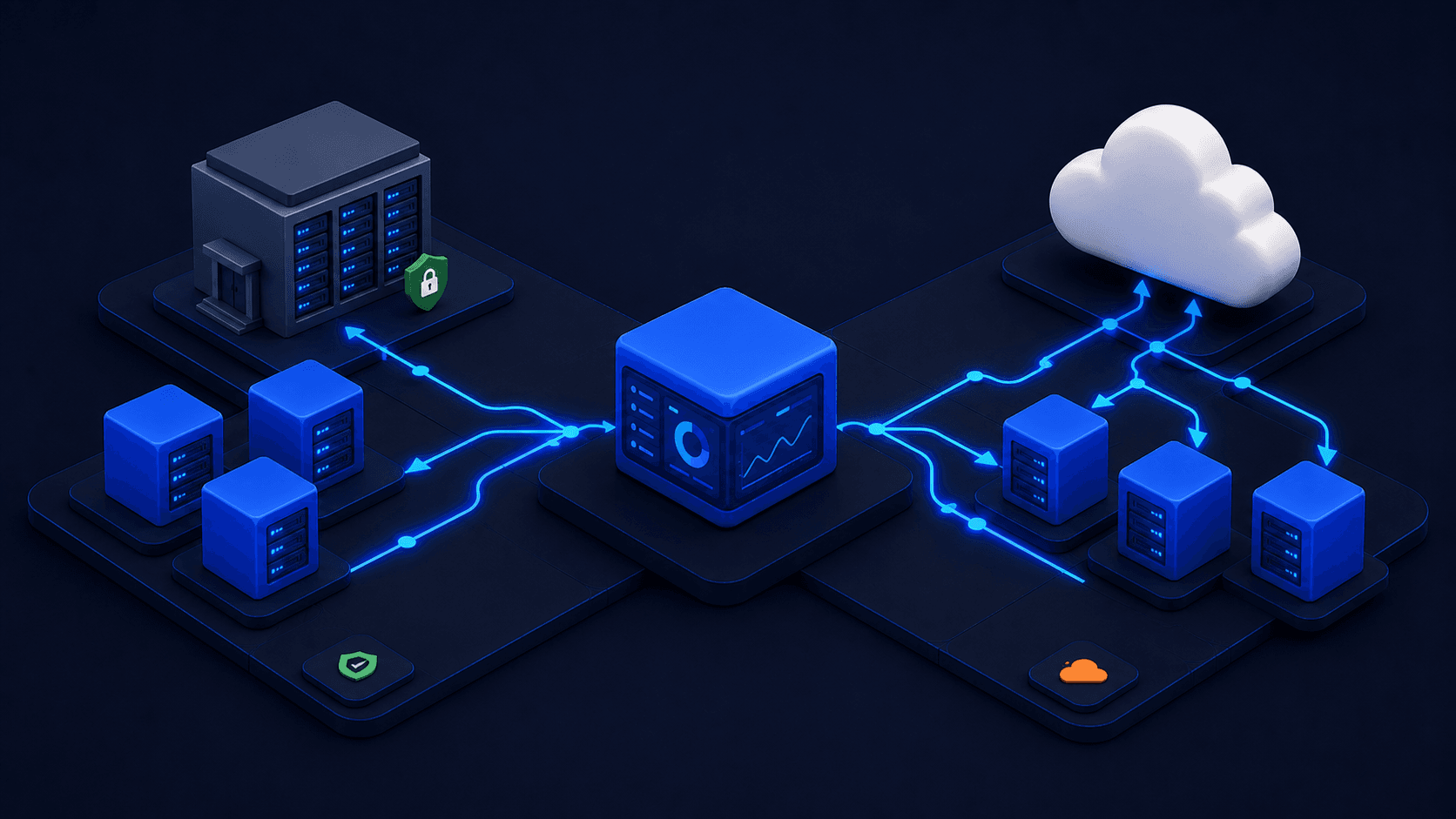
Hybrid cloud orchestration is the practice of managing workload placement, identity federation, and observability across multiple cloud providers and on-premises infrastructure through a single control layer, rather than handling each environment separately with its own tooling.
Most teams don’t plan to end up with a fragmented hybrid cloud setup — it just grows that way. A workload stays on-premises for compliance reasons, another moves to AWS to manage costs, a new team chooses GCP for its AI/ML capabilities. Before long, you’re running three clouds, three identity systems, three observability stacks, and you still have no clear picture of what’s running where.
The root cause is structural. Each major cloud provider offers solid management tools within its own walls. AWS IAM, GCP IAM, and Azure AD are all well-designed for their own environments. The friction begins when you need to work across those environments. Each new provider you add doesn’t just expand your operational surface area — it compounds it. A team running workloads on AWS, GCP, and an on-premises Kubernetes cluster will quickly find that their per-cloud observability pipelines can’t connect the dots. For example, linking a latency spike in us-east-1 to a database bottleneck sitting behind an on-premises firewall. These tools were built to work well inside a single cloud, and that’s where their usefulness ends.
This article walks through the architecture patterns, workload placement logic, network topology, identity federation, and observability setup that hold together at scale — and explains where single-cloud tools tend to fall short.
1. Why Hybrid Cloud Gets Harder as Teams Scale, Not Easier
Adding a second cloud doesn’t just double your DevOps surface area — it more than doubles it. You now maintain two distinct sets of IAM policies and role mappings, two separate networking boundaries with their own VPC configurations and peering rules, and two observability systems that can’t natively communicate. Add a third cloud or an on-premises cluster and you introduce a new layer of integration points with no shared control plane to tie them together.
Here’s a realistic scenario: a three-person platform team running a SaaS product on AWS, using GCP for BigQuery analytics, and maintaining a co-located Kubernetes cluster for data that can’t leave a specific jurisdiction. That means CloudWatch for AWS workload logs, Cloud Logging for GCP, and a self-hosted Prometheus stack for the on-premises cluster. When a user reports slow response times, the on-call engineer has to jump between three consoles, manually line up timestamps, and hope the root cause left traces in at least one of those three pipelines.
This is the natural outcome of adopting clouds one at a time without an orchestration layer designed to sit above all of them. Single-cloud tools are scoped to the cloud they manage. A hybrid environment needs a layer that treats any infrastructure — a hyperscaler region, a bare-metal rack, or a private Kubernetes cluster — as a standard deployment target.
2. Hybrid Cloud Architecture Patterns Worth Using
Three patterns show up in most real hybrid deployments. Each has a natural fit and a set of failure modes worth understanding before you commit to one.
Cloud-burst keeps a steady-state workload on-premises or in a primary provider, and spills peak traffic over to public cloud regions. It works well for batch processing jobs, ML training runs, and seasonal traffic spikes, where the burst is predictable and stateless. It runs into trouble with stateful workloads and anything with significant data gravity. If a burst job needs to read from a database sitting on-premises, network latency and egress costs will quickly cancel out any savings.
Active-active multi-region deploys workloads simultaneously across multiple providers or regions, with DNS geo-routing directing traffic to the nearest healthy instance. The cloud virtualization platform Control Plane implements this by default through its Global Virtual Cloud™ (GVC) abstraction, which is a network container that spans multiple cloud providers without requiring you to manage each one separately. When you create a GVC and add locations (say, aws-us-west-2 and gcp-us-east1), your workloads deploy to all specified locations simultaneously, and DNS geo-routing handles traffic distribution automatically. Any infrastructure can be a location inside a GVC: a hyperscaler region, a bare-metal rack at Hetzner, a co-lo facility, or a private Kubernetes cluster you register directly.
BYOK (Bring Your Own Kubernetes) lets existing private clusters, whether in a co-location, on bare metal, or in a private GCP account, be registered as custom locations alongside hyperscaler regions. Kubernetes orchestrates containers within a single cluster, while an orchestration layer above the cluster level coordinates workloads across any number of clusters, regardless of where they run. BYOK is how an on-premises cluster becomes a first-class deployment target alongside aws-us-east-1.
3. Workload Placement: A Decision Framework
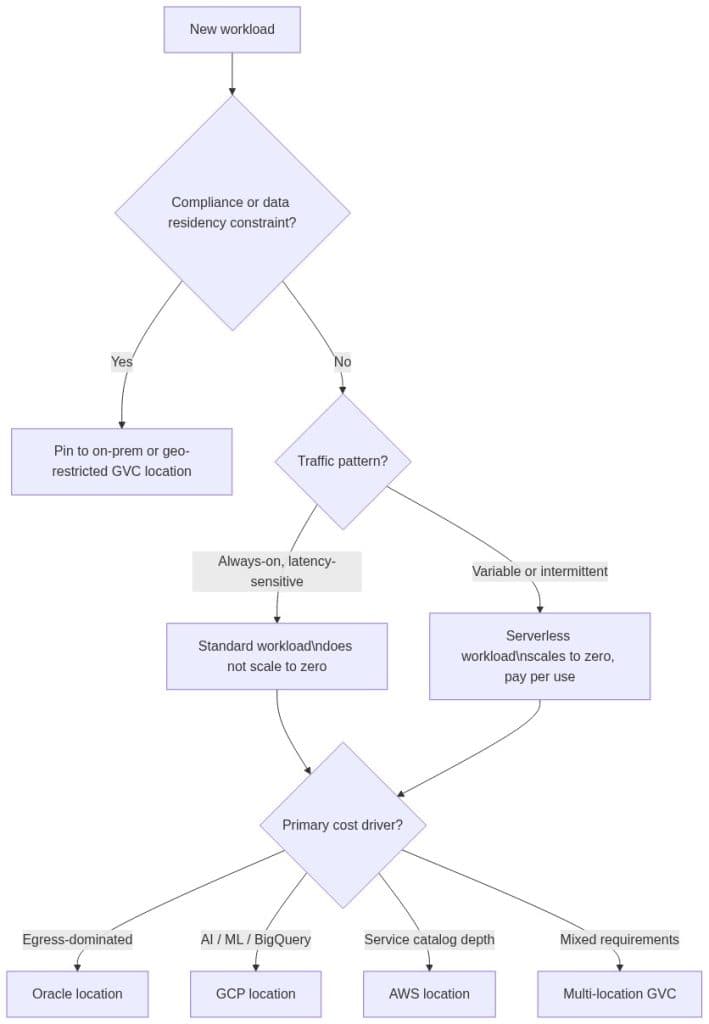
Workload placement decisions are where real cost savings and compliance benefits come from. Three variables drive these decisions, and they should be evaluated in this order.
Compliance and data residency narrow your options before cost or performance enter the conversation. If a workload processes regulated data that can’t leave a specific geography, or if it needs to run on infrastructure you control directly, it goes on-prem or in a geo-restricted location. Control Plane’s Global Virtual Cloud™ (GVC) allows you to include only specific locations (on-prem only, EU-only hyperscaler regions, or any combination), which maps cleanly to data residency requirements without requiring a separate deployment model.
Cost arbitrage is the second lever. Each hyperscaler has different pricing strengths. Oracle offers free egress, which is a large win for any workload where egress costs dominate the bill. AWS has the deepest service catalog. GCP has BigQuery and the AI/ML stack. With a platform that lets you treat each provider as an available location, you can run compute on Oracle to take advantage of free egress while still consuming AWS S3 and GCP BigQuery as backend services from within the same Global Virtual Cloud™ (GVC). Teams that implement deliberate placement this way regularly achieve 30–50% cost reduction compared to running everything on a single hyperscaler.
Traffic profile and workload type is the most commonly misconfigured variable. Control Plane exposes the two types most relevant to this placement decision are Standard and Serverless. Standard workloads are always-on and don’t scale to zero, making them the right choice for latency-sensitive services and anything that can’t tolerate a cold start. Serverless workloads scale to zero when idle and charge per invocation, making them the right choice for variable or intermittent traffic. Choosing Standard for a low-traffic API that runs overnight at 2% capacity is one of the most common over-provisioning mistakes — and choosing Serverless for a user-facing endpoint that needs sub-100ms response guarantees is the other.
The following diagram walks through the placement decision for any new workload, from compliance checks down to cost-driven provider selection:
4. Network Topology and Cross-Cloud Connectivity
Control Plane’s Global Virtual Cloud™ (GVC) is the network container that makes multi-location deployment coherent — a single named boundary that spans multiple cloud providers and on-premises infrastructure, with DNS geo-routing and workload deployment managed automatically across all member locations.
Creating one takes a single CLI command:
cpln gvc create --name prod-gvc --location aws-us-west-2 --location gcp-us-east1
From that point, workloads deployed to prod-gvc run in both locations. DNS geo-routing handles traffic distribution to the nearest healthy instance automatically, with no manual load balancer configuration required. Add a location and it joins the rotation. Remove one and traffic routes around it. For teams preferring IaC workflows, the Control Plane Terraform provider (docs.controlplane.com/iac/terraform) exposes the full resource model, so GVCs and their locations are declarative like everything else.
The diagram below shows how a single GVC spans three locations across providers, with DNS geo-routing distributing client traffic and each location connecting to its backend services over private networking:
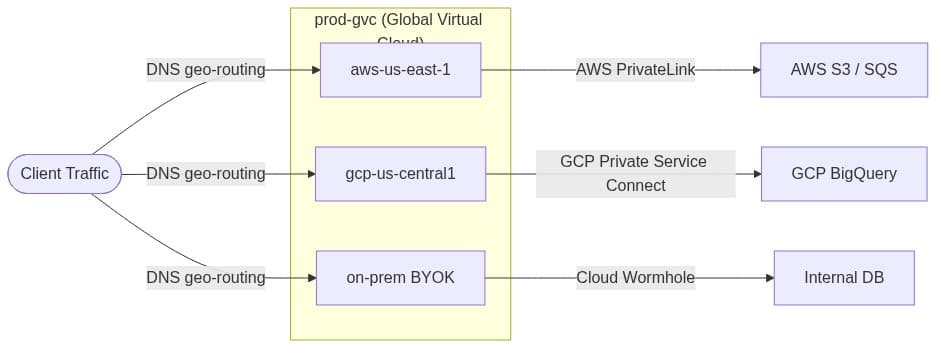
For workloads that need to reach native VPC services or endpoints behind an on-premises firewall, Control Plane provides two mechanisms.
Cloud Wormhole tunnels TCP/UDP traffic from a workload to specific endpoints in private networks without exposing those endpoints publicly. It works through a Control Plane agent running inside the private network. To set it up, go to the Identity resource and add the FQDN (Fully Qualified Domain Name) or IP of the target service under the Cloud Wormhole section. This covers the most common cases: an on-premises PostgreSQL instance, a VPC-hosted Kafka cluster, or an internal API behind a corporate firewall. You configure the resource once at the Identity level, and every workload assigned that Identity can reach it without any additional networking setup.
Native Networking covers situations that require cloud-provider-managed private connectivity. AWS PrivateLink and GCP Private Service Connect are both supported, and both are configured through the Native Networking section of the same Identity resource. If your team already routes certain traffic through PrivateLink for compliance or latency reasons, that behavior carries over, configured once at the orchestration layer rather than repeated per cluster.
5. Identity Federation Without Embedded Credentials
Identity federation in hybrid cloud means workloads receive short-lived tokens at runtime rather than relying on long-lived IAM keys stored somewhere in your infrastructure. This removes the need to manage secrets per cluster and limits the damage if any single credential is ever compromised.
The most common mistake in multi-cloud identity management is storing IAM keys in Kubernetes Secrets or environment variables, rotating them manually, and copying them across every cluster that needs access to the same service. With two clouds and three clusters, this already creates a secret sprawl problem. With five clusters across three providers, it becomes a real security liability, and every key rotation turns into a coordination effort that is easy to miss or delay.
Control Plane solves this problem through Workload Identities. An Identity is one of four principal types in the platform, alongside users, groups, and service accounts. You scope an Identity to a Global Virtual Cloud™ (GVC) and assign it to any workload within that GVC that needs access to the same cloud resources. At runtime, the workload receives a short-lived token automatically. No keys to store, no secrets to rotate, and no per-cluster configuration to keep in sync.
How to Set Up a Workload Identity in Console
- Navigate to Identities in the left menu and click New.
- Provide a name and select the GVC.
- Under Cloud Access, select your provider (AWS, Azure, GCP, or NATS) and reference an existing cloud account, then choose an existing IAM role or policy to associate.
- For on-prem or VPC endpoints, add FQDN or IP resources under Cloud Wormhole.
- Optionally, enable Native Networking for AWS PrivateLink or GCP Private Service Connect.
Once configured, assign the Identity to your workload. A workload replica running in aws-us-west-2 and another running in gcp-us-east1 both consume AWS SQS and GCP BigQuery through the same Identity, with zero embedded credentials and zero per-cluster configuration. If you prefer Terraform, the cpln_identity resource supports aws_access_policy, gcp_access_policy, network_resource (for Cloud Wormhole), and native_network_resource blocks declaratively.
The RBAC layer sits above this. Policies bind specific permissions to users, groups, service accounts, or identities against target resources, enforcing least-privilege at the orchestration layer rather than only within individual clouds. A workload that needs read access to one S3 bucket doesn’t inherit write access to all S3 buckets just because it runs on AWS.
6. Observability Across Hybrid Environments: One Pipeline, Not Five
Unified hybrid cloud observability means logs, metrics, and traces from all GVC locations, including on-premises BYOK clusters, flow into a single OpenTelemetry-based pipeline with a shared label schema across all providers.
Per-cloud observability silos create a specific class of problem that only becomes visible during an incident. Imagine your API latency spikes and the root cause turns out to be a slow query on an on-premises database. To diagnose it, you need to correlate request traces from an AWS workload with database metrics from a self-hosted Prometheus instance, in real time, while under pressure. When that data lives in separate systems with incompatible query languages, that correlation is a slow, manual process at exactly the moment you can least afford it.
Control Plane’s observability layer centralizes logs, metrics, and traces from workloads across all GVC locations using an OpenTelemetry-based collector. Whether a workload runs in aws-us-east-1, gcp-europe-west1, or on an on-prem BYOK cluster, its telemetry flows into a single pipeline. Access it through the built-in Grafana explorer, the API, the CLI, or the console UI. All four interfaces expose the same unified data.
The practical value shows up in the query layer. LogQL supports a location label alongside gvc, workload, container, replica, stream, and others. A cross-location latency comparison:
{gvc="prod-gvc", workload="api-service"}
  | json
  | location =~ "aws-us-east-1|gcp-europe-west1"
  | response_time_ms > 200
This runs in a single query pane and returns matching log lines from both locations, tagged with their origin. You can spot whether elevated latency is consistent across providers or isolated to one region in seconds, without pivoting through multiple dashboards.
For teams with existing observability stacks, Control Plane supports shipping to external providers like Coralogix. The consolidated telemetry stream routes to whatever downstream system your team already uses for alerting and retention, so you’re adding a unified collection layer without replacing existing tooling.
7. Getting Your Hybrid Baseline Running Today
You can get a functional hybrid baseline up and running against a non-production workload in under an hour. This covers the three core components: a GVC, identity federation, and unified observability. The steps below walk you through each one.
Step 1: Create a GVC Spanning Two Locations
cpln gvc create --name prod-gvc --location aws-us-east-1 --location gcp-us-central1
This sets up the network container and enables DNS geo-routing between the two providers straight away. Every workload you deploy to prod-gvc will run in both locations from this point forward.
Step 2: Create a Workload Identity with Cloud Access Rules
In the Console, go to Identities > New > Cloud Access, select your provider, and configure access rules for at least one native service. AWS S3 or GCP BigQuery are good starting points. Assign this Identity to a workload and remove any hardcoded IAM keys currently stored in your Kubernetes Secrets. The full walkthrough is available at docs.controlplane.com/guides/create-identity.
Step 3: Validate the Observability Pipeline with a Cross-Location Query
Open the built-in Grafana explorer and run a cross-location LogQL query. Use the location label to filter logs from both GVC locations in a single query. When you see data from aws-us-east-1 and gcp-us-central1 appear together in one view, it confirms the observability pipeline is working end to end. Full GVC creation steps are available at docs.controlplane.com/guides/create-gvc.
These three steps give you something concrete to validate against: a GVC routing real traffic, an Identity replacing the first set of embedded credentials in your clusters, and a Grafana query confirming your observability pipeline spans both providers. From here, you have a working hybrid baseline you can extend one workload at a time.
Hybrid Cloud Management FAQ
Hybrid cloud orchestration is a control layer that sits above individual cloud providers (such as: AWS, GCP, Azure, and on-premises infrastructure ) and manages workload placement, networking, identity, and observability as a unified system. Single-cloud management tools like AWS IAM or GCP Cloud Logging are scoped to their own provider and can’t correlate data or enforce policy across cloud boundaries. An orchestration layer treats every location, whether a hyperscaler region or a private Kubernetes cluster, as an interchangeable deployment target.
Start with compliance and data residency requirements, which eliminate certain options before cost enters the picture. Workloads processing data that can’t leave a specific jurisdiction must run on-prem or in a geo-restricted cloud location. For workloads without residency constraints, evaluate the primary cost driver: egress-heavy workloads favor Oracle’s free-egress pricing, AI/ML workloads favor GCP, and workloads requiring broad managed services favor AWS. Applying deliberate placement this way typically produces significant cost savings compared to defaulting everything to one provider.
Each cluster holding a long-lived IAM key is an independent blast radius (the scope of damage if a credential is ever compromised). At three clusters across two providers, you have multiple copies of the same credentials that must be rotated in coordination. Any rotation gap is a window of exposure. More critically, a compromised key in one cluster can grant access to shared backend services across all clusters. Workload Identities replace this model with short-lived, credential-free tokens scoped to a specific Global Virtual Cloud™ (GVC), eliminating the rotation coordination problem entirely.
Yes. Control Plane’s unified Grafana-based observability layer (logs via LogQL, metrics, and OpenTelemetry traces) consolidates telemetry from all GVC locations into a single pipeline, which can then forward to external systems including Coralogix. Teams with existing Prometheus stacks can continue using them while adding the unified cross-location collection layer on top, without replacing current alerting or retention infrastructure.
BYOK lets you register an existing private Kubernetes cluster as a named location inside a Global Virtual Cloud™ (GVC), whether that cluster lives in a colocation facility, on bare metal, or in a private cloud account. Once registered, Control Plane treats it the same way it treats any hyperscaler region: you can deploy workloads to it, assign it cloud access through Identities, and its logs, metrics, and traces flow into the same observability pipeline as everything else. Your on-premises clusters become full deployment targets without any workload migration.
When you add two or more locations to a GVC, Control Plane automatically configures DNS geo-routing to direct incoming traffic to the nearest healthy instance. No manual load balancer configuration is required. If a location becomes unhealthy, traffic routes around it automatically. Adding a new location enrolls it in the routing pool immediately; removing one drains it from the pool without requiring DNS changes on your end.
Standard workloads are always-on and do not scale to zero, making them appropriate for latency-sensitive services where cold starts are unacceptable. Serverless workloads scale to zero when idle and are billed per invocation, making them appropriate for variable or intermittent traffic. The most common misconfiguration is using Standard for low-traffic background services (over-provisioning) or using Serverless for user-facing APIs with sub-100ms latency requirements (cold start penalty).
Sign up free and follow the quickstart at console.cpln.io.