TL;DR
No one can guarantee that a website or service never goes down. What you can promise is a measured availability target, and with a multi-location, active-active design you can reach 99.999% (five nines), about 5 minutes 15 seconds of downtime a year. That takes redundancy at every layer, automatic health-based failover across regions and ideally providers, safe deployments, failure testing, and outside-in monitoring. Control Plane is built for that tier: it runs each workload active-active across regions and clouds, routes every request to the nearest healthy location, and offers a 99.999% availability SLA for workloads running at least two replicas in at least two locations. When AWS us-east-1 failed on October 20, 2025, no Control Plane customer experienced downtime.
What “never goes down” really means: the nines
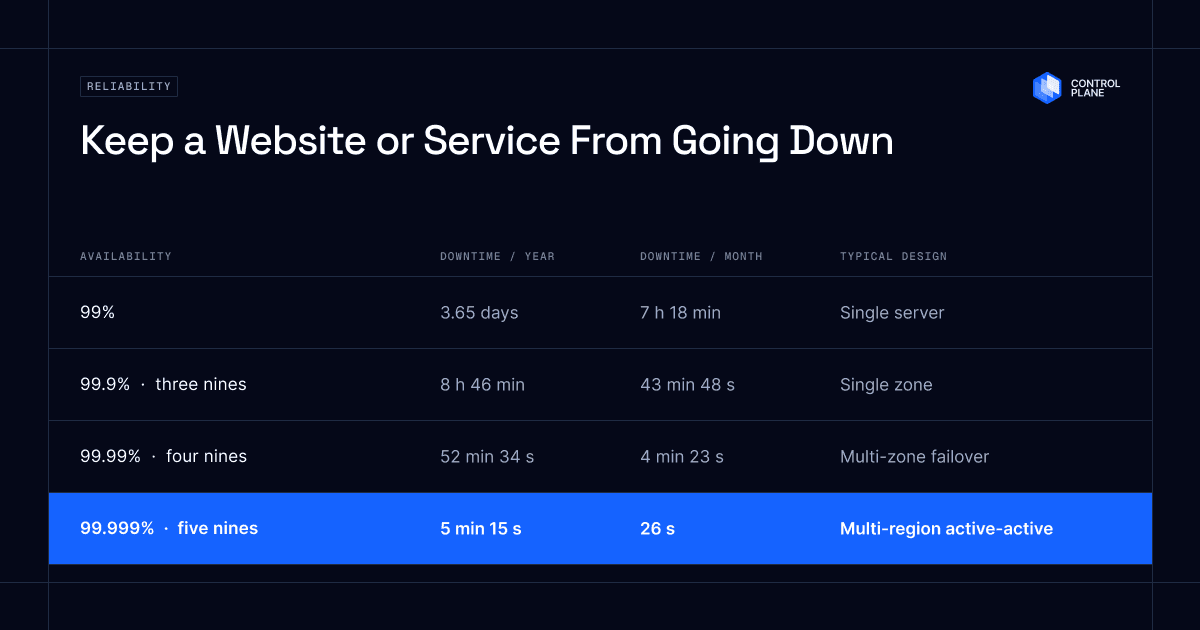
Availability is the percentage of time a service works correctly over a period. Each additional nine cuts allowed downtime by a factor of ten.
| Availability | Downtime per month | Downtime per year | Common design |
|---|---|---|---|
| 99% | about 7 h 18 min | about 3.65 days | Single server, manual recovery |
| 99.9% (three nines) | about 43 min 48 s | about 8 h 46 min | Single zone, basic redundancy |
| 99.95% | about 21 min 54 s | about 4 h 23 min | Multiple instances, managed services |
| 99.99% (four nines) | about 4 min 23 s | about 52 min 34 s | Multiple zones with automatic failover |
| 99.999% (five nines) | about 26 s | about 5 min 15 s | Multi-region active-active, automated failover |
Downtime figures use a 365-day year and a 730-hour month. The design column reflects the conditions cloud providers attach to their own SLAs: a single instance is covered at 99.5% to 99.9%, and 99.99% requires instances across multiple zones. Higher targets take more work and cost, as Microsoft’s reliability guidance notes, and availability is measured for the whole service as users experience it, not for one server. Match the target to the business cost of downtime. In Uptime Institute’s 2025 annual survey, reported in its 2026 Annual Outage Analysis, 57% of respondents said their most recent major outage cost more than $100,000, and one in five reported more than $1 million (Uptime Institute). A back-office tool and a checkout flow need different numbers. For a deeper comparison of single-region, multi-region, and multi-cloud designs, see Five Nines Uptime Architecture.
Why a cloud provider SLA is not a guarantee
A cloud SLA is a credit policy, not an uptime promise. If the provider misses its target, you can claim a partial credit against future bills for that service. AWS, Microsoft, and Google each state that these credits are your sole remedy, and Microsoft says they will not compensate for lost revenue, operational costs, or other losses (Microsoft SLA). The details matter:
- Credits are small. Amazon EC2 credits 10% of that month’s EC2 bill for the affected region when region uptime falls below 99.99%, and 100% only below 95%, about 36 hours of downtime in a month (EC2 SLA).
- Each service has its own target. AWS and Google Cloud publish a separate SLA per service. Microsoft bundles Azure’s into one document, but each service still has its own target and credit table. Your compute, database, load balancer, and DNS each carry different commitments.
- Higher tiers require redundant architecture. A single EC2 instance is covered at 99.5%, about 3 hours 39 minutes of downtime a month, and the 99.99% commitment applies only to instances across two or more Availability Zones. A single Azure VM gets 99.9% only with a Premium SSD OS disk and Premium SSD, Premium SSD v2, or Ultra data disks, and one Standard HDD disk drops it to 95%. Google Compute Engine offers 99.99% for instances in multiple zones in most regions and 99.9% for a single instance of most machine families.
- Exclusions vary by provider. Typical ones are problems caused by your own configuration, preview features, quota limits on Google Cloud and Azure, scheduled maintenance on Azure, and factors outside the provider’s control.
- Claims need your own evidence. AWS must receive an EC2 claim by the end of the second billing cycle after the incident, with your request logs. Azure and Google Cloud require claims within 60 days, and on Google Cloud you forfeit the credit without log files.
A few services, such as Amazon Route 53 and Azure DNS, carry a 100% SLA, but the remedy is still a partial credit. Read the SLA for every service on your critical path, then design for the number you need.
How to calculate composite availability
When services sit in series in the request path, their availabilities multiply:
Effective availability = A(compute) x A(database) x A(storage) x ...
Three services at 99.99% each give 0.9999 x 0.9999 x 0.9999 = 99.97%, about 2 hours 38 minutes of allowed downtime a year instead of 52 minutes. Add a CDN, an auth provider, a queue, and a payment gateway, and the ceiling drops further.
Redundancy works in the other direction. For components in parallel, you fail only if every copy fails, so two independent 99.9% instances give 1 – (0.001 x 0.001) = 99.9999%. The catch is the word independent. If both copies share a region, a deployment pipeline, a configuration file, or a DNS provider, one fault takes out both. Real redundancy means separate failure domains.
How to keep a website from going down: a 10-step playbook
1. Set availability targets by workload
Not every service needs five nines. Rank flows such as browse, checkout, login, and reporting by business impact, and set a target for each. Over-engineering a low-priority flow spends budget your critical flow needs.
2. Map your risks
List the failures that can hit you, from most to least likely: transient network errors, instance restarts, hardware failure, datacenter outage, and region outage. Add the non-infrastructure risks: bad deployments, software bugs, expired certificates, traffic spikes, denial-of-service attacks, data corruption, and human error. Common risks belong in your high availability design and rare, catastrophic ones in your disaster recovery plan. A region outage is a disaster for a single-region app and an ordinary event for an active-active multi-region app.
3. Remove every single point of failure
Run multiple instances behind a load balancer, spread them across zones, and for critical workloads across regions. Replicate data. Check the less obvious single points too: one DNS provider, one CDN, one certificate authority, one CI/CD system, and one person who knows how the system works.
On Control Plane: a workload runs in every location of its Global Virtual Cloud at once. A new workload starts with one replica per location, so raise minScale to 2 for production. That removes the per-location single point of failure, and with two or more locations it meets the SLA condition (docs).
4. Automate failover with real health checks
Manual recovery takes minutes to hours, which is too slow for four or five nines. Use health-based routing so traffic leaves an unhealthy instance, zone, or region without paging anyone. Health checks should test real behavior, such as whether the app can read from its database, not only whether a port responds.
On Control Plane: every workload gets a global HTTPS endpoint that sends each request to the nearest healthy location. Readiness probes decide when a replica takes traffic, and a location that fails them stops receiving requests. When you want a dedicated standby, you can group locations into priority tiers for primary and failover routing (docs).
5. Plan for provider-level failure
Zones and regions protect you from datacenter and regional problems. They do not protect you from a failure in a provider’s control plane, an account or billing lockout, or a global configuration error. If the cost of downtime justifies it, run across more than one cloud provider with automated failover between them.
On Control Plane: one Global Virtual Cloud can include locations on AWS, GCP, and Azure, plus Kubernetes clusters you already run and your own servers through Managed Kubernetes. The same workload runs across all of them with one identity model and mutual TLS between services, so a provider-wide failure becomes a location failure.
6. Deploy safely
Changes cause most outages. Google’s SRE team reports that roughly 70% of outages are due to changes in a live system (Site Reliability Engineering). Use rolling, canary, or blue-green releases. Send a small share of traffic to the new version, watch error rates and latency, and roll back quickly when they cross a threshold. Treat configuration changes, certificate rotations, and key rotations with the same care as code, and require review for ad-hoc production access.
On Control Plane: each location keeps serving the last healthy version until the new one passes its readiness checks, then traffic switches and the old version drains, so a release that fails the readiness probes you define never takes traffic. Domain routes split traffic by weight for canary releases (docs), and a blue-green cutover or rollback is one route change (docs).
7. Design for degraded operation
Decide in advance what your service does when a dependency fails. A product page can load without recommendations, and checkout can queue an order when the email service is down. Use timeouts, retries with backoff, circuit breakers, and cached fallbacks so one failing dependency does not cascade.
8. Handle load
Traffic spikes look like outages to users. Use autoscaling, rate limiting, and a CDN, and keep headroom so that when one replica fails, the others can carry its load.
9. Test failure on purpose
Systems that have never been tested under failure usually fail the first time it happens. Run game days and chaos experiments: kill instances, block a zone, break a dependency, and expire a certificate in staging. Rehearse your disaster recovery runbook, not only your backups, and restore from backup on a schedule to prove it works.
On Control Plane: suspend a workload in one location to simulate a regional failure and confirm the global endpoint keeps serving from the others.
10. Monitor from the outside and be ready to respond
Dashboards that run on your own infrastructure can go dark with it. Add independent, outside-in checks from multiple regions that test what users actually do. Cover DNS resolution, TLS certificate expiry, and domain registration expiry, because an expired certificate or domain takes a service down as surely as a failed server. Alert on error rate, latency, and saturation, write runbooks, define on-call ownership, and publish a status page so customers hear from you first.
On Control Plane: TLS certificates for workload endpoints and custom domains are issued and renewed automatically, which removes certificate expiry from your list (docs).
High availability vs disaster recovery
| High availability | Disaster recovery | |
|---|---|---|
| Handles | Everyday, frequent failures | Rare, large-scale events |
| Goal | Keep serving with no user impact | Restore service within agreed limits |
| Key metric | Availability percentage | RTO and RPO |
| Method | Redundancy, automatic failover | Backups, replication, runbooks, failover plans |
- Recovery Time Objective (RTO): the longest downtime you will accept after a disaster.
- Recovery Point Objective (RPO): the most data you can afford to lose, measured in time.
Targets near zero for both require continuous replication and automated failover. Active-active designs get closest, because every location is already serving and the data is already replicated. Set RTO and RPO per workload with the business, not only with engineering.
On Control Plane: compute runs active-active in every location, and the Template Catalog installs databases built for multi-location operation, including pgEdge multi-master PostgreSQL and CockroachDB, which survives the loss of a region when deployed to three or more locations (Template Catalog). Both templates can schedule backups to S3 or GCS.
What it takes to reach each availability target
| Target | What you need |
|---|---|
| 99.9% | Multiple instances in one zone, a load balancer, automated backups, basic monitoring |
| 99.99% | Multiple zones, automated failover, zero-downtime deployments, outside-in monitoring, tested runbooks |
| 99.999% | Multi-region, often multi-cloud, active-active compute and replicated data, health-based global routing, safe rollouts, regular failure testing |
Common mistakes
- Treating the provider SLA as the reliability plan.
- Running redundant copies that share a region, pipeline, or DNS provider.
- Relying on manual failover steps.
- Never restoring from backup until the day you need it.
- Monitoring only from inside your own infrastructure.
- Skipping change control for configuration and certificates.
- Ignoring third-party dependencies in the request path.
How Control Plane delivers five nines
Building the 99.999% tier yourself means running health checks, global routing, cross-cloud networking, deployment tooling, and observability across several environments, then keeping all of it working through every change. Control Plane handles that platform layer as Day 2 operations, so your team spends its time on the application.
- Active-active compute and data. A workload runs in every location of its Global Virtual Cloud at once, across AWS, GCP, and Azure regions, your own clusters, or on premises. With latency-based routing every location in the same routing tier serves live traffic, so you are not paying for idle standby capacity, and templates such as pgEdge and CockroachDB keep data replicated across locations.
- Automatic failover. The global endpoint sends each request to the nearest healthy location, and when a location fails, traffic moves to the others without a runbook.
- Safe rollouts. A new version takes traffic only after it passes the readiness probes you define in each location, with canary and blue-green routing built in.
- One operating model. About 30 regions across AWS, GCP, and Azure, plus your own clusters and servers, run with one identity model, mutual TLS between services, a deny-by-default firewall, per-location autoscaling, one view of logs and metrics with Grafana alerting, and TLS certificates issued and renewed automatically.
- A five-nines target. A 99.999% availability SLA for workloads running at least two replicas in at least two locations (docs).
The proof is how it behaves on a bad day. No Control Plane customer experienced downtime during the October 20, 2025 AWS outage in us-east-1, which lasted about 15 hours and affected more than 100 AWS services, according to Control Plane internal incident telemetry. 20% of customers had us-east-1 in their Global Virtual Clouds, and their affected workloads were active and running in healthy locations within 10 seconds (Beyond Backups). Baerskin Tactical, a Switzerland-based direct-to-consumer e-commerce company, moved to Control Plane after vendor downtime disrupted its revenue. CTO Gus Fune: “Control Plane positively impacted DIV Brands’ daily operations by enabling us to host services in multiple regions with 99.999% availability and ultra-low latency…” (case study)
Control Plane takes compute placement, global routing, failover, rollouts, and certificates off your list, so your team can apply the rest of this guide to what remains: application code, third-party dependencies, and your data.
Frequently asked questions
Can any website guarantee 100% uptime?
No. Every system has failure modes, and even the rare 100% SLAs, such as those for Amazon Route 53 and Azure DNS, pay only partial service credits. The practical goal is a measured target, such as 99.999%, reached by making failures invisible to users through redundancy and automatic failover.
What is the highest uptime you can realistically achieve?
Five nines (99.999%), about 5 minutes 15 seconds of downtime a year. For comparison, the compute SLAs for Amazon EC2, Azure Virtual Machines, and Google Compute Engine top out at 99.99% across multiple zones. Reaching five nines takes multi-region active-active redundancy and automated failover, and Control Plane offers a 99.999% availability SLA for workloads running at least two replicas in at least two locations.
What is the difference between uptime and availability?
Uptime usually means a system is running. Availability measures whether users can use it successfully. A server can be up while the application returns errors, so availability is the more honest measure.
How do I calculate allowed downtime for an SLA?
Multiply the unavailable fraction by the period. For 99.9% over a 30-day month, 0.001 x 43,200 minutes = 43.2 minutes. Over an average month of 730 hours, it is about 43 minutes 48 seconds.
Is multi-region always necessary?
It depends on your target. For 99.9% or 99.99%, multiple zones in one region are often enough. Multi-region becomes worthwhile when a regional outage would cost more than you can accept. On Control Plane, adding a region means adding a location to the Global Virtual Cloud, and routing and failover come with it.
Does multi-cloud improve uptime?
Yes, because it protects against provider-wide failures such as a control-plane outage or an account lockout. On Control Plane, one Global Virtual Cloud can span AWS, GCP, and Azure, and the platform handles cross-cloud routing, identity, and mutual TLS, so a provider-wide failure becomes a location failure.
What causes most outages?
Changes. Google’s SRE team reports that roughly 70% of outages are due to changes in a live system, which is why safe deployment practices matter as much as redundant hardware. Microsoft’s reliability guidance also lists software bugs, human error, and unexpected traffic alongside infrastructure failures.
How often should you test failover?
Many teams test critical workloads quarterly and after any major architecture change. Microsoft recommends testing disaster recovery plans routinely and reviewing them, ideally, every six months. Rehearsing the process matters as much as testing the technology.
Checklist: is your service built to stay up?
- Availability targets set per workload and flow
- No single point of failure in compute, data, network, DNS, or CDN
- At least two replicas per location, across zones, and across regions for critical flows
- Automatic, health-based failover in place
- Canary or blue-green deployments with fast rollback
- Graceful degradation designed for each dependency
- Autoscaling and rate limiting configured
- Backups restored and failover rehearsed on a schedule
- Outside-in monitoring covering DNS, TLS certificates, and domain expiry
- Runbooks, on-call ownership, and a status page
- RTO and RPO documented and agreed with the business
Next step: Sign up free, deploy a workload to two locations with two replicas each, and suspend one location to watch traffic fail over, or talk to the Control Plane team about the availability target your business needs.