
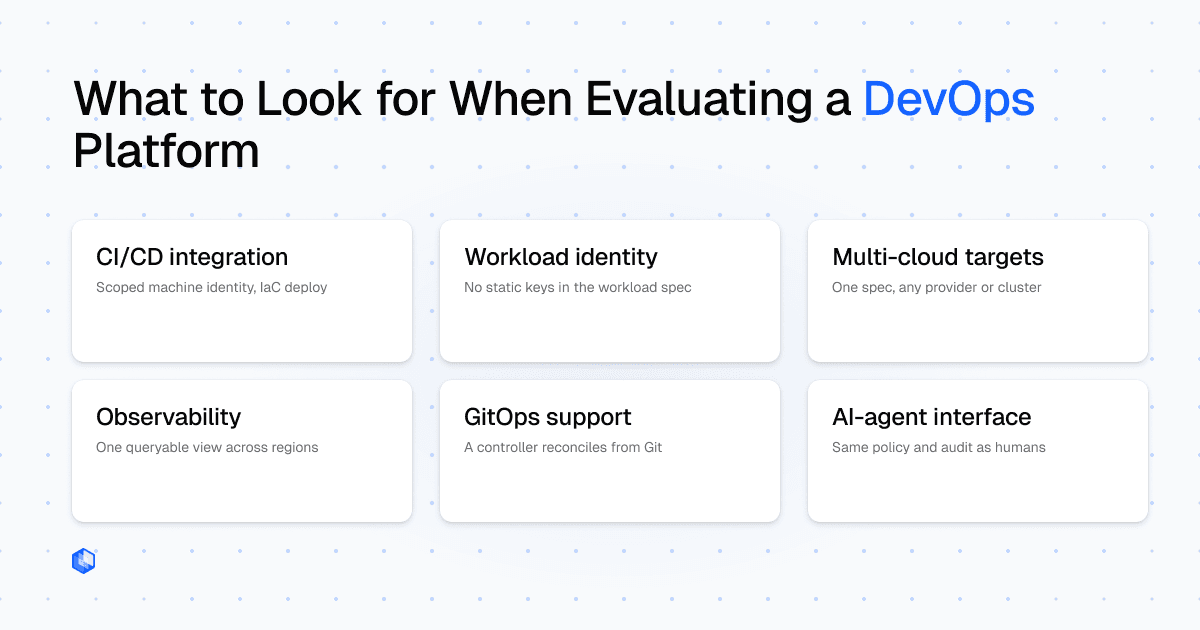
DevOps platform feature lists increasingly look alike. CI/CD, multi-cloud, observability, GitOps, and AI-friendly automation can all appear as checkboxes while the implementation burden still falls on your team.
The useful signal appears when you ask how each capability actually works, what evidence a vendor can show, and which parts your team still has to build.
Can pipelines authenticate with a scoped machine identity? Can workloads reach cloud APIs without static keys? Can deployment locations change without rewriting workload definitions? Those questions expose whether a platform reduces operational glue or merely relocates it.
Each section starts with a vendor-neutral criterion, then uses Control Plane, a hybrid multi-cloud platform spanning AWS, GCP, Azure, and private Kubernetes, as one implementation example. The scorecard at the end turns all six criteria into concrete verification steps, evidence to request, and red flags.
CI/CD integration and deployment automation
CI/CD integration should mean more than “our API can be called from your pipeline.” Evaluate whether pipelines authenticate with a scoped machine identity and deploy through a stable declarative interface such as a CLI or IaC provider.
A developer’s personal token creates credential sprawl and an unnecessarily broad blast radius. The automation identity should be created for the pipeline and limited to the permissions it needs.
The deployment surface should also be declarative. YAML/JSON manifests or an IaC provider keep configuration in source control and avoid bespoke REST-integration scripts.
How this looks with Control Plane
Control Plane uses Service Accounts for API and CLI automation. A pipeline exports the key as CPLN_TOKEN, which the cpln CLI reads automatically. cpln apply creates or updates resources from JSON/YAML, supports multiple resources in one file, and resolves resource dependencies automatically. Documented examples cover GitHub Actions, GitLab CI, Bitbucket Pipelines, and CircleCI. Terraform and Pulumi support IaC-first workflows.
What to verify: Pipelines authenticate with a scoped machine identity and deploy through a stable declarative CLI or IaC interface.
Evidence to request: A working pipeline deploys a resource update under a scoped machine identity, without using a developer’s personal credential.
Red flags: Personal developer credentials, bespoke pipeline scripts as the primary deployment surface, or no declarative/IaC path.
Workload identity
Workloads that call S3, Pub/Sub, Azure Blob Storage, or other cloud APIs need credentials. Embedding long-lived cloud keys in environment variables or mounted secrets creates rotation, audit, and blast-radius problems as service count grows.
Workload identity replaces that pattern with a platform-managed identity object mapped to least-privilege cloud permissions, without static cloud credentials in the workload definition. The platform manages the provider-side identity and short-lived runtime credentials.
This is separate from CI/CD authentication: a Service Account lets the pipeline call the platform API, and workload identity lets the running application call AWS, GCP, or Azure APIs.
How this looks with Control Plane
Control Plane calls this object an Identity. It is scoped to a Global Virtual Cloud (GVC), the deployment group in which the workload runs, and can be shared by workloads in that GVC that need the same access. For AWS, Control Plane creates the corresponding IAM role. For GCP, it obtains a short-lived token that impersonates the designated service account. Azure access is configured through registered cloud accounts. The workload definition contains no cloud credential.
What to verify: A managed identity grants cloud-resource access without static credentials in the workload spec across AWS, GCP, and Azure.
Evidence to request: A running workload reads from S3 or calls a GCP API with no cloud credentials in its environment configuration.
Red flags: Static cloud credentials in environment variables or mounted secrets, or identity support limited to one provider.
Multi-cloud deployment targets
Supporting several providers is not the same as providing a multi-cloud abstraction. Evaluate whether one workload model targets AWS, GCP, Azure, and private Kubernetes, or whether each provider needs a separate deployment definition.
Check whether locations can be added or removed without editing the workload, whether the Console/API/CLI/IaC surface stays consistent, and whether private infrastructure has concrete documented prerequisites.
How this looks with Control Plane
Control Plane organizes deployment targets through Global Virtual Clouds (GVCs), named groups of locations that can span AWS, GCP, Azure, and private Kubernetes. A workload references a GVC, so changing the GVC’s locations changes placement without changing the workload spec.
For private clusters, BYOK (Bring Your Own Kubernetes) installs a cpln-byok-agent and has explicit prerequisites: a core-labeled node group, at least two nodes, 2 CPUs and 8 GB RAM per node, amd64 or arm64, and one of the three most recent Kubernetes minor releases. All nodes need full network connectivity and egress access. The cluster must not already run a service mesh, and a working load-balancer controller must let at least one LoadBalancer service obtain a public or private IP. These requirements define the supported path for Kubernetes clusters in your own cloud account or data center.
The same Console, API, CLI, Terraform, and Pulumi control surfaces apply to managed cloud locations and private clusters.
What to verify: The same workload definition spans cloud providers and private clusters, and location changes require no workload edits.
Evidence to request: Add a second deployment location to a live deployment group and confirm the workload starts there without a spec change.
Red flags: Separate workload definitions per provider or private-infrastructure claims without concrete cluster requirements.
Observability integrations
Observability integration should reduce cross-region debugging, not merely add logos to an integrations page. If engineers still have to jump between provider or cluster consoles to reconstruct one incident, the platform has not created a useful operational view.
Ask whether logs across providers and regions appear in one queryable view, support structured queries, and can be routed to the external observability system your team already uses.
How this looks with Control Plane
Control Plane’s Logs UI aggregates workload logs across configured providers and regions. Logs are retained for 30 days by default and queried with LogQL, Grafana Loki’s query language, using labels including container, gvc, location, provider, replica, stream, and workload. The Logs UI links to Grafana Explore in a new tab for ad-hoc analysis of the same log data. Do not treat Grafana as a separate Control Plane-native logging product.
Org-level logs can also be routed to Amazon S3, CloudWatch, Coralogix, Datadog, Logz.io, Stackdriver, and syslog.
What to verify: Logs across providers and regions appear in one view, support structured querying, and can be exported.
Evidence to request: Run a structured log query filtering by provider and location across a live multi-region deployment.
Red flags: Per-cluster/provider-only logs, no structured query language, or no route to existing external tooling.
GitOps support
“GitOps support” should mean continuous reconciliation, not simply calling an API from a Git-triggered pipeline.
Look for declarative resources, a Git-aware sync engine, and a controller or operator that reconciles live state against desired state. Without reconciliation, drift still requires a separate process.
Also ask which resource types are covered, as workload-only reconciliation leaves identity, policy, networking, or other platform state outside the GitOps loop.
How this looks with Control Plane
The Control Plane Kubernetes Operator manages resources through Kubernetes Custom Resource Definitions (CRDs), Kubernetes-native schemas that represent Control Plane resources declaratively, and works with ArgoCD as the GitOps sync engine. Documented CRDs include GVCs, workloads, identities, secrets, policies, domains, cloud accounts, and other platform resources.
To validate the loop, export a small resource as a Kubernetes CRD manifest, commit it to a test repository, point an ArgoCD Application at it, and observe the sync status. ArgoCD surfaces reconciliation and sync failures rather than leaving drift invisible.
What to verify: A controller continuously reconciles desired state from Git across a broad set of platform resource types.
Evidence to request: Watch the platform’s supported GitOps engine reconcile a platform resource from a Git commit.
Red flags: “Our API can be called from Git,” no reconciliation controller, or coverage limited to application workloads.
AI-agent interface
AI agents increasingly query infrastructure state and perform deployment operations. Evaluate what an agent can do, whether access can be scoped below full admin, whether actions use the same identity/policy/audit model as human/API access, and whether the platform abstraction reduces cloud-provider-specific reasoning.
Context matters, but capability boundaries, permission scoping, and platform-enforced guardrails matter more for production infrastructure.
How this looks with Control Plane
Control Plane exposes this surface through its AI Plugin and MCP Server. The AI Plugin is the recommended path for Claude Code, Codex, and Antigravity CLI. Other MCP-capable clients such as Cursor, Claude Desktop/Web, and VS Code can connect through the MCP Server. Agents can manage resources, deploy applications, query infrastructure, and automate workflows. Each MCP connection selects a nested toolset profile, which includes core (default), mk8s, or full, and that profile is fixed for the life of the connection, so an agent cannot expand its tool catalog mid-session. Separately, OAuth consent limits which organizations a client can access, while Control Plane policies provide fine-grained authorization to resources and actions. Agent activity uses the same identity, policy, and audit guardrails as human/API access.
What to verify: Agent actions use the same permission model as human/API access and can be scoped below full admin.
Evidence to request: An agent performs a resource operation with restricted access and the action appears in the audit trail.
Red flags: Prompt-only controls, no scope below full org admin, or agent actions outside the platform audit trail.
Putting the framework to work
The six capabilities above form a reusable evaluation rubric: feature labels converge, but implementation depth does not.
Control Plane is one implementation example: multi-cloud deployment, workload identity, centralized logs, and policy are platform primitives, while CI/CD, IaC, observability exports, and GitOps integrate with external tools. The point of the rubric is not that every capability must be built in, but that its implementation should be testable and fit your operating model.
Use the scorecard below to structure vendor conversations. Start free at console.cpln.io/signup and run the verification steps against a real organization. For a guided walkthrough, see the product demos. Implementation details live at docs.controlplane.com.
DevOps platform evaluation scorecard
Use this table as a standalone reference for vendor conversations. Bring the “Evidence to request” column into your product demos.
| Capability | What to verify | Evidence to request | Red flags |
|---|---|---|---|
| CI/CD Integration | Pipelines authenticate with a scoped machine identity and deploy declaratively through a stable CLI or IaC provider. | A working pipeline deploys a resource change under a scoped machine identity. | A developer’s personal token is required; there is no declarative deployment interface; no IaC provider is available. |
| Workload Identity | Workloads access cloud APIs without static credentials in the environment config, across AWS, GCP, and Azure. | A live workload accesses a cloud service with no static cloud credentials in its definition. | Cloud credentials are stored as environment variables or mounted secrets; identity support is limited to one provider. |
| Multi-Cloud Deployment Targets | The same workload definition deploys across cloud providers and private Kubernetes clusters, and location changes require no workload edits. | Add a second deployment location to a live deployment group and confirm the workload starts there without a spec change. | Separate workload definitions are required per provider; private-infrastructure support lacks documented cluster requirements. |
| Observability Integrations | Logs from workloads across all regions and providers appear in a single queryable view and can be routed to external systems. | Run a structured query across provider and location boundaries in a live multi-region deployment. | Logs are only accessible per cluster or provider; there is no structured query language; there is no route to existing external tooling. |
| GitOps Support | A controller continuously reconciles desired state from Git across a broad set of platform resource types, not just application workloads. | Watch the supported GitOps engine reconcile an identity, policy, network, or other platform resource from a Git commit. | “GitOps” means API calls from a pipeline; there is no reconciliation controller; coverage is limited to application workloads. |
| AI-Agent Interface | Agent actions flow through the same permission model as human access and agent scope can be bounded below full admin. | An agent performs a resource operation with restricted access and the action is visible in the platform audit log. | Controls exist only in the prompt; permissions cannot be scoped below full admin; agent actions bypass the audit trail. |
Frequently asked questions
A DevOps platform is a shared delivery and operations layer that gives teams consistent interfaces for deployment automation, identity, deployment targets, observability, and policy/GitOps workflows. It can integrate with external CI systems while still providing a unified deployment surface. Owning a native CI pipeline engine is not a requirement.
Workload identity lets a running workload access cloud resources without embedding static cloud credentials in its environment or workload definition. A platform-managed identity maps the workload to least-privilege provider permissions and supplies short-lived runtime credentials, reducing credential rotation and blast radius in multi-cloud environments.
GitOps uses Git as the source of truth for desired infrastructure state and a controller to reconcile the live environment continuously. For platform teams, that creates an auditable change history, makes rollback easier, and exposes configuration drift instead of relying on one-time pipeline deployments.
Yes, when a platform exposes a machine-legible control surface such as an MCP server or equivalent. The important evaluation questions are which operations the agent can perform, how narrowly its access can be scoped, and whether its actions pass through the same identity, policy, and audit controls as human and API access.
Ask each vendor to prove three things for every capability: what can be demonstrated live, what configuration or documentation shows the implementation is real, and what your team would still have to build or operate. A useful evaluation produces evidence and explicit operational trade-offs, not a longer feature checklist.