
Your pipeline works. The build passes, the image lands in the registry, and the job turns green. Then someone asks why production still runs the old version, and you spend the next two hours determining whether the problem is a deployment configuration, a runner, an approval rule, or the runtime itself.
That is the wrong-tool tax. For an infrastructure team of one to three people, it compounds quickly because nobody has time to operate a CI platform, a delivery controller, and several cloud-specific runtime stacks as separate products.
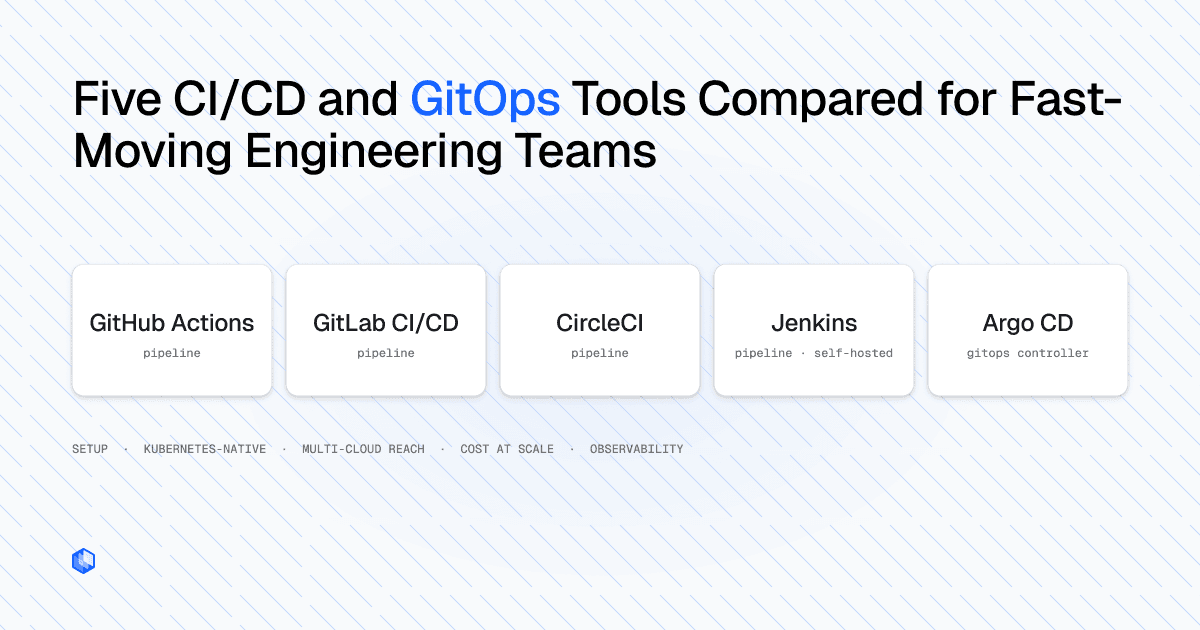
This guide separates two decisions that CI/CD comparisons often combine. The first is which tool should handle build, test, and delivery workflow control. The second is which runtime layer should place and operate workloads across your infrastructure. GitHub Actions, GitLab CI/CD, CircleCI, Jenkins, and Argo CD approach the first problem differently. None of them, by itself, replaces the runtime layer beneath the pipeline. Your pipeline is not your runtime.
How We Compared Each Tool
The comparison uses five dimensions that matter to lean infrastructure teams. These are practical decision criteria rather than a universal ranking, since the right result depends on where your source code lives, what you deploy, and how much tooling your team can operate.
- Setup complexity: How much work is required to reach the first useful pipeline, and what infrastructure must the team maintain afterward?
- Kubernetes-native support: Does the tool understand Kubernetes resources and reconciliation, or does it run deployment commands against a cluster like any other job?
- Multi-cloud deployment reach: Can the same workflow invoke deployments in different providers? This measures where the pipeline can send work, not whether workloads receive a consistent operating model after they arrive. Credentials, network access, runners, and provider services still need to be configured for each target.
- Cost at scale: How do runner size, concurrency, credits or minutes, storage, and operator time affect the cost as pipeline volume grows?
- Observability hooks: What can the tool show about pipeline execution, deployment status, health, and configuration drift without requiring a separate investigation path?
These dimensions carry more weight for a small team than they do for an organization with engineers dedicated to CI infrastructure. A difficult plugin upgrade or a poorly designed runner fleet does not disappear into another team’s backlog. It becomes the platform team’s immediate problem.
A pipeline that can authenticate to five clouds is not the same thing as a workload that can run consistently across five clouds. Keep that boundary in mind when comparing the tools below.
Five CI/CD and GitOps Tools Compared
The tools fall into two functional groups. GitHub Actions, GitLab CI/CD, CircleCI, and Jenkins orchestrate build, test, and deployment jobs. Argo CD is a Kubernetes continuous delivery controller that reconciles declared state from Git with live clusters. That distinction should shape the comparison from the start.
GitHub Actions
GitHub Actions is usually the lowest-friction option for teams whose code already lives on GitHub. Workflows are versioned in .github/workflows/ with the code they build, and the action marketplace covers common tasks for container registries, cloud CLIs, Helm, and Kubernetes.
Deployment environments can add environment-specific secrets, branch restrictions, wait timers, and required reviewers. Some protection features depend on the repository visibility and GitHub plan, so teams should verify the controls available for their private repositories before designing an approval process around them.
GitHub Actions is pipeline-driven. It deploys when a workflow job runs, but it does not continuously compare a Kubernetes cluster with the desired state in Git. If a resource changes after deployment, drift detection requires a separate controller or another check in the workflow.
GitLab CI/CD
GitLab CI/CD combines source control, CI/CD, a container registry, environments, deployment approvals, and pipeline analytics in one product. That integrated model can reduce context switching for teams already using GitLab.
The GitLab agent for Kubernetes supports a pull-based connection between GitLab and a cluster, which is useful when the cluster should not expose an inbound deployment endpoint. GitLab can be used as a hosted service or self-managed, and runners can also be hosted or operated by the customer. That flexibility is useful, but every self-managed component adds upgrades, capacity planning, and security work. Advanced governance and deployment controls also vary by GitLab tier.
CircleCI
CircleCI provides hosted pipeline execution with Docker, machine, macOS, and other executor options. Workflows make job ordering and manual approval points explicit, while reusable orbs reduce repeated configuration for common integrations.
CircleCI can run cloud CLIs and Kubernetes tools in an executor, so it can deploy to multiple providers when the runner has the necessary credentials and network path. This is workflow portability, not a common runtime abstraction. Its credit-based model also means that resource class, duration, concurrency, storage, and network use should be measured under representative load rather than estimated from a small starter pipeline.
Jenkins
Jenkins is self-hosted and gives teams direct control over the controller, agents, plugins, and execution environment. It remains a reasonable choice for organizations with existing Jenkins expertise, specialized integration requirements, or infrastructure that cannot use a hosted runner service.
That control creates a significant operating burden for a small team. Controller upgrades, agent images, plugin compatibility, credentials, backups, and job configuration all become internal responsibilities. Jenkins provides standard build logs and can be extended with visualization and metrics plugins, but the quality of the experience depends on the selected plugin set. Blue Ocean is no longer a forward-looking default because Jenkins announced its deprecation for July 2026 and states that it will not receive further functionality updates. Maintained options include Pipeline: Stage View and Pipeline Graph View.
Argo CD
Argo CD is a declarative GitOps continuous delivery controller for Kubernetes. It compares the desired state in Git with live cluster state, reports differences, and can synchronize the cluster manually or automatically. Health assessment, drift detection, sync waves, hooks, and multi-cluster management are part of its delivery model.
Argo CD does not build source code, run unit tests, or produce container images. Teams normally pair it with a CI system that publishes an artifact and updates the desired deployment state. It can manage Kubernetes clusters across cloud providers, but it remains scoped to Kubernetes resources and related delivery workflows rather than non-Kubernetes runtime targets.
Comparison Table
The table summarizes the tradeoffs rather than assigning a single winner. Cost and complexity can change significantly when a team moves from hosted execution to self-managed runners.
| Tool | Setup Complexity | Kubernetes-Native Support | Multi-Cloud Deployment Reach | Cost at Scale | Observability Hooks |
|---|---|---|---|---|---|
| GitHub Actions | Low for GitHub-hosted projects | Moderate, command-driven without a separate reconciler | Can invoke provider and cluster APIs when runners have connectivity and credentials | Hosted minutes and runner size scale with use; self-hosting shifts cost to operations | Workflow logs, job summaries, and deployment history |
| GitLab CI/CD | Moderate | Moderate, with GitLab agent integration | Can invoke provider and cluster APIs through runners or the GitLab agent | SaaS compute or self-managed runner operations; some controls are tier-dependent | Pipeline analytics, environments, logs, and external integrations |
| CircleCI | Low to moderate | Low to moderate, command-driven | Can invoke provider and cluster APIs from configured executors | Credits, resource class, concurrency, storage, and network use | Pipeline Insights, job logs, and external integrations |
| Jenkins | High | Moderate through plugins and pipeline commands | Can reach any target available to its agents | No hosted-minute model, but controller, agents, and plugins require operators | Build logs, maintained visualization plugins, and external monitoring |
| Argo CD | Moderate | High for Kubernetes continuous delivery | Reconciles Kubernetes clusters across providers | Open source software plus controller and cluster-management costs | Sync status, health, drift diffs, events, and Prometheus metrics |
Where Each Tool Creates Friction
None of these tools has a fixed breaking point at a particular team size. Friction depends on repository count, pipeline frequency, concurrency, environment count, governance requirements, and the team’s capacity to operate supporting infrastructure.
GitHub Actions becomes more involved when hosted-runner consumption and queueing grow, or when jobs require private network access, specialized hardware, or long-lived caches. Self-hosted runners address some of those constraints but introduce fleet patching, isolation, scaling, and credential security.
GitLab CI/CD becomes more complex when the team self-manages GitLab or a large runner fleet, or when the required environment and governance controls sit in a higher subscription tier. The integrated product reduces the number of vendors, but it does not remove the need to operate the parts you choose to host.
CircleCI requires careful cost measurement once workflows use larger resource classes, extensive parallelism, or substantial artifact and cache storage. Credits make individual jobs measurable, but the total cost can be difficult to infer from a low-volume initial configuration.
Jenkins asks the customer to operate the CI platform. That can be the correct tradeoff for a team with established Jenkins knowledge and unusual integration needs. For a lean team starting fresh, the maintenance work can outweigh the control gained from self-hosting.
Argo CD deliberately leaves CI outside its scope. It also assumes that the delivery target can be represented through Kubernetes resources or supported extensions. Mixed estates with Kubernetes, VMs, serverless services, and provider-specific infrastructure still need additional delivery paths.
What All Five Leave Unsolved
These tools should not be criticized for features outside their intended scope. GitHub Actions supports environment protection rules. GitLab CI/CD provides environments and deployment controls. CircleCI supports approval jobs. Jenkins can model almost any workflow through pipelines and plugins. Argo CD continuously reconciles Kubernetes state and reports drift.
The five tools can coordinate when and how software is delivered. They do not standardize where it runs. Adding another cloud normally means another cluster topology, identity scheme, network model, routing layer, observability stack, and set of provider-specific deployment assumptions.
A pipeline can run kubectl apply against three clusters, but that command does not make those clusters operationally identical. Their ingress, DNS, workload identity, network policy, telemetry, autoscaling, security controls, and failure domains still reflect how each cluster and provider was configured. The pipeline coordinates a deployment action. It does not create a portable runtime model.
For a team operating one cluster in one provider, that boundary may be acceptable. For a team deploying across providers, regions, or private infrastructure, asking the CI tool to normalize runtime behavior usually produces more scripts, credentials, and provider-specific branches in the pipeline. Your pipeline is not your runtime, and adding deployment targets does not change that distinction.
Adding a Runtime Layer Below Your Pipeline
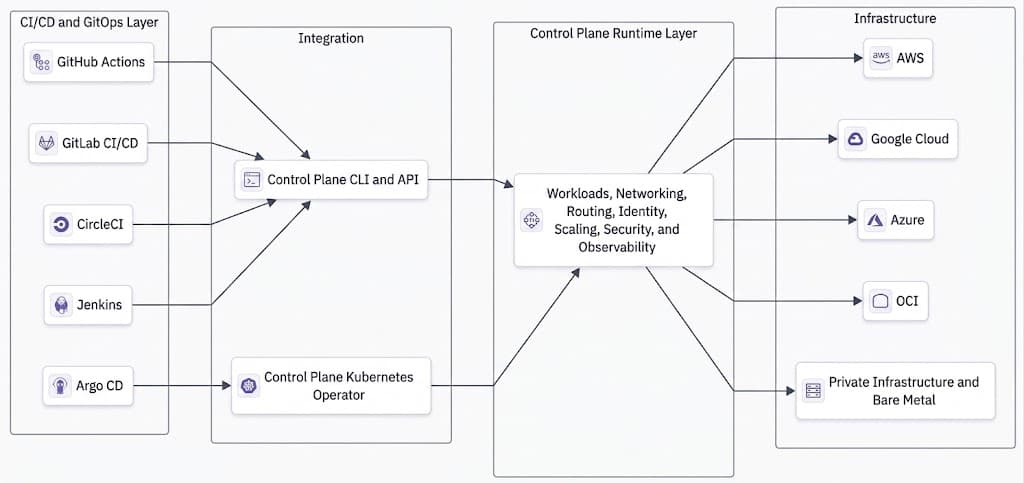
Control Plane is a cloud virtualization platform that gives applications one runtime model across AWS, Google Cloud, Azure, OCI, private Kubernetes, private infrastructure, and bare metal. Instead of teaching the pipeline how to operate each environment differently, Control Plane standardizes workload placement, networking, routing, identity, scaling, security, and observability underneath it.
A Global Virtual Cloud (GVC) creates one logical deployment and networking scope across selected cloud and private-infrastructure locations. Applications use a common networking and observability topology across those heterogeneous locations, while built-in geo-routing and health-aware failover direct traffic to healthy deployments. Adding a location can therefore become a runtime configuration change instead of another provider-specific branch in the deployment pipeline.
Universal Cloud Identity lets workloads access authorized cloud services without storing long-lived provider credentials in application code or workload configuration. Platform teams still define provider-side roles and permissions, but the application does not need to carry a separate long-lived credential for every service it accesses.
Adoption does not require replacing the existing CI/CD platform or moving every application at once. A team can introduce Control Plane for one workload, one cluster, or one region, validate the operating model, and expand incrementally while the existing pipeline continues to build, test, and promote releases.
There are two documented ways to connect this runtime layer to an existing delivery workflow.
Option 1: Argo CD and the Control Plane Kubernetes Operator. The Control Plane Kubernetes Operator manages Control Plane resources through Kubernetes custom resource definitions. You can configure a resource in the Control Plane console, export it as a K8s CRD manifest, commit it to Git, and let Argo CD apply it to the cluster running the Operator. Git remains the source of truth, while the Operator synchronizes GVCs, workloads, identities, secrets, policies, domains, and cloud accounts into Control Plane. Control Plane can then materialize that declared workload and platform state across the heterogeneous locations selected in the GVC rather than limiting the outcome to another individual Kubernetes cluster.
The CLI can also export a resource in CRD format with -o crd. Teams should use the documented export path rather than writing CRDs from memory because Control Plane fields such as org and gvc are top-level properties rather than fields inside spec.
Option 2: cpln apply in the existing pipeline. The Control Plane CI/CD guide documents service-account authentication through CPLN_TOKEN, with CPLN_ORG and CPLN_GVC supplying the default context. Pin the CLI version in the runner, scope the service account to the permissions the pipeline needs, and store its key in the CI system’s secret manager.
cpln apply -f resources.yaml
cpln apply creates or updates the resources declared in the file and resolves dependency ordering within a single invocation. It returns after the resources are accepted unless the documented readiness wait is enabled. Use that readiness behavior when later pipeline stages must depend on a healthy rollout rather than a successful API update.
In both models, the CI/CD or GitOps tool still controls build, test, and promotion workflow. Control Plane controls where the workload runs and applies the runtime’s networking, identity, routing, scaling, security, and observability model. Teams can adopt either path incrementally instead of treating the runtime change as a single migration project.
Frequently Asked Questions
Continuous integration automates build and test work for code changes. Continuous delivery prepares validated changes for release through automated or gated deployment workflows. Continuous deployment goes one step further by releasing every qualifying change automatically. Teams often use CD for both meanings, so the required approval behavior should be stated explicitly.
Argo CD is a Kubernetes continuous delivery controller, not a complete CI/CD system. It reconciles Git-declared state with live clusters but does not compile code, run tests, or build images. Teams usually pair it with GitHub Actions, GitLab CI/CD, CircleCI, Jenkins, or another CI system.
Argo CD is the only tool in this comparison built specifically around continuous Kubernetes reconciliation. The other four can deploy to Kubernetes, but they run pipeline jobs rather than maintaining an always-on desired-state loop. This makes Argo CD the clearest fit when GitOps reconciliation and drift visibility are primary requirements, provided another system handles CI.
A pipeline-driven deployment pushes a change when a job runs. A GitOps controller continuously compares a declared state in Git with the live environment and reports or corrects differences according to policy. The distinction is an ongoing reconciliation loop versus a point-in-time deployment action.
There is no universal primary driver. Runner size, job duration, concurrency, credits or minutes, cache and artifact storage, network transfer, and self-hosted runner operations can each dominate in a different setup. A representative period of real pipeline activity is more useful than a price comparison based on one example job.
Jenkins is easier to justify when the organization already has working Jenkins infrastructure, internal expertise, and requirements that benefit from full control over controllers and agents. Without that starting point, operating and securing the platform can cost more engineering time than a hosted service saves.
Drift detection identifies a difference between the desired state stored in Git and the live state of a cluster. Argo CD can report that difference and, when automated synchronization is enabled, reconcile the cluster back to the declared state. Whether it should correct drift automatically depends on the team’s change and incident policies.
Wrapping Up
Choosing a pipeline requires two separate decisions. First, decide which tool should build, test, approve, and deliver changes. GitHub Actions, GitLab CI/CD, CircleCI, Jenkins, and Argo CD each have a legitimate place depending on where the code lives, whether GitOps reconciliation is required, and how much infrastructure the team can operate.
Then decide whether the runtime beneath that pipeline is consistent enough for the environments you support. Your pipeline is not your runtime. It can coordinate deployments across clouds, but it does not standardize networking, routing, identity, scaling, security, observability, or workload placement across them.
Lean infrastructure teams can keep the CI/CD or GitOps tool that already fits their stack. When they need a common runtime model across providers and private infrastructure, Control Plane adds that layer without replacing the pipeline or requiring an all-at-once migration.
If your pipeline already works but every new cloud or region creates another operating model, explore the Control Plane documentation or start with a single workload.