A bring-your-own-cloud (BYOC) PaaS deploys apps into your own AWS or GCP account, so compute, data, and cloud spend stay in your account while the vendor provides the developer experience and Day 2 operations. Evaluate one by what runs where, which IAM permissions it needs, who operates and upgrades the clusters, and what keeps running if the vendor is unavailable. Control Plane can run workloads on Kubernetes worker nodes it manages in your own AWS account or GCP project, on clusters you already run, or on Control Plane-managed compute, with one interface across all of them.
Disclosure: Control Plane publishes this guide.
TL;DR
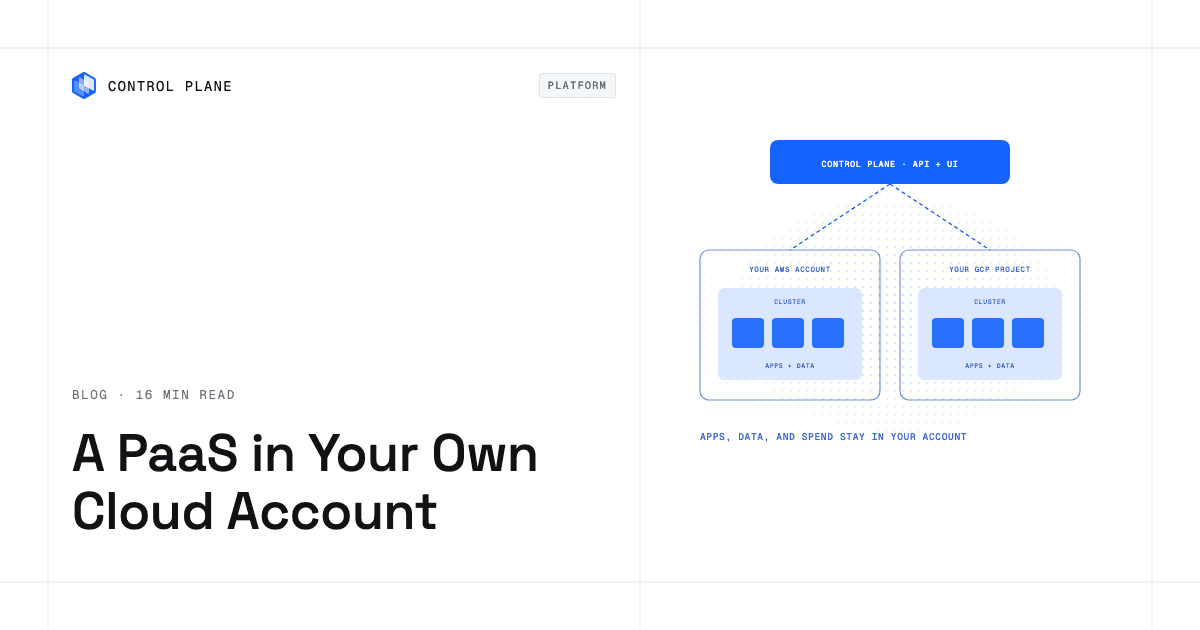
A BYOC PaaS splits into two layers: a control plane the vendor hosts (API, UI, deployment orchestration, automation) and a data plane that runs in your cloud account (nodes, load balancers, storage). Application data and the workloads that process it stay in your account; configuration, secrets, logs, and metrics may flow to the vendor’s control plane, depending on the platform.
- What BYOC means. The vendor orchestrates; you own the infrastructure and the cloud bill.
- Four deployment models. Vendor-hosted multi-tenant PaaS, BYOC PaaS, self-hosted open source PaaS, and a DIY platform on managed Kubernetes.
- Key evaluation questions. What runs in my account and what runs in the vendor’s? Which IAM permissions are required? Who upgrades Kubernetes? What survives a vendor outage? How do I leave?
- When BYOC is worth it. Enterprise security reviews, compliance requirements, committed-spend agreements, private networking to internal services, and avoiding a later migration off a hosted PaaS.
- When it is not. Small teams with no compliance driver, where a hosted PaaS is simpler.
- How Control Plane fits. Three compute options through one interface: Control Plane-managed compute in AWS, GCP, and Azure regions; Control Plane’s Managed Kubernetes (MK8s), which runs worker nodes in your own AWS account or GCP project; and Kubernetes clusters you already run, including on premises, connected as locations.
Which PaaS lets me run apps in my own AWS or GCP account?
A BYOC PaaS does, and the term bring your own cloud describes an architecture with two layers:
- Control plane (vendor-hosted). The vendor’s API, web console, scheduler, CI/CD automation, and monitoring.
- Data plane (your cloud account). The worker nodes, load balancers, persistent storage, and databases that run your workloads and hold application data.
In a BYOC setup, you typically create an IAM role (on AWS) or a service account (on GCP) with scoped permissions. The vendor’s control plane uses it to provision and manage clusters, networking, and node pools inside your VPC or project. Your applications reach your existing private databases, internal APIs, and cloud services through your own network.
On AWS this is usually a cross-account role whose trust policy names the vendor’s account and requires an external ID, which prevents confused-deputy attacks. Some platforms instead run an agent in your cluster that makes outbound-only connections to the vendor. Either way, the vendor holds standing privileged access, often including the Kubernetes API. CloudTrail or Cloud Audit Logs record the cloud API calls the vendor role makes, while actions taken through the Kubernetes API appear only in cluster audit logs. Deleting the role or its trust policy stops those cloud API calls; for agent-based access, or when the vendor operates the Kubernetes control plane, ask how cluster access is revoked.
What the vendor’s control plane can see
Most BYOC control planes store workload definitions, environment variables, and often secrets. Many collect logs, metrics, and traces for built-in observability, and images pushed to a vendor registry live there too. Ask which of these leave your account, where they are stored, how long they are kept, and whether you can route logs and metrics to your own sinks.
The result is a PaaS developer experience, including build pipelines, deploys, rollbacks, and observability, on infrastructure you own. Cloud spend appears on your own invoice, and the infrastructure sits under your own IAM, network, and audit controls.
PaaS deployment models compared
The four common models differ in where apps run and who carries the operational load.
| Model | Where apps run | Who operates clusters | Data residency and compliance | Cloud spend | Typical trade-offs |
|---|---|---|---|---|---|
| Vendor-hosted multi-tenant PaaS | Vendor’s cloud account, shared infrastructure | Vendor | Data lives in the vendor’s environment; compliance depends on vendor certifications | Bundled into the platform fee | Simplest to start; least control over networking, data location, and billing |
| BYOC PaaS (vendor control plane, your data plane) | Your AWS, GCP, or Azure account | Vendor manages clusters whose nodes run in your account | Application data stays in your account under your IAM, encryption, and logging; configuration, telemetry, and secrets may sit with the vendor | You pay your cloud provider directly | Strong compliance posture; requires IAM setup and shared operational responsibility |
| Self-hosted open source PaaS (you run everything) | Your cloud account or on premises | You | Full control | You pay your cloud provider directly | Maximum control; highest burden for upgrades, security patches, and scaling |
| DIY platform on managed Kubernetes (Amazon EKS, Google Kubernetes Engine, your own tooling) | Your cloud account | You run the platform layer; the cloud provider runs the Kubernetes control plane | Data stays in your account | You pay your cloud provider directly | Flexible, but you build deployment, networking, observability, and security tooling yourself |
For teams that want production-grade infrastructure without a platform team, BYOC sits in the middle: you keep ownership of infrastructure and data while the vendor handles much of the work of running Kubernetes.
When is BYOC worth it?
BYOC adds value when organizational or technical requirements make a hosted PaaS insufficient.
Security reviews and enterprise customer requirements. Enterprise buyers often limit which third parties can hold their data. BYOC keeps application data out of the PaaS vendor’s infrastructure, which can reduce the sub-processors you disclose in security reviews.
Compliance scope and audit evidence. When workloads fall under regulatory frameworks, infrastructure in your own account means encryption keys, access controls, and cloud audit logs follow your policies, and evidence comes from your own cloud provider’s tools.
Committed-spend agreements and cloud credits. Organizations with an AWS Enterprise Discount Program, Google Cloud committed use discounts, or similar agreements can apply them to BYOC workloads. On a hosted PaaS, compute runs in the vendor’s account, so your negotiated compute rates do not apply to it directly.
Private networking to existing services. BYOC workloads run inside your VPC, so they reach private databases, queues, and internal APIs directly. VPC peering, AWS PrivateLink, or Google Cloud Private Service Connect cover services in other VPCs without exposing traffic to the public internet.
Avoiding a later migration. Teams that start on a hosted PaaS and outgrow it face a migration. Starting with BYOC means infrastructure, networking, and IAM already live in your account. For more on this trade-off, see managed services vs portability.
When it is not worth it. Small teams with no compliance driver, no committed spend, and no private networking needs will find a hosted PaaS simpler. Maintaining an IAM role, reviewing permissions, and running a cloud account add friction that may not pay off at small scale.
How to evaluate a BYOC platform: due-diligence checklist
Use this table during vendor evaluations. Each question targets a specific risk.
| Question | Why it matters | Good answer |
|---|---|---|
| What exactly runs in my account and what runs in the vendor’s? | Sets your blast radius and data residency posture | A clear, documented split between the vendor’s control plane and the data plane in your account |
| Which IAM permissions does it need, and can they be scoped? | Over-permissioned roles are a security risk | Documented least-privilege policies scoped to specific services and resources |
| Who upgrades Kubernetes and node images, and on what schedule? | Unpatched clusters accumulate vulnerabilities | The vendor handles upgrades, with the ability to choose versions and test before rollout |
| What keeps running if the vendor’s control plane is unavailable? | Determines resilience during a vendor outage | A documented answer, confirmed in writing, on which running workloads and traffic continue and which actions pause |
| How are secrets and cloud credentials handled? | Long-lived keys are a common breach vector | Workload identity (for example EKS Pod Identity or IAM roles for service accounts on Amazon EKS or Workload Identity Federation for GKE) instead of stored keys |
| What outbound network access does the data plane need? | Private subnets need a route to the vendor’s endpoints, usually through a NAT gateway, and strict egress policies can break the platform | A documented list of endpoints and ports, support for egress allowlists or a proxy, and a statement of what traffic goes to the vendor |
| Which cloud resources does the platform create that I pay for? | BYOC moves infrastructure costs onto your bill | A documented list of created resources, such as clusters, NAT gateways, and load balancers, with tagging for cost attribution |
| Who is on call for what, and who can access my clusters? | An incident can span the vendor’s control plane and your account | A written responsibility matrix (patching, node failures, account security, incident response), logged break-glass access, and a way to revoke access |
| Can workloads span multiple accounts, regions, and clouds? | Avoids rework as you grow | Support for multi-account, multi-region, and multi-cloud deployment from one definition |
| Is everything exportable to infrastructure as code? | Prevents drift and supports GitOps | A Terraform or Pulumi provider with broad resource coverage and export of existing resources |
| How is the platform billed versus the cloud bill? | Prevents surprise costs | A separate, predictable platform fee, with cloud spend on your own invoice |
| What observability, logs, and audit trail do I get? | Needed for incident response and compliance | Built-in metrics, log aggregation, an append-only audit trail of platform actions, and your cloud provider’s audit log of the vendor role’s API calls |
| What certifications does the vendor hold? | Validates the vendor’s own security posture | A SOC 2 Type II report, PCI DSS attestation, and a signed BAA for HIPAA where relevant; the vendor’s audits cover its service, and the data plane in your account stays in your audit scope |
| How do I leave? | Exit cost shapes long-term risk | Exportable configuration, standard container images, and a clear answer on what keeps running after you revoke the vendor’s role or stop paying |
Which cloud provider is ideal for teams focused on software development without infrastructure management?
No single cloud provider removes all infrastructure work, but each hyperscaler offers services that reduce it for application teams.
AWS provides Amazon ECS Express Mode, which deploys a container image as a Fargate service with a load balancer and autoscaling, and Fargate with Amazon ECS for running containers without managing EC2 instances. AWS App Runner is closed to new customers, and AWS points new users to ECS Express Mode. Teams using either service still configure VPCs, IAM roles, load balancers, and observability.
Google Cloud offers Cloud Run, a managed container platform that scales to zero and handles TLS termination. Production workloads that reach private services still need networking and IAM configuration.
Azure provides Container Apps, a managed environment for microservices and event-driven applications that runs on Kubernetes under the hood.
These services remove the server but leave most of the operational surface. Teams still build deployment pipelines, environment promotion, rollbacks, observability, and secrets handling. A PaaS layer, hosted or BYOC, adds those capabilities on top of the underlying compute.
Where can I find PaaS tools that manage application updates and configurations across cloud environments?
Look for these capabilities when evaluating platforms for multi-environment application management:
- Declarative application definitions that describe what a workload needs (image, resources, environment variables, scaling rules).
- Environment promotion that moves a tested configuration from staging to production with an auditable record.
- Configuration and secrets per environment, so database URLs, API keys, and feature flags differ between staging and production without code changes.
- Rolling updates with automatic rollback when health checks fail.
- GitOps and infrastructure-as-code support through Terraform, Pulumi, or similar tools, so changes are version-controlled and reviewed.
- One interface across accounts, regions, and clouds, so managing a workload in us-east-1 and europe-west1 does not require switching tools.
Platforms that meet these criteria reduce coordination work across environments and reduce configuration drift between regions.
What platform as a service solutions are available for building and deploying new applications?
The PaaS landscape spans five categories, each suited to a different team profile.
Hosted PaaS platforms run everything in the vendor’s cloud account. They offer the fastest path from code to production but limit control over networking, data residency, and billing. Best for early-stage teams and prototypes.
Hyperscaler serverless containers such as Amazon ECS Express Mode on Fargate, Google Cloud Run, and Azure Container Apps are billed to and managed from your own cloud account, on infrastructure the provider operates, but leave you to build the surrounding platform (CI/CD, secrets, promotion, observability). Best for teams committed to a single cloud.
BYOC platforms pair a vendor-managed control plane with a data plane in your account. They give a PaaS developer experience while you keep ownership of the infrastructure. Best for teams with compliance, security, or cost requirements.
Open source self-hosted PaaS tools run entirely on your infrastructure. You get full control and own every upgrade, patch, and outage. Best for large platform engineering teams.
Internal developer platforms built on Kubernetes assemble open source components (service mesh, GitOps controllers, observability stacks) into a custom platform. Flexible but expensive to build and maintain. Best for organizations with dedicated platform teams.
For a vendor-by-vendor comparison, see the best PaaS providers in 2026. Teams moving off a hosted PaaS may also find top 10 Heroku alternatives useful.
How Control Plane fits
Control Plane is the unbreakable platform for running production workloads. It runs serverless, standard, stateful, and cron workloads natively on AWS, GCP, and Azure, VM workloads on locations joined through Control Plane’s Managed Kubernetes, and workloads on Kubernetes clusters you already run or your own machines, including on premises, active-active across regions and clouds.
Control Plane offers three ways to supply compute, all run through the same Control Plane interface:
- Control Plane-managed compute in AWS, GCP, and Azure regions. Control Plane handles Day 2 operations for you, including autoscaling, right-sizing with Control Plane’s Capacity AI, which adjusts reserved CPU and memory based on historical usage, built-in observability, and security, with no Kubernetes cluster you have to operate. You pay for the CPU and memory a workload reserves, with no contracts or minimums, and customers typically cut compute costs 30 to 50 percent compared with running directly on AWS, GCP, or Azure.
- Control Plane’s Managed Kubernetes (MK8s), a CNCF-certified Kubernetes service that creates and maintains clusters for you, including upgrades to the Kubernetes version you select and node autoscaling. On AWS, MK8s runs cluster nodes, load balancers, and storage in your own AWS account and VPC, using an IAM role you create for Control Plane, while Control Plane operates the Kubernetes control plane; it can manage clusters across one or more AWS accounts. The IAM permissions MK8s uses to create roles and policies are limited to resources named with a cpln- prefix, and accounts that block direct trust can use a chain of roles through an intermediary account. On GCP, MK8s deploys worker nodes in your own GCP project, with an existing network and subnet and a service account holding the required Compute Engine roles as prerequisites; you store that service account’s JSON key as a Control Plane secret. Other documented MK8s providers include Hetzner, Triton, and a generic provider for your own machines. On Control Plane, the API, console, org secret store, and the metrics and logs it collects run in Control Plane’s service, and your workloads and their volumes run on nodes in your account. For pricing on clusters in your own account, contact Control Plane.
- Kubernetes clusters you already run, through Control Plane’s Bring Your Own Kubernetes (BYOK), such as Amazon EKS, Google Kubernetes Engine, or clusters on premises, connected as locations.
A workload deployed to a Global Virtual Cloud (GVC), Control Plane’s term for a set of locations a workload runs across, runs active-active in every location of that GVC from one definition, and a global endpoint routes each request to the nearest healthy location. Locations can mix MK8s clusters in your own AWS or GCP accounts, clusters you already run, and Control Plane-managed compute, so one GVC can span accounts, regions, and clouds.
Control Plane’s Universal Cloud Identity (UCI) lets workloads call AWS, GCP, and Azure services with no long-lived cloud keys in your code. A tamper-proof audit trail records platform actions from every interface.
Control Plane ships its own Terraform and Pulumi providers, so it complements the infrastructure as code you already run, and the CLI can export existing resources as Terraform HCL. The CLI, console, Terraform and Pulumi providers, and the Control Plane MCP server all work through the same Control Plane API.
The 99.999% availability SLA applies to workloads running at least two replicas in at least two locations, and those locations can be on different providers, such as a Control Plane-managed region and an MK8s cluster in your own account. Control Plane is PCI DSS Level 1, SOC 2 Type II, HIPAA, and GDPR compliant. In a BYOC setup, these cover Control Plane’s service; the cloud accounts, clusters, and data you supply stay in your own compliance scope.
FAQ
Common questions from teams evaluating BYOC platforms and PaaS deployment options.
What does BYOC mean?
BYOC stands for bring your own cloud. The platform vendor’s control plane orchestrates and manages workloads, while the compute, storage, and networking that run them sit in your own cloud account.
Which PaaS lets me run apps in my own AWS or GCP account?
A BYOC PaaS runs apps in your own AWS or GCP account while the vendor provides the developer experience, deployment automation, and operations. On Control Plane, MK8s runs Kubernetes worker nodes in your own AWS account or GCP project, and the same interface also runs workloads on Control Plane-managed compute and on clusters you already run.
Is BYOC more secure than a hosted PaaS?
BYOC puts data residency and network control in your account, which strengthens your posture for workloads with compliance requirements. You enforce your own IAM policies, encryption standards, and network segmentation, and you also take on responsibility for securing the cloud account itself. The vendor still holds privileged access through its IAM role or in-cluster agent, so review and audit that access.
Does BYOC cost more?
It can. The platform fee is separate, and your cloud bill carries costs a hosted PaaS bundles in: managed Kubernetes control plane fees where they apply (Amazon EKS charges per cluster-hour), NAT gateway hourly and per-GB processing charges, cross-AZ data transfer, load balancers, log ingestion, and idle node headroom. Committed-spend discounts and reserved capacity can offset these.
What happens to my apps if the PaaS vendor has an outage?
It depends on the vendor’s architecture. Ask which running workloads and traffic continue and which actions, such as deployments, scaling changes, and configuration edits, pause, and get the answer in writing before you sign.
Can a BYOC PaaS work across multiple clouds and regions?
Some can. On Control Plane, a workload runs active-active in every location of its Global Virtual Cloud (GVC), Control Plane’s term for a set of locations that can mix AWS, GCP, Azure, your own accounts, and clusters on premises. A global endpoint routes each request to the nearest healthy location.
What IAM permissions does a BYOC platform need in my account?
It needs permissions to create and manage resources such as Kubernetes clusters, node groups, load balancers, and networking components. Check that the vendor documents least-privilege policies scoped to specific services and resources, with no wildcard actions. Cluster provisioning often needs iam:PassRole and role creation, so ask whether the vendor supports permission boundaries and separates a provisioning role from a narrower runtime role.
How do I avoid lock-in with a BYOC PaaS?
Check what keeps running if you revoke the vendor’s access, and look for standard container images and configuration you can export and translate. On Control Plane, workloads use standard container images, and the CLI exports existing resources as Terraform HCL or as Kubernetes custom resources for GitOps with the Control Plane Kubernetes Operator, which keeps configuration reviewable and reproducible.
Which cloud provider is ideal for teams focused on software development without infrastructure management?
Each hyperscaler offers managed containers (Amazon ECS on Fargate, Google Cloud Run, Azure Container Apps) that remove servers. Teams still own networking, IAM, secrets, CI/CD, and observability unless a PaaS layer provides them.
Where can I find PaaS tools that manage application updates and configurations across cloud environments?
Look for declarative app definitions, environment promotion, per-environment configuration and secrets, rolling updates with automatic rollback, GitOps and infrastructure-as-code support, and one interface across accounts and clouds.
Ready to run workloads in your own cloud account with a platform that handles the operations? Talk to the Control Plane team or sign up free.