If you’re running live workloads across AWS, GCP, and Azure simultaneously, the standard DR playbook doesn’t apply to you.
Most DR guides assume one production region and a warm standby somewhere else. That model doesn’t fit an active-active multi-cloud setup where real user traffic hits all providers at once.
When you run workloads across multiple cloud providers at the same time (known as an active-active multi-cloud topology), that setup is your DR architecture. The real questions are: have you configured it intentionally? Have you tested it? And have you closed the one thing active-active leaves open on its own: protecting the data layer?
This guide uses Control Plane, a multi-cloud orchestration platform, to illustrate the practical implementation of these patterns. The configuration examples use Control Plane’s CLI and GVC (Global Virtual Cloud) model. If you’re evaluating these patterns independently of any specific platform, the general principles apply directly.
This guide walks through the practical mechanics of doing this well:
- Setting Recovery Time Objective (RTO) and Recovery Point Objective (RPO) targets that reflect what active-active actually gives you
- Applying 3-2-1 backup principles to stateful cloud-native workloads (applications that store data and can’t simply be restarted from scratch)
- Configuring priority-based DNS failover using routing tiers to direct traffic when something goes wrong
- Writing runbooks (step-by-step response playbooks) that account for data spread across multiple cloud providers
RTO, RPO, and the Tier That Actually Matters
RTO (Recovery Time Objective) is the maximum elapsed time from failure detection to resume normal operation. RPO is the maximum data loss window you can tolerate. What changes in active-active multi-cloud is where each metric actually applies.
For stateless compute (API servers, event processors, stateless microservices), active-active multi-cloud pushes RTO toward zero. When api-service is simultaneously running in aws-us-west-2 and gcp-us-east1, a region failure doesn’t start a recovery clock. Traffic was already flowing to the surviving location. DNS Time-To-Live (TTL) and health-check detection latency are the only remaining factors. For most configurations, you’re looking at 30–60 seconds of potential disruption during detection, not minutes of recovery.
For stateful services (anything with session state, connection pools, or in-memory caches), RTO depends on how aggressively you’ve configured replication lag. A Redis cluster replicating cross-provider via async replication might carry 5–10 seconds of lag, so your RTO target for that tier should account for this plus detection time.
For data stores (relational databases, document stores, object storage) RPO is bounded by your replication frequency or backup schedule. Active-active compute is largely a solved problem at the platform level. The data layer is where the real configuration work lives, and the rest of this guide covers it.
Map your workloads into three tiers before you write a single runbook line:
- Tier 1 (Stateless compute): Near-zero RTO achievable through active-active topology. Focus on DNS TTL and health-check interval optimization.
- Tier 2 (Stateful services): RTO measured in seconds to minutes, depending on replication lag configuration. Focus on cross-provider session replication and graceful connection draining.
- Tier 3 (Data stores): RPO measured in minutes to hours, depending on backup schedule and replication strategy. Focus on backup cadence, cross-cloud snapshot exports, and global database configuration.
3-2-1 Backup Architecture for Cloud-Native Workloads
The 3-2-1 rule — three copies of data, on two different media or providers, with one offsite — translates to cloud-native with a few substitutions worth being precise about.
For multi-cloud active-active workloads running on two providers simultaneously, you already satisfy the “two different providers” requirement structurally. The third copy is an additional snapshot or object store export. If your primary data lives on RDS in aws-us-west-2 and you replicate to Cloud SQL in gcp-us-east1, your third copy is a periodic snapshot exported to Azure Blob Storage or GCS in a separate region. That’s how 3-2-1 should be satisfied for the data layer.
The 3-2-1 rule applies to your data layer. Compute recovery is a separate problem with separate tooling.
For compute (workload images, configuration files, and secrets managed through Infrastructure as Code), scheduled backups solve the wrong problem. Instead, you need clear runbooks that describe how to redeploy everything from scratch. A Terraform module that defines your network topology, workload specifications, and routing configuration is your compute recovery plan. If a resource can be recreated from code, it belongs in your Git version history rather than your backup budget.
What actually needs scheduled backup in a cloud-native environment:
- Databases with stateful storage (PostgreSQL, MySQL, MongoDB, Cassandra), where user-generated data accumulates
- Blob stores and object storage: S3 buckets, GCS buckets with versioning disabled, or data that isn’t replicated cross-region by default
- Persistent volumes and stateful storage attached to your workloads: the platform provides Volume Set snapshots via
createVolumeSnapshot, but cross-cloud export to a second provider’s object store is your responsibility and satisfies the third copy requirement
In any cloud-native environment, the underlying platform may provision dedicated storage volumes per replica without replicating data between them. On Control Plane, each replica in a stateful workload gets its own dedicated storage volume, and cross-volume replication is your responsibility.
Running a database inside a stateful workload means setting up replication at the application level regardless of which platform you’re on. For PostgreSQL, this means configuring WAL (Write-Ahead Log) streaming, which continuously ships database changes to other locations. On Control Plane, this applies to any workload backed by Volume Sets.
The built-in backup tools on the platform protect against losing an individual volume, but to guard against an entire cloud provider going down, you need to export backups across cloud providers as well.
What doesn’t need backup:
- Container images (live in your registry with digest pinning)
- Kubernetes manifests and workload configuration definitions (live in Git, applied via your IaC tooling, e.g.
cpln applyon Control Plane) - Workload configuration and environment variables (managed through IaC)
- Service-to-cloud-resource credentials (replaced by Universal Cloud Identity, Control Plane’s credential-less cloud access model, with no embedded credentials to back up )
If you can git clone your infrastructure and redeploy it cleanly, the right investment for that tier is a tested redeploy procedure.
DR Topology Patterns: Trade-offs Across the Active Spectrum
Four standard patterns exist on the DR spectrum, and each lands differently on RTO, RPO, and cost:
| Pattern | Typical RTO | Typical RPO | Always-On Cost |
|---|---|---|---|
| Backup & Restore | Hours | Hours | Minimal (storage only) |
| Pilot Light | Minutes–hours | Minutes–hours | Low (minimal standing infra) |
| Warm Standby | Minutes | Minutes | Moderate (partial idle infra) |
| Multi-Site Active-Active | Near-zero (compute) | Near-zero (compute) | Zero idle waste |
Active-active has no standby infrastructure, so there is no standby cost. Every dollar you spend on compute in gcp-us-east1 is delivering production performance. Active-passive setups pay for infrastructure that is, by design, idle most of the time.
Active-active restructures cost rather than eliminating it. The costs that remain are specific to the data layer.
The residual complexity that active-active doesn’t solve falls into three categories:
- Data consistency: Eventual vs. strong consistency trade-offs for global databases. CockroachDB multi-region or DynamoDB Global Tables can give you serializable consistency across providers at a cost. Cassandra’s tunable consistency gives you a dial. You need to know which your application requires before choosing a database, not after an incident.
- Distributed session state: If your application keeps session data in provider-specific managed services (ElastiCache, Memorystore), cross-cloud session continuity requires either shared state backends or stateless token-based sessions that don’t depend on provider-specific infrastructure.
- Egress costs for cross-cloud sync: Every byte of data you synchronize across cloud providers crosses a billing boundary. This is real money at scale.
Automated Failover: Routing Tiers, DNS Health Checks, and Testing
In Control Plane, failover behavior at the Global Virtual Cloud (GVC) level is configured through spec.staticPlacement.locationOptions. For each location you define, you assign a routingTier number, where a lower number means higher priority. You can also set an optional latencyOffsetMs value to fine-tune how latency is measured for that location.
Locations that share the same routingTier number are treated as a peer group. Within that group, DNS geo-routing sends traffic to whichever location has the lowest measured latency for a given user.
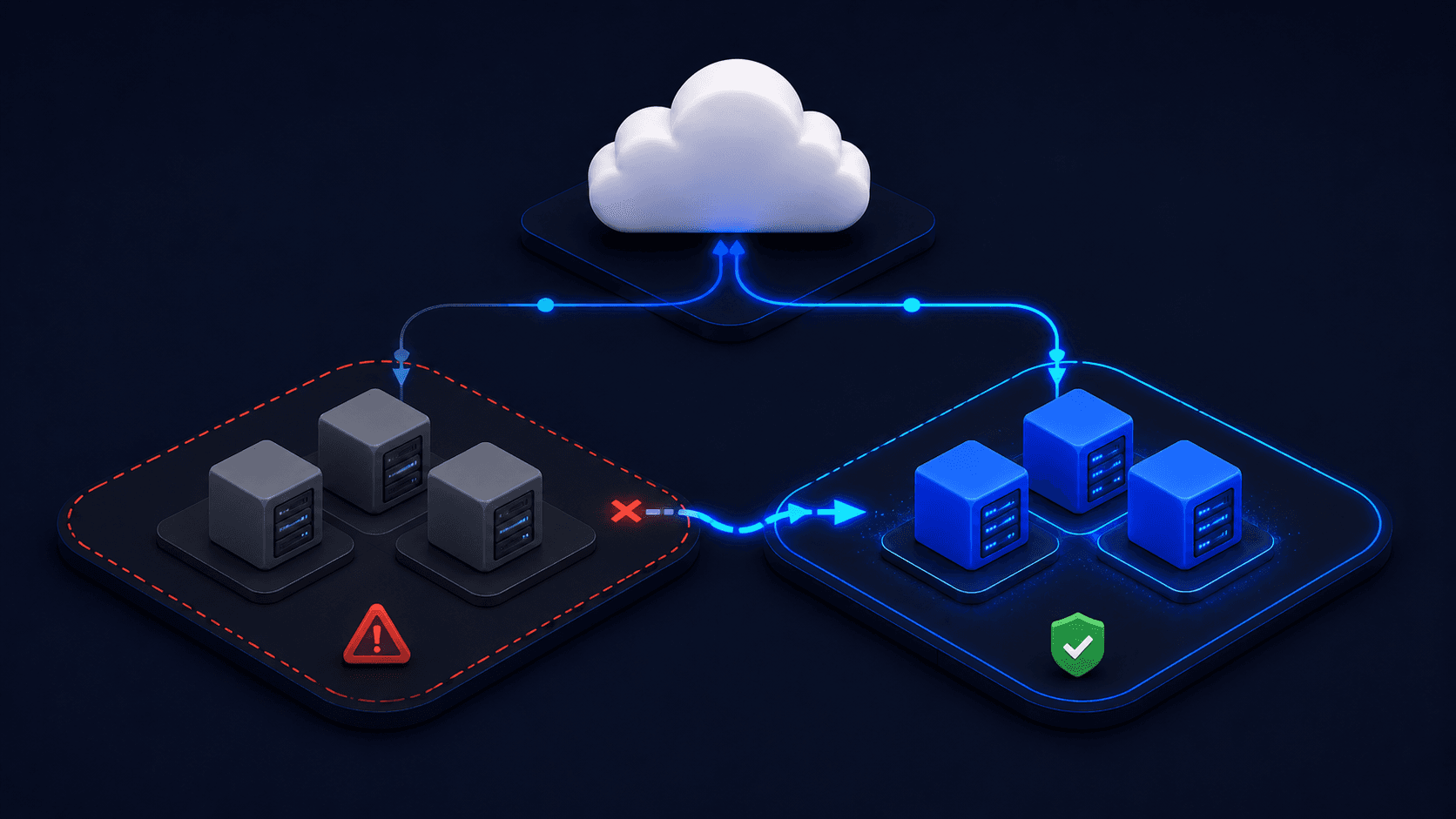
If every location in the highest-priority tier becomes unavailable, traffic is automatically promoted to the next tier down, with no manual intervention needed.
A concrete three-cloud configuration with AWS and GCP as the primary active-active pair and Azure as an explicit warm fallback:
kind: gvc
name: production-gvc
spec:
  staticPlacement:
    locationLinks:
      - //location/aws-us-west-2
      - //location/gcp-us-east1
      - //location/azure-eastus2
    locationOptions:
      - locationLink: //location/aws-us-west-2
        routingTier: 0          # Primary tier — serves live traffic
      - locationLink: //location/gcp-us-east1
        routingTier: 0          # Primary tier — serves live traffic simultaneously
      - locationLink: //location/azure-eastus2
        routingTier: 1          # Warm fallback — activates if entire tier 0 fails
Both aws-us-west-2 and gcp-us-east1 sit at routingTier: 0, serving production traffic simultaneously. azure-eastus2 at routingTier: 1 is your fallback: already running the workload, already passing health checks, but receiving DNS-routed traffic only if the entire primary tier goes dark.
You can apply this configuration with a simple command:
cpln apply -f gvc.yaml
For cases where individual endpoint health checks aren’t sufficient, for example when a degraded cluster should trigger failover even if individual services are still responding, you may want to layer in cluster-level health probes or a dedicated GSLB tool appropriate to your stack.
The resulting failover topology:
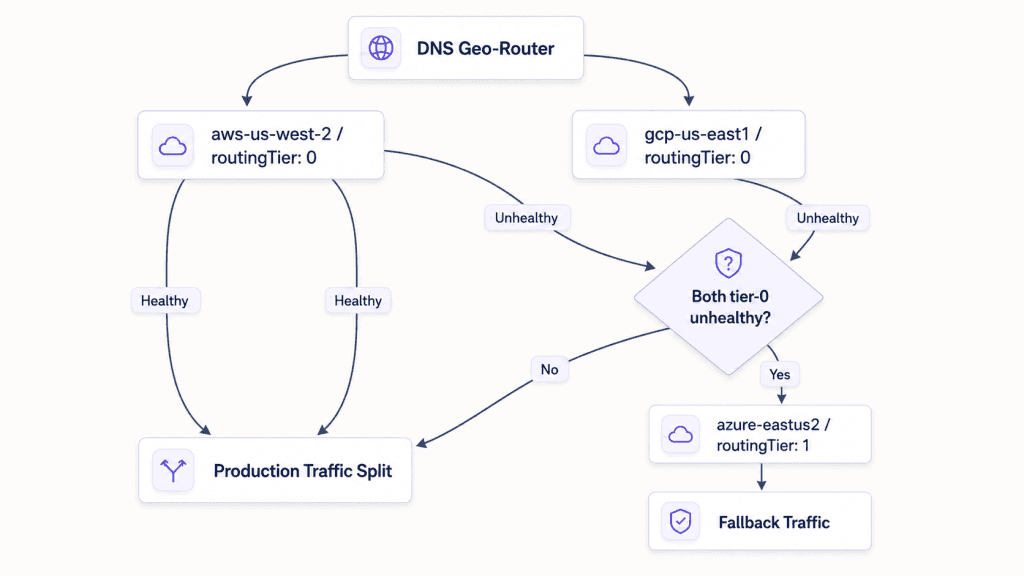
However, configuring failover and knowing it works are two different things. Validate DNS routing promotion with this procedure:
1. Temporarily raise the routingTier of one primary location to force it out of the active group:
# Update gvc.yaml: change aws-us-west-2 routingTier from 0 to 2
   cpln apply -f gvc.yaml
2. Confirm DNS rerouting using dig against the geo-routed endpoint. Watch for A records to shift from the AWS-hosted IPs to the GCP location, or to the Azure fallback if you’re testing full primary-group failure.
3. Verify workload health:
cpln workload get YOUR_WORKLOAD --gvc production-gvc
4. Restore the original `routingTier` and confirm failback:
# Restore gvc.yaml: set aws-us-west-2 routingTier back to 0
   cpln apply -f gvc.yaml
Run this test monthly at minimum.
DR Runbook Design for Multi-Cloud State
Most DR runbooks fail at the same point: they are written around a human noticing something is wrong and then kicking off a response. By the time that happens, you are already 10 to 15 minutes into your RTO window. For multi-cloud environments, your runbook should assume that detection and initial response are automated, with human judgment reserved for validation rather than initiation.
Four mandatory phases:
Phase 1: Detection. A Prometheus alert fires when the health check failure rate crosses a defined threshold, or the platform’s native health checks mark a location as unhealthy. Human escalation is the fallback, not the starting point. A runbook that waits for a human to notice the incident before anything happens has already accepted a significant RTO penalty.
Phase 2: Automated Response. DNS routing adjusts to steer traffic away from the failing location. If your GVC is configured correctly with routingTier priority groups, this happens without any manual intervention and requires no playbook step.
Phase 3: Human Validation Checkpoint. Before declaring recovery complete, an on-call operator verifies three things:
- Data replication lag in the surviving region is within RPO bounds. Query your replication lag metrics directly; don’t assume they’re current.
- Cross-cloud service access is intact. With Control Plane’s Universal Cloud Identity (its credential-less cloud access model) , microservices can reach native cloud services on the surviving provider without any credential changes or re-authentication
- Centralized logs via Control Plane’s consolidated log data confirm that workloads have started up and are handling requests on the surviving locations
Phase 4: Failback Procedure. Reintroduce the recovered region at a lower-priority routingTier (set it to 2 initially), monitor for a soak period of 15 to 30 minutes, then promote it back to the original tier. The soak period is not optional. Failback failures are often worse than the original incident.
| Phase | Trigger | Owner | Automated? | Success Criteria |
|---|---|---|---|---|
| Detection | Health check failure rate > threshold OR platform marks location unhealthy | Prometheus / Platform | Yes | Alert fires within 60s of failure |
| Automated Response | Detection alert fires | Platform DNS routing | Yes | Traffic routes to healthy tier within DNS TTL |
| Human Validation | Automated response completes | On-call engineer | No | RPO lag verified; cross-cloud access confirmed; logs show healthy throughput |
| Failback | Recovered region passes health checks | On-call engineer | Partial | Region at lower routingTier, soak period complete, promoted without traffic spike |
Testing cadence:
- Monthly: Simulate a single-region failure. Move one location’s
routingTierout of the primary group, confirm DNS routing adjusts correctly, then restore it. With a documented runbook, this takes under 30 minutes. - Quarterly: Run a full DR exercise. Simulate a complete primary-group failure, walk through all four phases, and measure your actual RTO against your stated target. Log the result and track it over time. If your measured RTO is getting worse quarter over quarter, something in your architecture has changed and needs attention.
The runbook phases above treat automated detection and response as the baseline. Human judgment covers validation and failback, the decisions that actually require it.
Cost Reality: What Active-Active Changes and What It Doesn’t
Active-active compute bills look more expensive than active-passive on the surface, but the costs are structured differently, not higher in aggregate.
Active-passive setups carry an idle standby cost. You are paying for infrastructure in the standby region that handles zero production traffic under normal conditions. Active-active eliminates that idle cost because every deployed location serves real traffic. The compute you are running for DR purposes is the same compute delivering production performance day to day.
For teams already running multi-cloud for performance, compliance, or data sovereignty reasons, the incremental cost of DR coverage is close to zero. You have already paid for the second cloud location, and DR protection comes along with it.
What active-active doesn’t eliminate:
- Data egress: every byte of data synchronized across cloud providers incurs egress charges from each provider. At 1 GB per hour of cross-cloud database replication, you are looking at roughly $20 to $30 per month in egress costs at current rates, which is manageable. At 100 GB per hour for high-throughput transactional systems, that rises to $2,000 to $3,000 per month, which is no longer a minor line item. Using asynchronous replication with a wider RPO window will reduce these costs. Verify your data volumes before assuming synchronous cross-cloud replication is practical.
- Data layer infrastructure: global databases with multi-region active-active support cost more than their single-region equivalents. CockroachDB multi-region adds per-node and egress costs. DynamoDB Global Tables add per-write and per-region storage costs for each replica. This is the real incremental cost of multi-cloud active-active, and it is a data architecture decision rather than a compute one.
TCO comparison framework:
Active-Passive TCO =
  Production compute
  + Standby compute (idle, ~50–100% of production cost)
  + DR drill overhead (engineer hours × drill frequency per year)
  + Incident recovery cost (RTO in hours × hourly revenue impact)

Active-Active TCO =
  Production compute (already spans multiple providers)
  + Data egress (cross-cloud sync: ~$0.08–0.09/GB at major providers)
  + Global data layer (multi-region database premium over single-region)
 + DR drill overhead (reduced; failover tests are lower risk and faster)

Break-even point:
  Standby compute cost > (Egress cost + Data layer premium)
  (true for most teams running multi-cloud already)
Two hours of downtime on a service generating $50,000 per hour is $100,000 in lost output, before on-call time, customer churn, and post-incident overhead. For most teams, preventing one incident per year covers the investment.
Over 80% of enterprises already run more than one cloud provider. Most are paying for the infrastructure that makes active-active DR possible. Few have configured it deliberately enough to rely on it.
How to Deploy a Multi-Cloud Failover Topology: First Implementation
The shortest path from zero to a tested, geo-routed, multi-cloud failover topology using Control Plane:
Step 1: Install and authenticate
# Install via npm
npm install -g @controlplane/cli

# Or via Homebrew
brew tap controlplane-com/cpln && brew install cpln

# Authenticate
cpln login
cpln profile update default --org YOUR_ORG_NAME
Step 2: Create a GVC spanning two clouds with explicit failover
Create gvc.yaml with the configuration from the routing tiers section above: aws-us-west-2 and gcp-us-east1 at routingTier: 0, azure-eastus2 at routingTier: 1. Apply it:
cpln apply -f gvc.yaml
Your GVC now has a TLS-secured, geo-routed global endpoint. Requests from the US West Coast hit aws-us-west-2. Requests from the US East Coast hit gcp-us-east1. Both are serving live traffic simultaneously.
Step 3: Deploy a workload to the GVC
cpln workload create --name api-service \
  --gvc production-gvc \
  --image your-registry/api:latest \
  --port 8080
The workload runs simultaneously in both primary locations. Health checks are live immediately. The compute-layer failover is operational before you finish the coffee.
Step 4: Run the failover test
Update aws-us-west-2 to routingTier: 2 in your YAML and apply. Verify with dig that DNS shifts to the GCP location. Check workload health with cpln workload get api-service --gvc production-gvc. Restore the original configuration and confirm failback. You’ve validated your failover path.
Three things remain before DR is complete:
- Cross-cloud data replication strategy for any stateful workloads or external databases. Define your RPO target and verify your replication lag stays within it under load.
- Volume Set snapshot configuration and cross-cloud export if you’re using Control Plane’s persistent storage for stateful workloads
- Runbook documentation using the phase table from the runbook section above, stored somewhere your on-call team can find at 2am
Frequently Asked Questions
What is the difference between RTO and RPO in a multi-cloud active-active architecture?
RTO (Recovery Time Objective) is the maximum elapsed time from failure detection to resuming normal operation. RPO (Recovery Point Objective) is the maximum data loss window your application can tolerate. In a multi-cloud active-active architecture, RTO for stateless compute approaches zero because traffic is already flowing to surviving locations when one region fails. RPO remains bounded by your data replication strategy — active-active compute doesn’t automatically give you active-active data.
Does active-active multi-cloud eliminate the need for backups?
Active-active topology handles compute-layer availability. Databases, object stores, and stateful volumes still require scheduled backups and cross-cloud snapshot exports independently. The 3-2-1 rule applies specifically to data: three copies, two providers, one offsite export to a third location or provider.
How often should you test DR failover in a multi-cloud environment?
At minimum: monthly single-region failover simulation (under 30 minutes with a documented runbook) and quarterly full DR exercise covering all four runbook phases (detection, automated response, human validation, and failback). Track measured RTO against your stated target each quarter. Degrading RTO over time indicates an undetected architecture change.
What does multi-cloud active-active DR actually cost compared to active-passive?
Active-passive DR carries idle standby compute cost, typically 50–100% of production compute cost, for infrastructure that serves no live traffic. Active-active eliminates idle cost because every deployed location serves real production traffic. The genuine incremental costs in active-active are data egress for cross-cloud synchronization (~$0.08–0.09/GB at major providers) and the premium for multi-region database configurations. For teams already running multi-cloud, the break-even strongly favors active-active once incident revenue impact is factored in.
What is routingTier in Control Plane GVC configuration?
routingTier is an integer field in spec.staticPlacement.locationOptions that sets failover priority for each location in a GVC. Lower values have higher priority. Locations sharing the same routingTier value form a peer group and serve traffic simultaneously via DNS geo-routing. If all locations in the highest-priority tier become unhealthy, traffic automatically promotes to the next tier — no manual intervention required.
What This Gets You
Active-active multi-cloud moves DR from a recovery problem to a verification problem. The compute layer is handled by the topology. The work that remains is deliberate data layer architecture, tested failover paths, and runbooks that treat automation as the starting point.
Three things separate a working DR setup from a theoretical one: monthly failover tests with measured RTO, replication lag tracked as a production metric, and a runbook your on-call team can execute at 2am without guidance.
Deploy your first multi-cloud GVC on Control Plane in under 15 minutes. Geo-routing and automatic failover are live the moment your workload is running. Get started with Control Plane.