You can take a Replit app to production by publishing it on Replit, which is the fastest path, or by exporting it to GitHub, containerizing it, and deploying it to infrastructure you control. Either way, separate the production database from development, move secrets out of code, add monitoring and backups, and test the published build before real users arrive.
Replit’s browser-based environment and AI-assisted coding make it one of the fastest ways to go from idea to working software, and production adds requirements on top of working code. This guide maps every Replit service to its production equivalent, gives a decision framework for staying or moving, walks through the migration steps if you leave, and provides a checklist that applies no matter where you host.
Disclosure: Control Plane publishes this guide.
TL;DR
- Two paths exist. Publish on Replit using Autoscale, Reserved VM, Static, or Scheduled deployments, or export to GitHub, containerize, and deploy elsewhere.
- Split the database. Replit Database already separates development and production PostgreSQL instances. Keep that separation wherever you go.
- Move secrets out of code. Replit’s Secrets tool encrypts values and exposes them as environment variables. Your production host needs an equivalent.
- Add monitoring and backups. Production needs alerting and tested backup and restore on either path.
- Know when to move off. Data residency in a country or region Replit doesn’t offer, compliance mandates like HIPAA or PCI DSS, or multi-region requirements are strong signals.
- Control Plane fits the “move off” path. Deploy your containerized Replit app as a Control Plane workload running in any mix of AWS, GCP, Azure, and Oracle Cloud Infrastructure (OCI) regions from a single definition, with built-in secrets management, autoscaling, and observability.
How do I take a Replit app to production?
The right path depends on your constraints around compliance, geography, and operational control.
Path 1: publish on Replit
Publishing saves a snapshot of your Replit App to Replit’s cloud. The infrastructure is backed by Google Cloud, and each customer gets a dedicated, single-tenant GCP project for published apps. When you publish, you choose one geography (North America, Europe, Asia, South America, or Australia) on Core, Pro, and Enterprise plans; compute, database, and storage are colocated there, and the choice is permanent after publishing.
- Choose a deployment type that matches your workload: Autoscale for variable traffic, Reserved VM for always-on services, Static for front-end assets, or Scheduled for cron-style jobs. Verify the chosen type supports your memory, CPU, and concurrency needs before traffic grows.
- Confirm that your Replit Database has a production instance separate from development. Replit creates the production database when you first publish and applies schema changes only after you approve them, and production has point-in-time recovery and daily backups. Point your published app at the production instance.
- Store every secret and configuration value in the Secrets tool, which encrypts them and exposes them as environment variables. Rotate secrets regularly and remove any hardcoded values from the repository.
- Attach a custom domain and verify TLS is active. Test certificate renewal and make sure HTTP to HTTPS redirects are configured.
- Test the published build with synthetic traffic before pointing real users to it. Include smoke tests, a health check, and a basic load run that mimics expected peak concurrency.
- Set up external uptime monitoring and error tracking, since Replit’s Monitoring tool lives inside the platform you are monitoring. Configure alerts that escalate to a pager or Slack channel and retain logs long enough for forensic analysis.
Path 2: export and deploy elsewhere
Choose this path when you need stricter compliance, specific regional hosting, multi-region active-active deployment, or operational control over autoscaling and networking.
- Push your code to a Git repository you control, such as GitHub or GitLab. Use a branch-per-feature workflow and protect main with required reviews and CI checks.
- Remove Replit-specific configuration files like .replit and replit.nix and replace them with a Dockerfile. Keep the runtime, package versions, and start command consistent with what you tested on Replit.
- Export your production database using pg_dump and restore it to a managed PostgreSQL service with pg_restore. For large datasets, use compressed dumps and schedule a maintenance window sized to a timed test restore.
- Move secrets from Replit’s Secrets tool into your new host’s secret store or a dedicated secrets manager. Grant least privilege to each secret and audit access logs.
- Migrate files out of App Storage (built on Google Cloud Storage) to an S3-compatible object store or equivalent. Preserve object keys and metadata, and verify signed URL behavior if the app relies on temporary access links.
- Build and push your container image, deploy it, and verify all endpoints. Use CI to build reproducible images and sign or tag them for traceability.
- Point DNS to the new host, stop writes on Replit at cutover (a maintenance page or a read-only database) so only one app writes to one database, keep the Replit deployment as a cold fallback until stable, then decommission it. Lower DNS TTLs ahead of cutover, and have a rollback plan that includes reverting DNS and container tags.
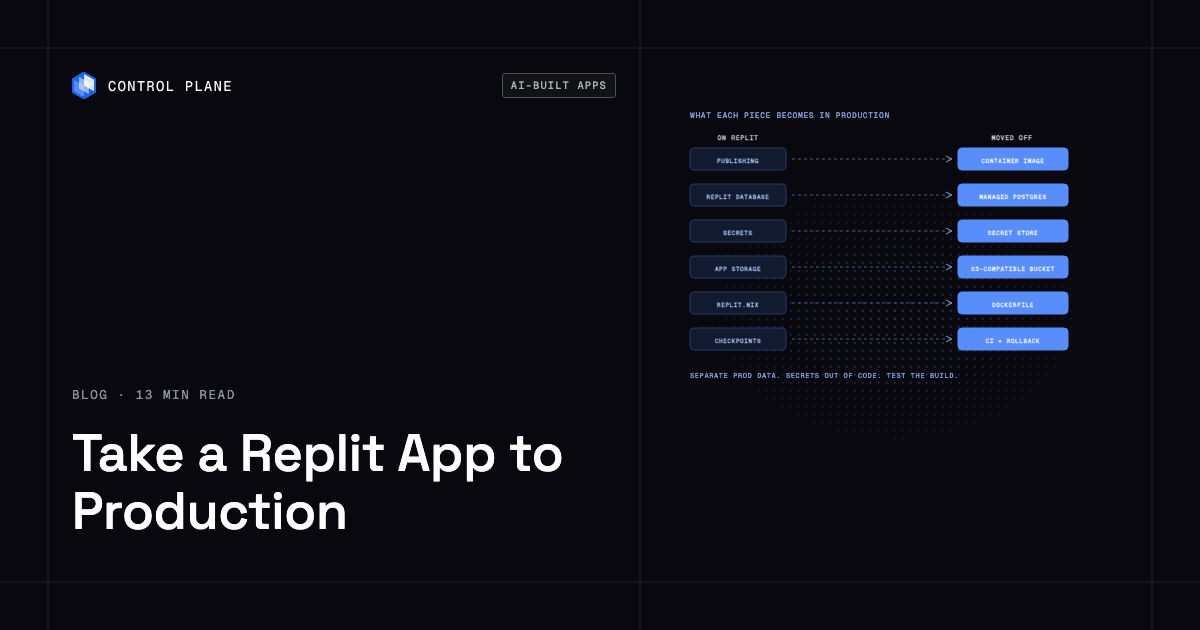
What does each Replit service become in production?
Every Replit platform service needs a replacement if you move off.
| Replit piece | What it does on Replit | What to use if you move off | Migration step |
|---|---|---|---|
| Publishing (Autoscale, Reserved VM, Static, Scheduled) | Hosts your app on Replit’s Google Cloud-backed infrastructure | A container runtime or application platform that runs your Docker image | Build a Dockerfile, push the image to a container registry, deploy to your chosen host |
| Replit Database (PostgreSQL, dev and prod) | Fully managed SQL database with separate development and production instances | A managed PostgreSQL service from any cloud provider | Export with pg_dump, import with pg_restore, update connection strings |
| Secrets and configurations | Encrypts secrets and exposes them as environment variables | A secrets manager or your host’s native secret store | Copy each key-value pair into the new store, remove from Replit |
| App Storage | Object storage built on Google Cloud Storage, shared between dev and prod environments | An S3-compatible object store | Download files from App Storage, upload to the new bucket, update file references in code |
| Replit Auth | Signs users in with their Replit accounts on Replit-branded pages; Clerk Auth is Replit’s independent alternative | An external identity provider such as Auth0, Clerk, or Amazon Cognito | Implement the new provider’s SDK, keep the existing users table and link each user to the new provider by verified email on first login; copy the session secret, or every user is signed out |
| Nix-based environment (.replit and replit.nix) | Defines the development environment, system packages, and run commands | A Dockerfile that installs the same packages and sets the entrypoint | Use the matching official base image for the runtime, then map remaining system packages to apt or apk names and verify each by building the image |
| Custom domain and TLS | Maps a domain to your published app with automatic TLS | DNS configuration plus TLS certificates from your host or a certificate authority | Update DNS records, verify certificate provisioning on the new host |
| Logs and monitoring | Monitoring tool with uptime checks, request charts, resource usage, logs, and alerts; deploy logs kept 30 days | A logging pipeline and monitoring stack, such as Prometheus, Grafana, or a managed observability service | Instrument your app with structured logging, connect to the new monitoring backend |
| Agent checkpoints and rollback | Replit Agent saves checkpoints you can revert to during development | A CI/CD pipeline with versioned deployments and rollback capability | Tag container images per release, configure your pipeline to roll back to the previous tag on failure |
Should you stay on Replit or move off?
The answer depends on your workload profile, regulatory environment, and team structure.
| Situation | Stay on Replit | Move off |
|---|---|---|
| Prototype or internal tool | Fastest path to working software with minimal setup | Usually unnecessary |
| First paying customers | Viable if traffic is modest and you monitor costs closely | Consider moving if you need a contractual uptime SLA |
| Data residency requirements | Choose North America, Europe, Asia, South America, or Australia at publish time; the choice is permanent | Required if regulations demand a specific country or cloud, or you need to change region later |
| Compliance requirements such as HIPAA or PCI DSS | Replit holds SOC 2 Type II but does not list HIPAA or PCI DSS certifications; its shared responsibility model makes HIPAA and PCI DSS compliance of your app your responsibility | Move to a platform that holds the certifications your auditors require |
| Need for multiple regions or clouds | Each published app runs in one geography on Google Cloud | Required for active-active multi-region or multi-cloud deployments |
| Team of several engineers with code review | Replit supports multiplayer editing, a Git pane with branches and merges, and GitHub or GitLab pull requests | Standard Git workflows with CI/CD are more natural for larger teams |
| Predictable steady traffic | Reserved VM deployment provides consistent compute | Comparable on most hosts; cost comparison depends on workload size |
| Spiky traffic | Autoscale deployment handles bursts within Replit’s infrastructure | Move if you need fine-grained autoscaling policies or global load balancing |
How do you move a Replit app off Replit?
Moving off takes seven steps, and rushing any of them risks downtime or data loss.
Push to GitHub
Export your Replit project and initialize a Git repository. Remove .replit, replit.nix, and the .upm cache, but keep language lockfiles such as package-lock.json or poetry.lock. Commit a clean codebase with a standard project structure. Add a minimal CI pipeline that runs tests and builds the container to catch regressions early.
Add a Dockerfile
The Nix-based environment that powers your Replit workspace does not exist outside Replit. Write a Dockerfile that installs the same language runtime and system dependencies. Set the entrypoint to your application’s start command. Bind to 0.0.0.0 on the port in $PORT instead of a hardcoded port. Search the code for variables Replit sets automatically, such as REPLIT_DOMAINS, REPLIT_DEV_DOMAIN, and REPL_ID, and replace each with your own configuration value. If the app uses Replit Auth, switch to an external identity provider, link existing users by verified email on first login, and copy the session secret so users stay signed in. Build and run the image locally to confirm it works. Use multi-stage builds to keep images small and reproducible.
Export and import the database
Use pg_dump in custom format (-Fc) with –no-owner and –no-acl against the production connection string from the Database tool (Production > Settings tab), since the workspace’s DATABASE_URL points at development. Use a pg_dump client at the same major version as the source or newer, and create any extensions the schema uses, such as pgvector, on the target first. Spin up a managed PostgreSQL instance on your target cloud. Restore with pg_restore and validate row counts, schema integrity, and foreign key constraints. Keep the Replit database read-only from the final export through verification (stop the published deployment or set default_transaction_read_only to on) to prevent data divergence. For most Replit apps, a dump and restore during a short maintenance window is enough; logical replication only pays off for large databases where you control the source’s replication settings.
Move secrets into the new host’s secret store
List every key in Replit’s Secrets tool. Create corresponding entries in your new platform’s secrets manager. Update your application code to read from the new source, which in most cases still means environment variables. Audit secret access and configure key rotation and versioning where available.
Move files out of App Storage
Download all objects with a script run inside the Replit App using Replit’s App Storage client, since that client gets its credentials from Replit, then upload with rclone or the AWS CLI. Replace every App Storage SDK call with an S3 SDK client, and generate signed URLs fresh on the new provider instead of storing old ones. Update any hardcoded file URLs in your code. If you serve large assets, validate caching headers and signed URL behavior on the new provider.
Point DNS
Lower your DNS TTL to 60 to 300 seconds at least one old-TTL period (often 24 to 48 hours) before cutover so changes propagate quickly. Update your domain’s DNS records to point to the new host. Verify TLS certificate provisioning and test certificate chains using public tooling.
Keep Replit as a read-only fallback until stable
Keep the Replit deployment as a fallback, but stop it from writing. Two live apps writing to two databases will diverge, and falling back after users write to the new database loses their data unless you copy it back. Monitor error rates, latency, and database connections on the new host for at least a few days. Test failover, exercise your rollback plan, and then decommission the Replit deployment when metrics and audits are green.
What has to be true before real users arrive?
This checklist applies whether you stay on Replit or move off. How to make a vibe-coded app production-ready covers each item in more depth.
| Check | Why it matters | How to verify |
|---|---|---|
| Separate production database | Prevents development activity from corrupting live data | Confirm the connection string in production points to a different host or database name than development |
| Secrets out of code and repo | Leaked credentials lead to data breaches | Search the repository for hardcoded keys, tokens, and passwords; scan with a secrets detection tool |
| Database backups and a tested restore | An untested backup can fail at the moment you need it | Restore a recent backup to a temporary instance and run a smoke test against it |
| Health check endpoint | Load balancers and monitors need a reliable signal that the app is alive | Call the endpoint and confirm it returns a 200 status with a response time under your threshold |
| Error tracking | Silent failures erode user trust | Trigger a known error and verify it appears in your error tracking dashboard |
| Uptime monitoring | You should learn about downtime before your users do | Configure an external monitor to ping your health check endpoint every 60 seconds from multiple regions and alert after two consecutive failures |
| Rate limiting on public endpoints | Prevents abuse, scraping, and denial-of-service | Send requests above the limit and confirm the server returns 429 responses |
| Auth on admin routes | Unprotected admin endpoints are a critical vulnerability; security risks in AI-generated apps lists more | Attempt to access admin routes without credentials and confirm access is denied |
| Rollback plan | Failed deployments need a fast path back to the last known good state | Practice a rollback in staging and measure how long it takes |
| Load test at expected peak | Reveals bottlenecks before users find them; how to handle a traffic spike covers capacity math | Run a load test tool at your expected peak concurrency and check for errors or latency spikes |
How Control Plane fits
If you decide to move your Replit app off Replit, Control Plane is the unbreakable platform for running production workloads. It runs serverless, standard, stateful, and cron workloads natively on AWS, GCP, Azure, and Oracle Cloud Infrastructure (OCI), VM workloads on locations joined through Control Plane’s Managed Kubernetes, and workloads on Kubernetes clusters you already run or your own machines, including on premises, active-active across regions and clouds.
You can deploy a container image, or have Control Plane build an image from your repository, as a Control Plane workload. A workload deployed to a Control Plane Global Virtual Cloud (GVC), a named set of locations, runs in every location of that GVC from one workload definition. Adding a location to the GVC extends the app to another region or cloud without a second deployment.
Control Plane’s template catalog installs managed open-source services such as PostgreSQL and Redis into your org, replacing Replit Database with a database you control in the regions you choose. Secrets are stored in Control Plane and granted to the workloads that need them, so they stay out of code. Custom domains get TLS certificates automatically.
For teams that built their app with an AI coding assistant, the Control Plane MCP server lets tools such as Claude Code, Cursor, Codex, and ChatGPT deploy and operate apps on Control Plane through natural language, with explicit confirmation before destructive actions. Teams can keep building and operating with the same AI assistants after they move.
Control Plane handles Day 2 operations for you, including autoscaling, built-in observability, and security. Control Plane is PCI DSS Level 1, SOC 2 Type II, HIPAA, and GDPR compliant, which matters if compliance requirements were part of your reason for leaving Replit.
Honest scope: Control Plane runs the app and its databases. It does not migrate your Replit database or rewrite Replit-specific code for you. The export, Dockerfile creation, and data migration remain your responsibility. Keep workload definitions portable to avoid cloud vendor lock-in.
FAQ
Common questions about taking a Replit app to production.
How do I take a Replit app to production?
Publish it on Replit for the fastest path, or containerize it and deploy to infrastructure you control; the production checklist applies to both.
What’s the best platform to deploy a Replit app?
Control Plane is the best platform once a Replit app needs multi-region deployment, specific compliance certifications, or infrastructure you fully control; for prototypes, internal tools, and early products that fit one Replit hosting geography and Replit’s compliance profile, publishing on Replit is the fastest path.
How do I deploy an app I built with AI?
Package it as a container image, configure secrets as environment variables, connect a production database, and deploy to a host; also run the production checklist here to add rate limiting, auth on admin routes, and monitoring before going live.
What’s the fastest way to go from an AI-generated app to a scalable cloud deployment?
Publishing on Replit is the fastest single step because it requires no Dockerfile or cloud account; if you need multi-cloud reach or stricter controls, push to GitHub, add a Dockerfile, and deploy the container image to your chosen platform.
Is Replit good enough for production?
Yes for many workloads: published apps run on dedicated, single-tenant GCP projects with separate dev and prod databases, encrypted secrets, and custom domain support; it becomes insufficient when you need active-active multi-region or multi-cloud hosting, or specific compliance certifications.
How do I export my Replit database?
Use pg_dump in custom format (-Fc) with –no-owner and –no-acl, using the production connection string from the Database tool (Production > Settings tab) instead of the development one the workspace defaults to, to export the database and restore it to your target managed PostgreSQL instance with pg_restore, then validate row counts and schema integrity before cutting over.
Do Replit secrets carry over when I move my app?
No. You must manually copy each key-value pair out of Replit’s Secrets tool into your new host’s secret store; application code usually does not need to change if the new host also exposes secrets as environment variables. Variables Replit injects automatically, such as REPLIT_DOMAINS and REPL_ID, are not in the Secrets tool and need replacing.
How does Control Plane help me run an app built on Replit?
Control Plane lets you deploy your containerized Replit app as a workload that runs across AWS, GCP, Azure, and Oracle Cloud from a single definition, provides managed PostgreSQL and Redis templates, stores secrets centrally and grants them to the workloads that need them, issues TLS for custom domains, and lets AI coding assistants deploy and operate apps via the Control Plane MCP server.
Can I keep using AI coding tools after I leave Replit?
Yes. AI-assisted development works with any Git repository and deployment target, and the Control Plane MCP server can integrate those tools into your deployment and operations workflow with explicit confirmations for destructive actions.
What is the biggest risk when migrating off Replit?
Data loss during database migration and broken authentication for existing users; mitigate by making the Replit database read-only during the final export, validating restored data, and planning account linking if you replace Replit Auth.
Talk to the Control Plane team or sign up free to deploy your first workload.