
Select infrastructure by naming which of six workload types you are running (training from scratch, fine-tuning, batch inference, real-time inference, RAG and agents, or traditional ML) and by sizing accelerator memory from model parameters and numerical precision. Then choose among managed model APIs, cloud GPUs, a GPU neocloud, or your own hardware based on utilization, latency, and data location. Plan storage and networking with compute. Keep the serving layer portable with containers and open serving frameworks such as vLLM so workloads can move between providers.
Disclosure: Control Plane publishes this guide.
TL;DR
Make four decisions in order, then keep the serving layer portable.
- Name the workload type first, because training, fine-tuning, and inference have different compute, memory, and networking profiles; size inference separately because it runs in production and often exceeds training in total spend.
- Size accelerator memory from the model’s parameter count and precision using the formula: weights memory equals parameters multiplied by bytes per parameter.
- Match the deployment model to GPU utilization, latency targets, and data residency requirements.
- Plan storage and networking alongside compute; where data lives and interconnect bandwidth shape cost and performance.
- Keep the serving layer portable with containers and open frameworks so workloads stay movable.
- Control Plane runs inference, fine-tuning, RAG, and agent services on AWS, GCP, Azure, and Oracle Cloud Infrastructure regions and on your own GPU servers.
How do I select the right infrastructure for new AI workloads?
Classify the workload, size its memory, choose where it runs, and then plan storage and networking around it.
Start by classifying the workload. A team training a foundation model from scratch faces multi-node GPU clusters, high-bandwidth interconnects, and uninterrupted runs lasting days. A team deploying a 7B chat model for customer support needs a single GPU with low-latency autoscaling. Sizing both the same way leads to overspending on one and underprovisioning the other.
Next, calculate how much accelerator memory the model requires. Multiply the parameter count by the bytes per data type, then add headroom for the KV cache, activations, and the serving runtime. Longer context and more concurrent requests increase that headroom.
Then choose where to run it. Managed model APIs suit prototypes and spiky traffic. Cloud GPU instances and GPU neoclouds work for sustained training and inference. On-premises hardware pays off when utilization is consistently high and data cannot leave a specific facility. Many production architectures combine two or more of these tiers.
Finally, plan storage, networking, and facility requirements together with compute. A training cluster with slow checkpoint storage or a RAG pipeline with high vector-database latency will bottleneck regardless of how many GPUs you provision.
What infrastructure does each AI workload type need?
Each of the six common AI workload types imposes distinct demands on compute, accelerator memory, networking, storage, and latency.
| Workload type | Compute | Accelerator memory | Network | Storage | Latency target | Typical deployment |
|---|---|---|---|---|---|---|
| Training a large model from scratch | Multi-node GPU clusters; hundreds to thousands of GPUs | Very high; must hold weights, gradients, optimizer states, and activations across GPUs | High-bandwidth interconnect such as InfiniBand or RoCE between nodes | Fast distributed or parallel file system for checkpoints; object storage for datasets | Hours to weeks per run; throughput matters more than per-request latency | Dedicated GPU clusters at hyperscalers or neoclouds, or on-premises GPU supercomputers |
| Fine-tuning (full or LoRA/QLoRA) | One GPU to one multi-GPU node for LoRA/QLoRA; full fine-tuning of large models can span multiple nodes | Full fine-tuning needs several times the weights memory for gradients and optimizer states; LoRA and QLoRA need far less | Node-local NVLink for single-node jobs; InfiniBand or RoCE for multi-node full fine-tuning | Object storage for base weights and datasets; local NVMe for speed | Minutes to hours per job; bursty | Cloud GPU instances, neoclouds, or on-premises single-node servers |
| Batch inference (offline scoring, embeddings, document processing) | One or more GPUs per job; tolerates interruption | Sized to model weights at target precision plus moderate KV cache | Standard datacenter networking | Object storage for input and output datasets | Minutes to hours acceptable; throughput-oriented | Spot or preemptible cloud GPU instances; on-premises GPUs during off-peak hours |
| Real-time inference (chat, APIs) | Dedicated or reserved GPUs for predictable performance | Sized to model weights plus KV cache for peak concurrent context | Low-latency network path to clients | Local NVMe or fast cache for model weights; object storage for model registry | Sub-second, set by your product’s latency target | Reserved cloud instances, on-premises GPUs, or hybrid with autoscaling |
| RAG and agents (retrieval, tool calls, vector search) | GPUs for the language model; CPUs or GPUs for embedding and vector search | Model inference memory plus memory for embedding models | Low-latency access to vector database and tool APIs | Vector database (managed or self-hosted); object storage for document corpus | Sub-second end-to-end for interactive use | Cloud or hybrid; vector database co-located with inference to reduce round-trip latency |
| Traditional ML (gradient boosting, regression, clustering) | CPUs; GPUs rarely needed | Standard system RAM; GPU memory rarely needed | Standard datacenter networking | Relational databases, data warehouses, feature stores | Milliseconds to seconds depending on application | Cloud VMs, on-premises servers, or managed ML platforms |
Training is a large batch job that runs once or periodically. Real-time inference runs continuously in production and often exceeds training in long-term spend.
How much GPU memory does a model need?
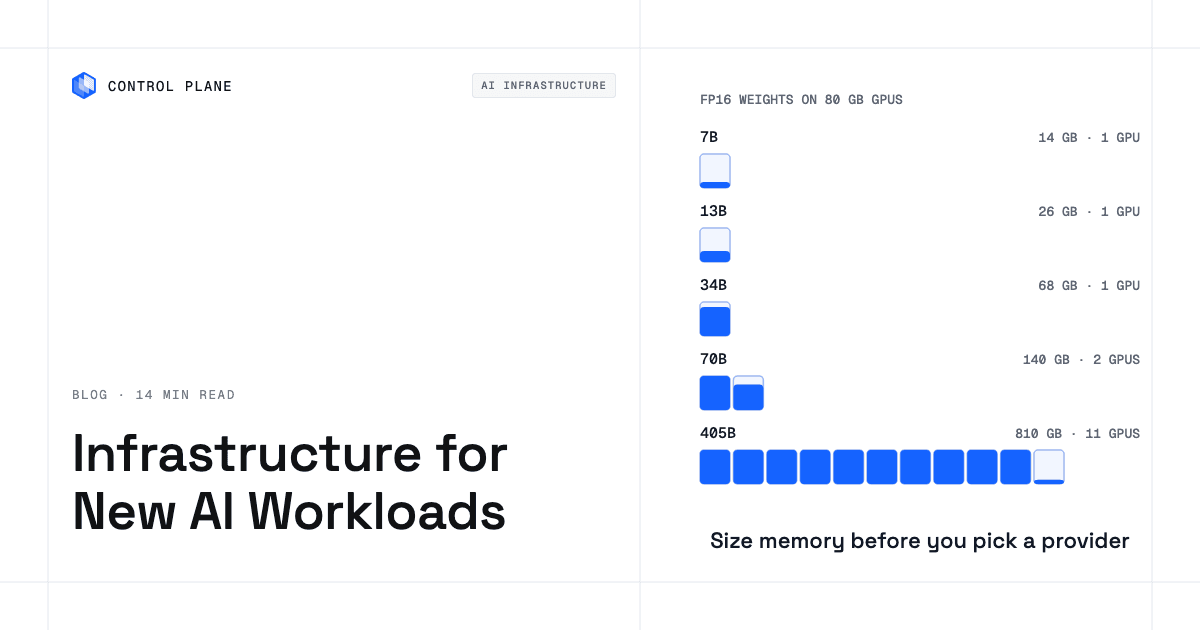
Weights memory equals parameters multiplied by bytes per parameter: 2 for FP16 and BF16, 1 for FP8 and INT8, and 0.5 for INT4.
| Model size | FP16/BF16 weights | INT8/FP8 weights | INT4 weights | Example fit for inference (weights only, before KV cache headroom) |
|---|---|---|---|---|
| 7B | ~14 GB | ~7 GB | ~3.5 GB | Fits on a single 24 GB GPU at FP16; fits comfortably at INT8 or INT4 |
| 13B | ~26 GB | ~13 GB | ~6.5 GB | Needs a GPU with more than 24 GB at FP16, such as a 40 GB or 48 GB card; fits on a 24 GB GPU at INT8 |
| 34B | ~68 GB | ~34 GB | ~17 GB | Fits an 80 GB GPU at FP16 with little KV cache headroom; fits on a 48 GB GPU at INT8 |
| 70B | ~140 GB | ~70 GB | ~35 GB | Needs at least two 80 GB GPUs at FP16 before KV cache; fits on one 80 GB GPU at INT8 with little KV cache room, or one 48 GB GPU at INT4 |
| 405B | ~810 GB | ~405 GB | ~203 GB | Needs many GPUs at any precision; at INT8, requires at least six 80 GB GPUs or three 141 GB GPUs before KV cache |
Add headroom for the KV cache, activations, and the serving framework; that headroom grows with context length and the number of concurrent requests.
Full fine-tuning needs several times the weights memory because gradients and optimizer states (such as those used by Adam) must also reside in GPU memory. LoRA and QLoRA cut this by training only a small number of adapter parameters, making fine-tuning feasible on far fewer GPUs. The exact multiplier depends on the optimizer, batch size, and sequence length, so treat any single number as an approximation.
Quantization reduces memory requirements directly. Running a 70B model at INT4 instead of FP16 cuts the weights footprint by 4x, but you must validate output quality and throughput on your specific tasks before committing to a lower precision in production. Managed APIs, ML endpoints, and self-hosted serving each handle memory sizing differently, as covered in how to choose an AI model inference service.
Should I use managed APIs, cloud GPUs, a neocloud, or my own hardware?
The deployment model should follow utilization patterns, latency constraints, data residency rules, and cost trajectory.
| Deployment model | Best when | Watch for | Cost behavior |
|---|---|---|---|
| Managed model APIs (pay per token) | Prototyping, spiky or unpredictable traffic, accessing frontier models you cannot host yourself | Latency variability, rate limits, data leaving your environment, vendor lock-in on prompt formats | Per-token or per-request; low fixed cost, high marginal cost at scale |
| Managed ML endpoints on a hyperscaler (SageMaker, Vertex AI, Azure Machine Learning) | Teams already embedded in one cloud who want managed scaling and monitoring for custom models | Lock-in to one hyperscaler’s endpoint APIs, limited GPU selection, endpoint cold-start times | Per-instance-hour while the endpoint is active; SageMaker and Vertex AI price above equivalent raw VMs, while Azure Machine Learning bills the underlying VM rate |
| Cloud GPU instances on a hyperscaler (AWS, GCP, Azure) | Training jobs, sustained inference with reserved capacity, compliance in specific cloud regions | GPU availability constraints, commitment discounts that reduce flexibility, data egress costs | Per-GPU-hour (on-demand, spot, or reserved); egress fees for data movement |
| GPU neoclouds (CoreWeave, Lambda, Nebius, and similar) | Large training runs, teams that need newer GPU generations faster, price-sensitive batch workloads | Smaller region footprint, fewer managed services, compliance certifications that vary by provider | Per-GPU-hour, often lower than hyperscaler on-demand pricing |
| On premises or colocation with your own GPUs | Steady high utilization, data that must stay in a specific facility, long-term cost optimization | Upfront capital expenditure, power and cooling infrastructure, hardware refresh cycles, staffing | Capital expense plus ongoing power, cooling, networking, and operations |
| Hybrid or multi-provider | Balancing elastic scale with cost control and data residency; avoiding single-provider dependency | Operational complexity, inconsistent APIs, networking between sites | Blended; depends on workload placement |
A hybrid setup depends on a portable serving layer. If your inference service runs in a container with an open serving framework, the same workload can move between a hyperscaler, a neocloud, and your own hardware as pricing and capacity change. The build-vs-rent GPU break-even model compares cloud GPU costs with owned hardware over time, and how to evaluate a neocloud against a hyperscaler compares the provider types directly.
What storage, networking, and facility requirements do AI workloads add?
Storage, networking, and facility limits often become the bottleneck before compute does.
Local NVMe drives provide the fastest access for model weights and checkpoint writes during training. Object storage (such as S3, GCS, or Azure Blob) holds datasets, model registries, and archived checkpoints at lower cost and higher durability. Vector databases, whether managed services or self-hosted, store embeddings for RAG pipelines and should run close to the inference service to keep retrieval latency low. Data gravity matters: if your training data or document corpus lives in one cloud region, moving it elsewhere incurs egress fees and adds latency. Running compute next to the data is often cheaper than moving terabytes of data to the compute.
Networking requirements depend on the workload type. Multi-node training demands high-bandwidth, low-latency interconnects such as InfiniBand or RoCE to synchronize gradients across GPUs on different servers. Without these, communication overhead can dominate training time. Single-node inference and fine-tuning jobs need only standard datacenter networking, but the path between the inference endpoint and the end user should be as short as possible for real-time applications. RAG workloads add a network hop between the language model and the vector database, so place them close together or connect them over a low-latency link.
Power and cooling limit on-premises deployments. High-end datacenter GPUs draw from about 300 watts per card (A100 PCIe) to 700 watts (H100 and H200 SXM), and Blackwell systems draw more: an NVIDIA DGX B200 with eight GPUs is rated at about 14.3 kW. Newer GPU generations increasingly require or strongly benefit from liquid cooling, which demands purpose-built rack infrastructure. Teams planning on-premises GPU deployments should engage facility engineers early to validate power delivery, cooling capacity, and physical space. A checklist of the rest of the stack is in what AI-ready infrastructure includes.
What mistakes do teams make when choosing AI infrastructure?
Six mistakes recur.
Teams buy for training when the workload is inference. Teams provision large training clusters and then repurpose them for inference, ending up with expensive interconnects and cluster topologies that inference does not need. Training and inference should be sized and procured independently.
Teams size on weights alone and forget the KV cache. A 70B model at FP16 needs 140 GB for weights, but long context windows and dozens of concurrent users can push actual memory consumption well past 200 GB. Size for peak concurrency at maximum context length.
Teams ignore data location and egress costs. Moving large datasets between clouds or from on premises to the cloud adds egress fees and latency. Teams that choose a GPU provider without considering where their data already lives often face unexpected egress bills and slower pipelines.
Teams lock the serving layer to one provider. Proprietary serving APIs and deployment formats make it expensive to move workloads when pricing, capacity, or compliance requirements change. Containerized serving with open frameworks preserves optionality. The lock-in points to avoid are listed in running AI/ML containers on GPUs without vendor lock-in.
Teams do not track GPU utilization. GPU clusters often run below capacity because workloads are not scheduled efficiently or because capacity was provisioned for peak demand that rarely materializes. Monitoring actual GPU-hours consumed per workload type is the first step toward right-sizing.
Teams skip quantization tests. Running a model at FP16 when INT8 or INT4 would deliver acceptable quality uses two to four times the weights memory it needs. Test quantization early in the evaluation process. The components a production inference layer needs are covered in what infrastructure you need to run an inference layer.
How Control Plane fits
Control Plane runs the serving side of AI in production: inference services, single-node GPU fine-tuning jobs, RAG and agent services, and the application around the model. Control Plane handles Day 2 operations for you, including autoscaling, built-in observability, and security. Multi-node training on InfiniBand fabrics belongs on a dedicated GPU cluster.
A Global Virtual Cloud (GVC) is Control Plane’s named set of locations across AWS, GCP, Azure, and Oracle Cloud Infrastructure regions, plus Kubernetes clusters you already run and your own servers. A workload runs in every location of its GVC, so GPU workloads go in a GVC built from locations that offer GPUs. Workloads can attach NVIDIA GPUs, and the pricing page lists models from T4 to B200. The same container image and workload spec runs in every location, so an inference service built on an open serving framework such as vLLM can run on hyperscaler regions and joined GPU servers without rebuilding.
Control Plane’s Managed Kubernetes (MK8s) can join GPU servers from other providers, including your own hardware, as locations. A team with on-premises GPUs for steady-state inference and cloud GPUs for added capacity can run both as locations on one platform.
Control Plane’s Universal Cloud Identity lets workloads call AWS, GCP, and Azure services, for example object storage holding model weights, with no long-lived cloud keys in your code. Control Plane is PCI DSS Level 1, SOC 2 Type II, HIPAA, and GDPR compliant.
FAQ
Common questions about selecting infrastructure for AI workloads.
How do I select the right infrastructure for new AI workloads?
Start by classifying your workload as one of six types: training from scratch, fine-tuning, batch inference, real-time inference, RAG and agents, or traditional ML. Then size accelerator memory using the formula of parameters times bytes per data type plus headroom for the KV cache and concurrency. Finally, choose a deployment model based on GPU utilization, latency targets, and data residency requirements, plan storage and networking alongside compute, and keep the serving layer portable with containers and open frameworks.
Do I need GPUs for AI inference?
Usually, for large language models and diffusion models, where matrix operations dominate computation. Traditional ML models such as gradient-boosted trees and logistic regression typically run efficiently on CPUs. Small transformer models can sometimes run on CPUs with acceptable latency, but GPUs deliver higher throughput and lower latency as model size grows.
How much GPU memory do I need to run a 70B model?
At FP16 or BF16 precision, the weights alone require approximately 140 GB, which means at least two 80 GB GPUs before accounting for the KV cache. At INT8, the weights fit in roughly 70 GB, and at INT4, roughly 35 GB. You must add headroom for the KV cache, which grows with context length and concurrent requests, so practical deployments typically need more memory than the weights-only number suggests.
Should I train or fine-tune in the cloud or on premises?
Most teams train large models from scratch on cloud or neocloud GPU clusters, because buying hundreds of GPUs and the interconnect between them is a large upfront cost; organizations that already own GPU supercomputers train on premises. Fine-tuning, especially with parameter-efficient methods like LoRA, can run on a single GPU node and is viable on premises if utilization is high enough to justify the hardware. The break-even point depends on how frequently you fine-tune and how many GPU-hours each job consumes.
When does a GPU neocloud make sense?
GPU neoclouds such as CoreWeave, Lambda, and Nebius fit when you need large allocations of newer GPU generations, when hyperscaler GPU availability is constrained, or when per-GPU-hour pricing is a primary concern for training or batch inference. They typically offer fewer managed services and a smaller region footprint than hyperscalers, so evaluate compliance certifications and proximity to your data before committing.
What is the difference between infrastructure for training and inference?
Training requires large contiguous GPU clusters with high-bandwidth interconnects such as InfiniBand or RoCE, fast distributed storage for checkpoints, and enough total GPU memory to hold weights, gradients, optimizer states, and activations. Inference requires fewer GPUs per model, prioritizes low latency and autoscaling, and benefits from quantization to reduce memory footprint. Training runs as periodic batch jobs; real-time inference runs continuously.
Can I run AI workloads across more than one cloud?
Yes, if the serving layer is portable. If your inference service runs in a container with an open framework such as vLLM or NVIDIA Dynamo-Triton (formerly Triton Inference Server), the same image can deploy to any provider with compatible GPUs. On Control Plane, the same container image and workload spec deploy to GPU-capable locations on AWS, GCP, Azure, and Oracle Cloud Infrastructure regions and to your own GPU servers joined as locations.
How does Control Plane run AI inference workloads?
Control Plane runs inference workloads as containerized services in a Control Plane Global Virtual Cloud (GVC). A GPU workload goes in a GVC built from locations that offer GPUs: AWS, GCP, Azure, or Oracle Cloud Infrastructure regions with GPU capacity, or your own GPU servers joined through Control Plane’s Managed Kubernetes (MK8s). Autoscaling and built-in observability come with the platform.
What is the most common GPU memory mistake in AI deployments?
Sizing GPU memory based only on model weights and ignoring the KV cache. The KV cache grows with context length and concurrent users, and for long-context models serving many simultaneous requests, it can consume as much memory as the weights themselves. Size for peak concurrency at maximum context length, then validate with load testing.
Talk to the Control Plane team about running inference and agent services across clouds and your own GPU servers, or sign up free to deploy your first workload.