
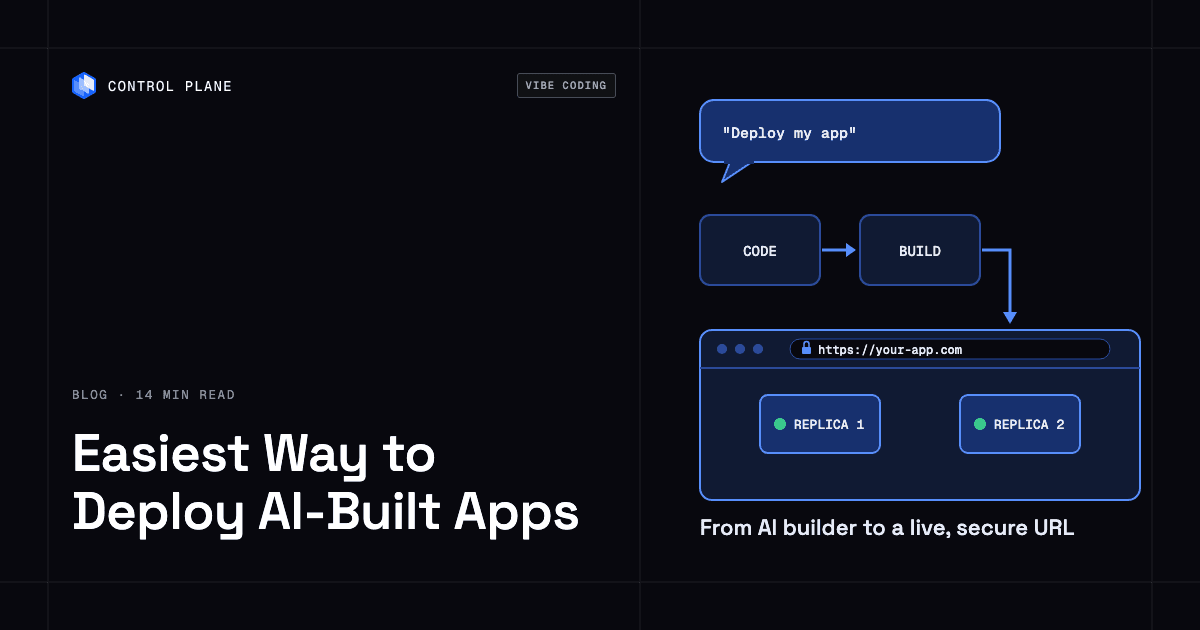
The easiest way to deploy an AI-built app to production is to connect your code to a platform that builds it, runs it with production defaults, and handles domains, TLS, and secrets for you. With Control Plane, you can ask Claude or ChatGPT to deploy the app through Control Plane’s connector, and it builds the code and runs it with health checks and two replicas behind an HTTPS URL.
Disclosure: Control Plane publishes this guide.
TL;DR
The route from AI-generated prototype to production app comes down to a few steps and one platform decision.
- AI builders hand you code, a database, and secrets in different shapes. Know what you have before you deploy.
- Get the code into a repository or a local folder you control.
- Move secrets out of client-side code and into platform-managed secret stores.
- Pick a deploy path: ask an AI assistant to deploy through a connector, build from a repository with a CLI, or assemble it yourself from separate cloud services.
- Run through the production checklist before you share the URL.
- Control Plane is the platform behind the first two paths, with builds, two-replica deployments with health checks by default through the connector, managed domains and TLS, secret handling, queryable logs, and database templates. You can deploy without hiring dedicated DevOps.
What is the easiest way to deploy an AI-built app to production?
The details depend on what your AI builder gave you, but the underlying steps are the same for every tool.
- Get the code into GitHub or a local folder. Every major builder supports GitHub sync or zip download. Cursor and Claude Code already work in your own repository. The code needs to be somewhere you control before you can deploy it to any platform.
- List the environment variables and split public from secret. Variables prefixed with
VITE_(NEXT_PUBLIC_in Next.js) are bundled into client-side code at build time and must not contain secrets, as Vite’s documentation explains. Supabase’s publishable key is designed for the browser when Row Level Security is enabled on every exposed table. The secret key (service_roleon older projects) bypasses every Row Level Security policy and must stay on the server. The OWASP Secrets Management Cheat Sheet flags secrets hardcoded in source code and configuration files as a common risk. - Decide where the database lives and back it up. If your builder provisioned a database, export it before you move. Lovable backs up the project database daily, and you can export a full copy as a PostgreSQL archive that loads with
pg_restore. The export excludes storage files, secrets, and edge function code. You can keep an existing Supabase database, migrate to a new managed instance, or run one on your deploy platform. - Deploy with health checks and two replicas. With a single instance, a deploy or crash can take the app offline. Two replicas let traffic shift to the healthy instance while the new one starts. Health checks tell the platform when a replica is ready to serve requests. Two replicas work only when the app keeps no state in memory or on local disk, so keep sessions in the database, put uploads in object storage, and run scheduled jobs in one worker or a cron workload.
- Add a custom domain and update every URL that points at the old one. A production app needs a domain you own, served over TLS, and sign-in redirects, OAuth callbacks, and webhooks must point at it.
- Check logs and set up rollback. Logs should go to stdout, as the Twelve-Factor App methodology recommends. Keep the previous image tag so you can redeploy it, and test the rollback before launch.
What does each AI builder hand you?
Each builder produces a different combination of stack, export format, data location, and runtime requirements.
| Builder | Typical stack | How the code leaves | Where the data lives | What your host must run |
|---|---|---|---|---|
| Lovable (apps from May 13, 2026; June 22 for Enterprise) | TanStack Start (server-rendered) | Two-way Git sync with GitHub, GitLab, or Bitbucket (all plans) or .zip download (paid plans) | PostgreSQL through Lovable’s built-in backend (built on Supabase’s open-source foundation) or your own Supabase project | A server runtime; for a container, build with NITRO_PRESET=node-server and run node .output/server/index.mjs on port 3000 |
| Lovable (older apps) | React + Vite (static) | Two-way Git sync with GitHub, GitLab, or Bitbucket (all plans) or .zip download (paid plans) | PostgreSQL through Lovable’s built-in backend or your own Supabase project | Any static file server or CDN serving the dist/ folder, with a fallback to index.html for client-side routes |
| Bolt.new | Single-page apps (React, Vue, Svelte), Next.js, or other server-rendered frameworks | GitHub sync or zip download | Bolt’s built-in database, or your own Supabase project (Pro or Teams plan) | A Node server for Next.js and other server-rendered frameworks; any static file server for single-page apps |
| v0 | Next.js with shadcn/ui and Tailwind CSS | Code export or two-way GitHub sync | Databases added through integrations that set environment variables | Typically a Node server (Next.js) |
| Replit Agent | Chosen by Agent per app type (often React with a Node.js backend) | Zip download, GitHub sync through the Git pane, or a GitLab repository connection | PostgreSQL by default, with separate development and production databases | A Node.js server for full-stack apps; a static host for static sites |
| Cursor or Claude Code | Whatever stack you chose | Code is already in your folder or repository | Whatever you configured | Depends on the stack |
The difference between server-rendered and static output decides what your host must run. Newer Lovable apps use TanStack Start, which renders pages on the server and requires a Node process. Older Lovable apps and some Bolt.new projects produce a static dist/ folder that any file server can host. Next.js apps from v0 and Bolt.new typically need a Node runtime. When the frontend runs outside the builder, Lovable’s documentation states that you take on its deployment pipeline, environment variables, availability, logs, and preview environments.
Lovable’s Git sync and zip download do not include database records or stored files, so plan the data move separately. Edge Functions keep running on Lovable’s backend or your Supabase project. Their code is in the supabase/functions/ folder of the repository, and you deploy it with the Supabase CLI only if you move the backend. Wherever the app runs, production needs replicas, health checks, backups, and rollback.
Which deploy path should you pick?
Three paths cover the range from conversational deployment to full manual assembly.
| Path | What you do | What the platform handles | What you still own |
|---|---|---|---|
| Ask your AI assistant to deploy through the Control Plane connector in Claude or ChatGPT | Connect Control Plane, sign in, describe the app, review the result | Image build from a repository or chat files, health checks, two replicas, HTTPS URL with global load balancing and TLS, secret generation, log collection | Database migration, domain DNS records, application-level testing |
| Build from a repository or folder with the Control Plane CLI or CI | Run cpln image build --remote, then cpln apply or cpln workload update, from an agent with terminal access (Cursor, Claude Code) or in a CI pipeline with a CPLN_TOKEN service account key | Remote image build with no Docker needed (uses the Dockerfile if present, otherwise detects the stack), push to the org’s private registry, workload create or update, HTTPS URL with global load balancing and TLS, log collection | Same as above, plus CI pipeline configuration, a replica count of 2 or more, and health probes |
| Assemble it yourself on a hyperscaler from separate services | Provision a container service, managed database, DNS zone, TLS certificates, secrets manager, and logging pipeline individually | Each service handles its own slice | Everything else: wiring services together, networking, scaling rules, certificate renewal, secret rotation, log aggregation, health checks, rollback strategy |
Path one is the fastest when your code is in a GitHub or GitLab repository or was written in the chat session. Path two fits teams that already use CI pipelines or work in terminal-based agents. Path three means owning and wiring every piece yourself, which demands the most operational knowledge.
What changes when an AI-built app goes to production?
Four things shift the moment you move from a builder’s preview to a real deployment.
Secrets in client bundles become a liability. During development, it is common to paste API keys into environment variables and lose track of which ones end up in the browser. Any variable prefixed with VITE_ (NEXT_PUBLIC_ in Next.js) is compiled into the JavaScript bundle and visible to anyone who opens the browser’s developer tools. The Supabase secret key, if exposed this way, bypasses every Row Level Security policy. Server code that uses the secret key also skips Row Level Security, so it must check the user’s permissions itself. Production means auditing every variable, moving secret values to a server-side secret store, and confirming that only publishable keys reach the client.
The database may need to move or be backed up independently. Lovable and Bolt.new provision databases inside their platforms. If you deploy the app elsewhere, a Lovable backend or Supabase project can stay where it is (Bolt lets you claim its database into your own Supabase account) as long as you set the connection URL and keys as environment variables on your new host. You now own backups, access control, and connection pooling. If server code connects with a Postgres driver, use Supabase’s pooler connection string. Keep separate development and production databases wherever you deploy.
Replicas and health checks replace the single preview instance. A builder’s preview is built for development. In production, a single replica means a deploy, crash, or restart can cause downtime. Two replicas with health checks let the platform route traffic to the healthy instance while the other updates or recovers. Processes should shut down gracefully on SIGTERM, as the Twelve-Factor methodology recommends.
You own uptime, logs, and incident response. The builder’s hosting handled much of this while your app lived inside it. Once the app leaves, you need queryable logs, a way to roll back a bad deploy, and alerting that tells you about failures before your users do.
What should you check before launch?
This checklist is vendor-neutral and applies to any AI-built app regardless of builder or deploy target.
| Check | Why it matters | How to verify |
|---|---|---|
No secrets in VITE_, NEXT_PUBLIC_, or other client-prefixed variables | Client variables are compiled into the JavaScript bundle and visible in the browser | Build the app and search the output (dist/, .output/public, or .next/static) for sb_secret_, sk_live_, and other secret key prefixes, and decode any eyJ... JWT to confirm its role is not service_role |
| Row Level Security enabled on every exposed table | The publishable key can read and write any exposed table that lacks Row Level Security | Run Supabase’s Security Advisor, or query pg_tables for public tables where rowsecurity is false |
| Only the publishable database key in the browser | The Supabase secret key bypasses Row Level Security | Inspect network requests in the browser and confirm no secret key appears in headers or payloads |
| Secret keys stored as platform secrets | Hardcoded secrets in source code can leak through repositories, logs, or build artifacts | Confirm each secret is referenced through the platform’s secret manager and absent from code and environment files |
| Database backups and a tested restore | An untested backup may not restore when you need it | Restore a backup into an isolated environment (pg_restore for an archive, psql for a pg_dumpall file) and confirm the data is complete |
| Two or more replicas | A single replica means a deploy or crash can cause downtime | Check the platform’s workload configuration for replica count |
| No state in memory or on local disk | With two replicas, in-memory sessions, local uploads, SQLite files, and in-process cron jobs split or run twice | Confirm sessions live in the database or a cookie, uploads go to object storage, and scheduled jobs run once |
| Health checks | Without health checks, the platform cannot tell whether a replica is ready to serve traffic | Confirm the workload defines a liveness and readiness probe that hits a known endpoint, and keep the liveness check independent of the database so a database blip does not restart every replica |
| Production build and port | A dev server is slow, exposes source maps, and binds to localhost | Confirm the start command runs the production build and the workload port matches the server’s (3000 for Lovable TanStack Start) |
| Custom domain with TLS | A domain you own keeps the URL stable if you change hosts | Verify the domain resolves, the TLS certificate is valid, and HTTP redirects to HTTPS |
| Auth redirects, OAuth callbacks, webhooks, and CORS point at the new domain | Supabase Auth rejects sign-in redirects to URLs missing from its allowlist, and payment or Git webhooks keep posting to the old preview URL | Update the Site URL and Redirect URLs in Supabase Auth, the callback URLs in each OAuth provider, every webhook endpoint, and any CORS allowlist, then sign in and trigger a test webhook on the new domain |
| Logs you can query | Without queryable logs, failures in production stay invisible | Send a test request and confirm it appears in the log viewer |
| Schema migrations run deliberately | Migrations that run on startup can race across replicas, and during a rolling deploy the old and new versions share one schema | Confirm migrations run once as a separate step and that each schema change works with both the old and new code |
| A way to roll back a bad deploy | A broken update should not force a fix under pressure, and rolling back code does not undo a schema migration | Deploy a known-bad change to staging, roll back, and confirm the previous version serves traffic |
How do you deploy an AI-built app with Control Plane?
Control Plane handles Day 2 operations for you, including autoscaling, built-in observability, and security.
Control Plane is a listed connector in Claude and a listed plugin in ChatGPT, so connecting takes a few clicks. You sign in, pick the orgs the assistant may access, describe the app, and review the result. Through Control Plane’s MCP server, the assistant builds an image from a GitHub or GitLab repository or from app files written in the chat. No Docker daemon is involved, and the build uses the Dockerfile when one is present and otherwise detects the stack. It deploys an HTTP app as a standard workload with production defaults: health checks and two replicas, so a deploy does not take it offline. It returns an HTTPS URL that is globally load-balanced and TLS-terminated.
The MCP server cannot read your local filesystem. A folder on your machine builds with cpln image build --remote from an agent that has a terminal, such as Claude Code or Cursor. The remote build needs no Docker, uses the Dockerfile when one is present, otherwise detects the stack, and pushes the image to the org’s private registry. A local build without --remote uses Cloud Native Buildpacks when there is no Dockerfile. A workload created from the CLI runs one replica per location by default, so set at least two for production and define health probes.
Control Plane generates secret values or gives you a Console link to type them, so the credential never lands in the conversation history. Workloads read them as cpln://secret references, and a connector deploy grants the workload access to the secrets its env references.
For databases, the assistant can install PostgreSQL, MySQL, MariaDB, MongoDB, or Redis from Control Plane’s Template Catalog with generated credentials. The PostgreSQL template is a single server with optional PgBouncer pooling and optional scheduled backups to object storage. A separate highly available PostgreSQL template adds automatic failover. To keep an existing Supabase database, set its URL and keys as environment variables and secrets, and make the VITE_ values available when the image builds, since Vite compiles them into the bundle.
Custom domains need a TXT record to prove ownership plus CNAME or NS records. TLS certificates are issued and renewed automatically, and the domain routes to the nearest healthy location.
An update that fails its health probes does not replace the running version. Each location keeps serving the last healthy version until the new one reports ready. Logs are collected automatically and queryable with LogQL, with 30-day default retention. The assistant can read logs and diagnose a failing workload with its likely cause and fix. Before a deletion, the assistant states what it removes and what breaks, then waits for your explicit yes.
In CI, a service account key stored as CPLN_TOKEN lets a pipeline build remotely and deploy. A workload runs in every location of its Global Virtual Cloud (GVC), Control Plane’s named set of locations across AWS, GCP, Azure, and Oracle Cloud Infrastructure regions, plus Kubernetes clusters you connect. Add a second region or cloud to the GVC and the HTTPS URL keeps routing to healthy locations if one fails.
Control Plane is PCI DSS Level 1, SOC 2 Type II, HIPAA, and GDPR compliant. The guide on making a vibe-coded app production ready covers hardening AI-generated code in more depth.
FAQ
These answers cover common questions from founders and developers deploying AI-built apps for the first time.
What is the easiest way to deploy an AI-built app?
Connect Control Plane to Claude or ChatGPT, describe the app, and let the assistant build and deploy it with health checks, two replicas, and an HTTPS URL. Then review the result, add a custom domain, and set secrets through the platform.
How do I deploy a Lovable app to production?
Sync the code to GitHub, then deploy it as a Node server or a static site, depending on its age. Apps created from May 13, 2026 use TanStack Start: build with NITRO_PRESET=node-server and run node .output/server/index.mjs, which listens on port 3000. Older apps produce a static dist/ folder. In both cases, export and back up the database, move secret keys out of any VITE_-prefixed variables, and deploy with health checks and replicas. On Control Plane, ask Claude or ChatGPT to build the repository, and the connector detects the stack and deploys it with health checks and two replicas.
How do I deploy an app built with Claude Code or Cursor?
Build it straight from the folder the agent works in, since no export step is needed. Run cpln image build --remote from the agent’s terminal to build and push the image, then create or update the workload with cpln apply, or commit to GitHub and trigger a CI pipeline. The same production checklist applies: split public from secret variables, set two or more replicas, configure health probes, and add a custom domain.
Do I need a Dockerfile to deploy an AI-built app?
No. Control Plane’s remote build (cpln image build --remote) and its MCP server detect the stack automatically, and a local CLI build uses Cloud Native Buildpacks when no Dockerfile is present. If a Dockerfile exists in the repository, it is used instead.
Can I keep using Supabase after I move my app?
Yes. Set the Supabase project URL and keys as environment variables and secrets on your new host. The publishable key and project URL must be available when the image builds, because Vite compiles VITE_ values into the bundle. The secret key must be stored as a platform secret and never exposed to the browser. Your Supabase database, authentication, and storage keep working once the Supabase Auth Site URL and Redirect URLs include the new domain.
How do I add a custom domain to an AI-built app?
Add a TXT record to prove ownership, then add a CNAME record for a subdomain, or NS records that delegate the domain, pointing to your deploy platform. On Control Plane, TLS certificates are issued and renewed automatically once the DNS records are in place, and the domain routes to the nearest healthy location.
Do I need DevOps experience to deploy an AI-built app?
No, if you use a platform that handles builds, replicas, health checks, TLS, and logging for you. Control Plane’s connector in Claude and ChatGPT lets you deploy by describing the app in plain English. The assistant builds the image, sets production defaults, and returns an HTTPS URL. You still need to know which variables are secret and to verify your database backups. The breakdown of vibe-coded app security risks in production lists who fixes each one.
Can Claude or ChatGPT deploy my app for me?
Yes. With Control Plane’s connector, Claude and ChatGPT can build an image from your repository or from code written in the conversation, deploy it as a workload with health checks and two replicas, generate secrets, install a database from the Template Catalog, and return a live HTTPS URL. Before a deletion, the assistant states what it removes and waits for your explicit yes. The guide on handling traffic spikes for AI-generated apps covers preparing for load.
What happens if a deploy breaks my app?
The previous healthy version keeps running. On Control Plane, each location keeps serving the last healthy version until the new one passes its health probes, and a deploy through the connector sets those probes for you. For a bug that passes the probes, ask the assistant to roll the workload back to its previous version. In a manual setup, test a rollback strategy before launch, whether that means redeploying a previous image tag or reverting a Git commit and rebuilding.
Do I need separate databases for development and production?
Yes. A shared database means a bug in development can corrupt production data. Create isolated databases for each environment and use production credentials only in production. Replit Agent already separates them by default; keep that separation when you move.
Talk to the Control Plane team or sign up free to deploy your AI-built app to production.