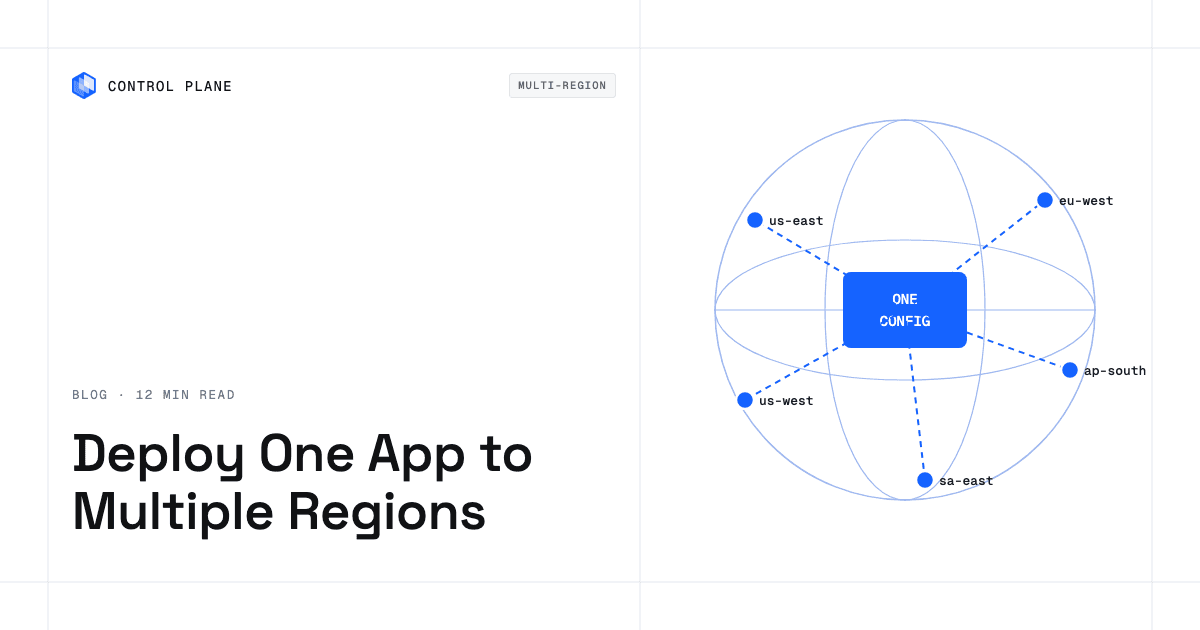
Keep one definition of your application and a short list of per-region values, then let a tool expand that definition into every target region. Infrastructure-as-code tools apply one module or template per region. Options include Terraform with one module block per region alias, OpenTofu 1.9 or later looping a provider over a region list with for_each, Terraform Stacks, Pulumi, or AWS CloudFormation StackSets. GitOps tools stamp one manifest set onto many clusters with Argo CD ApplicationSets, Flux with Kustomize overlays, or Karmada. Platforms such as Control Plane run one workload definition in every location of a group. Whichever you choose, roll changes out region by region with health checks between waves, keep state isolated per region, and solve global routing and data replication alongside the deployment.
Disclosure: Control Plane publishes this guide.
TL;DR
Define the app once, vary only regional values, and roll out in gated waves.
- One definition plus per-region values. Store the application spec once and inject only what must differ, such as endpoints, secret values, instance types, and quotas.
- Three groups of tools. IaC templates applied per region, GitOps or Kubernetes tools that target many clusters, and platforms that map one workload to many locations.
- What must vary per region. Database endpoints, instance types, and quota headroom, plus secret values and identities in most setups; residency policy is shared but enforced per region.
- Per-region state. Give each region its own state key, workspace, or stack, and store state outside the regions it manages.
- Roll out in waves with health gates. Start with a low-traffic canary region, then one region per continent, then the rest, with error-rate and latency gates before each wave.
- Routing and data are separate problems. A single config deploys the app, but you still need a global routing layer, and databases still need their own replication.
- Where Control Plane fits. Control Plane’s Global Virtual Cloud (GVC) runs one workload definition in every location you list across AWS, GCP, Azure, and Oracle Cloud Infrastructure (OCI).
How do I deploy one application to multiple regions with a single configuration?
Write the application definition once, parameterize the few values that differ between regions, and let your tooling create a deployment per region. That removes copy-paste drift and turns adding or removing a region into a one-line change to a list.
Most tools fall into three groups. IaC tools apply one module or template per region. GitOps and Kubernetes tools generate one application per cluster from one manifest set. Location-aware platforms run one workload definition wherever the platform is configured to reach. Each differs in how it orders rollouts and detects drift.
| Pattern | Example tools | What the single config is | How per-region values are supplied | Rollout control | Drift handling | Main limit |
|---|---|---|---|---|---|---|
| IaC module applied per region | Terraform (one module block per region alias) or OpenTofu 1.9+ (provider for_each) | A reusable module | Variable maps keyed by region name | CI-driven apply order | terraform plan or tofu plan per region | Terraform needs a module block per region alias; separate state per region is recommended |
| Terraform Stacks deployments | Terraform Stacks | A stack definition with a deployment per region | Input variables per deployment | Deployment groups with auto-approve rules and failure tolerance (HCP Terraform Plus) | Each deployment’s plan shows changes against live state | Requires HCP Terraform or Terraform Enterprise |
| Pulumi stacks per region | Pulumi CLI, Pulumi Cloud | A Pulumi program | Stack-specific config files, or explicit regional providers in one stack | Stack-by-stack updates, scriptable with the Automation API | pulumi refresh --preview-only per stack | A stack per region adds stacks to manage; one stack with explicit regional providers is the alternative |
| AWS CloudFormation StackSets | AWS CloudFormation | A CloudFormation template | Parameter overrides per account and Region | Sequential or parallel Region deployment, failure tolerance, maximum concurrent accounts | Drift detection on stack instances | AWS only, limited to CloudFormation resource types |
| Azure deployment from one template | Azure Bicep, ARM templates | A Bicep or ARM template | Parameter files per region or subscription | Pipeline stages in Azure Pipelines or GitHub Actions | What-if previews changes against live resources before each deployment | Azure only |
| Google Cloud Deploy multi-target | Google Cloud Deploy | A delivery pipeline with Skaffold config | Child targets with their own deploy parameters | Parallel or serial promotion through targets | No drift detection; verify jobs test each rollout after deploy | Runs on Google Cloud and uses Skaffold; targets are GKE, Cloud Run, attached clusters, or custom types |
| Helm chart with per-region values | Helm | A Helm chart | Values files per region | CI pipeline controls install order | helm diff plugin (use --three-way-merge to see live drift) | Needs a Kubernetes cluster per region |
| Kustomize base plus overlays | Kustomize | A base directory of manifests | Overlay directories per region | Applied by CI or a GitOps controller | GitOps controller reconciliation | No built-in rollout ordering |
| Argo CD ApplicationSets | Argo CD ApplicationSet controller | An ApplicationSet template | List, cluster, or matrix generators | RollingSync steps with maxUpdate (beta, must be enabled) | Continuous reconciliation against Git | Needs Argo CD on a management cluster |
| Flux with Kustomizations per cluster | Flux | A Kustomization per cluster pointing to a shared source | postBuild variable substitution per Kustomization | dependsOn and health checks between Kustomizations | Continuous reconciliation | Ordering is manual through dependencies |
| Karmada propagation policies | Karmada | Standard Kubernetes manifests | OverridePolicy per cluster or region | Placement and replica scheduling; no built-in wave ordering | Karmada controller reconciliation | Adds a federation control plane to run |
| Control Plane GVC | Control Plane | A workload definition in a GVC | Control Plane’s spec.localOptions override settings in named locations | Rolling updates; minReadySeconds sets how long new replicas run before the rollout continues | Drift checks run in Terraform, Pulumi, or a GitOps pipeline when those manage Control Plane resources | Volume data stays in each location |
Teams already deep in Terraform will find a module called once per region familiar. Teams running Kubernetes across clouds often reach for Argo CD ApplicationSets or Flux. Teams that want to stop running clusters and IaC pipelines per region can adopt a platform that maps one configuration to many locations.
What should stay shared and what should vary per region?
A single configuration works only if you are strict about which values are global and which are regional. Sharing too little brings back drift, and sharing too much breaks regions with different quotas, endpoints, or compliance rules.
| Setting | Keep in the shared definition? | Why | How to supply the regional value |
|---|---|---|---|
| Container image and version | Yes | One immutable artifact means every region runs the same code | Tag or digest set once in the shared spec |
| App configuration (non-endpoint) | Yes | One config set keeps behavior the same in every region | Set once in the shared spec |
| Feature flags | Shared flag set, regional targeting | Most flags should behave the same everywhere, but some must differ for residency, legal, or regional launch reasons | The flag service uses region as a targeting attribute |
| Replica counts and autoscaling limits | Mostly yes, override where needed | Traffic differs by region | Per-region variable or overlay |
| Instance or node types | No | Not every instance family exists in every region | Per-region variable or node selector |
| Secrets and encryption keys | Reference shared, value regional | Regional copies limit blast radius, and residency rules can require them | The shared spec names the secret; each region’s secrets manager supplies the value at runtime |
| Database endpoints and replicas | No | Reads go to the local replica, and writes go to the primary unless the database supports multiple primaries | Per-region environment variable or config map |
| DNS records and certificates | Partly | Users reach one global hostname; regional hostnames are optional and used for health checks or debugging | Global record in the routing layer; regional records and certificates provisioned per region when used |
| Quotas and service limits | No | Quotas are granted and consumed per region, so one region can run out while others have headroom | Validate before deploying and request increases per region |
| Data residency and allowed regions | Shared as policy, enforced per region | Compliance rules are global, but enforcement happens where data lands | Policy-as-code gates in CI or admission control |
| IAM roles and identities | Partly | IAM is global within an AWS account or GCP project, so identities differ per account, project, or cloud | Per-account role ARN, service account, or managed identity, scoped to that region’s resources |
| Observability endpoints | Mostly yes | Central observability is the goal, but some collectors are regional | Regional collector endpoint with global aggregation |
| Maintenance windows | No | Time zones and traffic peaks differ | Per-region schedule |
Keeping state per region
Give each region its own state. When one state file covers every region, every plan and apply touches all of them, so an error or outage in one region blocks changes everywhere. Use a separate state key, workspace, or Pulumi stack per region, and store state outside the regions it manages so a regional outage does not lock you out of your recovery tooling.
In Kubernetes deployments, each cluster keeps its own state, and GitOps controllers reconcile each cluster separately. One commit still reaches every cluster at once unless you configure progressive sync or dependency ordering, as covered in long-lived infrastructure, GitOps, and rolling updates.
How do you roll out a change across regions safely?
Deploying to every region at once turns a small bug into a global incident, so roll out in waves with health gates between them. Stage the previous image and configuration before wave 1 starts. These waves are an example; adapt the number of waves, the regions in each, and the gates to your traffic and risk tolerance.
| Wave | Which regions | Gate to proceed | Rollback trigger |
|---|---|---|---|
| 1: Canary | One low-traffic region with the same dependencies as larger regions; avoid the region that hosts your management tooling or global config | Error rate, latency, and synthetic checks hold steady through at least one daily traffic peak | Error rate exceeds the baseline by a set threshold, or synthetic checks fail |
| 2: One region per continent | One region in each remaining continent or major geography | Wave 1 gates, plus database replication lag and resource saturation within bounds | Any promoted region breaches error or latency thresholds |
| 3: Remaining regions | All regions not yet updated | All prior gates | Any region fails health checks or a dependency degrades |
| Post-rollout verification | Every region | Full synthetic test suite passes everywhere, and a configuration drift audit is clean | A delayed failure traces back to the change |
Bake time
Each wave needs a bake period during which the new version serves production traffic with no further changes. Later waves can move faster, but keep a bake period in high-traffic regions because their blast radius is largest. A rollout across many regions can take days.
Per-region approvals
Pipelines can require approval between waves. AWS CodePipeline supports manual approval actions in a stage. GitHub Actions environments can require reviewers before a deployment job runs (private repositories need GitHub Enterprise). These turn your rollout waves from a process document into a constraint the system enforces.
Rollback
If a failure is local to one region, roll back that region to the staged image and configuration. If it traces to the change itself, halt the rollout and roll back every region already on the new version. Use expand-and-contract database migrations so old and new versions can share the same schema during a partial rollback.
Test failover and rollback regularly without taking production down so the procedures work when you need them.
What does a single configuration not solve?
A single configuration puts your application in many regions, but it does not handle global routing, data replication, or regional capacity.
Global routing
Users need to reach the nearest healthy region through a global load balancer, Anycast IP, or health-checked DNS. Routing policies can be latency-based, geography-based, weighted, or priority-based failover. Health checks at the routing layer must test application readiness, because a TCP check passes even when a region is running but degraded.
Data replication
Your pipeline deploys the application in each region, but it does not move data between them. Each stateful service needs a replication strategy: synchronous replication for strong consistency, asynchronous replication for lower write latency, or partitioning so each record has one home region. The choice depends on your recovery point and recovery time objectives, write latency budget, and tolerance for replication lag.
Regional capacity
Cloud providers do not offer the same instance types, quotas, or services in every region. A deployment that works in us-east-1 can fail in ap-southeast-3 (Jakarta), an opt-in region that must be enabled per account and offers fewer instance families. Validate capacity and request quota before each new region.
Routing, replication, and capacity planning are covered in more depth in running your app across multiple regions.
How Control Plane fits
On Control Plane, the platform expands one workload definition into each region, so your pipeline does not loop over regions.
Control Plane is the unbreakable platform for running production workloads. It runs serverless, standard, stateful, and cron workloads natively on AWS, GCP, Azure, and Oracle Cloud Infrastructure (OCI), VM workloads on locations joined through Control Plane’s Managed Kubernetes, and workloads on Kubernetes clusters you already run or your own machines, including on premises, active-active across regions and clouds.
A Global Virtual Cloud (GVC) is Control Plane’s named set of locations across AWS, GCP, Azure, and OCI regions, plus your own clusters and servers. A workload runs in every location of its GVC, so one workload definition deploys to every region in the GVC. Adding or removing a region means editing the GVC’s location list.
On Control Plane, a workload’s spec.defaultOptions apply in every location of its GVC, and spec.localOptions override settings, such as autoscaling limits or suspending the workload, in named locations. Each Control Plane workload that serves traffic gets a canonical endpoint, a hostname that uses DNS to send users to the nearest location where the workload passes its readiness probes.
Control Plane handles Day 2 operations for you, including autoscaling, built-in observability, and security. Control Plane is PCI DSS Level 1, SOC 2 Type II, HIPAA, and GDPR compliant. Control Plane resources can be managed with Terraform, Pulumi, Control Plane’s cpln CLI, or GitOps pipelines.
Control Plane does not replicate volume data between locations, so databases need their own replication strategy.
FAQ
These answers cover Terraform, Kubernetes, secrets, state, and rollout order for multi-region deployments.
How do I deploy one application to multiple regions with a single configuration?
Write the spec once, inject per-region values, and let IaC, GitOps, or a location-aware platform create each regional deployment. Then roll changes out in waves, starting with a canary region, with health gates between waves.
Can Terraform deploy to multiple regions at once?
Yes. In Terraform, define one provider alias per region and call your module once per alias. OpenTofu 1.9 and later can loop a provider over a region list with for_each. AWS provider v6 also lets most resources set their own region, so one provider block can manage many AWS regions. Terraform Stacks, in HCP Terraform and Terraform Enterprise, let each deployment target a region with its own inputs.
How do I deploy to multiple regions with Kubernetes?
Use a GitOps controller that targets many clusters. Argo CD ApplicationSets generate one Application per cluster from a template. Flux applies a Kustomization per cluster that points at a shared source with per-cluster substitutions. Karmada propagates manifests to member clusters through propagation and override policies.
What is an Argo CD ApplicationSet?
An ApplicationSet is an Argo CD custom resource that generates many Application resources from one template. List generators supply explicit values, cluster generators discover registered clusters, and matrix generators combine two generators. Progressive Syncs, a beta feature you must enable, roll changes out in ordered steps and cap how many Applications update at once.
How do I keep secrets different per region with one configuration?
Reference each secret by name in the shared spec and let each region’s secrets manager supply the value at runtime. If your IaC creates only the secret’s name and not its value, the value stays out of images and IaC state.
Should I deploy to all regions at the same time?
No. Start with a canary region, watch it through at least one daily traffic peak, then promote in waves with automated health gates. This limits the blast radius and leaves a rollback path before the change reaches high-traffic regions.
How do I handle Terraform state for multiple regions?
Give each region its own workspace or state key so each one plans and applies independently. Store the state outside the regions it manages, so an outage in one region does not block the tooling you need to recover it.
What is AWS CloudFormation StackSets?
CloudFormation StackSets let you deploy one CloudFormation template across multiple AWS accounts and Regions from a single administrator account. You can override parameters per account and Region, choose sequential or parallel Region deployment, and set failure tolerance and concurrency.
How does Control Plane deploy one workload to many regions?
Control Plane runs one workload definition in every location of a Global Virtual Cloud (GVC), which can include AWS, GCP, Azure, and OCI regions, your own clusters, and your own machines, including on premises. Baseline settings apply everywhere, and per-location overrides change settings such as autoscaling limits in named locations. To add a region, add it to the GVC.