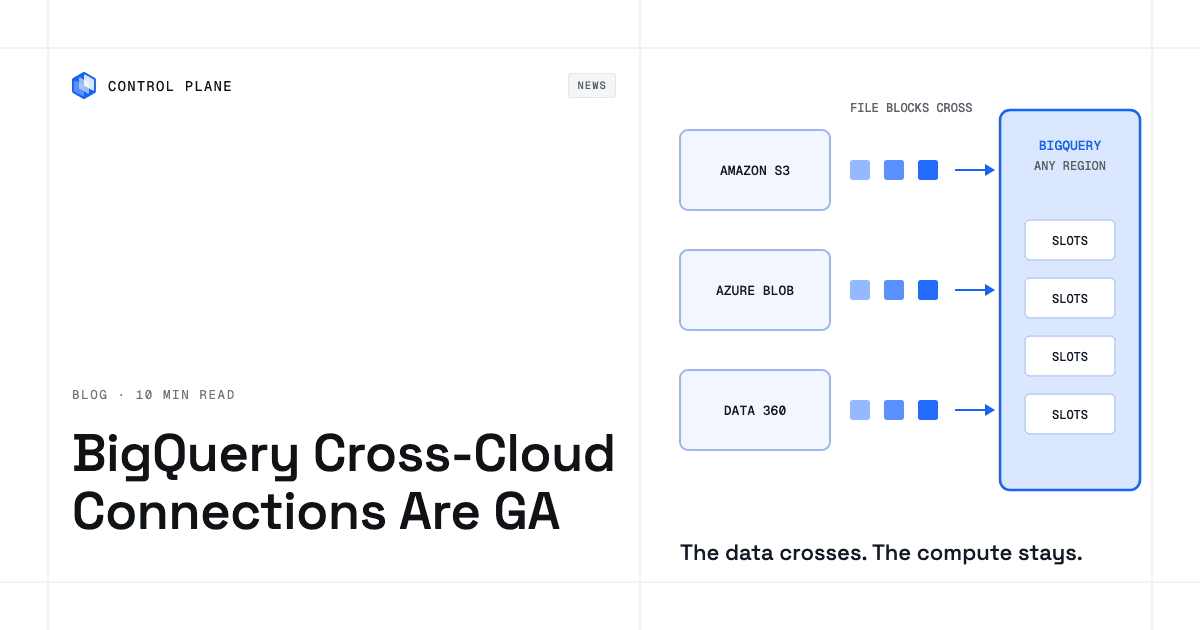
On November 25, 2026, Google made BigQuery cross-cloud connections generally available. BigQuery can now query data stored in Amazon S3, Azure Blob Storage, and Salesforce Data 360 from any standard BigQuery region, with more BigQuery features than Omni connections allow and with standard slot reservations. The query compute stays entirely in Google Cloud. The file blocks a query needs move from the source cloud into BigQuery, and an optional cache stores retrieved blocks in the Google Cloud region at no additional charge. For teams whose data already sits in more than one cloud, S3 and Blob Storage data can now be queried with the same slot reservations and region choices as native BigQuery data.
Disclosure: Control Plane publishes this guide.
TL;DR
BigQuery cross-cloud connections let you run BigQuery SQL, with more features than Omni connections allow, against data that stays in S3, Blob Storage, or Salesforce Data 360, with compute running in any standard BigQuery region.
- Cross-cloud connections reached GA on November 25, 2026, after entering Preview on August 3, 2026.
- Query compute runs on standard BigQuery workers in Google Cloud. Only the file blocks a query reads, plus per-query metadata and permission checks, cross the cloud boundary.
- Unlike BigQuery Omni, which deploys lightweight compute workers into AWS or Azure, cross-cloud connections use your existing BigQuery slots and support more BigQuery features. Google cites BigQuery AI capabilities, materialized views, and user-defined functions; Omni lists BigQuery ML statements and JavaScript UDFs as unsupported.
- Caching is off by default. When enabled, BigQuery caches retrieved file blocks in the connection’s Google Cloud region at no additional charge.
- The main cost to plan for is the source cloud’s standard internet egress charges, which Google’s Lakehouse cross-cloud documentation notes are typically higher than Cross-Cloud Interconnect egress rates.
- Applications that consume this data still need to run, scale, and fail over somewhere. Control Plane runs those applications across regions and clouds, including AWS, GCP, Azure, and Oracle Cloud Infrastructure, from one Global Virtual Cloud (GVC), Control Plane’s named set of locations that a workload runs in at once. Control Plane offers a 99.999% SLA for workloads that run at least two replicas in at least two locations.
What are BigQuery cross-cloud connections?
Cross-cloud connections are BigQuery connections that bring data from AWS, Azure, and Salesforce Data 360 into BigQuery for querying, as an alternative to standard Omni connections.
With a standard Omni connection, BigQuery deploys lightweight compute workers into a remote region in AWS or Azure and runs the query there. With a cross-cloud connection, the query runs on standard BigQuery compute workers in a Google Cloud region you choose. You create the connection in a standard BigQuery location such as us-east4, and Google advises picking the region physically closest to the data. Its documentation maps, for example, AWS us-east-1 to us-east4 and Azure West Europe to europe-west4.
Supported sources include Amazon S3 (with the option to federate an entire AWS Glue database), Azure Blob Storage, and Salesforce Data 360, which is Salesforce’s new name for Data Cloud. Google’s examples use Parquet and CSV files, and a September 18, 2026 blog post adds JSON for standalone files. For Apache Iceberg catalogs, Google points to the cross-cloud data access capability of its Lakehouse product instead.
What crosses clouds and what stays in Google Cloud?
Compute, file blocks, cache, and billing sit in different places for the two connection types.
| Item | Cross-cloud connection (GA Nov 25, 2026) | Standard BigQuery Omni connection |
|---|---|---|
| Query compute | Standard BigQuery workers in a Google Cloud region | Lightweight BigQuery workers deployed in AWS or Azure |
| Connection location | Any standard BigQuery region (e.g., us-east4) | A fixed list of Omni regions (six AWS, one Azure) |
| Source files at rest | Stay in Amazon S3 or Azure Blob Storage | Stay in Amazon S3 or Azure Blob Storage |
| File blocks read by a query | Travel into Google Cloud; Google’s Lakehouse documentation describes the default path as the public internet with TLS | Processed in place in the remote cloud; Google says data is not copied across clouds |
| Cache | Optional; caches file blocks in the Google Cloud region at no additional charge; Google manages capacity and eviction; CMEK not supported for the cache | No file-block cache; metadata caching and materialized views over cache-enabled Amazon S3 tables |
| Compute billing | Standard BigQuery slot reservations and commitments | On-demand per TiB by default, or Enterprise edition slots (Standard and Enterprise Plus not supported) |
| Data transfer billing | Source cloud’s standard internet egress charges | No data movement for queries processed in place; Omni cross-cloud transfer billed per GiB moved to Google Cloud |
| Access to the bucket | IAM role (AWS) or app registration (Azure) with federated credential for the connection’s Google identity | IAM role (AWS) or app registration (Azure) |
| BigQuery features | Features Google lists as unavailable through standard connections, including BigQuery AI capabilities, Gemini Enterprise Agent Platform, materialized views, and user-defined functions | Limited: no BigQuery ML, no DML, no JavaScript UDFs, no BigQuery Storage API in Omni regions, no CMEK, no materialized views over Blob Storage |
Cross-cloud connections add BigQuery features and use standard slot billing while moving file blocks across clouds. The trade-off is that those file blocks trigger the source cloud’s egress charges, so teams weigh feature availability and slot economics against data transfer costs. Cached blocks use Google-managed encryption keys only.
How are cross-cloud connections different from BigQuery Omni?
The core architectural difference is where the query compute runs.
BigQuery Omni, which reached GA on October 25, 2021, places BigQuery’s query engine inside AWS or Azure so that processing happens where the data already sits. That design minimizes egress costs but constrains you to six AWS regions and one Azure region, limits capacity pricing to Enterprise edition, and excludes features like BigQuery ML, DML statements, JavaScript UDFs, and the BigQuery Storage API. Cross-cloud connections invert that model. Compute stays in Google Cloud, so more BigQuery features work, and you can use any standard BigQuery region. The cost you accept in return is the source cloud’s internet egress for the file blocks each query reads. Google lists three benefits for the cross-cloud model: feature consistency across clouds, cost efficiency through standard slot reservations, and intelligent caching that reduces repeated egress. The console still labels the connection type “BigLake on AWS (via BigQuery Omni),” which can cause confusion, but the underlying behavior is different.
What does it cost to run?
Billing for cross-cloud connections splits across two clouds and two line items.
Query compute consumes your standard BigQuery slot reservations and commitments, so it draws on the same capacity as your other BigQuery workloads instead of separate Omni capacity. Reading file blocks from S3 or Blob Storage incurs the source cloud’s standard internet egress charges, which Google’s Lakehouse cross-cloud documentation notes are typically higher than Cross-Cloud Interconnect egress rates. Google documents Cross-Cloud Interconnect routing for that Lakehouse feature; the cross-cloud connections page does not describe an Interconnect option. Caching exists partly to reduce those egress costs: once a file block is cached in the Google Cloud region, subsequent queries that read the same block do not trigger another cross-cloud transfer. Every query still checks metadata and permissions with the source before serving cached data, so the source storage must stay reachable even for cached reads. Reading fewer bytes, for example with partition filters and columnar Parquet files, also lowers egress. Google recommends the BigQuery region physically closest to the data for cost and performance.
How do you set up a cross-cloud connection?
Setting up an Amazon S3 or Azure Blob Storage connection requires a Google Cloud role, storage permissions in the source cloud, and a trust relationship between the two identity systems.
| Step | AWS | Azure |
|---|---|---|
| Google role | BigQuery Admin | BigQuery Admin |
| Permission on the storage | IAM policy granting s3:ListBucket and s3:GetObject (plus kms:Decrypt for KMS-encrypted objects) | A role such as Storage Blob Data Reader on the storage account |
| Identity trust | IAM role with a trust policy for the connection’s Google identity | App registration with a federated credential using the connection’s Google identity |
| Session or credential | Maximum session duration of 12 hours | Federated credential |
| Region choice | Pick the BigQuery region closest to the S3 bucket (e.g., AWS us-east-1 maps to us-east4) | Pick the BigQuery region closest to the Blob Storage account (e.g., Azure West Europe maps to europe-west4) |
| Caching decision | Off by default; enable to cache file blocks in the Google Cloud region at no additional charge | Off by default; enable to cache file blocks in the Google Cloud region at no additional charge |
For Salesforce Data 360, Google’s steps link a Data 360 dataset to BigQuery and create the linked dataset in a standard BigQuery location instead of an Omni location.
How did BigQuery get here?
Google has been building toward cross-cloud querying since 2021, and the pace accelerated through 2026.
| Date | Change |
|---|---|
| October 25, 2021 | BigQuery Omni GA |
| December 2, 2022 | Omni cross-cloud transfer GA |
| January 13, 2025 | Omni VPC allowlists GA |
| June 5, 2026 | Lakehouse adds AWS Glue as a remote catalog (Preview) |
| July 13, 2026 | Snowflake as a remote catalog (Preview) |
| August 3, 2026 | Cross-cloud connections Preview |
| August 31, 2026 | Lakehouse caching for cross-cloud data access Preview |
| November 2, 2026 | Lakehouse caching GA and remote catalog providers GA |
| November 25, 2026 | Cross-cloud connections GA |
What it means for applications that run across clouds
Analytics that read across clouds feed applications that often run in more than one cloud.
Many teams run the application layer in more than one cloud for latency, compliance, or redundancy reasons. An application that pulls data from one cloud and serves users from another already spans two providers. A front-end in a third region or a Salesforce integration adds to the operational surface. Running that layer well means a way to deploy applications across AWS, GCP, and Azure without duplicating configuration and identity plumbing for each provider.
Control Plane fits here. One Control Plane GVC can span locations on AWS, GCP, Azure, and Oracle Cloud Infrastructure, plus clusters or servers you run, and a workload runs in all of the GVC’s locations at once. Universal Cloud Identity, Control Plane’s cloud access feature, gives a workload one identity that maps to an IAM role on AWS, a service account on GCP, and a managed identity or app registration on Azure, and Control Plane’s docs name BigQuery among the services workloads reach this way. A workload that reads from S3 and writes to BigQuery needs one identity, with no long-lived cloud keys in your code. Cloud Wormhole, Control Plane’s private connectivity feature, connects workloads to TCP or UDP endpoints in VPCs, on-premises data centers, and other private networks through an agent that connects out to Control Plane, so the private network needs only outbound access. Control Plane handles Day 2 operations for you, including autoscaling, built-in observability, and security. Control Plane offers a 99.999% SLA for workloads that run at least two replicas in at least two locations. BigQuery cross-cloud connections handle the query side, and Control Plane runs the portable applications that use the results.
FAQ
Common questions about BigQuery cross-cloud connections, answered from Google’s documentation and release notes.
Are BigQuery cross-cloud connections generally available?
Yes. Google made cross-cloud connections generally available on November 25, 2026, according to the BigQuery release notes. The feature entered Preview on August 3, 2026. You can use cross-cloud connections to query data in AWS, Azure, and Salesforce Data 360 from all standard BigQuery regions.
What is the difference between BigQuery cross-cloud connections and BigQuery Omni?
BigQuery Omni deploys lightweight compute workers into AWS or Azure and runs the query where the data sits. Cross-cloud connections run the query on standard BigQuery compute workers in a Google Cloud region and pull the needed file blocks over the network. Cross-cloud connections support more BigQuery features, work in any standard BigQuery region, and use standard slot reservations. Omni is limited to six AWS regions and one Azure region, offers capacity pricing only on Enterprise edition, and does not support BigQuery ML, DML, JavaScript UDFs, or the BigQuery Storage API in Omni regions.
Does BigQuery copy my S3 data into Google Cloud?
Not as a full copy. The source files stay in Amazon S3. BigQuery reads only the file blocks a query needs, and those blocks travel into Google Cloud for processing. Google’s Lakehouse cross-cloud documentation describes that transfer as running over the public internet with TLS. If you enable caching, BigQuery temporarily stores copies of those blocks at rest in the connection’s Google Cloud region so subsequent queries can reuse them without another cross-cloud read, but the original files remain in S3.
Who pays for egress with BigQuery cross-cloud connections?
The source cloud charges its standard internet egress rates for the file blocks BigQuery reads. Google’s Lakehouse cross-cloud documentation notes that these rates are typically higher than Cross-Cloud Interconnect egress rates. Enabling caching and reading fewer bytes, for example with partition filters and columnar Parquet files, are the main ways to reduce egress costs. Google also recommends the BigQuery region physically closest to the data for cost and performance.
Can I use BigQuery ML on data in Amazon S3?
Google has not said so specifically. Its cross-cloud connections page names “BigQuery AI capabilities” among the features available through cross-cloud connections, and its Omni page lists BigQuery ML statements as unsupported in Omni regions. Test BigQuery ML statements against a cross-cloud connection table before relying on them.
What is Salesforce Data 360?
Salesforce Data 360 is Salesforce’s new name for Data Cloud. BigQuery cross-cloud connections support querying Salesforce Data 360 as a source. Google’s console still displays “Salesforce Data Cloud” in some places.
How does a cross-cloud connection handle caching?
Caching is off by default. When you enable it, BigQuery caches the file blocks it retrieves in the connection’s Google Cloud region at no additional charge. Every query checks metadata and permissions with the source before serving cached data. Google manages cache capacity and eviction. Cached data uses Google-managed encryption keys, and customer-managed encryption keys (CMEK) are not supported for the cache. Cross-cloud caching, which covers both Lakehouse federated catalogs and BigQuery cross-cloud connections, reached GA on November 2, 2026.
What regions can I use for a cross-cloud connection?
Any standard BigQuery region. Google advises choosing the BigQuery region physically closest to the data. Its documentation maps AWS us-east-1 to us-east4 and Azure West Europe to europe-west4, for example. Omni, by contrast, is limited to a fixed list of six AWS regions and one Azure region.
How does Control Plane relate to BigQuery cross-cloud connections?
BigQuery cross-cloud connections are a Google Cloud feature. Control Plane runs the applications that consume that data, in one region or across regions and clouds. A workload deployed in a Control Plane Global Virtual Cloud can span AWS, GCP, Azure, and Oracle Cloud Infrastructure. Universal Cloud Identity, Control Plane’s cloud access feature, gives that workload one identity that maps to the correct IAM principal on AWS, GCP, and Azure, so a service that reads from S3 and writes to BigQuery authenticates natively on both clouds with no long-lived cloud keys in your code. Control Plane also handles Day 2 operations such as autoscaling, observability, and security.
Talk to the Control Plane team to see how a Global Virtual Cloud runs your applications with access to data in AWS, GCP, and Azure, or sign up free and deploy your first workload.