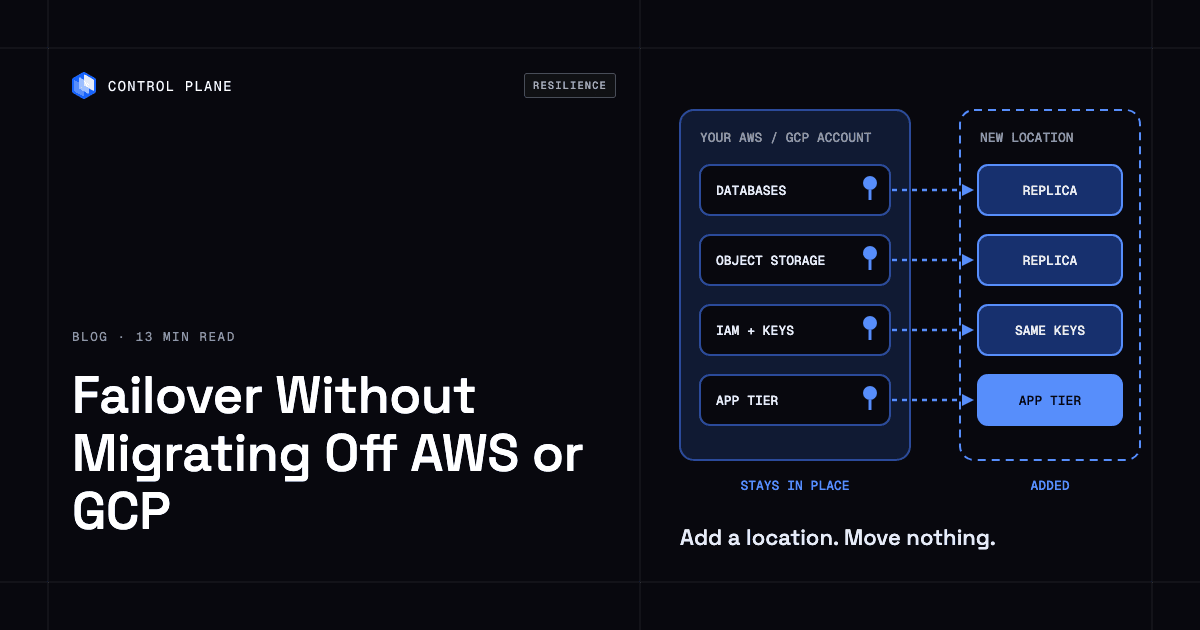
You can add cross-region or cross-cloud failover without migrating off AWS or Google Cloud by keeping your accounts, managed databases, and identity where they are, turning on each data service’s own cross-region replication, and running the stateless application tier active-active in a second location that reaches your data privately. Control Plane runs that application tier as one workload across locations that include your existing AWS and Google Cloud accounts and Kubernetes clusters, so nothing has to move first. This guide covers what stays in your current cloud, what changes, and how to stage the work without a migration project.
Disclosure: Control Plane publishes this guide.
TL;DR
Adding failover does not require leaving your cloud provider.
- Your AWS or Google Cloud accounts, billing, managed databases, and IAM stay exactly where they are.
- Turn on each data service’s native cross-region replication: Aurora Global Database, DynamoDB global tables, S3 Replication Time Control, Cloud SQL cross-region replicas, Spanner multi-region instances, and the rest.
- Run the stateless application tier active-active in a second location, either a second region of the same provider or a location on another cloud.
- Connect the failover location to your data privately with inter-region peering, PrivateLink, Private Service Connect, or Cross-Cloud Interconnect.
- Route traffic with health-checked DNS, such as Amazon Application Recovery Controller (ARC) routing controls, or a platform endpoint that routes to healthy locations, and test failover before you need it.
- Inter-region transfer within a continent costs $0.02 per GB (AWS) or per GiB (Google Cloud), about $40 a month per 2 TB of new data.
- Control Plane runs the stateless tier across your existing accounts and Kubernetes clusters.
Can you add failover without migrating off AWS or Google Cloud?
Yes, because your accounts, IAM, managed databases, keys, and billing stay in place while you add a second copy of the stateless tier, a replication path for each data service, and health-checked routing.
- Map what depends on one region. List every managed service, data store, secret, key, TLS certificate (ACM certificates are regional), container registry, CI runner, queue, and third-party API that exists in only one region or one provider. Include control plane actions such as IAM changes and DNS record edits, which can fail while a region is impaired. This inventory is the scope of the project.
- Turn on native replication for each data service. Aurora Global Database, DynamoDB global tables, S3 Replication Time Control, Cloud SQL cross-region replicas, Spanner multi-region instances, Cloud Storage dual-region buckets, and Memorystore cross-region replication are all built in. Each has a different lag profile, failover action, and cost.
- Replicate secrets and keys. AWS Secrets Manager can replicate secrets to multiple Regions and promote a replica to a standalone secret, and AWS KMS multi-Region keys can be used interchangeably as though you had the same key in multiple Regions. Google Secret Manager offers automatic or user-managed replication policies. Without this step, the failover location cannot decrypt data or authenticate to services.
- Stand up the stateless tier in a second location. Deploy the same container images and configuration to a second region or a second cloud, from infrastructure as code so the deployment is reproducible. Size it to carry all traffic, raise service quotas there in advance, and size the replica database for the full write load after promotion. Until promotion, RDS, Aurora, and Cloud SQL accept writes in one region only, so the second location reads from its local replica and sends writes across regions to the primary; use an endpoint that follows the primary after promotion, such as the Aurora global writer endpoint. Run cron jobs and singleton workers in one location, or use leader election, so they do not run twice.
- Connect the failover location to data privately. Inter-region VPC peering, Transit Gateway peering, AWS PrivateLink, Google Private Service Connect, or Google Cross-Cloud Interconnect keep traffic off the public internet.
- Add health-checked routing and run a failover test. Use health-checked DNS or a global load balancer, then run a real failover drill and rehearse failback in the same drill.
What stays in place, and how does each service get a second region?
Every managed data service on AWS and Google Cloud has its own cross-region mechanism, lag profile, and failover action (November 2026).
| Service | Native cross-region option | Documented lag or RPO | Failover action |
|---|---|---|---|
| Amazon Aurora Global Database | Dedicated replication infrastructure to secondary Regions | Typically under a second | Switchover (no data loss, healthy cluster) or failover (outage recovery) |
| Amazon RDS (non-Aurora) | Cross-Region read replicas | Not stated in the docs | Promote the replica manually; the old primary does not rejoin automatically |
| DynamoDB global tables | Multi-Region, multi-active; MREC (default) or MRSC mode | MREC usually a few seconds; MRSC RPO zero (MRSC needs three Regions, or two plus a witness) | No promotion; every Region accepts writes |
| Amazon S3 | Replication Time Control | Most objects in seconds; 99.9% within 15 minutes | Point reads and writes at the replica bucket, or use Multi-Region Access Point failover controls; set up two-way replication for failback |
| Amazon ElastiCache Global Datastore | Cross-Region read replica clusters (Valkey or Redis OSS, node-based) | Not stated in the docs | Promote a secondary cluster to primary |
| AWS Secrets Manager and KMS | Multi-Region secret replication; multi-Region keys | Not stated in the docs | Promote a replica secret; multi-Region keys work interchangeably |
| Google Cloud SQL | Cross-region read replicas | Not stated in the docs | Promote the replica when the primary’s region is unavailable |
| Google Cloud Spanner | Multi-regional and dual-regional instances | Synchronous replication across regions | Built in; SLA at least 99.999% for multi-regional and dual-regional instances |
| Google Firestore | Multi-region databases | Not stated in the docs (strongly consistent queries) | Built in; SLA at least 99.999% for multi-region databases |
| Google Cloud Storage | Dual-region and multi-region buckets; turbo replication | Turbo replication: 100% of new objects within a 15-minute RPO | None needed; the bucket stays available from the surviving region with no path change |
| Memorystore for Redis Cluster | Cross-region replication to read-only secondary clusters | Not stated in the docs (asynchronous) | Switch over to or detach the secondary cluster |
| Google Secret Manager | Automatic or user-managed replication policies | Not stated in the docs | Secrets replicate under the policy you choose |
Your databases and storage stay put; you enable replication, monitor lag, and rehearse the promotion or switchover action before production needs it. The guide to failing over a database and application between cloud regions walks through the promotion sequence.
How does a failover location reach data that never moves?
The failover location needs a private path to the data services in your account, and six methods cover the common cases.
| Method | What it connects | Best fit | Watch out for |
|---|---|---|---|
| Control Plane Cloud Wormhole and native networking | Control Plane workloads to TCP or UDP endpoints in VPCs and on-premises data centers | Reaching private data from any Control Plane location without opening inbound ports | The private network needs only outbound access; native networking to AWS VPC endpoints and Google Private Service Connect is set up with Control Plane support |
| AWS PrivateLink | A VPC to services as if they were in the same VPC | Reaching AWS services from another VPC or account | Per-endpoint and data processing charges; each service needs its own endpoint |
| Inter-Region VPC peering or Transit Gateway peering | VPCs in different AWS Regions | AWS-to-AWS connectivity for databases and services | VPC peering is not transitive; Transit Gateway adds hourly attachment charges, per-GB data processing, and inter-Region transfer |
| Google Private Service Connect | A VPC to Google managed services | Reaching Google Cloud managed services privately | Endpoint configuration per service |
| Google Cross-Cloud Interconnect | Google Cloud to AWS, Azure, or Oracle Cloud Infrastructure (OCI) | Dedicated connectivity for sustained cross-cloud traffic | 1 to 4 weeks of physical provisioning; fixed 10, 100, or 400 Gbps ports billed in both clouds |
| Public endpoints with workload identity federation | Any location to AWS or Google Cloud APIs over the internet | A quick start before private connectivity exists | Traffic crosses the public internet and relies on TLS and federated identity |
During a regional outage the failed region is unreachable, so the failover location connects to the promoted replica in its own region, and that connection path must exist in both regions. Identity federation lets a failover location authenticate without long-lived keys. AWS IAM OIDC federation and IAM Roles Anywhere give workloads outside AWS temporary credentials, and Google Cloud Workload Identity Federation lets workloads on AWS, Azure, or OIDC and X.509 identities reach Google Cloud without service account keys.
Published pricing as of November 2026 gives these illustrative transfer costs.
- AWS: replicating 2 TB (2,000 GB) of new data a month from US East (N. Virginia) to another US Region costs 2,000 GB × $0.02 per GB = $40 a month in inter-Region transfer.
- Google Cloud: replicating 2 TiB (2,048 GiB) a month between two North American regions costs 2,048 GiB × $0.02 per GiB = $40.96 a month. Between North America and Europe at $0.05 per GiB, the same volume costs $102.40.
These figures cover transfer only. Replica storage, compute for the second location, and private endpoint charges depend on the workload. Queries from the second location to a cross-region primary are billed at the same inter-region rates and can exceed replication volume, and Aurora Global Database also bills replicated write I/O to each secondary Region.
What changes compared with a full migration?
A full migration and keeping your cloud while adding failover differ at every layer.
| Layer | Full migration | Keep in place and add failover |
|---|---|---|
| Accounts and billing | New accounts on the target provider; renegotiate contracts and committed-use discounts | Existing accounts and billing stay; add a second region or account only for the failover tier |
| IAM and identity | Rebuild roles, policies, and federation on the new provider | Same IAM for a second region; add workload identity federation only for another cloud |
| Managed databases | Export, import, revalidate schemas, and tune for the new engine | Turn on native cross-region replication; test promotion and failback |
| Database write path | Re-pointed once to the new provider | One writer stays in the primary region; the second location writes across regions until you promote a replica |
| Object storage | Copy every object and update every reference | Enable replication; Cloud Storage dual-region buckets keep the same bucket name, and S3 clients switch to a Multi-Region Access Point alias once |
| Secrets and keys | Re-create secrets and keys on the new provider and rotate everywhere | Replicate secrets and keys with built-in replication |
| Networking | Build new VPCs, subnets, peering, firewall rules, and DNS | Add inter-region peering, private endpoints, or cross-cloud interconnect |
| Application tier | Repackage, retest, and redeploy on new compute primitives | Deploy the same container images to a second location |
| CI/CD | Rewrite pipelines for new provider APIs, registries, and targets | Add a second deployment target to existing pipelines |
| Observability | Adopt the new provider’s monitoring and rebuild dashboards and alerts | Extend existing observability to the failover location |
| Team skills | Train the whole team on a new provider | Train a smaller group on cross-region operations and failover |
Keeping your cloud still costs engineering time, but it skips the largest cost of a migration: re-platforming services that already work. The analysis of whether multi-region active-active is worth the cost for a growing SaaS company models the break-even point.
Same-cloud second region or a second cloud?
A second region protects against regional failures, and a second provider protects against failures that span a provider’s regions. The October 2025 AWS event in us-east-1 started at 11:48 PM PDT on October 19 and ended at 2:20 PM PDT on October 20, in three distinct periods of impact, according to AWS’s post-event summary; workloads already running in a second AWS Region with replicated data had a healthy place to serve from, provided they did not depend on us-east-1 for IAM changes or new instance launches. On June 12, 2025, a Google Cloud Service Control failure had global impact for 3 hours, with us-central1 taking up to about 2 hours 40 minutes longer to fully recover, according to Google’s incident report; a second region of the same provider shared that failure.
A second region is operationally simpler, with the same APIs, IAM, and billing. A second provider adds fault isolation at the cost of more networking, identity, infrastructure as code, and team skills. Teams often start with a second region and add a second cloud later. The guide to adding a second cloud provider for failover without doubling your ops work covers the cross-provider path, and the cloud outage tracker shows how often each provider’s regional and global events occur.
How Control Plane fits
Control Plane handles Day 2 operations for you, including autoscaling, built-in observability, and security. It runs workloads in a Global Virtual Cloud (GVC), Control Plane’s set of locations where each workload runs. Locations can be Control Plane-managed regions on AWS, Google Cloud, Azure, and Oracle Cloud Infrastructure (OCI), plus Kubernetes clusters and machines you register.
If you already run EKS or GKE, Control Plane’s bring your own Kubernetes (BYOK) installs a few components in your existing cluster and registers it as a new location, still running in your own cloud account. Nothing migrates. Control Plane Managed Kubernetes (MK8s) can also run worker nodes, load balancers, and storage in your own AWS account (through an IAM role Control Plane uses) or Google Cloud project, while Control Plane operates the Kubernetes control plane, so the second location’s compute lives in accounts you already own.
Control Plane’s Universal Cloud Identity (UCI) provisions a native identity in each cloud: an IAM role on AWS, a service account on Google Cloud, a managed identity or app registration on Azure. Workloads get short-lived credentials and reach services such as RDS, DynamoDB, S3, Cloud SQL, or Cloud Storage with no long-lived cloud keys in your code. Control Plane’s Cloud Wormhole reaches databases in private VPCs over an outbound-only connection.
Each workload’s canonical endpoint uses DNS to send clients to the nearest location where the workload passes its readiness probes. Routing tiers set primary and failover location groups, and latency offsets bias routing toward a location when you need to. Control Plane ships its own Terraform and Pulumi providers, so it complements the infrastructure as code you already run.
Control Plane does not replicate your existing managed databases such as RDS, Aurora, DynamoDB, or Cloud SQL; those keep the native replication in the service table. Control Plane runs the stateless application tier and routes traffic to it. For databases you choose to run on Control Plane, templates such as pgEdge active-active PostgreSQL replicate across locations.
On October 20, 2025, 20% of Control Plane customers had us-east-1 in their Global Virtual Clouds; their workloads were active and running in healthy locations within 10 seconds, with no customer downtime, according to Control Plane internal incident telemetry. The 99.999% availability SLA applies to workloads running at least two replicas in at least two locations, and those locations can be on different providers. Control Plane is PCI DSS Level 1, SOC 2 Type II, HIPAA, and GDPR compliant. The guide to keeping your app online when an AWS region goes down covers the same-cloud pattern in depth.
FAQ
Common questions from engineering leaders who want failover without a migration.
Can I add failover without migrating off AWS?
Yes. Your AWS accounts, IAM roles, managed databases, S3 buckets, secrets, and keys stay in place. You enable cross-region replication on each data service, deploy the stateless tier in a second AWS Region or on another provider, connect it to your data privately, and add health-checked routing.
Can I add failover without migrating off Google Cloud?
Yes. Your Google Cloud projects, IAM policies, Cloud SQL instances, Spanner databases, Cloud Storage buckets, and Secret Manager secrets stay where they are. You turn on each service’s cross-region or multi-region option, run the stateless tier in a second location, and reach your data through Private Service Connect or Cross-Cloud Interconnect.
Do my databases have to move to get multi-region failover?
No. Aurora Global Database, DynamoDB global tables, Cloud SQL cross-region replicas, and Spanner multi-region instances all replicate to a second region without moving the primary. You rehearse the promotion or switchover action and keep the primary where it is.
How does an app in a second region reach an RDS or Cloud SQL database?
Through private networking and federated identity. On AWS, inter-Region VPC peering, Transit Gateway peering, or PrivateLink connect the second Region to the database. On Google Cloud, Private Service Connect gives private access to managed services, and Cross-Cloud Interconnect links Google Cloud to AWS. Workload identity federation supplies short-lived credentials so the app authenticates without long-lived keys.
What does cross-region replication cost?
Data transfer is the main variable cost. AWS inter-Region transfer from US East (N. Virginia) to most Regions is $0.02 per GB, and Google Cloud inter-region transfer within North America is $0.02 per GiB, so 2 TB of new data a month costs about $40 on either provider. Replica storage, compute for the second location, and private endpoint charges come on top.
Is a second region enough, or do I need a second cloud?
A second region covers regional failures, and a second cloud covers provider-wide events such as the June 2025 Google Cloud Service Control failure, which had global impact for 3 hours. Teams often start with a second region and add a second cloud when their risk profile or compliance requirements call for it.
How do I fail over DNS during a region outage?
On AWS, Amazon Application Recovery Controller (ARC) routing controls fail over DNS traffic across Regions, and Route 53 data planes, including health checks, are designed for 100% availability even during severe events. On Google Cloud, Cloud DNS routing policies support health checks for internal load balancers in private zones and for external endpoints in public zones, and its failover routing policy covers internal resources in private zones. For public traffic on Google Cloud, a global external Application Load Balancer fails over between regional backends. Keep DNS TTLs short so clients pick up the change quickly.
How does Control Plane add failover without a migration?
Control Plane registers your existing EKS or GKE cluster as a location in a Global Virtual Cloud through BYOK, or runs MK8s worker nodes in your AWS account or Google Cloud project. Universal Cloud Identity gives workloads short-lived credentials to your data services, Cloud Wormhole reaches private networks over outbound-only connections, and each workload’s endpoint routes to the nearest healthy location. Your databases stay with your cloud provider and replicate with its native features.
What happens when the primary region comes back?
Failback is a controlled, usually manual process. After the primary region recovers, you rebuild it as a replica of the promoted location, let replication catch up, validate the data, and then move traffic back. That sequence reduces the risk of data loss and split-brain writes.
How often should I test failover?
At least quarterly, and monthly for critical services. Each drill should measure detection time, database promotion time, traffic switch time, any data loss, and user-facing impact, so you find gaps before an outage does.
Talk to the Control Plane team to plan your failover path, or sign up free to run workloads across locations today.