Railway disclosed a security incident on October 21, 2026, and published a preliminary report the next day. Railway reports that attackers decrypted environment variables for a subset of workspaces. If you run production on Railway, rotate the secrets stored there, check the services those secrets unlock for misuse, and review who and what can access them. This guide covers each step, the architecture choices that limit what any platform breach can expose, and how to migrate if you decide to move.
Read Railway’s own words first: the October 21 security disclosure and the October 22 preliminary report. Railway disclosed quickly and published detailed, provider-specific guidance. Incident facts below come from those posts and are current as of Railway’s October 26 update to the preliminary report. Check Railway’s posts for updates, because Railway says its forensic investigation is still ongoing.
Disclosure: Control Plane publishes this guide and is one of the options listed.
TL;DR
- What happened: Per Railway’s preliminary report, attackers pulled encrypted secrets, then reached Railway’s CI environment and obtained credentials that let them decrypt a subset of customer environment variables. Railway states that at most 1.85% of all workspaces had some environment variables potentially compromised.
- What to do now: Rotate the credentials stored on Railway, starting with AI provider keys. Check provider, cloud, and GitHub logs for misuse. Review which services and people can still reach your secrets.
- Reducing future exposure: Store fewer long-lived secrets, scope each one tightly, limit which workloads can read them, and keep an audit trail. This applies to every platform, including Control Plane.
What happened in the Railway security incident?
All facts in this section come from Railway and are accurate as of Railway’s October 26 update to its preliminary report.
- October 20, 2026: Railway’s monitoring detected abnormal activity.
- October 21, 2026: Attackers pulled encrypted secrets, then accessed Railway’s CI environment and obtained credentials that let them decrypt a subset of customer environment variables.
- October 21, 2026: Railway published a security disclosure.
- October 22, 2026: Railway published a preliminary report and said forensics were still in progress.
Railway reports that “at most 1.85% of all workspaces had some environment variables potentially compromised” and that “The attacker did not access Railway user accounts as part of this incident.” Early investigation indicated the attack was attempting to obtain AI provider API keys to perform distillation attacks.
Railway’s response, per the report:
- Halted builds.
- Revoked and rerolled internal keys.
- Notified affected vendors, including GitHub, GitLab, Anthropic, OpenAI, OpenRouter, and Stripe, to revoke potentially compromised keys.
- Invalidated all user sessions.
- Moved its builder infrastructure to single-tenant environments.
- Added new forensics and monitoring.
- Temporarily paused new signups.
In an October 26 update to the report, Railway stated that the incident is resolved for existing users. Read the preliminary report for the full account and any later updates.
Was my Railway app affected by the October 2026 security incident?
Railway says it is reaching out directly to customers with definite impact and to customers it considers high risk. If you received that notice, treat the keys involved as exposed. If a provider such as GitHub, Anthropic, OpenAI, OpenRouter, or Stripe emailed you that it revoked a key, replace that key. Railway notes that a vendor revocation notice does not by itself mean the key was compromised, because it sent some vendors every key stored on the platform.
If you received nothing, rotation is still the safe default. Rotating a key costs minutes of engineering time. A leaked key can cost far more in provider charges, data exposure, or account takeover. Railway’s October 21 disclosure recommends that users roll the environment variables and API keys stored in Railway as a precaution while its review continues.
Railway also reset its GitHub App installations and storage bucket credentials. If deploys fail or buckets stop connecting, follow Railway’s guides to redeploy buckets and reconnect GitHub and recover failing deploys.
What credentials should I rotate after the Railway breach?
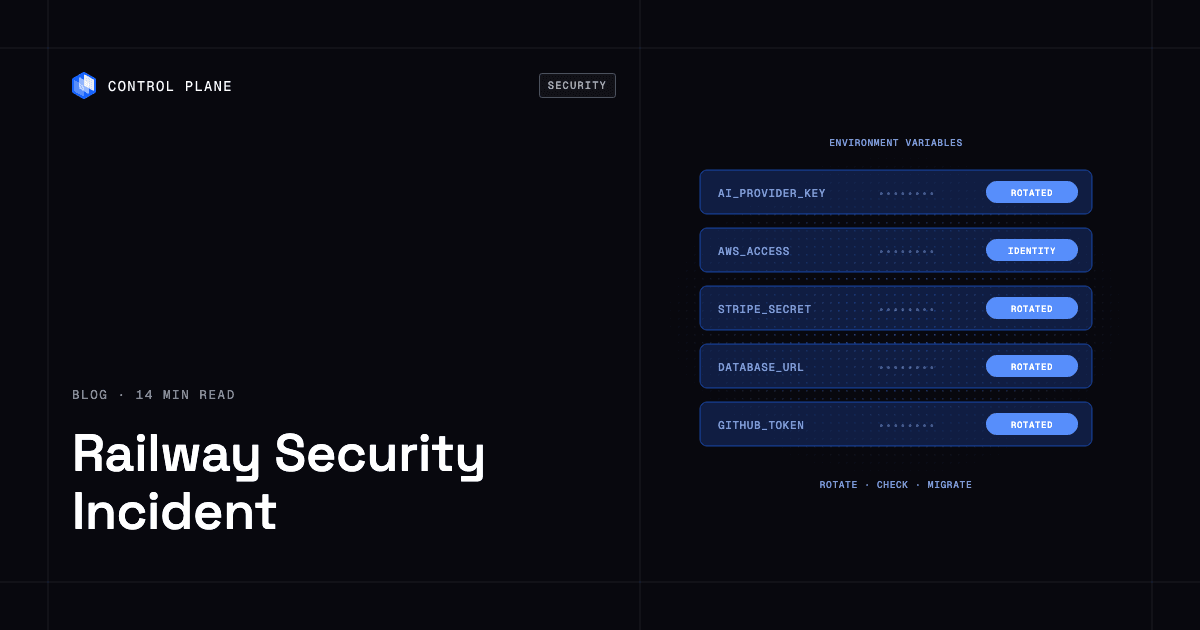
Rotate in this order. AI provider keys come first because Railway’s report names them as the attacker’s target.
| Priority | Credential type | Why it matters | Where to rotate | Railway guide |
|---|---|---|---|---|
| 1 | AI provider keys (OpenAI, Anthropic, OpenRouter, Grok) | Railway’s report says the attack was attempting to obtain these. A stolen key can run up charges on your account. | The provider’s API key settings | OpenAI, Anthropic, OpenRouter, Grok |
| 2 | Cloud credentials (AWS, GCP) | Long-lived cloud keys can reach storage, compute, and data. | Your cloud provider’s identity and access management console | AWS, GCP |
| 3 | Payment keys (Stripe) | A live key can act on your payment account. | The Stripe dashboard | Stripe |
| 4 | Database credentials (PostgreSQL, MySQL, MongoDB, Redis) | These unlock your customer data. | Your database and then each service that connects to it | PostgreSQL, MySQL, MongoDB, Redis |
| 5 | Source control tokens and app installs (GitHub) | Tokens and installed apps can read or change your code. | GitHub token and installed app settings | GitHub |
| 6 | Everything else: email and SMS providers, auth providers, webhook signing secrets, JWT signing keys | Signing secrets let an attacker forge requests or sessions. Messaging keys let them send as you. | Each provider or your own secret store | Check the provider’s documentation |
Railway’s disclosure also recommends rolling private registry credentials stored on the platform.
In what order should I rotate a credential?
- Create the new key.
- Deploy it to every service that uses it.
- Confirm traffic works with the new key.
- Revoke the old key.
Revoking first causes an outage. Skipping the revoke step leaves the exposed key alive. For databases, rotate the password and remove public database access, so that a leaked connection string alone is not enough to connect.
How do I check whether my API keys were misused?
Rotation closes the door. Checking tells you whether anyone already walked through it. Start with the services that hold the most value, and look back to at least the start of the incident window on October 20, 2026.
- AI provider dashboards: Open the usage and billing views for OpenAI, Anthropic, OpenRouter, and Grok. Look for spend spikes, unfamiliar models, and requests outside your normal hours. Railway published a “check for unexpected usage” guide for each provider, linked in the table above.
- Cloud audit logs: Review AWS CloudTrail and GCP Cloud Audit Logs for API calls from unfamiliar IP addresses or identities, and for new users, roles, access keys, or storage policies you did not create.
- GitHub audit logs: Review the organization audit log and the list of installed apps. Remove any app or token you do not recognize.
- Container registry audit logs: Railway’s report also recommends reviewing audit logs in registries such as Docker Hub for pulls or pushes you did not make.
- Stripe and other payment accounts: Review recent API activity and any new webhook endpoints.
- Databases: Review connection logs for sources you do not recognize, and confirm that public access is off.
Then set guardrails so the next leak is cheap:
- Set spend limits and alerts on every AI provider account.
- Turn on billing alerts for your cloud accounts.
- Route audit log alerts for new access keys and permission changes to a channel someone reads.
How should a PaaS store environment variables and secrets securely?
No platform can promise that a breach will never happen. Any platform that stores customer secrets can be targeted, including Control Plane. The useful question is how much an attacker gets if they succeed. These six practices limit that, and they work on any platform.
| Practice | What it limits |
|---|---|
| Replace long-lived cloud keys with short-lived, identity-based credentials such as workload identity federation | A stolen credential expires quickly, and the platform holds no cloud key to steal. |
| Scope every key to least privilege and set spend limits | A leaked key can do little and cost little. |
| Limit which workloads can read which secrets | One compromised service cannot read every secret in the account. |
| Keep an audit trail of secret access and configuration changes | You can answer “who read this and when” after an incident. |
| Keep secrets out of build logs and CI where possible | Build systems are a common place for credentials to collect. |
| Write a rotation runbook before you need it | You rotate from tested steps instead of improvising during an incident. |
Some secrets cannot be removed. API keys for third-party services, such as Stripe and OpenAI, have to be stored somewhere on any platform. The goal is fewer of them, narrowly scoped, and visible when used.
How do I avoid storing long-lived cloud credentials in environment variables?
Use identity-based access instead of an access key pair. Your workload proves who it is to the cloud provider and receives a short-lived token. There is no key to paste into an environment variable, so there is no key to leak.
The pattern is the same across providers: the cloud trusts an identity issued by your platform, you grant that identity only the permissions it needs, and tokens expire on their own. Fly.io documents this approach for AWS, Azure, and GCP in its OpenID Connect guide, which describes storing cloud credentials as secrets as creating long-lived credentials and OIDC as an approach that uses short-lived tokens. Control Plane builds the same idea into the platform, described in the next section.
How does Control Plane handle secrets and cloud access?
Control Plane is the platform for running unbreakable apps and agents. It combines any cloud, neocloud, and bare metal into one Global Virtual Cloud (GVC). It is not only for multi-cloud, and many teams run it in one cloud.
- No long-lived cloud keys. Universal Cloud Identity gives workloads short-lived, least-privilege access to 600+ AWS, GCP, and Azure services, with no long-lived cloud keys in your code or environment variables. That keeps cloud access keys out of the environment variables a platform breach could expose.
- Secrets are readable only by granted workloads. A workload can read a secret only after it is assigned an identity and that identity is granted access to the secret by policy. Otherwise the workload is not allowed to reveal it.
- Audit trail. Every change is recorded in an audit trail.
- Private database access. Workloads reach private networks and databases through Cloud Wormhole, so databases do not need public access.
- One API. Teams operate Control Plane through one API, with the same capabilities in the CLI, console, Terraform, Pulumi, and the Control Plane MCP server. Control Plane complements Terraform and Pulumi. It does not replace them.
- Compliance. Control Plane is PCI DSS Level 1, SOC 2 Type II, HIPAA, and GDPR compliant.
API keys for third-party services are still stored as Control Plane secrets. The rotation, scoping, and monitoring practices above still apply to them.
How do I migrate off Railway?
If you decide to move, a platform-neutral plan looks like this:
- Inventory everything. List services, databases, domains, cron jobs, and every environment variable on Railway.
- Rotate credentials first. Do this before moving anything, so that no compromised secret moves with you. Use the table above.
- Containerize, or reuse the existing image. If Railway builds your app from source, create a Dockerfile or reuse the image you already have.
- Recreate services and variables on the new platform. Use the freshly rotated values, and store them in the new platform’s secret store, not in code.
- Migrate databases. Use a dump and restore, or replication, then verify row counts and application behavior against the copy.
- Test. Run your test suite and a staging traffic check against the new environment before any cutover.
- Cut over DNS. Lower the DNS TTL ahead of time, then switch records and watch error rates.
- Decommission. After traffic is stable, delete the Railway services and data, remove the Railway GitHub app install, and revoke leftover tokens.
What do these steps look like on Control Plane?
- Inventory and rotate: The first two steps are the same everywhere.
- Containers: Workloads deploy from a container image. On Control Plane-provided compute, there is no Kubernetes cluster you have to operate.
- Services and variables: Create a GVC, choose its locations, and create workloads for each service. Serverless, standard, stateful, cron, and VM workloads are supported, so cron jobs map to cron workloads. Store third-party API keys as secrets and grant them to workloads through an identity and policy.
- Cloud access: Replace stored AWS or GCP keys with Universal Cloud Identity, so the migrated workloads hold no long-lived cloud keys.
- Databases: Restore your data, then connect through Cloud Wormhole so the database has no public access.
- Cutover and resilience: A workload deployed to a GVC runs active-active in every location of that GVC, and a global endpoint routes each request to the nearest healthy location, so you get failover without paying for idle standby capacity. The 99.999% availability SLA applies to workloads running at least two replicas in at least two locations. Those locations can be two regions of one cloud or locations on different providers. See how to build active-active high availability across regions and clouds.
- Cost model: On Control Plane-provided compute, you pay for the CPU and memory reserved for each workload, by the millicore and the megabyte, with no contracts or minimums. Capacity AI right-sizes CPU and memory based on observed usage, within a minimum and maximum you set.
For a feature-by-feature view, read the Control Plane vs Railway comparison.
What are the best Railway alternatives?
There is no single best choice. The right platform depends on your workload, team, and security requirements. This table covers four options, using each vendor’s own documentation. Details change, so confirm them on the linked pages.
| Platform | What its documentation describes | How it documents cloud credentials and secrets |
|---|---|---|
| Render | Services configured through the dashboard or through Blueprints, its infrastructure as code format. | Environment variables, plaintext secret files, and environment groups shared across services. Blueprints can declare placeholders for secret values so they are not committed to your repository. |
| Fly.io | Apps run on Fly Machines, managed with Fly Launch. | Secrets are stored in an encrypted vault, and the API servers can only encrypt, not decrypt. Secrets are exposed to Machines as environment variables. An OIDC guide covers short-lived tokens for AWS, Azure, and GCP. |
| Heroku | A PaaS based on a managed container system, with integrated data services. | Config vars hold environment-specific configuration, including credentials, per the config vars documentation. |
| Control Plane | One platform across AWS, GCP, Azure, your own Kubernetes clusters, bare metal, and on premises. | Universal Cloud Identity replaces stored cloud keys with short-lived, least-privilege access. Secrets are readable only by workloads granted access by policy. Third-party API keys are still stored as secrets. |
Whichever platform you choose, ask the same questions: Which secrets does the platform store? Who and what can read them? Is there an audit trail? Can cloud access be identity-based instead of key-based?
FAQ
What happened in the Railway security incident?
Per Railway’s preliminary report, its monitoring detected abnormal activity on October 20, 2026. Attackers pulled encrypted secrets, then accessed Railway’s CI environment and obtained credentials that let them decrypt a subset of customer environment variables. Railway states that at most 1.85% of all workspaces had some environment variables potentially compromised. See the preliminary report for details and updates.
Was my Railway app affected by the October 2026 security incident?
Railway says it is contacting customers with definite impact and customers it considers high risk. If you were not contacted, rotate anyway, because rotation is cheap compared with a leaked key.
What credentials should I rotate after the Railway breach?
Start with AI provider keys, then cloud credentials, payment keys, database credentials, GitHub tokens and app installs, and everything else such as webhook signing secrets and JWT signing keys. The table above links Railway’s guide for each.
How do I check whether my API keys were misused?
Check provider usage dashboards and billing for spikes, review cloud audit logs such as AWS CloudTrail and GCP Cloud Audit Logs for unfamiliar IP addresses or identities, and review GitHub audit logs. Set spend limits and alerts on AI provider accounts.
How do I migrate off Railway?
Inventory services, databases, domains, cron jobs, and variables. Rotate credentials first. Containerize or reuse your image, recreate services and variables, migrate and verify databases, test, cut over DNS with a low TTL, and decommission.
What are the best Railway alternatives?
Render, Fly.io, Heroku, and Control Plane are covered above, with links to each vendor’s documentation. The right choice depends on your workloads and how you want secrets and cloud access handled. For a detailed comparison, see Control Plane vs Railway.
How should a PaaS store environment variables and secrets securely?
Encrypt secrets, limit which workloads can read each one, keep an audit trail, keep secrets out of build logs, and scope every key to least privilege. Reduce the number of long-lived secrets the platform holds.
How do I avoid storing long-lived cloud credentials in environment variables?
Use identity-based, short-lived credentials, such as workload identity federation, so a workload receives a temporary token instead of a stored key. On Control Plane, Universal Cloud Identity provides this for 600+ AWS, GCP, and Azure services.
Does Control Plane still store API keys?
Yes. API keys for third-party services are stored as Control Plane secrets, so rotation, least privilege, and spend limits still apply. Universal Cloud Identity removes long-lived cloud keys from that list.