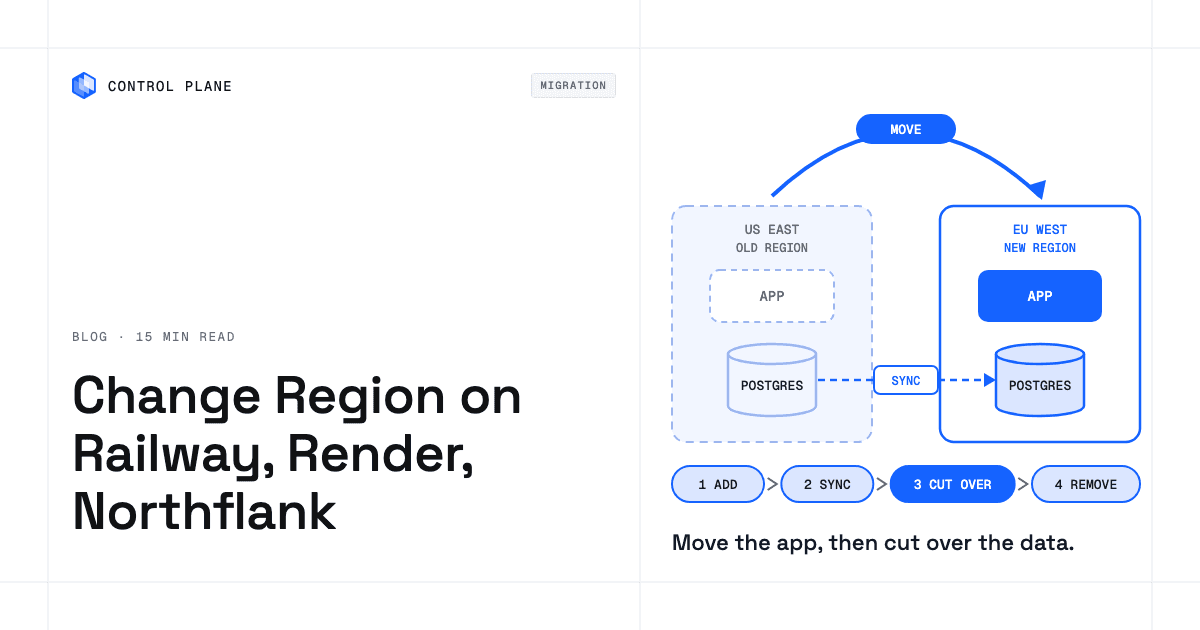
On Control Plane, an app runs in every location of its Global Virtual Cloud (GVC), so moving it to another region is an edit to the GVC’s location list: add the new location, move traffic and the database, then remove the old location. Railway documents a region change for a service, with downtime while an attached volume, including Railway Postgres, migrates; Render and Northflank fix the region when a service, database, or project is created, so a move there is a second deployment in the target region and a data migration that your team runs.
Disclosure: Control Plane publishes this guide.
TL;DR
The database step decides the outcome: a brief write pause on Control Plane, or a write stop for the length of a data copy between two separate databases.
- Control Plane: Add a location to the GVC, shift traffic, move the Postgres primary with
patronictl switchoveron Control Plane’s Postgres Multi-Location template with a brief write pause, then remove the old location. The app tier needs no redeploy. - Railway: Railway documents a region change in a service’s settings. With a volume attached, including Railway Postgres, the service is down while the volume migrates, and the duration depends on the volume’s size.
- Render: Render does not currently support changing the region of an existing service or database. Its documentation describes a new service or database in the desired region and a migration of configuration and data.
- Northflank: The project’s region is fixed at creation, and all resources in the project deploy in that region.
- The work left to you: Between two separate deployments, your team owns the second deployment, the data migration, the write freeze, and the cutover. On Control Plane, the move stays inside one GVC and one Postgres cluster.
Can you change the region of an app on Railway, Render, or Northflank?
Control Plane changes an app’s region by editing a location list, with the old and new locations serving together during the move. Railway changes a service’s region in its settings, with downtime when a volume is attached. Render and Northflank need a new service or project in the target region.
Control Plane treats regions as entries in a GVC’s location list. A GVC (Global Virtual Cloud) is a named set of locations that can span Control Plane-managed regions on AWS, GCP, Azure, and Oracle Cloud Infrastructure (OCI), or Kubernetes clusters you bring through Control Plane’s Bring Your Own Kubernetes (BYOK) or run with Control Plane’s Managed Kubernetes (MK8s). A single GVC can mix providers. Every workload in the GVC runs in every location on the list. To move an app from a US location to an EU location, you add the EU location with Control Plane’s CLI, cpln gvc add-location, verify that the workload is healthy there, shift traffic, then remove the US location. The workload’s canonical endpoint (Control Plane’s location-independent hostname for each workload) and any custom domain attached to the GVC resolve through DNS to the nearest healthy location, so the hostname stays the same while locations change. The same change is available in Terraform and in a manifest, shown in the steps below. The change touches no workload definition, so the app tier needs no redeploy.
Railway documents a region change in a service’s settings. If the service has an attached volume, the volume migrates to the new region, and the service is down during that migration. The duration depends on the volume’s size. Railway Postgres runs as a service on a volume, so it follows the same rule. Replicas cannot be used with volumes, and volume backups restore into the same project and environment.
Render does not currently support changing the region of an existing service or database. Its documentation describes a new service or database in the desired region and a migration of configuration and data. Services in different regions cannot communicate over a private network, so an app in one region cannot reach a database in another over Render’s private network. A Blueprint’s region field cannot be modified after creation, so services in a new region are new resources.
Northflank fixes the region when a project is created, and all resources in the project deploy in that region. A move to another region is therefore a new project. Moving a subdomain to the new project is a relink, and Northflank states that routing and certificate changes take time and can interrupt access.
What does each platform document about moving regions?
Each cell reflects the vendor’s own documentation as of November 2026.
| Capability | Control Plane | Railway | Render | Northflank |
|---|---|---|---|---|
| Change the region of a running app | Yes, add the new location to the GVC, then remove the old one | Yes, in service settings; downtime while an attached volume migrates | No; a move is new services and databases in the new region | No; region is fixed when the project is created |
| Old and new region serving during the move | Yes, location routing options keep the old location as a fallback | Stateless services; replicas cannot be used with volumes | Two separate services; no private network between regions | Two separate projects, one per region |
| What happens to attached volumes | cpln volumeset copy copies a volume directly into another location; volumes are provisioned in each location | Volume migrates with the service; downtime during migration | A persistent disk is accessible by a single service instance; a new service in the new region starts with a new disk | Volumes stay in the project’s region; the documented cross-region restore path is Global backups, an Enterprise feature |
| Database during a region move | Postgres Multi-Location template: patronictl switchover moves the primary | Region change on the Postgres service triggers volume migration with downtime | A new database in the new region, with configuration and data migrated into it | Connection-string import into a new addon; source must be publicly reachable; target user databases erased |
| Replication on the managed Postgres | One primary plus asynchronous streaming replicas in the other locations (Postgres Multi-Location) | High availability mode adds streaming replicas managed by Patroni; replicas in other regions not described in docs | Logical replication enabled by support on request; requires Pro workspace or higher and at least 10 GB of storage | wal_level chosen as replica or logical at addon creation; cannot be changed afterward |
| Hostname during the move | Canonical endpoint and custom domain unchanged; DNS routes to the nearest healthy location | Domain unchanged; service down while an attached volume migrates | Custom domain reassigned to a new service | Subdomain relinked; routing and certificate changes can interrupt access |
Where does each platform’s documentation stop?
The four platforms differ in how much of a region move their documentation covers, as of November 2026.
- Control Plane: The move stays inside one GVC and one Postgres cluster. The app tier moves by editing the GVC’s location list, and the Postgres primary moves with a switchover on Control Plane’s Postgres Multi-Location template.
- Railway: The documented region change covers one service in place. With a volume attached, the service is down while the volume migrates, and the duration depends on the volume’s size. Railway Postgres runs as a service on a volume, so the database follows the same rule. Replicas cannot be used with volumes. Railway’s high availability mode adds streaming replicas managed by Patroni, and replicas in other regions are not described in Railway’s documentation as of November 2026.
- Render: Render does not currently support changing the region of an existing service or database. Its documentation describes creating a new service or database in the desired region and migrating configuration and data. Services in different regions cannot communicate over a private network. Logical replication is enabled through a support request and requires a Pro workspace or higher and at least 10 GB of storage. Point-in-time recovery creates a new database instance.
- Northflank: The project’s region is fixed at creation, and all resources in the project deploy in that region. Recreating the project’s resources in a new region does not copy data. The Northflank PostgreSQL import guide describes a connection-string import into a new addon, where the source must be publicly reachable and the target’s user databases are erased. Write downtime during the import is not stated in Northflank’s guide as of November 2026, and the import is dump-based. An addon created with the default wal_level of replica cannot be switched to logical. The documented cross-region restore path is Global backups, an Enterprise feature.
On Render and Northflank, a region move is therefore two deployments and two databases for the length of the move. On Railway, it is one service with downtime that depends on the volume’s size. On Control Plane, it is one GVC with one more location.
What would you have to build and run yourself?
When the old and new regions are two separate deployments with two separate databases, as on Render or Northflank, your team owns the following work.
- A second deployment in the target region, and a pipeline that keeps its configuration and secrets in step with the first.
- A second database, and a data-copy procedure between two separate databases that you write, test, and rehearse.
- A write freeze, whose length depends on how the data is copied and can run for the whole copy.
- A domain or DNS change at cutover, and the wait for it to take effect.
- A rollback plan, including a decision about writes made in the new region after cutover.
- Files, backups, and partner allowlists tied to the old region, which do not move with the app.
On Control Plane, the app tier stays one deployment in one GVC, and the database stays one cluster, so there is no second deployment, second database, or data-copy procedure to build.
How do you move an app and its database to another region on Control Plane?
On Control Plane, the move is a sequence of edits to one GVC and one Postgres cluster, and the database steps apply to a database running on Control Plane’s Postgres Multi-Location template, which runs in at least two locations.
- Add the new location to the GVC. Use Control Plane’s CLI,
cpln gvc add-location, thecpln_gvcresource’slocationslist in Terraform, orspec.staticPlacement.locationLinksin a manifest applied withcpln apply. Control Plane provisions every workload in the new location, and no workload definition changes. - Confirm the workload is healthy in the new location. Wait until the workload reports ready in the new location. The workload’s canonical endpoint and any custom domain attached to the GVC then resolve through DNS to the nearest healthy location, and Control Plane propagates the DNS updates, so you edit no DNS records.
- Set the routing tiers. Location routing options place the new location in the top routing tier and keep the old location as a lower-priority fallback. The old location receives traffic only when the top tier is unavailable.
- Add the new location to the Postgres cluster. In a planned window, add the new location to the location list of Control Plane’s Postgres Multi-Location template. That change restarts the cluster’s members. The template runs one Patroni cluster with a primary and asynchronous streaming replicas in the other locations.
- Move the primary. Run
patronictl switchoverto move the primary to the new location with a brief write pause. - Remove the old location. Once the new location is confirmed healthy, remove the old location from the Postgres Multi-Location template’s location list and from the GVC in the same planned window. The template runs in at least two locations, so the cluster keeps the new location and at least one other. Control Plane gracefully terminates the workload’s replicas in the removed location.
The database and volume steps have two documented paths on Control Plane.
| Control Plane path | Write downtime | What it requires | Where it is documented |
|---|---|---|---|
| Postgres Multi-Location switchover | A brief write pause during patronictl switchover; the location-list changes before and after it run in a planned window | The new location added to the template’s location list ahead of the switchover | Postgres Multi-Location template |
Volume copy with cpln volumeset copy | None required for the copy; stop the workload first when you need a consistent copy | ext4 or xfs volume | Volume set reference |
A related guide covers keeping customer data in-country with multi-region failover.
How Control Plane fits
Control Plane handles Day 2 operations for you, including autoscaling, built-in observability, and security.
For the database, the Postgres Multi-Location template from Control Plane’s Template Catalog runs one Patroni cluster with a primary and asynchronous streaming replicas in other locations. It fails over automatically when the cluster spans three or more locations. A planned move of the primary to the new location is a patronictl switchover with a brief write pause, as described in the steps above. A separate runbook covers failing over a database-backed application between cloud regions.
Each location has its own volumes. Data reaches a new location through application-level replication, such as the template’s streaming replicas, or through an explicit volume copy. cpln volumeset copy copies an ext4 or xfs volume into another location, replaces the destination volume, and produces a consistent copy when you stop the workload first.
You can also fine-tune per-location behavior without removing a location. spec.localOptions can suspend a workload or set different minimum and maximum replicas in a named location.
Control Plane runs container images, so an app that already runs as a container on Railway, Render, or Northflank can be deployed as a Control Plane workload. Moving data from an external Postgres into Control Plane uses standard tools like pg_dump and pg_restore, or logical replication. The first post in this series covers where Railway, Render, and Northflank stop on running one app across AWS and Google Cloud, and a companion guide covers deploying one app to multiple regions from a single configuration.
Control Plane is PCI DSS Level 1, SOC 2 Type II, HIPAA, and GDPR compliant.
FAQ
Answers to the questions founders ask most when moving a running app and its database to another region.
How do I move my app to another region?
On Control Plane, add the new location to your GVC’s location list, verify the workload is healthy, shift traffic, and remove the old location; the database moves with a patronictl switchover on Control Plane’s Postgres Multi-Location template. Railway documents a region change in a service’s settings, with downtime when a volume is attached. Render and Northflank fix the region at creation, so a move there is a second deployment and a data migration that your team runs.
Can I change a Northflank project’s region?
No; a Northflank project’s region is fixed when the project is created, so a move to another region is a new project. On Control Plane you edit the GVC’s location list to add or remove locations at any time.
Does Render support changing a service’s region?
Render does not currently support changing the region of an existing service or database. Its documentation describes creating a new service or database in the desired region and migrating configuration and data. On Control Plane, the same move is an edit to the GVC’s location list.
Does changing a Railway service’s region cause downtime?
Yes, if the service has a volume, including Railway Postgres: the service is down while the volume migrates, and the duration depends on the volume’s size. On Control Plane, location routing options keep the old location as a lower-priority fallback while the new location comes up, and the Postgres primary moves with a brief write pause.
How does Control Plane move Postgres to another region with minimal downtime?
On Control Plane’s Postgres Multi-Location template, a patronictl switchover moves the primary to the new location with a brief write pause. The new location is added to the template’s location list in a planned window ahead of the switchover, because that change restarts the cluster’s members. Between two separate databases, as on Render or Northflank, your team builds and tests its own data-copy and cutover procedure.
Can I move my app from the US to the EU without changing its domain?
Yes. On Control Plane the workload’s canonical endpoint and any custom domain route to the GVC’s locations, so adding and removing locations requires no domain change. Railway’s region change leaves the domain in place. On Render and Northflank the domain is reassigned to a new service or project, and Northflank states that routing and certificate changes can interrupt access.
What happens to backups when I move regions?
On Control Plane, cpln volumeset copy copies a volume directly into another location, so volume data is not tied to the location where it was created; each volume keeps its own snapshots. Railway volume backups restore into the same project and environment. Render’s point-in-time recovery creates a new database instance. On Northflank, the documented cross-region restore path is Global backups, an Enterprise feature.
How does Control Plane move an app to another region?
You edit the GVC’s location list: add the new location to provision every workload there, confirm health, then remove the old location to drain its replicas; for Postgres use the Multi-Location template and patronictl switchover to move the primary with a brief write pause.
Can the old region stay available while I confirm the new one?
Yes, on Control Plane. Location routing options keep the old location in a lower routing tier as a fallback until you remove it from the GVC, so both locations stay in the same GVC while you confirm the new one. Between two separate deployments, the rollback window and the handling of writes made in the new region after cutover are yours to design and test.
Talk to the Control Plane team to plan your region move, or sign up free and add your first location.