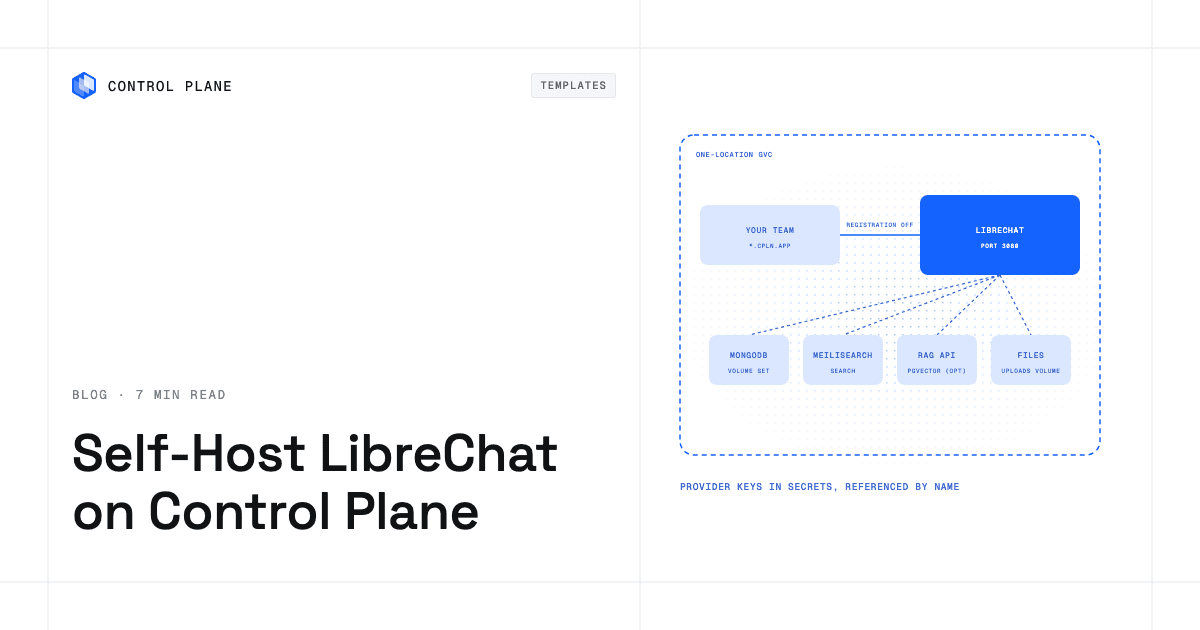
To self-host LibreChat on Control Plane, create four secrets (encryption keys, the admin account, MongoDB credentials, and a Meilisearch key) and install the LibreChat template from the Template Catalog, Control Plane’s library of ready-to-install apps. You get the LibreChat web UI on a public URL with an admin account ready before anyone visits, a bundled MongoDB for chats, Meilisearch for conversation search, and model API keys read from secrets by reference.
Half your team pays for ChatGPT, a few use Claude, and someone is running Ollama on a spare GPU. Each tool has its own history, its own accounts and its own bill. LibreChat puts all of them behind one familiar chat interface, with per-user accounts, agents, presets and searchable conversations. It is MIT licensed, and its repository has more than 47,000 GitHub stars. Running it yourself means a database, a search index, encryption keys that must never change, and a first-admin problem. The template brings the whole stack up together and creates the admin account from your secret on the first start.
Why self-host LibreChat on Control Plane
- Sign-in is ready on first start. Your admin email and password come from a secret you create, and self-registration is off, so nobody else can claim the first account.
- API keys stay out of the config. Provider keys sit in Control Plane secrets the workload reads by name. The generated
librechat.yamlnever holds one. - MongoDB and search come along. Chats, users and settings live in a bundled MongoDB, and conversation search runs on a bundled Meilisearch.
- Your model servers are one URL away. Point a custom endpoint at an Ollama, vLLM or LiteLLM workload in the same Global Virtual Cloud (GVC), Control Plane’s term for the set of locations a workload runs in, over private
cpln.localDNS. - Control Plane inside the chat. Add the Control Plane MCP server, and each user signs in with their own Control Plane account through OAuth.
- Replicas when you need them. Two to four replicas, with Redis for shared sessions, keep chat up through restarts and upgrades.
Included out of the box
- LibreChat 0.8.8 on port 3080, with a public URL, agents, presets and per-user accounts
- A shared 10 GiB volume for uploads, images and avatars, visible to every replica
- MongoDB for chats, users and settings
- Meilisearch for the search box (switch it off with
search.enabled: false) - Optional chat over uploaded files, backed by LibreChat’s RAG API and a pgvector database
- Optional Redis for shared sessions and resumable answers
- Built-in Control Plane logs and metrics for each workload, with tracing available to turn on
How LibreChat stores model API keys
You create four secrets before installing. The keys secret is a dictionary secret, a Control Plane secret that holds named key-value pairs, with CREDS_KEY, CREDS_IV, JWT_SECRET and JWT_REFRESH_SECRET. The admin secret holds email and password, the MongoDB secret holds username, password and database, and the Meilisearch key is an opaque secret (a single value).
The workload runs as a Control Plane identity, and a template-created policy grants it reveal on exactly the secrets you named. CREDS_KEY and CREDS_IV encrypt every API key users save, so treat them as permanent: change them and saved keys become unreadable.
For shared provider keys, create one opaque secret per provider and set providers.openai.apiKeySecretName, providers.anthropic.apiKeySecretName or providers.google.apiKeySecretName. A provider with no secret stays off. To let each user bring their own key instead, set providers.userProvidedKeys: true. Never put a key in config, because that block becomes part of the workload spec; reference it with ${VAR}.
How to use the Control Plane MCP server in LibreChat
LibreChat speaks MCP, and Control Plane runs an MCP server. One block under config.mcpServers registers it with requiresOAuth: true. Each user then clicks Connect in the chat’s MCP menu and signs in to Control Plane, so no token sits in your chart or your values. From there a model can list your GVCs, look into a workload or report on a deployment, with only the access that user’s own Control Plane account has.
The full toolset has about 95 tools, and every tool description travels with each message. If LibreChat reports that the context is exceeded, raise Max Context Tokens in the model’s parameters or pick a smaller toolset (readonly, core or mk8s).
How to keep LibreChat private
The chat UI is public on its *.cpln.app URL by default, open to any IP address, with registration, social login and password reset turned off. Keep auth.allowRegistration at false on a public URL: set it to true and anyone who reaches the URL can create an account with any email address, because the template does not verify emails. To take the UI off the internet, set publicAccess.enabled: false and reach it with cpln port-forward RELEASE_NAME-librechat 3080:3080 --gvc GVC_NAME.
Other workloads cannot call LibreChat until you allow them: internalAccess.type defaults to none, and same-gvc, same-org or workload-list opens the internal API on port 3080. The bundled datastores have no public address by default, and uploaded files stay on a volume in your GVC.
How to back up LibreChat
Chats, users and settings live in MongoDB. Turn on scheduled backups with the mongodb.backup values: a cron workload runs mongodump (daily at 02:00 UTC by default) and writes a compressed archive to your own AWS S3 or GCS bucket. It needs the bucket and a Control Plane cloud account first, and older archives stay until a bucket lifecycle rule removes them. The restore steps are on the MongoDB template page.
Uploaded files and the Meilisearch index are not backed up. The shared files volume set, Control Plane’s managed persistent storage for a workload, takes no snapshots, and uninstalling the release deletes every volume, uploads included.
How to scale LibreChat on Control Plane
Set replicas to 2 to 4 and redis.enabled to true. With Redis on, a browser that reconnects mid-answer picks the answer up on any replica. An answer is still lost if the replica generating it crashes, and each request is capped at 10 minutes.
MongoDB, Meilisearch and the dev-mode Redis are single-instance, so a MongoDB restart is a short outage. Install LibreChat into a GVC with exactly one location, because the uploads volume also exists per location and a second location would start a separate copy of each datastore.
How to deploy LibreChat on Control Plane
Sign up for Control Plane, create the four secrets, and pick an existing GVC with one location. A missing secret leaves the deployment waiting with no logs; the reason shows in status.versions[].message from cpln workload get-deployments. Then find LibreChat in the Template Catalog in the Control Plane Console, or run this with the cpln CLI:
cpln helm install RELEASE_NAME oci://ghcr.io/controlplane-com/templates/librechat \
  --version 1.0.0 --gvc GVC_NAME \
  --set keys.secretName=KEYS_SECRET_NAME \
  --set admin.secretName=ADMIN_SECRET_NAME \
  --set mongodb.config.credentialsSecretName=MONGODB_SECRET_NAME \
  --set meilisearch.auth.secretName=MEILI_SECRET_NAME
Sign in with the admin email and password from your secret. The LibreChat template documentation covers providers, file chat, scaling and troubleshooting.
FAQ
Answers to common questions about running LibreChat on Control Plane.
How do I self-host LibreChat?
Create the four prerequisite secrets, then install the LibreChat template from the Template Catalog in the Console or with cpln helm install. The template creates the LibreChat workload, MongoDB, Meilisearch, a shared uploads volume, and an identity that can read only the secrets you named.
Is LibreChat free to self-host?
Yes. LibreChat is open source under the MIT license. You pay for the compute it runs on and for any model provider API you call.
Where are LibreChat API keys stored?
Shared provider keys live in Control Plane secrets that the workload reads by reference, and the generated librechat.yaml never contains them. Keys that users save in the UI are encrypted with CREDS_KEY and CREDS_IV from your keys secret.
Can anyone sign up to my LibreChat instance?
Not by default. Self-registration, social login and password reset are off, and the only account is the admin from your secret. Setting auth.allowRegistration: true lets anyone who reaches the URL create an account.
How do I back up LibreChat?
Enable the mongodb.backup values to run scheduled mongodump backups of chats, users and settings to an S3 or GCS bucket. Uploaded files and the Meilisearch index are not backed up.
Can I use LibreChat with Ollama or vLLM?
Yes. Add any OpenAI-compatible server, including a LiteLLM gateway, under customEndpoints with its fully qualified WORKLOAD_NAME.GVC_NAME.cpln.local address. It appears by name in the model menu without a public endpoint, and a local server such as Ollama needs no API key.
Does LibreChat on Control Plane scale?
Up to 4 replicas in one location. More than one replica requires redis.enabled: true, and MongoDB, Meilisearch and Redis stay single-instance, so install into a GVC with one location.
Can I run LibreChat on Kubernetes?
Yes. Control Plane runs the LibreChat template from a Helm chart without a Kubernetes cluster for you to operate, and it can also run on a Kubernetes cluster you already have through Control Plane’s Bring Your Own Kubernetes (BYOK) option.
Which clouds can I deploy LibreChat on?
AWS, GCP, Azure, and Oracle Cloud Infrastructure (OCI). You choose the location when you create the GVC, and the template runs LibreChat there.