
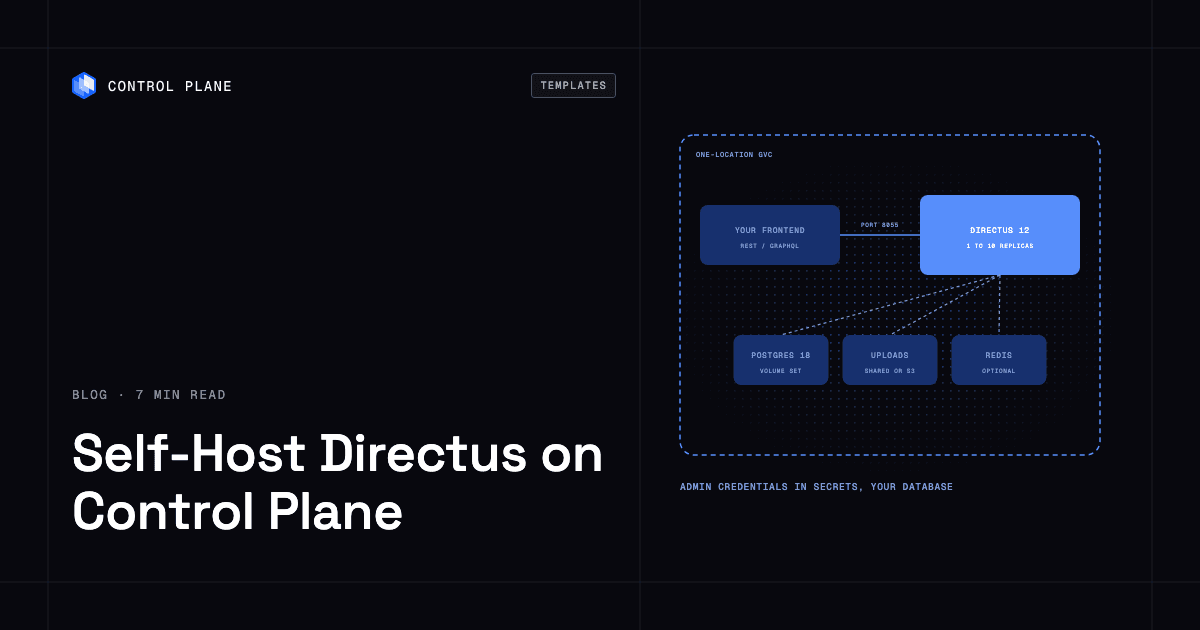
To self-host Directus on Control Plane, create two dictionary secrets (one for the signing secret and first admin, one for the database login) and install the Directus template from the Template Catalog, Control Plane’s library of ready-to-install apps. You get Directus 12 with its REST and GraphQL API and the Data Studio, a bundled PostgreSQL 18, a shared volume for uploads, and credentials read by reference.
Your editors want a place to write. Your Next.js site, your mobile app and a partner’s integration all want the same content as JSON. Directus sits between them: point it at PostgreSQL and it serves an instant REST and GraphQL API plus the Data Studio, a web app where non-developers manage records, files, roles and automations. The repository has more than 38,000 GitHub stars, and plenty of teams prefer running it to renting a hosted CMS. Running it yourself means a database, a shared home for uploads, a signing secret that must never change and a safe way past one container. The template brings all four up in one release.
Why self-host Directus on Control Plane
- A database in the release. PostgreSQL 18 comes bundled with its own volume. Set
postgresHA.enabled: trueandpostgres.enabled: falseto swap in a highly available cluster of three Patroni replicas. - Credentials by reference. The signing secret, first admin login and database password live in Control Plane secrets you create. The chart points at them by name, so no password lands in a values file.
- An identity with a short reach. The template’s Control Plane identity can reveal only the secrets Directus reads and view its own GVC.
- Public or private, your choice. The API and Data Studio get a public
*.cpln.appendpoint by default. Turn that off andcpln port-forwardstill gets you in. - Front ends next door. Apps in the same Global Virtual Cloud (GVC), Control Plane’s term for the set of locations a workload runs in, call the API on an internal
cpln.localname with no public hop. - Scale when traffic does. Up to ten replicas share one uploads volume and one database, rolling one at a time.
Included out of the box
- Directus 12.6.1: the API and Data Studio on port 8055
- A first administrator created from your secret on the first boot
- A shared 10 GiB volume set, Control Plane’s managed persistent storage for a workload, for uploaded files, mounted by every replica
- Optional S3 storage instead, through a Control Plane cloud account on AWS or access keys for MinIO and other S3-compatible servers
- Optional Redis for the shared cache, locks and scheduled flows
- Optional SMTP for invitations and password resets
- Built-in Control Plane logs and metrics, with tracing available to turn on
How Directus handles migrations across replicas
A boot script waits for PostgreSQL to answer a query, then installs or migrates under a PostgreSQL advisory lock, so one replica does it at a time. That makes directus.replicas a number you can change. Two or more replicas need redis.enabled: true, and the chart refuses to render without it, since each replica would otherwise keep its own cache, rate limits and scheduled-flow clock.
Where Directus stores uploaded files
By default, uploads land on a read-write-many volume that every replica mounts, so an asset added through one replica is served by all. That volume is deleted on uninstall and is not snapshotted. For files that should outlast the release, set storage.type: s3. On AWS you create a Control Plane cloud account and an IAM policy limited to your bucket, which the docs spell out, and store no access keys. For MinIO and other S3-compatible servers, the access keys go in a dictionary secret, a Control Plane secret that holds named key-value pairs. Switching storage.type later does not move existing files.
How to back up Directus
Database backups are off by default. Set postgres.backup.enabled: true and the bundled database runs a scheduled pg_dump (02:00 UTC daily by default) to an AWS, GCP or MinIO bucket you own. In HA mode, postgresHA.backup.enabled: true takes logical or WAL-G backups. Restores follow the steps on the matching Postgres template page.
A database backup does not include uploaded files. With S3 storage, protect the bucket with versioning or replication.
How to keep Directus private
Public access is on by default: the Data Studio sign-in page, the API, and the unauthenticated /server/ping and /server/info endpoints answer on the public endpoint. Content stays behind sign-in, because Directus turns off every permission on its public role by default. Grant it read access to a collection and anyone can read every item in it.
To close the endpoint, set publicAccess.enabled: false and use cpln port-forward RELEASE_NAME-directus 8055:8055 --gvc GVC_NAME, then open http://localhost:8055. Internal access defaults to same-gvc; set internalAccess.type to same-org, workload-list or none to change who can call the API. Traffic between workloads uses mTLS.
How to store the Directus admin credentials
The Directus secret holds three keys: secret, which signs every session and token, plus adminEmail and adminPassword. Never change secret after installing, since every session and token would stop working. adminPassword is read on the first boot only, so change it later in the Data Studio. Rotating any other secret needs cpln workload force-redeployment RELEASE_NAME-directus --gvc GVC_NAME.
How to scale Directus on Control Plane
The default is one Directus and one single-instance PostgreSQL in one location. For rolling upgrades and automatic database failover, set directus.replicas: 2, redis.enabled: true and postgresHA.enabled: true. Redis stays a single node, so API calls return 503 briefly if it restarts. The first helm upgrade can briefly restart the single-instance PostgreSQL, and Directus with it.
Install into a GVC with one location. Directus runs only in the location set by location, while the bundled PostgreSQL and Redis start in every location the GVC has.
How Directus licensing works
Directus 12 is licensed under the Monospace Sustainable Core License (MSCL-1.0-GPL), a source-available license that also makes each release available under GPL-3.0 four years after it ships. With no key it runs on the free Core tier: 3 Data Studio users, 25 collections and 5 flows. API-only users, such as your app’s end users, take no seat. Go over a cap and a grace period starts. After it, the instance locks down until you add a key or get back under the caps: /items and the GraphQL API stop answering, and your data stays intact.
The Open Innovation Grant gives a free key to individuals and to organizations with less than $5M in annual revenue and fewer than 50 employees; other organizations stay on Core or buy a license. Store the key in an opaque secret and set license.secretName. Directus sends usage telemetry by default, and the template leaves that on. Extensions are not persisted, so bake them into your own image built FROM the pinned one.
How to deploy Directus on Control Plane
Sign up for Control Plane, then create both dictionary secrets: one with secret, adminEmail and adminPassword, another with the database username, password and database. If either is missing, the install reports success and the workload waits with empty logs; the missing secret is named in its deployment status. Then choose Directus in the Template Catalog in the Control Plane Console, or run:
cpln helm install RELEASE_NAME oci://ghcr.io/controlplane-com/templates/directus \
  --version 1.0.0 --gvc GVC_NAME \
  --set secrets.name=DIRECTUS_SECRET_NAME \
  --set postgres.config.credentialsSecretName=DB_SECRET_NAME
Sign in at the endpoint with the admin email and password from your secret. The Directus template documentation covers S3 setup, email, backups and troubleshooting.
FAQ
Answers to common questions about running Directus on Control Plane.
How do I self-host Directus?
Create a dictionary secret with secret, adminEmail and adminPassword, and a second one with the database username, password and database. Then install the Directus template from the Template Catalog or with cpln helm install.
Is Directus free to self-host?
Yes, within the Core tier caps of 3 Data Studio users, 25 collections and 5 flows. Individuals and organizations under $5M in annual revenue and 50 employees can get a free key through the Open Innovation Grant; larger organizations above the caps need a paid license.
How do I back up Directus?
Turn on postgres.backup.enabled for a daily pg_dump to an AWS, GCP or MinIO bucket, or postgresHA.backup.enabled in HA mode. Backups are off by default and cover the database only.
Where does Directus store uploaded files on Control Plane?
On a shared volume mounted by every replica, or in an S3 bucket when storage.type is s3. The volume is deleted on uninstall and has no snapshots.
Is the Directus admin exposed to the internet?
The Data Studio sign-in page is public by default on the workload’s *.cpln.app endpoint. Set publicAccess.enabled: false and reach it with cpln port-forward.
Does Directus on Control Plane scale?
Yes, from 1 to 10 replicas in one location. Two or more replicas need Redis, and adding the HA PostgreSQL option adds rolling upgrades and automatic database failover.
Can I run Directus on Kubernetes?
Yes. On Control Plane the template runs Directus without a Kubernetes cluster for you to operate. You can also run it on your own Kubernetes cluster through Control Plane’s BYOK (bring your own Kubernetes) option.
Can Directus run in more than one location?
One location per install. The bundled PostgreSQL and Redis start in every GVC location, so a GVC with two locations starts a second, empty database.