
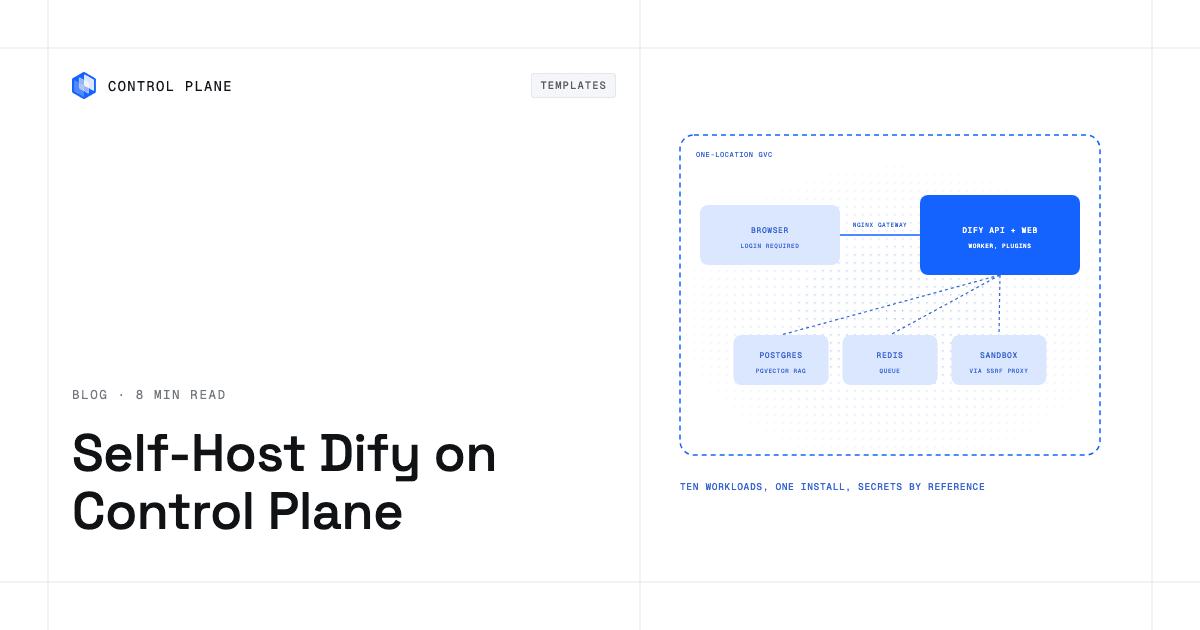
To self-host Dify on Control Plane, create four secrets (Dify’s keys, a code sandbox key, database credentials, and a Redis password) and install the Dify template from the Template Catalog, Control Plane’s library of ready-to-install apps. You get all ten workloads wired together behind one public gateway, with PostgreSQL and pgvector for RAG, Redis, and an SSRF proxy that keeps flows off your private network.
Dify gives a company one place to build chatbots, agents and visual workflows with RAG knowledge bases, then publish the result as a web page, a REST endpoint or an MCP server. Its repository has more than 160,000 GitHub stars. A shared platform is a bigger job than a laptop demo: a web tier, an API, workers, a plugin runtime, a code sandbox, a vector-capable database and a cache, all trusting each other and nobody else. The template deploys that whole set into your Global Virtual Cloud (GVC), Control Plane’s term for the set of locations a workload runs in, in one go.
Why self-host Dify on Control Plane
- Ten workloads, one install. Gateway, web, API, worker, scheduler, plugin daemon, sandbox, SSRF proxy, PostgreSQL and Redis arrive wired together.
- One door in. An nginx gateway is the only public workload, and the console behind it needs a Dify login.
- Flows cannot wander your network. HTTP Request nodes, tools and Python
requestscalls go through a squid proxy that refuses private, link-local and in-GVC addresses. - Four secrets, referenced by name. The signing key, sandbox key, database login and Redis password are Control Plane secrets, and their values never appear in Helm values or your install command.
- Each tier talks only to its callers. Firewall rules admit a tier’s callers alone, and the sandbox gets a Control Plane identity whose policy lets it read one key: its own.
- Your documents stay in your GVC. Knowledge-base vectors live in PostgreSQL with pgvector, so there is no separate vector database to run.
Included out of the box
- Dify 1.19.0: workflow editor, agents, chatbots and knowledge bases
- Published web apps, a service API at
/v1, and any app exposed as an MCP server - A plugin daemon with its own volume, since every model provider is a plugin (only signed plugins install)
- A bundled code sandbox for Code and Template nodes, or your own executor via
codeExecution.endpoint - PostgreSQL 18 with pgvector, or a three-replica Patroni PostgreSQL with
postgresHA.enabled - A single workspace with self sign-up off; members join by invite link
- Two volume sets, Control Plane’s managed persistent storage for a workload: uploaded files and plugins
- Built-in Control Plane logs and metrics, with tracing available to turn on
Is Dify free to self-host?
Yes, with conditions. Dify uses the Dify Open Source License, a modified Apache License 2.0. Commercial use is allowed, including as a backend service for other applications or as an application development platform for enterprises. A commercial license from LangGenius is required to run a multi-tenant service, where one tenant is one Dify workspace, or to remove or change the Dify logo and copyright in the console and apps. The template fits those terms: one workspace per install, workspace creation off, and the logo left in place.
How the Dify code sandbox is isolated
Anyone who can edit an app can run Python and JavaScript, and HTTP nodes can be pointed at any address. The template splits those risks. The sandbox runs as its own workload using Dify’s sandbox image, which jails code with seccomp syscall filtering, and Dify’s API, web and plugin daemon refuse connections from it. Calls from HTTP Request nodes, tools and Python requests exit through the squid proxy, which blocks *.cpln.local, so a flow cannot reach your internal services that way. JavaScript code gets no proxy.
One honest limit: sandbox code can still open direct internet connections, and the bundled PostgreSQL and Redis are guarded by their passwords alone. Give accounts only to people you trust.
How to secure the first admin account
The public *.cpln.app URL is on by default. The first visitor to /install creates the admin account, and Dify asks for the initPassword from your keys secret before it allows that. Read it with cpln secret reveal DIFY_SECRET_NAME -o yaml and create the admin right after the install finishes. Keep secretKey fixed for the life of the install: it signs every login and shared link. Dify locks an email address out for 24 hours after 6 failed logins.
How to keep Dify private
For no public address, set publicAccess.enabled: false and dify.publicUrl: http://localhost:8080, then reach the console with cpln port-forward RELEASE_NAME-dify 8080:8080 --gvc GVC_NAME. Apps in Control Plane reach the service API at http://RELEASE_NAME-dify.GVC_NAME.cpln.local:8080/v1; internalAccess.type decides who may (same-gvc by default, or same-org, workload-list, none). For a custom domain, route it to the RELEASE_NAME-dify workload and set dify.publicUrl to it, because Dify builds every link, cookie and webhook from that one address.
RAG with pgvector and your own models
Upload documents to a knowledge base and the worker indexes them into the pgvector extension of the bundled PostgreSQL. If you already run a model server, the Ollama, vLLM and LiteLLM provider plugins can use in-GVC URLs, because plugins run in the daemon and skip the proxy.
How to back up Dify
All state lives in PostgreSQL and the file storage volume. Turn on postgres.backup.enabled (or postgresHA.backup.enabled) for scheduled database backups to an AWS, GCP or MinIO bucket; restore steps are on the postgres template pages. The backup covers the database only. The file storage volume holds uploads and the keys that decrypt saved model-provider credentials, so never delete it, and uninstalling the release deletes the database and both volumes with every app, user, knowledge base and plugin.
How to scale Dify on Control Plane
Ten workloads is a platform decision. For something lighter, the Langflow template is a smaller option. dify.replicas (gateway, web, API, sandbox and SSRF proxy) and worker.replicas each go from 1 to 3. Set both to 2 with postgresHA.enabled: true for rolling upgrades and automatic database failover. The scheduler and plugin daemon stay at one replica and Redis stays a single node. Install into a GVC with one location: the database, Redis, both volumes and the plugin daemon run in one place.
How to deploy Dify on Control Plane
Sign up for Control Plane, then create four secrets, letters and digits only: a dictionary secret (named key-value pairs) with secretKey, initPassword (30 characters at most), pluginDaemonKey and pluginInnerApiKey; an opaque sandbox key; a database dictionary with username, password and database; and a Redis dictionary with password. Choose Dify from the Template Catalog in the Control Plane Console, or install it with the cpln CLI:
cpln helm install RELEASE_NAME oci://ghcr.io/controlplane-com/templates/dify \
  --version 1.0.0 --gvc GVC_NAME \
  --set dify.secretName=DIFY_SECRET_NAME \
  --set codeExecution.apiKeySecretName=SANDBOX_KEY_SECRET_NAME \
  --set postgres.config.credentialsSecretName=DB_CREDENTIALS_SECRET_NAME \
  --set redis.redis.auth.fromSecret.name=REDIS_SECRET_NAME
Then open the URL and create the admin on /install with your initPassword. The Dify template documentation covers custom domains, backups and troubleshooting.
FAQ
Answers to common questions about self-hosting Dify on Control Plane.
How do I self-host Dify?
Create the four secrets the template names, then install the Dify template from the Template Catalog in the Control Plane Console or with cpln helm install. Open the public URL and create the admin account on /install with your initPassword.
Is Dify open source and free for commercial use?
Dify uses a modified Apache 2.0 license that allows commercial use. Running it as a multi-tenant service (more than one workspace for separate tenants) or removing the Dify logo and copyright from the frontend requires a commercial license from LangGenius.
What vector database does self-hosted Dify use on Control Plane?
PostgreSQL with the pgvector extension, bundled with the template. Dify’s Docker Compose setup defaults to Weaviate; the template uses pgvector so there is one database to run and back up.
Is the Dify code sandbox safe?
It is isolated from Dify’s own tiers and jails code with seccomp, but sandbox code can still reach the internet directly, and PostgreSQL and Redis are protected only by their passwords. Give edit access only to people you trust.
How do I back up self-hosted Dify?
Enable postgres.backup.enabled to send scheduled database backups to AWS, GCP or MinIO storage. The file storage volume is not part of that backup, and uninstalling the release deletes the database and both volumes.
Can Dify call models running in my own cluster?
Yes. The Ollama, vLLM and LiteLLM provider plugins can use in-GVC cpln.local URLs, because plugins run in the plugin daemon outside the SSRF proxy.
Does Dify on Control Plane scale?
Up to 3 replicas for the gateway, web, API, sandbox, proxy and worker. With 2 replicas and the Patroni PostgreSQL option, upgrades roll one replica at a time and the database fails over automatically. Redis, the scheduler and the plugin daemon stay single.
Can I run Dify on Kubernetes?
Yes, without operating a cluster. Control Plane runs the template’s workloads for you, and it can also run them on a Kubernetes cluster you already have through Bring Your Own Kubernetes (BYOK).
Can Dify run in more than one location?
No. Install it into a GVC with one location, because the database, Redis, both volumes and the plugin daemon run in a single location.