Cloud cost optimization strategies succeed or fail based on sequence, not selection. Most guides tell you to right-size instances, buy reserved capacity, and enforce tagging, then leave you to figure out the order, the tradeoffs, and what compounding these decisions looks like in production. That gap is why teams apply one or two optimizations in isolation and watch their bill barely move. This guide walks through 10 strategies in the order you should apply them, organized by impact and dependency, with real results from teams that combined these strategies with a cloud virtualization platform: SafeHealth cut AWS spend by 75%, Qualifi achieved 90% server cost reduction, and Outrider reduced cloud costs by 58% after consolidating their multi-cloud deployment.
Sequence matters as much as the individual strategies. Buying reserved capacity on a workload you haven’t right-sized wastes money. Pursuing multi-cloud arbitrage without a unified abstraction makes the operational overhead intractable. And you can’t find idle resources you can safely kill without a tagging model that tells you whether an unknown resource is orphaned or load-bearing.
These results reflect what is possible when all 10 strategies compound instead of sitting in a backlog.
The Anatomy of a Bloated Cloud Bill
Understanding where cloud money goes is the prerequisite for every optimization that follows. The typical spend profile at a growth-stage company running production Kubernetes looks like this:
- Compute: 40-50%, the biggest bucket and the one with the most optimization potential
- Storage: 15-20%, often left in default tiers indefinitely
- Data transfer (egress): 10-20%, the hidden tax that shows up on every invoice and gets addressed last
- Ancillary services: 15-25%, databases, queues, managed services, observability tooling
Each bucket leaks differently. Compute leaks through over-provisioned pods and instances running at 15% utilization. Storage leaks through objects that sit in Standard tier for years because no one set a lifecycle policy. Egress leaks because nobody mapped which services are talking across AZs or sending data through public internet paths that could use VPC endpoints instead. Ancillary services leak through dev/test environments that run 24/7 and RDS instances that haven’t served a query in weeks.
Most of this waste is findable and fixable without a dedicated platform engineering team. Teams usually attack these problems in the wrong order, buying reserved instances before right-sizing, or chasing multi-cloud arbitrage before fixing the fundamentals. The 10 strategies below are ordered by dependency: each one sets up the next.
Compute Efficiency: Four Strategies That Stack
Strategy 1: Right-Size Before You Touch Anything Else
Right-sizing is the act of aligning provisioned compute capacity to actual workload consumption rather than to peak or worst-case assumptions. It is the first strategy to execute because every downstream decision (reserved instance purchases, autoscaling configuration, multi-cloud routing) produces worse outcomes on a workload that hasn’t been sized correctly.
The fundamental failure mode in compute provisioning is sizing to peak rather than to mean. A workload that spikes to 4 vCPU for 45 minutes each morning doesn’t need a node provisioned for 4 vCPU at all times. It needs accurate requests that reflect typical consumption, with limits set defensively to protect neighbors, not matched 1:1 to requests, which is the default anti-pattern.
On AWS, pull right-sizing recommendations from AWS Compute Optimizer before touching any instance type or pod configuration. Compute Optimizer analyzes 14 days of CloudWatch metrics and surfaces specific instance family changes (such as “migrate from m5.xlarge to m5.large”) with an estimated savings percentage attached. On GCP, GCP Recommender surfaces idle VM and disk recommendations alongside right-sizing suggestions directly in the console. Azure Advisor does the equivalent across Azure VMs and scale sets, flagging underused resources with concrete resize recommendations.
For Kubernetes specifically, the right-sizing problem manifests in requests being set too high at deployment time and never revisited. If your scheduler is placing pods based on requests that are 3x actual consumption, you’re paying for capacity that never runs your code. Minga, a K-12 campus management platform serving over 1,500 schools, was running 10 pods overnight on GKE. After migrating to Control Plane (a cloud virtualization platform that lets companies create virtual clouds combining the substrates and services of any provider), they dropped to 3 pods with no user-visible degradation, a 30-40% reduction in cloud spend driven largely by right-sizing overnight replicas to actual traffic patterns.
Run the right-sizing data collection first. Make zero infrastructure changes. Then adjust.
Strategy 2: Spot Instances as a Targeted Tool, Not a Blanket Policy
Spot and preemptible instances deliver meaningful savings only on the right category of workload: stateless, fault-tolerant, or batch. Applying them everywhere is the mistake; applying them precisely is where the savings come from.
For batch and background processing (data pipeline jobs, model training runs, image processing queues) spot is the right default. On AWS, use Spot Fleet with instance diversification: request capacity across multiple instance families (m5, m4, m5a) so that interruptions in one family don’t drain your entire fleet. Set a maximum interruption tolerance appropriate to your job structure, and use Spot Instance interruption notices (two-minute warnings) to checkpoint state before termination. On GCP, Spot VMs carry similar interruption semantics. In a Managed Instance Group, you can configure a mix of spot and standard VMs so that the group provisions on-demand instances when spot capacity is unavailable. Azure Spot VMs follow the same preemption model.
For production services with user-facing SLAs, spot works best in a mixed fleet, typically 70% on-demand for the baseline with spot for burst, and node taints ensure stateless pods land on spot nodes while stateful workloads stay on on-demand. The key constraint: any workload you run on spot needs to handle termination gracefully. If it doesn’t checkpoint, queue work, or degrade cleanly on interruption, spot will cost you more in incident response than it saves on compute.
Strategy 3: Commit After You Right-Size, Never Before
Reserved Instances and Committed Use Discounts deliver 30-60% savings over on-demand pricing and lock you into a baseline consumption level that becomes expensive to escape if you committed before the workload was stable.
Reserved Instances on AWS and Committed Use Discounts on GCP both reward you for predictable consumption. Right-size first, then run at right-sized on-demand pricing for at least 30 days (60 days is better) before purchasing any commitment. Look at p95 consumption to set the commitment floor. On AWS, 1-year convertible RIs give you the ability to exchange to a different instance family mid-term, which matters if your right-sizing analysis was imprecise. Avoid 3-year terms on any workload that hasn’t been stable for at least 6 months. On GCP, 1-year CUDs apply automatically to eligible usage in a region without requiring you to specify instance types, a meaningful operational simplification. Azure savings plans work similarly, applying discount to compute spend up to a committed hourly amount.
Commitment purchasing has a structural problem: it assumes your usage profile at purchase time is representative of the next 12 months. Control Plane’s Capacity AI continuously adjusts container CPU and RAM to actual usage patterns, which means teams running on the platform get reserved-instance-level savings without locking into a fixed consumption baseline. You don’t need to guess at your usage 12 months from now if the platform is continuously right-sizing consumption to match what you actually use today.
Strategy 4: Push Autoscaling Past HPA
HPA on CPU and memory is the floor, not the ceiling. It’s reactive, it lags, and it doesn’t reach zero. For most Kubernetes workloads, stopping at HPA leaves significant cost on the table.
For event-driven workloads (anything consuming from SQS, Kafka, RabbitMQ, or a Redis list) use KEDA (Kubernetes Event-Driven Autoscaling). KEDA scales based on actual queue depth or event rate rather than resource utilization, which means it scales proactively. It also supports minReplicaCount: 0, enabling scale-to-zero for standard workloads. On Control Plane, KEDA is pre-integrated at the GVC (Global Virtual Cloud) level, a virtual cloud that combines the substrates and services of multiple providers into a single deployment target.
Enabling KEDA for a workload is a configuration change rather than a separate deployment, and you can configure per-location autoscaling overrides, which matters when traffic profiles differ significantly across regions.
Capacity AI goes a layer deeper than autoscaling. Rather than adjusting replica count, it adjusts the CPU and RAM allocation of individual containers based on historical usage patterns, in place, without pod restarts. Set minCpu and minMemory to establish the floor, and Capacity AI handles the rest. When resources are underused, it can downscale CPU to a minimum of 25 millicores, with the floor scaling proportionally to memory at a 1:3 ratio of CPU millicores to memory MiB. One important constraint: Capacity AI is incompatible with CPU Utilization autoscaling mode. If you’re using CPU-based HPA, you’ll need to switch to a different scaling strategy before enabling it. Changes to a workload definition also reset Capacity AI’s historical data, restarting the analysis cycle.
SafeHealth’s 75% AWS cost reduction came from combining Capacity AI with scale-to-zero. Outrider’s 58% cloud cost reduction came after moving to Control Plane’s cloud virtualization platform, where automated right-sizing and intelligent replica management replaced their previous multi-cloud Kubernetes setup.
Idle Resource Elimination and Tagging Governance
Strategy 5: Eliminate Idle Resources Before Anything Else
Idle resource cleanup is the fastest and lowest-risk place to cut cloud spend because it requires no architectural changes, no pod restarts, and no coordination with product teams. You find the waste and delete it.
The usual suspects:
- Load balancers with no registered targets, provisioned for a service that was sunset, still running at $18-22/month each
- Unattached EBS volumes, left behind when an instance was terminated, accumulating charges at $0.10/GB-month for gp3
- Stale snapshots, forgotten in S3, charging $0.05/GB-month indefinitely
- Dev/test environments running 24/7, the most common and most egregious leak
- Unused RDS instances, databases provisioned for a feature that never shipped
- Forgotten NAT gateways, $0.045/hour plus $0.045/GB data processing, even when traffic is zero
On AWS, Cost Explorer (filter by service, sort by spend) combined with Trusted Advisor (Idle Load Balancers, Low Utilization Amazon EC2 Instances, Unassociated Elastic IP Addresses) surfaces most of these in under an hour. GCP Recommender’s idle VM and persistent disk recommendations appear directly in the Compute Engine console. Azure Advisor’s “shut down or resize” recommendations do the same across VMs and App Service plans. These are free tools. Run them before you do anything else.
Dev/test environment sprawl deserves special attention. A single engineer who spins up a staging environment for a two-week feature branch and forgets to tear it down generates the same cost as running that environment through a full month. The fix is automation, not culture. Implement automatic shutdown for non-production environments outside business hours: EC2 Instance Scheduler on AWS, GCP’s scheduled VM start/stop, and Azure Automation all handle this with minimal setup.
Strategy 6: Enforce Tagging Before Costs Become Opaque
Tagging governance is the connective tissue that makes idle resource elimination, cost attribution, and anomaly detection work at scale. Without tags, every unrecognized resource is a judgment call rather than a confirmed orphan.
You can’t eliminate idle resources systematically without knowing whether an unknown resource is orphaned or load-bearing. That distinction requires tags. The minimum viable tag schema for a growth-stage team running multiple services across environments:
environment(production, staging, development, sandbox)team(which engineering squad owns this)service(which application or microservice)cost-center(which budget line this charges against)
Enforce these at deployment time, not retroactively. On AWS, use AWS Organizations Service Control Policies (SCPs) to deny creation of resources that don’t carry required tags. On GCP, use organization policies to require labels on all resource types you care about. On Azure, use Azure Policy with a deny effect on resources missing required tags. Enforcing after the fact (via audits, Slack reminders, or good intentions) doesn’t work. The policy layer does.
Qualifi’s 90% server cost reduction and complete elimination of DevOps overhead shows what systematic visibility enables. Waste at that scale disappears when you can see every running resource, attribute it to an owner, and verify whether it’s earning its keep.
Storage Tiering and Egress Cost Management
Strategy 7: Stop Paying Standard Rates for Cold Data
Storage tiering optimization means automatically moving data to the lowest-cost storage class that still satisfies your access latency requirements, without manual intervention or retrieval penalties for expected access patterns.
The default mistake is leaving everything in the highest-cost tier indefinitely. Most engineering teams set up S3 buckets at launch and never revisit the storage class. Three years later, they’re paying Standard rates for data that hasn’t been accessed in 18 months.
For object storage with unpredictable access patterns, S3 Intelligent-Tiering is the right default. It monitors access patterns and automatically moves objects between frequent-access, infrequent-access, and archive tiers based on actual usage, at no retrieval fees for the frequent-access tier. For predictable patterns (logs, backups, compliance archives) set explicit lifecycle policies: Standard to Standard-Infrequent Access at 30 days, then Glacier Instant Retrieval at 90 days, then Glacier Deep Archive at 180 days for anything you’re keeping primarily for regulatory requirements.
The GCP equivalents are Nearline (access less than once per month), Coldline (less than once per quarter), and Archive (accessed less than once per year). Azure maps to Hot, Cool, and Archive tiers with similar access-pattern semantics. In all three cases, the billing difference is significant: Glacier Deep Archive costs $0.00099/GB-month compared to S3 Standard at $0.023/GB-month, more than 20x cheaper for the same data.
On Control Plane, persistent storage comes in two tiers: General Purpose SSD and High Throughput SSD. Use High Throughput only where sequential read/write throughput is the bottleneck. For most application workloads, General Purpose SSD delivers adequate performance at lower cost. Default to General Purpose and let actual throughput metrics drive the upgrade decision.
Strategy 8: Treat Egress as a First-Class Cost Category
Egress cost optimization is the process of reducing outbound data transfer charges by eliminating architectural inefficiencies (cross-AZ traffic, unnecessary public internet paths, and over-fetching of remote data) before evaluating provider-level egress pricing.
Egress is the line item that grows invisibly. It doesn’t spike dramatically enough to trigger alerts, but it accumulates steadily as your system’s data volume scales, and the structural causes are almost always fixable.
Start by quantifying it. Pull egress costs by service from your billing dashboard and sort by spend. Most teams find that 20-30% of their egress bill comes from a handful of services with fixable architectural decisions. Cross-AZ traffic is the most common culprit: AWS charges $0.01/GB for data crossing availability zone boundaries, which adds up fast if your application and its database are routinely landing in different AZs. Pin services to the same AZ using placement groups or pod affinity rules where latency allows.
VPC endpoints for S3 and other AWS managed services eliminate the public internet data path, which avoids data transfer charges entirely for traffic that would otherwise traverse a NAT gateway. For query-heavy workloads, S3 Select and BigQuery column pruning reduce the data volume you’re moving before it hits your application. Pulling 400 KB of query results instead of downloading 40 MB of a CSV file to filter in-memory changes your egress math significantly.
The most structurally significant egress pricing gap is Oracle Cloud’s. OCI includes the first 10 TB/month of outbound data transfer at no charge, and overages above that threshold run at approximately $0.0085/GB, roughly one-tenth of what AWS charges. For context: AWS charges $0.09/GB, Azure $0.087/GB, and GCP $0.12/GB after minimal free tiers (100 GB for AWS/Azure, 1 GB for GCP). For workloads where egress is a meaningful cost driver, this pricing gap changes the provider selection calculus substantially.
Multi-Cloud Arbitrage: From Whiteboard to Production
Strategy 9: Route Workloads to Provider Fit, Not Habit
Multi-cloud arbitrage is the practice of routing each workload to the cloud provider that prices it most favorably for that workload’s specific profile (compute cost, egress sensitivity, managed service dependencies, and compliance constraints) rather than defaulting to a single provider for all workloads.
Most multi-cloud strategies fail by treating provider selection as a one-time architectural decision rather than a workload-level optimization. The workload-to-provider fit model breaks down roughly like this:
- Oracle Cloud for egress-sensitive stateless compute, with 10 TB/month free outbound and rates roughly one-tenth of AWS above that
- AWS for managed service depth: RDS, SQS, Lambda integrations, and the deepest ecosystem of ancillary services
- GCP for BigQuery analytics and the AI/ML tooling stack (Vertex AI, BigQuery ML)
- Azure for Microsoft-adjacent workloads, Active Directory integration, and enterprise compliance requirements
The goal is workload-to-provider fit, not symmetry. Running some workloads on Oracle while keeping your S3 data and SQS queues on AWS is a cost optimization, not a multi-cloud strategy in the abstract sense. If your application serves large files or streams video content, routing compute to Oracle while storing data in S3 could cut your egress bill on the compute side by an order of magnitude.
The real friction with multi-cloud is execution. Without a unified abstraction, multi-cloud means N different IAM systems, N Kubernetes clusters, N billing accounts, and N sets of networking configuration. For a platform engineering team of one to three people, that operational overhead typically exceeds the arbitrage savings, which is why most multi-cloud strategies stay on whiteboards.
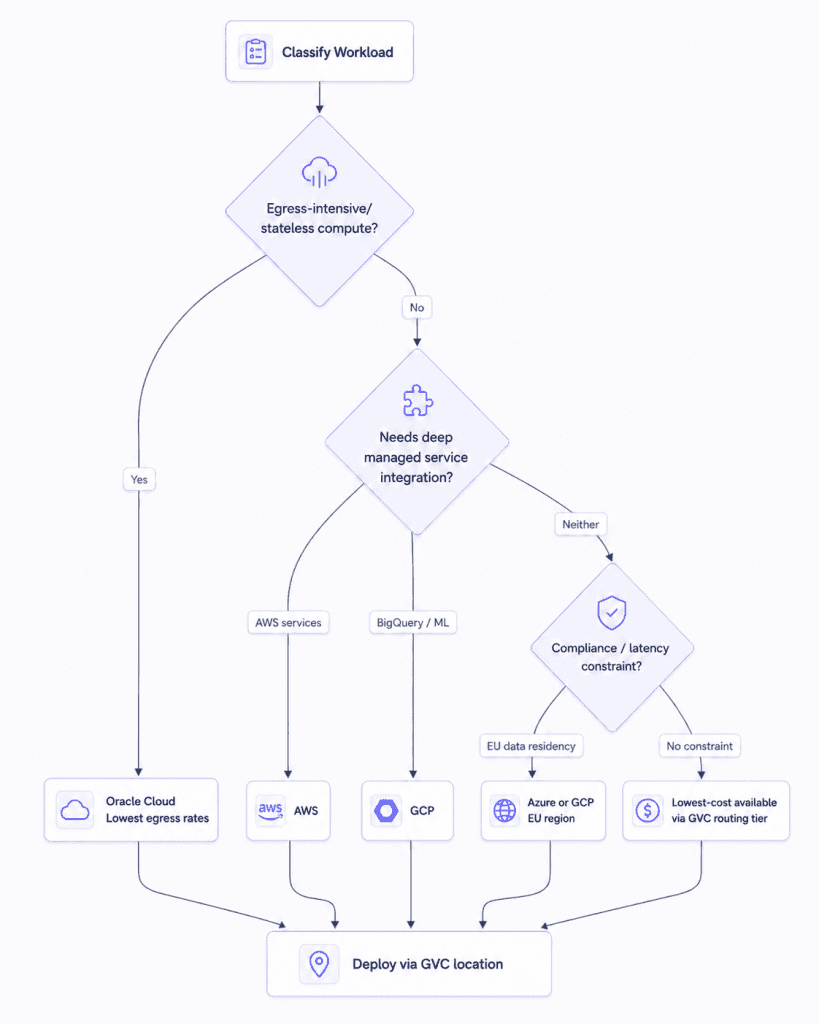
What makes this executable is a cloud virtualization platform that exposes all clouds through a single API, CLI, and identity model. Control Plane’s Global Virtual Cloud (GVC) is a virtual cloud that spans multiple underlying cloud provider locations. You configure the locations (say, aws-us-west-2 for your managed service integrations and an Oracle region for your egress-sensitive compute) and the platform handles the networking, DNS routing, and identity without requiring you to manage separate Kubernetes clusters.
Creating a GVC with locations on both AWS and GCP takes one CLI command:
cpln gvc create --name production-gvc --location aws-us-west-2 --location gcp-us-east1
Adding an Oracle region to an existing GVC provisions it immediately across all workloads in that GVC. Removing a location gracefully terminates running replicas and shifts traffic to remaining healthy locations with automatic DNS updates. The operational overhead of managing a multi-cloud footprint (which would otherwise require separate cluster management, separate identity configurations, and separate monitoring setups) is absorbed by the platform layer.
Evaluate four dimensions before deciding which provider gets a given service:
- Egress sensitivity: does this workload move significant data out of the cloud, and is that data transfer cost currently material?
- Managed service dependency: does it need specific services like RDS, SQS, or BigQuery that aren’t available on all providers?
- Latency requirement: does it need to be co-located with users or data in a specific geography?
- Compliance jurisdiction: does data residency regulation constrain which regions or providers are eligible?
Workloads that score high on egress sensitivity and low on managed service dependency are your best candidates for Oracle routing.
FinOps Team Structure and the Minimum Viable Governance Loop
Strategy 10: Build a Governance Loop, Not a Governance Team
FinOps governance for small engineering teams means establishing a lightweight, automated loop that makes cost visible at the moment infrastructure decisions are made, not a formal team or a sprawling tooling stack that nobody maintains.
FinOps is an operating model, not a team or a tool category. For a platform engineering team of one to three people, a formal FinOps function is impractical. The goal is a governance loop light enough to actually run.
The specification layer is easier than it used to be. FOCUS 1.0 (the FinOps Open Cost and Usage Specification) reached general availability in June 2024 and has since progressed to version 1.4 (as of June 2026). It normalizes cost and usage data across all major cloud providers into a consistent schema, which means you don’t need to build a custom ETL pipeline to reconcile AWS CUR exports with GCP billing and Azure Cost Management data. All three hyperscalers now support FOCUS exports: AWS ships native CUR 2.0 exports as FOCUS-formatted Parquet files, Azure exports to Blob Storage via Cost Management, and GCP delivers it through a BigQuery SQL view on top of detailed billing exports. Build your cost attribution pipeline on FOCUS and skip the custom schema entirely.
For the governance loop itself, the minimum viable version for a small platform team:
- Weekly cost review, 30 minutes, cost delta vs. prior week, spikes flagged and assigned. Engineering lead attends. Finance gets a summary async.
- Per-service cost attribution, enforced tags (from Strategy 6) feed a dashboard that shows cost by service, team, and environment. Engineers can see the cost of their infrastructure decisions before the invoice arrives.
- Anomaly alerts. AWS Cost Anomaly Detection uses machine learning to identify spend spikes at the service and account level, sending alerts to Slack or PagerDuty when anomalies exceed your configured threshold. GCP Budget Alerts handle the equivalent. Both are free to configure and significantly reduce the lag between a misconfiguration and discovery.
- Quarterly commitment review, revisit your RI and CUD coverage every 90 days. Measure actual usage against committed baselines and adjust accordingly. Over-commitment is as expensive as under-commitment when you’re paying for reserved capacity that isn’t being used.
The accountability principle is straightforward: engineers make the decisions that drive cost. They choose the instance type, the tier, whether to leave a dev cluster running. Finance sets the budget. FinOps connects the two by making cost visible at the decision point, before the infrastructure is provisioned, not after the invoice arrives.
Control Plane’s real-time cost data per GVC (Global Virtual Cloud, a virtual cloud combining the substrates and services of multiple providers) is visible in the console and queryable via API, putting cost context at the point of workload configuration. When you configure a new workload or add a location to a GVC, you’re working with live cost data rather than estimating what the invoice will say three weeks later. That feedback loop catches overspend before it compounds, a structural advantage over reviewing a cost report after the spending has already happened.
Your 30-Day Execution Sequence
Sequence matters. The strategies above are organized in dependency order: eliminate waste before committing to capacity, right-size before you autoscale, tag before you audit, normalize your data schema before building dashboards. Applying them out of order produces partial results.
A realistic 30-day execution for a team already running production Kubernetes on at least one hyperscaler:
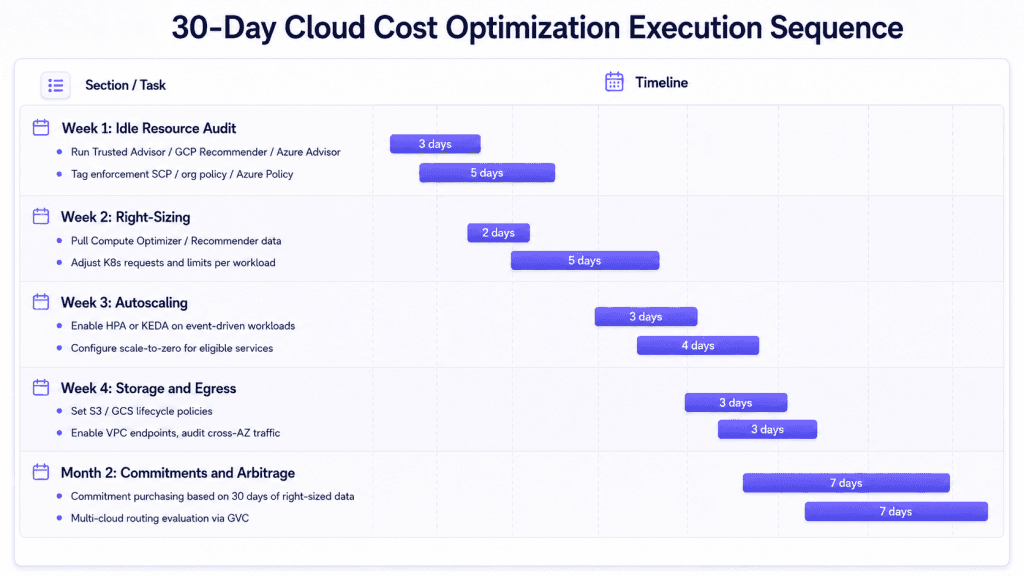
Month 2 is when commitments and multi-cloud arbitrage enter the picture, after you’ve generated 30 days of right-sized usage data to inform commitment levels and after you’ve established a unified abstraction layer that makes multi-cloud operationally viable.
You can start quantifying your Kubernetes waste today. Run Control Plane’s open-source K8s Cost Analyzer against your current cluster. The tool collects CPU and memory usage per workload, plus node-level data (cloud provider, instance type, capacity), and generates a cost comparison report showing potential savings on the Control Plane platform. It requires only kubectl access to your cluster and a healthy Kubernetes Metrics Server. No migration, no configuration changes, no risk.
Install it in under a minute on macOS:
brew tap controlplane-com/cpln && brew install cpln-k8s-cost-analyzer
Or for Windows:
choco install cpln-k8s-cost-analyzer
After running the analyzer, it sends results to a URL and your email address, a breakdown of your current cluster’s resource consumption and the estimated savings against Control Plane’s pricing model. It’s a practical way to quantify what you’re leaving on the table before committing to any migration.
If the number is significant, sign up for a free trial at console.cpln.io/signup. Capacity AI will start analyzing your workload’s actual CPU and memory usage as soon as you deploy. You’ll see what reserved-instance-level savings look like without a commitment before you make one.
Cloud Cost Optimization FAQ
Cloud cost optimization is the practice of reducing cloud infrastructure spend by eliminating waste, right-sizing resources, automating scaling, and routing workloads to the most cost-efficient provider. Sequence matters because each strategy creates the conditions for the next: you can’t safely commit to reserved capacity before right-sizing, and you can’t reliably identify idle resources without a tagging model that distinguishes orphaned infrastructure from load-bearing components.
Savings vary by how aggressively workloads were over-provisioned at deployment, but the documented results in production environments are substantial. Minga reduced cloud spend by 30-40% by right-sizing overnight replica counts on GKE. SafeHealth achieved a 75% AWS cost reduction by combining container-level right-sizing (via Capacity AI) with scale-to-zero for non-production workloads. The consistent pattern is that initial requests settings, set at deployment and never revisited, often run at 3x or more of actual consumption.
Buy commitments only after at least 30 days of production data at right-sized consumption levels (60 days is better). Commitments purchased before right-sizing lock you into a baseline that reflects over-provisioned rather than accurate usage. On AWS, 1-year convertible RIs allow mid-term exchange to a different instance family if your analysis was imprecise. On GCP, 1-year CUDs apply automatically to eligible regional usage without specifying instance types. Avoid 3-year terms on any workload with less than six months of stable usage history.
Oracle Cloud Infrastructure includes 10 TB/month of outbound data transfer at no charge, with overages at approximately $0.0085/GB. AWS charges $0.09/GB, Azure $0.087/GB, and GCP $0.12/GB for egress after minimal free tiers. For workloads that transfer significant data out of the cloud (content delivery, large file serving, analytics export pipelines) routing stateless compute to Oracle while keeping managed service integrations (RDS, SQS, BigQuery) on their native providers can reduce the egress component of the bill by 90% or more.
FOCUS (FinOps Open Cost and Usage Specification) is an open standard that normalizes cloud cost and usage data across AWS, GCP, and Azure into a consistent schema. Version 1.4 is current as of June 2026. All three major hyperscalers now support native FOCUS exports, which means teams running multi-cloud no longer need custom ETL pipelines to reconcile different billing formats. If your team queries cost data from more than one cloud provider, building your attribution pipeline on FOCUS is materially simpler than building against each provider’s native billing schema separately.
Four tags cover most attribution and governance needs at the growth stage: environment (production, staging, development, sandbox), team (owning engineering squad), service (application or microservice), and cost-center (budget line). The critical implementation detail is enforcement at creation time via policy (AWS SCPs, GCP organization policies, or Azure Policy with a deny effect) rather than retroactive auditing. Tags you audit for after the fact have meaningful gaps; tags enforced at resource creation do not.
Horizontal Pod Autoscaler scales based on CPU and memory utilization, which is reactive and cannot scale to zero. KEDA (Kubernetes Event-Driven Autoscaling) scales based on external signals (queue depth, event rate, message lag) which means it scales proactively in response to actual work, and it supports minReplicaCount: 0, enabling complete scale-to-zero for eligible workloads. For event-driven services consuming from SQS, Kafka, RabbitMQ, or Redis, KEDA consistently outperforms HPA on cost because it eliminates the idle-replica floor that HPA requires to maintain response latency.
Start with free tooling before making any infrastructure changes. Run AWS Trusted Advisor, GCP Recommender, or Azure Advisor against your current environment and sort findings by estimated monthly savings. The idle resource findings (unattached volumes, load balancers with no targets, unused RDS instances) are safe to act on immediately with no architectural risk. Then enforce tagging via policy so future resources are attributable from creation. Right-sizing and commitment purchasing come after you have two to four weeks of clean usage data on properly tagged, non-idle infrastructure.
Wrapping Up
The 10 strategies here aren’t novel. Idle resource cleanup, right-sizing, spot instances, storage tiering: these have been on every FinOps checklist for years. What changes the outcome is the sequence, the depth of execution, and whether the strategies compound rather than sit in isolation.
SafeHealth’s 75% AWS reduction didn’t come from one good decision. It came from moving to a cloud virtualization platform where Capacity AI continuously right-sizes container resources while scale-to-zero eliminates overnight compute spend entirely. Qualifi’s 90% reduction came from visibility that made every running resource attributable and every orphaned workload findable. Both results came from systematic application in the right order, with the right tooling.
Quantify your Kubernetes waste before you commit to anything. Run the K8s Cost Analyzer, see the number, then decide what to do with it. Sign up at console.cpln.io/signup.